Agent Memory Guide: How to Build AI Agents That Actually Remember

AI agents forget everything between runs. Here's how to implement persistent memory for agents — in-context, external, and in-weights approaches with practical patterns.
AI agents are excellent at one-shot tasks. Ask Claude to review a PR, research a topic, or generate a spec — it does it well. But for ongoing work — daily code reviews, iterative research, long-running project management — agents fall apart without memory.
The problem isn't intelligence. It's persistence. Every run starts from zero.
This guide covers how to implement memory that actually works for real agent workflows.
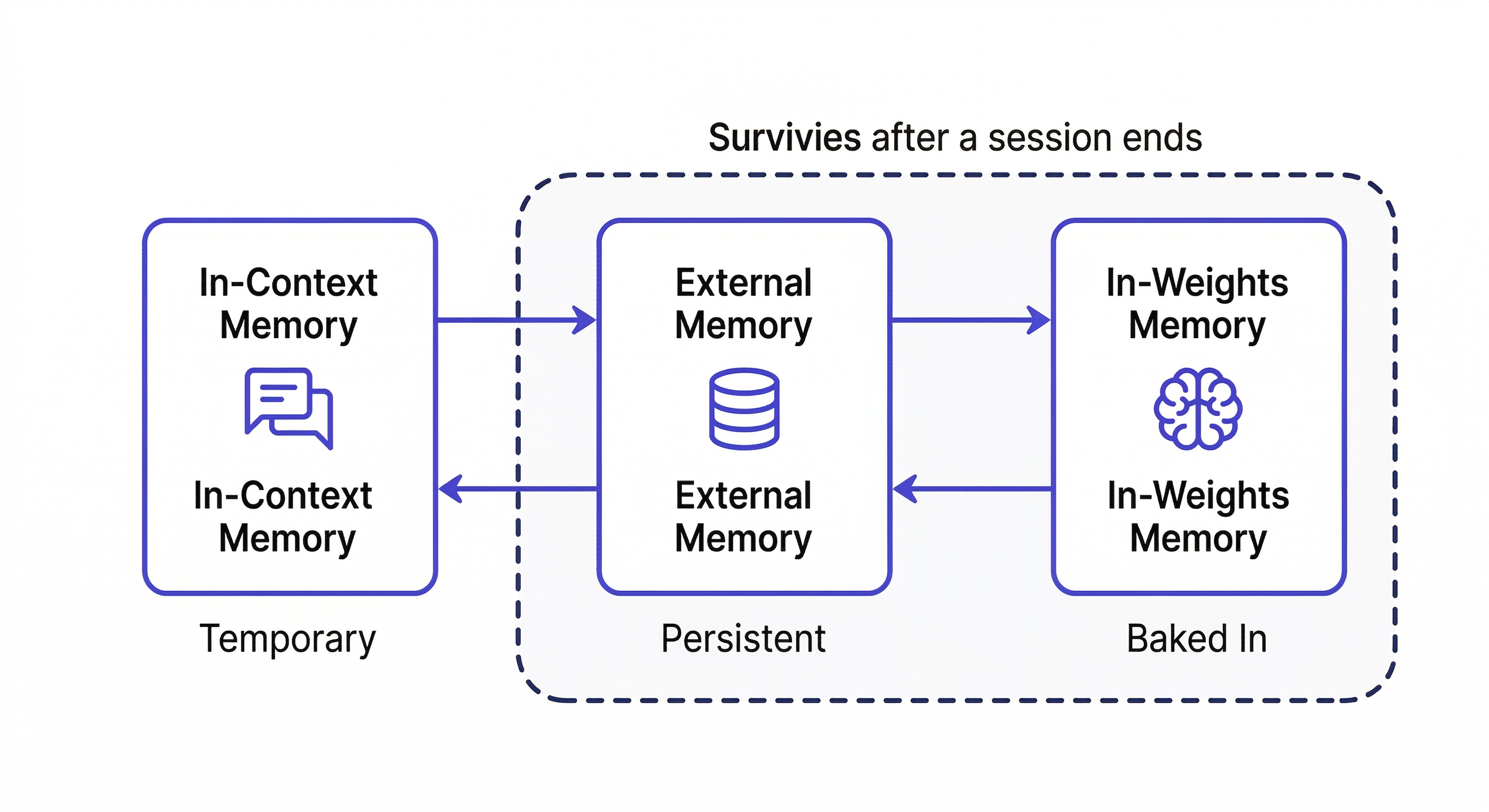
The Three Types of Agent Memory
In-Context Memory
What's in the active session right now. Fast to access, immediately available — but completely gone when the session ends. Everything you tell the agent, every file it reads, every decision it makes: gone.
For one-off tasks, this is sufficient. For agents that run repeatedly on the same domain, it's a fatal limitation.
External Memory
Persistent storage outside the model — files, databases, vector stores. The agent reads from it at session start and writes back to it during and after runs. This is what MemClaw provides: structured workspaces the agent reads and writes automatically.
External memory is the right approach for most ongoing agent workflows. It persists across sessions, is searchable, and can be shared across team members and different agents.
In-Weights Memory
Knowledge baked into the model during training. This includes everything Claude knows about programming languages, frameworks, and general software practices. You can't write to it — it's fixed. Fine-tuning can add domain knowledge, but it's expensive and slow.
For custom project knowledge — your specific codebase, your team's decisions — external memory is the only viable option.
Why "Store Everything" Fails
The naive approach: instruct the agent to save everything important. This fails in practice for two reasons:
Over-storage: Agents told to "remember important things" save noise — intermediate reasoning steps, tentative ideas, things that were superseded. The memory store fills with context that actively misleads future sessions.
Under-storage: Agents miss the actually valuable things — the decision that was made, the approach that was ruled out, the constraint that was added. These are harder to identify automatically than they are for a human who understands the project.
The reliable pattern: explicit write-back with human judgment on what matters.
Memory Patterns for Common Agent Types
Code Review Agent
What to remember across runs:
- Coding standards and team conventions
- Past review decisions and their rationale
- Known anti-patterns in this codebase
- Files or modules with recurring issues
Session start:
Load the Code Review workspace
I'm reviewing the payment module changes. Load the coding standards
and any past decisions about the payment module.
Write-back after review:
Add to workspace: Reviewed payment/webhook.ts — flagged direct DB query
in route handler (violates Repository Pattern). Team convention requires
all DB access through /lib/repositories/. Logged 2026-04-08.
Next week's review: Claude knows the pattern was already flagged. It can track whether it was fixed, and whether the same pattern appears elsewhere.
Research Agent
Dead-end logging is the highest-value thing a research agent can do:
Add to workspace: Explored Redis for session caching — ruled out.
Race condition in webhook handler when processing concurrent requests.
Idempotency keys don't solve it because the race is at the DB query level.
Do NOT revisit Redis for this use case.
Without this, every research run re-explores the same dead ends.
Session start:
Load the Research workspace
Continuing research on [topic]. What have we already explored?
What approaches have been ruled out?
Project Management Agent
What compounds most for PM agents:
- Decisions with stakeholder context and rationale
- Scope changes and why they happened
- Blocked items with owner and last update
Write-back:
Add decision to workspace: Deprioritized search feature for Q2.
Finance said CAC model doesn't support it this quarter.
Sarah (VP Product) confirmed — revisit in Q3 planning. 2026-04-08.
Setting Up Agent Memory with MemClaw
Install on Claude Code:
/plugin marketplace add Felo-Inc/memclaw
/plugin install memclaw@memclaw
export FELO_API_KEY="your-api-key-here"
Create a workspace per agent type:
Create a workspace called Code Review Agent
Create a workspace called Research Agent
Create a workspace called Project Management
The session pattern:
- Load workspace at start
- Do the work
- Write back decisions, dead ends, status updates before closing
This is the complete loop. What distinguishes agents that get better over time from ones that stay static: consistent write-back.
The Write-Back Problem (And How to Solve It)
Automatic extraction is unreliable. The solution that works: build explicit write-back into the agent's workflow.
Tell the agent what to save, immediately when it matters:
We just decided to use server-side rendering for the dashboard.
Add this to the workspace: SSR chosen for dashboard pages — client
requires SEO indexability. CSR ruled out. 2026-04-08.
Or build it into session end:
Before we close: summarize the key decisions from this session
and add them to the workspace with today's date.
After three months of consistent write-back:
- The agent answers "what did we try?" from logged history
- It doesn't re-explore dead ends
- It gives advice consistent with decisions made months ago
That's the compounding effect of external memory done right.
Evaluating Agent Memory Quality
Three questions that reveal whether your agent memory is working:
- Can the agent accurately answer "what did we try last time?" — tests episodic memory
- Does the agent re-suggest approaches already ruled out? — tests dead-end logging
- Is the agent giving more specific, consistent advice over time? — tests compounding
If the answer to question 3 is no after two months of use, the memory isn't being used effectively. Either write-back isn't happening consistently, or the workspace isn't being loaded at session start.
Getting Started
- Install MemClaw (memclaw.me)
- Create a workspace per agent domain
- Seed it with baseline knowledge the agent needs
- Load at session start, write back at session end