AI Context Persistence: How to Keep AI Context Across Sessions

AI context disappears when sessions end. Here's how context persistence works, why it matters for ongoing work, and the practical patterns that make it reliable.
Every AI coding session ends the same way: the context window closes, and everything in it disappears. The architecture you explained, the decisions you made, the constraints you established — gone.
For one-off tasks, this doesn't matter. For ongoing work, it's a significant problem. Here's how context persistence works and how to implement it reliably.
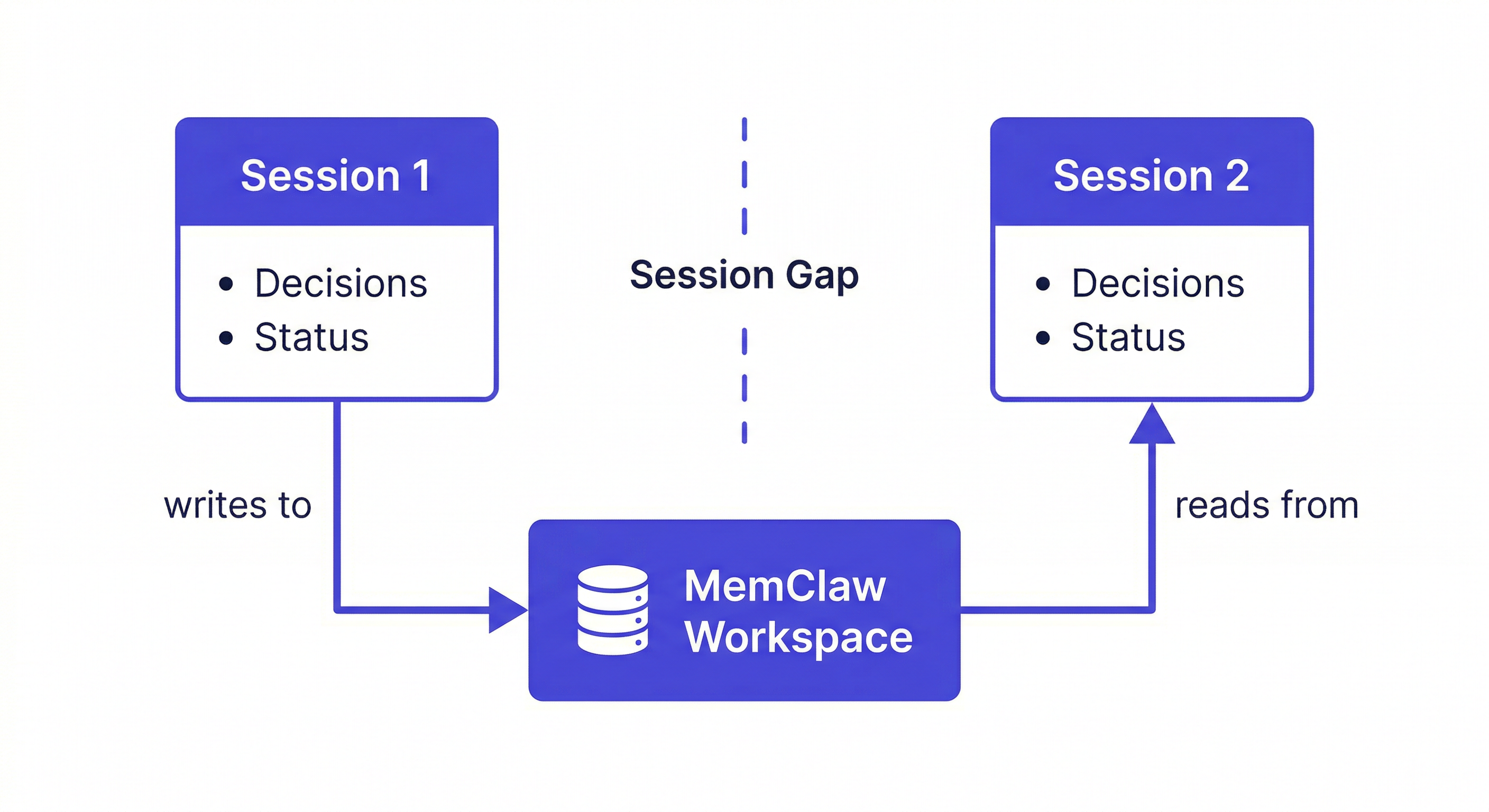
Why Context Doesn't Persist by Default
Language models are stateless. The model itself — the neural network — doesn't update based on your conversations. Each session loads the model fresh and processes your input through it. When the session ends, the computation stops.
This is intentional. Stateless systems are predictable, scalable, and safe. But for developers working on ongoing projects, it creates a fundamental mismatch: the work is continuous, but the tool resets to zero every session.
Context persistence is the bridge between stateless AI and continuous work.
What Context Persistence Actually Means
"Persistent context" means different things at different levels:
Within-session persistence: Context stays available throughout a single session. This is the context window — everything you've said and Claude has responded. It works automatically, up to the context window limit.
Between-session persistence: Context survives when the session ends and is available in the next session. This requires external storage — something outside the model that holds the context and loads it at session start.
Cross-agent persistence: Context is available regardless of which AI agent you use. A decision logged in a Claude Code session is available in an OpenClaw session on the same project. This requires a storage layer that multiple agents can read from.
MemClaw provides all three: workspace context persists between sessions, and the same workspace is accessible from Claude Code, OpenClaw, and Gemini CLI.
The Persistence Stack
A complete context persistence setup has three components:
1. Stable context (set once)
Project identity, stack, hard constraints. Doesn't change session to session. Goes in the workspace once.
Add to workspace: Next.js 14 + TypeScript + Postgres.
Deployed on Vercel. Auth: JWT httpOnly cookies (security requirement).
2. Evolving context (updated as work progresses)
Decisions made, approaches ruled out, current status. Changes as the project evolves. Updated at the end of sessions when decisions are made.
Add decision to workspace: using React Query for all async operations.
Reason: standardizes loading/error states across the app. 2026-04-08.
3. Session context (loaded fresh each session)
What's relevant right now — current task, files being worked on, immediate questions. This lives in the context window, not the workspace. You load it at session start by telling Claude what you're working on today.
Load the MyApp workspace
Today I'm working on the checkout flow. Read src/checkout/page.tsx.
Implementing Context Persistence with MemClaw
Install:
/plugin marketplace add Felo-Inc/memclaw
/plugin install memclaw@memclaw
export FELO_API_KEY="your-api-key-here"
Create workspace:
Create a workspace called [Project Name]
The persistence loop:
Session start:
Load the [Project Name] workspace
During session — log decisions immediately:
Add decision to workspace: [decision + reasoning + date]
Session end:
Update workspace status: [what was done, what's next]
That's the complete loop. Context from this session is available in every future session.
What Persists vs. What Doesn't
Persists (in workspace):
- Architecture decisions with reasoning
- Ruled-out approaches with root cause
- Project constraints and requirements
- Current sprint status
- Artifacts (documents, analyses, specs)
Doesn't persist (context window only):
- The specific conversation from this session
- Intermediate reasoning steps
- Files read during the session
- Tentative ideas that didn't become decisions
The distinction matters: don't try to persist everything. Persist the decisions and status that future sessions need. Let the rest stay in the context window where it belongs.
Context Persistence for Teams
When multiple developers share a workspace, context persistence becomes team-level:
- Developer A logs a decision → available in Developer B's next session
- New team member loads workspace → immediately has months of project context
- Code review references shared conventions → consistent across all sessions
The workspace becomes the single source of truth for project context. Not a Notion doc that nobody reads — an active memory layer that every Claude Code session reads automatically.
Common Persistence Mistakes
Logging decisions without reasoning. "Using Postgres" is much less useful than "Using Postgres because the client's DBA only supports it." The reasoning is what prevents Claude from arguing you out of the decision in a future session.
Not logging dead ends. Every failed approach that isn't logged will be suggested again. Dead-end logging is the highest-value habit in any persistence system.
Letting status go stale. A workspace with a status from three weeks ago is misleading. Update it every session — one line is enough.
Over-persisting. Storing intermediate reasoning, tentative ideas, and generic best practices creates noise. Persist decisions and status. Let everything else stay in the context window.
Getting Started
- Install MemClaw (memclaw.me)
- Create a workspace per active project
- Add stable context once (stack, constraints, key decisions already made)
- Load at session start, log decisions during, update status at end
Context persistence starts working from the first session. The value compounds over weeks and months.