AI Memory Explained: How Context Loss Works and How to Fix It

Why AI assistants forget everything between sessions, how different memory architectures work, and the practical approaches that actually solve context loss for ongoing work.
Every time you open Claude Code, it starts from zero. It doesn't remember your codebase, your decisions, or the conversation you had yesterday. This isn't a limitation that will be fixed in the next model update — it's a fundamental architectural property of how language models work.
Understanding why helps you choose the right fix.
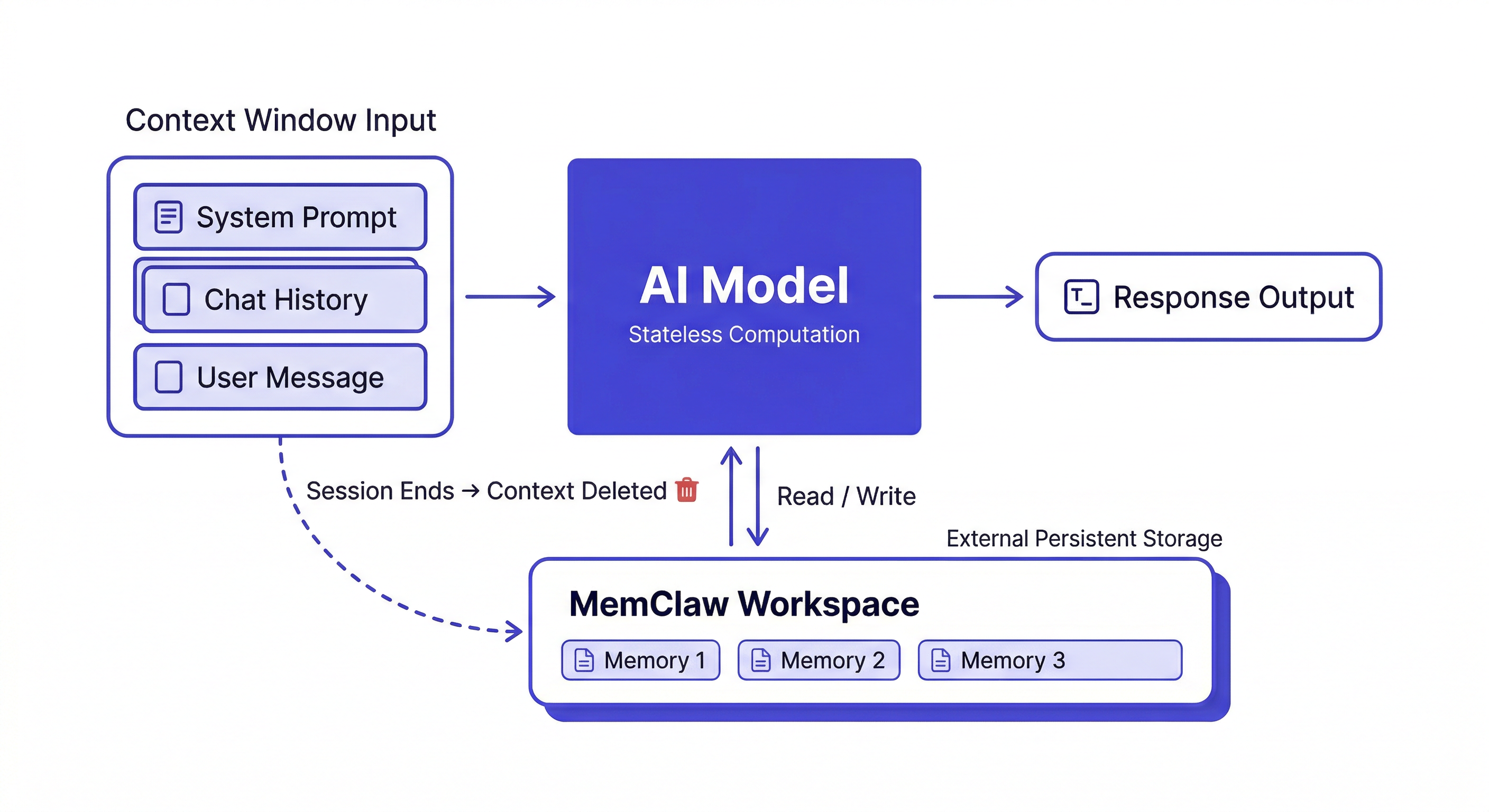
Why AI Assistants Are Stateless by Design
Language models are trained to predict the next token given a sequence of input tokens. The model itself — the billions of parameters — is fixed after training. It doesn't update, learn, or remember anything from your conversations.
Each session loads the model into memory and processes your input through it. When the session ends, the computation stops. Nothing about that session is written back into the model.
This is intentional, for good reasons:
Predictability. A model that updated itself based on user interactions would drift in unpredictable ways. Two users asking the same question might get different answers based on who talked to it last.
Scalability. Stateless systems are much easier to scale — you can run thousands of parallel instances without any coordination between them.
Safety. A model that accumulated context from all users would be a serious privacy and security risk.
Statelessness isn't going away. The fix is external memory — storing context outside the model and loading it at session start.
The Three Memory Architectures
1. In-Context Memory (Temporary)
What's in the active session right now. This is the context window — everything you've said, everything Claude has responded, every file it's read in this session.
Fast and immediately available. Completely gone when the session ends.
The context window has gotten large (hundreds of thousands of tokens in modern models), but it still has limits, and it still resets to zero at session end.
2. External Memory (Persistent)
Storage outside the model — files, databases, vector stores — that the agent reads from and writes to. This persists across sessions.
Types of external memory:
- File-based (CLAUDE.md): Simple markdown file the agent reads at session start. Static, manual maintenance.
- Workspace-based (MemClaw): Structured per-project workspaces with decisions, status, artifacts. The agent reads and writes automatically.
- Vector databases: Semantic storage for large document corpora. Retrieves relevant chunks at query time. Good for reference material, not for project state.
3. In-Weights Memory (Permanent, Read-Only)
Knowledge baked into the model during training. Claude knows Python, SQL, software architecture patterns — all from training data. This can't be updated at runtime. Fine-tuning can extend it, but it's expensive and doesn't suit project-specific knowledge.
For your specific codebase, your team's decisions, your project history — external memory is the only option.
What External Memory Actually Needs to Store
Not all context is worth persisting. The things with highest long-term value:
Architectural decisions with reasoning:
2026-04-08: Using Postgres over MySQL.
Reason: Client's DBA only supports Postgres. Not negotiable.
Ruled out: MySQL (ops constraint), SQLite (scale concern)
The reasoning matters as much as the decision. Without it, Claude can argue you out of the decision in a future session.
Ruled-out approaches:
2026-03-15: Tried Redis for session caching.
Result: Race condition in webhook handler — can't use Redis here.
Do NOT revisit.
Dead-end logging prevents re-exploring failed approaches.
Current status:
Sprint 8 (ends 2026-04-11): checkout flow in progress.
Webhook handler done. Retry logic pending.
Blocker: waiting on Stripe documentation update.
This is what Claude reads first when resuming work.
Things NOT worth persisting: Intermediate reasoning steps, tentative ideas that were superseded, generic best practices Claude already knows.
How MemClaw Implements External Memory
MemClaw gives Claude Code a workspace per project. The architecture:
- You install MemClaw as a skill on Claude Code
- Each project gets an isolated workspace in Felo's storage
- At session start, you load the workspace — Claude reads the context
- During the session, you save decisions and artifacts to the workspace
- Next session starts with all that context available
The workspace model maps directly to how developers think: one project, one workspace, clean isolation.
Install:
/plugin marketplace add Felo-Inc/memclaw
/plugin install memclaw@memclaw
export FELO_API_KEY="your-api-key-here"
Create a workspace called MyApp
Load the MyApp workspace
Add decision to workspace: [decision + reasoning]
The Future of AI Memory
Context windows are getting larger — a trend that will continue. Longer windows reduce the frequency of within-session context loss, but don't solve between-session loss. Even with a million-token context window, you still start from zero next session.
Better retrieval is improving external memory: vector search is getting more accurate, retrieval is getting faster. But the fundamental read-write loop — load context at session start, save decisions at session end — will remain the core pattern for project-specific memory.
The mental model that works: treat the context window as RAM (fast, temporary) and external memory as a hard drive (slow, persistent). You need both. The context window handles what you're working on right now; external memory handles what needs to survive.
Getting Started
For most ongoing development work:
- Install MemClaw (memclaw.me)
- Create one workspace per active project
- Load at the start of every session
- Log decisions and status as you work