The Complete Guide to AI Memory for Agents (And Why Most Don't Have It)

AI agents forget everything between sessions by design. This guide explains how persistent memory for AI agents works, why it matters, and how to set it up in under 2 minutes.
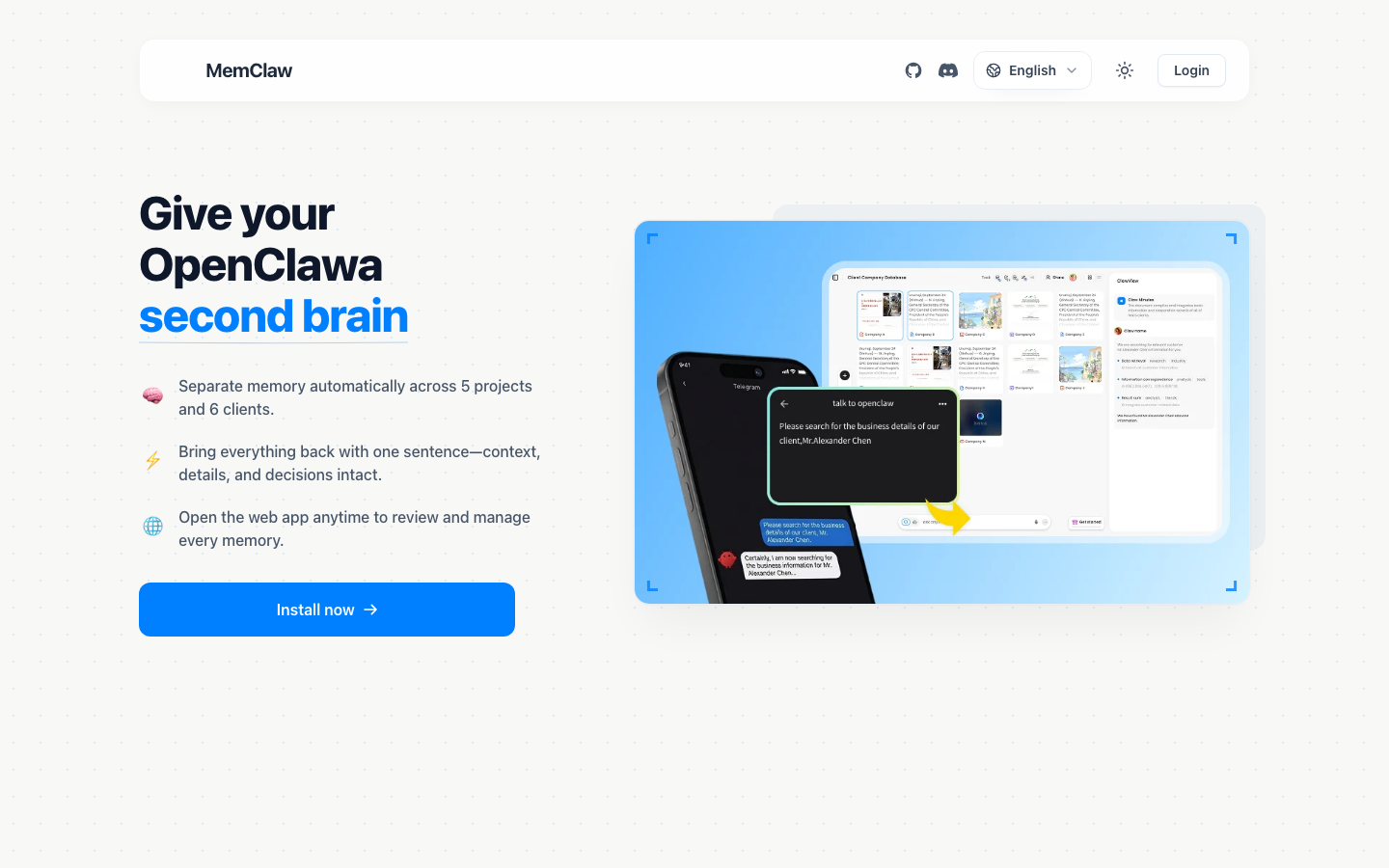
You open Claude Code. You type: "Let's continue working on the payment integration."
The agent has no idea what you're talking about.
You've been on this project for three weeks. You've made dozens of decisions — which library to use, why you ruled out the other approach, what the client's edge case requirements are. None of it is there. You spend the next 20 minutes re-briefing an agent that should already know.
This is the AI memory problem. And it's not the agent's fault.
This guide covers what AI agent memory actually is, why most agents don't have it, how persistent memory works, and how to set it up so your agent always knows where things left off.
What Is AI Agent Memory — and Why Does It Matter?
When people talk about "AI memory," they usually mean one of two things: the ability to recall facts from a previous conversation, or the ability to maintain context within a single session.
Both matter. But for anyone using AI agents across real projects, neither is enough.
What actually matters is project memory — the ability for an agent to open a project and immediately understand:
- What this project is and who it's for
- What decisions have been made and why
- What's currently in progress
- What still needs to be done
Without this, every session starts from zero. You're not just re-explaining facts — you're re-establishing the entire working context. For a single project, that's annoying. For five projects running in parallel, it becomes a serious productivity problem.
The cost isn't just time. It's decision quality. An agent that doesn't remember why you chose optimistic locking over pessimistic locking might suggest you revisit that decision. An agent that doesn't know Client A's budget constraints might propose solutions that were already ruled out.
AI agent memory matters because context is the difference between an agent that helps and an agent that creates work.
The Two Types of AI Memory Most Agents Use (and Why They Fall Short)
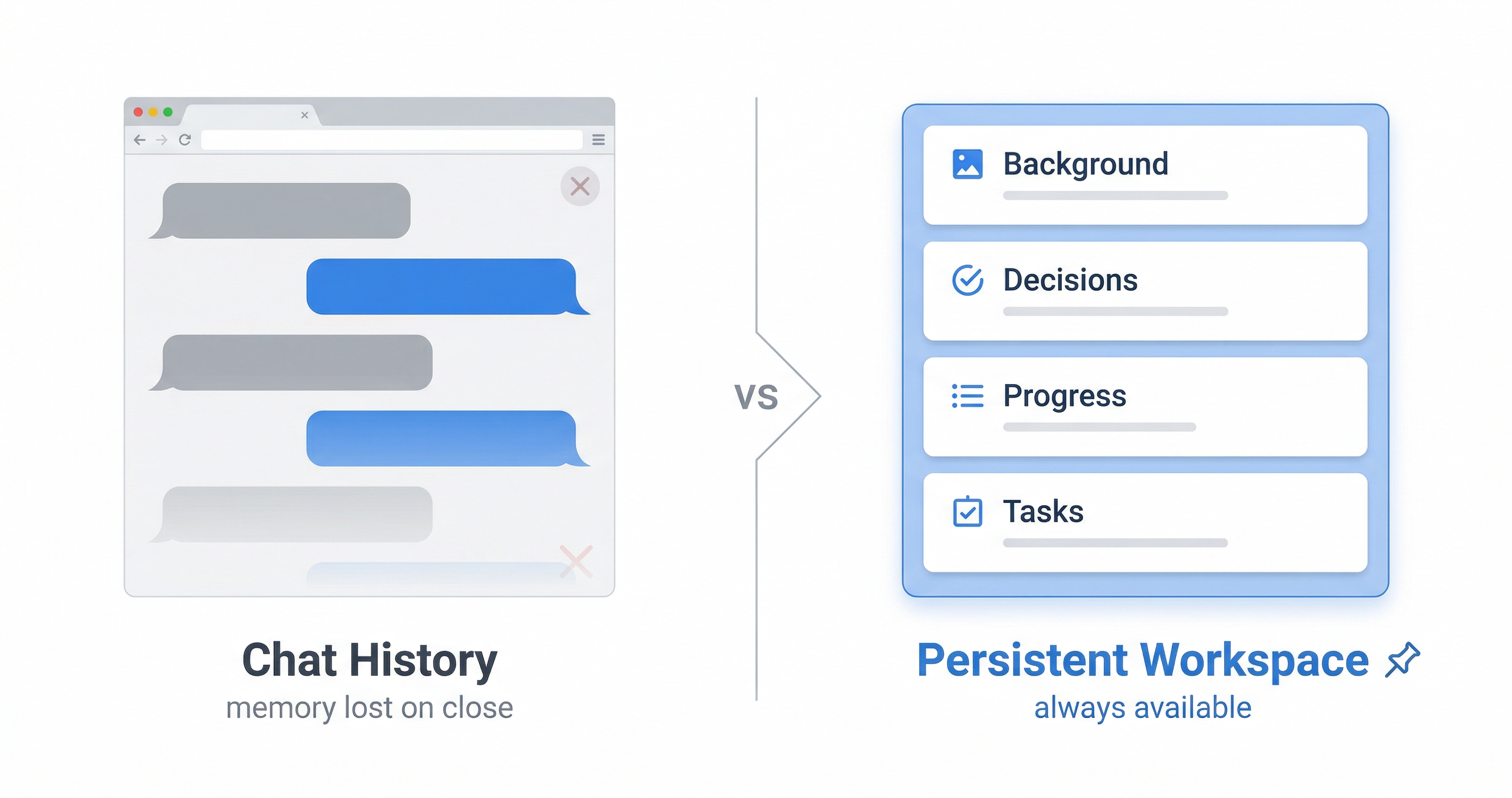
Most AI agents today rely on one of two memory mechanisms. Both have real limitations.
1. Chat History (In-Context Memory)
The simplest form of memory: everything said in the current conversation window is available to the agent. The agent "remembers" because the text is literally in its context window.
The problem: Context windows have limits. Long projects generate long conversations. Eventually, early context gets truncated. More importantly, chat history doesn't survive session boundaries — close the window, and it's gone.
For quick tasks, chat history is fine. For ongoing projects that span days or weeks, it's fundamentally insufficient.
2. Manual Context Files (CLAUDE.md, System Prompts)
A step up: you maintain a file — often called CLAUDE.md or a system prompt — that you manually update with project context. The agent reads this at the start of each session.
The problem: It's entirely manual. You have to remember to update it. You have to decide what's worth saving. You have to maintain it across projects. For one project, this is manageable. For five projects, it becomes its own job.
There's also a structural problem: a flat text file doesn't distinguish between background context, active decisions, current progress, and pending tasks. Everything lives in one document, and the agent has to figure out what's relevant.
Neither approach gives you what you actually need: structured, persistent, automatically-maintained project memory that works across sessions without manual overhead.
Persistent Memory for AI Agents: How It Actually Works
Persistent memory for AI agents works by giving each project a dedicated workspace — a structured store of context that the agent reads at the start of every session and updates as work progresses.
The key word is structured. A good persistent memory system doesn't just dump text into a file. It organizes context into distinct layers:
Background context — What is this project? Who is it for? What are the constraints and requirements? This is stable information that rarely changes.
Decisions log — What choices have been made, and why? This is the most valuable layer. "We decided to use JWT httpOnly cookies because the client's security requirements ruled out localStorage" is the kind of context that prevents an agent from re-opening settled questions.
Current progress — What's in progress right now? What was the last thing worked on? This is what lets an agent pick up exactly where things left off.
Pending tasks — What still needs to be done? An agent that can see the task list doesn't need to be told what to work on next.
When this structure exists, session startup looks like this: the agent opens the workspace, reads the structured context, and is immediately oriented. No re-briefing. No "can you remind me where we left off."
MemClaw implements this as a Living README — a structured workspace document that the agent reads at session start and updates automatically as work progresses. Each workspace has its own isolated context. Five projects means five workspaces, each with its own background, decisions, progress, and tasks.
The "living" part matters: the agent updates the README as you work. You can also explicitly save context — "Add to workspace: we decided to use optimistic locking for inventory updates because the client's concurrent user load makes pessimistic locking a bottleneck" — and it's there permanently.
How to Give Your AI Agent Persistent Memory Across Sessions
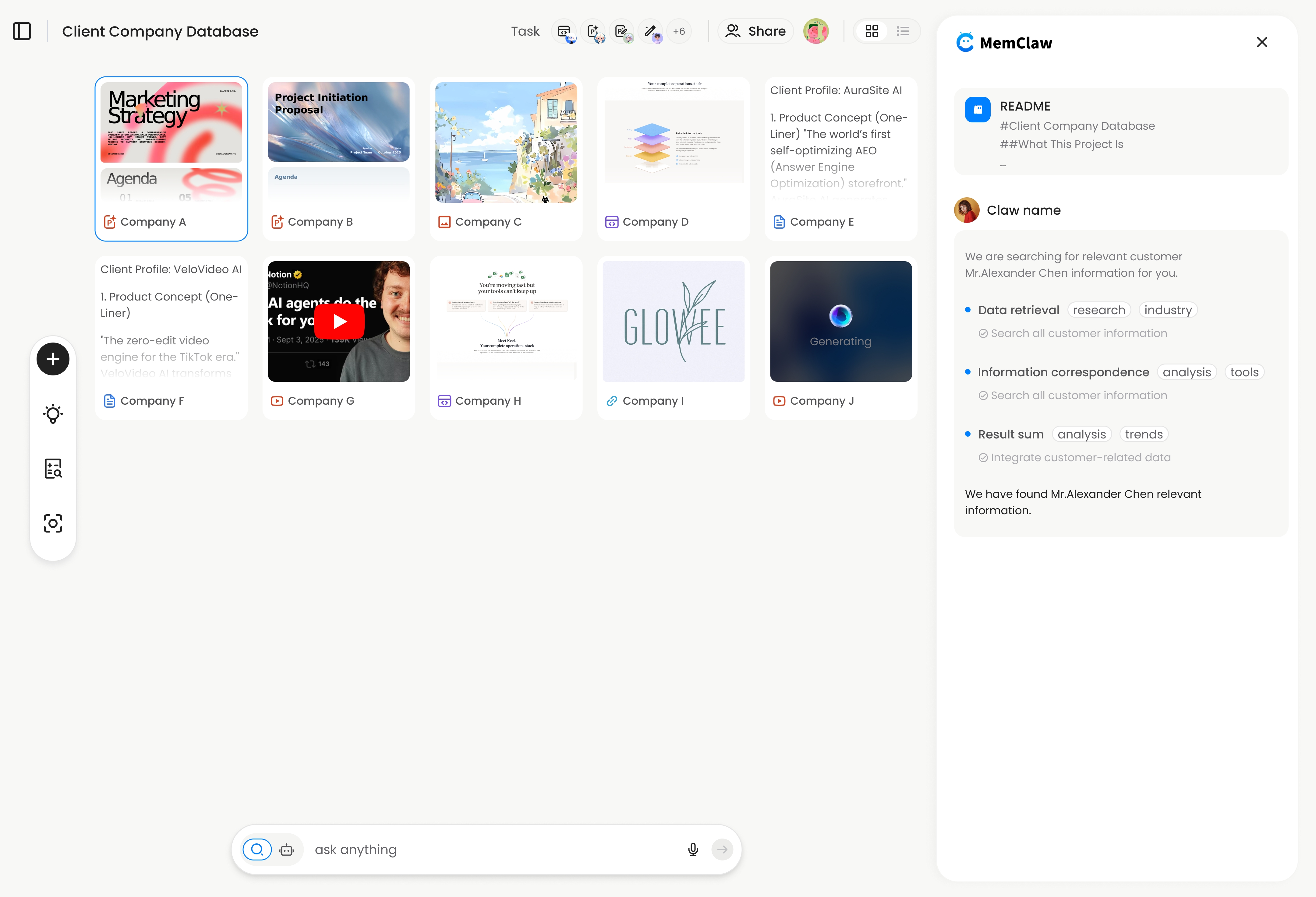
Setting up persistent memory for your AI agent takes under two minutes. Here's how to do it with MemClaw.
Step 1: Install MemClaw
In Claude Code:
/plugin marketplace add Felo-Inc/memclaw
/plugin install memclaw@memclaw
In OpenClaw:
bash <(curl -s https://raw.githubusercontent.com/Felo-Inc/memclaw/main/scripts/openclaw-install.sh)
Manual install:
git clone https://github.com/Felo-Inc/memclaw.git
cp -r memclaw/memclaw ~/.claude/skills/
Step 2: Set your API key
Get your key at felo.ai/settings/api-keys, then:
export FELO_API_KEY="your-api-key-here"
Step 3: Create a workspace for your project
Open your project in Claude Code or OpenClaw and say:
Create a workspace for this project
The agent creates an isolated workspace and initializes the Living README with the project context from your current conversation.
Step 4: Load the workspace at the start of each session
Load the project workspace
That's it. The agent reads the workspace, restores context in about 8 seconds, and is ready to work.
If you're using Claude Code or OpenClaw across multiple projects, MemClaw makes persistent memory a one-command setup.
AI Memory in Practice: 4 Real Workflow Examples
Abstract explanations only go so far. Here's what persistent AI memory looks like in four real workflows.
Freelancer Managing Multiple Clients
A freelance developer has six active clients. Each client has different tech stacks, different requirements, different communication preferences, and different ongoing work.
Without persistent memory: every session starts with "which client is this again?" Context from Client A bleeds into Client B's conversation. Pricing models get confused. Requirements get mixed up.
With MemClaw: each client gets its own workspace. The workspace stores the client's tech stack, current project status, key decisions, and pending deliverables. Opening a client workspace takes 8 seconds. The agent knows exactly which client it's working with and where things stand.
Product Manager Tracking Multiple Features
A PM is tracking five features simultaneously across two products. Each feature has its own requirements, design decisions, stakeholder constraints, and development status.
Without persistent memory: the PM spends the first 10 minutes of every AI session re-establishing context. "We're working on the notification feature. The design decision was to use push notifications, not email, because..."
With MemClaw: each feature has a workspace. The PM opens the workspace, the agent reads the current status and pending decisions, and they're immediately working on the right thing.
Developer Working Across Multiple Codebases
A developer maintains three separate codebases. Each has its own architecture decisions, known issues, and ongoing work.
Without persistent memory: the agent doesn't know which codebase it's in, what the architectural constraints are, or what was being worked on last session.
With MemClaw: the workspace stores the codebase architecture, key decisions ("we use repository pattern here, not active record, because..."), and current work in progress. The agent opens the workspace and is immediately oriented in the codebase.
Sales Professional Managing Multiple Accounts
A sales rep manages 12 active accounts. Each account has different requirements, different decision-makers, different objections, and different stages in the pipeline.
Without persistent memory: the rep has to re-brief the AI agent on each account before every interaction. "This is the Acme account. They're concerned about data residency. The main contact is..."
With MemClaw: each account has a workspace with the full context. The rep opens the workspace and the agent already knows the account history, requirements, and current status.
Multi-Project AI Workflow Guide
Comparing AI Memory Approaches: Chat History vs. Files vs. Workspace
Here's a direct comparison of the three main approaches to AI agent memory:
| Approach | Persistence | Structure | Maintenance | Multi-project |
|---|---|---|---|---|
| Chat history | Session only | None | None needed | No isolation |
| Manual files (CLAUDE.md) | Permanent | Flat text | Manual | One file per project |
| Persistent workspace (MemClaw) | Permanent | Structured layers | Automatic | Isolated per project |
Chat history is the right choice for one-off tasks and quick questions. It requires no setup and works immediately. The limitation is that it doesn't survive session boundaries and has no structure.
Manual context files work well for solo developers with one or two projects who are disciplined about maintaining them. The limitation is the manual overhead and the lack of structure — everything lives in one flat document.
Persistent workspaces are the right choice when you're managing multiple ongoing projects and need the agent to maintain context automatically. The tradeoff is initial setup (under 2 minutes per project) and a dependency on an external service.
Claude Memory Tool Selection Guide
FAQ — AI Agent Memory Questions
Does Claude have built-in memory?
Claude doesn't have persistent memory by default. Each conversation starts fresh. Claude can remember things within a single conversation (via its context window), but that context doesn't carry over to new sessions. Persistent memory requires an external tool like MemClaw or a manually maintained context file.
How is AI agent memory different from RAG?
RAG (Retrieval-Augmented Generation) retrieves relevant documents from a knowledge base to answer questions. AI agent memory is about maintaining project context — decisions, progress, preferences — across sessions. They solve different problems. RAG is for "find me information." Agent memory is for "remember where we left off."
Can I use the same workspace in Claude Code and OpenClaw?
Yes. MemClaw workspaces are cross-agent compatible. If you use OpenClaw for research and Claude Code for coding on the same project, both agents read from and write to the same workspace. How to Add Persistent Memory to OpenClaw
How to give AI agent persistent memory without a paid tool?
The manual approach: maintain a CLAUDE.md file in your project directory and update it yourself after each session. This works but requires discipline and doesn't scale well across multiple projects. For a single project with a disciplined workflow, it's a viable free option.
What happens if I forget to load the workspace?
The agent starts without project context — same as a fresh session. You can load the workspace at any point during a session: "Load the project workspace." The agent will read the context and continue from there.
How long does context restoration take?
With MemClaw, loading a workspace takes approximately 8 seconds. The agent reads the structured Living README and is immediately oriented in the project.
Summary: AI Memory Is a Workspace Problem
AI agents don't have a memory problem. They have a workspace problem.
The agents themselves are capable. The issue is that there's nowhere to put project memory — no persistent, structured store that survives session boundaries and scales across multiple projects.
The solution isn't more powerful AI. It's giving each project its own isolated workspace with structured context that the agent reads at session start and updates as work progresses.
That's what persistent AI memory actually means: not a smarter agent, but a better-organized workspace.
The three things to take away from this guide:
- Chat history and manual files work for simple cases but don't scale to multiple ongoing projects
- Persistent memory requires structured, isolated workspaces — not just a flat text file
- Setup takes under 2 minutes and the productivity return starts immediately
Stop re-briefing your AI agent. Give it a permanent home for every project. → Get MemClaw free at memclaw.me
Why Your AI Forgets Everything Between Sessions
Related: Why Your AI Forgets Everything Between Sessions | Claude Memory Tool Selection Guide | Multi-Project AI Workflow Guide | How to Add Persistent Memory to OpenClaw