AI Pair Programming with Claude Code: How to Work Effectively with an AI Partner

AI pair programming with Claude Code requires a different mindset. This guide covers effective patterns, what AI is good and bad at, and how to build a productive workflow.
AI Pair Programming with Claude Code: How to Work Effectively with an AI Partner
AI pair programming is different from traditional pair programming. Your AI partner doesn't get tired, doesn't have opinions about tabs vs. spaces, and can hold the entire codebase in context. But it also has no memory between sessions and can confidently suggest wrong approaches. Understanding how to work with these characteristics makes the difference between AI pair programming that accelerates you and AI pair programming that frustrates you. Make AI pair programming more effective with MemClaw → memclaw.me
The AI Pair Programming Mindset
Traditional pair programming: two humans, one keyboard, continuous dialogue. AI pair programming: you lead, Claude assists. You make the architectural decisions. Claude handles implementation details, catches bugs, and suggests alternatives. The key shift: you're the driver, Claude is the navigator. Claude doesn't know your business context, your team's preferences, or the history of decisions that led to your current architecture. You do.
What AI Pair Programming Is Good For
Implementation: "Implement this function according to this spec." Claude is fast and accurate for well-defined tasks. Code review: "Review this code for security issues and architecture violations." Claude catches things humans miss. Debugging: "Here's the error. What's the root cause?" Claude is good at systematic debugging. Boilerplate: "Generate the CRUD endpoints for this model following our Repository Pattern." Claude handles repetitive code well. Documentation: "Write JSDoc for these functions." Claude writes clear, accurate documentation.
What AI Pair Programming Is Bad For
Architectural decisions without context: Claude will suggest architectures that don't fit your constraints. Always provide context before asking for architectural advice. Business logic: Claude doesn't know your business rules. You need to specify them explicitly. Long-term planning: Claude has no memory of previous sessions (without MemClaw). It can't reason about multi-sprint plans without context.
Effective Patterns
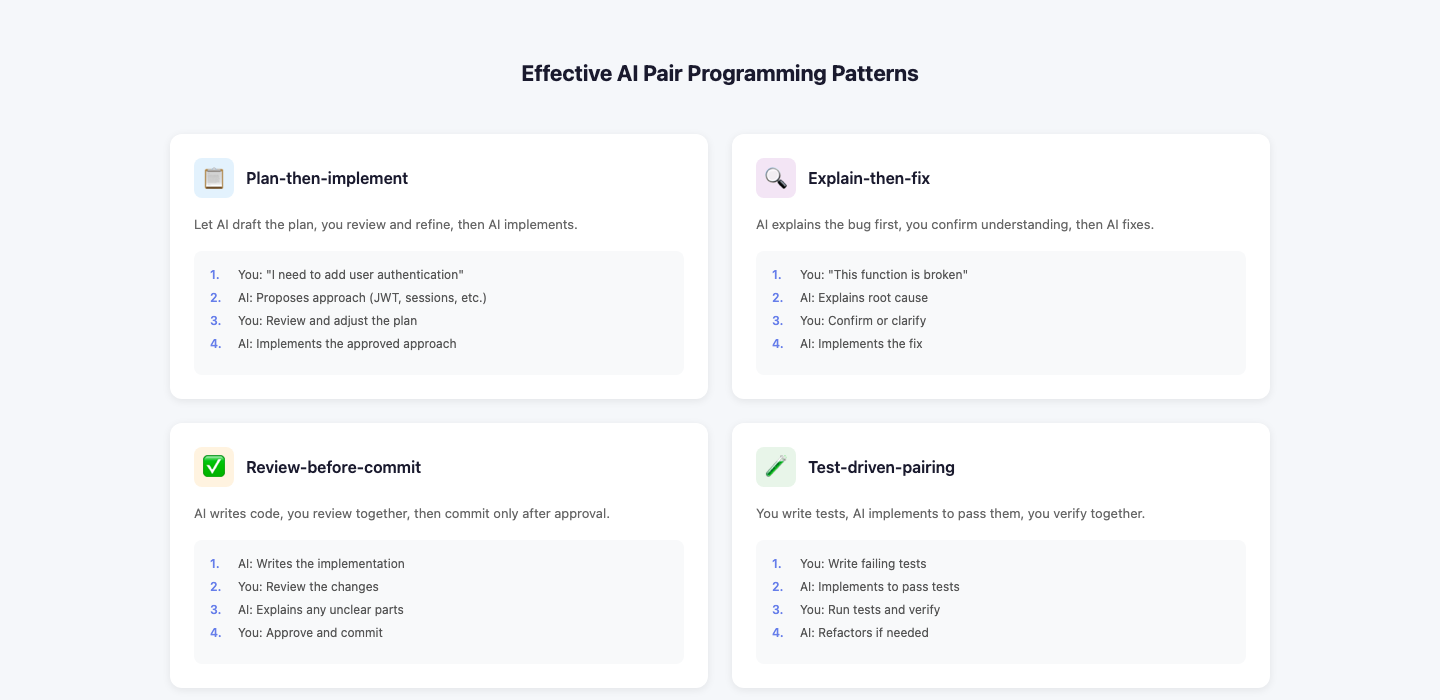
Pattern 1: Plan-then-implement
You: "I need to add rate limiting to the API. Before writing any code, explain your approach and which files you'll modify."
Claude: [explains approach]
You: "That looks right. Proceed."
Claude: [implements] Catching misunderstandings before they become code is faster than refactoring.
Pattern 2: Root cause before fix
You: "Here's the error: [paste]. Before suggesting a fix, explain the root cause."
Claude: [explains root cause]
You: [evaluates whether the root cause analysis is correct]
You: "That's right. Now suggest a fix."
Pattern 3: Architecture discussion mode
You: "I'm considering [A] vs [B] for the caching layer. Given our current architecture, what are the trade-offs? Don't write any code yet."
Claude: [discusses trade-offs]
You: [makes decision]
You: "We'll go with [A]. Now implement it."
Pattern 4: Constrained implementation
You: "Implement the checkout flow. Constraints: - Use Repository Pattern for all DB access - JWT in httpOnly cookies - React Query for async operations - No direct DB queries in route handlers" Explicit constraints prevent Claude from suggesting approaches you've already rejected.
Making AI Pair Programming Persistent
The biggest limitation of AI pair programming: Claude forgets everything between sessions. Without memory:
- Every session starts with re-explaining the project
- Claude suggests approaches you've already rejected
- You can't build on previous sessions With MemClaw:
- Claude loads your project context automatically
- It knows your architecture decisions and why you made them
- Sessions build on each other Setup: { "mcpServers": { "memclaw": { "command": "npx", "args": ["-y", "@memclaw/mcp-server"], "env": { "MEMCLAW_API_KEY": "your_key", "MEMCLAW_WORKSPACE_ID": "your_workspace_id" } } } } With MemClaw, AI pair programming becomes genuinely collaborative — Claude builds on previous sessions instead of starting over.
Daily AI Pair Programming Workflow
Session start: claude /start
Claude loads context, briefs you on current state
Implementation session: "I need to implement [feature]. Before writing code, explain your approach." → Review plan → "Proceed" → Review implementation → "Looks good. Commit." Session end: /end
Claude saves session summary to workspace
Getting Started
- Install Claude Code
- Set up MemClaw at memclaw.me
- Create CLAUDE.md with your project brief
- Create
/start,/end,/reviewslash commands - Run your first structured AI pair programming session Make AI pair programming more effective with MemClaw → memclaw.me