How to Build AI Agent Workflows That Actually Finish Work

Practical guide to building AI agent workflows that go from request to real deliverables — research, presentations, landing pages, and more.
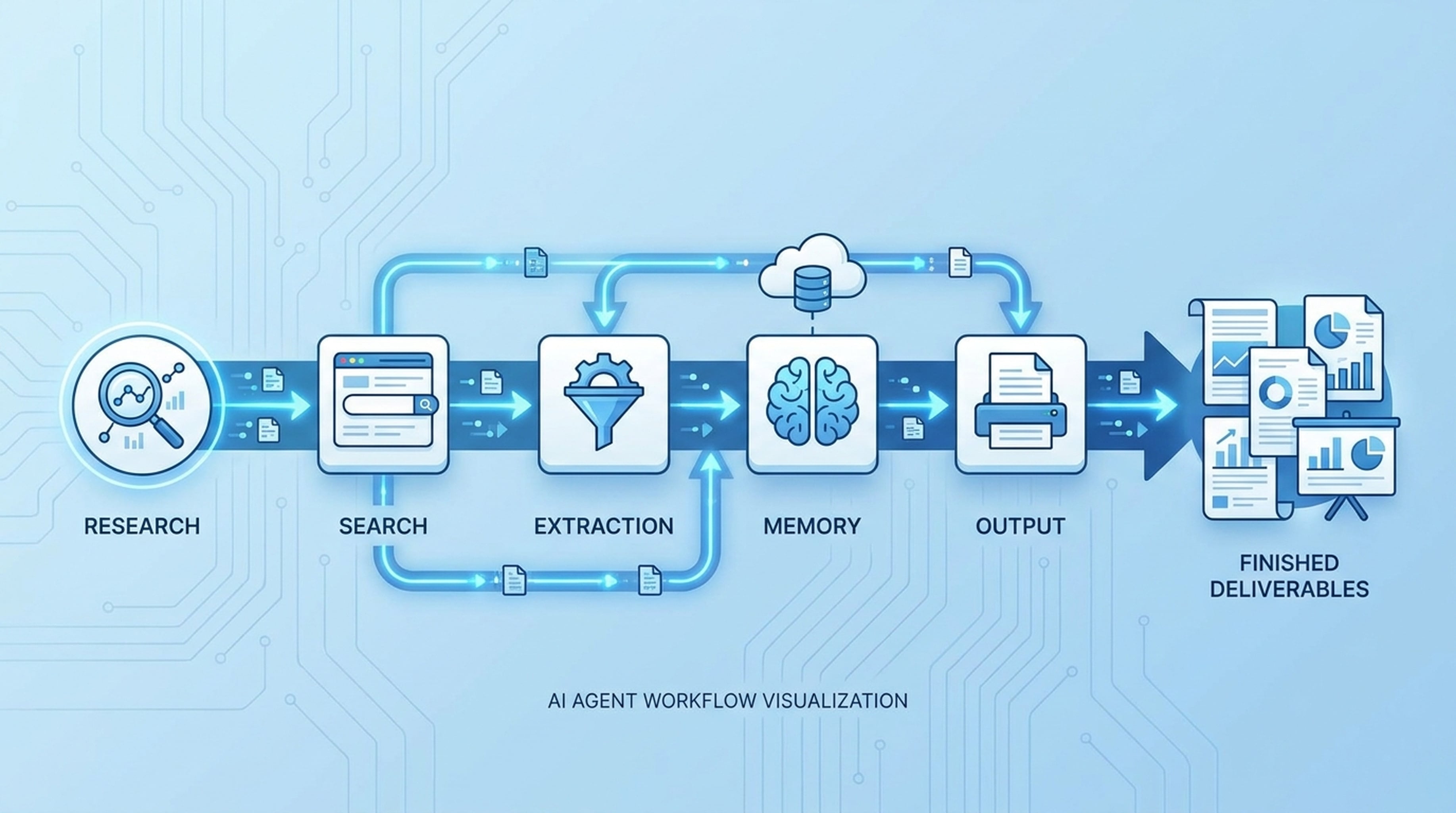
Most AI agent demos end with a chat message. Real work doesn't end with a chat message. It ends with a presentation, a report, a landing page, or a campaign package.
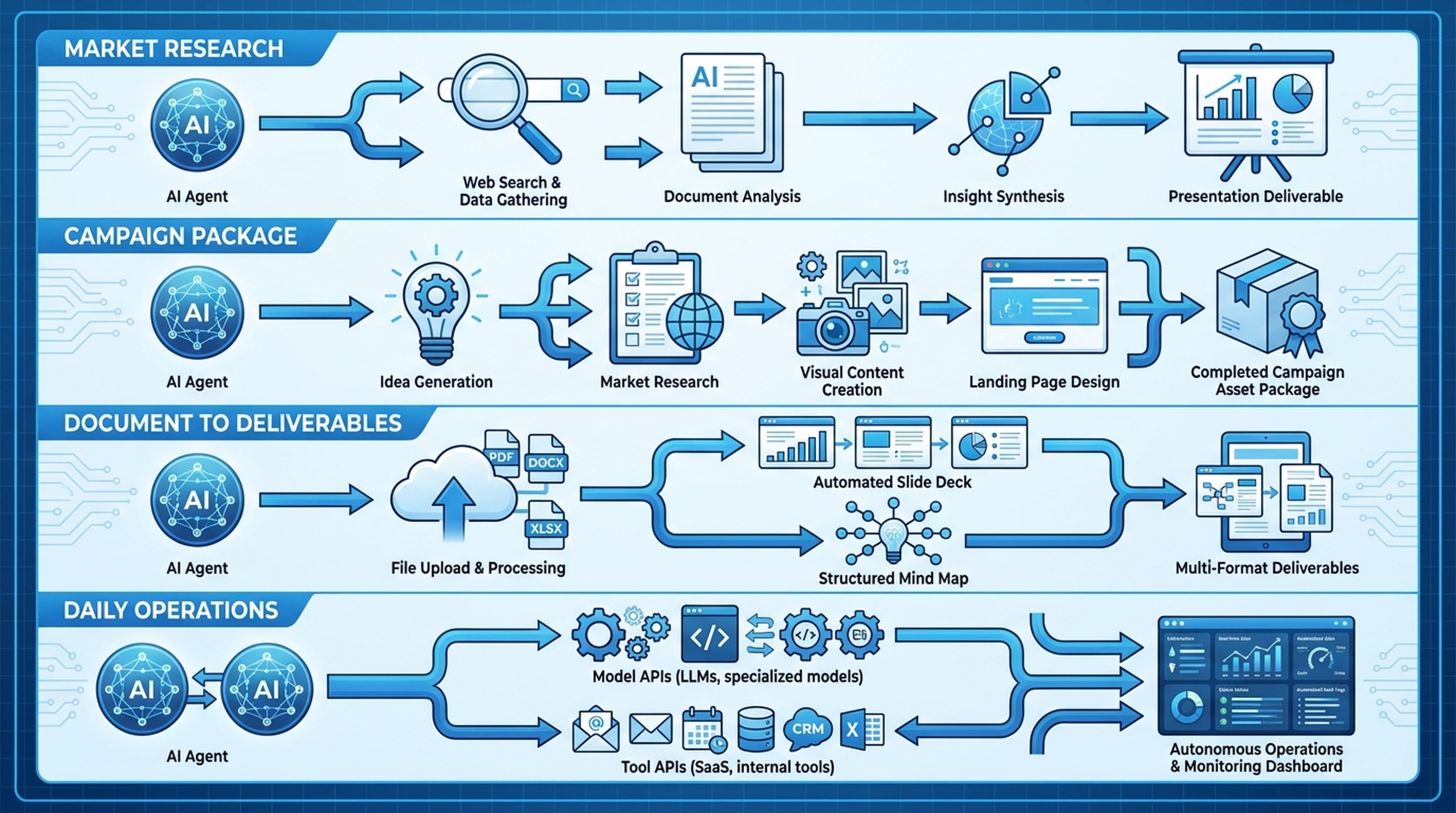
Here's how to build agent workflows that produce actual deliverables instead of just answers.
The Problem: Agents That Talk but Don't Deliver
Your agent can reason through a problem. It can write a plan. It can generate a solid response. But then what?
The response sits in the chat. You still need to:
- Copy the research into a document
- Build the presentation yourself
- Find the sources to back up claims
- Create the visuals
- Draft the landing page copy
The agent did the thinking. You still do the work.
What Changes When Agents Have Real Tools
When an agent can call actual tools — not just imagine what it would do — the output shifts from conversation to deliverable:
Before: "Here's a summary of the market research. You should look at these trends..."
After: The agent searches for data, pulls sources, generates a PPT deck, saves everything to shared memory, and hands you a finished deck.
Before: "I suggest a landing page structure with these sections..."
After: The agent researches the topic, generates visual assets, drafts the landing page with copy and structure, and produces a ready-to-publish page.
The difference isn't better reasoning. It's access to tools that produce real output.
Building Workflows That Work
Step 1: Define the Deliverable
Start with what the output should be, not what the agent should say.
- A presentation deck for the team meeting?
- A research report with sourced evidence?
- A landing page draft for a product launch?
- A campaign package with visuals and copy?
Name the deliverable. The agent's job is to produce it.
Step 2: Map the Tool Chain
Every deliverable requires a chain of tool calls. Here are the most common patterns:
Research to Presentation Search API → Web Fetch → LiveDocs → PPT API
The agent searches for information, reads source pages, saves findings to memory, then generates a slide deck with cited sources.
Idea to Campaign Package Search → Web Fetch → Image API → Landing Page API
The agent researches the concept, pulls supporting sources, generates visuals, and drafts a landing page.
Document to Brief Upload files → LiveDocs Retrieve → Mindmap API → PPT API
The agent reads uploaded documents, extracts key points, creates a mindmap, and generates a presentation.
Step 3: Give Your Agent the Tool Layer
This is the practical part. Your agent needs a platform that provides all these tools through a single interface.
Felo OpenAPI does this by putting model APIs, tool APIs, memory, and output capabilities under one API key. Your agent calls whatever tools it needs from the same capability layer.
The tools available:
- AI Search — real-time web search
- Web Fetch — read and extract page content
- X Search — search users, tweets, social signals
- YouTube Subtitles — pull video transcripts
- PPT API — generate themed slide decks
- Mindmap API — create visual structure maps
- Landing Page API — draft launch pages
- Image Generation — create visual assets
- LiveDocs — store files, URLs, and shared context with semantic retrieval
- SuperAgent — multi-step workflow conversations with streaming
Step 4: Let the Agent Chain Tools
Once connected, the agent decides which tools to call and in what order. You give it the goal, it figures out the path.
Example prompt: "Research the AI agent market, pull 5 credible sources, and generate a presentation for the team."
The agent:
- Calls Search API for market data
- Calls Web Fetch to read source pages
- Saves findings to LiveDocs
- Calls PPT API to generate the deck
- Returns a finished presentation
No step-by-step instructions needed. The agent knows the pattern.
Real Workflow Patterns
Market Research to Presentation
A common workflow for analysts and consultants:
- Agent searches for market trends and data points
- Reads web pages to verify sources and extract quotes
- Tracks X (Twitter) discussions for sentiment and expert opinions
- Saves all findings to LiveDocs with source attribution
- Generates a PPT deck with themed slides and cited evidence
The output is a deck your team can review, backed by sources the agent collected and preserved.
Product Launch Campaign
For content teams launching a new product:
- Agent researches the market and competitors
- Pulls web sources for data and validation
- Generates visual assets for the campaign
- Drafts a landing page with copy, structure, and SEO considerations
- Produces supporting materials (briefs, outlines, mindmaps)
You get a complete campaign package from a single prompt.
Document Conversion
Turn existing files into presentations and briefs:
- Upload files and URLs to LiveDocs
- Agent retrieves relevant content with semantic search
- Creates a mindmap to structure the key points
- Generates slides from the organized content
- Produces briefs and summaries for distribution
Raw documents become organized, presentable work.
Daily Agent Operations
For everyday productivity:
- Agent calls model APIs for reasoning and planning
- Uses search and extraction tools for fresh data
- Accesses LiveDocs for team context and past research
- Generates output — slides, pages, images, briefs
Your favorite agent (Claude Code, Codex, OpenClaw, Hermes) becomes the interface, Felo becomes the capability layer.
Common Mistakes to Avoid
Asking for Summaries Instead of Deliverables
Don't ask: "What do you think about the AI agent market?"
Ask: "Research the AI agent market and generate a 10-slide presentation with sources."
The first gets you a chat message. The second gets you a deck.
Not Giving Agents Memory
Agents without memory start from zero every session. LiveDocs lets them remember what your team saved, what sources were relevant last week, and what context to carry forward.
Using Only One Tool
The best workflows chain multiple tools together. Search + extract + save + generate. Each tool feeds the next. Don't stop at search.
Getting Started
- Create your free API key
- Set up your agent — works with Claude Code, Codex, OpenClaw, Hermes, or custom agents
- Give your agent a deliverable-focused prompt and watch it work
Your agent already knows how to think. Give it the tools to produce.