Claude Code Context Window: How to Stop Losing Context Mid-Session

Claude Code's context window limits how much it can hold at once. Here's how to manage it effectively — and how to solve the bigger problem of losing context between sessions.
Every Claude Code session has a context window — a limit on how much information the model can hold at once. Understanding how it works, and how to work with it, makes a real difference in how useful Claude is for complex development work.
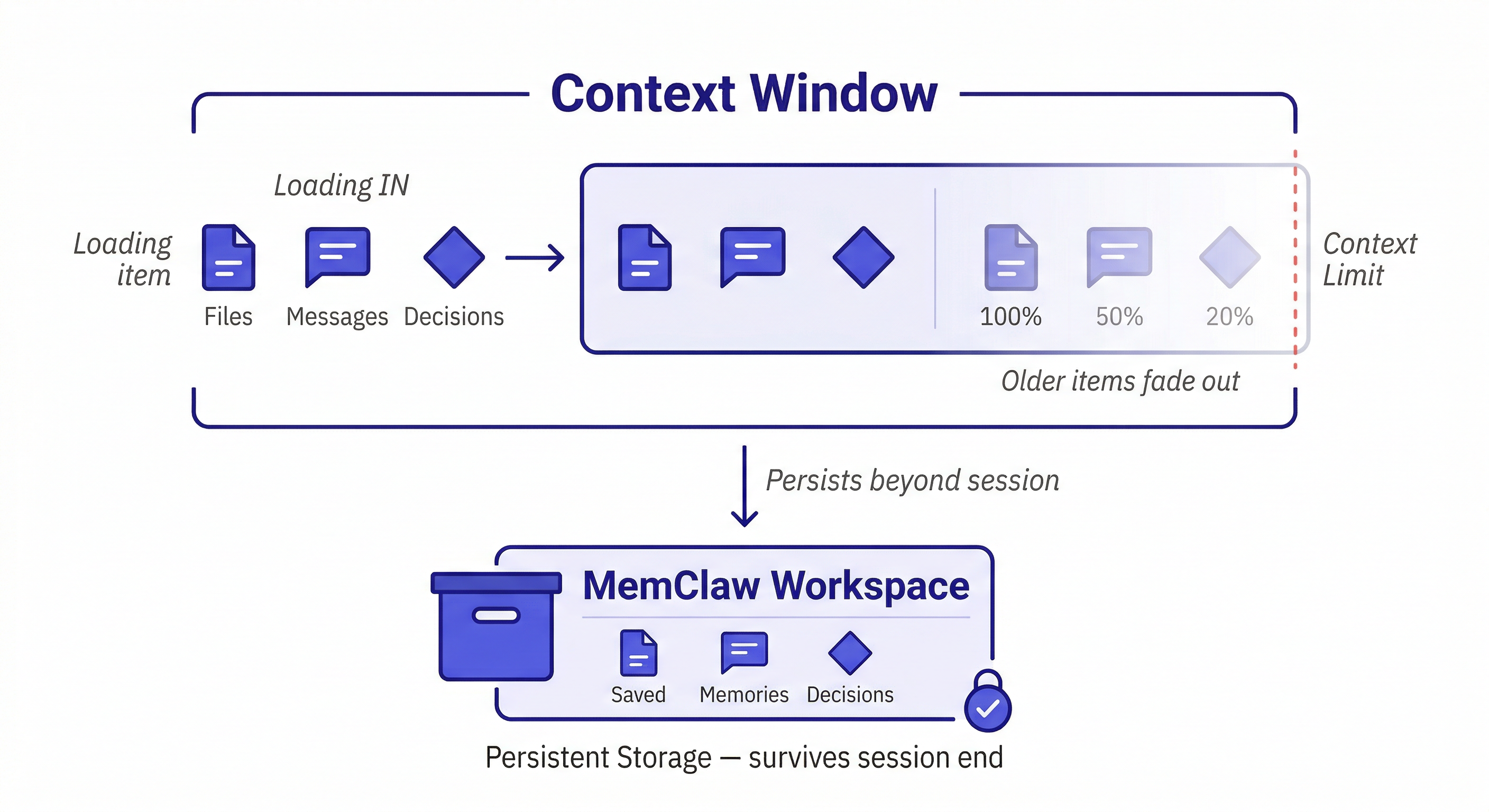
What Is the Context Window?
The context window is the total amount of text — measured in tokens — that Claude can process in a single session. This includes:
- Your messages
- Claude's responses
- Files you ask it to read
- System prompts and tool outputs
Modern Claude models have large context windows — hundreds of thousands of tokens. For most development sessions, you won't hit the limit. But for long, complex sessions involving large codebases, you can approach it.
Signs you're approaching the context limit:
- Claude contradicts something it said earlier in the session
- It forgets a constraint you established at the start
- It re-asks for information you already provided
- Responses become less coherent or less specific
The Two Context Problems
Developers often conflate two different problems. They're related but require different solutions.
Problem 1 — Within-session context loss
For very long sessions with large files, you can approach the context limit. Claude starts "forgetting" earlier parts of the conversation as new content pushes old content out.
Fix: start a new session and reload the relevant context. Keep sessions focused on a specific task rather than trying to do everything in one long session.
Problem 2 — Between-session context loss
This is the more common and more painful problem. Every new session starts with an empty context window. Everything from previous sessions is gone — architecture decisions, debugging history, the three hours you spent explaining your codebase.
Fix: MemClaw persistent workspaces. This is what the rest of this guide covers.
How to Manage the Context Window Efficiently
Load only what's relevant to the current task.
Instead of:
Read all the files in src/
Do this:
Read src/middleware/auth.ts and src/lib/jwt.ts.
I'm working on extracting the JWT validation logic.
Focused context loads faster, uses less of the window, and gives Claude more room to reason about the specific problem.
Use CLAUDE.md for stable context.
Put things that don't change session-to-session in a CLAUDE.md file at your project root:
# MyApp
Stack: Next.js 14, TypeScript, PostgreSQL
Auth: JWT in httpOnly cookies (security team requirement)
Conventions: Repository Pattern for DB access, React Query for async
Claude reads this at session start automatically. It's free context that doesn't require you to re-explain every time.
Use MemClaw for evolving context.
Decisions made over time, conversation history, status updates, artifacts — this is what MemClaw stores. It's the context that CLAUDE.md can't handle because it changes.
Load the MyApp workspace
Claude reads the workspace and knows where things stand — not just the static architecture, but the current status, recent decisions, and what's been tried and ruled out.
Context Window vs. Memory: The Key Distinction
Think of it this way:
- Context window = RAM — fast, limited, cleared when the session ends
- MemClaw workspace = hard drive — persistent, searchable, survives session end
You want important things in both. But you can't fit everything in RAM, and you don't want to load the entire hard drive into RAM every time.
The right pattern: load a focused subset of workspace context at session start (the living README, recent decisions, current status), then load specific artifacts on demand as you need them.
Load the MyApp workspace
Show me the decisions we made about the payment integration
Claude loads the workspace summary first, then retrieves the specific payment decisions when asked. Efficient use of the context window.
Practical Context Management Patterns
The focused session pattern
Start each session with a clear, narrow scope:
Load the MyApp workspace
Today I'm working on the payment webhook handler.
Read src/webhooks/stripe.ts and let's fix the duplicate trigger issue.
Narrow scope = less context needed = more room for Claude to reason deeply about the specific problem.
The checkpoint pattern
For long sessions, periodically summarize and reset:
Let's checkpoint. Summarize the key decisions we've made in this session,
then I'll start a fresh session with that summary loaded.
This prevents context degradation in very long sessions and gives you a clean record of what was decided.
The end-of-session save pattern
Before closing a session:
Summarize the key decisions from this session and update the workspace status.
This is how the workspace grows. Every session adds something. The next session starts smarter than the last.
When Context Window Size Actually Matters
For most development work, the context window is large enough that you won't hit the limit. It becomes a real constraint when:
- Working with very large files (10,000+ lines)
- Reading many files in a single session
- Very long sessions with extensive back-and-forth
- Asking Claude to analyze an entire large codebase at once
In these cases, the solution is the same: break the work into focused sessions, use CLAUDE.md for stable context, and use MemClaw for the evolving context that needs to persist.
How to build a persistent knowledge base →
Getting Started with MemClaw
Install on Claude Code:
/plugin marketplace add Felo-Inc/memclaw
/plugin install memclaw@memclaw
export FELO_API_KEY="your-api-key-here"
Create a workspace per project:
Create a workspace called [Project Name]
Load at the start of every session:
Load the [Project Name] workspace
The context window problem doesn't go away — it's a fundamental constraint of how language models work. But with focused sessions and persistent workspace memory, it stops being a bottleneck.