Claude Code Projects: Manage Multiple Projects with Persistent AI Context

How to manage multiple projects in Claude Code without context bleed — one workspace per project, clean switching, and persistent context that carries across every session.
Running multiple projects in Claude Code without a system creates a specific kind of chaos: context from Client A bleeds into Client B, you re-explain the same project three times a week, and Claude gives advice that contradicts decisions you made on a different project.
The fix is one workspace per project, loaded at session start. Here's how to set it up.
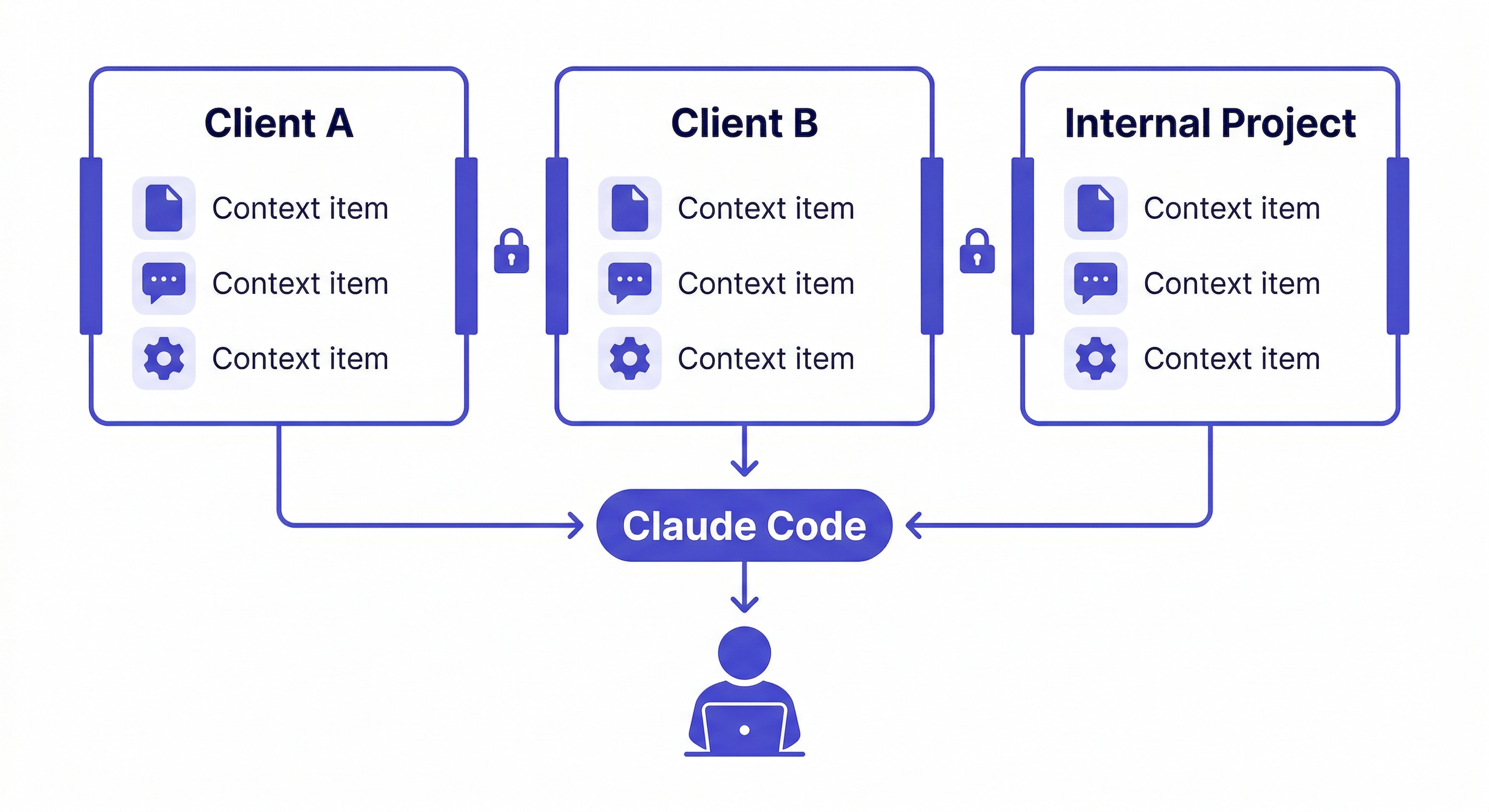
The Multi-Project Context Problem
When you work on multiple projects without isolation, every Claude Code session is a gamble:
- You ask about authentication — Claude gives advice based on Client A's JWT setup, but you're working on Client B which uses sessions
- You ask about deployment — Claude references Railway, but this project is on AWS
- You ask about the database schema — Claude describes the wrong project's schema
This happens because Claude only knows what's in the current session. Without a system for loading the right context, you're manually managing which project Claude thinks you're working on — and inevitably getting it wrong.
The Solution: One Workspace Per Project
Install MemClaw on Claude Code:
/plugin marketplace add Felo-Inc/memclaw
/plugin install memclaw@memclaw
export FELO_API_KEY="your-api-key-here"
Create one workspace per active project:
Create a workspace called Client Alpha
Create a workspace called Client Beta
Create a workspace called Internal Dashboard
Each workspace is completely isolated. Loading Client Alpha gives Claude only Client Alpha context. Loading Client Beta gives Claude only Client Beta context. No bleed.
Seeding Each Workspace
Spend 15 minutes per project adding baseline context. You only do this once per project.
For a client project:
Load the Client Alpha workspace

Add to workspace: E-commerce platform for Alpha Corp.
Stack: Next.js 14, Postgres, Stripe. Deployed on Vercel + Railway.
Main contact: James ([email protected]). Q2 launch deadline.
Hard constraint: GDPR compliance, EU data residency required.

Add decision: using Stripe Checkout (not custom payment form) —
client's legal team requires PCI-compliant hosted payment page.

Update workspace status: auth flow complete, product catalog in progress.
For an internal project:
Load the Internal Dashboard workspace

Add to workspace: Internal analytics dashboard for the team.
Stack: React, FastAPI, SQLite. Runs locally, no deployment needed.
No external dependencies, no auth required (internal only).

Update workspace status: data ingestion pipeline done.
Working on visualization layer.
Daily Switching Workflow
Starting a session on Client Alpha:
Load the Client Alpha workspace
Claude reads Client Alpha's context — stack, decisions, current status. Ready to work.
Switching to Client Beta mid-day:
Load the Client Beta workspace
Claude switches completely. Client Alpha context is gone. Client Beta context is loaded. No bleed.
Returning to a project after a week away:
Load the Client Alpha workspace
Where did I leave off?
Claude reads the status you logged at the end of your last session and orients you in seconds.
What to Log Per Project
The context that makes the biggest difference across multiple projects:
Stack and constraints — so Claude never suggests a tool that doesn't fit the project's environment.
Key decisions — so Claude doesn't re-open settled questions or suggest approaches already ruled out.
Current status — so you can pick up exactly where you left off, even after switching to other projects for a week.
Client-specific conventions — coding standards, naming conventions, or preferences that differ between clients.
Add decision to workspace: Client Beta uses camelCase for API responses
(not snake_case). Their frontend team's requirement. All new endpoints
must follow this convention.
This kind of client-specific convention is exactly what gets lost without per-project isolation. With it, Claude automatically applies the right convention for whichever project you're working on.
Scaling to 5+ Projects
When you're managing many projects simultaneously:
Keep workspaces current. A workspace with stale status is less useful than no workspace — it gives Claude false confidence about where things stand. Update status at the end of every session.
Archive inactive projects. If a project is on hold for more than a month, note it in the workspace status:
Update workspace status: PROJECT ON HOLD as of 2026-04-08.
Resuming in Q3. Last active: payment integration 80% complete.
When you return, load the workspace and Claude immediately knows the project was on hold and where it left off.
Use consistent naming. Client Alpha, Client Beta, Internal Dashboard — clear names make switching fast and unambiguous.
Team Multi-Project Setup
If multiple developers work across the same set of projects, share the workspaces:
Each developer installs MemClaw with their own API key. The workspace owner invites teammates. Everyone loads the same workspace for the same project.
Result: all developers get the same project context in their Claude Code sessions. No more "wait, which auth approach are we using on this one?" — the workspace has the answer.
Getting Started
- Install MemClaw (memclaw.me)
- Create one workspace per active project
- Spend 15 minutes seeding each with stack, decisions, and current status
- Load the relevant workspace at the start of every session
The isolation is immediate. From the first session, Claude knows which project you're working on and gives advice specific to that project's context.