Claude Code vs Cursor in 2026: A Developer's Honest Comparison

Claude Code and Cursor take fundamentally different approaches to AI coding. This comparison breaks down architecture, workflow, pricing, and memory to help you choose.
Cursor and Claude Code are the two tools developers argue about most in 2026. Both use Claude models under the hood. Both promise to make you faster. But they solve the problem of AI-assisted coding in completely different ways, and picking the wrong one for your workflow costs you weeks of frustration before you switch.
This comparison is based on daily use of both tools across real projects. No benchmarks on toy problems. No feature-list padding. Just what matters when you sit down to ship code.
The Core Difference: IDE vs Terminal Agent
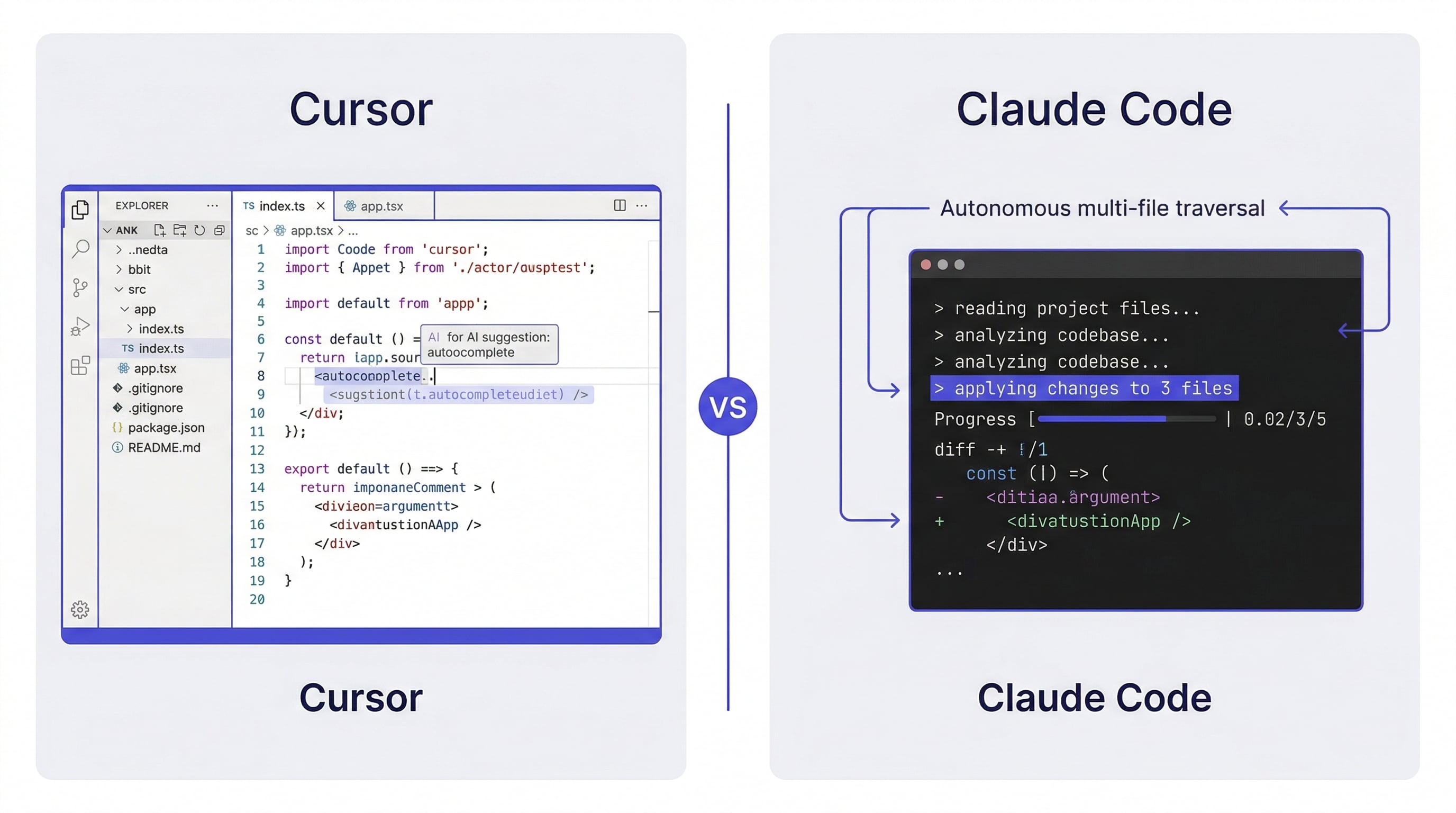
Cursor is a fork of VS Code. It adds AI features — autocomplete, inline edits, chat — directly into the editor you already know. You see your code, highlight a section, and ask Cursor to change it. The AI operates within the boundaries of what you show it.
Claude Code is a terminal agent. You describe what you want in natural language, and it reads your codebase, plans changes across multiple files, and executes them. There is no GUI. You do not highlight code. You talk to it like a colleague who has access to your entire repository.
This is not a minor UX difference. It shapes everything: how you think about tasks, how much context the AI has, and how much autonomy you give it.
Code Editing: Inline Suggestions vs Autonomous Changes
Cursor excels at the small-to-medium edit. You are staring at a function, you know roughly what needs to change, and you want the AI to do the typing. Tab-complete fills in the next line. Cmd+K rewrites a selected block. The feedback loop is tight — you see the diff immediately and accept or reject.
Claude Code operates at a higher level. You say "refactor the authentication module to use JWT instead of sessions" and it reads every file involved, plans the migration, and makes changes across your codebase. You review the result after it finishes, not line by line as it works.
When Cursor is better: small edits, single-file changes, writing code you could write yourself but faster.
When Claude Code is better: multi-file refactors, architectural changes, tasks where you would spend 20 minutes figuring out which files to touch.
Context and Memory
This is where the two tools diverge most sharply.
Cursor's context is what you give it. You can add files to the chat, use @-mentions to reference specific code, and the AI sees your current file. But it does not automatically understand your project's architecture, your team's conventions, or the decisions you made last week. Each chat session starts relatively fresh.
Claude Code reads your entire repository. When you start a session, it has access to every file, every directory, every config. It builds understanding from the ground up. Combined with CLAUDE.md files, it can follow project-specific rules and conventions automatically.
Neither tool, however, remembers anything between sessions by default. Close the window, and both start over.
This is the gap that tools like MemClaw fill — persistent project workspaces that survive across sessions. If you work on multiple projects and switch between them, session memory becomes the bottleneck regardless of which editor you use. claude-code-memory
Multi-File Operations
Cursor handles multi-file edits through its Composer feature. You describe a change, and Composer proposes edits across several files. It works, but you are still reviewing and approving each file individually within the IDE.
Claude Code treats multi-file operations as its default mode. When you ask it to add a new API endpoint, it creates the route, the controller, the tests, and updates the documentation — all in one pass. It thinks in terms of the task, not individual files.
For projects with strong conventions (consistent file structure, naming patterns, test organization), Claude Code's approach saves significant time. For projects where you need tight control over every change, Cursor's file-by-file review feels safer.
Pricing and Usage Limits
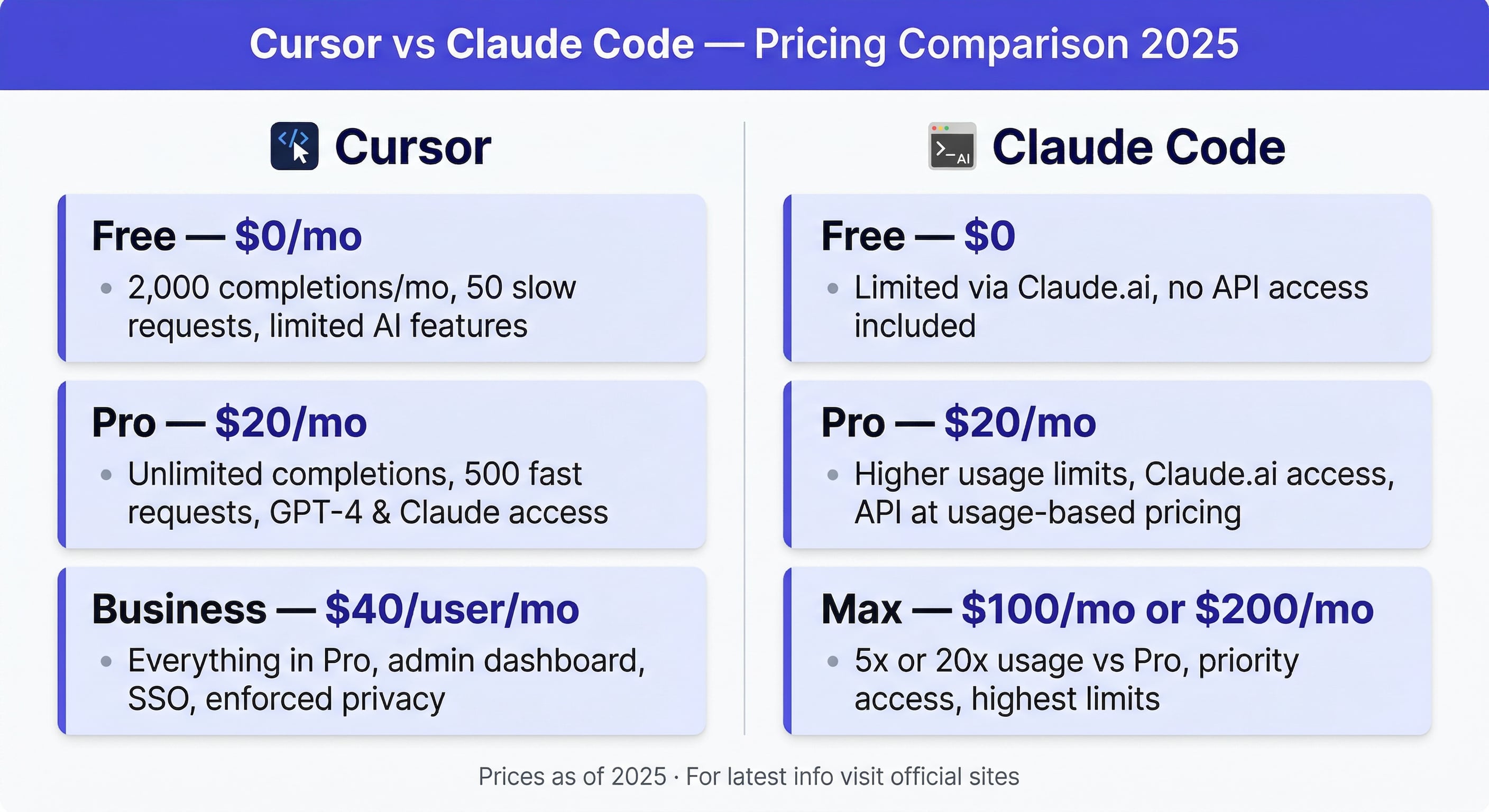
Cursor offers a free tier with limited completions, a Pro plan at $20/month with 500 fast requests, and a Business plan at $40/month. You pay for the editor and its AI features as a bundle.
Claude Code pricing is tied to your Anthropic API usage. The Pro plan ($20/month) includes Claude Code access with usage limits. The Max plan ($100/month or $200/month) removes most limits. You are paying for the underlying model usage, not the tool itself.
The cost comparison depends entirely on how much you use AI assistance. Light users spend less with Cursor's predictable pricing. Heavy users who run Claude Code for hours daily may find the Max plan necessary — but they also get significantly more capability per dollar.
Neither pricing model is objectively better. Cursor is predictable. Claude Code scales with usage.
Where Each Tool Struggles
Cursor's limitations:
- Context is limited to what you explicitly provide. It does not "know" your project the way a human teammate would after a week of onboarding.
- Multi-file operations through Composer can feel clunky compared to Claude Code's natural language approach.
- Heavy reliance on VS Code means you inherit VS Code's limitations and resource usage.
Claude Code's limitations:
- No visual interface. Developers who think visually or prefer seeing code as they edit may find the terminal-only workflow disorienting.
- Token consumption can be high for large codebases. Reading your entire repository on every session is not free.
- The autonomous approach means mistakes happen at scale — a bad refactor touches 15 files instead of 1.
The Memory Problem Both Tools Share
Both Cursor and Claude Code lose all context when you close a session. This matters more than most comparisons acknowledge.
If you work on one project all day, it is a minor annoyance. If you juggle three clients or five microservices, it becomes the primary bottleneck. Every morning starts with re-explaining your project. Every context switch means re-loading your mental model into the AI.
Claude Code partially addresses this with CLAUDE.md files — static instructions the agent reads on startup. But static files do not capture session history, evolving decisions, or task progress.
For developers managing multiple projects, adding a persistent memory layer like MemClaw to either tool changes the workflow fundamentally. Your project context loads in 8 seconds instead of 10 minutes of re-explanation. persistent-ai-memory
Which One Should You Use
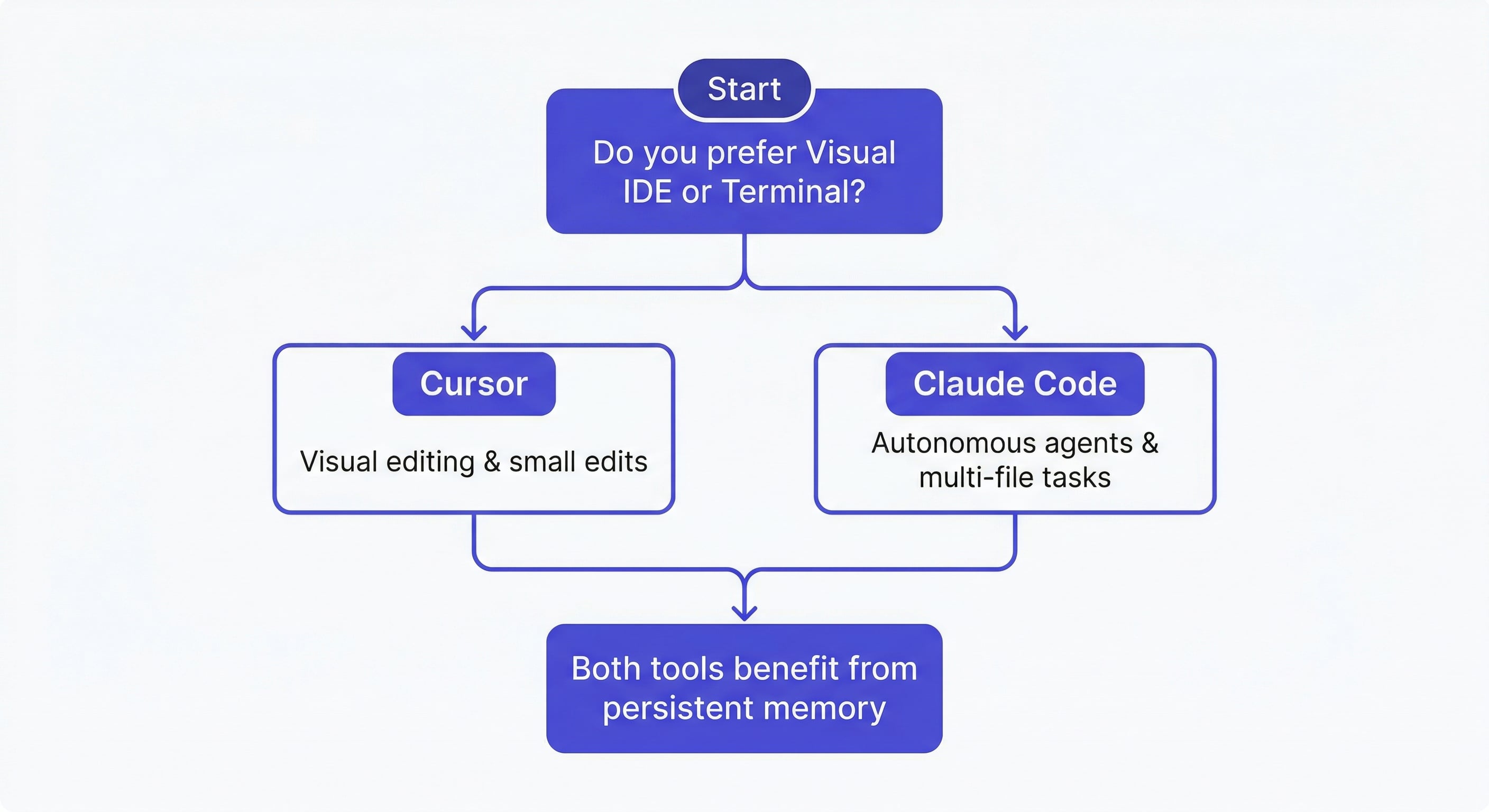
Choose Cursor if:
- You prefer a visual IDE and want AI integrated into your existing VS Code workflow
- Most of your work is single-file edits and code completion
- You want predictable monthly pricing
- You are transitioning from a non-AI workflow and want a gentle learning curve
Choose Claude Code if:
- You are comfortable working in the terminal
- Your tasks frequently span multiple files and require architectural understanding
- You want the AI to operate autonomously on complex tasks
- You already use the Anthropic API or need Claude's full reasoning capability
Many developers use both. Cursor for quick edits during the day, Claude Code for larger refactors and planning sessions. The tools are not mutually exclusive.
Going Beyond the Editor
The Claude Code vs Cursor debate focuses on the editing experience, but the real productivity gains in 2026 come from what happens around the editor: persistent memory, project context, and workflow automation.
Both tools benefit from a memory layer that persists across sessions. If you are evaluating these tools, consider how you will handle context management — especially if you work on multiple projects.
Try MemClaw for persistent project memory → memclaw.me
# Claude Code
export FELO_API_KEY="your-api-key-here"
/plugin marketplace add Felo-Inc/memclaw
/plugin install memclaw@memclaw

# OpenClaw
bash <(curl -s https://raw.githubusercontent.com/Felo-Inc/memclaw/main/scripts/openclaw-install.sh)
claude-code-best-practices | claude-code-context-window | ai-pair-programming-claude-code