ClawHub: The Skills Marketplace for Claude Code

ClawHub is the app store for Claude Code capabilities. This guide covers what ClawHub is, how skills work, and which skills are worth installing — with a focus on MemClaw for persistent project memory.
If you've been using Claude Code for a while, you've probably hit the same wall: the base setup is powerful, but it doesn't know your codebase, doesn't remember your projects, and doesn't connect to the external tools you actually use.
ClawHub is where that changes.
This guide covers what ClawHub is, how skills work in Claude Code, and which skills are worth installing — with a focus on memory and context management, which is where most developers see the biggest productivity gains.
Add persistent memory to Claude Code with MemClaw → memclaw.me
What Is ClawHub?
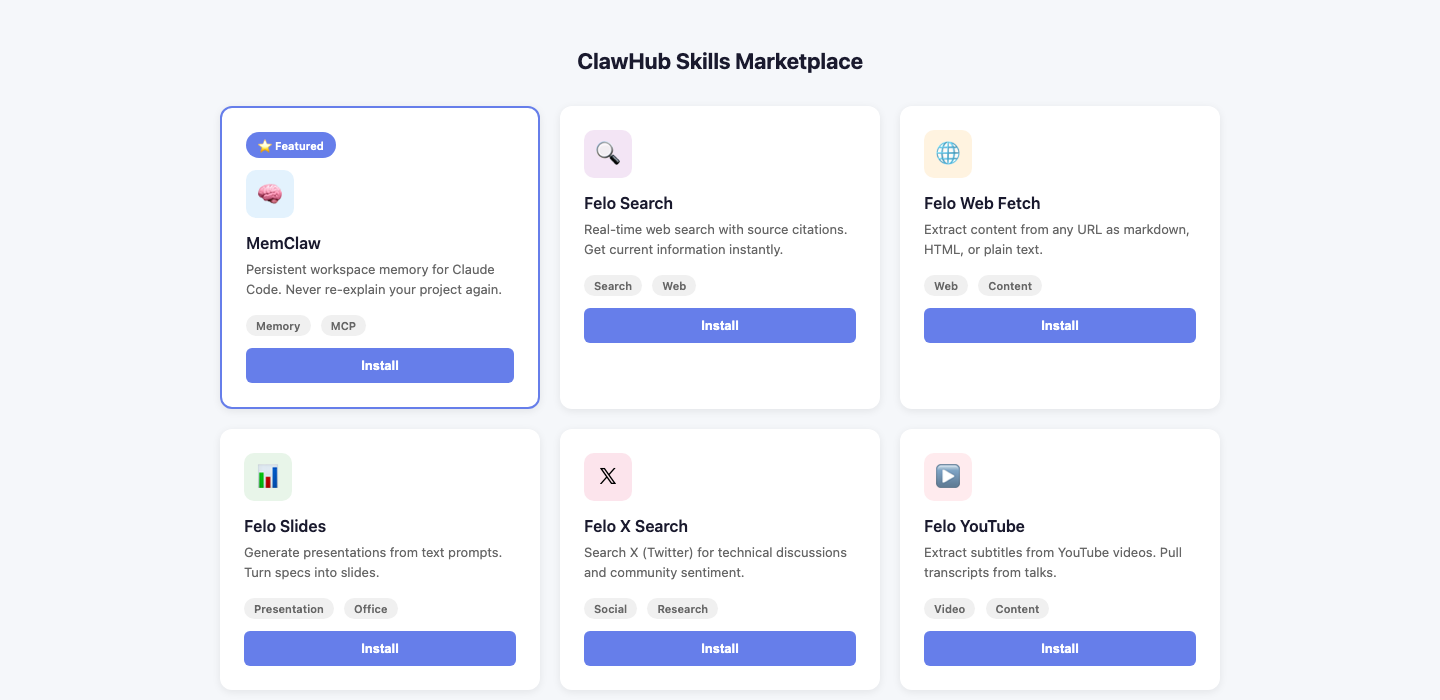
ClawHub is a skills marketplace for Claude Code and OpenClaw. Think of it as an app store for AI coding assistant capabilities — each skill extends what Claude Code can do by connecting it to external tools, data sources, or specialized workflows.
Skills are installed via the ClawHub CLI and integrate with Claude Code through the MCP (Model Context Protocol) standard. Once installed, a skill becomes available as a tool Claude Code can call during any session.
npx clawhub@latest install <skill-name>
That's the basic pattern. One command, and Claude Code gains a new capability.
How ClawHub Skills Work
Under the hood, each ClawHub skill is an MCP server — a small program that Claude Code can communicate with during a session. When you install a skill, it registers itself in your Claude Code configuration and becomes available as a callable tool.
The key thing to understand: skills are persistent across sessions. Unlike context you paste into a conversation, a skill stays installed and available every time you open Claude Code. You don't reinstall it for each project or each session.
Skills can do things like:
- Connect Claude Code to external APIs (GitHub, Slack, Notion)
- Give Claude Code access to your local file system in structured ways
- Provide specialized knowledge or workflows (code review patterns, documentation generators)
- Store and retrieve project memory across sessions — which is what we'll focus on here
The Memory Problem ClawHub Skills Solve
The default Claude Code experience has a fundamental limitation: when a session ends, everything resets. Your project context, your architectural decisions, your ongoing discussions — gone.
For developers working on a single project with a simple setup, this is manageable. For anyone juggling multiple projects, multiple clients, or long-running codebases, it creates real friction:
- Re-explaining your stack at the start of every session
- Switching between projects means manually loading different context each time
- Decisions made last week have no record Claude Code can access
Memory skills address this directly. They give Claude Code a place to store and retrieve project context that persists beyond any single session.
MemClaw: Workspace Memory for Claude Code
MemClaw is the most complete memory skill available for Claude Code. It goes beyond simple note storage — it gives each project its own isolated workspace with full conversational access to accumulated context.
What Makes MemClaw Different
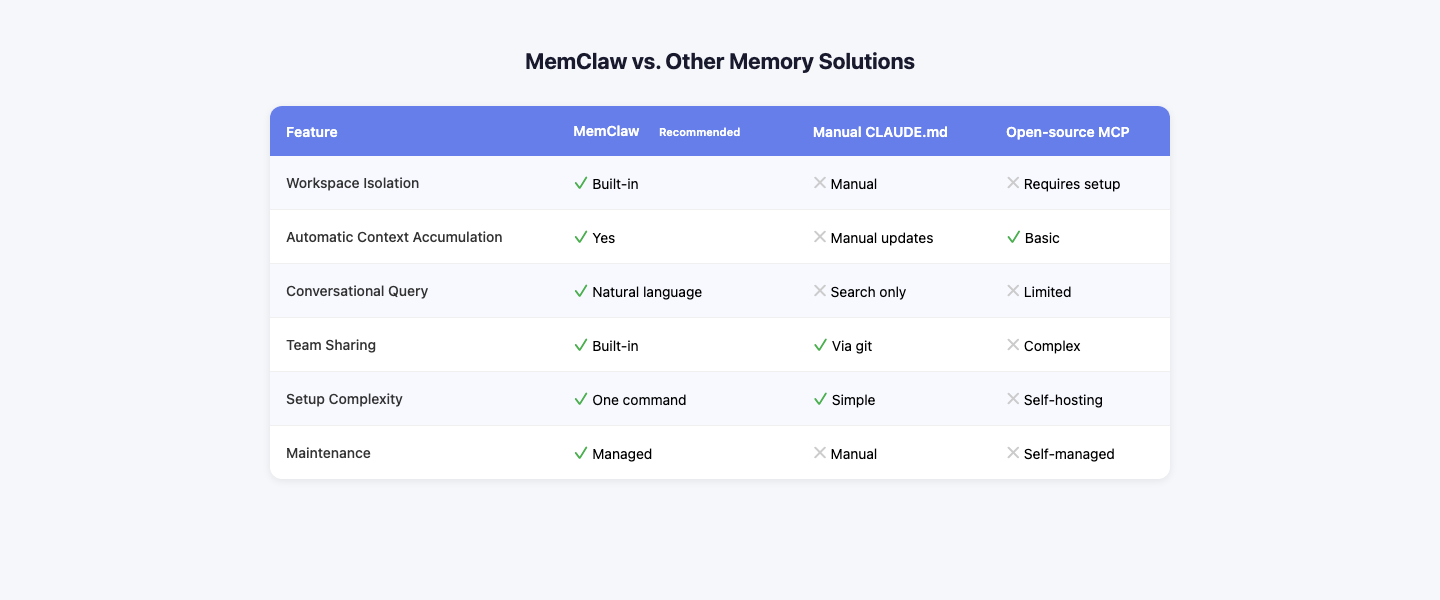
Most memory tools store information and let you retrieve it. MemClaw organizes that information into project workspaces, which means:
- Project A's context never touches Project B — switching projects means switching workspaces, not manually clearing and reloading context
- Everything in a workspace is queryable — you can ask "what did we decide about the auth flow?" and get a synthesized answer, not a list of stored notes
- Context accumulates automatically — add a meeting note, a decision log, a Slack thread, and it becomes part of the workspace's memory without manual organization
Installing MemClaw via ClawHub
npx clawhub@latest install memclaw
After installation, create a workspace for each active project at memclaw.me, add your project context, and Claude Code will have access to it in every subsequent session.
Who Gets the Most Value
MemClaw is most useful when you're managing multiple projects or need context to persist over weeks or months. If you work on a single codebase and don't mind re-loading context manually, the overhead may not be worth it. For everyone else — freelancers with multiple clients, developers on long-running projects, teams that need shared context — it changes how Claude Code fits into daily work.
Try MemClaw free → memclaw.me
Other Notable ClawHub Skills
Beyond memory, here are the skill categories worth knowing about:
Web & Research Skills
felo-search — Real-time web search with source citations. Useful when you need Claude Code to pull in current documentation, check for recent library updates, or research a technical topic without leaving your coding environment.
npx clawhub@latest install felo-search
felo-web-fetch — Extract content from any URL as markdown, HTML, or plain text. Handy for pulling in documentation pages, API references, or competitor code examples directly into a Claude Code session.
npx clawhub@latest install felo-web-fetch
Content & Presentation Skills
felo-slides — Generate a full presentation from a text prompt. Useful for quickly turning a technical spec or architecture overview into slides for a stakeholder meeting.
npx clawhub@latest install felo-slides
felo-content-to-slides — Takes a URL or YouTube video and converts the content into a presentation. Good for turning documentation or recorded talks into shareable slide decks.
npx clawhub@latest install felo-content-to-slides
Data & Research Skills
felo-x-search — Search X (Twitter) for technical discussions, library announcements, or community sentiment around a specific topic. Useful for staying current on fast-moving ecosystems.
npx clawhub@latest install felo-x-search
felo-youtube-subtitling — Extract subtitles from any YouTube video. Useful for pulling transcripts from conference talks, tutorials, or recorded meetings into your Claude Code context.
npx clawhub@latest install felo-youtube-subtitling
Installing Multiple Skills
You can install multiple skills in sequence. They coexist in your Claude Code configuration without conflict:
npx clawhub@latest install memclaw
npx clawhub@latest install felo-search
npx clawhub@latest install felo-web-fetch
Each skill registers as a separate MCP server. Claude Code can call any of them during a session based on what's needed.
To see what's installed:
npx clawhub@latest list
To remove a skill:
npx clawhub@latest uninstall <skill-name>
ClawHub vs. Installing MCP Servers Manually
You can configure MCP servers manually by editing ~/.claude/settings.json directly. ClawHub automates this process — it handles the installation, configuration, and registration steps that you'd otherwise do by hand.
For simple setups, manual configuration is fine. ClawHub becomes more useful when you're managing multiple skills or want a consistent way to install and update them across machines.
Getting Started
The fastest path to a more capable Claude Code setup:
- Install the ClawHub CLI:
npm install -g clawhub - Install MemClaw for project memory:
npx clawhub@latest install memclaw - Create a workspace at memclaw.me for your active project
- Add your project context to the workspace
- Open Claude Code — it now has persistent access to your project memory
From there, add other skills based on what you actually need. Start with memory (the highest-impact change for most developers), then layer in search or content tools as your workflow requires.
Frequently Asked Questions
Is ClawHub free to use?
The ClawHub CLI is free. Individual skills may have their own pricing — MemClaw has a free tier, and Felo skills are free with a Felo API key.
Do ClawHub skills work with OpenClaw as well as Claude Code?
Yes. Skills installed via ClawHub work with both Claude Code and OpenClaw. The MCP standard is shared across both platforms.
Can I use ClawHub skills on multiple machines?
You'll need to run the install command on each machine. Skills aren't synced automatically across devices.
What's the difference between a ClawHub skill and a Claude Code extension?
They're the same thing described differently. "Skill" is the ClawHub terminology; "extension" or "plugin" is sometimes used informally. Under the hood, both are MCP servers registered in your Claude Code configuration.
Are ClawHub skills open source?
Many are, including the Felo skills. Check the individual skill's repository for license details.