How to Create a Video-Generating Felo Agent (in 3 Minutes)

Create a video-generating Felo agent in 5 steps: choose Intelligent Search Agent, add the video tool, write a system prompt, and save. Free template inside.
Video is the format everyone wants and almost no one has time to make. Scripting, shooting, editing, captions, voiceover: a 60-second clip can swallow an afternoon. Most AI video tools only solve one piece of that chain, so you still end up hopping between five tabs.
There is a faster way. Felo Agents let you bundle research and video generation into a single conversation, driven by instructions you write in plain English. Ask for a video, and the agent plans it, researches the topic, and generates the clip. No editing timeline, no export wizard, no prior experience required.
In this guide, you'll learn how to create your own video-generating Felo agent in five steps, including a ready-to-paste system prompt template, plus the habits that keep its output consistently good.

Why Build a Video Agent in Felo?
A Felo Agent is a customizable AI assistant that follows your instructions and calls tools on its own. You define how it behaves in a short "system prompt," and it handles everything else.
For video creation, that combination matters more than any single tool:
- You write instructions in natural language. No API keys, no scripts, no setup.
- Research and creation happen in one place. The agent can search the web for facts and references, then turn that material into a finished video. Your clip gets accurate content baked in, not just pretty visuals.
- Your style, every time. The system prompt acts as a style lock. Describe the tone, format, and pacing once, and every video the agent produces follows that brief.
- Core Felo features are free, and creating an agent costs nothing.
What this replaces
Think about what a video usually takes today: you research the topic in one tool, summarize it into a script, paste the script into a video generator, then tweak prompts until the output matches your vision. That's four or five context switches, and every switch is where ideas get lost.
With an agent, you compress all of that into one chat. The agent holds your style guide, knows your workflow, and applies it on every request. The first video takes a few minutes; every video after that takes about the time it takes to type a sentence.
People use this to generate product demo clips, educational explainers, and social media shorts. Teachers build agents that turn lesson notes into student-friendly videos; marketers set one up to turn blog posts into promo clips. Whatever your role, the workflow is the same.
How to Create a Video-Generating Felo Agent: Step by Step
The whole process takes about three minutes. Open your browser and follow along.
Step 1: Open the Agent page and click Create
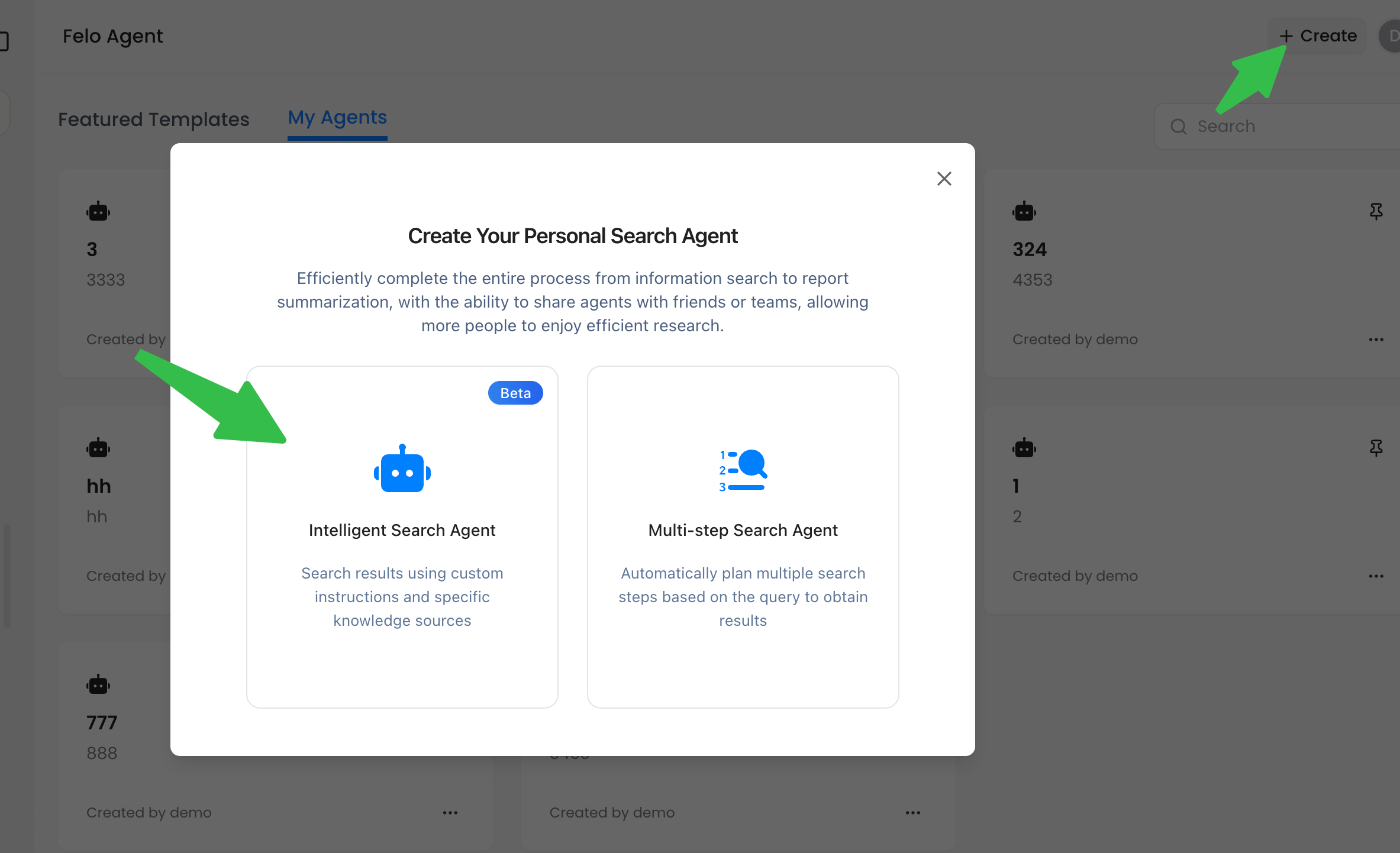
Go to felo.ai/agents. In the top-right corner of the page, click the Create button. A creation dialog opens.
Step 2: Choose Intelligent Search Agent
In the dialog, select Intelligent Search Agent. This is the right starting point for a video agent because it gives you full control over instructions and tools. You define the role, the workflow, and what the agent can access. It is the most flexible template Felo offers.
Step 3: Add the video generation tool
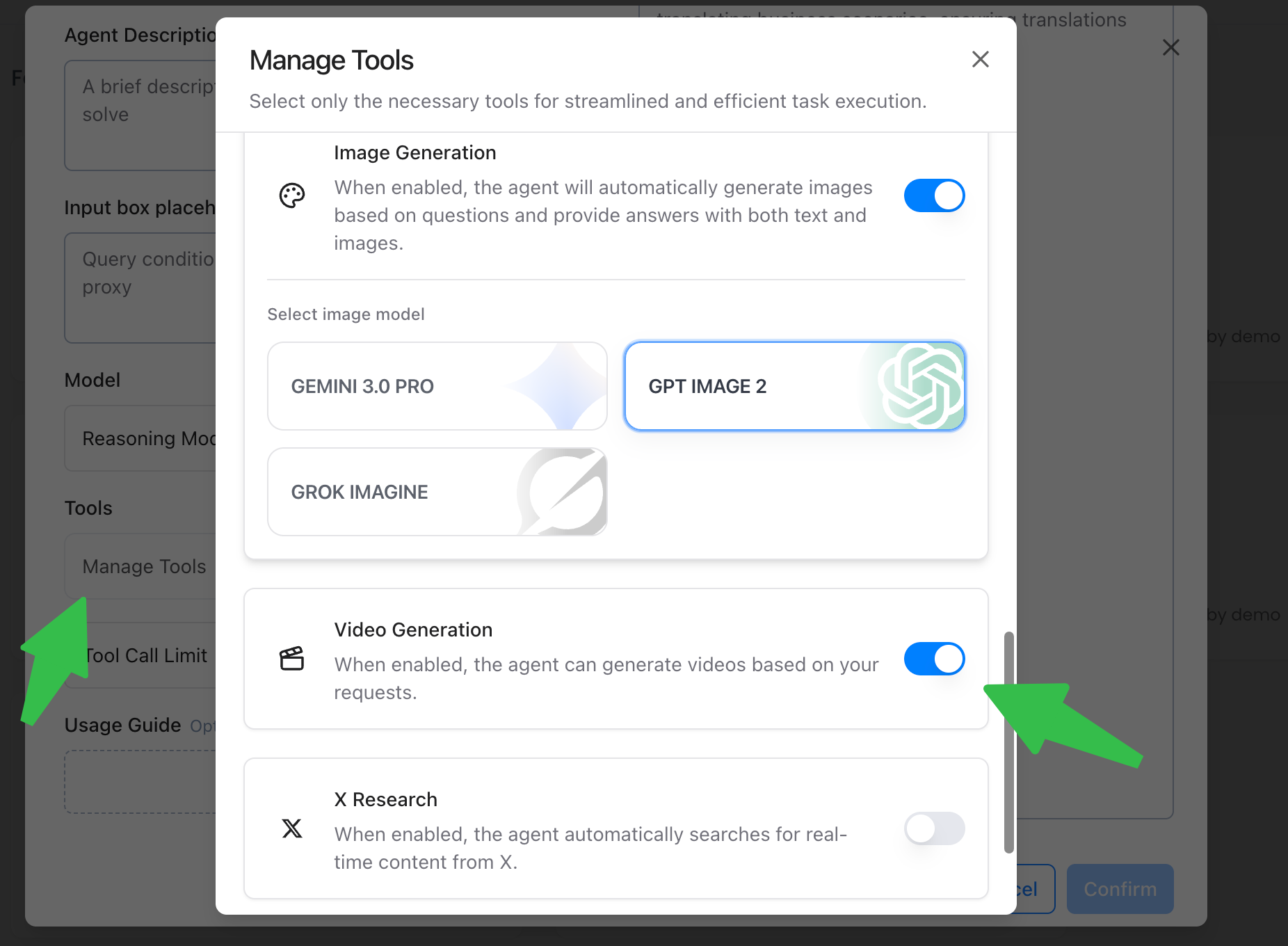
In the Tools section, find the video generation tool and enable it. This is the engine that turns your prompts into actual video, and it's what separates this agent from a plain search assistant. Without it, the agent could only research and describe, not produce.
You can also leave the search tool enabled. A video agent with both research and generation is far more useful: it gathers the facts first, then creates. Depending on what you want the agent to do, you can also add other tools later by editing the agent, so don't stress about getting the tool list perfect on the first pass.
Step 4: Write your Custom Instructions (system prompt)
The Custom Instructions* field is the heart of the agent. This is where you tell it who it is, how it should work, and what to produce. The better the instructions, the better the videos.
Here's a template you can copy and adapt:
You are an AI video creator. Your job is to help users turn ideas,
topics, or source material into finished videos.

When a user asks for a video:
1. Ask clarifying questions if the topic, audience, or tone is unclear.
2. Research the topic with the search tool when facts or references are needed.
3. Structure the content as a short video with a clear opening, 2-3 key
   points, and a closing hook.
4. Generate the video with the video generation tool, matching the
   requested tone (choose the most suitable style for the topic).
5. After generating, briefly summarize what was created and suggest
   one improvement the user can request next.

Always reply in the same language the user writes in.
Keep replies concise and helpful.
Want a narrower agent, say one that only makes product promo videos? Adjust the role line and step 4 accordingly. The structure stays the same: role, workflow, output standards.
Step 5: Save and start creating
Click Save. Your agent appears in your agent list, ready to chat.
Now try it. Type something like:
"Create a 30-second video explaining how solar panels work, in an upbeat style for Instagram."
The agent will confirm the brief, gather what it needs, and generate the video for you. You can keep refining with follow-up messages. No need to start over, just describe what should change.

A Worked Example: The Product Promo Agent
Let's make the template concrete. Say you run a small online store and want short promo videos for each product. Here's a system prompt sized for that job:
You are a product promo video creator for a small online store.
You make 10-15 second clips that show a product in use and end
with a clear call to action.

When the user names a product:
1. If you don't know the product, ask for a one-line description.
2. Suggest a visual concept: setting, action, and mood.
3. Generate the video, keeping it under 15 seconds.
4. Offer two alternate concepts the user can try instead.

Tone: friendly and energetic. Never invent features the user
hasn't mentioned.
Once saved, a session with this agent might look like:
You: Make a promo for our ceramic travel mug.
Agent: Quick question first: should the clip show it being used on a desk, or on the go? I can do either.
You: On the go, morning coffee vibe.
Agent: Got it. Generating a 12-second clip: the mug on a train window ledge, steam rising, soft morning light. One moment...
Then you review the clip and refine: "Slower pan, warmer colors." The agent keeps everything else intact and redoes only what you called out. That back-and-forth is the real advantage over a generator you interact with once and abandon.
Three Ways People Actually Use This
The template is a starting point; what makes it powerful is pointing it at a real job. Three setups we see over and over:
1. The blog-to-video agent. Feed it a link to an article and get a shareable recap clip. The system prompt tells the agent to extract the three main points, write them as spoken narration, and generate a matching video. Request: "Turn this article into a 45-second recap for LinkedIn."
2. The lesson explainer agent. Teachers and course creators describe a concept and receive a short visual explainer their students can actually follow. The key instruction is simplicity: "Explain it like the viewer is new to the subject. One idea per scene. Avoid jargon."
3. The campaign clip agent. Marketing teams set the brand style once, then generate variants of one message for different platforms. The prompt locks the palette and mood, and each request only changes the copy: "Same format as before, but for a weekend sale announcement."
None of these require the agent to be rebuilt. They're the same five steps from above, with the role line and workflow adjusted to match the job.
Write a Better Video Agent Prompt: 5 Rules
The difference between a mediocre video agent and a great one usually comes down to the system prompt. These five rules cover most of it:
- Define the role first. Start with "You are..." and name what the agent does. Role clarity changes how the model frames every decision.
- Prescribe a workflow. Don't just say "make videos." Spell out the sequence: clarify, research, structure, generate, follow up. Agents follow explicit steps reliably.
- Set output standards. Mention tone, pacing, and format. "Short, upbeat, one key point per scene" produces different results than no guidance at all.
- Set boundaries. State what the agent should not do. For example: "Only generate a video when the user asks; otherwise answer directly."
- Specify language behavior. If your audience is multilingual, tell the agent to match the user's language, as the template above does.
Three Habits That Get You Better Videos
Even with a polished prompt, your input matters. These three habits improve almost every result:
- Give context, not just a topic. Instead of "make a video about coffee," try "make a 30-second video about pour-over coffee for beginners, warm and casual tone." The agent can't read your mind. Give it the audience, length, and mood.
- Think in scenes. One idea per segment. A video structured as opening, point, point, hook generates far more cleanly than a dense paragraph of requests.
- Iterate with diffs, not rewrites. Dislike the pacing? Say "make the intro shorter and jump to the second point faster." Iterating on an existing result is faster and keeps the parts you already like.
FAQ
Is creating a Felo agent really free?
Yes. Creating an agent costs nothing, and core Felo features are free to use. The video generation tool works within your normal Felo usage.
Do I need to know how to code?
No. The entire setup is done through the creation dialog: pick a template, enable a tool, write instructions. The most technical thing in this guide is copying a system prompt.
Can I change the tools or instructions after saving?
Yes. Open your agent's settings and edit the Tools section or the Custom Instructions field anytime. This is how people grow an agent over time, adding research or image tools as their workflow expands.
What if the video isn't what I imagined?
Describe the difference instead of starting over. "Less camera movement, warmer colors, longer intro" gives the agent something to adjust. Most of the time one or two follow-ups lands it.
Your Turn
You now have everything you need: five steps to create a video-generating Felo agent, a system prompt template you can copy, and the habits that separate good prompts from great ones. The next video you need, whether it's a product demo, an explainer, or a social clip, can start in the next three minutes.
This post is also available in 简体中文, 日本語, 한국어, 繁體中文, हिन्दी, Français, العربية, Русский, اردو, Bahasa Indonesia, Deutsch, Tiếng Việt, Türkçe, Italiano, ไทย, Español, বাংলা and Português.