Felo AI Image: Turn Your Imagination into Pictures in 30 Seconds Using Plain Language

Felo AI Image is a free AI image generation and editing tool with 3 specialized models, 50+ visual styles, and natural language input — no prompt engineering needed.
Finding the right image can sometimes be harder than writing an article.
Scour free stock libraries and you won't find the style you want. Buy a license and you'll blow your budget. Turn to AI image generators and you're suddenly learning prompt syntax, tweaking parameters, and juggling tools. By the end, the time spent wrestling with tools has buried the creative idea itself.
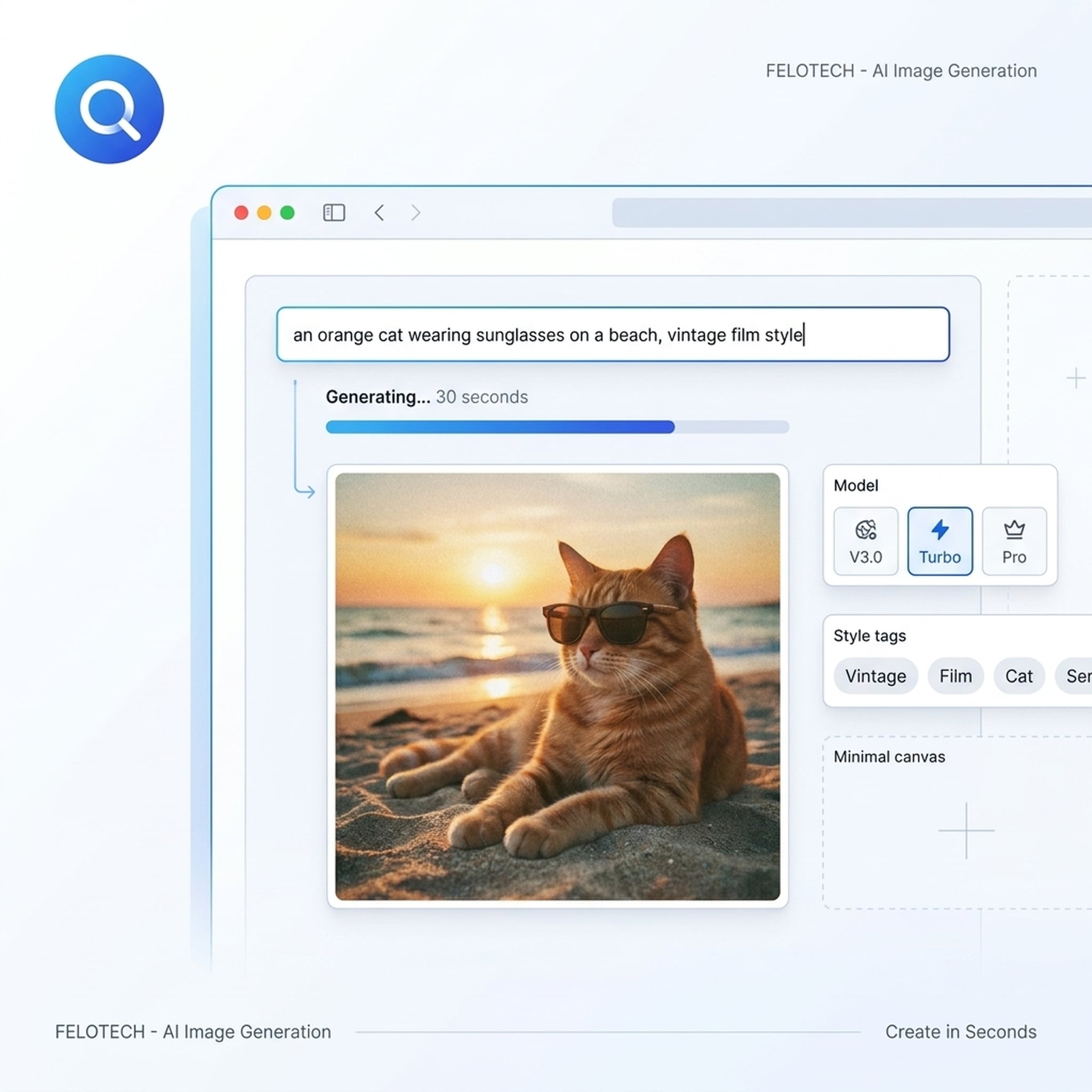
Felo AI Image does one simple thing: describe your scene the way you'd talk to a friend, and get a professional-grade image in 30 seconds. No syntax to learn. No parameters to tune. No toolchain to assemble.
In One Sentence
Felo AI Image is an online AI image generation and editing platform powered by 3 specialized models and 50+ visual styles, all driven by natural language input. Generate and edit entirely in your browser — no software to install.
Three things define it:
- Describe in plain language — Talk like you're briefing a designer. No prompt engineering needed.
- 3 specialized models, auto-matched — AI picks the best model for your description, or you switch manually to compare.
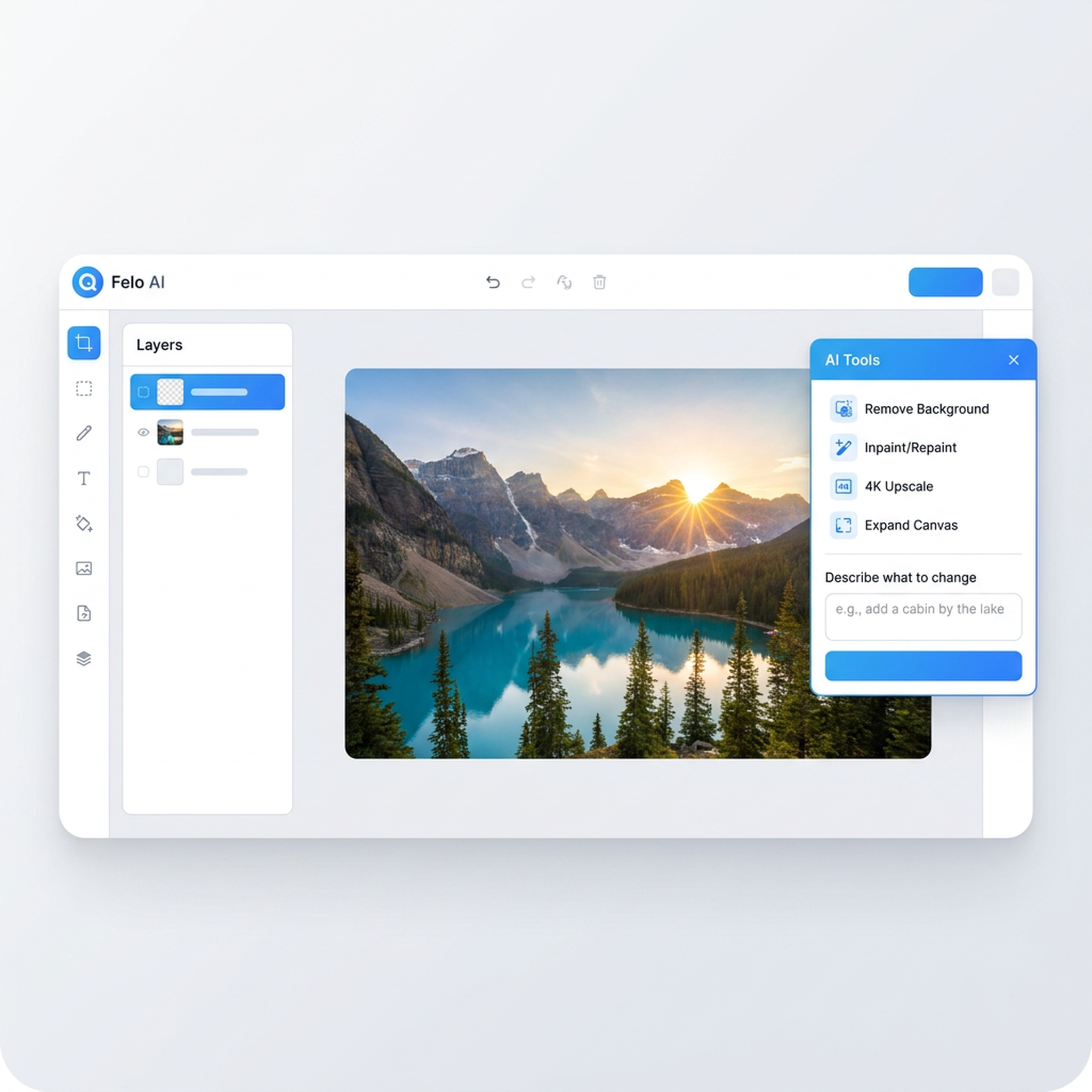
- Canvas-based one-stop editing — Remove backgrounds, inpaint, upscale to 4K, and expand your canvas without leaving the workspace.
Who's it for? Content creators, social media managers, ecommerce sellers, indie developers, designers — anyone who needs visual assets fast.
3 Specialized Models, One for Every Visual Need
Most AI image tools route every prompt through a single general-purpose model. Everything passes the same pipeline, so outputs inevitably look the same.
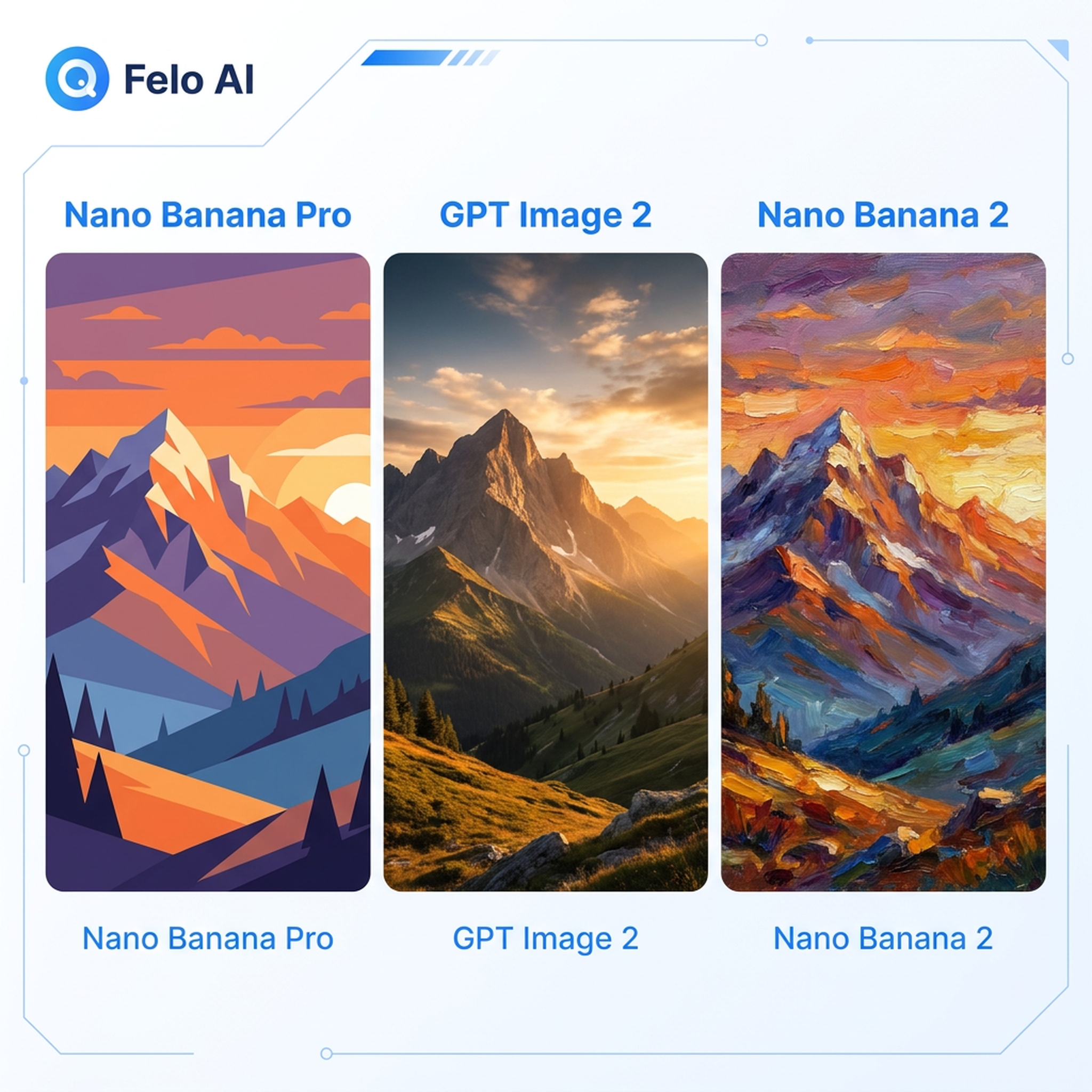
Felo takes a different approach: 3 purpose-built models, each optimized for a specific creative task. The AI auto-recommends the best model based on your description, or you can switch manually and compare results side by side.
Nano Banana Pro — Vector & Flat Design Expert
Generate logos, icons, flat illustrations, and infographics. Clean lines and scalable output — the go-to model for brand assets, UI design, and print materials.
Use it to design a brand logo, create a set of app icons, or build an infographic. The results are always clean and sharp.
GPT Image 2 — Photorealistic Photography Specialist
Product photography, portraits, architectural visualization, food photography — images that are virtually indistinguishable from real photographs.
Ecommerce sellers especially love this model: skip the photo studio and generate white-background product shots or lifestyle scenes that go straight onto your listings.
Nano Banana 2 — Artistic & Creative Powerhouse
Oil paintings, watercolors, anime, cyberpunk, fantasy, concept art — this model turns wild imagination into stunning visual art.
Indie game developers, illustrators, and concept designers use it for mood boards and visual exploration, cutting their workflow time dramatically.
3 Steps: From Idea to Image
No learning curve. Three steps:
Step 1: Describe Your Vision
Describe your scene in everyday language. For example:
"An orange cat wearing sunglasses on a beach, vintage film style."
No special syntax. No parameters. Just talk, like you're briefing a designer.
Step 2: AI Picks the Best Model
Felo analyzes your description and auto-recommends the right model. Not quite what you had in mind? Switch manually and compare.
Step 3: Generate in 30 Seconds — Iterate Freely
Get a professional-grade image in 30 seconds. Not perfect? Adjust your description, switch models, regenerate — unlimited iterations, no extra cost.
Canvas Editing: Where Generation Ends, Work Begins
Many AI image tools stop at "here's your image." But in real workflows, generation is just the starting point — you still need to edit, adjust, compose, and export.
Felo bakes the full editing suite into a single Canvas workspace. No tool-hopping.
Natural Language Editing
Skip the layers, selections, and masking tutorials. Paint a selection on the image and tell the AI what you want in plain text:
- "Make the sky more dramatic and add storm clouds"
- "Remove the person on the left and fill in the background"
- "Change the jacket color to deep red"
The AI understands your intent, targets the right area, and blends the edit seamlessly.
Practical Editing Tools
Beyond natural language editing, a suite of one-click tools:
- Background Removal — Isolate your subject on a transparent layer with clean edges, no manual masking.
- Inpainting — Paint a selection, describe the replacement, and the result blends naturally into the original.
- 4K Upscale — Enlarge to print-ready 4K resolution without losing sharpness or introducing artifacts.
- Canvas Expand — Extend your image in any direction. AI generates new content that matches the scene.
- Text Editing — Modify text inside generated images without rebuilding the entire prompt.
SuperAgent: Let AI Do the Heavy Lifting
Select images on the canvas and hand them to SuperAgent for multi-step creative work: batch-generate variants, create presentations, explore design directions, or plan campaigns. The visual context stays intact throughout.
Free, Unlimited, Commercial License
This might be Felo AI Image's most practical advantage.
- Free to start — Sign up and go. No credit card required.
- No generation cap — Unlike tools that limit you to 20 lifetime generations on the free tier, Felo doesn't put up that wall.
- Commercial license included — Every generated image comes with commercial usage rights. Use it for ads, product pages, packaging, print — no additional fees.
- No installation — Works right in your browser.
For solo creators and small teams, this means you can experiment freely and iterate boldly without watching a generation counter tick down.
Dig Deeper: Three Feature Pages
Want to explore a specific direction? These three pages go deeper:
The Canva AI Alternative
If you use Canva's AI image generator, Felo AI Image's Canva alternative page breaks down the differences: 3 specialized models vs. one, unlimited generations vs. a 20-generation cap, built-in inpainting vs. no post-editing at all.
The Free AI Image Generator
Curious what a free AI image generator can actually do? The free AI image generator page covers the full range — from social media graphics and product shots to logos and artistic illustrations.
The Free AI Photo Editor
Already have a photo that needs work? The free AI photo editor page shows how to edit images with natural language — remove backgrounds, inpaint, upscale to 4K — all in the browser, no Photopea or Photoshop needed.
What Creators Say
"When clients need visual direction before we have a shoot budget, I use Felo. The first result isn't always final, but it gets us to a solid visual route much faster than stock sites."
— Maya Tan, Freelance Social Strategist
"For product pages, GPT Image 2 has been the most useful. I can test clean backgrounds, lifestyle scenes, and seasonal angles before deciding what's worth photographing for real."
— Noah Brooks, Ecommerce Founder
"It's great for roughing out concepts. It gives me six or seven believable starting points instead of one over-polished AI-looking image."
— Sofia Alvarez, Illustrator & Creator
"Our indie game team uses it for mood boards and prop ideas. It's fast enough that designers, writers, and developers can all look at the same visual reference during planning."
— Arjun Mehta, Indie Game Developer
Start Creating Your First Image
3 specialized models · 50+ visual styles · 30-second generation · Commercial license
Your imagination is the only limit. The skill barrier is gone.
Sign up free, describe your vision, and get your first image in 30 seconds.
This post is also available in 简体中文, 日本語, 한국어, 繁體中文, हिन्दी, Français, العربية, Русский, اردو, Bahasa Indonesia, Deutsch, Tiếng Việt, Türkçe, Italiano, ไทย, Español, বাংলা and Português.