Felo AI Slide Generator: 21 Tools to Turn Any Input Into Editable Slides

Felo AI ships 21 specialized slide generators — from PDFs to YouTube links to raw ideas — each producing editable slides you can download and ship. Here's the full toolkit.
Making slides used to mean a blank canvas, a late night, and copy-paste from half a dozen tabs. Most AI slide tools promise to fix that with one general-purpose generator — and most users end up wrestling with the output because the tool doesn't know what kind of input it's getting.
Felo AI took a different route. Instead of one slide maker, the platform ships 21 specialized slide generators, each tuned for a specific starting point — a PDF, a spreadsheet, a YouTube URL, a Markdown file, or nothing more than an idea in your head. Every tool produces the same end result: editable slides you can download, restyle, and ship.
This post walks through the full lineup so you can match your input to the right slide generator in seconds.

The three input types (and why it matters)
Before diving into the full list, it helps to know how Felo organizes its slide ecosystem. Every tool falls into one of three buckets based on your starting point:
- Generalist AI slide generators — for topics, prompts, or mixed inputs
- Format converters — for existing files (PDF, Word, Excel, Markdown, image) or URLs
- Text-first slide tools — for pasted prose, notes, or outlines
The right slide tool depends less on what your deck needs to look like and more on what you already have. A 40-page PDF gets very different treatment from a napkin-sketched idea.
Generalist AI slide generators
These are the workhorses. Start here when you have a topic, a brief, or a mix of materials, and want the fastest path from idea to finished slides.
- Felo AI Slides — the flagship slide generator. Turn ideas and notes into presentation-ready slides with research, structure, and design handled for you.
- AI PowerPoint Generator — produces editable slides from topics, notes, files, and links in a single pass.
- AI PPT Maker — same underlying engine, optimized for users who search "PPT" specifically but still outputs editable slides.
- PowerPoint AI Auto Generation — drafts complete slide sequences with order and content from any prompt, note, file, or URL.
- AI Presentation Maker — layers live research and design on top of slide generation. Useful when you need background context you don't already have written down.
- Presentation Creator — template-driven, research-aware slide creation. Good for branded or templated decks.
- Slideshow Maker — turns a topic, outline, or document into an editable slideshow. The phrasing changes; the editable slide output is the same.
- Slide Creator — editable slides from topics, documents, notes, or URLs. A catch-all slide generator entry point.
- Nano Banana Pro Slides — the visual-heavy slide generator, powered by Gemini 3 Pro Image. Built for slides where clear typography, diagrams, and high-impact visuals matter more than raw text density.
When to pick which slide generator: If you want speed and a clean default, use AI Slides. If your slides need live research pulled from the web, use AI Presentation Maker. If visuals are the point — investor decks, keynote openers, design reviews — use Nano Banana Pro Slides.
Format converters: existing files into slides
Most slides don't come from a blank page. They come from a report written last month, a spreadsheet exported from analytics, or a webpage someone bookmarked. These slide converters preserve your source structure instead of flattening it.
- PDF to PPT — convert PDF reports, whitepapers, or ebooks into editable slides. Headings, bullet points, and section breaks carry over.
- Word to PPT AI — turn DOC and DOCX files into editable slides, respecting your heading hierarchy.
- Excel to PPT — converts spreadsheet data into slides with charts and tables intact. Useful for finance, analytics, and operations slides.
- CSV to PPT — same idea, for raw CSV exports. Skip the spreadsheet middle step.
- Markdown to PPT — if you draft notes in Markdown (Notion, Obsidian, Bear, VS Code), this turns headings, lists, and notes directly into editable slides.
- Image to PPT — converts images — screenshots, scans, infographics — into editable slides. OCR and layout parsing happen automatically.
- URL to PPT — paste any webpage URL; get back a slide deck that summarizes it. Faster than copy-pasting into a doc first.
- YouTube to PPT — paste a YouTube URL; get slides built from the video transcript. Great for turning conference talks, lectures, or product demos into shareable slide decks.
- Outline to PPT — start with a bulleted outline, end with a structured slide deck.
- Idea to PPT — the closest thing to "napkin-to-slides." Describe the idea in a sentence or two; the slide generator handles the rest.
The pattern across this group: the more structure your input has, the more structure shows up in the slides. A well-organized PDF with clear section headings will produce a tighter slide deck than a loose collection of notes.
Text-first slide tools
If your starting point is plain prose — pasted text from a doc, a brief in an email, a transcript from a meeting — these two slide tools are built for that.
- Text to PowerPoint AI — paste text, notes, or outlines, get editable slides. Ideal when your content is written but the slide structure isn't.
- Text to Slides — same core function, phrased for users who think in "slides" first. Choose based on your downloaded file preference.
Under the hood, both tools identify topics, chunk content into slide-sized units, and apply layout decisions you'd otherwise make manually.
How to choose the right slide generator in 10 seconds
Three quick rules cover most cases:
- If you have a file, use the matching slide converter. PDF, Word, Excel, CSV, Markdown, or image — each has a dedicated slide tool that handles its source format better than a generic prompt. Don't paste a PDF into a text box if there's a PDF to PPT button one click away.
- If you have a link, use URL to PPT or YouTube to PPT. These fetch the content directly — faster and cleaner than copy-paste into a slide generator.
- If you have only an idea or topic, use Felo AI Slides or Idea to PPT. Both let the AI handle research, structure, and first-pass slide design.
What "editable slides" actually means here
A common frustration with AI slide tools is that the output looks fine in the browser but breaks when you download it. Text is pinned into images. Charts are flat PNGs. Edits mean rebuilding the slides from scratch in PowerPoint.
Felo's slide output is real PPTX — text boxes, shapes, charts, and speaker notes stay editable after download. You can:
- Swap slide templates and restyle
- Merge Felo-generated slides into an existing master deck
- Edit charts on slides with live data bindings
- Collaborate in PowerPoint, Keynote, or Google Slides as usual
For visually dense slides, Nano Banana Pro Slides is worth singling out. It uses Gemini 3 Pro Image to render diagrams and typography on slides with production-grade visual quality — closer to a design-team draft than a boilerplate slide template.
A real workflow using multiple slide tools
Most users don't pick one Felo slide tool and stop. The pattern that works is treating each slide generator as a specialist, then merging the output.
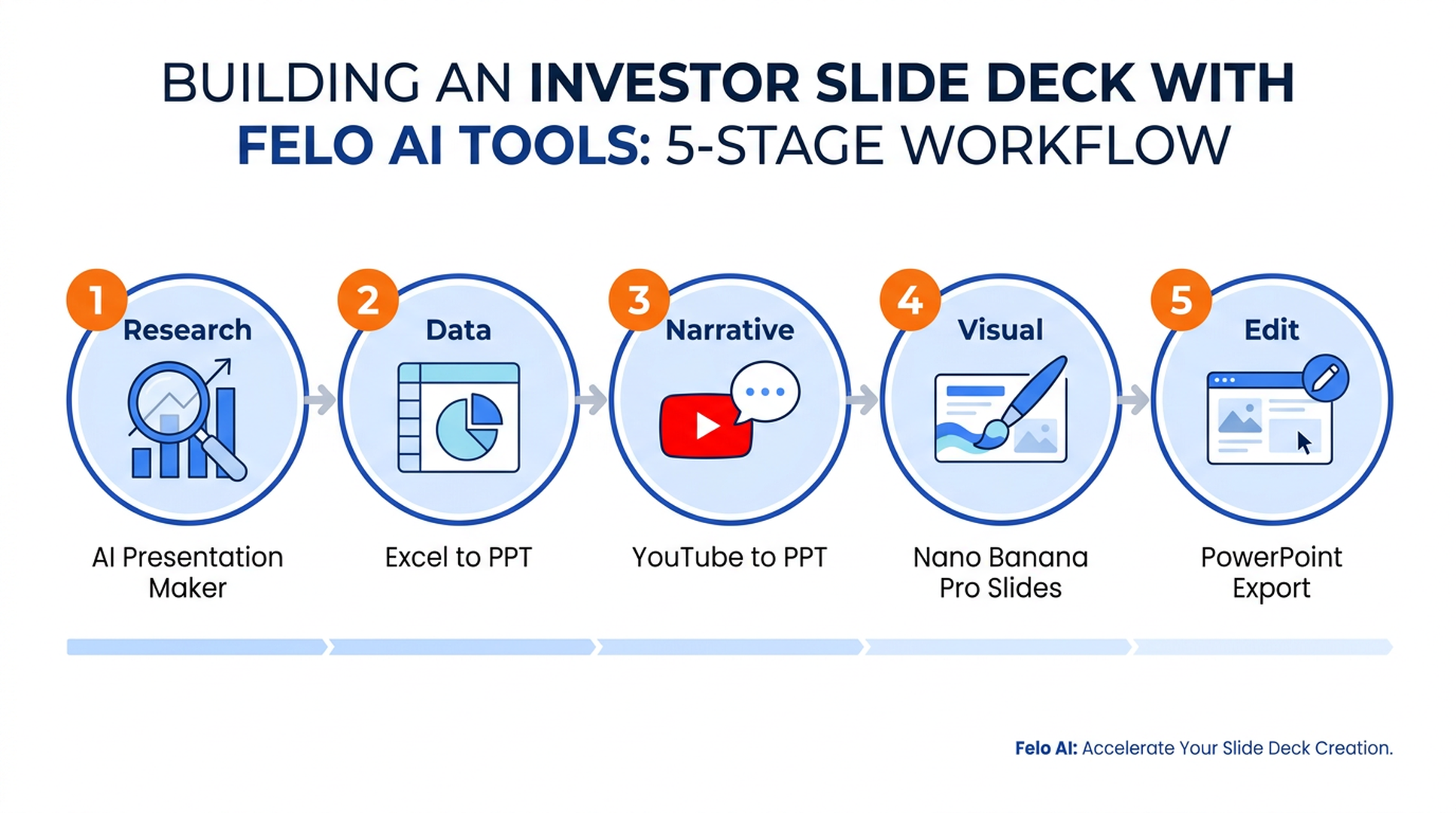
A sample workflow for building an investor update slide deck:
- Research phase — use AI Presentation Maker to pull together market context for the opening slides.
- Data integration — run last quarter's financial model through Excel to PPT to get charts as editable slides.
- Narrative sourcing — convert last month's all-hands recording via YouTube to PPT, then cherry-pick 2–3 slides.
- Visual polish — generate the cover and section-divider slides with Nano Banana Pro Slides.
- Final edit — download the merged slide deck, tighten in PowerPoint, ship.
Total time: 30–45 minutes for a slide deck that used to take half a day.
FAQ
Can Felo AI slide generators produce slides in languages other than English?
Yes. All 21 slide tools support multilingual generation. Felo is built as a multilingual platform — you can prompt in one language and get slides in another, which is useful for international teams.
Do the generated slides work with Microsoft PowerPoint?
Yes. Every slide tool exports standard PPTX files. Slides open natively in PowerPoint, Keynote, Google Slides, and LibreOffice Impress without conversion.
Which Felo slide tool is best for converting a long PDF into slides?
Use PDF to PPT. It's specifically built to preserve PDF section structure and produces tighter slides than pasting PDF text into a general-purpose slide generator.
What's the difference between the AI slide maker and the text-to-slides tool?
AI PPT Maker accepts topics, files, and URLs as input — it's the generalist slide maker. Text to Slides is specialized for pasted prose, notes, and outlines. If you already have written content, the text-specific slide tool usually gives cleaner output.
Can I turn a YouTube video into slides?
Yes. Paste any YouTube URL into YouTube to PPT. The slide generator pulls the transcript and builds slides from it. Works well for conference talks, tutorials, and product demos.
Are these slide tools free?
Core slide generation across all 21 tools is free to try. For power-user features and higher volume, Felo offers a paid tier.
Start with the slide tool that fits your input
The 21 slide tools above aren't 21 different products — they're 21 doors into the same underlying slide generator. Pick whichever door matches what you already have:
- A topic or idea → Felo AI Slides
- A PDF → PDF to PPT
- Spreadsheet data → Excel to PPT or CSV to PPT
- A Word doc → Word to PPT AI
- Markdown notes → Markdown to PPT
- A webpage → URL to PPT
- A YouTube video → YouTube to PPT
- An image → Image to PPT
- An outline → Outline to PPT
- Pasted text → Text to Slides
- Visual-heavy slide needs → Nano Banana Pro Slides
Most users find their slide workflow shifts from "build from scratch" to "assemble from the slide tool that fits." The first slide deck is the one that convinces you.
Try Felo AI for Free → felo.ai/tools/ai-slides