Felo PPT API Now Exports Real PPTX Files

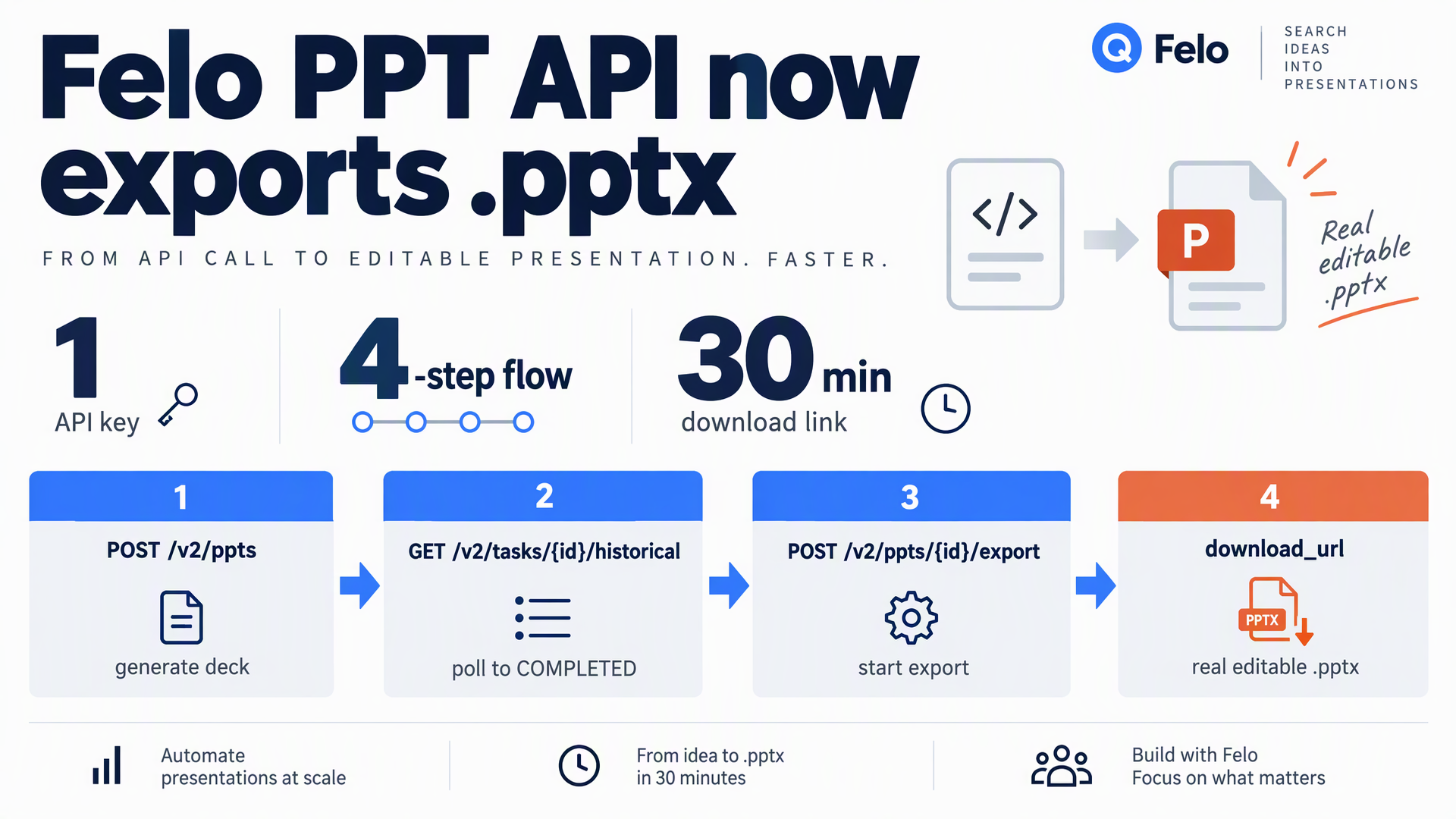
Felo OpenAPI's PPT Task API can now export generated decks as editable .pptx files. One API key, a four-step async flow, and a download link.
Your agent can research a topic, build an outline, and generate a finished slide deck without you touching a design tool. The one thing it could not do was hand you a file your team could open in PowerPoint.
That gap is closed. Felo OpenAPI now exports generated decks as real .pptx files. The PPT Task API already produced editable slides inside Felo; the new export endpoints turn them into a PowerPoint file you download, edit, and share. Same API key, same async pattern, one extra call.
Try it now: https://openapi.felo.ai/docs/api-reference/ppt-tasks
What actually changed
Before this update, the PPT Task API ended at a Felo slide URL. You got a deck, but the handoff stopped there: to put it in front of a client, a class, or a board, someone had to rebuild it in PowerPoint by hand.
Now the flow finishes. Once a PPT generation task reaches COMPLETED, you call one export endpoint and poll a second one. The API returns a signed download_url pointing at a genuine .pptx file — the same deck, in the format everyone already uses.
Two things make this more than a format conversion:
- The deck is editable. Not a PDF, not a flat image set. Text, layouts, and theme structure survive into PowerPoint, so a colleague can fix a number or reorder a section without regenerating anything.
- The research is already done. Felo's PPT generation does not just pour your prompt onto slides. It researches the topic, gathers sources, structures the argument, and applies a theme. You get a deck that is ready to present, not a first draft that needs a rewrite.
That combination is the point. Most tools either research well and hand you text, or format well and hand you empty structure. Felo does both, and now ships the result as a file.
How the export works
The export is asynchronous, matching the rest of the PPT Task API. You submit a job, poll until it finishes, and download the result.
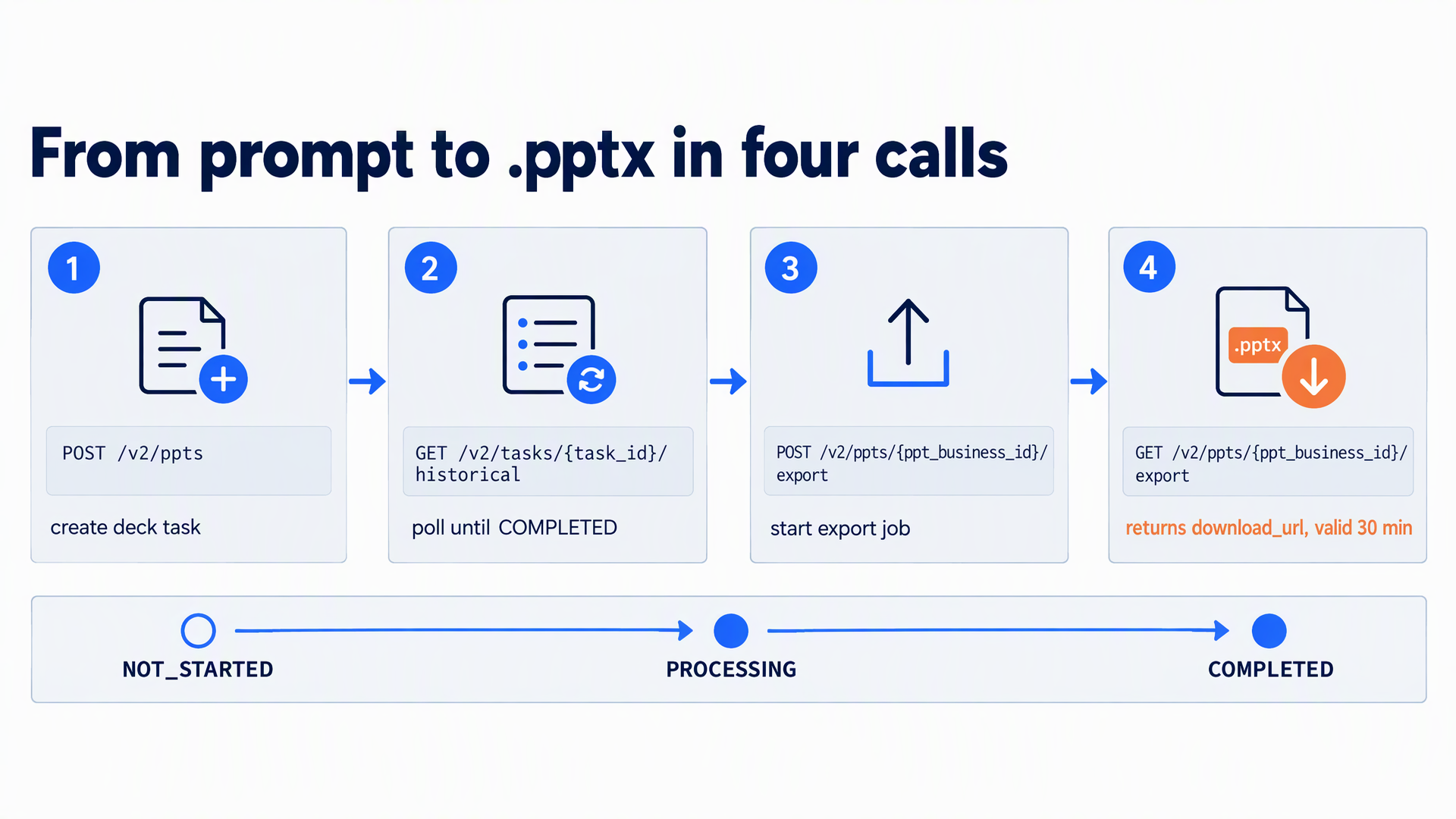
Step 1 — Generate the deck
Create a PPT task with a prompt. If you want a specific look, list the available themes first and pass the theme ID.
POST https://openapi.felo.ai/v2/ppts
Authorization: Bearer YOUR_API_KEY
Content-Type: application/json

{
  "query": "Q3 competitive landscape review, 12 pages",
  "ppt_config": {
    "ai_theme_id": "02968979-a69f-42c4-b136-de02c40ab2d7"
  }
}
The response returns a task_id and a ppt_business_id. Keep both — you need the task ID to poll generation, and the business ID to export.
Step 2 — Poll until the deck is ready
GET https://openapi.felo.ai/v2/tasks/{task_id}/historical
Authorization: Bearer YOUR_API_KEY
Poll every 2–5 seconds. When task_status reads COMPLETED, the deck exists and you can export it. A ppt_url comes back alongside it if you want to preview the slides in Felo first.
Step 3 — Submit the export
POST https://openapi.felo.ai/v2/ppts/YOUR_PPT_BUSINESS_ID/export
Authorization: Bearer YOUR_API_KEY
Content-Type: application/json

{}
That is the whole request body: {}. The export runs as a background job.
Step 4 — Poll the export and download
GET https://openapi.felo.ai/v2/ppts/{ppt_business_id}/export
Authorization: Bearer YOUR_API_KEY
Poll every 2–5 seconds. data.status moves through NOT_STARTED, PROCESSING, and COMPLETED. Only COMPLETED carries the payload you want:
{
  "status": "ok",
  "message": null,
  "data": {
    "status": "COMPLETED",
    "download_url": "https://example.com/presentation.pptx?signature=...",
    "expires_at": "2026-09-29T10:30:00Z"
  }
}
Download the file from download_url and you are done.
Four details worth knowing before you ship
The download URL expires 30 minutes after issuance. This is a signed URL, not a permanent link. If it lapses, call the GET export endpoint again — that issues a fresh URL without regenerating the PPTX, so it costs nothing.
Re-running the export after completion costs a credit. Repeating the POST while an export is still processing is safe and does not start a second job. But calling POST again after the export finished regenerates the file and incurs the existing PPT export credit charge. If you only need a new link, use GET.
The API key must own the deck. Export is scoped to the key that created the PPT. A key that did not generate the deck cannot export it, which keeps decks inside the account that made them.
Failures are retryable. A FAILED export can be submitted again with the same POST. Insufficient credits return HTTP 402; rate limits return HTTP 429 and are worth retrying after a short backoff.
Why this matters for agents
The interesting part is not the file format. It is what a complete research-to-file pipeline unlocks.
An agent that can research and export can now run the full loop unattended:
- Weekly business reviews — pull the week's metrics, research the context behind the numbers, generate the deck, export it, and drop the
.pptxinto the shared drive before Monday standup. - Client deliverables — turn a brief into a sourced, themed deck and hand over an editable file the client can brand themselves.
- Sales enablement — generate a tailored deck per prospect from account research, export each one, and attach it to the CRM record automatically.
- Course and training material — research a topic, structure it as a lesson, export slides an instructor can edit before class.
In each case the human's job shrinks to review and polish. Nobody starts from a blank slide.
If you would rather not write the polling loop yourself, the Felo PPT Skill handles it. Install the Felo AI agent package and your agent gains the ability to create, poll, and export decks as a single capability — the same pipeline described above, wrapped so the agent can call it directly.
Getting started
Export is live on the PPT Task API now, available to every Felo OpenAPI key.
- Grab your API key from the Felo OpenAPI dashboard.
- Read the PPT Task API reference — the Export PPTX section has the exact request and response shapes.
- Generate a deck, export it, and open the file in PowerPoint.
If you want the fast path, install the Felo PPT Skill and let your agent run the whole flow.
Start building with Felo OpenAPI: https://openapi.felo.ai
Frequently asked questions
Is the exported file really editable in PowerPoint?
Yes. The export produces a standard .pptx file. Text, layout, and theme structure carry over, so the deck can be edited in PowerPoint, Google Slides, or Keynote.
Does exporting cost extra? Submitting an export after the deck is generated uses the existing PPT export credit. Insufficient credits return HTTP 402. Re-fetching a fresh download link with GET does not regenerate the file and does not add a charge.
How long is the download link valid? 30 minutes from issuance. Call the GET export endpoint again for a new link.
Can I export a deck created with a different API key? No. The API key making the export request must own the PPT.
What happens if the export fails?
data.status returns FAILED. Submit the POST export request again to retry.
This post is also available in 简体中文, 日本語, 한국어, 繁體中文, हिन्दी, Français, العربية, Русский, اردو, Bahasa Indonesia, Deutsch, Tiếng Việt, Türkçe, Italiano, ไทย, Español, বাংলা and Português.