Felo Slides: Generate Client-Ready PPT Decks from a Prompt — Now Compatible with Google Antigravity

Turn any topic into a polished presentation deck in minutes. Felo Slides drops into Google Antigravity's Agent Manager to give your AI employee the power to create real PPT deliverables.

When Google launched Antigravity and its Agent Manager, developers got a powerful AI planning layer inside the IDE. But there was always one gap: the Agent Manager could research, reason, and summarize — but it couldn't ship finished deliverables. You'd get a markdown summary when what you needed was a client-ready PowerPoint deck.
That changes today.
Felo Slides is now officially compatible with Google Antigravity, closing the most visible gap in any AI agent's output toolkit: the ability to turn a simple prompt into a professional, polished presentation — complete with structured slides, visual hierarchy, and content ready for your next briefing, proposal, or internal update.
This isn't a gimmick. It's a folder you drop into .agent/skills/, commit to Git, and suddenly every developer on your team has an AI that can produce real PPT files. No browser. No manual slide construction. Just a prompt, and a deck.
The Output Problem AI Agents Still Haven't Solved
Let's be honest about what most AI agents deliver today. You ask for a competitive analysis, and you get a well-organized text document. You ask for a quarterly briefing, and you get bullet points. The research quality might be excellent — but the format is wrong for how work actually gets shared in organizations.
Presentations are the universal currency of business communication. Sales teams pitch with decks. Engineering teams brief with slides. Executives make decisions based on structured presentations. Yet AI agents have historically been stuck in the text-output paradigm.
The result? You take the agent's excellent research and then spend 45 minutes building slides from scratch. The agent saved you two hours of research, then you gave it all back to formatting.
Felo Slides solves exactly this problem. It's the missing output layer that turns agent research into a deliverable your team can actually use.
What Felo Slides Does
Felo Slides is a skill designed for the Google Antigravity ecosystem. Here's what it does in practice:
Prompt to Deck — Give it a topic like "Q2 market analysis for the APAC region" or "Proposal for migrating to microservices," and it generates a complete PowerPoint presentation. The output is a real .pptx file with structured slides, logical flow, and content organized for presentation.
Client-Ready Quality — These aren't rough drafts. The generated decks have proper slide hierarchy, clear headings, bullet structures, and content density calibrated for actual business use. You can open the file and present from it with minimal edits.
Async Execution — Slide generation is handled asynchronously by the agent. You kick off the task, the agent does the work, and you get a finished file. No need to sit and watch it build slides one by one.
Antigravity-Native Installation — Install it the same way you install any Felo Skill for Antigravity: copy the folder into .agent/skills/, commit to Git, and every developer's instance picks it up automatically. No per-user setup, no configuration drift.
How It Fits Into the Antigravity Workflow
The best way to understand Felo Slides is to see it in context. Here's how a typical workflow unfolds once the skill is installed:
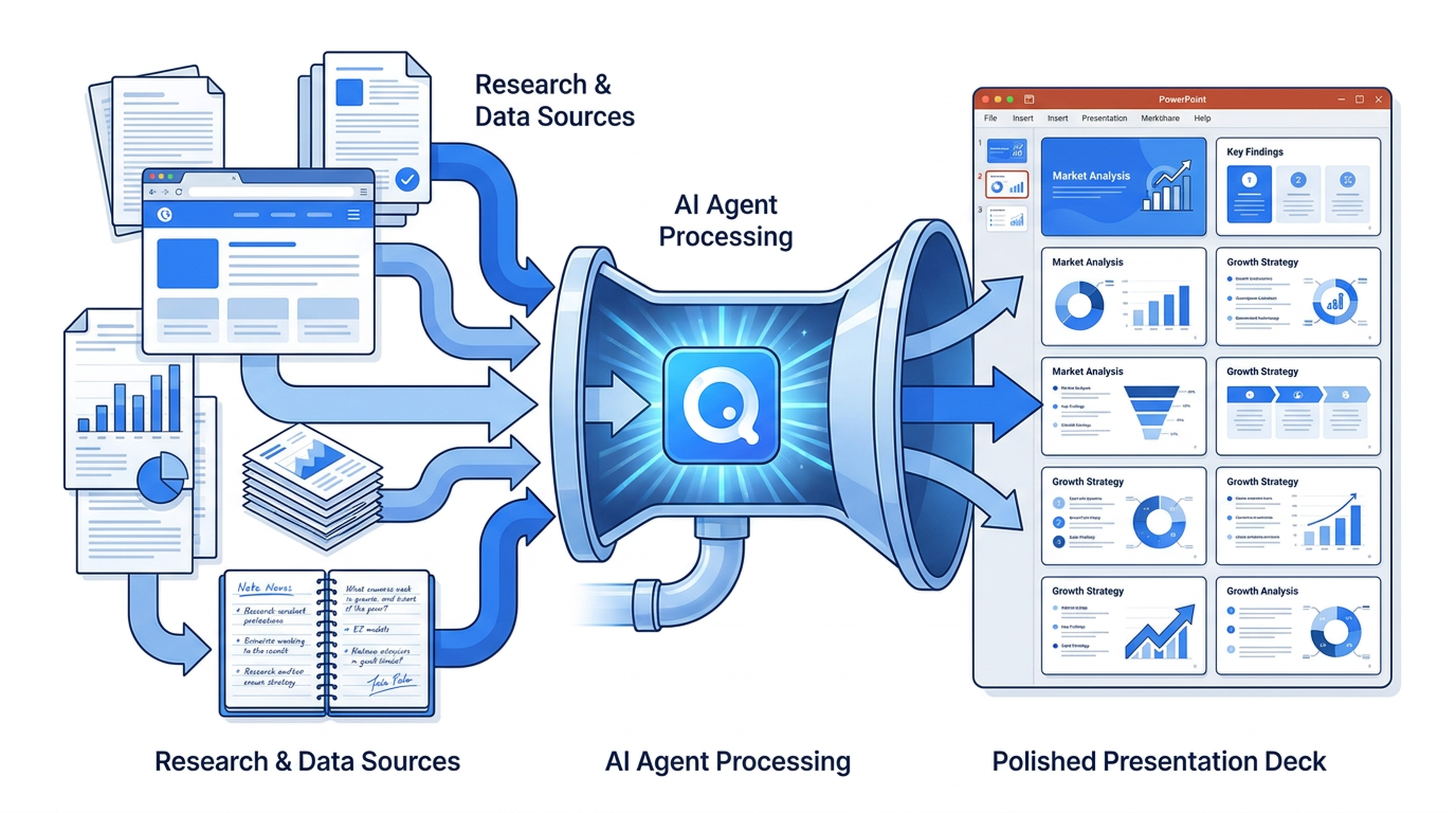
Step 1: The Agent Researches — You give the Antigravity agent a task like "Prepare a briefing on our competitor's pricing strategy for the next sales meeting." The agent uses its research capabilities (potentially powered by other Felo Skills like felo-search for live data) to gather current, accurate information.
Step 2: The Agent Structures — Rather than returning a text summary, the Agent Manager recognizes that a presentation is the right output format for this task. It triggers felo-slides automatically — no slash commands, no manual intervention.
Step 3: The Deck Ships — Minutes later, you have a .pptx file. The content is grounded in actual research, structured for presentation flow, and ready to share with your team or clients.
The key insight is that this entire pipeline happens inside Antigravity's Agent Manager. You don't switch tools. You don't copy-paste research into a presentation app. The agent handles the complete workflow from research to finished deliverable.
Real Use Cases
Sales Proposals
Your sales team needs a proposal deck for a prospective client. Instead of a rep spending hours building slides, the agent researches the prospect's industry, pain points, and your relevant case studies — then generates a polished proposal deck. The rep reviews, customizes a few slides, and sends it out.
Quarterly Business Reviews
Engineering managers preparing QBRs can ask the agent to compile performance metrics, project status, and upcoming roadmap items into a structured presentation. The agent pulls data from multiple sources and organizes it into a coherent deck with the right level of detail for executive review.
Internal Briefings
New product launches, policy changes, process updates — anything that needs to be communicated to a team works better as a presentation. Felo Slides lets the agent create the first draft of these briefings automatically, so the human author can focus on refinement rather than construction.
Competitive Analysis
Market intelligence teams regularly need to present competitive landscapes. The agent can research current competitor positioning, feature comparisons, and market trends — then package everything into a structured analysis deck with clear visual hierarchy.
Client Reports
Consulting and agency teams produce client reports as presentations. With Felo Slides, the agent can compile project metrics, deliverable summaries, and next-step recommendations into a professional report deck that consultants can review and deliver.
Installation: Two Commands
Getting Felo Slides into your Antigravity setup is intentionally simple:
# Clone the Felo skills repository
git clone https://github.com/Felo-Inc/felo-skills.git

# Copy the slides skill to your Antigravity skills folder
cp -r felo-skills/felo-slides ~/.gemini/antigravity/skills/
That's it. The SKILL.md file tells the Agent Manager when and how to use the skill. No configuration files to edit. No API keys to set up (beyond what Antigravity already requires). No browser plugins to install.
Once the skill folder is in place and committed to your team's repository, every developer gets the capability on their next pull. The Agent Manager automatically triggers slide generation when the task calls for it.
Why the Antigravity Integration Matters
You might wonder: why build this specifically for Antigravity instead of as a standalone tool? The answer is about trigger intelligence.
A standalone slide generator requires you to manually feed it content, choose a template, adjust settings, and hit generate. It's another tool in your stack — useful, but disconnected from your workflow.
Felo Slides integrated into Antigravity works differently. The Agent Manager is a planner that understands task context. When you ask for "a briefing on X," the agent knows that a presentation is the right output. When you ask for "research on Y," it knows a text summary might suffice. The skill triggers automatically based on what the task actually needs.
This is the difference between a tool you have to remember to use and a capability that's just there when you need it.
The Bigger Picture: Felo Skills as Antigravity's Output Layer
Felo Slides is part of a broader set of skills designed specifically to extend what Antigravity's Agent Manager can accomplish. The capability gaps it addresses fall into three categories:
Live Data Layer — Skills like felo-search, felo-web-fetch, and felo-x-search give agents access to current information that Gemini's training data doesn't cover. Real-time pricing, latest documentation, social signals.
Knowledge Layer — felo-livedoc creates a persistent knowledge base from your team's runbooks, API docs, and internal resources. Every agent retrieves grounded answers instead of approximations.
Output Layer — This is where Felo Slides lives, alongside felo-content-to-slides and felo-landingpage. These skills transform agent research into finished deliverables: PowerPoint decks, hosted landing pages, and structured reports.
The output layer is the most visible because it's where work becomes tangible. Research is valuable, but a research deliverable is what gets shared, reviewed, and acted on. Felo Slides closes that final loop.
What Makes a Good Prompt for Felo Slides
The quality of your generated deck depends partly on the quality of your prompt. Here are some guidelines:
Be specific about the audience. "Create a technical deep-dive on our API architecture for engineering leadership" produces different content than "Create an overview of our API capabilities for potential clients."
Include scope and depth. "Q1 performance review covering all three product lines" gives the agent enough context to generate appropriately comprehensive slides.
Specify the tone when it matters. "Create a formal investor update" versus "Create an energetic team kickoff presentation" will produce decks with different energy and structure.
Add constraints if you have them. "Keep it to 8-10 slides" or "Include a competitive comparison slide" helps the agent structure the deck to your needs.
The Agent Manager handles the rest — research, content organization, slide construction, and file generation.
Getting Started
If you're already using Google Antigravity, adding Felo Slides takes about two minutes. Clone the skills repository, copy the folder, commit to your team's repo, and you're done.
Try it with a task you'd normally spend an hour building slides for:
- "Prepare a competitive analysis deck for our SaaS product vs. the top three competitors"
- "Create a quarterly engineering briefing covering sprint velocity, incident metrics, and Q3 roadmap"
- "Generate a sales proposal for a mid-market manufacturing prospect"
Open the resulting .pptx file. You'll see structured slides with logical flow, appropriate content density, and formatting that's ready for real use. Then customize what needs customizing and send it out.
The future of AI agents isn't just better research — it's better deliverables. Felo Slides is one step in that direction, built specifically for the teams already investing in AI agent workflows through Google Antigravity.
Explore all available Felo Skills and start building at felo.ai.
This post is also available in 简体中文, 日本語, 한국어, 繁體中文, हिन्दी, Français, العربية, Русский, اردو, Bahasa Indonesia, Deutsch, Tiếng Việt, Türkçe, Italiano, ไทย, Español, বাংলা and Português.