Genspark Alternatives: Why Felo AI Search is the Professional Choice for AI Slides

Genspark alternatives? Felo AI Search simplifies AI slide generation with brand consistency. Learn how to elevate your presentations!
Quick Summary: While many AI tools like Genspark offer rapid slide generation, they often leave users with "formatting debt"—hours spent fixing layouts and fonts. Felo AI Slide stands out as the premier alternative by focusing on reusable brand assets, professional-grade outputs, and a comprehensive workflow that turns presentation creation from a repetitive chore into a strategic asset.
The "Efficiency Illusion" of Modern AI PPT Tools
In the current era of generative AI, tools like Genspark, Gamma, and Beautiful.ai have revolutionized how we create presentations. By simply entering a prompt, users can receive a full slide deck in seconds. It's impressive—until you actually need to present it to your team.
Here's the reality that many professionals face: you save 20 minutes generating the initial draft, then spend two hours adjusting fonts, fixing broken layouts, and manually applying your company's brand colors. Recent studies, including reports from Axios and Business Insider, suggest that while AI helps employees finish tasks faster, it often increases the long-term burden of manual adjustments. This is what I call the "efficiency illusion"—you save time on the initial draft but lose it all trying to make the output match your company's branding, fonts, and structural standards.
For business professionals who need to maintain brand consistency across dozens of presentations, this isn't just frustrating—it's unsustainable.
Why Users are Searching for Genspark Alternatives
Genspark is an impressive tool for quick, one-off presentations. If you need a casual deck for a brainstorming session or an internal team update, it gets the job done. However, as users move from casual use to professional environments, several critical limitations become apparent:
The Real Pain Points
1. The "One-Off" Problem
Most AI slide tools, including Genspark, treat every deck as a completely new project. You generate a presentation, manually adjust it to match your brand, and then... you have to do it all over again next time. There's no memory, no learning, no reusable assets. This repetitive labor is exactly what a professional-grade tool should eliminate.
2. Lack of Deep Brand Consistency
Generic templates look fine in a vacuum, but they don't reflect your company's visual identity. Every presentation becomes a manual exercise in font matching, color correction, and layout adjustment. For teams that produce presentations regularly, this creates a fragmented brand image.
3. Limited Control Over Complex Business Structures
Business presentations aren't just bullet points and images. They require specific page types: KPI dashboards, competitive matrices, TAM (Total Addressable Market) breakdowns, product roadmaps, and financial projections. Generic AI tools don't understand these structures—they just fill slides with text blocks.
4. Export Nightmares
You've spent an hour perfecting your deck in the browser, but when you export it to PowerPoint for your boardroom presentation, the fonts break, the alignment shifts, and images get cropped. Now you're troubleshooting layout issues instead of preparing your talking points.
These aren't minor inconveniences—they're workflow killers that undermine the entire value proposition of AI-generated slides.
Felo AI : The Professional Edge
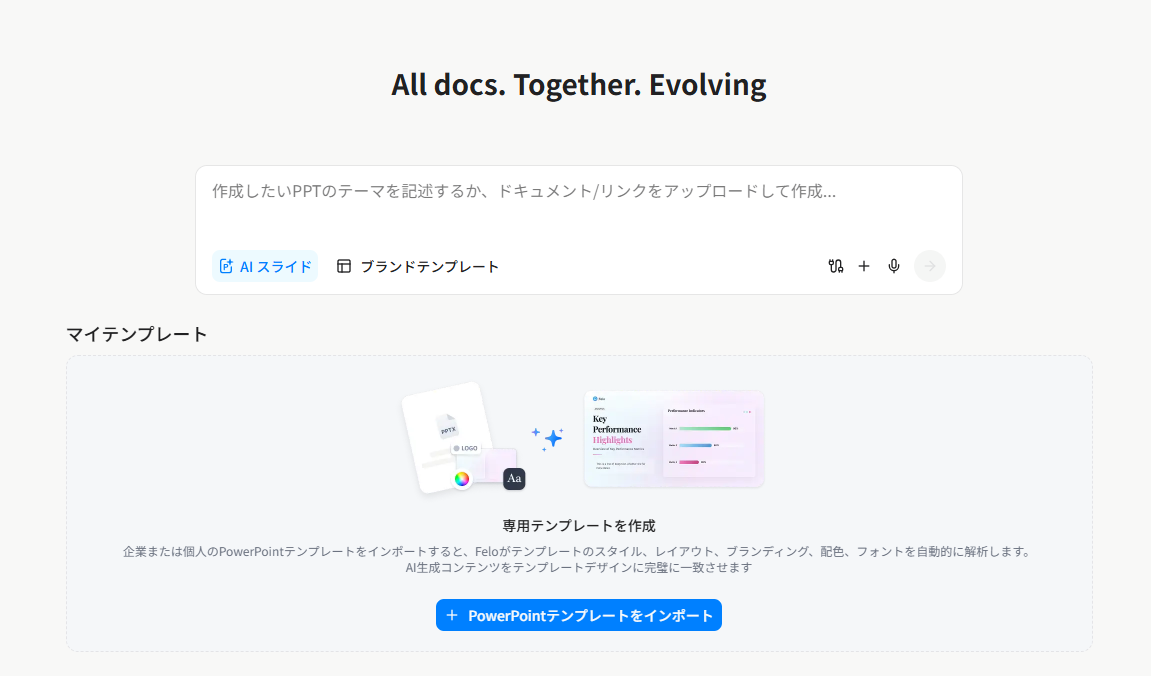
Felo AI Slide has emerged as a powerful alternative, specifically designed to turn AI-generated content into a long-term corporate asset. Rather than just "making a deck," Felo focuses on creating a sustainable workflow through its advanced features that address the real pain points professionals face every day.
1. Multi-Source Intelligent Generation: From Ideas to Insights
Unlike tools that only accept text prompts, Felo AI Slide supports a comprehensive range of input sources, making it genuinely flexible for real-world workflows:
Topic & Keyword Generation
Simply enter a topic like "AI applications in healthcare," and Felo's AI agents automatically search for the latest information, including data, statistics, and news. The system identifies key concepts and constructs a structured presentation with titles, bullet points, and visual suggestions—all grounded in current, verified information.
Document to PPT Conversion
Upload PDF, Word (.docx), or TXT files, and the AI automatically scans the content, analyzes text, tables, and charts, then extracts core information into clear, concise slides. The system even includes OCR functionality to recognize text in image-based PDFs. This feature dramatically reduces the time required to transform dense research reports, academic papers, or meeting minutes into presentation-ready formats.
URL to PPT
Paste a web article or blog link, and Felo reads the content and generates corresponding slides. Perfect for turning industry insights, case studies, or thought leadership pieces into shareable presentations.
YouTube to PPT
One of Felo's most innovative features: paste a YouTube video link, and the AI reads the video subtitles, summarizes the content, and generates a presentation. This is invaluable for educators converting video lectures into course materials, or professionals who need to distill webinar content into actionable slides.
2. Brand Kit & Custom Template Framework 2.0: "Upload Once, Use Forever"
This is where Felo fundamentally changes the game. The core differentiator is its Custom Brand Template 2.0 philosophy: upload your corporate master slides once, and every subsequent presentation automatically adheres to your brand standards.
How It Works:
- Upload your company's PowerPoint template (with your logo, color palette, font hierarchy, and spacing rules)
- Felo's AI learns your brand's visual DNA
- Every presentation generated afterward strictly follows these standards—automatically
Rebuilt Editor for Pixel-Perfect Control:
The new editor provides comprehensive tools including drag-and-drop placement, text and image editing, one-click element deletion, and even AI-powered regeneration of individual master slides. It's the perfect balance of AI assistance and manual fine-tuning.
Prominent Placement:
Your custom brand templates are displayed directly on the Felo AI Slide homepage—no hunting through menus. Instant access means faster deployment and consistent usage across your team.
This eliminates the "formatting debt" entirely. You're not re-applying your brand identity every single time—you're building a library of reusable, brand-compliant assets.
3. Professional PPT Translation with Pixel-Perfect Layout Preservation
For global teams and international businesses, Felo's translation capabilities are transformative:
Multi-Agent Collaboration:
During translation, different AI agents handle specific tasks: one translates text, another verifies industry terminology, and a design agent automatically adjusts font sizes and text box layouts. This ensures translations are accurate, professional, and visually consistent.
Pixel-Perfect Layout Retention:
Unlike traditional translation tools that break your carefully designed layouts, Felo uses AI design agents to intelligently adjust typography and spacing. The translated PPT maintains the original format, charts, and design style—no manual reformatting required.
Support for Large Files:
Handles files over 25MB and supports multiple formats including PPTX and PDF, making it suitable for complex, content-rich presentations.
4. Smart Layout and Beautification Features
Felo AI Slide doesn't just generate content—it makes it look professional:
Intelligent Layout Adjustment:
The system automatically matches appropriate images and icons to your slides. If you're not satisfied with a particular page, use the AI editor for adjustments or leverage the "auto-image" function to optimize visual effects.
Custom Brand Templates:
Upload your own PPT templates and let the AI generate content based on specific brand guidelines (logo, color scheme, fonts). This solves the universal problem of generic AI tools producing visually inconsistent presentations.
Professional Design Platform Integration:
Export your Felo-generated content as standard PPTX format for further editing in PowerPoint, or connect with design platforms like Canva for advanced beautification.
5. Structural Intelligence for Business
Felo AI understands business logic. It recognizes specific page types—such as KPI overviews, TAM breakdowns, competitive matrices, and roadmaps. This structural intelligence ensures that the AI doesn't just write content; it organizes it into a format that is ready for a boardroom presentation.
This is the difference between a tool that "makes slides" and a tool that "creates business presentations."
6. Lossless PPTX Export: No More Broken Layouts
One of the most frustrating aspects of AI slide tools is the "broken layout" problem when exporting to PowerPoint. You perfect your deck in the browser, export it, and suddenly fonts are substituted, text boxes are misaligned, and images are cropped.
Felo solves this with pure image-based PPTX export featuring lossless font rendering. This ensures your presentation looks identical on any device—whether it's a laptop, a projector, or a mobile screen—without the risk of font substitutions or alignment shifts.
7. Presentation Mode with Follow Link Functionality
Felo's Presentation Mode transforms how you deliver and share presentations:
Immersive Full-Screen View:
One click enters a clean, distraction-free full-screen presentation mode. All editing toolbars and sidebars disappear, allowing your audience to focus entirely on the content.
"Follow Link" Real-Time Synchronization:
This is the "magic" feature. Generate a unique "Follow Link" and share it with your audience. When they join via the link, their screens automatically synchronize with yours—every slide transition, every scroll, perfectly in sync. This eliminates the common remote presentation problem of "Wait, which slide are you on?"
Flexible Viewing:
Audience members can temporarily exit follow mode to browse independently, then rejoin synchronization with one click. It balances structure with flexibility—perfect for remote teams, webinars, and hybrid meetings.
8. Multi-Language Support and Global Collaboration
Felo supports content generation in multiple languages including Simplified Chinese, Traditional Chinese, Japanese, and English. Simply specify the language in your instructions—ideal for international teams and cross-border collaboration.
9. Integration with the Felo Ecosystem
As part of the Felo AI Create suite, Felo Slides integrates seamlessly with Felo Search and Felo Doc:
Complete Workflow Integration:
Conduct research in Felo Search, gathering global data with cross-lingual search capabilities. Then, with one click, transform that research into a brand-compliant presentation. What used to be a half-day task—researching, synthesizing, formatting—is reduced to 10 minutes of final refinement.
Single Canvas Experience:
In Felo LiveDoc, process PDFs, web links, and PPTs simultaneously on one canvas. Research, writing, translation, and design happen in one integrated interface, with one-click export to PPT, PDF, or shareable online links.
Comparison Table: Felo AI Search vs. Genspark
| Criteria | Felo AI Search | Genspark |
|---|---|---|
| Brand Consistency | High (Reusable Brand Kit & Master Slide Learning) | Low (Generic templates requiring manual adjustment) |
| Output Quality | Professional-grade, direct-to-delivery | Draft-quality, requires "formatting debt" payment |
| Content Sources | Multi-source (Topic, PDF, Word, URL, YouTube) | Primarily text prompts |
| Content Logic | Structural intelligence (KPI, TAM, Roadmap pages) | General text-to-slide mapping |
| Export Fidelity | Lossless image-based PPTX (Perfect fonts) | Standard PPTX (Potential layout breaks) |
| Translation Capabilities | Professional multi-agent translation with pixel-perfect layout preservation | Limited or no translation features |
| Presentation Mode | Immersive mode with real-time "Follow Link" synchronization | Standard viewing only |
| Template Customization | Custom Brand Template 2.0 with AI learning | Generic templates |
| Research Depth | Global cross-lingual search integration via Felo Search | Standard web-based research |
| Ecosystem Integration | Full integration with Felo Search, Felo Doc, Felo LiveDoc | Standalone tool |
| Multi-Language Support | Native support for 25+ languages | Limited language options |
How Felo AI Search Redefines the Professional Workflow
The true value of Felo AI isn't just in how fast it generates a slide—it's in how it integrates into a professional workflow and eliminates repetitive labor.
Traditional Workflow:
- Research topic (2 hours)
- Synthesize information into outline (1 hour)
- Create slides in PowerPoint (2 hours)
- Apply brand formatting (1 hour)
- Adjust layouts and fix alignment issues (1 hour)
- Total: 7 hours
Felo AI Workflow:
- Enter topic or upload document in Felo
- AI searches, synthesizes, and generates brand-compliant slides (5 minutes)
- Review and refine with AI editor (10 minutes)
- Export with lossless formatting (1 minute)
- Total: 16 minutes
This isn't just about speed—it's about sustainability. With Felo, you're building a library of reusable brand assets. Every presentation strengthens your template library. Every deck reinforces brand consistency. You're not just saving time today; you're investing in a more efficient future.
Real-World Use Cases
For Business Analysts:
Convert dense market research PDFs into executive-ready presentations with KPI dashboards and competitive matrices, all formatted to corporate brand standards.
For Educators:
Transform YouTube lectures into course materials, or convert academic papers into student-friendly slide decks—in multiple languages.
For Marketing Teams:
Maintain perfect brand consistency across dozens of presentations, from sales pitches to investor decks, without manual reformatting.
For Global Teams:
Translate presentations into multiple languages while preserving pixel-perfect layouts, ensuring professional quality across all markets.
Conclusion: Choosing the Long-Term Winner
If you are looking for a tool to make a quick, casual presentation for an internal brainstorming session, Genspark is a solid choice. It's fast, it's simple, and it gets the job done.
However, if your goal is to build a library of reusable assets, maintain a consistent professional brand image without repetitive labor, and integrate presentation creation into a comprehensive research-to-delivery workflow, Felo AI Search is the clear winner.
By shifting the focus from "instant generation" to "sustainable deliverability," Felo ensures that your time is spent on high-value creative work—strategic thinking, storytelling, refining your message—rather than pixel-pushing and font-matching.
In a world where AI tools promise to save time, Felo is one of the few that actually delivers on that promise—not just for the first presentation, but for every presentation thereafter.
Ready to transform your presentations? Explore Felo AI today and experience the future of professional AI slides.
FAQ
Is Felo AI free to use?
Felo offers a variety of plans, including a free tier for basic search and generation, and premium tiers for advanced features like Custom Brand Template 2.0, professional translation, and presentation mode.
Can I import my existing PowerPoint templates into Felo?
Yes, Felo's Custom Brand Template 2.0 feature allows you to upload your own .pptx master slides so the AI can learn and replicate your specific design style, color palette, and font hierarchy.
Does Felo support translation while maintaining my slide layouts?
Absolutely. Felo uses multi-agent AI collaboration to translate text while automatically adjusting typography and spacing, ensuring pixel-perfect layout preservation across languages.
Can I convert YouTube videos into presentations?
Yes, Felo can read YouTube video subtitles, summarize the content, and generate corresponding presentations—perfect for converting video lectures, webinars, or tutorials into slide decks.
How does the "Follow Link" presentation mode work?
Generate a unique link and share it with your audience. When they join, their screens automatically synchronize with yours in real-time, eliminating the "which slide are you on?" problem in remote presentations.
What file formats can I upload to generate presentations?
Felo supports PDF, Word (.docx), TXT files, web URLs, and YouTube links. The system can even handle image-based PDFs using OCR technology.
Will my exported presentations look the same in PowerPoint?
Yes. Felo uses lossless image-based PPTX export to ensure your presentations look identical across all devices and platforms, without font substitution or layout shifts.