Start using GPT-5.2 for free, Try GPT-5.2 in Felo today

How to use GPT-5.2 in Felo for free. Elevate your search and content creation—start enjoying advanced AI tools now!
Felo now supports GPT‑5.2 — and you can use it for free
I’ve been really excited to share this with you: Felo now supports OpenAI’s latest GPT‑5.2 model, and you can use it directly in Felo for free.
If you’ve been using Felo for a while, you probably already feel how much large language models can boost your productivity — from smarter search to faster content creation and analysis. Now, with GPT‑5.2 joining the lineup, you get access to one of the most advanced models available, right inside the tools you already use every day.
This isn’t a marketing announcement — think of it as me pinging a friend: “Hey, this new model is live in Felo, it’s really good, and here’s how to try it in 10 seconds.”
Why GPT‑5.2 in Felo matters
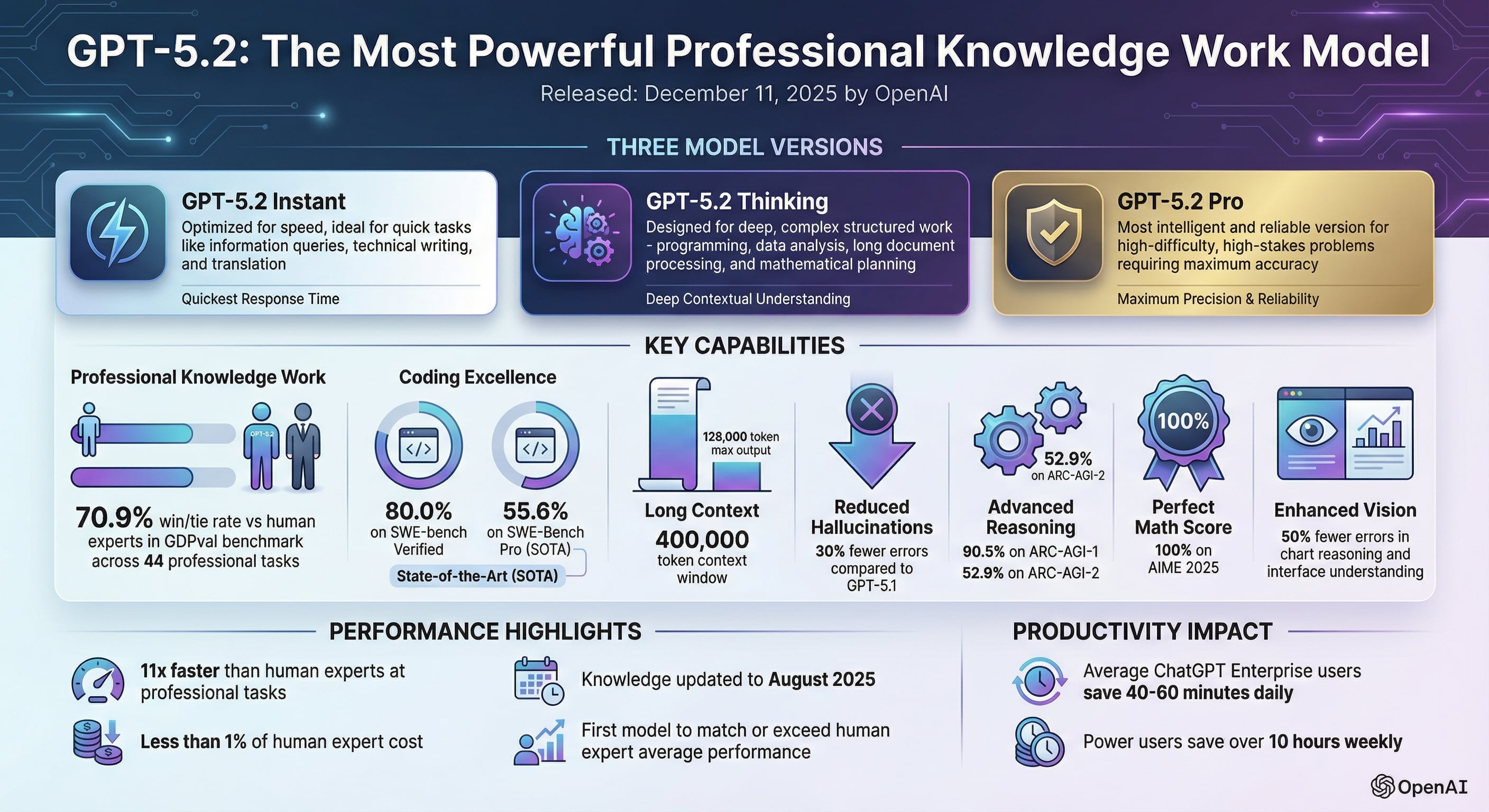
GPT‑5.2 is OpenAI’s newest model family, designed for serious knowledge work and long‑running intelligent agents. It brings major improvements in:
- General reasoning and understanding across complex topics
- Long‑context handling, so it can follow and remember much longer conversations or documents
- Coding and technical work, including debugging and explaining code
- Math, science and logical reasoning, with performance that reaches or even surpasses human experts in key benchmarks
OpenAI has opened the GPT‑5.2 series (Instant, Thinking, Pro) to ChatGPT paid users and API developers. Felo builds on top of this, so you can enjoy these capabilities directly in:
- Felo Search – your AI‑powered search and answer engine
- Content creation and writing – drafting articles, emails, reports
- Agents and workflows – running more reliable, long‑running tasks
- Collaborative workspaces – working with AI in shared docs and spaces
In short: you don’t have to open a separate app or manage your own API keys. GPT‑5.2 just becomes another model option in your existing Felo workflow.
How to use GPT‑5.2 in Felo (method 1: via Felo Search)
If you mainly use Felo Search (the search engine at the core of Felo), here’s the simplest way to start using GPT‑5.2:
- Open Felo (https://felo.ai/)
Go to Felo as you normally do (web or app). - Switch to “Pro Search”
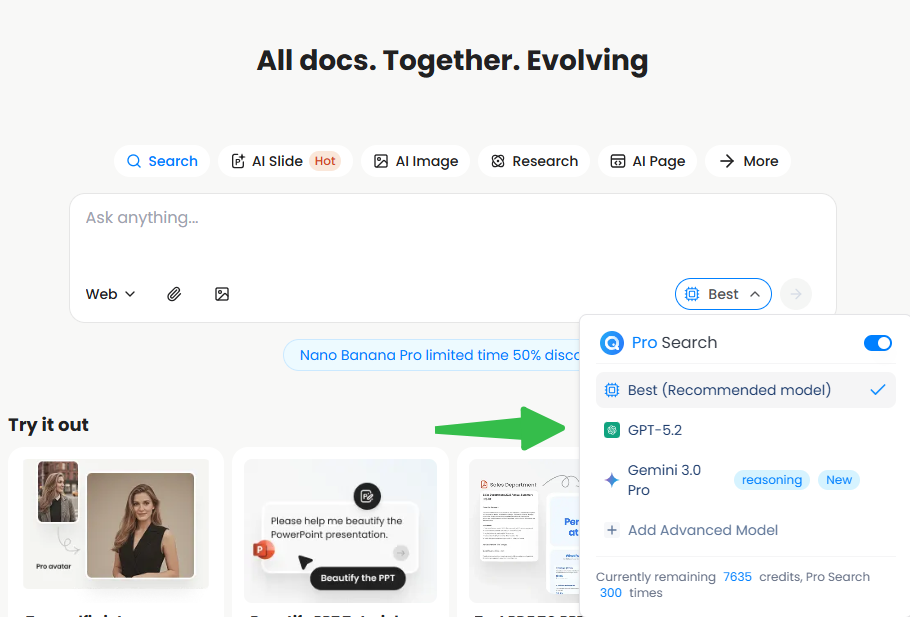
In the search interface, change your mode to Pro Search so you’re using the advanced LLM‑powered experience. - Open the model selector (“More models”)
In Pro Search, find the place where you select models, then click “More models” (or similar wording). Felo is designed as a multi‑model, LLM‑powered platform, so you can flexibly switch between them. - Add GPT‑5.2 to your model list
In the model list, find GPT‑5.2 and add it to your available models. Once added, you can pick it just like any other model whenever you run a search or start a conversation. - Start chatting / searching with GPT‑5.2
Now, every time you choose GPT‑5.2 in Pro Search, your queries and answers will be powered by it — whether you’re asking for summaries, draft writing, coding help, or research support.
You don’t need any extra configuration: Felo’s multi‑LLM architecture handles the rest for you, giving you high‑precision results and natural conversation powered by modern LLMs.
How to use GPT‑5.2 in Felo (method 2: via Playground)
If you like to experiment, compare models, or push them a bit harder, you’ll probably enjoy the Felo Playground:
- Open: https://playground.felo.ai/
- In the model dropdown, select GPT‑5.2.
- Start chatting, prompting, or testing your use cases.
The Playground is great for:
- Comparing GPT‑5.2 with other models side by side
- Iterating on prompts before you bring them into your daily workflow
- Trying more complex or creative tasks without affecting your usual workspace
Again, no extra setup: just pick GPT‑5.2 from the list and you’re good to go.
A few friendly suggestions for first‑time use
If you’re not sure what to try first with GPT‑5.2, here are some ideas you can run either in Pro Search or the Playground:
- Feed it a long article or report and ask for:
- a concise summary
- a bullet‑point brief you can send to your team
- pros/cons or risks you should pay attention to
- Paste a tricky email, contract, or technical spec and ask it to:
- explain it in plain language
- highlight key decisions or deadlines
- draft a reply from your point of view
- Give it some of your own writing and ask:
- “Help me rewrite this to be clearer and more professional, but keep my tone.”
- For coding:
- “Here’s my function, it’s throwing an error — what’s wrong and how can I fix it?”
- “Refactor this into cleaner, more readable code and explain the changes.”
Because GPT‑5.2 is tuned for professional knowledge work and long‑context reasoning, it tends to shine on tasks that are a bit more complex, messy, or open‑ended than usual.
Why Felo is doing this
Felo’s goal is to be a full‑stack intelligent work platform: search, content creation, agents, knowledge management, and collaboration all in one place. To do that well, it has to keep up with the best models in the world, not just one vendor or one version.
By integrating advanced LLMs, Felo is trying to give you:
- Radically higher efficiency – turning hours of work into minutes
- Natural, low‑barrier interaction – just type in your own words, no special skills needed
- High‑quality, precise outputs – powered by modern large models
Adding GPT‑5.2 is one more step in that direction.
Wrap‑up
To recap:
- Yes, Felo now supports GPT‑5.2, and you can use it for free inside Felo.
- Use it in Felo Pro Search: switch to Pro, open More models, add GPT‑5.2, and select it when you search or chat.
- Or go to https://playground.felo.ai/ and pick GPT‑5.2 directly to experiment.
If you already rely on Felo for search, writing, or analysis, it’s worth taking 5 minutes today to flip the model to GPT‑5.2 and see how it changes your experience.