GPT-Image 2.5 on Felo: OpenAI's Sharpest Image Model, Free to Try

OpenAI's GPT-Image 2.5 is now on Felo. Sharper details, up to 50% faster generation, and edits that stay consistent. Try it free, up to 4K.
The hardest part of AI image generation was never the first image. It was the second one.
You get a portrait you like, ask for a small change, and the face shifts. You generate a product shot, add a headline, and the text comes out scrambled. You build a five-panel storyboard, and your character wears a different jacket in every frame.
OpenAI's newest model is built for exactly that problem. ChatGPT Images 2.5 launched on September 8, 2026, with sharper details, more natural lighting, richer textures, and edits that hold together across multiple turns. It is now available on Felo — and you can try it free.
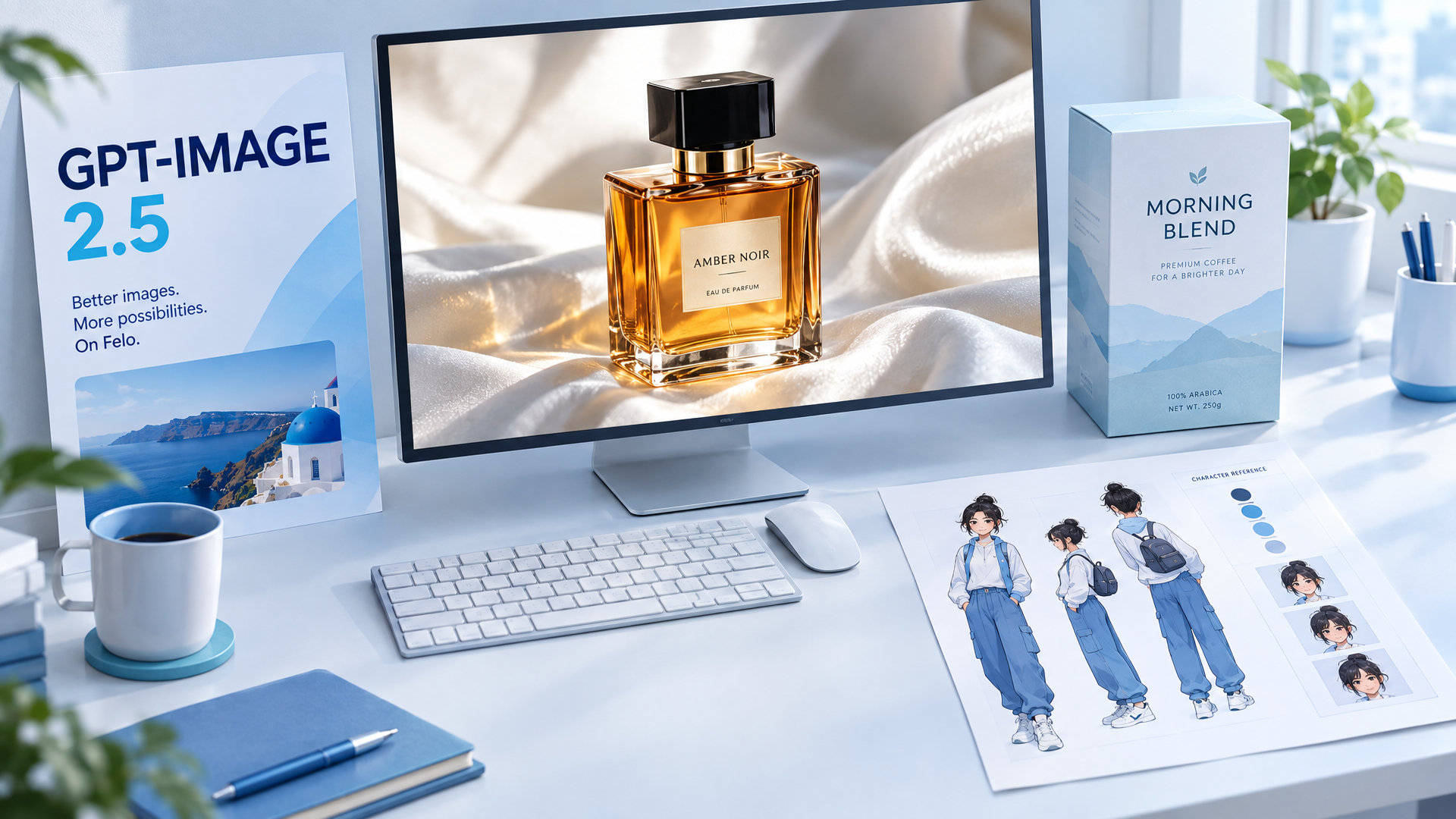
The cover image for this post was generated with GPT-Image 2.5 on Felo. The text in the poster and packaging is the model's output, not a design overlay.
What OpenAI announced
OpenAI says people create more than 3 billion images every week across ChatGPT Images and the GPT-Image models in its API. Images 2.5 is the new state-of-the-art model in that lineup, rolling out to all ChatGPT, ChatGPT Work, and Codex users on desktop, mobile, and web, across every tier.
The headline improvements:
- Sharper details, more natural lighting. Richer textures, better color, and fewer of the plastic-looking artifacts that made earlier AI images easy to spot.
- Reference photos stay recognizable. People, pets, and products look more like themselves when you move them into new settings, styles, or compositions.
- Edits are more precise. Change one element without rebuilding the whole image. Earlier changes stay consistent as you keep editing.
- Up to 50% lower latency. OpenAI cut generation time compared with Images 2.0, so iteration feels less like waiting and more like working.
- Better complex layouts. Images with real-world information are more accurate, the model handles more complex layouts including transparent backgrounds, and visual styles are followed more closely.
OpenAI also added new tools inside ChatGPT: Sketch, which turns a rough drawing into a finished image; templates for formats like posters and product photos; the ability to comment directly on an image for targeted edits; and shareable prompts. Those features live in ChatGPT. On Felo, you get the model itself in a browser workspace, with your own prompts and reference images.
The short version: 2.5 is not just prettier. It is more obedient, more consistent, and faster — the three things that make an image model useful for real work.
What actually got better
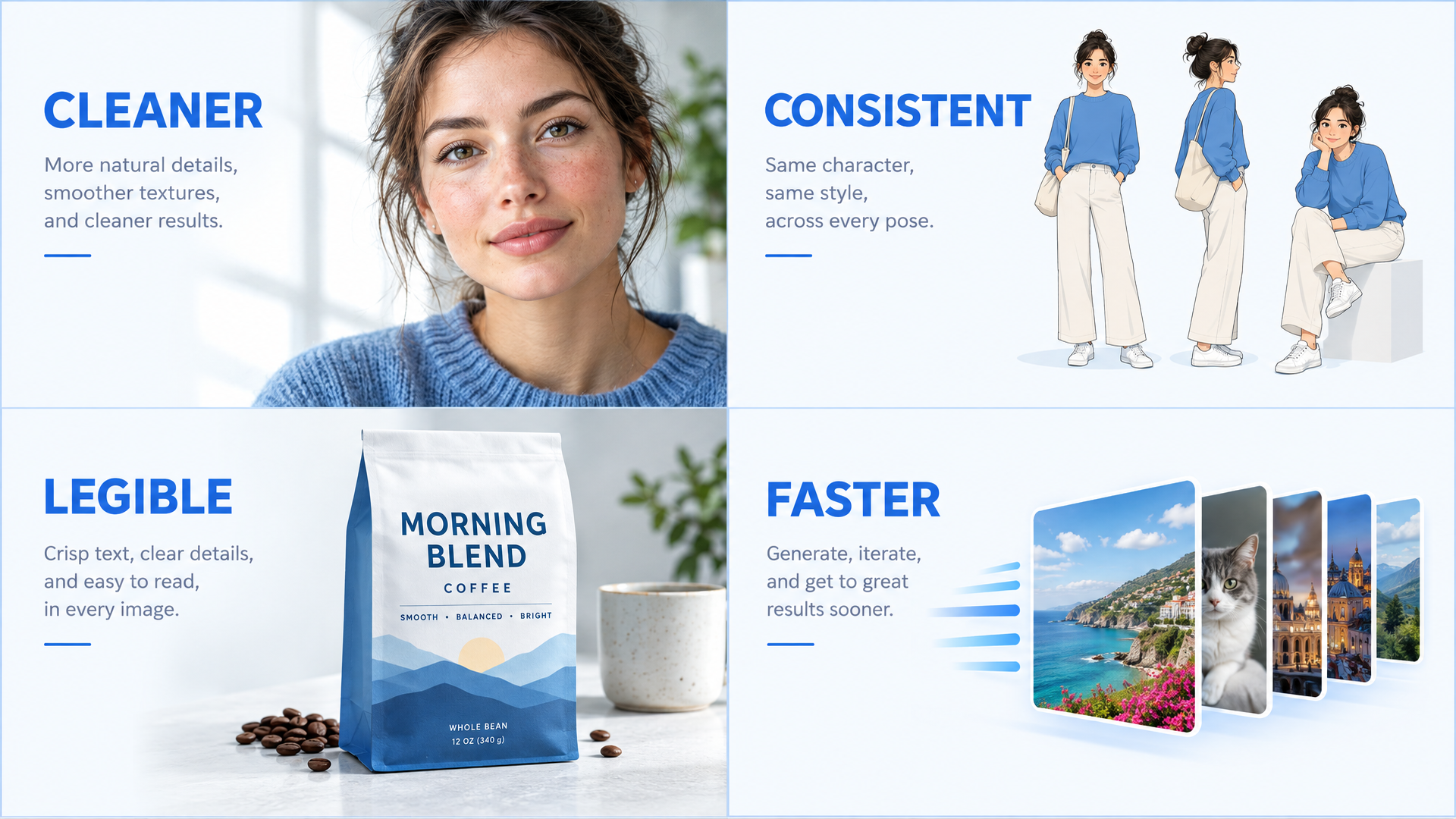
Four of the improvements OpenAI highlights in Images 2.5. This image was also generated with GPT-Image 2.5 on Felo.
1. Details look less synthetic
The most common complaint about AI images is not that they look bad. It is that they look almost right — skin too smooth, surfaces too clean, patterns repeating in ways your eye catches before your brain explains why.
Images 2.5 reduces those noise artifacts and repeating surface patterns. Lighting falls more naturally, textures have more depth, and the result looks less like a render and more like a photograph or a considered illustration.
2. Characters hold their identity
If you work with recurring characters — a mascot, a comic hero, a brand spokesperson, a game sprite — consistency is the whole game. Images 2.5 is better at preserving the subject from a reference photo and carrying distinctive features through new poses, scenes, and styles.
That matters for storyboards, character sheets, comic panels, and any project where the same face has to show up more than once.
3. Edits stop drifting
Multi-turn editing is where earlier models fell apart. Ask for a background change, then a lighting change, then a color change, and the image slowly mutates into something you did not ask for.
Images 2.5 follows editing instructions more reliably across multiple turns. Earlier changes are more likely to stay in place, and each new edit builds on the work instead of undoing it.
4. Text is more reliable
Text inside images — headlines, labels, packaging, UI copy — has always been the fastest way to make an AI image look fake. Images 2.5 handles more complex layouts and produces more accurate text, especially when the copy is short and clearly specified.
Felo's GPT-Image 2.5 workspace supports text rendering in 50+ languages and 50+ visual styles, so you can produce a poster, a product label, or a social graphic without fixing the words in another tool.
5. Iteration is faster
Speed changes how you work. At up to 50% lower latency than Images 2.0, you can test a direction, adjust the prompt, and test again in the time it used to take to generate one image. Most renders on Felo finish in under 10 seconds.
If you want to see how the previous generation handled text, 4K output, and prompt control, read our GPT Image 2 launch guide.
Flare vs. Sunburst: what's the difference?
OpenAI released two API models alongside the ChatGPT rollout:
| Model | What it's for | Trade-off |
|---|---|---|
| GPT-Image-2.5 Flare | The default for most applications: creator and social content, product experiences, visual search, rapid prototyping, high-volume generation | Higher quality than GPT-Image 2 at 50% lower latency |
| GPT-Image-2.5 Sunburst | Premium visual workflows that need tighter control across edits, such as production-ready campaign creative and polished product imagery | Longer generation times, more precision |
Both are priced the same as GPT-Image 2 under OpenAI's published API pricing: $8 per million image input tokens, $30 per million image output tokens, and $5 per million text input tokens.
On Felo, you do not manage API keys or choose a deployment. You open the workspace, pick GPT-Image 2.5, and generate. If you want to compare the result with another model, Felo keeps GPT-Image 2, Nano Banana Pro, Nano Banana 2 Lite, Grok Imagine 2.0, Gemini 3.1 Flash Image, and Grok Imagine in the same model picker.
How to try GPT-Image 2.5 on Felo
Three steps, no setup.
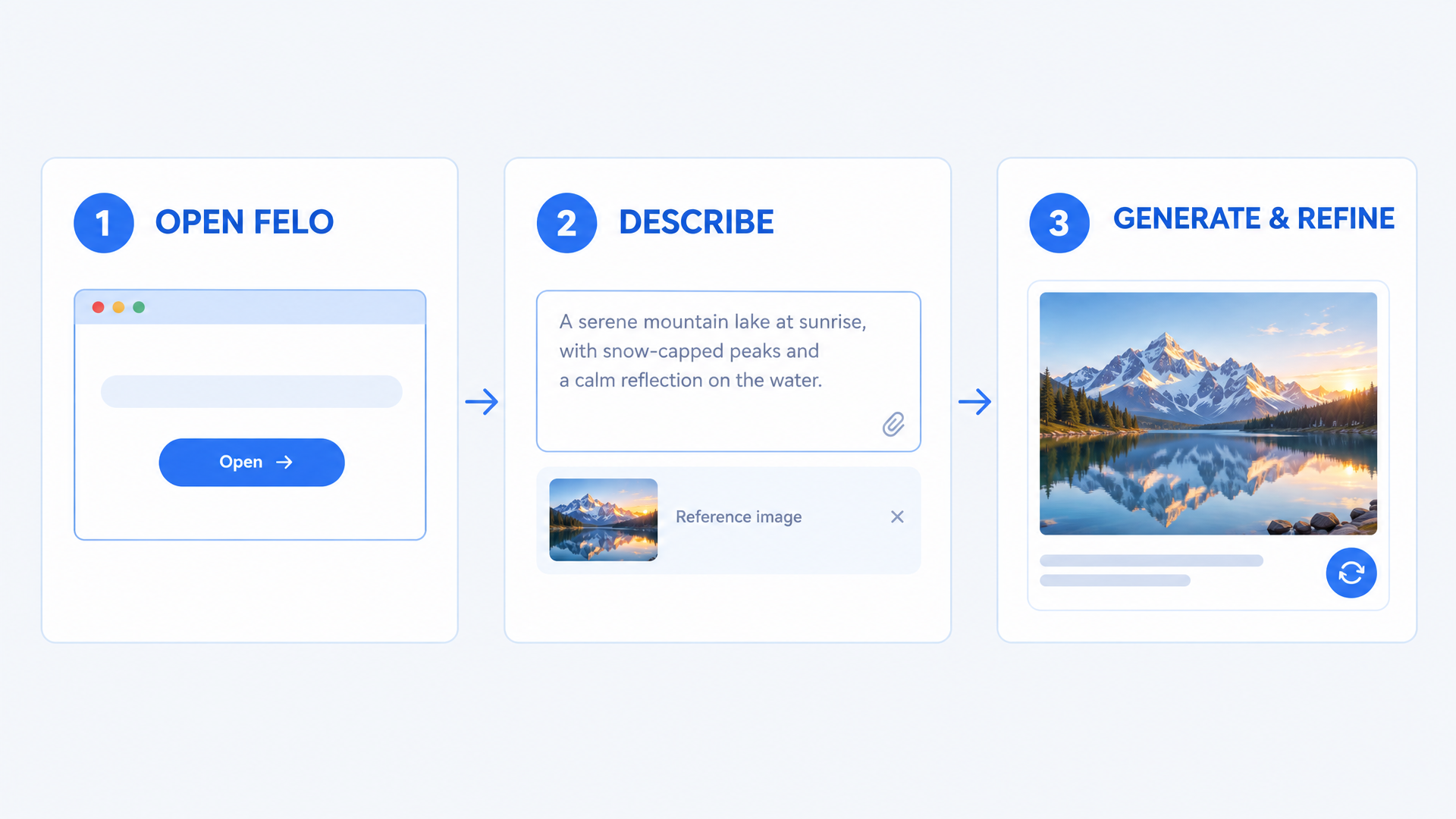
Step 1: Open the workspace
Go to the GPT-Image 2.5 generator on Felo and sign up free. You get daily credits to start — no credit card, no API key, no installation.
Step 2: Describe the image
Write the prompt the way you would brief a designer: what it is, what it should contain, the style, the layout, the mood. If you have a reference image, upload it. Images 2.5 understands natural language, so you do not need to memorize a prompt formula.
Step 3: Generate and refine
Your first render is usually ready in seconds. If something is off, change one thing and generate again. Because 2.5 holds edits better than its predecessor, you can keep refining instead of starting over.
What you get on Felo
The model is the headline, but the workspace matters too:
- Free to start. Generous daily credits, no card required.
- No watermark, full commercial rights. Every image is yours to use for ads, products, social, and print.
- Up to 4K output. Native high-resolution generation up to 3840×2160, so the first render is print-ready.
- 50+ visual styles. Photorealism, illustration, anime, 3D, watercolor, pixel art, and more.
- Text in 50+ languages. Useful for posters, packaging, menus, and multilingual campaigns.
- Every top model in one place. GPT-Image 2.5, GPT-Image 2, Nano Banana Pro, Nano Banana 2 Lite, Grok Imagine 2.0, Gemini 3.1 Flash Image, and Grok Imagine.
- A workflow, not just a generator. Search, draft, generate, and organize in the same Felo workspace.
What to make first
| If you need... | Try this |
|---|---|
| E-commerce product photos | A clean studio shot or lifestyle scene of your product, with a reference image to keep the shape accurate |
| Posters and ads with real text | A bold layout with the exact headline in quotes, then refine the type hierarchy in a second pass |
| Character-consistent visuals | A reference image plus a prompt that describes the new pose or scene; generate a set instead of a single image |
| Storyboards and comic panels | A multi-panel layout with the same character and style in every frame |
| Social content at volume | A batch of variations with one brand color system and different copy for each platform |
Five prompt tips that work with 2.5
- Lead with the job. Say "product photo," "event poster," or "character sheet" in the first sentence. The model picks a different composition for each.
- Put exact text in quotes.
headline reads "CITY LIGHTS FESTIVAL"works better than "add some event text." - Keep text short. Headlines, labels, and short callouts render best. Long paragraphs still belong in a layout tool.
- Use a reference image for consistency. If the same person, product, or character needs to appear again, upload the original.
- Change one thing at a time. When you refine, adjust the lighting, the background, or the copy — not all three at once. That way you know what worked.
FAQ
Is GPT-Image 2.5 free on Felo? Yes. You can start free with daily credits, and no credit card is required. Premium plans are available if you need more credits and higher volume.
Do I need a ChatGPT subscription to use it? No. Felo gives you browser access to GPT-Image 2.5 without a ChatGPT subscription or an API key.
What's new in GPT-Image 2.5 compared with GPT-Image 2? Four visible upgrades: fewer noise artifacts and repeating patterns, more natural color and lighting, stronger character consistency, and sharper text rendering. OpenAI also cut generation latency by up to 50% and improved multi-turn editing consistency.
What are Flare and Sunburst? They are the two API variants of GPT-Image 2.5. Flare is the fast default for most applications. Sunburst is the precision option for detailed creative work, with longer generation times. Both are priced the same as GPT-Image 2.
Can I use the images commercially? Yes. Images generated on Felo include full commercial usage rights and no watermark, including on the free plan.
Does GPT-Image 2.5 support transparent backgrounds? OpenAI says Images 2.5 handles more complex layouts, including transparent backgrounds, more reliably than the previous model.
Can I use Sketch on Felo? Sketch is a ChatGPT feature that turns a hand-drawn sketch into an image. On Felo, you work with text prompts and reference images instead — and you can still upload a rough reference to guide the composition.
Try OpenAI's newest image model — free
GPT-Image 2.5 closes the gap between "an interesting AI image" and "an image I can actually use." Sharper details, edits that stay put, text you can read, and faster iteration — in one browser workspace.
Open Felo, pick GPT-Image 2.5, and describe what you want. The first render is free.
This post is also available in 简体中文, 日本語, 한국어, 繁體中文, हिन्दी, Français, العربية, Русский, اردو, Bahasa Indonesia, Deutsch, Tiếng Việt, Türkçe, Italiano, ไทย, Español, বাংলা and Português.