
GPT Image 2.6 on Felo: Turn a GIF Into a Video Shot
GPT Image 2.6 on Felo: make a looping GIF, build action frames with the API, then animate them with Kling. Code and limits included.
Ask a video model for "a knight swinging a sword" and you usually get a sword swing in the loosest sense. The blade smears, the body changes proportions between frames, and the camera invents a move nobody asked for.
Directors solve this with blocking: where the character stands, what moves first, where the motion ends. GPT Image 2.6 on Felo can give you that plan as a 1.8-second looping GIF in the browser, or as a 3 × 3 frame sheet through the image API. Both are cheaper than deciding the action after you have paid a video model to light, frame, and score it.
Two ways into GPT Image 2.6 on Felo
In the browser: an AI GIF generator
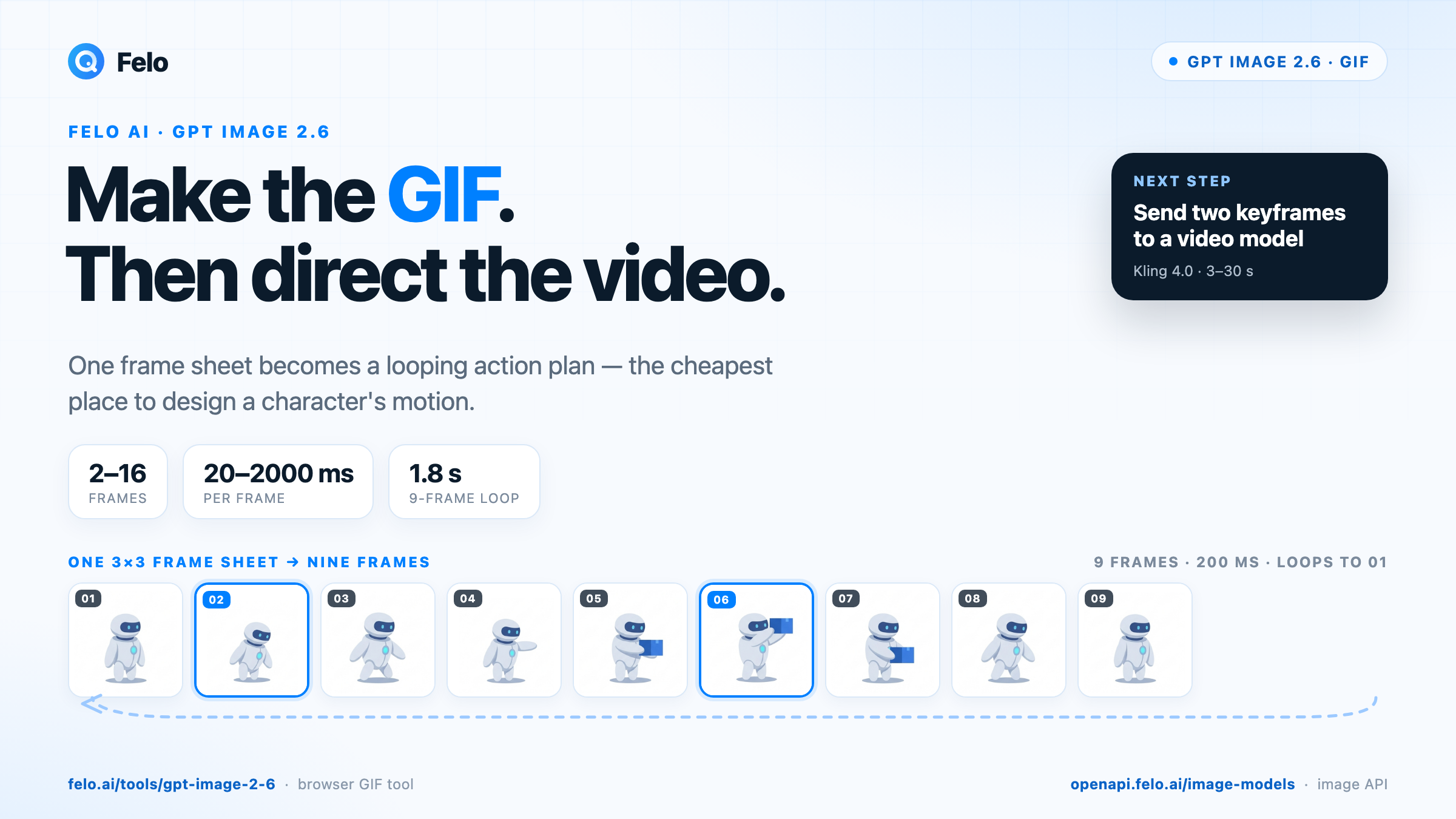
Open felo.ai/tools/gpt-image-2-6, describe the image, and pick a model. The input box defaults to GPT Image 2.6 Flare and PNG output. To animate, open the settings and choose GIF. Writing "GIF" in the prompt alone does not change the output format.
The GIF controls are narrow by design: 2 to 16 frames, 20 to 2000 milliseconds per frame, and a 512 × 512 frame size as the starting point. Felo's default is 9 frames at 200 ms, which produces a 1.8-second loop. That sounds short, and it is. It is also enough to see whether a gesture reads.
You can upload a reference image, ask for edits, or mark an area with the sketch control. For a first action test, use one subject, a plain background, and a single movement.
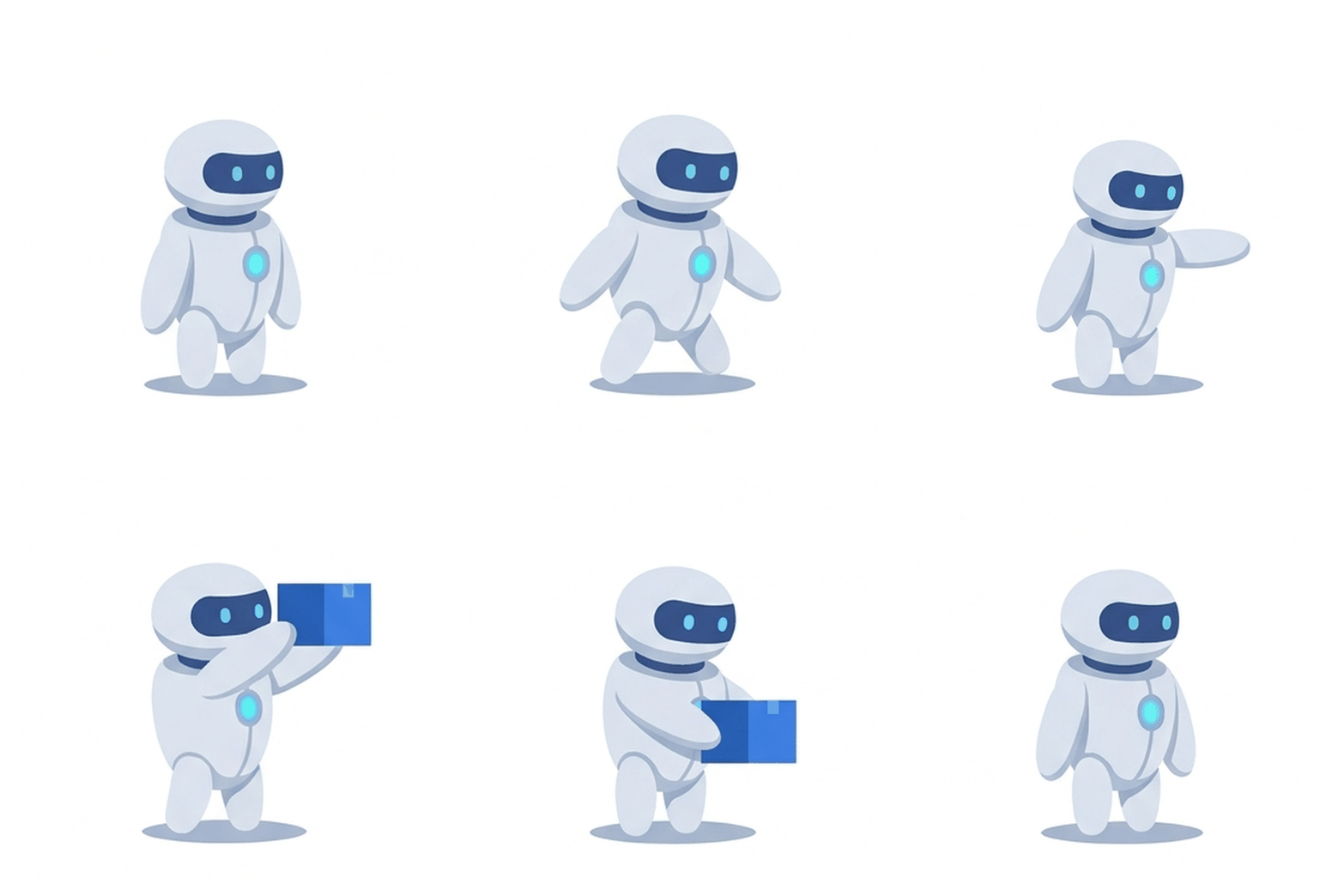
An illustration of the output: a 9-frame, 200 ms loop. The browser tool produces the GIF directly; the agent workflow below builds the same frames from one 3 × 3 sheet.
Through the API, for agents and apps
The same two models sit in Felo's image catalog under the IDs gpt-image-2.6-flare and gpt-image-2.6-sunburst. One key covers 18 image models from 8 providers, so an agent can compare or switch models without opening separate provider accounts.
| GPT Image 2.6 Flare | GPT Image 2.6 Sunburst | |
|---|---|---|
| Designed for | Fast drafts and frequent revisions | Detailed images and precise edits |
| Model ID | gpt-image-2.6-flare | gpt-image-2.6-sunburst |
| Input / output | Text, image → image | Text, image → image |
| Useful here | Exploring action ideas quickly | Consistent characters across panels |
| Listed pricing | $5 / 1M input tokens, $30 / 1M output tokens | $5 / 1M input tokens, $30 / 1M output tokens |
Pricing is per token, not per image, so resolution and reference images affect the bill. Both model pages show a limited-time free-trial badge; check the current terms and rates before planning a production run.
The browser outputs GIF; the image API returns still images. Its output_format enum for these models is png, jpeg, or webp, so agents build the GIF from generated frames. The API section below shows the pattern.
Why a GIF is a better first draft than a video prompt
Video models are interpolation engines. They are good at filling the space between two states and bad at deciding which states matter. A text prompt gives them one sentence to interpret. A nine-frame GIF gives them nine explicit decisions about pose, silhouette, and timing.
A nine-frame budget also forces a choice. At 200 ms per frame, there is no room for a vague "dynamic action scene." You have to say: ready stance, wind-up, strike, follow-through, return. Weak video prompts are usually weak because they never made that decision.
The loop adds a second constraint. A GIF that loops cleanly has to return to its starting pose, and that is also what makes a shot easy to edit. If the character's arm ends somewhere new, the next shot starts from a different body.
And you can inspect the whole thing in seconds. Check the silhouette, the hands, the prop, and the join between the last frame and the first. An agent can compare frames or ask a vision model to describe what changed, all before paying for a second of video.
Felo's tool page is explicit: "GIF is a silent loop. Use a video tool when you need sound, a long scene or several shots." That line is where this workflow starts, not where it stops.
Build the action in the browser
Here is a practical loop for designing a character action before it becomes a video shot.
1. Lock the character first
Do not start with the animation. Generate a still reference of the character, front view, neutral pose, plain background, and keep every detail in the prompt identical when you animate: hairstyle, outfit colors, accessories, weapon, proportions. Consistency drifts across separate generations, so the more specific the description, the less the model has to invent between frames.
2. Write the action as a loop, not a scene
A useful action prompt has four parts:
- Set the scene. What is in frame, where it stands, what it looks like.
- Name one motion. What moves, and in what order.
- Lock what stays. The camera, the feet, the logo, the hands.
- Ask for the return. End with the way back to the starting pose.
For example:
A courier in a mustard-yellow jacket stands on a pale stone street, side view, full body, fixed camera. They shift their weight, reach into a satchel, pull out a small blue parcel, and hold it forward. Keep the jacket, satchel, and camera still. Then lower the parcel and return to the starting pose. Make the motion loop smoothly. Simple background, no text.
That prompt is intentionally boring. Boring is good here: one clear action reads at 512 × 512 with nine frames. Save the crowd, the rain, and the camera move for the video model.
3. Choose GIF in settings and start small
Set 512 × 512, 9 frames, and 200 ms per frame. Generate. Do not add frames until the basic action reads.
When a loop goes wrong, fix it in order: fewer frames and a simpler action first, then a longer frame time, then more detail that must stay.
4. Review the join, not just the middle
Watch the loop twice. The join between the last frame and the first is where most failures show up: a jump in the shoulder, a prop that changes hands, a background that shifts.
Then change one variable at a time. A new pose idea is a new prompt. A timing tweak is a new frame count or frame time. Mixing both makes it impossible to know what helped.
From GIF to video: two handoffs
Felo's video API has no animated-GIF input. It takes still images or video, so the handoff needs one conversion step. Two routes work well, and a third keeps the GIF as the deliverable.
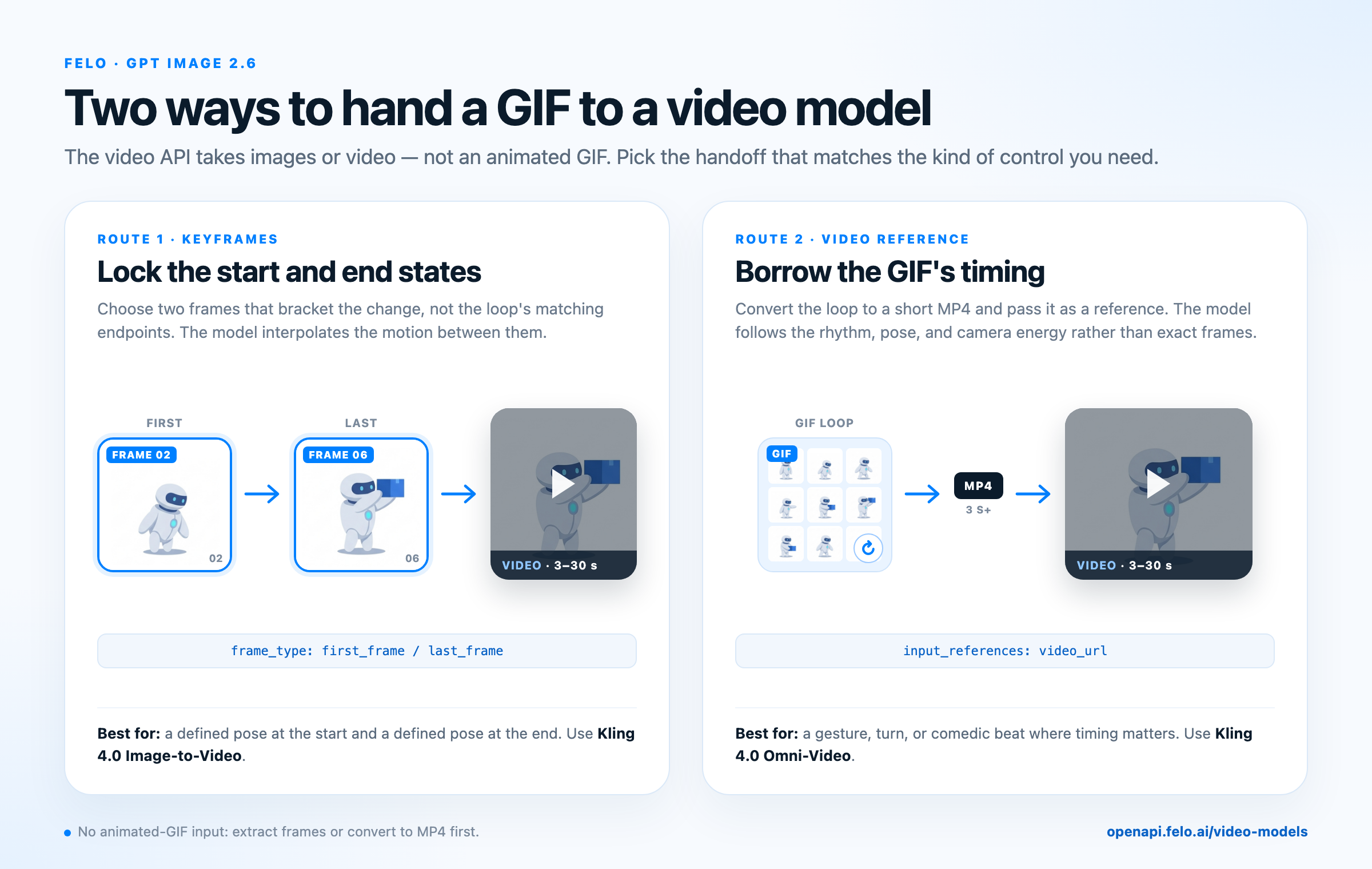
Keyframes lock the start and end states; a video reference borrows the loop's timing.
Route 1: Keyframes, for a defined start and end
Pick the two frames that bracket the change you care about. For the courier, that is panel 2 (weight shift) and panel 6 (parcel held out), not the loop's first and last frames, which are deliberately identical. Send them as frame_images with frame_type set to first_frame or last_frame.
That fixes the start and end states you chose. The prompt only has to describe what the two images cannot: camera movement, lighting, and pace.
Kling 4.0 Image-to-Video is a good fit here. The model page lists frame_images among its supported parameters and describes 3 to 30 second clips with stereo audio. Feed it the two chosen poses, and it interpolates the movement between them.
A short prompt for the keyframe route:
The same courier in the same mustard jacket, on the same stone street, reaches into the satchel and holds out a blue parcel. Slow push-in, soft late-afternoon light, shallow depth of field. Keep the character's face, clothing, and the parcel unchanged. Natural ambient street sound.
The video model fills in the motion between your two poses. That is a smaller creative leap than asking it to invent the whole action from a sentence.
Route 2: Video reference, for borrowed timing
If you want the video to follow the GIF's rhythm, convert the loop to a short MP4 and pass it as a video reference. In the video API, input_references accepts video_url entries alongside image_url references.
ffmpeg -stream_loop 1 -i action.gif -t 3 -movflags +faststart -pix_fmt yuv420p action.mp4
Kling 4.0 Omni-Video is the reference-driven option. Its page lists up to 5 video clips of 3 to 30 seconds, with a combined length no longer than 30 seconds, alongside up to 10 image references. That lets you send the motion sketch and a character image in the same request.
Use this route when the timing is the point: a three-beat gesture, a turn, a comedic pause. Omni-Video lists 3–30 second video references, so loop the GIF to at least three seconds before export; 12 frames at 250 ms also gets you there.
A video model will follow the reference's general rhythm and pose, not reproduce it frame for frame. If you need specific start and end states, use keyframes.
Or keep the GIF
Sometimes the GIF is the deliverable. A looping sticker, a UI state, a social post, or a game sprite does not need a video model or a soundtrack. Felo's GPT Image 2.6 model cases include a pixel-art water-sword loop, a portrait turn-and-wink, and a Japanese event banner; all three are built around a small, readable motion.
The format has real constraints: 256 colors per frame, no audio, and a file size that grows quickly with dimensions and frame count. Flat colors and simple backgrounds hide the color limit well. Gradients and skin tones can band.
The GPT Image 2.6 API: submit, poll, collect
A human can babysit a GIF in a browser. An agent cannot, unless the API gives it a clean task contract. Felo's does: submit, poll, collect.
The image endpoint is POST https://openapi.felo.ai/api/v1/images/generations with a bearer key. It returns 202 and a task_id. Poll GET /api/v1/images/generations/{task_id} until status is succeeded, then read the signed media URL from outputs.
The request body accepts the model ID, prompt, quality, aspect_ratio, output_format, and input_references for reference images. If you need a local reference image, upload it first with POST /api/v1/files; the endpoint accepts PNG, JPEG, GIF, WebP, MP4, and other common types up to 100 MiB, and returns a file record. Pass its id as file_id in input_references.
For an agent that needs a GIF, the cleanest pattern is to ask for the whole action as a storyboard sheet in one image call, then slice it into frames. One request asks for nine poses; the slicing is deterministic; the GIF is a local assembly step. The frames are also what the video step needs, so nothing is generated twice.
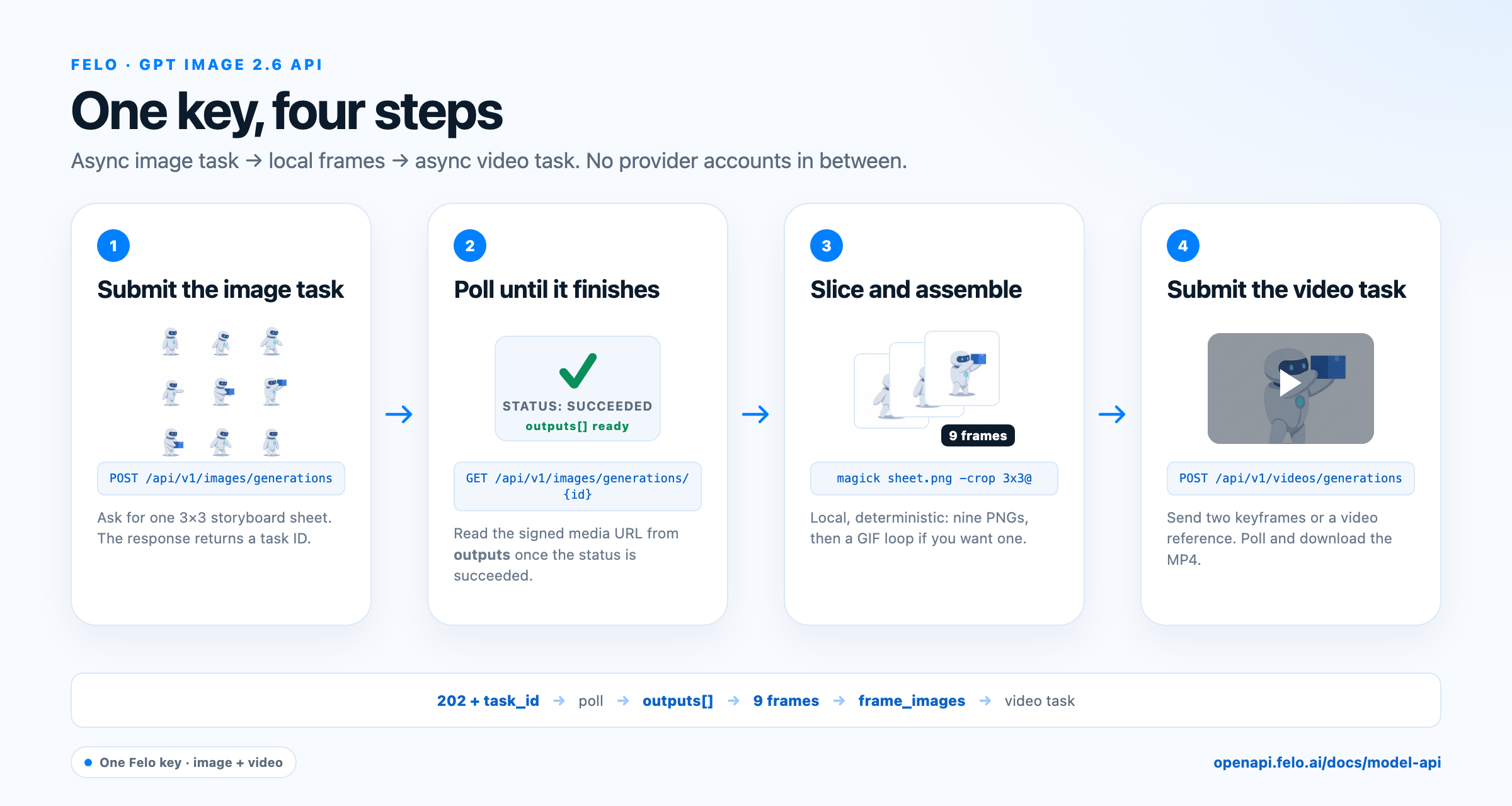
The task shape: submit an image task, poll for the result, slice the sheet locally, then submit a video task with the frames.
Ask for nine poses in one call
A storyboard prompt for that call looks like this:
A 3 × 3 storyboard sheet on a plain white background, nine equal square panels edge to edge, no gutters. The same courier in a mustard-yellow jacket appears in every panel: side view, full body, identical proportions, colors, and satchel. Panel 1 standing; panel 2 shifting weight; panel 3 reaching into the satchel; panel 4 opening it; panel 5 pulling out a blue parcel; panel 6 holding the parcel forward; panel 7 lowering it; panel 8 hand back at the side; panel 9 the same pose as panel 1. Flat lighting, consistent scale, no text, no captions, no panel numbers.
A 1K sheet yields roughly 340-pixel tiles after the crop, which is softer than the browser's 512-pixel frames; ask for a larger square if your channel exposes one. Check the sheet before slicing: if the panels are uneven or the character changes, regenerate with a simpler layout instruction rather than trying to fix it after the cut.
Submit, slice, assemble
import os
import time
import requests

BASE = "https://openapi.felo.ai/api/v1"
HEADERS = {"Authorization": f"Bearer {os.environ['FELO_API_KEY']}"}

def poll(path, timeout=900, interval=5):
    deadline = time.time() + timeout
    while time.time() < deadline:
        response = requests.get(f"{BASE}{path}", headers=HEADERS, timeout=30)
        response.raise_for_status()
        task = response.json()
        if task["status"] in {"succeeded", "failed", "interrupted"}:
            if task["status"] != "succeeded":
                raise RuntimeError(task.get("error", task["status"]))
            return task
        time.sleep(interval)
    raise TimeoutError(path)

STORYBOARD_PROMPT = (
    "A 3x3 storyboard sheet on plain white, nine equal square panels edge to edge, "
    "the same courier in a mustard jacket in every panel, side view, full body, "
    "identical proportions and colors: standing, shifting weight, reaching into a "
    "satchel, opening it, pulling out a blue parcel, holding it forward, lowering it, "
    "hand at side, standing again. Flat lighting, consistent scale, no text, no gutters."
)

response = requests.post(
    f"{BASE}/images/generations",
    headers=HEADERS,
    json={
        "model": "gpt-image-2.6-sunburst",
        "prompt": STORYBOARD_PROMPT,
        "aspect_ratio": "1:1",
        "quality": "medium",
    },
    timeout=60,
)
response.raise_for_status()

result = poll(f"/images/generations/{response.json()['task_id']}")
output = result["outputs"][0]
sheet_url = output["url"] if isinstance(output, dict) else output
with open("sheet.png", "wb") as file:
    file.write(requests.get(sheet_url, timeout=60).content)
Then slice the sheet and assemble the loop locally:
magick sheet.png -crop 3x3@ +repage -resize 512x512! frame-%02d.png
magick -delay 20 -loop 0 frame-*.png action.gif   # 20/100 s = 200 ms per frame
ImageMagick 6 users can replace magick with convert. The crop is even because the prompt asked for no gutters.
Send two keyframes to the video model
def upload(path):
    with open(path, "rb") as file:
        response = requests.post(
            f"{BASE}/files", headers=HEADERS, files={"file": file}, timeout=60
        )
    response.raise_for_status()
    return response.json()["id"]

VIDEO_PROMPT = (
    "The same courier on the same stone street reaches into the satchel and holds "
    "out a blue parcel. Slow push-in, soft late-afternoon light, shallow depth of "
    "field. Keep the face, clothing, and parcel unchanged."
)

# Panels 2 and 6 bracket the change; the loop's matching endpoints do not.
first_id = upload("frame-01.png")
last_id = upload("frame-05.png")

video = requests.post(
    f"{BASE}/videos/generations",
    headers=HEADERS,
    json={
        "model": "kling-4.0/image-to-video",
        "prompt": VIDEO_PROMPT,
        "duration": 5,
        "resolution": "720p",
        "frame_images": [
            {"type": "image_url", "frame_type": "first_frame",
             "image_url": {"file_id": first_id}},
            {"type": "image_url", "frame_type": "last_frame",
             "image_url": {"file_id": last_id}},
        ],
    },
    timeout=60,
)
video.raise_for_status()
video_task = video.json()["task_id"]
Poll the video task the same way and download the signed output URL. The endpoint is POST https://openapi.felo.ai/api/v1/videos/generations; the task carries status and outputs just like an image task. The full catalog of video routes is on the video models page.
Wire it into an agent
The agent can generate several action sheets for the price of a handful of images, compare them, and only then spend on video. It can also log which prompt produced which sheet, which is hard to do when a person is clicking through a UI.
Because the same key covers chat, image, and video models, the whole loop can live in one agent: a planning model writes the action beats, an image call renders the sheet, a vision model checks consistency, and a video call finishes the shot. Felo publishes OpenAI-compatible and Anthropic-compatible base URLs plus setup guides for Codex, Claude Code, DeepSeek Harness, OpenClaw, and other agent clients, so an existing agent can point at the platform without a rebuild.
What the pipeline does not solve
The GIF-first method removes ambiguity from action design. It does not make the video model frame-accurate.
- Motion will drift. A video model interpolates; it may change hand positions or cloth folds between your keyframes. Reference images help, but review the result.
- Short is short. Two to 16 frames is a gesture, not a scene. Build a scene from several gestures and let the video model handle transitions.
- Text inside frames is fragile. Lettering can wobble between frames. Add titles in a design tool, not in the animation.
- Model lists change. Trial terms and supported parameters are live data, so check the model page or the Playground before wiring an ID into production.
FAQ
Can GPT Image 2.6 generate animated GIFs on Felo?
Yes, in the browser tool. Choose GPT Image 2.6, open the settings, and select GIF. The panel supports 2 to 16 frames, 20 to 2000 ms per frame, and a 512 × 512 starting size; 9 frames at 200 ms makes a 1.8-second loop.
Can I call GPT Image 2.6 through an API?
Yes. Use the model IDs gpt-image-2.6-flare or gpt-image-2.6-sunburst with POST /api/v1/images/generations on the Felo API Platform. One Felo key covers the call; you do not need OpenAI, Google, or Kuaishou accounts. The call is asynchronous: submit, poll the task, then download the output.
Does the image API return a GIF file?
Not today. The public image API lists png, jpeg, and webp for these models. An agent can still produce a GIF by generating a frame sheet or a sequence of stills and assembling them locally with ImageMagick or ffmpeg. That is often the better artifact, because the video step needs individual frames anyway.
How do I turn a GIF into a video on Felo?
Use the GIF as a motion plan, then hand it to the image to video API in one of two ways: extract two keyframes that bracket the change and send them as frame_images, or convert the loop to an MP4 and pass it as a video_url reference. Felo's video API does not accept an animated GIF directly.
How much does a GPT Image 2.6 GIF cost?
Both models are priced per token: $5 per 1M input tokens and $30 per 1M output tokens, so a higher resolution or more reference images costs more. The browser tool and API draw from your Felo allowance; check the model page for current rates and trial terms.
Start with a loop
The reliable way to improve an AI video is to stop asking for one first. Make the action small enough to see, loop it, fix the join, and only then hand the frames to a model that can add light, camera, and sound.
Try GPT Image 2.6 on Felo to make your first loop in the browser. When you are ready to put the workflow inside an agent, browse the image model API, create a key, and send one request. The GIF is the plan. The video is the performance.
This post is also available in 简体中文, 日本語, 한국어, 繁體中文, हिन्दी, Français, العربية, Русский, اردو, Bahasa Indonesia, Deutsch, Tiếng Việt, Türkçe, Italiano, ไทย, Español, বাংলা and Português.