GPT Image 2 is here: Felo image generation tool upgraded to 4K quality

OpenAI releases the GPT Image 2 model, and Felo AI is the first to integrate it. Supports 4K resolution, precise text rendering, multilingual generation, and 30-second output.
Have you ever encountered this situation — you want to make an event poster, the picture in your mind is clear, but once you open the design software, you get stuck. Color matching, layout, fonts — every step drains your patience. Or maybe you used an AI image generation tool that produced a decent picture, but the text on it was all garbled and unusable.
That might be about to change today.
OpenAI has just released GPT Image 2, an image generation model that makes major strides in text rendering and image quality. Felo AI has already integrated it, and you can start using it right now.
What makes GPT Image 2 so powerful
Over the past year, AI-generated images have improved significantly, but a few old problems have persisted: inaccurate text rendering, poor detail when zoomed in, and weak understanding of complex instructions. GPT Image 2 brings obvious improvements in all these areas.
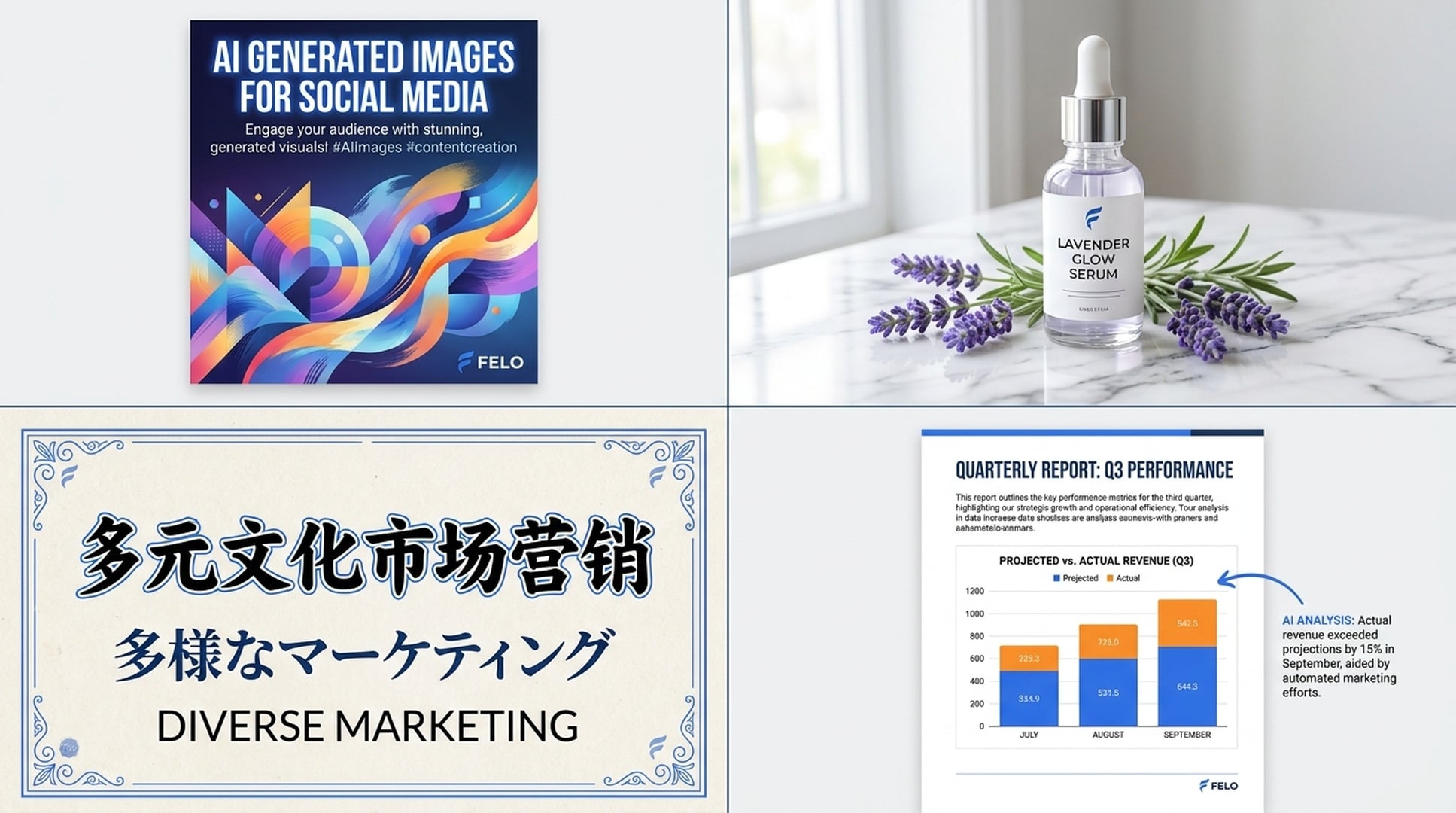
Text finally looks right. Poster titles, product packaging labels, and button tags in UI interfaces can all be rendered accurately — including Chinese, Japanese, and Korean. In the past, when using AI image tools to make content with text, you often had to fix it later in Photoshop. Now, it can be done in one step.
Resolution maxed out to 4K. It supports output up to 3840×2160, with details sharp enough for enlarging and cropping. Perfect for social media images, e-commerce product photos, or even printable materials — no need to worry about quality.
Understands complex instructions. In the prompt, you can write something like 'Put a cup of latte on the left with 'Good Morning' printed on it, and an open notebook on the right with sunlight streaming in through the window' — it can actually place each element correctly, not just randomly assemble them.
Multi-format output. Choose from PNG, JPEG, or WebP formats, with adjustable compression levels. Use PNG for lossless high definition, or WebP to control file size.
How to use it in Felo
The image generation tool in Felo does more than just connect with another model. It integrates GPT Image 2 into Felo’s existing workflow, allowing you to invoke image generation anytime while searching, writing documents, or creating slides—without switching tools.
Three entry points to start creating
Entry 1: Home Page Image Generation. Open Felo, click the Image Generation tool, select the GPT Image 2 model, enter a prompt, and click Generate. You’ll get results within 30 seconds.
Entry 2: Generate images inside LiveDoc. When writing a document in Felo LiveDoc, click the “+” button, select “Create with AI” → “Image,” and generate visuals directly inside the doc. Wherever you write, the related images follow—no need to open a separate image tool, download, upload, and insert.
Entry 3: AI Task Image Generation. Describe the image you want in the AI Task input box, and the system automatically calls GPT Image 2 to generate it. Ideal for batch creation or when combining with other AI capabilities.
Adjust parameters as you like
After selecting the GPT Image 2 model, you can fine-tune the generation results:
- Resolution: From the standard square image of 1024×1024 to 4K landscape of 3840×2160, custom sizes are also supported. Choose portrait for phone wallpapers, landscape for banners, and square for avatars—one tool covers all size needs.
- Quality level: Low is suitable for quick drafts and idea exploration, Medium balances quality and speed, and High outputs the finest finished images.
- Output format: PNG for lossless quality, JPEG for lightweight files, and WebP for a balance of both.
- Background mode: Automatic or enforced opaque, choose as needed.
Not sure what to pick? Just keep everything set to "Auto," and the model will automatically match the optimal parameters.
Ideal use cases
Here are some scenarios where it performs especially well:
Social media management. Write a tweet and have Felo generate an accompanying image. GPT Image 2’s accurate text rendering means you can add titles or slogans directly into the image, skipping the extra step in Canva. One person can easily complete the full content creation process.
E-commerce product showcase. Enter "a bottle of hand cream on a marble countertop, a few sprigs of lavender scattered nearby, and soft natural light coming from the left"—the generated image can be directly used as the main picture on a product detail page. 4K resolution ensures clarity even when zoomed in.
Multilingual marketing materials. You can describe the scene in Chinese, and have the text in the picture presented in Japanese or English. For cross-border e-commerce or global branding teams, there’s no longer a need to design separate visuals for each language version.
Images for documents and reports. Writing a quarterly report in LiveDoc and need a concept image for "data growth trends"? Just generate it directly in the document—much more convenient than searching for stock images.
How Felo differs from other image generation tools
Felo is not the only place where you can use GPT Image 2, but it does several things others don’t:
Image generation is part of the workflow, not a standalone feature. In Felo, you can first use AI search to gather materials and inspiration, organize your ideas and copy in LiveDoc, then directly generate images, and finally export everything into PPT with one click. From research to final output, you never need to switch tools.
50+ style templates. In addition to GPT Image 2, Felo also integrates multiple models such as Nano Banana Pro (based on Google Gemini), providing over 50 visual styles including realism, anime, oil painting, and cyberpunk. Different models excel in different styles, and Felo keeps the choice in your hands.
Image-to-image capability. Upload an existing picture, describe the changes you want—replace background, change style, adjust composition—and Felo’s Image-to-Image function will handle it for you, no Photoshop skills required.
Free credits are sufficient. The core image generation functions are free to use, and there are credit discounts while the GPT Image 2 model is being launched. Try it first—no upfront payment needed.
Get Started
Instead of looking at other people's generated images, why not try creating one yourself?
Open Felo AI, go to the image generation tool, choose the GPT Image 2 model, and type in the scene that's been in your mind but you haven’t had the right tool to create. See the result in 30 seconds.
If you’re already using Felo LiveDoc, try the built-in image generation directly in your document — this “write and draw as you go” experience is something you won’t want to give up once you’ve tried it.