How to Translate a PowerPoint Document (The Easy Way) 2026

Translate PowerPoint Document Without Losing Format
Need to translate a PowerPoint document without losing layout or formatting? There's a fast way to do it — no retyping required.
Manually translating an entire PowerPoint presentation is time-consuming, especially if you're dealing with complex slides, visuals, or multiple languages.
While Microsoft Office offers some basic tools to help translate text, they don't support full-slide translation — and you might lose your formatting along the way.
With Felo LiveDoc, you can translate your entire PowerPoint (.ppt or .pptx) file in just a few clicks. And yes — it preserves the layout, fonts, and visuals so your translated presentation looks just like the original.
Let's walk through how to translate a PowerPoint document easily, accurately, and online.
Why Traditional PowerPoint Translation Tools Fall Short
If you've tried to translate a PowerPoint using built-in features like Microsoft Translator, you already know the limitations:
- It only works on selected text — not the entire presentation
- Formatting and layout often break
- No support for bulk or multi-slide translation
- No full-document preview or layout preservation
You'll often end up copying and pasting text, slide by slide, into another translation tool — which leads to mistakes, inconsistencies, and wasted time.
The Better Way: Translate Your PowerPoint with Felo LiveDoc
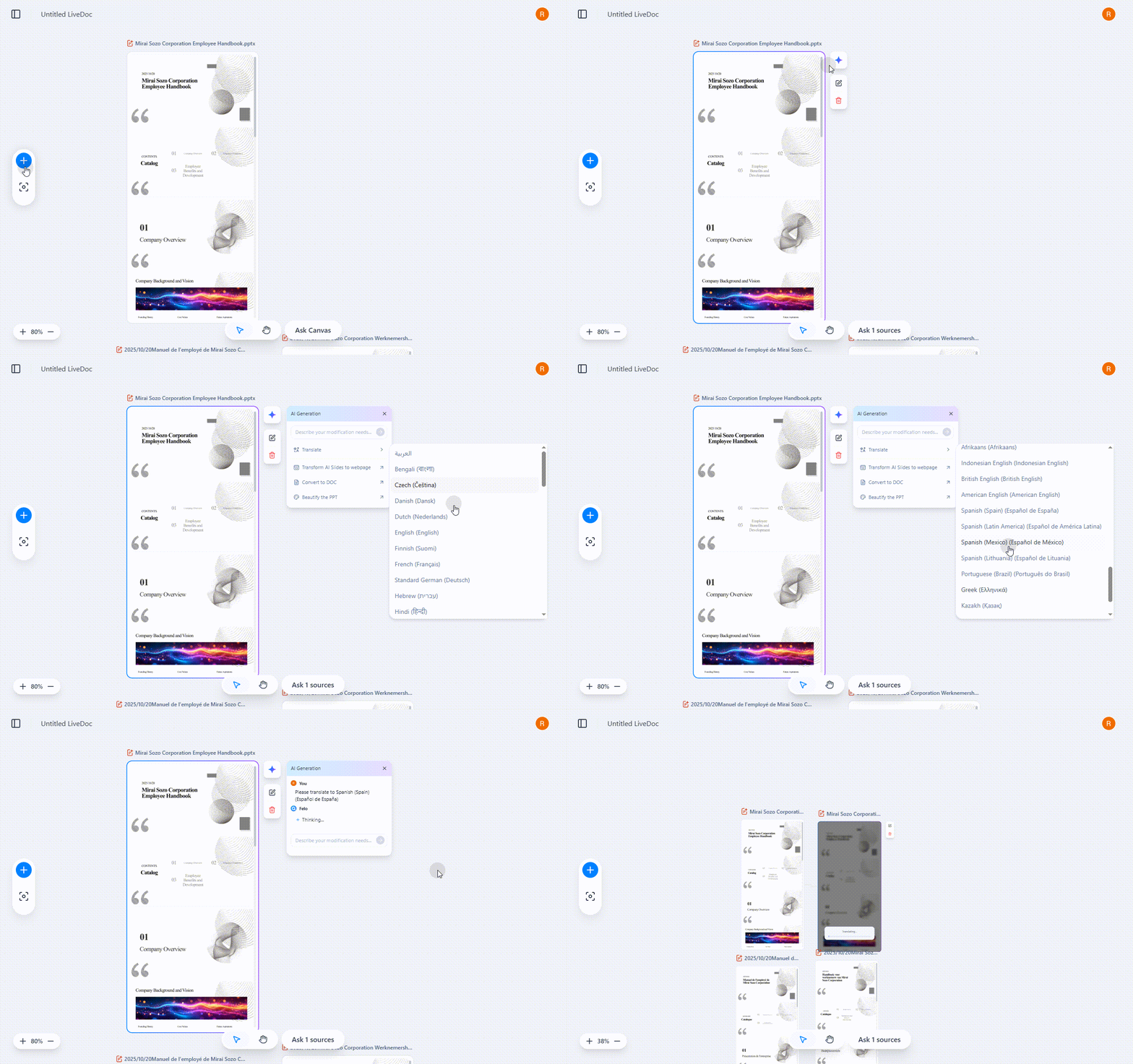
Felo LiveDoc does more than just handle PowerPoint files — it's an intelligent workspace where professional AI agents collaborate to deliver world-class translations. Here's how:
Upload Your File
Open Felo LiveDoc and upload your .ppt or .pptx file to the canvas. You can also add supporting documents like PDFs, URLs, or reference materials — the Translation Agent uses all context for better accuracy.
Choose Your Translation Type
- Entire Document – Preserves the full layout and formatting of your PowerPoint
- Summary – Gives you a short translated version of the content (for quick reads or overviews)
Select Languages
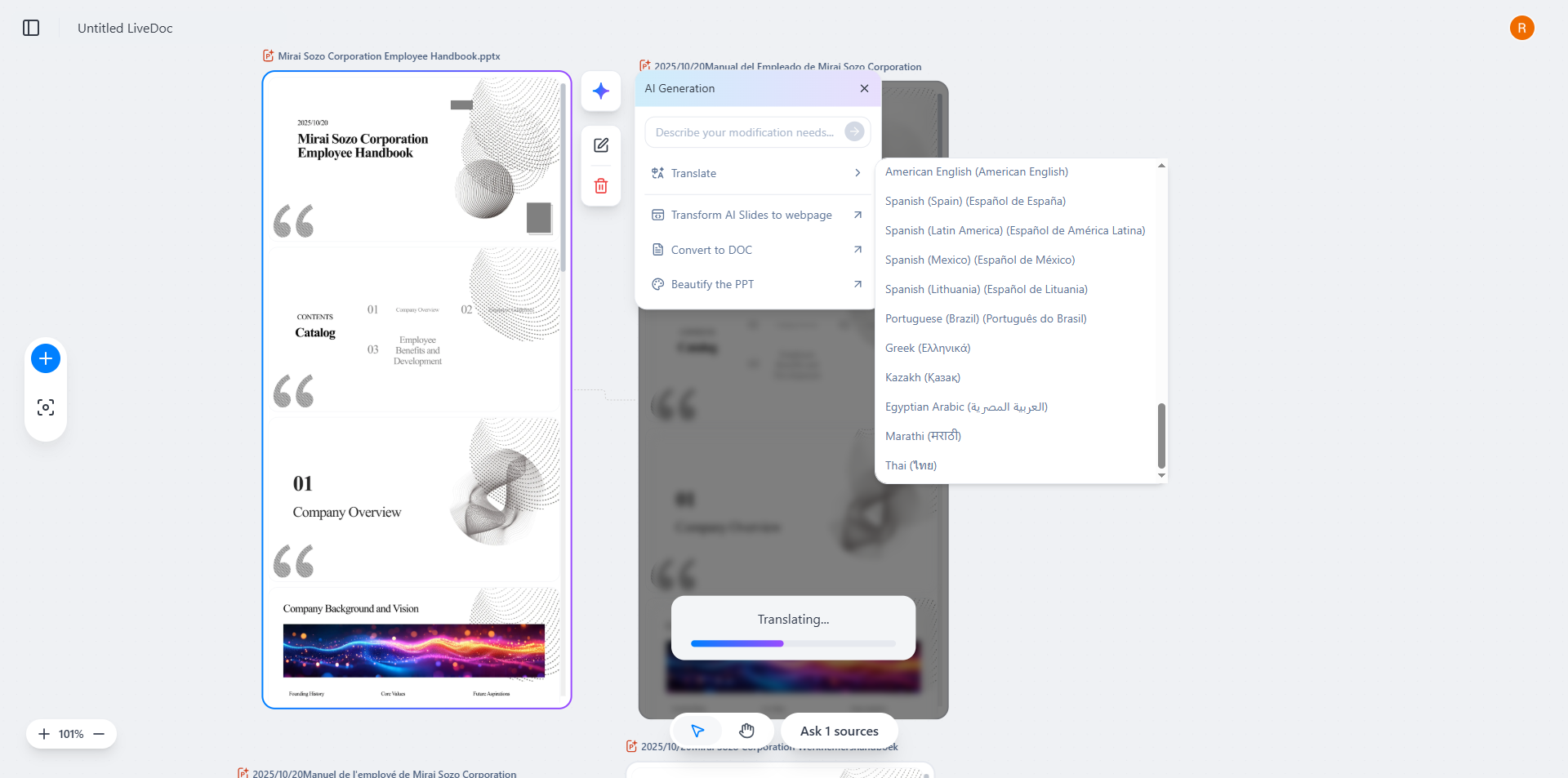
Pick the original language of your document and the language you want to translate into. Our tool supports dozens of major world languages.
Translate and Download
Click Translate and the Translation Agent gets to work — collaborating with the Design Agent to ensure layout integrity and the Research Agent to verify terminology. You can then download the translated version as a ready-to-share file — layout and visuals intact.
Benefits of Using Felo LiveDoc for PowerPoint Translation
- No copy-pasting needed
- Supports text, images, and slides
- Keeps layout, fonts, and styling
- Context-aware translation with professional AI agents
- Fast, accurate, and browser-based
- Intelligent format transformation — convert to PDF, web pages, or email briefs
Felo LiveDoc makes it easy to translate whole PowerPoint documents — perfect for business presentations, educational decks, training sessions, and more.
When You Should Use It
- You're preparing a multilingual presentation
- You want to send a client-friendly deck in their native language
- You need to translate slides for global teams, partners, or classrooms
- You're localizing content for different markets
Final Thoughts
You don't need complicated plugins or tedious manual edits to translate PowerPoint documents. With Felo LiveDoc, you can turn your presentation into a fully translated, polished, and professional file — ready to share with any audience.
Translate Your PowerPoint Document Now
Popular Translation Pairs
- Spanish to English
- Chinese to English
- Arabic to English
- French to English
- Korean to English
- German to English
FAQs
How do I translate an entire PowerPoint presentation?
Upload your file to Felo LiveDoc's canvas. The Translation Agent automatically translates the entire document into your chosen language — preserving layout and formatting while collaborating with other AI agents to ensure professional quality.
Can PowerPoint translate the entire presentation?
No. Microsoft PowerPoint's translation tool only translates selected text. It doesn't support full-document translation or layout preservation.
How do I change the language of a PowerPoint file?
To change the language for spellcheck or editing, go to Review > Language > Set Proofing Language in PowerPoint. For full translation, use a document translator like Felo LiveDoc.
Can I translate PowerPoint documents for free?
Yes, Felo LiveDoc offers translation capabilities for PowerPoint files with flexible pricing options.
Related articles
- How to Convert Documents with Felo LiveDoc
- Creating Multilingual Presentations Made Easy
- AI-Powered Document Translation Best Practices
Felo LiveDoc: Not just a document tool — it's your AI Agent workspace where presentations evolve into world-class, multilingual deliverables.