OpenClaw and Claude Code: Sharing Memory Across AI Agents

MemClaw workspaces work across OpenClaw, Claude Code, Gemini CLI, and Codex. One project, one workspace, all your agents in sync — no copy-pasting context between tools.
Most people who use AI agents heavily end up using more than one. OpenClaw for autonomous workflows. Claude Code for hands-on coding sessions. Maybe Gemini CLI for specific tasks. Each tool has strengths, and switching between them based on the task is a reasonable workflow.
The problem: each agent has its own memory silo. Context you've built up in OpenClaw isn't available in Claude Code. Decisions logged in one tool don't carry over to the other. You end up maintaining separate context for the same project across multiple agents — or re-briefing every time you switch.
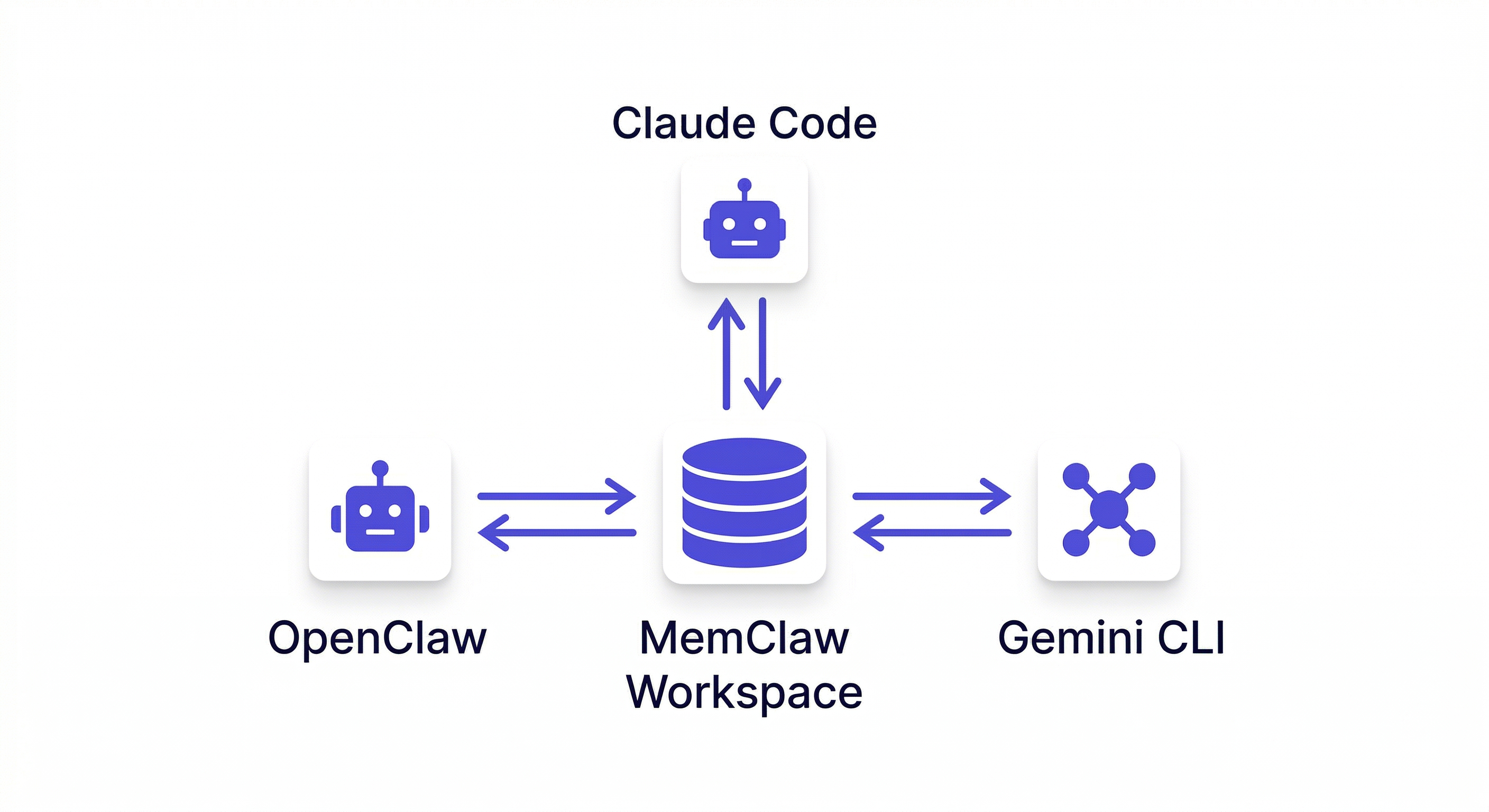
MemClaw solves this with a single shared workspace layer. One project, one workspace, all agents reading from and writing to the same context.
The Information Island Problem
When you use multiple AI agents on the same project without shared memory, you create information islands.
OpenClaw knows about the architecture decisions you made last week. Claude Code doesn't — you're starting fresh every time you open it. Research you ran in OpenClaw isn't accessible when you switch to Claude Code for implementation. A decision logged in one tool is invisible to the other.
The workaround most people try: copy-paste context between tools. Paste the relevant decisions into Claude Code before starting. Re-run research that already exists in OpenClaw. Keep a shared notes doc and manually update it after each session.
This works, barely, for one or two projects. It breaks down completely when you're managing multiple projects across multiple agents. The overhead of keeping context synchronized manually becomes larger than the time the agents are saving you.
How Shared Workspaces Work
MemClaw stores workspace data in Felo's infrastructure — not inside any specific agent. This means any agent with MemClaw installed can access the same workspace.
The flow:
OpenClaw session → loads workspace → does work → saves decisions/artifacts
Claude Code session → loads same workspace → sees everything from OpenClaw session
No sync step. No export/import. No copy-pasting. The workspace is the shared layer, and both agents read from and write to it directly.
Supported Agents
MemClaw currently works with:
- OpenClaw — install to
~/.openclaw/skills/ - Claude Code — install to
~/.claude/skills/ - Gemini CLI — install to
~/.gemini/skills/ - Codex — install to
~/.codex/skills/
Install once per agent, use the same workspace across all of them.
Installation Across Agents
OpenClaw
bash <(curl -s https://raw.githubusercontent.com/Felo-Inc/memclaw/main/scripts/openclaw-install.sh)
Or via natural language:
Please install https://github.com/Felo-Inc/memclaw and use MemClaw after installation.
Claude Code
/plugin marketplace add Felo-Inc/memclaw
/plugin install memclaw@memclaw
Or manual:
git clone https://github.com/Felo-Inc/memclaw.git
cp -r memclaw/memclaw ~/.claude/skills/
API Key (same for all agents)
export FELO_API_KEY="your-api-key-here"
Get your key at felo.ai/settings/api-keys.
The same FELO_API_KEY works across all agents — one key, one workspace layer, all tools connected.
Real Workflow: Research in OpenClaw, Build in Claude Code
This is the most common cross-agent pattern: use OpenClaw for autonomous research and planning, then switch to Claude Code for hands-on implementation.
Phase 1 — Research and planning in OpenClaw
Load the Project Alpha workspace

Run competitive research on the top 5 competitors
→ Save that analysis to the workspace as "Competitor research"

Draft the technical architecture
→ Save that as "Architecture doc v1"

Add decision: using microservices not monolith —
easier to scale individual components independently
OpenClaw runs autonomously, saves everything to the workspace.
Phase 2 — Implementation in Claude Code
Load the Project Alpha workspace
→ Agent: "Project Alpha workspace loaded. Competitor research,
   architecture doc, and 3 decisions available."

Show me the architecture doc
→ Agent retrieves and displays the document from the workspace

Let's implement the auth service based on this architecture
→ Agent has full context from the OpenClaw research phase
No copy-pasting. No re-running research. The Claude Code session picks up exactly where the OpenClaw session left off.
Real Workflow: Multiple Agents on the Same Team
If you're working with a team where different people use different agents, shared workspaces eliminate the context synchronization problem.
Developer A uses Claude Code. Developer B uses OpenClaw. They're both working on the same project.
Without shared memory: Developer A makes an architectural decision in their Claude Code session. Developer B has no idea. They make a conflicting decision in their OpenClaw session. You discover the conflict two days later.
With shared workspaces:
Developer A (Claude Code):
Add decision: using Redis for session storage —
agreed with the team in the April 3 standup

Developer B (OpenClaw):
Load the Project Alpha workspace
What decisions have been made about the infrastructure?
→ "Redis for session storage (logged April 3 by Developer A)"
Decisions are visible across agents and across team members. No synchronization overhead.
Openclaw Memory Management Guide
What Gets Shared
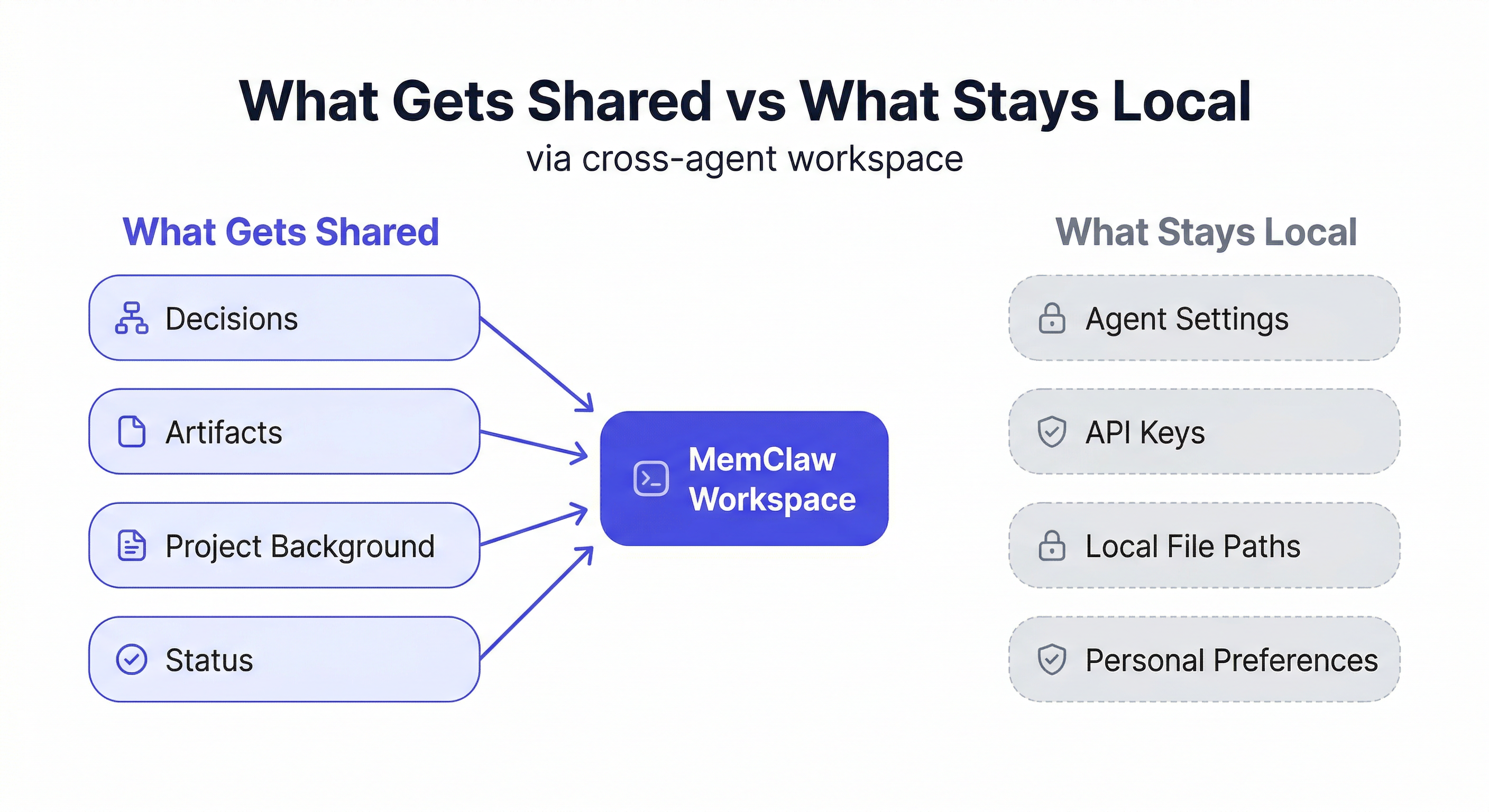
Everything stored in a workspace is accessible to any agent that loads it:
- Living README — project background, preferences, current status
- Decisions — all logged decisions with rationale
- Artifacts — documents, reports, analyses, code snippets
- Tasks — task history and current pending items
There's no agent-specific storage. Everything goes into the shared workspace, everything is readable by any agent.
What Doesn't Get Shared
The workspace stores context, not conversation history. Each agent session has its own conversation — the messages, the back-and-forth, the intermediate outputs that didn't get explicitly saved.
If you want something from a conversation to be available in a future session or a different agent, you need to save it explicitly:
Save that analysis to the workspace
Add this decision to the workspace
Update workspace status with what we just decided
Anything not explicitly saved stays in the conversation and disappears when the session ends. This is intentional — not every intermediate output is worth keeping, and the workspace stays clean.
Switching Agents Mid-Project
One practical benefit of shared workspaces: you can switch agents mid-task without losing context.
Say you're in an OpenClaw session doing research, and you realize you need to write some code. Instead of trying to do it in OpenClaw, you switch to Claude Code:
OpenClaw:
Save the current research findings to the workspace
Update status: research done, ready to implement

Claude Code:
Load the Project Alpha workspace
→ Sees the research findings and current status immediately
Let's implement based on the research
The handoff is clean. No context lost. No re-briefing.
This also works in reverse — start implementation in Claude Code, hit a question that needs research, switch to OpenClaw to investigate, come back to Claude Code with the findings already in the workspace.
Why Agent Specialization Makes Cross-Agent Memory Essential
As AI agent tooling matures, a clear pattern is emerging: different agents have different strengths, and serious workflows use more than one.
OpenClaw excels at autonomous, multi-step workflows — running a research task end-to-end, executing a sequence of operations without hand-holding, coordinating between multiple sub-agents. It's built for "set it and let it run."
Claude Code excels at interactive, hands-on sessions — pair programming, code review, iterative problem-solving where you want to stay in the loop. It's built for "work with me on this."
Using both together is a natural workflow: let OpenClaw run the autonomous parts, use Claude Code for the interactive parts. The problem is that without shared memory, these two modes of working produce isolated context silos. Everything OpenClaw learned in its autonomous phase isn't available when you switch to Claude Code for the interactive phase.
Shared workspaces are what make agent specialization practical. Each agent does what it's good at, and the workspace is the connective tissue that keeps the project context unified.
Common Cross-Agent Patterns
Pattern 1: Autonomous research → interactive implementation
Use OpenClaw to run research autonomously (competitor analysis, codebase exploration, documentation review), save findings to the workspace, then switch to Claude Code for hands-on implementation with the research already available.
Pattern 2: Interactive planning → autonomous execution
Use Claude Code to think through an approach interactively — discussing trade-offs, making decisions, defining the scope — log everything to the workspace, then hand off to OpenClaw for autonomous execution of the defined plan.
Pattern 3: Parallel agents, shared context
Run OpenClaw and Claude Code on different aspects of the same project simultaneously. Both write to the same workspace. Decisions made in one are immediately visible to the other. No synchronization meeting required.
Pattern 4: Agent handoff on long-running projects
Start a project in Claude Code during the interactive setup phase. As the project matures and the workflows become more defined, shift execution to OpenClaw for autonomous handling. The workspace preserves the full project history through the transition.
Agent-Specific vs. Shared Context
One nuance worth understanding: not everything belongs in the shared workspace.
The shared workspace is for project-level context — decisions, status, artifacts, background. Things that any agent (or teammate) needs to be oriented on the project.
Agent-specific conversation history stays in each agent's session and isn't persisted. This is intentional. If you're debugging a specific issue in Claude Code, the back-and-forth of that debugging session doesn't need to be in the shared workspace — just the outcome (a decision, a saved artifact, a status update).
The discipline is: when a session produces something that future sessions need, save it to the workspace explicitly. The rest can live and die in the conversation.
Getting Started with Cross-Agent Workflows
If you're already using Claude Code, adding MemClaw takes about two minutes:
/plugin marketplace add Felo-Inc/memclaw
/plugin install memclaw@memclaw
export FELO_API_KEY="your-api-key-here"
Get your API key at felo.ai/settings/api-keys.
Once installed, create a workspace for any active project and start logging context — decisions, status, background. When you bring OpenClaw into the same project, point it at the same workspace. Both agents are now operating from the same ground truth.
The workflow shift is small. The compounding benefit over weeks and months of multi-agent work is significant.
Frequently Asked Questions
Do I need to install MemClaw on every agent I use? Yes — MemClaw needs to be installed on each agent that should have workspace access. The workspace data is shared, but each agent needs the skill to read and write it.
Is the workspace data synced in real time? Yes. When one agent writes to the workspace, the update is immediately available to any other agent that loads the workspace.
What if two agents write to the workspace simultaneously? MemClaw handles concurrent writes. The last write wins for status updates; decisions and artifacts are appended rather than overwritten.
Can I have agent-specific context that isn't shared? Not currently. All workspace data is shared across agents. Agent-specific context stays in the conversation history, which isn't persisted.
Does this work with self-hosted OpenClaw? Yes. MemClaw connects to Felo's API for storage, so it works regardless of how OpenClaw is deployed.