MemClaw for Teams: Shared AI Memory for Engineering Teams

MemClaw shared workspaces give your whole engineering team the same project context in Claude. Every developer loads the same decisions, conventions, and sprint goals.
Individual developers lose time re-explaining context to Claude. Engineering teams have the same problem, multiplied by headcount.
Every developer on the team runs their own Claude Code sessions. Without shared context, each session starts from zero. Different developers get conflicting suggestions. New team members spend weeks learning decisions that should already be documented. Architecture knowledge lives in people's heads instead of in the tools.
MemClaw shared workspaces fix this.
The Team Context Problem
Here's what happens on a typical engineering team without shared AI memory:
Developer A spends a session with Claude establishing that the team uses Repository Pattern, JWT in httpOnly cookies, and React Query for async operations. Claude gives accurate, consistent advice based on this context.
Developer B starts a new session. Claude has no idea about any of those decisions. It suggests direct DB queries in route handlers, localStorage for tokens, and useEffect + fetch for async. Developer B either catches these issues — wasted time — or doesn't, and the codebase drifts.
New team member joins. They ask Claude about the codebase. Claude gives generic advice with no knowledge of the team's actual patterns, decisions, or history. Onboarding takes longer than it should.
The root cause is the same in every case: each Claude session is isolated. There's no shared source of truth for project context.
How MemClaw Shared Workspaces Work
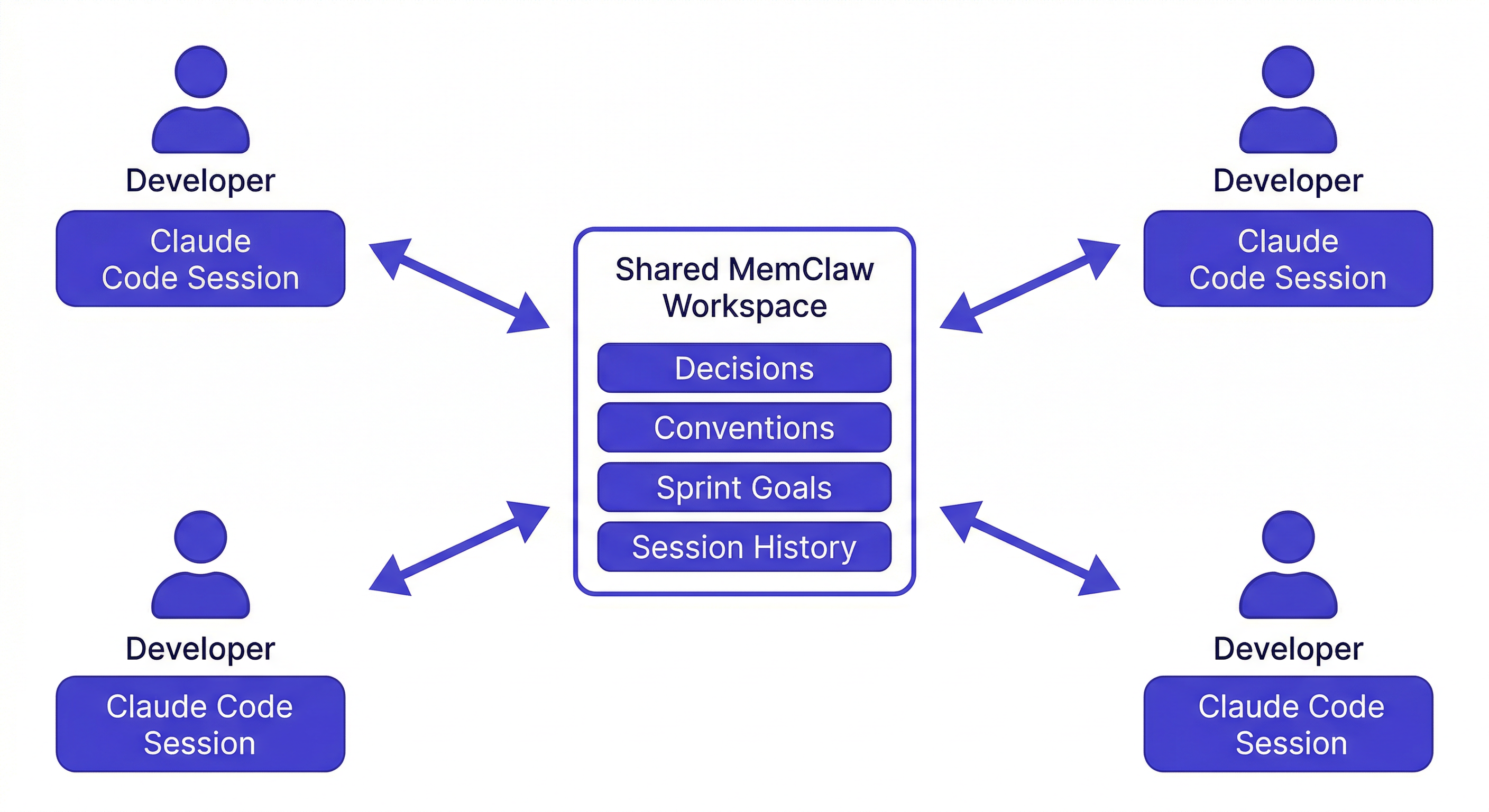
MemClaw workspaces can be shared across a team. All team members install MemClaw on their Claude Code setup and connect to the same workspace.
When any team member loads the workspace, Claude reads the shared project context — architecture decisions, conventions, sprint goals, known issues. When anyone saves a decision or status update to the workspace, it's immediately available to every other team member's next session.
The result: a living, growing knowledge base that every team member's Claude Code sessions can access. One workspace. All agents in sync.
Set up MemClaw for your team →
What Gets Shared
A shared MemClaw workspace contains exactly what a team needs to give Claude consistent context:
Architecture decisions — with dates and reasoning:
2026-02-15: Rejected GraphQL in favor of REST.
Reason: Team familiarity, simpler debugging, no need for flexible queries at current scale.
Conventions and patterns:
- All DB access via Repository Pattern (/lib/repositories/)
- JWT in httpOnly cookies — never localStorage
- React Query for all async operations
- Error boundaries at route level
Current sprint goals:
Sprint 8 (ends 2026-04-11):
- Complete checkout flow
- Fix Stripe webhook duplicate trigger
- Add order confirmation emails
Known issues and gotchas:
- Stripe webhook fires twice — always check idempotency key
- Redis pool: max 10 connections in dev environment
- Auth middleware doesn't run on /api/webhooks/* routes
Session history — what was built, when, by whom.
This is the context that normally lives in someone's head, or in a Notion doc that nobody keeps up to date. In a MemClaw workspace, it's accessible to every Claude session automatically.
Setting Up MemClaw for Your Team
Step 1: Install MemClaw on each developer's machine
Each team member installs MemClaw on their own Claude Code setup:
/plugin marketplace add Felo-Inc/memclaw
/plugin install memclaw@memclaw
Then set the API key:
export FELO_API_KEY="your-api-key-here"
Get a key at felo.ai/settings/api-keys. The workspace owner creates the workspace, then invites teammates.
Step 2: Create the shared workspace
One team member creates the workspace:
Create a workspace called [Project Name] Team
Then invite teammates from the workspace settings.
Step 3: Seed the workspace
Spend 30 minutes documenting your team's baseline context:
- Tech stack and versions
- Architecture decisions (with dates and reasons)
- Coding conventions
- Current sprint goals
- Known issues
This is a one-time investment. Everything after this point updates automatically as the team works.
Step 4: Load at the start of each session
Each developer loads the workspace at the start of their session:
Load the [Project Name] Team workspace
Claude reads the shared context and immediately gives advice consistent with the team's actual patterns and decisions.
Step 5: Keep it current
After making a meaningful decision, log it immediately:
Add decision to workspace: using JWT httpOnly cookies for auth
because security team requires it — not negotiable
Update sprint goals at the start of each sprint. Log known issues when you find them. The workspace grows as the team works.
Benefits for Different Team Roles
Senior developers: Architecture decisions are documented and enforced across every Claude session, not just the sessions where the senior dev was present.
Junior developers: Full context from day one. Claude gives advice based on the team's actual patterns — not generic best practices that contradict what the codebase already does.
New team members: Onboarding is faster. Load the workspace and Claude already knows the project history, the decisions that are off the table, and where things currently stand.
Tech leads: Architecture knowledge is no longer locked in people's heads. Decisions are written down with rationale, accessible to every session.
A Concrete Example
A junior developer joins a team mid-project. Without shared workspace context:
Junior dev: "How should I handle auth in this route?" Claude: "I'd recommend using localStorage for tokens with a short expiry..." Junior dev implements it. Senior dev reviews and catches it. Time wasted.
With a shared workspace that contains the team's decision log:
Junior dev: "How should I handle auth in this route?" Claude: "Based on your team's conventions, use JWT in httpOnly cookies — the decision log shows this was mandated by your security team on March 3rd. Never use localStorage. Here's how to implement it consistently with your existing auth middleware..."
The difference is the context. With a shared workspace, every developer — regardless of experience level — gets advice that's consistent with the team's actual decisions.
Cross-Agent Team Workflows
If different team members use different agents — some on Claude Code, some on OpenClaw or Gemini CLI — the same workspace works across all of them. A decision logged in a Claude Code session is available in an OpenClaw session. Research saved by one agent is accessible to all.
See how MemClaw works across agents →
This matters for teams where different people prefer different tools, or where you're bringing on contractors who use different setups.
Getting Started
The fastest path to a working team setup:
- Each developer installs MemClaw (memclaw.me)
- One developer creates the shared workspace and invites the team
- Spend 30 minutes seeding with baseline context
- Every developer loads the workspace at session start
The shared context compounds quickly. After the first week, Claude gives consistent advice across every developer's session. After a month, the workspace is a comprehensive record of project decisions that new team members can onboard from in minutes.