MemClaw for Product Managers: Persistent AI Memory Across Sprints

MemClaw gives Claude persistent memory for your product work — decisions, roadmap, stakeholder constraints, and sprint context that carries across every session.
Product managers deal with a constant stream of decisions, requirements, and stakeholder context. Without memory, every Claude session starts from zero — re-explaining product vision, stakeholder constraints, and decisions that were settled weeks ago.
MemClaw gives Claude persistent memory for your product work.
The Product Manager Context Problem
Monday: You brief Claude on the Q2 roadmap, stakeholder constraints, and the decision to prioritize checkout over search. Claude helps you draft the spec — accurate, relevant, consistent with your actual product strategy.
Wednesday: New session. Claude has no idea. It suggests prioritizing search — the exact direction you explicitly decided against. You re-explain. Again.
New sprint starts: You explain the full product context from scratch. Which stakeholders care about which outcomes. What's in scope and what isn't. Why certain approaches were ruled out. Every session, the same re-briefing overhead.
This isn't a Claude problem. It's a memory problem. Claude is good at product work — strategy, PRDs, prioritization frameworks, stakeholder analysis. It just doesn't remember your specific product between sessions.
What MemClaw Stores for Product Work
A MemClaw workspace for product management stores exactly the context Claude needs to give useful, consistent product advice:
Product vision and strategy — the high-level direction, what you're optimizing for, what you're explicitly not doing.
Stakeholder decisions — who has influence over what, constraints they've set, agreements that are off the table for renegotiation. With dates.
Current sprint context — what's in scope this sprint, what was deprioritized and why, what dependencies exist.
Known constraints — engineering capacity, design lead times, legal review requirements, platform limitations.
Roadmap decisions — why certain features were sequenced the way they were, what's been explored and ruled out.
This context doesn't change session-to-session. Once it's in the workspace, it's there. Claude reads it at session start and gives advice that's consistent with your actual product situation — not generic PM advice.
Setting Up MemClaw for Product Work
Install MemClaw on Claude Code:
/plugin marketplace add Felo-Inc/memclaw
/plugin install memclaw@memclaw
Set your API key:
export FELO_API_KEY="your-api-key-here"
Create a workspace per product:
Create a workspace called [Product Name]
Each product gets its own isolated workspace. No cross-product context bleed.
Seed the workspace — spend 30 minutes adding the context Claude will need in every session:
Add to workspace: We're building a B2B invoicing SaaS for mid-market companies.
Q2 priority is checkout completion rate — we deprioritized search after
user research showed checkout friction was the primary churn driver.
Key constraint: legal review required for any pricing-related changes, 2-week lead time.
Add decision: We decided against freemium after finance modeling showed
CAC wouldn't recover. All new accounts go through sales. Not up for re-discussion.
Update workspace status: Sprint 8 in progress — checkout redesign.
Payment form complete. Email confirmation flow is next.
That's it. Now every session starts with Claude already oriented to your product.
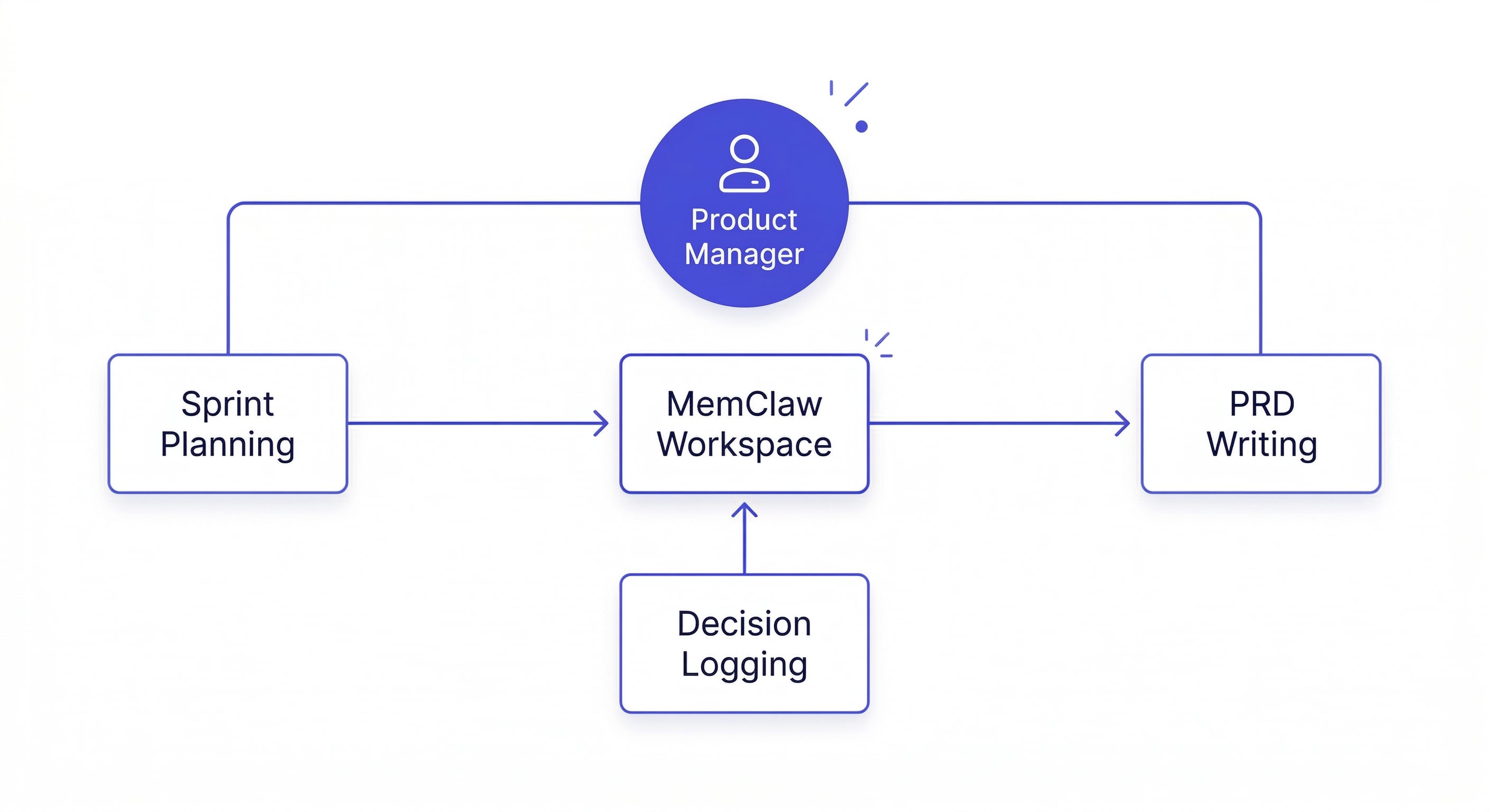
Daily PM Workflow with MemClaw
Sprint planning:
Load the [Product Name] workspace
What do we know about the checkout flow status?
Help me prioritize this sprint given our Q2 goals
Claude reads the workspace and gives advice that reflects your actual roadmap, constraints, and stakeholder agreements — not generic sprint planning frameworks.
Logging decisions immediately:
After a stakeholder meeting or key decision:
Add decision to workspace: Sarah approved the simplified checkout form.
Three-field version only (name, card, address). Full billing details
deferred to post-launch based on her preference to ship faster.
Agreed 2026-04-07.
This decision is now available to every future session. Claude won't suggest re-opening it with a compelling counter-argument six weeks from now.
PRD writing:
Write a PRD for the email confirmation feature based on our current sprint goals and product strategy
Claude writes the PRD consistent with your actual product strategy — the one in the workspace — instead of a generic template.
Stakeholder prep:
I have a review with the VP of Engineering tomorrow about the checkout timeline.
What do we know about the current status and key risks?
Claude reads the workspace and gives you a briefing based on what's actually logged — not what it infers from the conversation history.
Multi-Product Management
If you're managing multiple products — a common situation for senior PMs — create one workspace per product:
Create a workspace called Checkout Product
Create a workspace called Search Product
Create a workspace called Mobile App
Each workspace is completely isolated. Loading the Checkout workspace gives Claude only Checkout context. Switching to Search gives Search context. No cross-product bleed.
This is the same isolation model that makes MemClaw valuable for multi-client freelancers — and it works just as well for multi-product PMs.
How freelancers use MemClaw for multiple clients →
What Compounds Over Time
After a few weeks of consistent use:
Week 1: You're still adding context manually — product vision, initial decisions, stakeholder constraints. Claude is useful but still asks clarifying questions.
Week 3: The workspace has 10-15 logged decisions, a current sprint context, and a roadmap overview. Claude stops asking questions you've already answered.
Week 6+: New sessions start with Claude already oriented. You spend zero time re-briefing and more time on actual product work.
The decisions you log this sprint become the context that prevents bad suggestions in next sprint's sessions. Every decision logged is time saved in every future session.
Getting Started
- Install MemClaw (memclaw.me)
- Create a workspace per product
- Add product vision, key decisions, and current sprint context
- Load the workspace at the start of each session
Product management with Claude gets more useful the more context it has. MemClaw makes sure that context accumulates and persists instead of starting over every session.