MemClaw for Startups: AI Memory for Fundraising, Product, and Team Context

MemClaw gives Claude persistent memory for startup work — fundraising context, product decisions, and team knowledge that carries across every AI session.
Startups operate at a pace where context is constantly shifting. Fundraising conversations, product decisions, hiring, customer feedback — all running in parallel, all requiring different context from Claude.
Without memory, every Claude session starts from zero. You re-explain the pitch narrative before every investor prep session. You re-brief Claude on the product roadmap every time you need a spec. You reconstruct what was decided in last week's all-hands.
MemClaw gives Claude persistent memory for your startup work.
What Startups Need from AI Memory
Startup work has a few distinct memory requirements that don't fit the typical developer use case:
Fundraising context: Which VCs you're talking to, where each conversation stands, your pitch narrative, common objections and how you've been answering them. This context is high-stakes and fast-changing — you need Claude to know it precisely.
Product context: Roadmap decisions, customer feedback patterns, technical constraints, what's been built, what's next. This is the same project memory that MemClaw handles for developers — it works just as well for non-technical founders.
Team context: Who's responsible for what, hiring pipeline status, key decisions made in team meetings. Especially useful for multi-founder teams who want Claude to have the same context regardless of who's running the session.
Setting Up MemClaw for Startup Work
Install MemClaw on Claude Code:
/plugin marketplace add Felo-Inc/memclaw
/plugin install memclaw@memclaw
Set your API key:
export FELO_API_KEY="your-api-key-here"
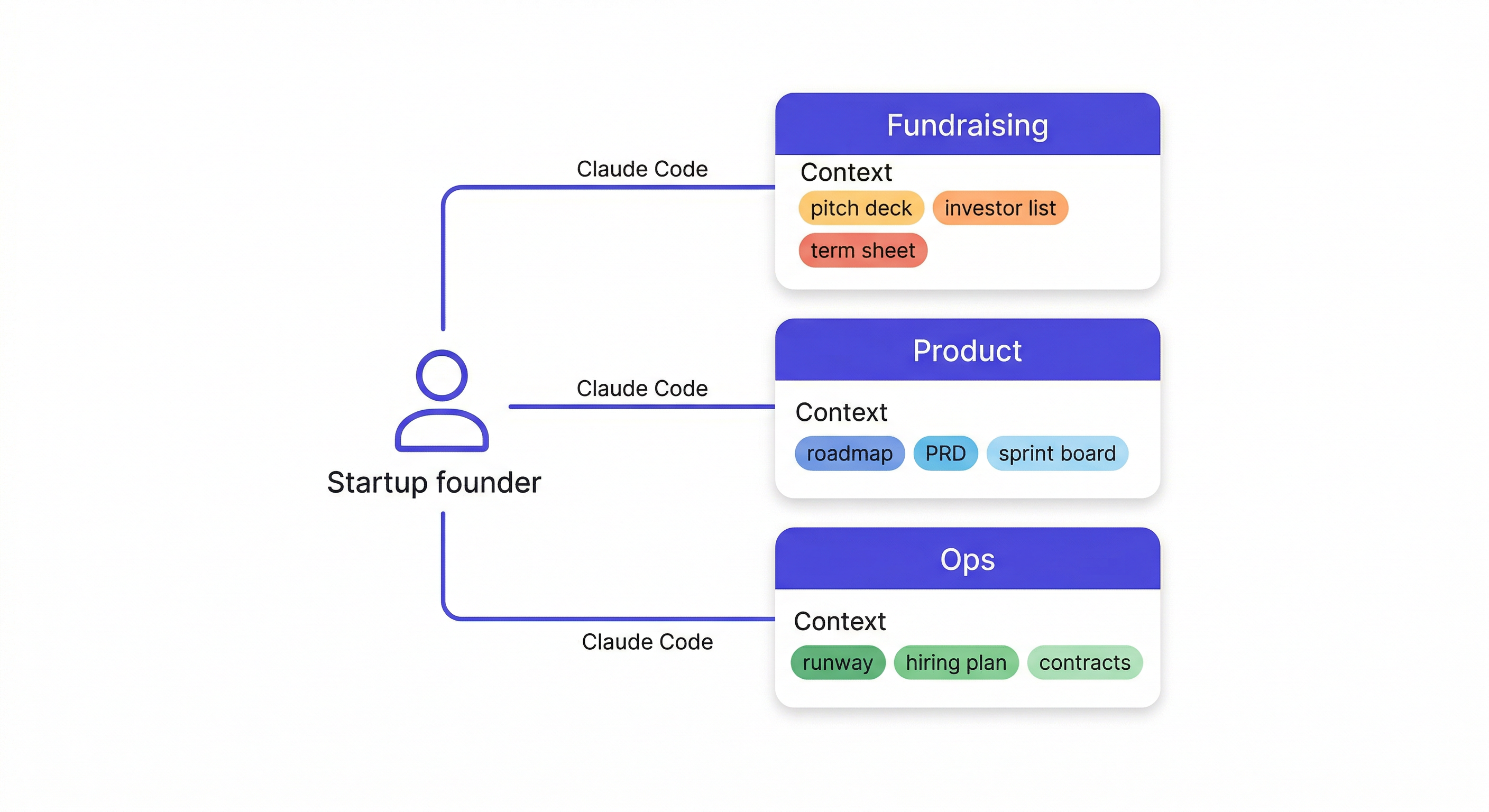
Create workspaces by function:
Create a workspace called Fundraising
Create a workspace called Product
Create a workspace called Ops
Separating by function keeps context clean. Fundraising conversations don't bleed into product sessions. Product decisions stay in the product workspace.
Seed each workspace with the baseline context Claude will need:
For the fundraising workspace:
Add to workspace: Series A raise, target $4M, 18-month runway.
Currently in conversations with: Benchmark (intro stage), Sequoia (second meeting done),
a16z (warm intro pending). Lead investor not yet identified.

Add to workspace: Core pitch narrative — we solve the enterprise AI deployment problem.
Enterprises want AI but can't deploy it because of security and compliance constraints.
Our infrastructure layer makes compliant AI deployment 10x faster.

Add decision: We're not pitching the consumer angle anymore.
Focus is 100% enterprise after customer discovery showed 8/10 of our best leads were enterprise.
For the product workspace:
Add to workspace: B2B SaaS, enterprise AI deployment infrastructure.
Current focus: SOC 2 compliance module — launch target Q2 2026.
Customer feedback themes: setup time is the #1 friction point.

Add decision: Deprioritized the self-serve tier for now.
All sales through direct channel until we hit $1M ARR. Revisit after.
Startup Use Cases
Investor meeting prep:
Load the Fundraising workspace
I have a meeting with Benchmark tomorrow — what do we know about
where that conversation stands? Help me prep.
Claude reads the workspace and gives you a briefing based on actual logged context: where the conversation is, what was discussed last time, what objections to expect based on previous interactions.
Post-meeting debrief:
Load the Fundraising workspace
Meeting with Sequoia went well. They asked hard questions about enterprise sales motion
and wanted to see pipeline data. Positive on the team, cautious on market size.
Second partner meeting in two weeks. Update the workspace.
MemClaw saves the debrief to the workspace. Next time you prep for Sequoia, Claude already knows the conversation history.
Product decision logging:
Load the Product workspace
Add decision: We're building native Kubernetes integration before the Azure connector.
Three enterprise customers specifically requested Kubernetes, only one asked for Azure.
Logged 2026-04-07.
Six weeks from now when you're planning the next sprint, Claude won't suggest deprioritizing Kubernetes — it knows it's already committed.
Pitch deck iteration:
Load the Fundraising workspace
Help me strengthen the market size slide — I'm getting pushback on TAM from VCs
Claude knows your pitch narrative, your current VC feedback, and the objections you've been fielding. It gives feedback specific to your situation, not generic pitch advice.
Multi-Founder Teams
Share the workspace across founders:
Create a workspace called [Company Name] Fundraising
Then invite co-founders from the workspace settings. Everyone loads the same workspace and operates from the same context — regardless of who last talked to the VC or made the product decision.
This eliminates a significant source of inconsistency in early-stage startups: two founders briefing Claude differently and getting conflicting outputs.
The Fundraising Workspace in Practice
A typical fundraising workspace after four weeks of active use:
- Investor tracker: 8 firms, each with status, last touchpoint, and key notes
- Pitch narrative: Current version with recent refinements noted
- Objection log: 12 objections encountered in meetings with how you've been answering them
- Data requests: What VCs have asked for, what you've sent
- Next actions: What's pending for each active conversation
Claude can read this and give prep that's actually specific to where each conversation is — not generic investor prep advice.
MemClaw Artifacts Guide — how to store documents and research in your workspace →
Getting Started
- Install MemClaw (memclaw.me)
- Create workspaces for fundraising, product, and ops
- Seed each with the baseline context that normally lives in your head
- Load the relevant workspace at the start of each session
The startup use case for MemClaw is slightly different from the developer use case — it's less about code patterns and more about operational context. But the core value is the same: Claude gives better, more specific advice when it knows your actual situation.