MemClaw vs Memory OS: Best AI Memory for Claude Code Developers

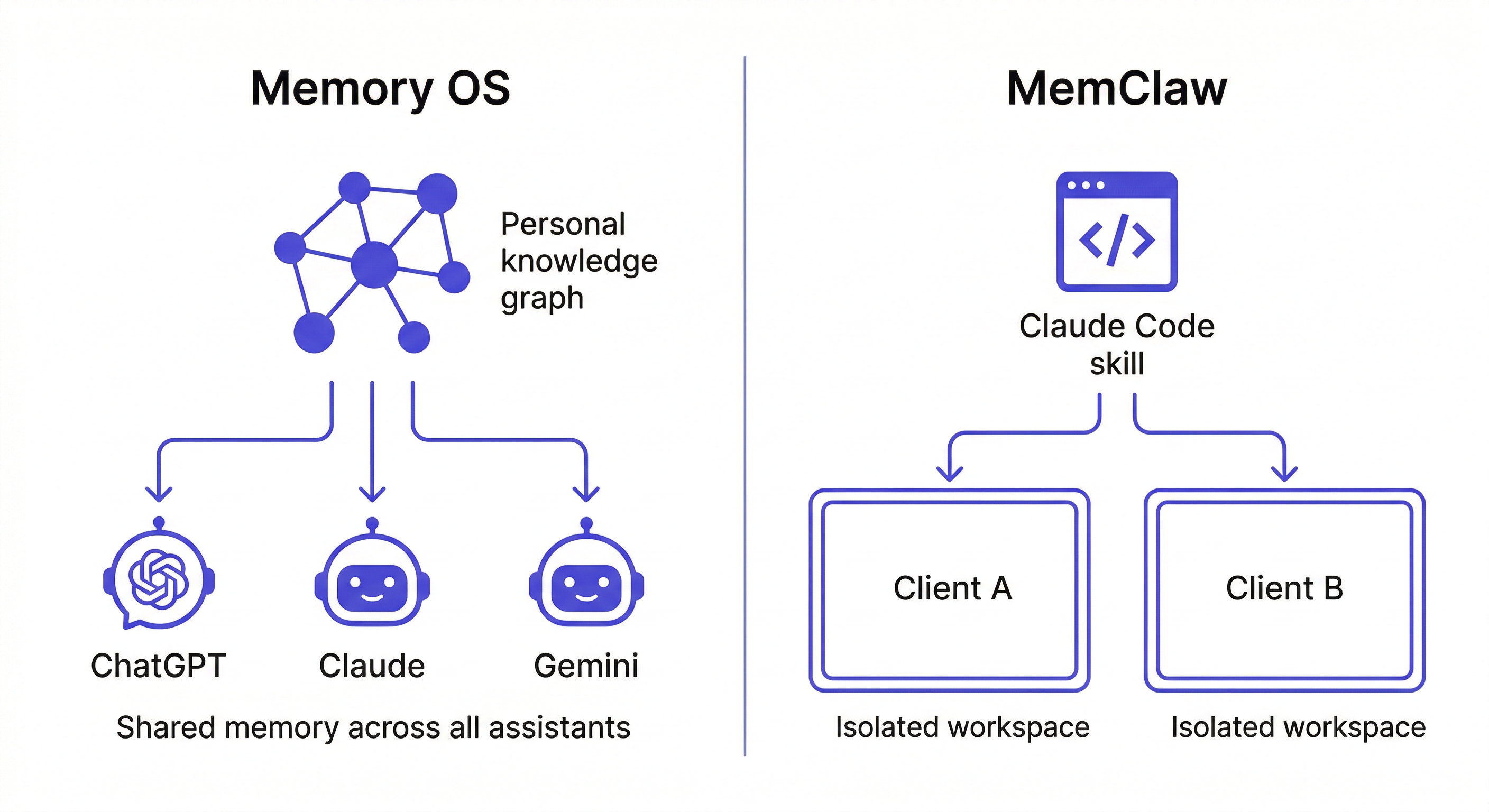
Memory OS builds a personal knowledge graph around you. MemClaw builds project-scoped workspaces around your work. One is personal memory, the other is project memory — here's the difference.
MemClaw vs Memory OS: Best AI Memory for Claude Code Developers
Both MemClaw and Memory OS add persistent memory to AI agents. But they model memory differently, and that difference matters.
Core distinction:
- Memory OS = personal knowledge graph built around you — your preferences, habits, and accumulated knowledge across all AI interactions
- MemClaw = structured workspaces built around your projects — architecture decisions, conventions, and goals scoped per project
One is personal memory. The other is project memory. They solve different problems, and for professional development work, the difference matters a lot.
What Is Memory OS?
Memory OS is an AI memory layer built around a personal knowledge graph. It works across multiple AI assistants and builds personal context about you over time — your communication style, preferences, recurring topics, accumulated knowledge.
Strengths:
- Cross-AI consistency: same personal context across ChatGPT, Claude, Gemini
- Builds automatically from your interactions
- Personal context persists without explicit logging
Weaknesses for professional developer work:
- No native Claude Code skill integration — using it requires building a custom wrapper
- Personal memory model doesn't map to project-scoped work
- No team sharing model
- Unified knowledge graph means context from different projects can mix
What Is MemClaw?
MemClaw is a workspace-based memory skill for Claude Code (and OpenClaw, Gemini CLI, Codex).
Strengths:
- Installs as a skill — no custom code, no configuration files
- Project isolation: each project has its own workspace, zero cross-project bleed
- Team sharing: whole team loads the same workspace, operates from the same context
- Conversation history tied to specific projects
- Semantic search within a project's workspace
Weaknesses:
- Focused on Claude Code and compatible agents — not a cross-AI personal memory tool
- Requires a Felo API key (managed service)
- Needs a network connection for workspace storage
The Claude Code Integration Gap
This is the most concrete difference for Claude Code users.
MemClaw installs as a Claude Code skill:
/plugin marketplace add Felo-Inc/memclaw
/plugin install memclaw@memclaw
After installation, you interact with it entirely in natural language:
Load the Acme workspace
Add decision: using Postgres, client DBA requirement
Save that report to the workspace
What did we decide about the API structure?
No configuration files. No custom code. Works within the existing Claude Code workflow.
Memory OS has no equivalent native Claude Code integration. To get Memory OS working with Claude Code, you'd need to build a custom integration layer — code that calls Memory OS's API, formats the response, and injects context into Claude's system prompt. For a developer who just wants Claude to remember their projects, this is significant overhead.
If you're already in a Claude Code workflow and want persistent project memory, MemClaw's skill installation is the path of least resistance.
Project Isolation: Why It Matters for Professional Work
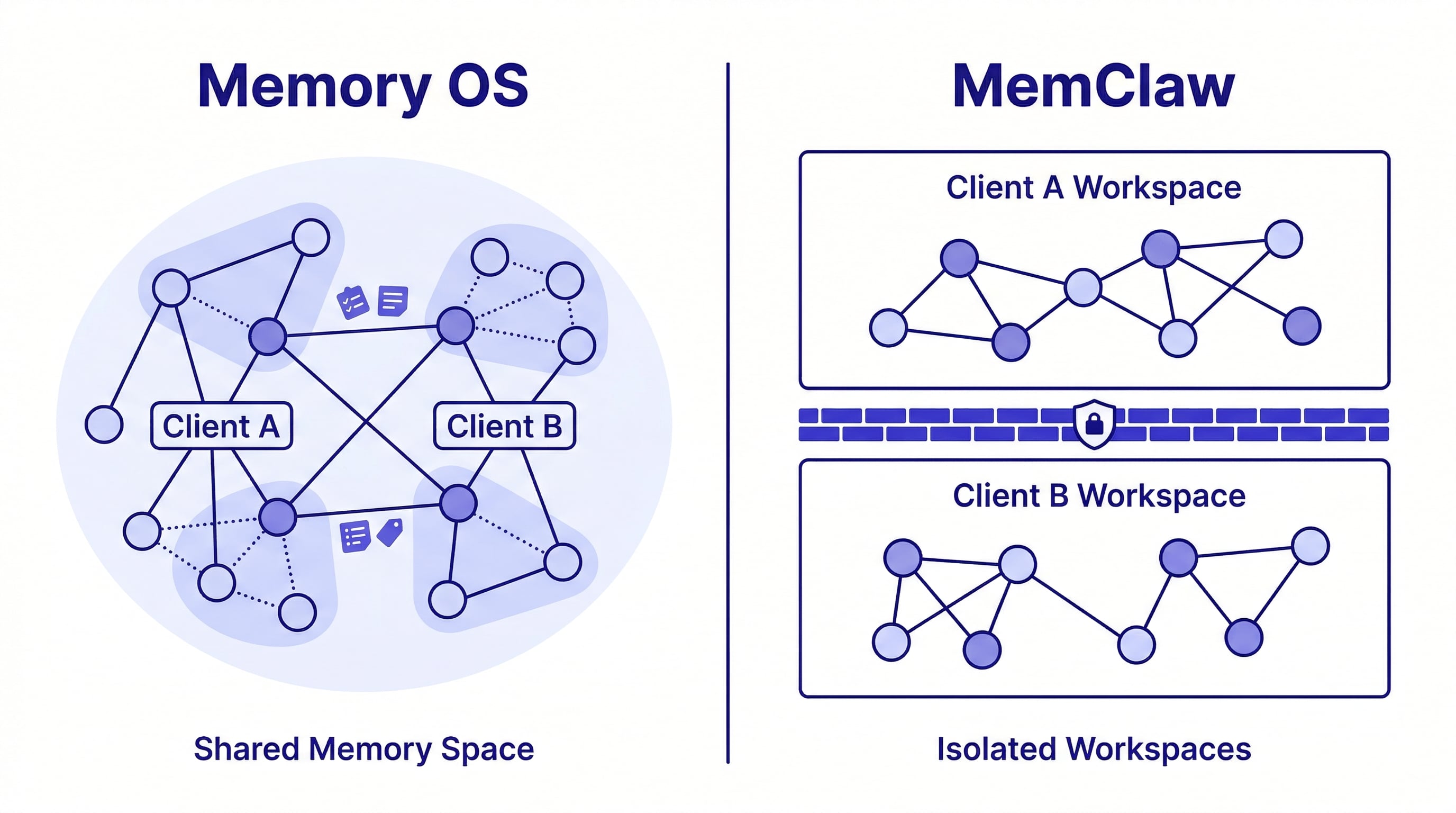
MemClaw: Each project has its own isolated workspace. Loading a workspace gives Claude exactly that project's context — nothing from other projects leaks in.
Load the Client A workspace
→ Claude has Client A context only

Load the Client B workspace
→ Claude switches to Client B context. Client A is gone from the picture.
For professional work with multiple clients or projects, this isolation is essential. A suggestion grounded in Client A's constraints showing up in a Client B session is worse than no suggestion at all.
Memory OS: Unified personal knowledge graph. Everything you've told any AI assistant is potentially retrievable in any session. For personal use, this is a feature. For professional work with separate clients, it's a liability — information from one client's context can surface in another's session.
Team Use Cases
MemClaw: Workspaces can be shared across a team. All developers load the same workspace and operate from the same project context. A decision logged in one session is available to everyone's next session.
This matters when:
- A new developer joins and needs to understand the project's decisions
- Different team members are working on different parts of the same project
- You're handing off a project and need the context to transfer
MemClaw for Teams — full guide →
Memory OS: Personal by design. There's no team sharing model — the memory is tied to you as an individual user.
What MemClaw Stores vs Memory OS
| MemClaw | Memory OS | |
|---|---|---|
| Architecture decisions | ✓ With dates and rationale | Indirectly (extracted from conversations) |
| Project conventions | ✓ Explicit | Indirectly |
| Sprint goals | ✓ Structured | Not designed for this |
| Session history | ✓ Per project | ✓ Across all interactions |
| Personal preferences | Partially (per workspace) | ✓ Primary use case |
| Cross-AI consistency | Within supported agents | ✓ Primary use case |
| Team sharing | ✓ | ✗ |
| Project isolation | ✓ Hard isolation | ✗ Unified graph |
When to Choose Memory OS
Memory OS is the right choice when:
- You use multiple AI assistants (ChatGPT, Claude, Gemini) and want consistent personal context across all of them
- Your memory needs are primarily personal rather than project-specific
- You want AI to remember your communication style, preferences, and accumulated knowledge
- You're not primarily a Claude Code developer
- You want a cross-AI layer that works regardless of which AI tool you use
When to Choose MemClaw
MemClaw is the right choice when:
- You use Claude Code for professional project work
- You work on multiple projects or multiple clients simultaneously
- You need clean isolation between projects
- You're on a team where context needs to be shared
- You want persistent memory without writing any custom integration code
How to build a knowledge base that persists →
Can You Use Both?
Yes. They address fundamentally different layers.
Memory OS handles your personal AI experience across tools. MemClaw handles your project context within Claude Code. A developer who uses multiple AI assistants for personal use and Claude Code for professional project work could legitimately use both without conflict.
The professional project memory (what decisions were made on Client A, what the architecture conventions are, where things stand) is what MemClaw handles. The personal preferences layer (how you like responses formatted, your communication style) is what Memory OS handles.
The Bottom Line
For Claude Code developers doing professional project work — especially anyone managing multiple projects or clients — MemClaw's project isolation and skill-based installation make it the more practical choice.
For developers who want consistent personal AI memory across multiple AI tools, Memory OS addresses something MemClaw doesn't.
The decision usually comes down to: are you primarily solving for project context (MemClaw) or personal context across AIs (Memory OS)?
Disclosure: This comparison was written by the Felo team, which makes MemClaw. Memory OS is represented accurately based on its public documentation and is recommended without qualification for its intended use case.