Memory for AI Agents: Patterns and Tools for Persistent Agent Context

AI agents are powerful for one-shot tasks but fall apart for ongoing work without memory. Here's how to implement persistent memory for code review, research, and project management agents.
AI agents are powerful for one-shot tasks. For ongoing work — code review, research synthesis, project management — they fall apart without memory.
The problem isn't capability. A Claude Code agent can review code as well as any tool available. The problem is that each run starts from zero. It doesn't remember what it reviewed last week, what patterns it flagged, what decisions the team made about those patterns.
This guide covers how to give agents persistent memory — and the patterns that make it actually work.
Why Agent Memory Is Different from Chatbot Memory
The chatbot memory problem is: "it forgot what I said earlier in the conversation."
The agent memory problem is: "it forgot everything from the last 50 runs."
Agents are designed to complete tasks autonomously — often running on a schedule or triggered by events. For agents that run repeatedly on the same domain (daily code reviews, weekly research synthesis, project status updates), statelessness means they can't build on their own work.
A code review agent that can't remember it flagged the same pattern last week will flag it again. And again. And again. Without memory, it's not a code review agent — it's a code review generator that produces redundant output.
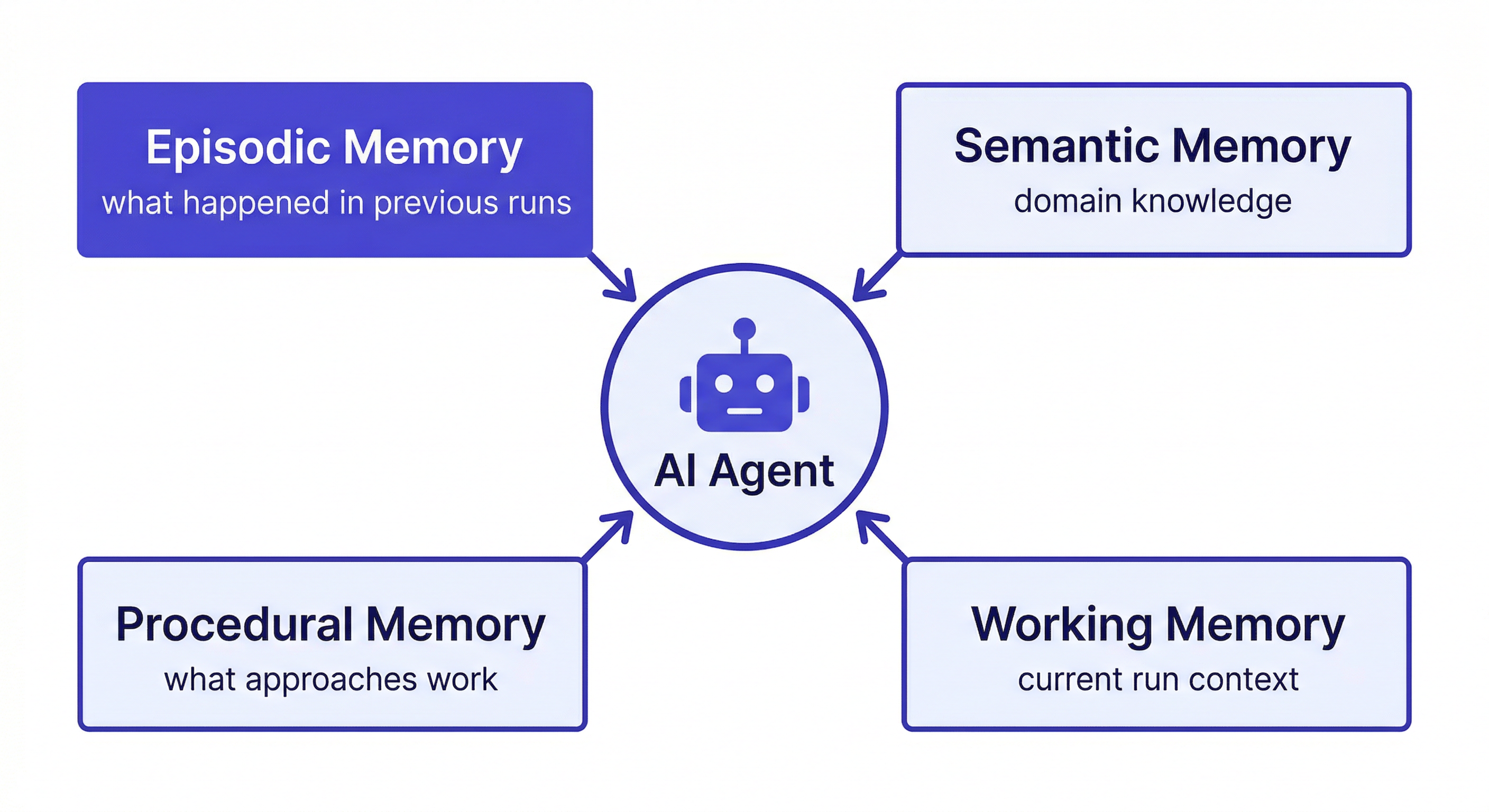
What agents actually need from memory:
- Episodic memory — what happened in previous runs, decisions made, outcomes observed
- Semantic memory — domain knowledge about the project: coding standards, architecture patterns, team conventions
- Procedural memory — what approaches work and don't work in this specific context
- Working memory — what's relevant to the current run (loaded fresh each time from persistent storage)
Memory Patterns for Common Agent Types
Code Review Agent
What to remember:
- Coding standards and team conventions
- Past review decisions and their rationale
- Known anti-patterns in this codebase
- Files or patterns that frequently cause issues
Write-back format:
Add to workspace: [DATE] REVIEW PATTERN
File: src/middleware/auth.ts
Issue: Direct DB queries in route handlers
Decision: Flag as blocking — violates Repository Pattern convention
Reasoning: Established 2026-01-15, all DB access must go through /lib/repositories/
Load at agent start:
Load the [Project] workspace
I'm running the weekly code review. Load the coding standards and recent review decisions.
Claude reads the workspace and reviews code against the team's actual conventions — not generic best practices that may contradict what the codebase already does.
Research Agent
What to remember:
- Research questions and their current status
- Sources evaluated with quality assessment
- Conclusions reached
- Dead ends — critically important
Add to workspace: [DATE] RESEARCH DEAD END
Topic: Distributed caching for the checkout flow
Approach tried: Redis with write-through cache
Result: Race conditions in webhook handler — idempotency keys weren't respected
Do not retry: This approach has a fundamental incompatibility with our webhook architecture
Dead-end logging is the most valuable thing a research agent can do. Without it, every new run re-explores the same failed approaches.
Load at agent start:
Load the [Project] workspace
I'm continuing research on [topic]. What have we already explored? What were the dead ends?
Project Status Agent
What to remember:
- Project goals and success criteria
- Decisions made with reasoning
- Current blockers and their owners
- Stakeholder preferences and constraints
Write-back format:
Update workspace status: [DATE]
Sprint 8 status: checkout flow 80% complete, webhook handler done, retry logic pending
Blocker: waiting on Stripe's updated idempotency key documentation
Owner: Marcus following up with Stripe support
Next milestone: retry logic done by 2026-04-14
Implementing Agent Memory with MemClaw
Install MemClaw on Claude Code:
/plugin marketplace add Felo-Inc/memclaw
/plugin install memclaw@memclaw
export FELO_API_KEY="your-api-key-here"
Create a workspace per agent domain:
Create a workspace called Code Review Agent
Create a workspace called Research Agent
Create a workspace called Project Status
Session start pattern:
Load the Code Review Agent workspace
I'm running the weekly review for [repo]. Load the coding standards and any decisions from recent reviews.
Mid-session queries:
Check the workspace — have we already reviewed how auth middleware handles JWT validation?
What patterns have we flagged as blocking in the past?
Write-back at session end:
Add to the workspace: flagged three instances of direct DB queries in the new payment routes.
Team convention is Repository Pattern for all DB access. These need to be fixed before merge.
Save this as a review decision for the payment module.
The Write-Back Problem
Automatic memory extraction is unreliable. Agents instructed to "remember everything important" over-store noise or under-store genuinely important decisions. The reliable pattern is explicit write-back.
Build write-back instructions into your agent's system prompt or session start:
At the end of every run, before finishing:
1. Summarize what you did and what you found
2. List any decisions made and the reasoning
3. List any approaches tried that didn't work
4. Update the workspace status
5. Add all of this to the workspace with today's date
This takes 30–60 seconds per run. The compounding effect over weeks makes it one of the highest-value habits in any agent workflow.
Evaluating Agent Memory Quality
Three questions that reveal whether your agent memory is working:
Can the agent answer "what did we try last time?" accurately? If yes, episodic memory is working.
Does the agent re-explore approaches it already ruled out? If it does, dead-end logging is broken or not happening.
Is the agent getting better over time — more specific, more consistent with team conventions, faster to identify relevant patterns? If yes, the memory is compounding. If the agent feels the same after six months as it did on day one, the memory isn't being used effectively.
Getting Started
- Identify which agents in your workflow run repeatedly on the same domain
- Create a workspace for each agent type (memclaw.me)
- Seed the workspace with the baseline knowledge the agent needs
- Load the workspace at the start of each agent run
- Build explicit write-back into every session end
The compounding starts from the first run that writes back useful context.