GPT-6.1 Sol API: Near-Astra Performance at a Lower Cost

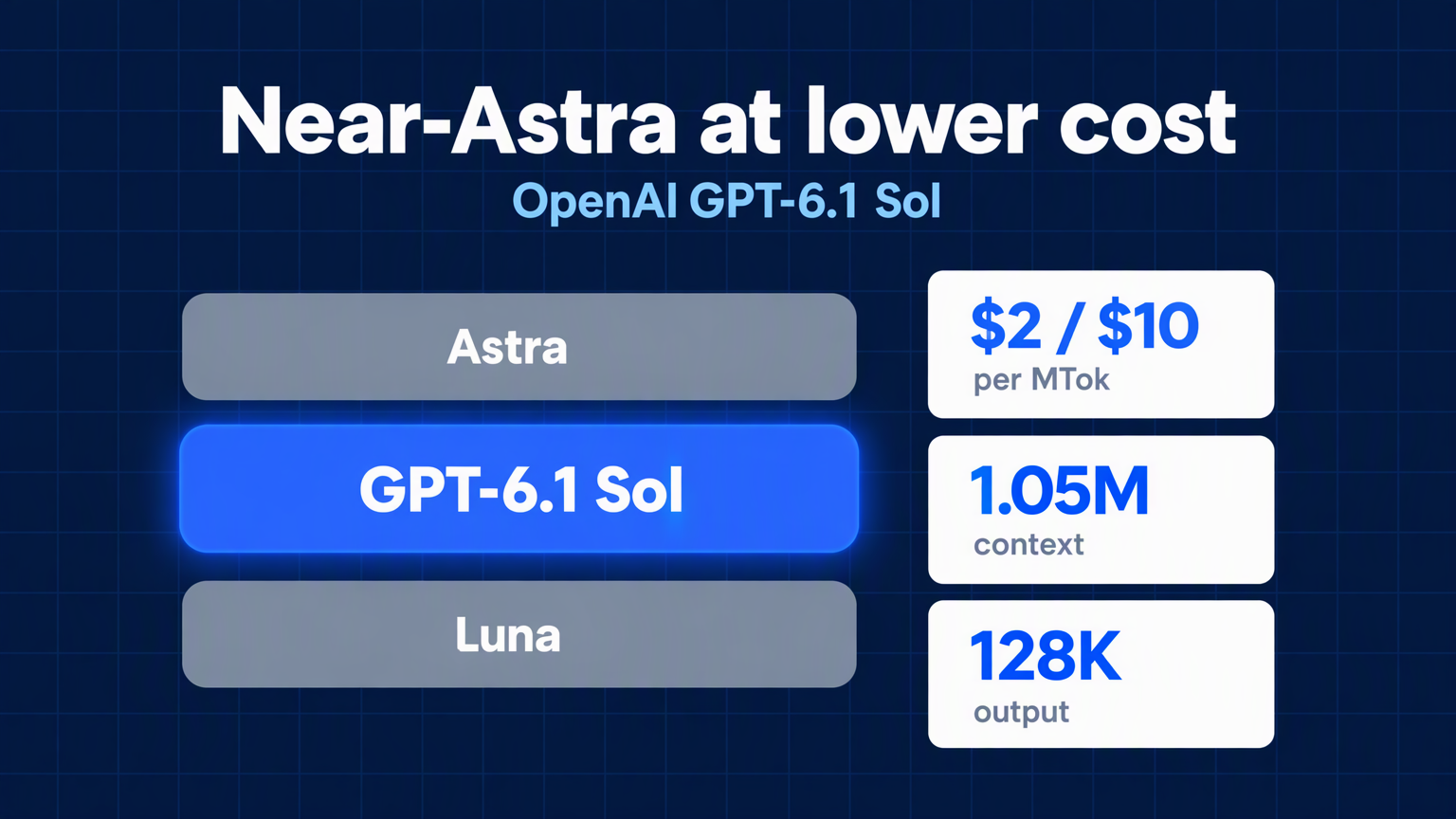
OpenAI GPT-6.1 Sol brings near-Astra performance for coding, computer use, and professional work at $2/$10 per million tokens with a 1.05M context window.
OpenAI's newest Sol model is not trying to be the smartest model in the room. It is trying to be the one you can afford to run all day.
GPT-6.1 Sol sits between the flagship GPT-6 Astra and the lightweight GPT-6 Luna. OpenAI's own model page describes it in one line: "Near-Astra performance for complex work at a lower cost." For teams building agentic coding tools, computer-use agents, and document-heavy workflows, that tradeoff is the whole point.
This guide covers what GPT-6.1 Sol actually ships with, what it costs, how it differs from GPT-6 Sol and Astra, and how to call it through the Felo API Platform.
What GPT-6.1 Sol is
GPT-6.1 Sol is a reasoning model built for complex coding, computer use, and professional work. OpenAI positions it as the balanced option in the GPT-6 family: more capable than Luna, cheaper than Astra, and strong enough that many production workloads will not need the flagship at all.
The model page is direct about how to use it: compare Sol against Astra on your own tasks, then decide whether the quality difference justifies the price difference. That is unusually practical guidance, and it reflects the model's purpose. Sol is a cost-control lever, not a benchmark trophy.
Felo's model page summarizes the same position from the platform side. GPT-6.1 Sol is "an upgrade to GPT-6 Sol, still positioned below the flagship GPT-6 Astra." It handles agentic coding, computer use, document-heavy professional work, and multi-step workflow automation, approaching Astra-level results on those tasks at a much lower cost. Compared with GPT-6 Sol, Felo notes fewer factual errors and closer adherence to explicit restrictions.
GPT-6.1 Sol is the model you reach for when the task is hard, long, and repeatable — and the bill has to stay predictable.
GPT-6.1 Sol specs at a glance
OpenAI publishes the full specification on the model page. Here is the short version.
| Specification | GPT-6.1 Sol |
|---|---|
| Model ID | gpt-6.1-sol |
| Default snapshot | gpt-6.1-sol |
| Context window | 1,050,000 tokens |
| Maximum input tokens | 922,000 |
| Maximum output tokens | 128,000 |
| Knowledge cutoff | April 30, 2026 |
| Input modalities | Text, image |
| Output modalities | Text |
| Unsupported modalities | Audio, video |
| Reasoning token support | Yes |
| Reasoning effort | low, medium (default), high, xhigh, max |
| Unsupported reasoning effort | none, minimal |
| Data residency | US and EU |
Two details matter more than the headline numbers.
First, reasoning effort cannot be turned off. GPT-6.1 Sol does not support none or minimal. If you are migrating from a model that allowed those settings, OpenAI recommends starting with low and comparing results on representative tasks.
Second, tool calling requires the Responses API. GPT-6.1 Sol supports Chat Completions for requests without tools, but any workflow that calls functions, searches files, browses the web, or drives a computer needs to move to Responses. That is not a limitation unique to Sol — it is the direction OpenAI has been pushing the entire platform.
GPT-6.1 Sol pricing: what $2/$10 actually buys
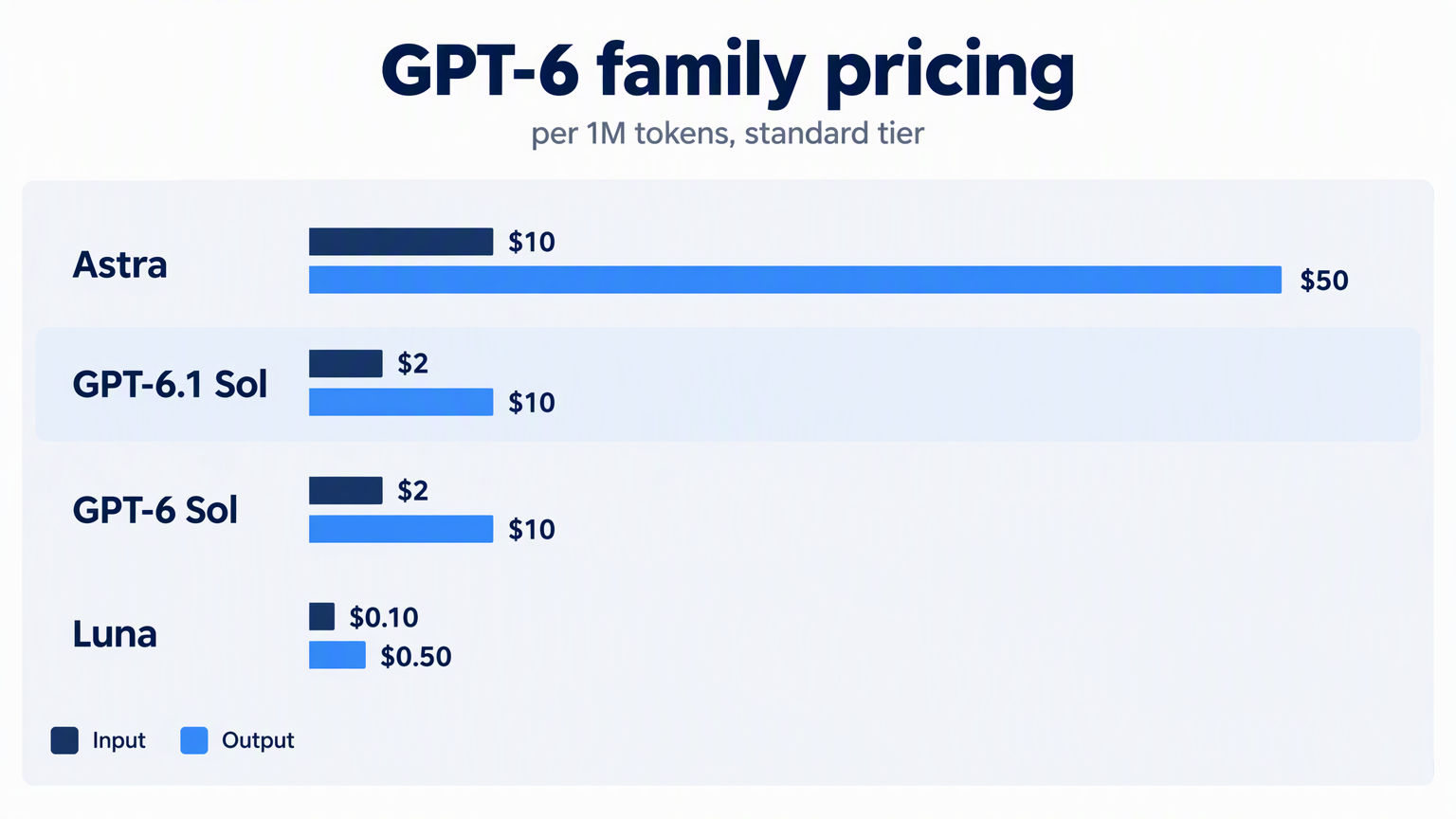
OpenAI's standard pricing for GPT-6.1 Sol is $2 per million input tokens and $10 per million output tokens. The full token table includes cache pricing, which changes the math for long-running agents.
| Metric | Price per 1M tokens |
|---|---|
| Input | $2.00 |
| Cached input | $0.10 |
| Cache writes | $2.50 |
| Output | $10.00 |
A few rules sit underneath that table:
- Cached input costs 5% of the uncached rate. OpenAI prices GPT-6.1 Sol cache reads at 0.05x, compared with 0.1x for most GPT-5.6 and later models. That is a meaningful discount for agents that reuse a large system prompt or repository context on every turn.
- Cache writes cost 1.25x the uncached input rate. You pay $2.50 per million tokens to write a prefix into cache, then $0.10 per million to read it back.
- Long context costs more. Prompts above 272K input tokens are billed at 2x input and cache rates and 1.5x output for the entire request. At that size, input becomes $4, cached input $0.20, cache writes $5, and output $15 per million tokens.
- Batch and Flex are 50% cheaper. If your workload can tolerate asynchronous processing, the effective rate drops to $1 input and $5 output per million tokens.
- Fast mode costs 2x Standard. You pay for lower latency, not for more intelligence.
- Regional processing adds a 10% premium where it is available.
The cache-read discount is the quiet headline. A coding agent that reuses the same 100,000-token repository context across twenty turns pays $0.10 per million cached tokens instead of $2.00 per million fresh input tokens. Over a long session, that difference compounds fast.
For comparison, GPT-6 Astra lists at $10 input and $50 output per million tokens. GPT-6.1 Sol is one-fifth the price on both sides of the token meter. GPT-6 Luna is cheaper still at $0.10 input and $0.50 output, but it gives up the near-Astra capability that makes Sol interesting.
What's new in GPT-6 that Sol can use
GPT-6.1 Sol inherits the GPT-6 platform features that OpenAI introduced with the Astra generation. Several of them matter specifically for agentic workloads.
Async tool calling
Normally, a function call pauses the model until your application returns a result. With async tool calling, you set async: true on a tool definition and the model keeps working — reasoning, calling other tools, or answering independent parts of the request — while your application runs the slow job in the background.
Your application still executes the tool and manages pending work. When the job finishes, you return the output in a later Responses request using the original call_id. OpenAI's docs describe this as a way to start slow lookups early and fill in the answer when the data arrives.
For Sol, this is a natural fit. A coding agent can kick off a long test suite, keep reviewing other files, and fold the test results in when they land.
Mid-turn steering
Mid-turn steering lets a user send a correction or a new requirement while the model is still working. Over a WebSocket connection to the Responses API, the server preserves completed work and folds the update into a continuation.
The important caveat: steering does not rewrite output already sent, undo earlier actions, or cancel tools that have already started. It changes where the work goes next, not where it has been. If steering interrupts the original response, that response ends with incomplete_details.reason: "steered" and a new response carries the update.
Change reasoning mid-conversation
You can raise or lower reasoning effort during a conversation by adding a configuration_update input item. The updated effort applies until another update overrides it. OpenAI recommends keeping the request-level reasoning.effort unchanged so the prompt prefix stays cacheable.
That combination — cheap cache reads plus adjustable reasoning — is what makes Sol economical for mixed workloads. Use low for routine follow-ups, then switch to xhigh when the task turns difficult, without rewriting the conversation.
Multi-agent (beta)
Multi-agent is available as a beta feature with GPT-6.1 Sol and all GPT-5.6 models. A root agent can spawn subagents that work in parallel, each with its own bounded context, then synthesize their results into a final answer.
OpenAI's docs recommend it for tasks that split into independent workstreams: exploring separate parts of a large codebase, comparing proposals, researching sources in parallel, or investigating several possible causes of a failure at once. The default max_concurrent_subagents is 3.
The tradeoff is token usage. More agents means more tokens, so multi-agent pays off when parallel speed and focused context matter more than raw token economy.
Compaction and persisted reasoning
Long-running agents eventually fill their context window. Compaction reduces context size while preserving the state needed for later turns. You can enable server-side compaction by setting context_management with compact_threshold in a Responses request; the server emits an encrypted compaction item when the rendered token count crosses the threshold.
GPT-6.1 Sol also supports reasoning.context: "all_turns", which lets compatible reasoning items from earlier turns carry into the next sample. Persisted reasoning stays opaque — the API never returns the model's raw reasoning text — but it gives the model continuity across a long session.
WebSocket mode
WebSocket mode keeps a persistent connection to the Responses API and sends only new input items each turn. OpenAI reports up to roughly 40% faster end-to-end execution for rollouts with 20 or more tool calls. For a model built around agentic coding and computer use, that is a direct latency win.
GPT-6.1 Sol vs GPT-6 Sol vs Astra vs Luna
The GPT-6 family now has four tiers. Picking between them is mostly a question of how much quality you need and how often the workflow runs.
| Model | Positioning | Input / Output per 1M | Best for |
|---|---|---|---|
| GPT-6 Astra | Highest intelligence | $10 / $50 | Demanding reasoning, coding, and professional work |
| GPT-6.1 Sol | Near-Astra at lower cost | $2 / $10 | Complex coding, computer use, document-heavy work |
| GPT-6 Sol | Previous Sol tier | $2 / $10 | Existing Sol workloads before upgrade |
| GPT-6 Luna | Fastest and most cost-effective | $0.10 / $0.50 | Focused, high-volume tasks |
GPT-6.1 Sol and GPT-6 Sol share the same headline price, but they are not the same model. Felo's page describes GPT-6.1 Sol as an upgrade with fewer factual errors and closer adherence to explicit restrictions. The cache-read rate is also halved: $0.10 per million tokens instead of $0.20. If you already run GPT-6 Sol in production, the upgrade improves both quality and caching economics at the same list price.
OpenAI's model-selection guide maps reasoning effort to task type:
- GPT-6.1 Sol at medium — complex technical work and coordinated deliverables you expect to revise.
- GPT-6.1 Sol at extra high — polished deliverables, connected visual systems, and decisions built from conflicting evidence.
- Astra at low — concise writing and content adaptation that preserve facts and nuance.
- Astra at medium — ambitious projects that need broad context, reliable interactions, and complete results.
- Astra at extra high — demanding analysis and complex deliverables with exacting requirements.
- Luna at low — fine-grained edits, well-scoped problem-solving, and simple data extraction.
- Luna at extra high — finding current context across multiple apps, prioritizing work, and solving problems with clear constraints.
The practical rule from OpenAI's Codex guidance: use Sol for repeated, long-running work across code, apps, and documents when cost matters. Keep Astra for your most demanding work. Use Luna for clear, repeatable tasks.
How to call GPT-6.1 Sol through Felo API Platform
Felo API Platform exposes GPT-6.1 Sol through compatible endpoints, so you can keep your existing SDK and change the base URL.
The model is available at:
- Chat Completions:
POST https://openapi.felo.ai/api/v1/chat/completions - Responses:
POST https://openapi.felo.ai/api/v1/responses - Messages (Anthropic-compatible):
POST https://openapi.felo.ai/api/v1/messages
Step 1: Get an API key
Create a key from your Felo API Platform account and export it:
export FELO_API_KEY="YOUR_API_KEY"
Step 2: Make your first request
curl https://openapi.felo.ai/api/v1/chat/completions \
  -H "Authorization: Bearer $FELO_API_KEY" \
  -H "Content-Type: application/json" \
  -d '{
    "model": "gpt-6.1-sol",
    "messages": [
      {"role": "user", "content": "Explain the tradeoff between reasoning effort and cost."}
    ]
  }'
Step 3: Use a compatible SDK
Point any OpenAI-compatible SDK at https://openapi.felo.ai/api/v1. For Claude-style clients, use the Anthropic-compatible base URL https://openapi.felo.ai/api.
import OpenAI from "openai";

const client = new OpenAI({
  apiKey: process.env.FELO_API_KEY,
  baseURL: "https://openapi.felo.ai/api/v1",
});

const response = await client.responses.create({
  model: "gpt-6.1-sol",
  reasoning: { effort: "medium" },
  input: "Review this pull request for correctness, security, and missing tests.",
});

console.log(response.output_text);
Step 4: Enable streaming when you need it
Add stream: true to receive server-sent events as the model works.
Felo's model page lists GPT-6.1 Sol at $2.00 per million input tokens and $10.00 per million output tokens, with launch pricing that may be up to 50% lower than official provider API rates. Final cost depends on the model, input/output mix, cache usage, and your active plan. Cache reads are billed at half of GPT-6 Sol's rate.
The platform also supports reasoning, tools, JSON output, streaming, and vision for this model, and offers a Playground for testing prompts before you write code.
Best use cases for GPT-6.1 Sol
OpenAI's guidance points to complex projects where cost matters. A few concrete patterns stand out.
Agentic coding at scale
A coding agent that reads a repository, proposes changes, runs tests, and iterates is exactly the workload Sol was built for. The 1.05M context window holds large codebases, the cache-read discount rewards reusing repository context, and async tool calling keeps the agent productive while tests run.
OpenAI's Codex guidance recommends Sol for repeated, long-running work across code and apps when cost matters, and reserves Astra for the most demanding tasks.
Computer use and workflow automation
GPT-6.1 Sol supports the full set of Responses tools, including computer_use, hosted_shell, apply_patch, mcp, and tool_search. That makes it viable for agents that operate software, fill forms, move data between systems, or automate multi-step business processes.
Felo's model page lists computer use and multi-step workflow automation as primary use cases.
Document-heavy professional work
Sol accepts text and images, which covers scanned documents, charts, screenshots, and slide decks. OpenAI's model-selection guide gives two examples: building a board presentation from financial results, and building a website from a product brief. Both involve large inputs, multiple revisions, and a quality bar that sits below "best possible" but well above "cheap and fast."
Research and analysis with parallel workstreams
With multi-agent beta enabled, Sol can split a research task into independent workstreams, run them concurrently, and reconcile the findings. Comparing vendor proposals, reviewing a pull request from three angles, or investigating several failure hypotheses are all good fits.
High-volume batch processing
Batch and Flex pricing cuts Sol's rate to $1 input and $5 output per million tokens. For overnight document processing, bulk summarization, or large-scale extraction where the output will be reviewed, that pricing changes what is economically feasible.
Migration checklist: moving from GPT-6 Sol to GPT-6.1 Sol
OpenAI recommends reviewing its migration guidance before switching from gpt-6-sol to gpt-6.1-sol. Here is the short version.
- Set the model ID. Change
modeltogpt-6.1-sol. - Fix reasoning effort. GPT-6.1 Sol does not support
noneorminimal. Replacenonewithlowand testminimalmigrations starting atlow. - Move tool calling to Responses. Chat Completions works for requests without tools. Any function calling, web search, file search, computer use, or MCP workflow needs the Responses API.
- Remove unsupported parameters. When reasoning effort is not
none, droptemperature,top_p, andtop_logprobs. In Chat Completions, also removelogprobs. In Responses, removemessage.output_text.logprobsfrominclude. - Update prompt caching config. If you are migrating from GPT-5.5 or earlier, replace
prompt_cache_retentionwithprompt_cache_options.ttlset to"30m". - Use
configuration_updatefor changing reasoning. If your app adjusts effort between turns, useconfiguration_updateitems instead of changing request-levelreasoning.effort, so the prompt prefix stays cacheable. - Check data residency. GPT-6.1 Sol supports US and EU data residency. Fast mode is not available with EU data residency.
- Test against Astra. Run both models on representative tasks and compare quality, latency, and total cost — including reasoning tokens, which are billed as output tokens.
Limitations and availability
GPT-6.1 Sol is not a universal replacement for Astra, and it is not available everywhere yet.
Capability limits. OpenAI positions Sol below Astra. For the most demanding reasoning and the highest-stakes deliverables, Astra remains the recommended model. Sol is the cost-effective option for complex work, not the maximum-quality option.
No fine-tuning. GPT-6.1 Sol does not support fine-tuning or predicted outputs. It also does not support embeddings, image generation, video, speech, transcription, translation, or moderation endpoints. It is a text-and-image-in, text-out reasoning model.
No audio or video input. Input modalities are text and image only.
Reasoning cannot be disabled. The none and minimal efforts are unsupported, so every request carries reasoning overhead.
Rollout is still in progress. OpenAI's launch rollout includes Plus, Pro, Business, Enterprise, and Edu plans in Codex on desktop and CLI, and ChatGPT Work on web and mobile. For Enterprise and Edu, the model stays off by default until an administrator enables it. Free and Go plans are not included at launch.
Fast mode has caveats. Standard and Fast modes are available at launch, but Fast mode costs 2x Standard and is unavailable with EU data residency. Ultrafast support for GPT-6.1 Sol is coming later.
Rate limits apply. Standard rate limits range from 500 RPM and 500,000 TPM on Tier 1 to 15,000 RPM and 40,000,000 TPM on Tier 5.
FAQ
What is GPT-6.1 Sol?
GPT-6.1 Sol is OpenAI's balanced GPT-6 model, positioned between the flagship GPT-6 Astra and the lightweight GPT-6 Luna. OpenAI describes it as delivering near-Astra performance for complex coding, computer use, and professional work at a lower cost.
How much does GPT-6.1 Sol cost?
OpenAI lists GPT-6.1 Sol at $2 per million input tokens and $10 per million output tokens. Cached input costs $0.10 per million tokens, and cache writes cost $2.50 per million tokens. Prompts above 272K input tokens are billed at higher long-context rates.
What is GPT-6.1 Sol's context window?
GPT-6.1 Sol has a 1,050,000-token context window, a maximum of 922,000 input tokens, and a maximum of 128,000 output tokens.
Does GPT-6.1 Sol support tool calling?
Yes, but tool calling requires the Responses API. Chat Completions is supported for requests without tools.
Can I disable reasoning on GPT-6.1 Sol?
No. GPT-6.1 Sol supports low, medium, high, xhigh, and max reasoning effort. It does not support none or minimal.
How does GPT-6.1 Sol compare with GPT-6 Sol?
GPT-6.1 Sol is an upgrade to GPT-6 Sol with fewer factual errors and closer adherence to explicit restrictions, according to Felo's model page. The two share the same headline token pricing, but GPT-6.1 Sol halves the cached input rate to $0.10 per million tokens.
Is GPT-6.1 Sol available on Felo API Platform?
Yes. Felo API Platform exposes GPT-6.1 Sol through Chat Completions, Responses, and Anthropic-compatible Messages endpoints. Launch pricing may be up to 50% lower than official provider API rates, and cache reads are billed at half of GPT-6 Sol's rate.
The bottom line
GPT-6.1 Sol is OpenAI's answer to a practical problem: the best model is often too expensive to run on every task, and the cheapest model is often not good enough. Sol splits the difference with near-Astra capability, a 1.05M context window, a 5% cache-read rate, and a price that is one-fifth of Astra's.
For teams building coding agents, computer-use workflows, and document-heavy automation, it is the model to test first. Compare it against Astra on your own tasks, watch the reasoning-token usage, and let the cost-quality tradeoff decide.
You can try GPT-6.1 Sol in the Felo API Platform Playground or call it directly with a Felo API key.
Sources
- GPT-6.1 Sol model page — OpenAI
- Using GPT-6 — OpenAI
- Model selection — OpenAI
- API pricing — OpenAI
- Codex and ChatGPT model availability — OpenAI
- Async tool calling — OpenAI
- Mid-turn steering — OpenAI
- Reasoning models — OpenAI
- Prompt caching — OpenAI
- Compaction — OpenAI
- Multi-agent — OpenAI
- WebSocket mode — OpenAI
- Fast mode — OpenAI
- Data residency — OpenAI
- GPT-6.1 Sol — Felo API Platform
This post is also available in 简体中文, 日本語, 한국어, 繁體中文, हिन्दी, Français, العربية, Русский, اردو, Bahasa Indonesia, Deutsch, Tiếng Việt, Türkçe, Italiano, ไทย, Español, বাংলা and Português.