OpenClaw Memory: How to Give Claude Persistent Memory Across Sessions

OpenClaw forgets everything after each session. This guide shows you how to add persistent memory using MemClaw — setup in 10 minutes, what to store, and how to make it a habit.
Every developer who uses Claude Code hits the same wall eventually.
You open a new session. Claude has no idea who you are, what you're building, or what you decided last week. You paste your architecture notes. You re-explain the quirky API behavior. You remind it about the naming conventions your team agreed on. Then you finally start working — until tomorrow, when you do it all again.
OpenClaw memory solves this. It's the memory layer that makes Claude actually remember.
Set up persistent memory for Claude → memclaw.me
What Is OpenClaw Memory?
OpenClaw is the skill and memory ecosystem built around MemClaw. When people search for "openclaw memory," they're looking for a way to give Claude — specifically Claude Code — a persistent memory that survives across sessions.
MemClaw is the product that delivers this. It stores your project context in organized workspaces and makes it available to Claude through the Model Context Protocol (MCP). When you start a new Claude Code session, your context loads automatically. No copy-pasting. No re-explaining.
The "openclaw" name comes from the ClawHub skill registry — the ecosystem of skills and integrations built for Claude Code. Memory is the foundational skill in that ecosystem.
Why Claude Forgets (And Why It Matters)
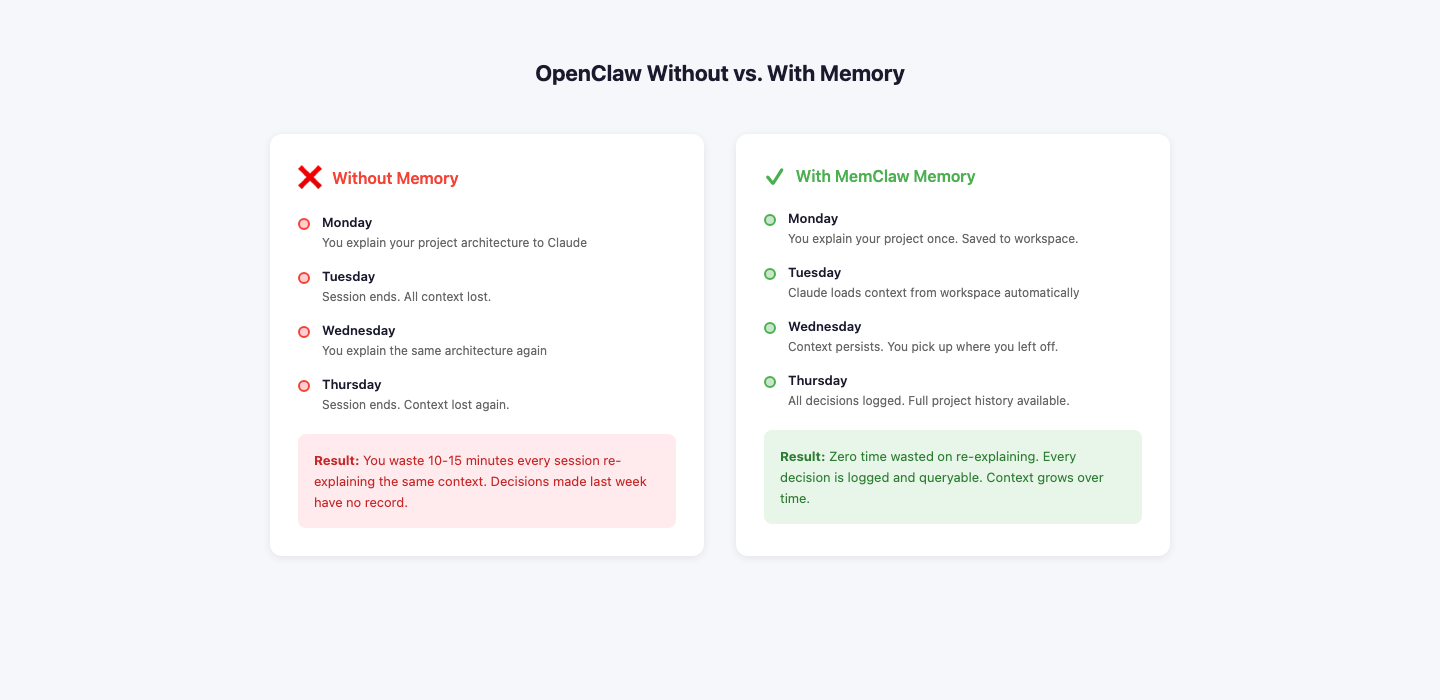
Claude Code is stateless by design. Each session is a clean slate. This is fine for isolated tasks, but it breaks down the moment you're working on anything with history:
- A codebase with architectural decisions made weeks ago
- A client project with specific tone and style requirements
- A research project where you've already ruled out certain approaches
- Any project where "what did we decide about X?" is a real question
Without memory, you're not getting an AI assistant. You're getting an AI that needs to be briefed from scratch every single time.
The cost isn't just time. It's the cognitive overhead of maintaining a mental model of "what does Claude currently know?" on top of actually doing your work.
How OpenClaw Memory Works
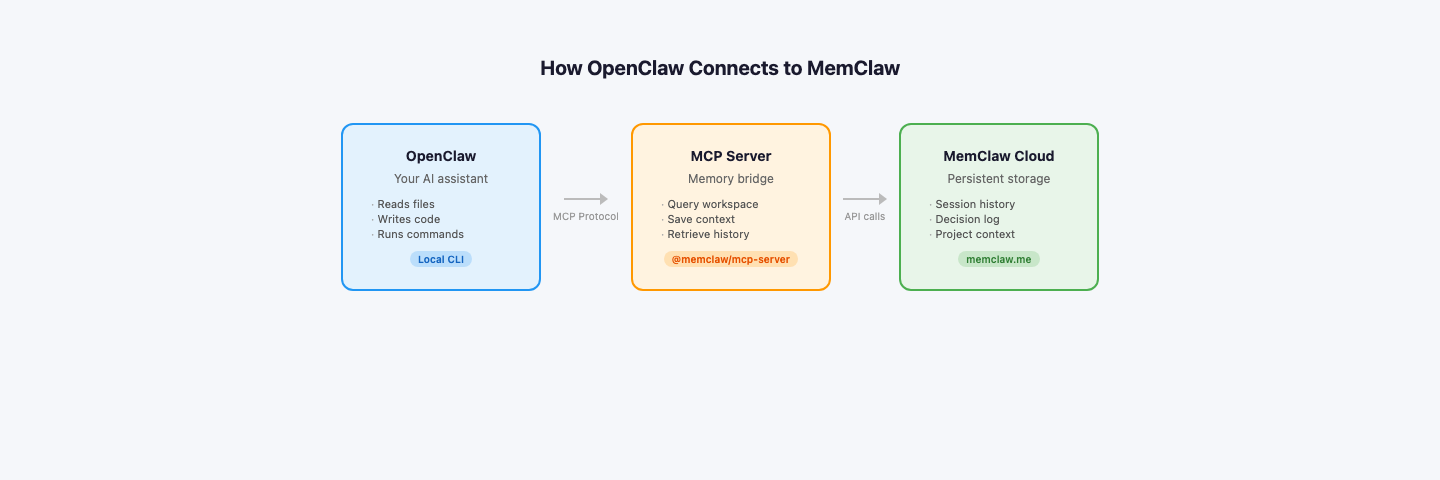
The architecture is straightforward:
- MemClaw workspace — a structured store for your project knowledge (architecture notes, decisions, conventions, current goals)
- MCP server — a bridge that Claude Code can query during a session
- Claude Code — reads from the MCP server at session start, pulls relevant context on demand
When you ask Claude something like "what did we decide about the auth flow?", it queries your MemClaw workspace and returns the answer from your actual notes — not a hallucination.
Setting Up OpenClaw Memory in 10 Minutes
1. Install Claude Code
npm install -g @anthropic-ai/claude-code
2. Create a MemClaw workspace
Go to memclaw.me, create an account, and set up a workspace for your project. Add your architecture notes, key decisions, and any context Claude should always have.
3. Configure MCP
In your project directory, create .claude/mcp_config.json:
{
"mcpServers": {
"memclaw": {
"command": "npx",
"args": ["-y", "@memclaw/mcp-server"],
"env": {
"MEMCLAW_API_KEY": "your_api_key",
"MEMCLAW_WORKSPACE_ID": "your_workspace_id"
}
}
}
}
4. Start a session
claude
Claude Code now has access to your workspace. Ask it anything about your project — it'll pull from your stored context instead of asking you to re-explain.
📷 Screenshot: B4-2 (en-memclaw-claude-code-session.png)
Purpose: 展示 Claude Code 成功读取 MemClaw 上下文的效果
Treatment: 需用户截图,加红色箭头指向引用的上下文内容
What to Store in Your OpenClaw Memory
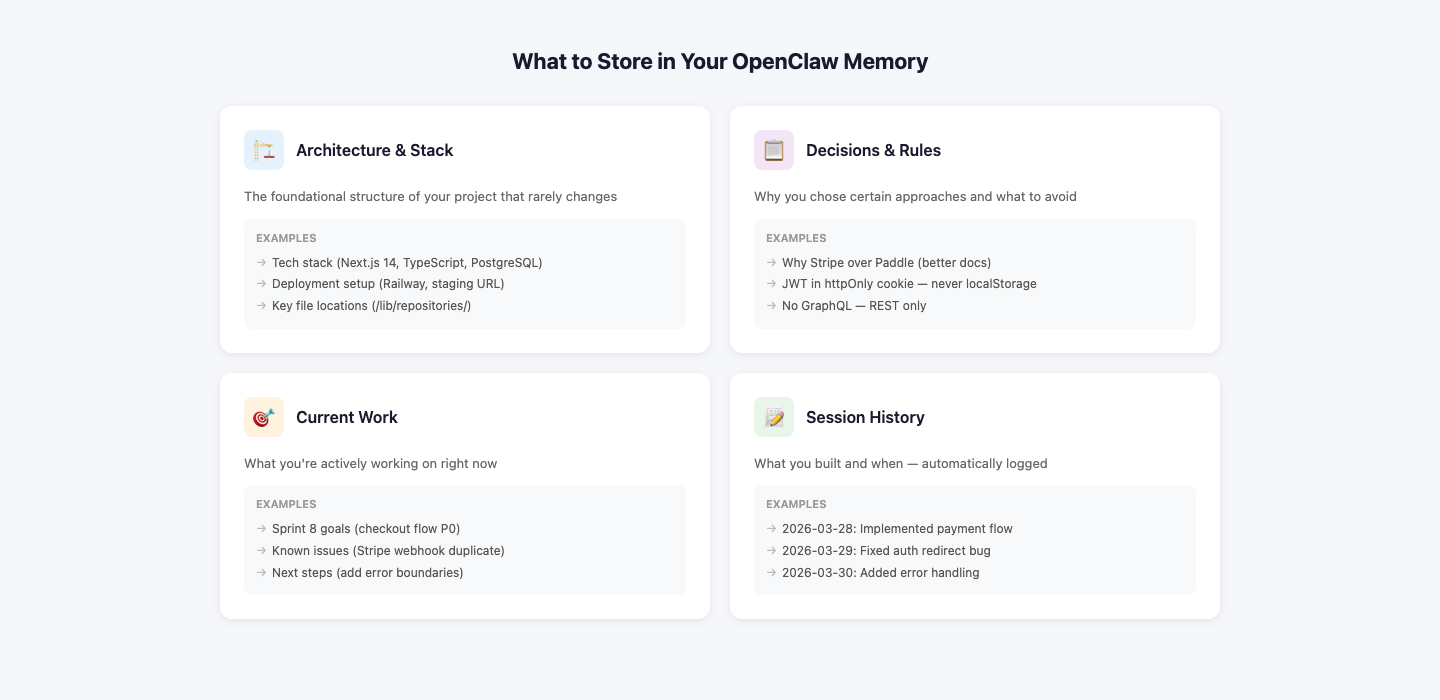
The quality of your memory is the quality of your context. Here's what's worth storing:
Architecture decisions — not just what you chose, but why. "We use Postgres because the team already knows it and we don't need document flexibility" is more useful than "database: Postgres."
Conventions — naming patterns, file structure, code style rules that aren't in your linter.
Current sprint goals — what you're trying to accomplish this week, so Claude's suggestions stay relevant.
Known constraints — rate limits, API quirks, things that have already burned you.
Ruled-out approaches — "we tried Redis caching here and it caused race conditions" saves you from re-exploring dead ends.
OpenClaw Memory vs. CLAUDE.md
Claude Code has a built-in mechanism for persistent context: the CLAUDE.md file. It's a markdown file in your project root that Claude reads at the start of every session.
CLAUDE.md works well for small, stable projects. But it has limits:
For a solo developer on one project, CLAUDE.md is fine. For anyone juggling multiple projects, working with a team, or building up months of project history, OpenClaw memory is the better tool.
Common Questions
Does OpenClaw memory work offline?
No. The MCP server requires a network connection to query MemClaw. If you're working offline, Claude falls back to whatever's in your CLAUDE.md or session context.
Does Claude automatically update the memory?
Not by default. You need to explicitly tell Claude to save something: "Add this decision to the workspace." You can build this into your workflow with a prompt template.
Is MemClaw free?
There's a free tier. Paid plans unlock larger workspaces and team features. Check memclaw.me for current pricing.
What if I have multiple projects?
Each project gets its own workspace. Switching projects means switching workspaces — context doesn't bleed between them.
The Habit That Makes It Work
The setup takes ten minutes. The habit is what determines whether it actually helps you.
After any session where you make a significant decision, spend two minutes updating your workspace. Treat it like a project log. The compounding effect over weeks and months is substantial — you end up with a searchable record of every architectural choice, every dead end, every constraint you've discovered.
That record is what makes Claude genuinely useful on long-running projects, not just for one-off tasks.
Start building your persistent memory at MemClaw — free to get started.