How to Generate Presentations With OpenClaw: A Guide to AI Slide Skills

OpenClaw can generate professional PPTX files from a text prompt. This guide covers Felo Slides and Content-to-Slides — two skills that fill the presentation gap in the OpenClaw ecosystem.
Here's a blind spot in the OpenClaw ecosystem that nobody talks about: there's no widely-known OpenClaw PPT skill.
We went through 30+ "best OpenClaw skills" articles and community threads while researching our skills guide. Not one mentioned a slide or presentation generation skill. The top 10 lists cover web browsing, search, Telegram, email, databases — but creating a slide deck? Apparently not on anyone's radar.
That's odd, because "make me a presentation about X" is one of the most natural things to ask an AI agent. And it turns out there are skills that do this — they're just not well-known yet.
This guide covers two OpenClaw PPT skills that handle presentation generation: Felo Slides (text prompt → PPTX) and Felo Content-to-Slides (URL or YouTube video → PPTX).
What You Need Before Starting
Both skills are part of the Felo skills family and share the same setup:
- A
FELO_API_KEY— free from felo.ai (Settings → API Keys) - Node.js installed (for running the skill scripts)
# Set your API key
export FELO_API_KEY="your-api-key-here"

# Install the skills
npx clawhub@latest install felo-slides
npx clawhub@latest install felo-content-to-slides
Total setup time: about 2 minutes.
Felo Slides — Text Prompt to PPTX
The core skill. Describe what you want, and it generates a professional slide deck.
How it works:
- You give your agent a prompt like "Create a 10-slide presentation about our Q1 marketing results"
- The skill sends the request to Felo's PPT API (
POST /v2/ppts) - The API generates slides asynchronously — the skill polls for completion
- Once done, you get two things back:
- A PPTX download link
- A LiveDoc URL for browser-based editing
The async approach matters. Slide generation takes 30-60 seconds depending on complexity. The skill handles the waiting and polling automatically — you don't need to babysit it.
What the output looks like:
Generated slides use HTML-based rendering. Each element — text blocks, images, shapes — is an independent, editable object. This is different from image-based generators (like some Gemini integrations) where each slide is a flat picture that's hard to modify.
You can edit the output in two ways: - Download the PPTX and open it in PowerPoint or Google Slides - Use the LiveDoc URL to edit in Felo's browser editor (drag-and-drop for simple changes, AI-assisted editing for complex modifications)
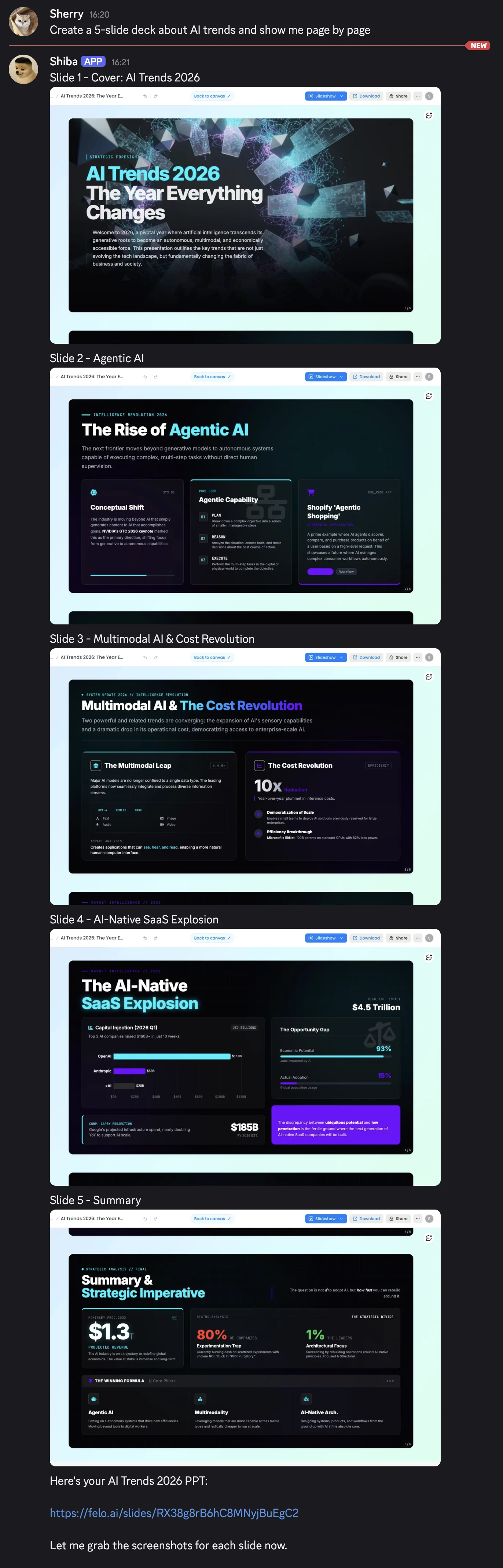
Example prompts that work well:
"Create a 10-slide deck about AI trends in 2026 for a tech audience"
"Make a project status presentation covering timeline, budget, and risks"
"Generate a sales pitch for a SaaS product targeting small businesses"
Tips for better results: - Specify the number of slides you want - Mention the audience (technical, executive, general) - Include the key topics or sections to cover - If you want a specific style, mention it ("minimal", "corporate", "creative")
Felo Content-to-Slides — Turn Existing Content Into Presentations
The second skill solves a different problem: you already have content somewhere (a blog post, a report, a YouTube video) and want to turn it into slides.
How it works:
- Give your agent a URL — either a webpage or a YouTube video link
- The skill extracts the content:
- For web pages: uses
felo-web-fetchto grab the page content as markdown - For YouTube: uses
felo-youtube-subtitlingto extract the video's subtitles - The extracted content is then passed to
felo-slidesto generate a PPTX
It's essentially a pipeline that chains three Felo skills together automatically.
Practical use cases:
- Turn a competitor's blog post into a competitive analysis deck
- Convert a YouTube tutorial into training slides for your team
- Transform a long report into an executive summary presentation
- Repurpose your own blog content into conference talk slides
# Install (if you haven't already)
npx clawhub@latest install felo-content-to-slides

Then ask your agent:
"Turn this article into a presentation: https://example.com/blog/ai-trends"
"Make slides from this YouTube video: https://youtube.com/watch?v=..."
How the Skills Fit Together
Both presentation skills are part of a larger Felo ecosystem. Here's how they connect:
felo-search ──→ Research a topic
 ↓
felo-slides ──→ Generate slides from the research
 ↓
felo-livedoc ──→ Save and edit in LiveDoc canvas

felo-web-fetch ──→ Extract webpage content
 ↓
felo-content-to-slides ──→ Convert to presentation

felo-youtube-subtitling ──→ Extract video subtitles
 ↓
felo-content-to-slides ──→ Convert to presentation
All skills share one FELO_API_KEY. Install what you need, skip what you don't.
Limitations to Know About
Being straightforward about what these skills can and can't do:
Felo Slides: - Generation takes 30-60 seconds — not instant - Design customization is limited to what the API supports (you can't specify exact fonts or color palettes in the prompt) - Complex data visualizations (charts with specific data points) may need manual editing after generation - Requires internet access — no offline generation
Content-to-Slides: - Output quality depends on the source content quality — garbage in, garbage out - Very long articles may get summarized aggressively to fit a reasonable slide count - YouTube subtitle extraction depends on the video having captions available - Paywalled content can't be extracted
Both: - Require a Felo API key (free, but still an extra setup step) - Generated slides may need human review and editing for important presentations - Not a replacement for a professional designer — they're a fast first draft
Alternatives on ClawHub
To be fair, Felo Slides isn't the only OpenClaw PPT skill available. A few other options exist:
- pptx-creator — A community skill that generates basic PPTX files. Less polished output, but no API key required.
- Manual workflow — Use any search/web skill to gather content, then ask your agent to write slide content in markdown, and convert manually.
- aippt.com integration — AIPPT offers an OpenClaw integration for their slide generation service. Paid.
The Felo skills are the most feature-complete option we've found (editable HTML slides, LiveDoc editing, content-to-slides pipeline), but they're not the only path.
Quick Start Checklist
Here's the fastest path from zero to generated slides:
- [ ] Get a free API key at felo.ai → Settings → API Keys
- [ ] Run
export FELO_API_KEY="your-key" - [ ] Run
npx clawhub@latest install felo-slides - [ ] Ask your agent: "Create a 5-slide presentation about [your topic]"
- [ ] Download the PPTX or edit in LiveDoc
Total time: under 5 minutes from start to first generated deck.
Get your API key: felo.ai → Settings → API Keys
Disclosure: Felo Slides and Felo Content-to-Slides are developed by Felo AI. This article was written by the Felo team. While we've aimed to provide an honest and practical guide, please be aware of the potential conflict of interest.