OpenClaw Skills: The Complete Guide to Extending Claude Code

Complete guide to OpenClaw skills. Best skills in 2026, how to install them, and which ones are worth using — memory, web search, content generation, and more.
OpenClaw Skills: The Complete Guide to Extending Claude Code
Claude Code is powerful out of the box. OpenClaw skills make it significantly more powerful. Skills are modular capabilities you install into Claude Code through the ClawHub ecosystem. Each skill adds a specific ability — persistent memory, web search, screenshot automation, slide generation, and more. You invoke them with slash commands or natural language, and they run as part of your Claude Code session. This guide covers what openclaw skills are, which ones are worth installing, and how to get started. 📷 Screenshot: A2 (en-memclaw-workspace-list.png) Purpose: 展示多工作区列表,说明项目隔离 Treatment: 裁剪左侧面板,加数字标注 1/2/3 指向不同项目
What Are OpenClaw Skills?
OpenClaw skills are pre-built integrations for Claude Code, distributed through the ClawHub registry. Think of them as plugins — each one extends Claude's capabilities in a specific direction without you having to build the integration yourself. The skill system works through two mechanisms:
- Slash commands — type
/skill-namein Claude Code to invoke a skill directly - Natural language triggers — describe what you want and Claude routes to the right skill automatically Skills are defined as markdown files with structured prompts and tool configurations. You can install them globally (available in any project) or per-project.
The Best OpenClaw Skills in 2026
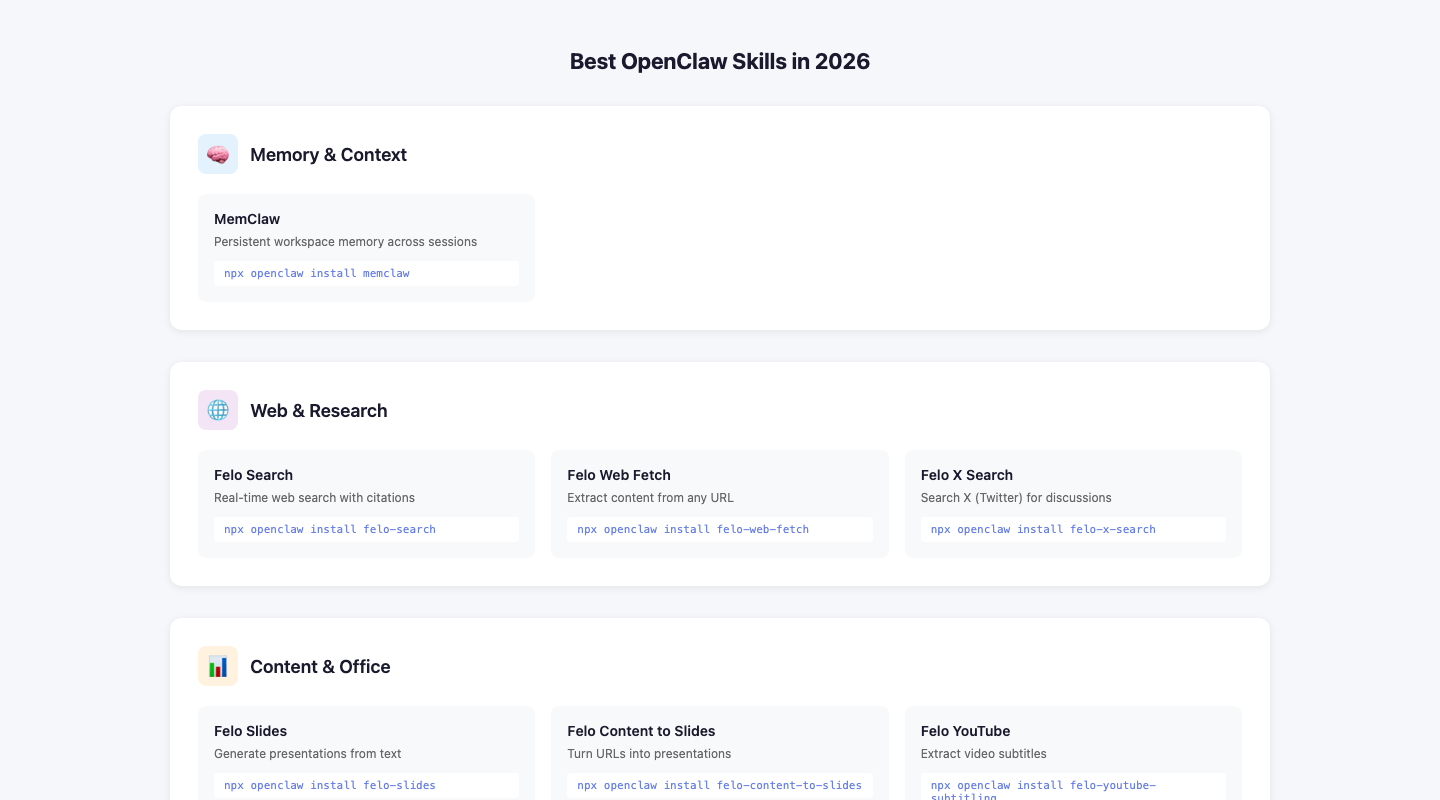
Memory: MemClaw
The foundational skill. MemClaw gives Claude Code persistent memory across sessions through an MCP server connection. What it does: Stores your project context — architecture decisions, conventions, current goals, conversation history — in a structured workspace. Claude queries it at session start and on demand. Best for: Any project longer than a week. Developers working on multiple projects simultaneously. Teams who want shared AI context. Install: memclaw.me 📷 Screenshot: A4 (en-memclaw-conversation.png) Purpose: 展示在工作区内直接对话的效果 Treatment: 裁剪显示对话区域,加标注「AI 已载入项目背景,直接开始工作」
Web Search: Felo Search
Real-time web search integrated directly into Claude Code sessions. What it does: When you ask Claude something that requires current information — recent library releases, current API docs, news — Felo Search fetches live results instead of relying on Claude's training data cutoff. Best for: Staying current on fast-moving ecosystems (React, LLM tooling, cloud services). Research tasks where accuracy matters. Invoke: Ask Claude anything requiring current information, or use /felo-search
Web Extraction: Felo Web Fetch
Extracts structured content from any URL — articles, documentation, product pages — and brings it into your Claude session. What it does: Fetches a URL and returns clean markdown or HTML. Supports CSS selectors for targeting specific page sections, custom user agents, and crawl mode for multi-page extraction. Best for: Pulling competitor content for analysis. Extracting documentation when you don't want to leave your terminal. Research pipelines. Invoke: /felo-web-fetch [url]
Screenshots: Auto Screenshot
Browser automation for capturing screenshots using natural language instructions. What it does: Navigates to a URL, handles popups and cookie banners automatically, and captures screenshots. Powered by Skyvern with Playwright fallback. Best for: Capturing product screenshots for content. Automated visual regression testing. Documentation screenshots. Invoke: /auto-screenshot [url] [instructions]
Slides: Felo Slides
Generates presentation decks from content or prompts. What it does: Takes a topic, URL, or document and produces a structured slide deck via the Felo PPT API. Returns a shareable link. Best for: Turning research or articles into presentations. Quick deck generation for client work. Invoke: /felo-slides [topic or url]
X/Twitter Search: Felo X Search
Searches X (Twitter) for users, tweets, trending topics, and replies. What it does: Queries the X API through Felo's integration. Supports user lookup, tweet search, reply threads, and trending topic discovery. Best for: Social listening. Finding relevant conversations for content research. Monitoring brand mentions. Invoke: /felo-x-search [query]
YouTube Subtitles: Felo YouTube Subtitling
Extracts transcripts from YouTube videos. What it does: Fetches captions/subtitles from any YouTube video by URL or video ID. Supports multiple languages and optional timestamps. Best for: Summarizing long videos. Extracting quotes for content. Research from video sources. Invoke: /felo-youtube-subtitling [url]
How to Install OpenClaw Skills
Global installation (recommended)
Skills installed globally are available in every Claude Code session, regardless of which project directory you're in.
Create the global skills directory
mkdir -p ~/.claude/skills
Copy a skill from ClawHub or your local install
cp /path/to/skill ~/.claude/skills/skill-name
Project-level installation
For skills that only make sense in a specific project: mkdir -p .claude/skills cp /path/to/skill .claude/skills/skill-name
Verifying installation
Start a Claude Code session and type / — you should see your installed skills listed as available commands.
Building Your Own OpenClaw Skill
Skills are markdown files with a specific structure. A minimal skill looks like this:
name: my-skill description: What this skill does triggers:
- /my-skill
- natural language trigger phrase
My Skill
[Prompt instructions for Claude]
Steps
- Do this
- Then this
- Return result The skill file tells Claude what to do when invoked. You can reference external tools, APIs, and file paths. More complex skills include tool configurations for MCP servers or API integrations.
OpenClaw Skills vs. MCP Servers
You'll see both "skills" and "MCP servers" mentioned in the Claude Code ecosystem. They're related but different: In practice, many skills use MCP servers under the hood. The skill is the user-facing interface; the MCP server is the backend connection.
Which Skills Should You Start With?
If you're new to the OpenClaw ecosystem, install in this order:
- MemClaw — memory is the foundation. Everything else is more useful when Claude remembers your project.
- Felo Search — you'll use this constantly for current information.
- Felo Web Fetch — useful for research and documentation extraction.
- Everything else based on your specific workflow. The skills that deliver the most value are the ones you use every day. Start with memory and search, build the habit, then add more as you identify gaps. Get started with MemClaw memory at memclaw.me