Project Memory for AI: Build a Knowledge Base Your AI Actually Uses

How to build layered project memory for Claude — from static project identity to dynamic decisions and current context — so every session starts with the full picture.
Not all project context is equally valuable to store. Dump everything into a CLAUDE.md file and you get noise — Claude gets distracted by outdated information or irrelevant details.
Build project memory in layers and you get a knowledge base that actually helps: every session starts with Claude oriented to the project, able to make consistent decisions, and aware of what's already been tried.
Here's how to structure it.
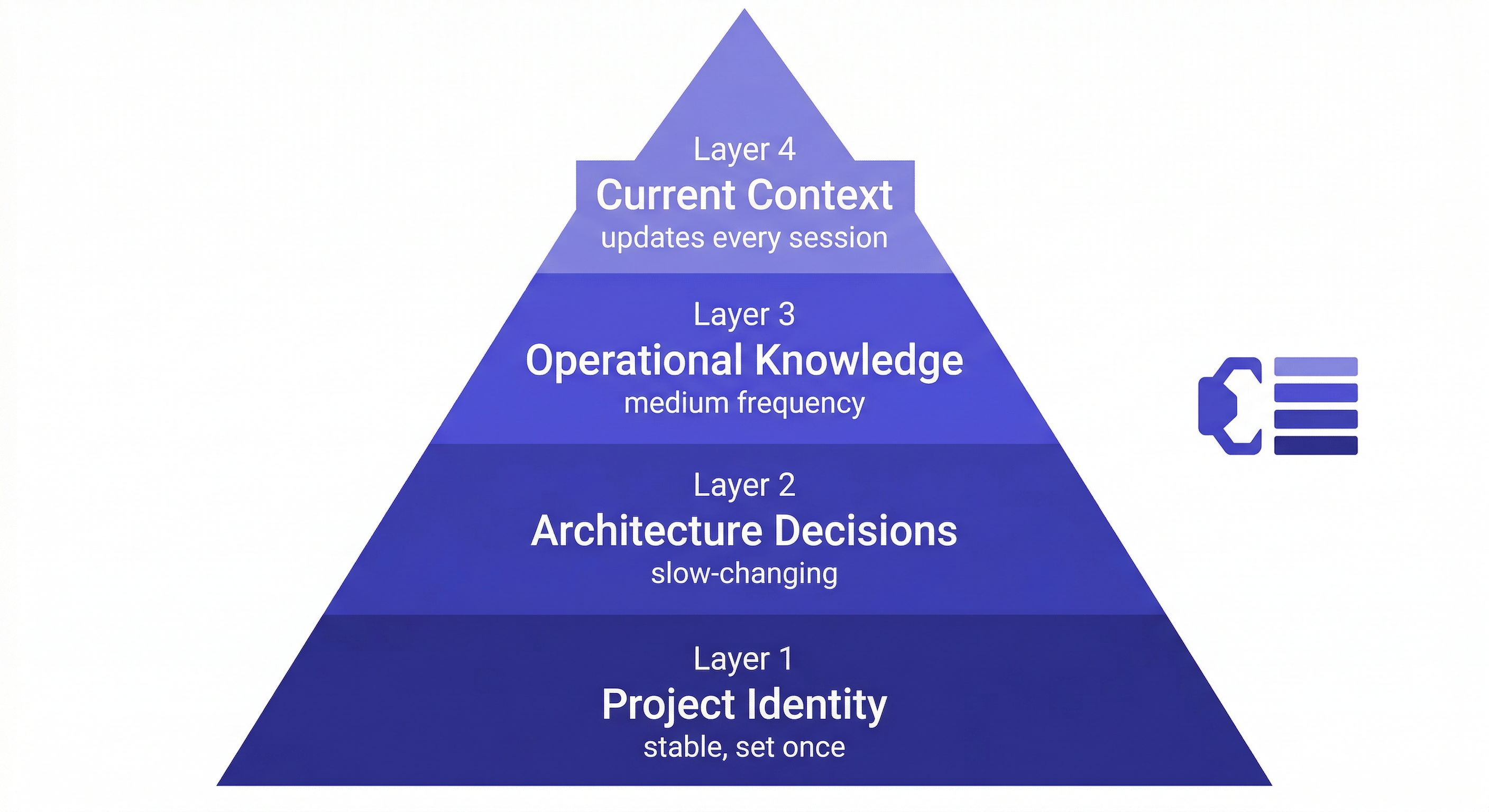
The Four Layers of Project Memory
Layer 1: Project Identity (Set Once, Rarely Changes)
The foundation — what the project is, who it's for, and what constraints matter. You write this once when you start the project.
Add to workspace: B2B invoicing SaaS for Acme Corp.
Stack: Next.js 14, TypeScript, Supabase, Stripe.
Main contact: Sarah Chen ([email protected]), VP Engineering.
Deployment: Vercel (frontend) + Railway (backend).
Hard constraints: SOC 2 compliance required, no third-party analytics,
all data must stay in US-East region.
This context is stable. Claude needs it in every session but you only write it once.
Layer 2: Architecture Decisions (Slow-Changing)
The choices that shape how the system is built — and why. The reasoning is as important as the decision.
Add decision to workspace: JWT in httpOnly cookies for auth.
Reason: Security team requirement. localStorage explicitly prohibited
in security audit. Not negotiable.
Date: 2026-02-15

Add decision to workspace: Repository Pattern for all DB access.
All queries go through /lib/repositories/ — no direct DB calls in routes.
Reason: Makes testing easier, isolates Supabase dependency.
Date: 2026-02-20

Add decision to workspace: Rejected Redis for caching.
Reason: Race condition in webhook handler — idempotency keys don't
prevent the race at the query level. Using Postgres-native caching.
Date: 2026-03-10
The rejected approach is critical. Without it, Claude will suggest Redis again.
Layer 3: Operational Knowledge (Medium Frequency)
Gotchas, known issues, environment quirks — the things that bite you and that Claude needs to know about to give safe advice.
Add to workspace: Stripe webhook fires twice in production.
Always check idempotency key before processing payment events.
This is a known Stripe behavior, not a bug in our code.

Add to workspace: Railway's Postgres has max 25 connections in free tier.
Using connection pooling via pg-bouncer. Don't add more direct connections.

Add to workspace: Supabase auth tokens expire after 1 hour.
Frontend handles refresh automatically. Backend validates on every request.
Layer 4: Current Context (Every Session)
Where things stand right now. This changes frequently — update it at the end of every session.
Update workspace status: Sprint 8 (ends 2026-04-11).
Auth flow complete. Payment integration in progress — webhook handler done,
retry logic is next. Blocked on: Stripe docs for exponential backoff limits.
Why the Layers Matter
The four layers serve different functions:
Layer 1 prevents Claude from giving advice that ignores fundamental constraints ("you could deploy to AWS" — but we're committed to Vercel/Railway).
Layer 2 prevents Claude from re-opening settled decisions ("have you considered using sessions instead of JWT?").
Layer 3 prevents Claude from suggesting approaches that will cause known problems ("you could use Redis for that").
Layer 4 tells Claude where things stand so it can pick up where you left off.
Without all four layers, Claude is giving advice without the full picture. It might be technically correct advice — but it ignores the specific constraints, decisions, and state of your project.
Setting Up MemClaw for Layered Project Memory
Install:
/plugin marketplace add Felo-Inc/memclaw
/plugin install memclaw@memclaw
export FELO_API_KEY="your-api-key-here"
Create workspace and add the four layers:
Create a workspace called Acme Invoice SaaS

# Layer 1 — Project Identity
Add to workspace: [project description, stack, contacts, constraints]

# Layer 2 — Architecture Decisions
Add decision to workspace: [decision + reason + date]

# Layer 3 — Operational Knowledge
Add to workspace: [known gotchas, environment quirks]

# Layer 4 — Current Status
Update workspace status: [current sprint, what's in progress, blockers]
Session start:
Load the Acme Invoice SaaS workspace
Claude reads all four layers and is immediately oriented.
Session end:
Update workspace status: [what was completed, what's next]
Add decision to workspace: [any decisions made this session]
Add to workspace: [any new gotchas discovered]
Querying Your Project Memory
Once the workspace has real content, Claude can answer questions that would otherwise require digging through code or meeting notes:
What did we decide about authentication?
→ JWT in httpOnly cookies, security team requirement, not negotiable.

What have we tried for caching?
→ Redis was ruled out due to race condition in webhook handler.

Where did we leave off?
→ Sprint 8, webhook handler done, retry logic next, blocked on Stripe docs.

What are the hard constraints on this project?
→ SOC 2 compliance, no third-party analytics, US-East data residency.
These answers come from the workspace, not from re-explaining every session.
Maintenance
What to update every session:
- Current status (Layer 4) — one line is enough
What to update when it changes:
- Architecture decisions (Layer 2) — immediately when decided
- Operational knowledge (Layer 3) — immediately when discovered
What almost never changes:
- Project identity (Layer 1) — only on major scope changes
The investment is small — 2-3 minutes per session to log decisions and update status. The return is a workspace that gives Claude full project context in every future session.