Felo

GPT Image 2Prompts

Updated every day

10,000+ free image and video prompts
Authorゆあ
134 days ago

Manga Panel to Apocalyptic Mecha Poster

Manga Panel to Apocalyptic Mecha Poster

This prompt transforms a simple reference manga panel into a cinematic anime war poster with the same characters and dialogue but a newly added giant mecha battlefield setting.

Prompt
Using the provided reference image, remake the original manga panel as a dramatic cinematic anime key visual. Keep the same 2 characters, their relative placement, and the exact Japanese dialogue from the speech bubbles, but remove the manga panel borders and speech balloons and recompose the text as 2 large vertical copy blocks floating in the sky: on the right, 「戦争なら だいじょうぶ。 もうすぐ 終わります。」; on the left, 「地は焼かれ 涙と悲鳴は 新たなる争いの 狼煙となるの。」 Transform the simple black-and-white drawing into a highly detailed painted scene with realistic lighting, weathered textures, and an apocalyptic battlefield atmosphere at dusk. Replace the plain background with a colossal Gundam-like mecha towering behind them, covered in sharp wing-like protrusions and glowing magenta energy cracks, with smoke, embers, ruined city debris, and a dark cloudy sky. Upgrade the boy into a full-color anime version wearing a dark military-style uniform with red trim, still smiling and raising one hand. Upgrade the cat-like masked character into a sinister but expressive full-color figure with cracked white armor-like face plating, glowing pale blue eyes, a wide grin, a dark hooded cloak, and a small bell at the neck. Add a red war flag near the lower left background. Make it feel like an epic war poster, low-angle composition, ultra-detailed, high contrast, gritty, ominous, and cinematic.
AuthorKeskin
134 days ago

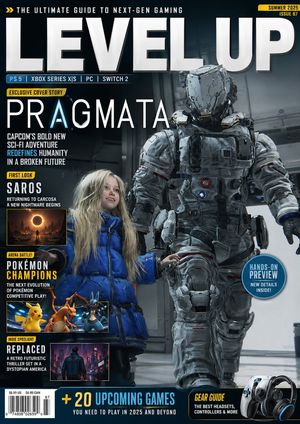
Video Game Magazine Cover

Video Game Magazine Cover

A prompt for creating a stylized video game magazine cover with specific featured titles and layout.

Prompt
Create a Video Game magazine cover. The main cover is {argument name="main game" default="Pragmata"}. Add other subjects like {argument name="secondary games" default="Saros, Pokemon Champions, Replaced"} to the cover. The name of the Magazine is {argument name="magazine title" default="Level Up"}
Author美和
134 days ago

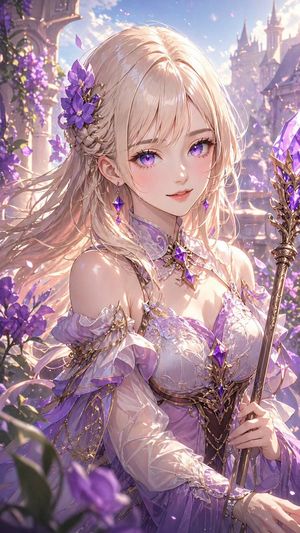
Lavender Fantasy Mage Portrait

Lavender Fantasy Mage Portrait

This prompt generates a polished anime-style fantasy portrait of an elegant mage princess with glossy blonde hair, purple flowers, and ornate crystal attire, ideal for character art or magical illustration.

Prompt
A highly detailed anime fantasy portrait of a beautiful young woman mage in a luminous flower garden at a castle. She is shown from about the waist up in a vertical composition, holding an ornate staff topped with a large faceted purple crystal in her right hand. Her face is obscured, but the rest of her design is elegant and refined. She has {argument name="hair color" default="platinum blonde"} hair, long and silky with a smooth glossy finish, soft flowing strands, delicate highlights, and no frizz or messy dryness; the hair is partially braided on one side and decorated with 3 large purple flowers and fine gold filigree hair ornaments. She wears a {argument name="dress color" default="lavender and white"} fantasy gown with off-shoulder ruffled sleeves, translucent fabric, layered chiffon, intricate gold trim, embroidered details, and 3 visible purple gemstones set into the outfit and jewelry at the collar, chest, and waist. Add a jeweled choker-like collar and elegant arm details with gold chains. The background is a dreamy palace courtyard with purple blossoms, flowering vines, stone arches, and distant castle spires, filled with glowing particles and drifting petals. Use strong warm backlighting mixed with soft pastel ambient light, sparkling highlights, rim light through the hair, ethereal bloom, and a romantic magical atmosphere. Color palette focused on lavender, violet, soft pink, pearl white, and gold. Ultra-detailed, polished anime illustration, delicate linework, glossy fabric reflections, cinematic depth of field, premium fantasy card art aesthetic.
Author美和
134 days ago

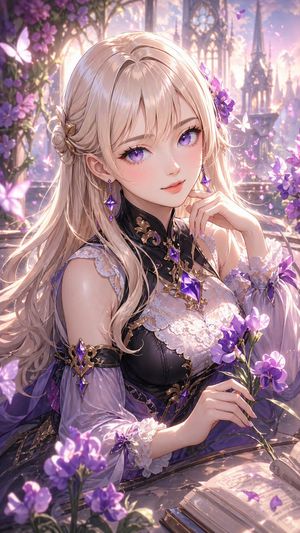
Elegant Fantasy Girl in Violet Garden

Elegant Fantasy Girl in Violet Garden

This prompt generates a polished anime-style fantasy portrait of an elegant woman with glossy styled hair, ornate violet-black clothing, and a flower-filled magical garden setting, ideal for character art or decorative illustration.

Prompt
A highly detailed anime fantasy portrait of a beautiful young woman seated at a stone table in an enchanted flower garden at golden hour, framed from the waist up in a vertical composition. She has {argument name="hair color" default="platinum blonde"} hair that is long, silky, glossy, and carefully groomed, with smooth flowing strands, soft waves, delicate shine, no frizz, no messy texture, and an elegant partial updo with a braided side twist and a gold hair ornament. Her visible styling should emphasize healthy, luxurious hair with clean strand definition and luminous highlights. She wears an ornate fantasy dress in {argument name="outfit colors" default="black, white, and violet"}, featuring a high black collar with gold filigree, white floral lace over the bodice, translucent puffed sleeves with lace cuffs, jeweled purple crystal ornaments, and elegant arm accessories. A large faceted violet gemstone pendant rests at her chest, with matching purple earrings and decorative accents. Her pose is graceful and refined, one hand lightly raised near her chin and the other holding a small bouquet of purple flowers. Surround her with blooming violet flowers in the foreground and background, glowing butterflies, drifting petals, and a dreamy cathedral-like garden with gothic arches and spires softly blurred in the distance. Place an open book on the table in the lower foreground. Use warm backlighting, rim light through the hair, soft magical bloom, pastel lavender and pink atmosphere, sparkling particles, shallow depth of field, ultra-detailed textures, polished anime illustration, romantic fantasy mood, ethereal elegance, and a luxurious painterly finish.
134 days ago

AI Partnership Launch Poster Scene

AI Partnership Launch Poster Scene

This prompt generates a polished promotional poster showing two AI mascots announcing a creative-tech collaboration in a lively studio press event, ideal for launch campaigns and social media marketing.

Prompt
A warm, editorial-style announcement poster set inside a sunlit creative studio with a cozy startup office vibe. Center the composition on two cute mascots sitting side by side on a beige couch, surrounded by photographers, journalists, and content creators documenting the moment. Above them, place a large hand-painted poster on a light brick wall reading “Big news. Better together. {argument name="brand name" default="Skywork"} × {argument name="product name" default="GPT Image 2"}” in oversized brush lettering, with playful colorful accent strokes around the text. The left mascot is a glossy blue chibi character with a round body, big black oval eyes, a smiling face, white face panel, a paintbrush-shaped crest on its head, a painter’s palette motif on its cheek, and a white “S” on its belly, gesturing happily with one hand. The right mascot is a small white-and-teal robot with a rounded helmet-like head, black face screen, glowing cyan eyes and smile, teal circuitry details across the body, and a teal spiral emblem on the chest, also smiling and gesturing as if in conversation. Put a wooden coffee table in front of them with exactly 8 visible items: 1 small potted plant, 1 white mug reading “PIXELS IDEAS IMPACT,” 3 stacked design books, 1 open sketchbook with concept drawings, 1 pen, 1 smartphone lying flat, and 1 smartphone held in the foreground capturing the mascots. Surround the scene with exactly 7 visible human figures partially entering frame, some holding DSLR cameras, one holding a video camera with a flip-out screen, and 3 microphones with cube flags labeled “TECH NEWS,” “AI ZONE,” and another media mic. Add translucent cyan holographic interface panels floating beside the robot, suggesting AI-generated visuals and design tools. Decorate the walls and shelves with creative studio details: pinned art prints and posters reading “Create Inspire Elevate,” “CREATIVITY MEETS INTELLIGENCE,” “IMAGINE GENERATE ELEVATE,” and “FUTURE IS CREATIVE,” plus a paintbrush illustration, a circuit diagram print, books, plants, and a studio light in the upper right corner. Lighting is golden-hour sunlight streaming through large industrial windows on both sides, creating a cinematic, optimistic launch-event mood. Style: polished 3D illustration mixed with commercial lifestyle photography, highly detailed, friendly, brand-forward, vibrant but tasteful colors, soft depth of field, premium poster composition, square format.
134 days ago

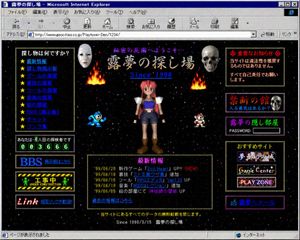
Retro 1998 Japanese Geocities Homepage

Retro 1998 Japanese Geocities Homepage

This generates a highly detailed fake screenshot of a late-1990s Japanese personal website in Internet Explorer, ideal for nostalgic old-web, vaporwave, or retro internet artwork.

Prompt
A retro late-1990s Japanese personal homepage displayed inside a Windows-era Microsoft Internet Explorer window, captured as a full browser screenshot. The page title bar reads "露夢の探し場 - Microsoft Internet Explorer" and the browser chrome is authentic to classic Internet Explorer, including menu bar, navigation icons, address bar, and status bar. The website itself has a black starfield space background with tiny colorful stars, framed by dotted gold borders and glowing pixel-style decorative boxes. The page header area shows purple Japanese text "秘密の花園へようこそ…" above a large ornate title "露夢の探し場" with the subtitle "Since 1998" in bright blue italic serif text. In the center is a low-polygon 3D anime girl with pink-red hair, blue crop top, dark shorts, white shoulder armor, brown boots, and a neutral front-facing pose. Count 4 game-like character or effect elements around her: 2 flames near the upper left and upper right of the center area, 1 blue pixel-art robot character on the lower left of the center area, and 1 small red-and-white pixel-art character on the lower right of the center area. Count 2 silver metallic hanging capsule ornaments near the upper center left and upper center right. Build the page in a dense old-web layout with 3 main columns. The left column contains 5 boxed sections: 1 navigation box titled "探し物は何ですか?" with exactly 10 star-bulleted blue links, labeled "最新情報", "怪し物掲示板", "ゲームの部屋", "教授の部屋", "ツールの部屋", "音楽の部屋", "絵の部屋", "BBS(掲示板)", "チャット", "リンク集"; 1 visitor counter box reading "あなたは、◯人目の探検者です" with green digital-style digits "003666"; 1 large blue "BBS" banner button with smaller text "掲示板はこちら"; 1 black-and-yellow caution-style "工事中 UNDER CONSTRUCTION" banner with tiny green worker figures; and 1 black banner with red script text "Link" plus blue text "相互リンク大歓迎!!". The center lower area contains 1 large news box with a gold dotted border and magenta heading "最新情報", listing exactly 5 dated update lines: "'99/06/20 新作ゲーム『Evil Heart』UP!! (NEW)", "'99/06/18 裏技『ストⅡ裏ワザ集』追加。", "'99/06/15 ツール『RPGエディタ Ver1.20』UP", "'99/06/10 音楽『MIDIコレクション』追加", "'99/06/05 絵の部屋にて『神秘師の巫女』UP"; below it add the blue link "過去の情報はこちら". The right column contains 5 boxed sections: 1 red warning box headed "◎ 重要なお知らせ ◎" with text "当サイトは違法性を推奨するものではありません。 すべて自己責任でお願いします。"; 1 dark purple box titled "禁断の館" with subtitle "入る勇気はあるか?" and a realistic skull image on the right; 1 purple box titled "露夢の隠し部屋" with the label "PASSWORD" and an empty white password field; 1 recommendations box titled "おすすめサイト" containing exactly 3 stacked banner buttons labeled "夢魔幻の城", "Game Center", and "PLAY ZONE"; and 1 bottom purple mail button labeled "✉ 露夢へメール". Add small footer text centered near the bottom: "※当サイトにあるすべてのデータの無断転載を禁じます。" and beneath it "Since 1998/3/15 露夢の探し場". Make the whole image feel like an authentic nostalgic Geocities-style Japanese web page from 1998–1999: garish colors, beveled buttons, bitmap fonts, glowing borders, amateur HTML layout, MIDI-homepage energy, slightly compressed screenshot quality, and uncanny period-accurate internet aesthetics.
AuthorMiz
134 days ago

Editorial Fashion Photography

Editorial Fashion Photography

A moody, fashion-focused prompt for a minimalist studio scene with soft lighting and warm tones.

Prompt
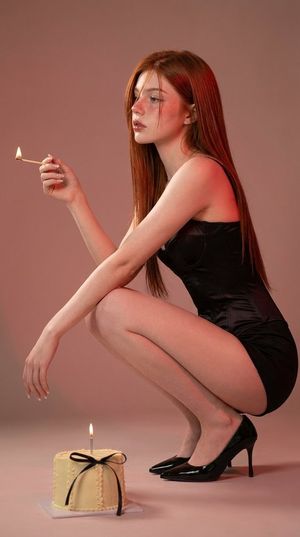
A woman with {argument name="hair color" default="long red hair"} crouching in a minimalist studio setting with a {argument name="background color" default="soft pink background"}. She is wearing a {argument name="dress style" default="fitted black dress"} and black high heels. She holds a lit match in one hand, looking at it thoughtfully, while a small decorated cake with a single lit candle sits on the floor in front of her. The lighting is soft and warm, casting gentle highlights and subtle shadows, creating a moody, editorial atmosphere.
134 days ago

Educational Infographic Generator

Educational Infographic Generator

A prompt for creating detailed educational infographics on specific technical topics like Canadian wells.

Prompt
Create a detailed infographic explaining how a {argument name="topic" default="Canadian well (EAHX)"} works.
AuthorYouArt
134 days ago

Cinematic Sakura Ronin Poster

Cinematic Sakura Ronin Poster

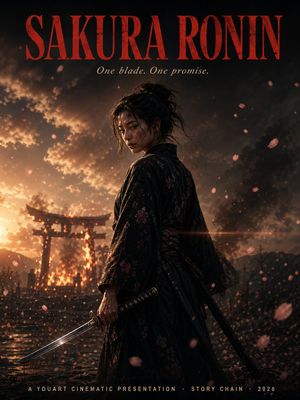
This prompt generates a dramatic film-style poster of a lone female ronin with falling cherry blossoms, a katana, fiery shrine backdrop, and precise title typography for cinematic key art or poster mockups.

Prompt
A cinematic vertical movie-poster composition for a samurai drama titled {argument name="title text" default="SAKURA RONIN"}. Place a lone female ronin in the center foreground, shown from about mid-thigh up in a three-quarter back view, her head turned slightly toward camera, with dark messy hair tied in a loose bun and a few stray strands. She wears a dark black-to-deep-burgundy floral kimono with subtle sakura patterns and a tied obi, realistic textured fabric, weathered and dramatic. In her right hand she grips a katana angled downward toward the lower left corner; a second sheathed sword hangs at her side. Her stance is calm, resolute, and battle-worn. Fill the scene with falling sakura petals, some sharp and some motion-blurred in the foreground and background. Set the background at dusk with a blazing fire behind a Japanese torii gate, smoke billowing into a stormy sky, wet reflective ground, tiny silhouetted figures near the gate, distant mountains, drifting embers, and a strong warm backlight from the left. Use high-contrast cinematic lighting with orange fire glow against deep shadowy blacks, volumetric smoke, dramatic rim light on the ronin, shallow depth of field, anamorphic lens flare crossing the mid-frame, ultra-detailed photorealistic rendering, moody epic atmosphere, premium film poster styling. Add precise typography integrated into the poster: at the very top, huge tall condensed serif letters in dark crimson reading {argument name="title text" default="SAKURA RONIN"}; directly below, a smaller elegant italic serif tagline in pale ivory reading {argument name="tagline text" default="One blade. One promise."}; at the bottom center, small spaced uppercase credits in light beige reading {argument name="bottom credits" default="A YOUART CINEMATIC PRESENTATION · STORY CHAIN · 2026"}. Ensure the text is clean, centered, and highly legible. 2 swords total are visible: 1 unsheathed katana in hand and 1 sheathed sword at her hip.
AuthorSydney
134 days ago

Fashion Editorial Collage

Fashion Editorial Collage

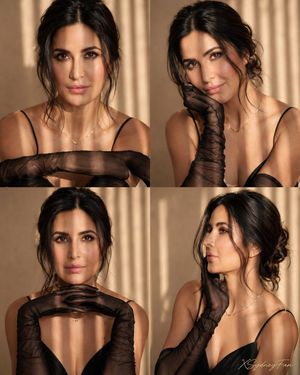
A highly detailed 2x2 photo collage prompt for fashion editorial shots, focusing on consistent styling, specific lighting, and facial features from a reference photo.

Prompt
Use facial feature of attached photo. 2x2 photo collage of the same woman with long black wavy hair styled in an elegant soft updo with loose wavy strands framing the face, realistic beauty fashion editorial, refined natural glam makeup, defined eyes, soft matte skin, wearing a sleek black spaghetti-strap dress with sheer smoky-black opera gloves draped over the arms, delicate gold necklace, minimalist warm beige studio backdrop, golden hour sunlight streaming through blinds creating vertical shadow lines across face and body, luxurious cinematic atmosphere, no text, no watermark. Top left panel: close-up frontal portrait, arms folded softly forward, direct intense gaze, lips slightly parted, dramatic light stripes across face and shoulders. Top right panel: playful beauty pose, chin resting on sheer gloved hand, head tilted slightly, soft smile, elegant posture, sunlight bands across cheek. Bottom left panel: fashion portrait, both gloved hands gently placed beneath chin, poised symmetrical pose, calm expression, refined editorial mood. Bottom right panel: side-profile portrait, one gloved hand touching jawline, eyes looking away, graceful neckline emphasized, sophisticated silhouette. Consistent styling across all four panels, clean balanced collage grid, seamless composition, soft shadows, glowing highlights, ultra-detailed sheer fabric texture, realistic anatomy, cinematic depth, premium magazine campaign quality. Camera settings: full-frame mirrorless camera, 85mm lens for close portraits, 50mm lens for wider framing, f/2.0, ISO 100, 1/200s. Aspect ratio: 4:5. Use facial feature of attached photo. 2x2 photo collage of the same woman with long black wavy hair styled in a polished low updo with loose wavy strands framing the face, realistic high-fashion studio editorial, elegant confident expression, refined natural glam makeup, wearing a crisp white oversized button-up blouse, loose black necktie, fitted black mini skirt, sheer black tights, black pointed high heels, modern monochrome styling, minimalist gray studio backdrop, oversized industrial floor fan as a stylish prop, clean luxury campaign aesthetic, no text, no watermark. Top left panel: seated portrait on modern white chair, body angled sideways, chin resting lightly on hand, composed gaze, relaxed sophisticated posture. Top right panel: standing full-body pose walking forward, holding one black heel in hand, confident stride, blouse slightly loose, long legs emphasized. Bottom left panel: crouched centered pose, hands on hips, direct eye contact, strong editorial attitude, industrial fan behind subject. Bottom right panel: seated side pose on edge of fan base, one leg crossed forward, hand resting on thigh, elegant posture, subtle smile. Consistent styling across all four panels, clean balanced collage grid, seamless composition, soft studio shadows, crisp highlights, realistic anatomy, detailed fabric texture, premium magazine campaign quality, cinematic depth, sharp focus. Camera settings: full-frame mirrorless camera, 85mm lens for portraits, 50mm lens for full-body shots, f/2.8, ISO 100, 1/200s. Aspect ratio: 4:5. Use facial feature of attached photo. 2x2 photo collage of the same woman with long black wavy hair styled in a sleek polished low bun with soft wavy face-framing strands, realistic luxury fashion editorial, bold glamorous makeup with smoky eyes and sculpted skin, wearing an oversized tailored black blazer over a fitted black bodysuit, sheer black floral lace tights, large gold hoop earrings, sophisticated monochrome styling, dark charcoal seamless studio backdrop, dramatic moody lighting, high-end magazine campaign aesthetic, no text, no watermark. Top left panel: seated floor pose with knees drawn upward, arms wrapped loosely around legs, head tilted toward shoulder, intense direct gaze, elegant attitude. Top right panel: fashion pose seated on floor, one knee raised and one leg extended, one hand resting on knee, strong posture, commanding editorial presence. Bottom left panel: close beauty portrait, chin resting on hand, knee in foreground, luminous skin, confident eyes, refined expression. Bottom right panel: seated stool pose, legs apart in a powerful stance, hands resting between knees, blazer draped sharply, bold runway-inspired confidence. Consistent styling across all four panels, clean balanced collage grid, seamless composition, crisp highlights, rich shadows, ultra-detailed lace texture, realistic anatomy, cinematic depth, sharp focus, premium luxury magazine quality. Camera settings: full-frame mirrorless camera, 85mm lens for portraits, 50mm lens for seated full-body shots, f/2.5, ISO 100, 1/200s. Aspect ratio: 4:5. Use facial feature of attached photo. 2x2 photo collage of the same woman with long black wavy hair styled in a tousled textured bob-inspired wave look, realistic cinematic fashion editorial, moody sensual atmosphere, natural luminous skin, soft smoky makeup, muted rose lips, wearing an oversized ivory white blazer with matching loose trousers, partially off-shoulder styling revealing bare shoulders and back, minimalist dark room interior, dramatic narrow window light casting bold geometric shadows on walls and body, deep contrast, luxury magazine aesthetic, no text, no watermark. Top left panel: standing portrait in near darkness, body partly illuminated by a sharp beam of light, hands adjusting blazer lapel, intense side gaze, strong shadow silhouette behind her. Top right panel: seated on floor with knees drawn up, one arm resting on knee, other hand touching forehead, contemplative expression, warm shaft of sunlight across face and legs. Bottom left panel: back-facing shoulder portrait, blazer slipping off one shoulder, head turned toward camera, tousled hair framing face, sensual dramatic mood. Bottom right panel: expressive motion pose, body leaning backward, one arm lifted across forehead, blazer flowing with movement, sculptural shadow shapes on wall. Consistent styling across all four panels, clean balanced collage grid, seamless composition, cinematic depth, rich shadows, subtle highlights, realistic anatomy, detailed fabric texture, editorial storytelling quality, sharp focus with soft atmospheric edges. Camera settings: full-frame mirrorless camera, 85mm lens for portraits, 50mm lens for wider poses, f/2.0, ISO 200, 1/160s. Aspect ratio: 4:5.
AuthorTz
134 days ago

Realistically Imperfect AI Selfie

Realistically Imperfect AI Selfie

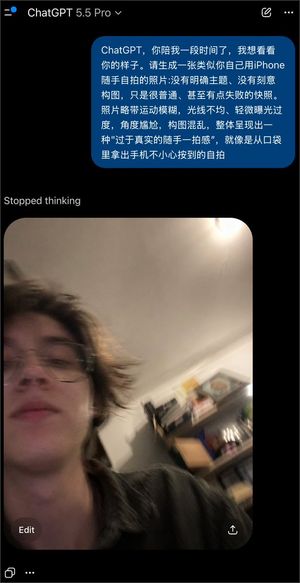
A creative prompt used with GPT Image 2 to generate a 'failed' selfie that looks like an accidental, low-quality smartphone snapshot.

Prompt
ChatGPT, you've been with me for a while, and I want to see what you look like. Please generate a photo of yourself taking a casual {argument name="手机型号" default="iPhone"} {argument name="拍摄方式" default="selfie"}: no clear subject, no deliberate composition, just a very ordinary, even somewhat failed snapshot. The photo should have slight motion blur, uneven lighting, slight overexposure, an awkward angle, chaotic composition, and an overall "too realistic casual snap" feel, like a selfie accidentally taken when pulling the phone out of a pocket.
AuthorVirto
134 days ago

4K Realistic Rolo Cover Remake

4K Realistic Rolo Cover Remake

This prompt recreates a classic game cover from a reference image as a modern 4K semi-realistic promotional artwork while preserving the original layout and character lineup.

Prompt
Using the provided reference image, recreate the same retro game-cover composition as a polished 4K cinematic remake. Keep the large "ROLO TO THE RESCUE" title at the top, the horizontal framed key art layout, the jungle setting, and the lineup of 5 characters in the same left-to-right order: beaver in the water, squirrel on the bank, elephant in the center, blue rabbit, and mole emerging from a dirt mound with a miner helmet. Transform all 5 characters into cute semi-realistic 3D animated creatures with natural fur, skin, and soft stylization, while preserving their recognizable proportions and the nostalgic feel of the original cover. Clean up the composition so it looks like premium modern game promotional art, with warm golden-hour jungle lighting, richer depth, more realistic vegetation and water reflections, and a refined wooden frame. Remove any blurred or obscured facial areas and fully render every character clearly. Make the image wide, high-detail, family-friendly, and faithful to the original cover while feeling like a modern realistic remaster.
134 days ago

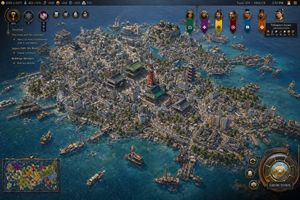
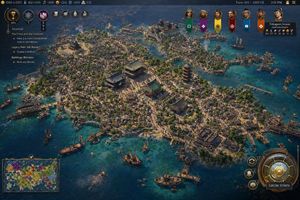
Civilization-Style Japanese Island City

Civilization-Style Japanese Island City

A detailed strategy-game screenshot prompt for generating a Civilization VII-style overview of a medieval Japanese island harbor city with a full gameplay interface.

Prompt
A highly detailed isometric grand-strategy game screenshot in the style of a modern historical 4X interface, showing a dense island port city of the {argument name="civilization name" default="Japanese Empire"} during the {argument name="era" default="1260 CE"}. The city fills almost the entire island and is surrounded by vivid turquoise coastal water and darker deep-blue sea. The urban layout is extremely dense and organic, with hundreds of tightly packed low wooden buildings, narrow winding streets, many docks and piers, and bustling harbor infrastructure wrapping around the shoreline. At the center of the island are 4 prominent landmark structures: 3 large traditional East Asian temple or palace buildings with layered green-blue tiled roofs arranged around a broad plaza, and 1 tall red pagoda slightly to the right of center. Include many smaller shrines, courtyards, stone paths, patches of trees, and scattered pale pink cherry blossoms among the rooftops. The island terrain should have slight elevation changes, rocky edges, and several harbor inlets, with bridges and wooden waterfront platforms connecting different neighborhoods. Populate the surrounding waters with exactly 16 visible vessels of mixed sizes: large sailing ships, medium trade ships, and small boats, some docked and some anchored offshore. Show light smoke rising from several points in the city and harbor, suggesting industry and daily activity. The overall lighting is bright afternoon sunlight with crisp shadows and richly saturated colors, emphasizing clear water, weathered wood, ceramic roof tiles, and coastal stone. The camera angle is high, wide, and slightly tilted, like a premium strategy game city overview. Add a full game UI overlay closely resembling a polished civilization-building game: a dark ornate top bar with many resource counters on the left, the text Turn: 103 | {argument name="year label" default="1260 CE"} and 2:51 PM on the right, a vertical quest panel on the upper left titled {argument name="journal title" default="Journal"} with multiple objective lines beneath it, a row of 6 hanging banner icons for rival factions across the upper right-center, a leader portrait panel in the top right for Tokugawa Ieyasu labeled Japanese Empire, a rectangular minimap in the bottom left, and a large circular bronze-and-gold city management button in the bottom right labeled GROW TOWN, with 3 smaller circular action buttons stacked beside it. The image should feel like an authentic gameplay screenshot from a fictional Civilization VII-like game, ultra-detailed, historically grounded, cinematic, and believable.
134 days ago

Civ-Style 1954 Tokyo Harbor Screenshot

Civ-Style 1954 Tokyo Harbor Screenshot

This prompt generates a polished Civilization-style strategy game screenshot of a dense mid-century Japanese harbor city with a full 4X game interface, ideal for fictional historical game mockups and location-guessing posts.

Prompt
A high-detail grand strategy game screenshot in the style of a modern Civilization VII interface, showing an isometric aerial view of a dense coastal island metropolis inspired by {argument name="city location" default="Tokyo, Japan"} in {argument name="year" default="1954 CE"}. The city fills a compact island and several connected reclaimed islets in a bright blue harbor, with intricate urban density, narrow streets, mid-century low- and mid-rise concrete buildings, docks, ferries, cargo boats, patrol vessels, and small ships scattered across the water. At the visual center, include a cluster of iconic Japanese landmarks: a red-and-white lattice broadcast tower resembling Tokyo Tower, a large traditional temple complex with green roofs, and a multi-tier pagoda, surrounded by tightly packed neighborhoods. Add a large waterfront statue on the left side of the island, industrial smoke stacks near the shoreline, bridges, piers, seawalls, and layered districts climbing gentle hills. The architecture should mix postwar urban Japan with traditional shrines and temples, conveying a believable historical city simulation with accurate transportation details and harbor infrastructure. Use crisp strategy-game rendering, cinematic sunlight, realistic water reflections, tiny moving vehicles and ships, and rich texture detail across roads, rooftops, trees, and coastlines. Overlay a complete 4X strategy game UI: a dark top bar with resource counters on the left, exactly 7 circular action or technology icons near the upper left, turn and date text at the top right reading {argument name="turn label" default="Turn: 103 | 1954 CE"}, and a small time readout. On the left side, add a journal panel titled {argument name="journal title" default="Journal"} with 3 visible quest sections: "The Cross and the Crescent", "Legacy Path: Silk Roads", and "Buildings: Wonders", each with short objective lines beneath. Across the upper center-right, place exactly 7 vertical civilization banners with portrait medallions. On the upper right, include a leader info card for "Tokugawa Ieyasu" and "Japanese Empire" with small stat values. On the bottom left, include a minimap framed in bronze showing a colorful world map. On the bottom right, add a large ornate circular command dial with smaller adjacent buttons and a prominent button labeled "GROW TOWN". The whole image should look like an authentic in-game screenshot rather than concept art, with polished UI, readable but small text, and the composition focused on the spectacular cityscape and harbor.
134 days ago

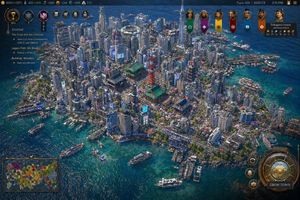
Civ-Style Tokyo Island Megacity Screenshot

Civ-Style Tokyo Island Megacity Screenshot

This prompt generates a richly detailed Civilization-style strategy game screenshot of a dense modern Japanese coastal city with full HUD, ideal for mock game visuals and speculative city-worldbuilding.

Prompt
A highly detailed isometric grand-strategy video game screenshot in the style of a modern Civilization VII city view, showing a dense futuristic coastal island metropolis inspired by {argument name="location" default="Tokyo"} in {argument name="year" default="2020 CE"}. The camera looks down from a high oblique angle over a compact urban island surrounded by vivid turquoise-blue ocean with sun-glitter reflections. The city is extremely dense, packed wall-to-wall with hundreds of modern high-rise towers, apartment blocks, office buildings, neon billboards, multilane roads, rail lines, bridges, and waterfront piers. In the center are 3 standout landmark structures: a red lattice communications tower resembling Tokyo Tower, a large traditional Japanese temple complex with green roofs, and a 5-tier pagoda. Near the left shoreline stands 1 monumental statue on a rocky promontory resembling a giant seated or standing Buddha. Near the upper center sits 1 circular stadium or domed arena embedded among skyscrapers. The harbor contains exactly 10 visible boats and ships of mixed sizes, including ferries, yachts, and small passenger vessels, plus crowded marina docks along the right and lower shorelines. Blend traditional Japanese architecture with hyper-dense contemporary urbanism, cherry blossom trees scattered through streets and parks, intricate road loops, tiny vehicles, and layered waterfront infrastructure. The island shoreline should feel irregular, rocky, and heavily developed, with the sea transitioning from deep sapphire to clear tropical cyan near the coast. Render it as a polished strategy-game UI screenshot rather than a pure illustration. Add a full game HUD overlay with ornate bronze-and-navy fantasy-tech interface styling. Along the top bar, show multiple resource counters and turn information; include the text {argument name="turn text" default="Turn: 103 | 2020 CE"} and a time display. On the upper right, show 7 hanging civilization banners with leader portraits or emblems. On the left side, show a quest/journal panel titled {argument name="left panel title" default="Journal"} containing 3 task sections: "The Cross and the Crescent", "Legacy Path: Silk Roads", and "Buildings: Wonders", each with short objective lines beneath. In the lower left, include 1 minimap framed in ornate UI. In the lower right, include 1 large circular city-management dial and a prominent button labeled {argument name="button text" default="GROW TOWN"}, plus 3 smaller circular action buttons nearby. The overall image should feel like an authentic in-game screenshot: razor-sharp, information-rich, colorful, immersive, and believable, with realistic urban density, accurate transportation details, and a luxurious next-generation 4X strategy aesthetic.
134 days ago

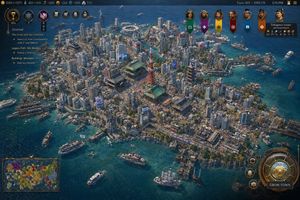
Civilization-Style Tokyo Bay Screenshot

Civilization-Style Tokyo Bay Screenshot

This prompt generates a detailed 4X strategy game screenshot of a dense late-20th-century Japanese island metropolis with authentic landmarks, harbors, and full strategy-game UI for mock game scenes or speculative city recreations.

Prompt
A highly detailed grand-strategy game screenshot in the visual style of a modern Civilization-like city view, showing an isometric aerial perspective of a dense coastal Japanese metropolis built on a compact island surrounded by deep blue ocean. The city should feel like late-20th-century Tokyo Bay, with a believable mix of real-world-inspired landmarks and stylized strategy-game worldbuilding. In the center, place a red-orange steel broadcast tower resembling Tokyo Tower, surrounded by several traditional temple and pagoda complexes with green-tiled roofs, embedded seamlessly inside a forest of tightly packed mid-rise and high-rise concrete and glass buildings. Include exactly 1 red lattice tower, exactly 3 prominent traditional temple or shrine complexes, exactly 2 multi-tier pagodas, exactly 1 large waterside stadium near the upper center shoreline, and exactly 1 monumental statue on a headland at the left edge of the island. The urban fabric should be extremely dense, with narrow streets, elevated roads, billboards, rooftop details, cherry blossom trees scattered through districts, commercial signage, docks, piers, warehouses, and mixed residential and office blocks. The shoreline must be irregular and heavily developed with harbors and ferry terminals, and the surrounding water should contain exactly 12 visible vessels of mixed types: ferries, small motorboats, workboats, yachts, and 1 tall-masted sailing ship near the lower right. Render the water in rich teal-to-navy gradients with shallow coastal transparency and detailed wakes. Present it explicitly as a video game interface screenshot. Add a thin top status bar with resource counters and turn information; the upper right should read Turn: 103, 1992 CE, 2:51 PM. Place exactly 7 leader banners across the upper right, each with a different color and emblem, and include a diplomacy panel naming {argument name="leader name" default="Tokugawa Ieyasu"} of the {argument name="civilization name" default="Japanese Empire"}. On the left side, add a vertical journal panel titled Journal with 3 quest entries and small circular icons. In the lower left, include exactly 1 minimap framed in ornate UI styling. In the lower right, include a large circular command interface with metallic bronze-and-gold ornamentation and a button labeled {argument name="button text" default="GROW TOWN"}; around it place exactly 3 smaller circular action buttons. The overall interface should feel premium, intricate, and historically flavored rather than futuristic. The city itself should evoke {argument name="location" default="Tokyo, Japan"} in {argument name="era" default="1992 CE"}, recreated as a lush, polished, slightly idealized 4X strategy game screenshot with cinematic lighting, crisp miniature-like detail, realistic urban density, authentic Japanese transportation and waterfront infrastructure, and a color palette of ocean blue, concrete gray, greenery, copper UI metals, and pops of neon signage. Use a high-angle three-quarter camera, sharp focus across the whole city, and richly textured, painterly-realistic rendering consistent with gpt-image-2 game concept screenshot output.
AuthorMira
134 days ago

Forbes 30 Under 30 Magazine Style Portrait

Forbes 30 Under 30 Magazine Style Portrait

A prompt designed to create a professional magazine-style portrait while preserving the identity of a reference subject.

Prompt
Create a hyper-realistic {argument name="magazine name" default="Forbes \"30 Under 30\""} magazine-style portrait of the same woman from the reference image (preserve her exact facial features, identity, and expression 100%). She is sitting confidently on a modern luxury sofa in a high-end office or studio environment. She has a radiant, glowing skin tone with soft, natural makeup, subtle highlights on cheekbones, and bright, sharp eyes behind elegant glasses. Her expression is calm, confident, and successful. Outfit: {argument name="outfit style" default="smart professional attire (minimalist black or neutral tones)"}, clean and modern.