Felo

GPT Image 2Prompts

Updated every day

10,000+ free image and video prompts
AuthorSydney
136 days ago

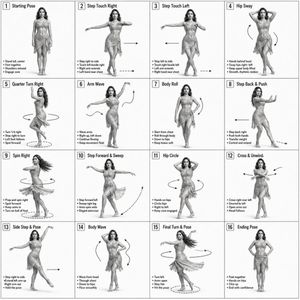
Dance Choreography Instruction Sheet

Dance Choreography Instruction Sheet

A technical prompt for creating a 3D-rendered dance sequence guide using a reference character for consistent posing across a grid layout.

Prompt
Dance Sequence Instruction Sheet [VISUAL STYLE] A composition featuring a highly detailed 3D-rendered female dancer. Designed like a professional choreography guide with a technical, diagram-inspired layout. Clean white background, soft studio lighting, and strong contrast to highlight body movement and posture. [GRID LAYOUT] Structured 4×4 panel grid (16 frames total), evenly spaced with thin black divider lines. Each panel is identical in size and clearly numbered from 1 to 16 to show a continuous dance progression. [CHARACTER] Use {argument name="reference" default="image1"} as the base character. The same female dancer appears consistently across all panels with accurate likeness and proportions. [WARDROBE] The dancer wears a stylish, performance-ready outfit: a {argument name="clothing" default="well-fitted top paired with a short, flowy skirt"}. The look should feel modern and visually appealing while still practical for dance movement. Fabric should subtly respond to motion (slight flow and folds), even in grayscale. [PANEL STRUCTURE – EACH FRAME] Top-left: Step number + short dance move title (e.g., “Step 5 – Spin Transition”) Center: Full-body pose capturing a precise moment in the choreography Bottom-left: 3–4 lines of concise instruction describing the move Overlay: Motion arrows and directional guides illustrating how the dancer transitions [MOTION INDICATORS] Incorporate curved arrows for fluid motion, straight arrows for directional steps, and circular indicators for spins or turns. Emphasize rhythm, weight shifts, and body isolation. [RENDER QUALITY] High-detail sculpted 3D style with smooth grayscale shading, subtle shadows, and clean linework. Maintain a polished, concept-art level finish with clarity in every pose. [RESTRICTIONS] No color, no background scenery, no extra characters, no visual clutter, only the dancer and instructional elements..
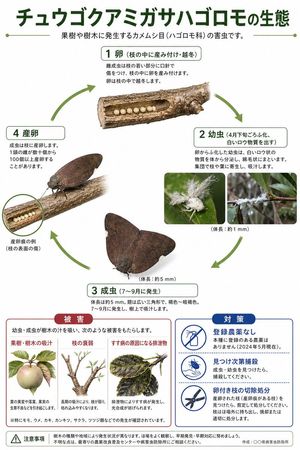
Japanese Pest Lifecycle Infographic

Japanese Pest Lifecycle Infographic

A clean Japanese agricultural infographic poster showing the lifecycle, damage, and control measures of a planthopper pest for educational or extension-office use.

Prompt
{"type":"Japanese ecological infographic poster","subject":{"species":"Ricania speculum","common description":"planthopper pest lifecycle on fruit trees and woody plants","theme":"scientific life cycle diagram with pest damage and countermeasures"},"style":{"background":"clean white","design":"educational poster, government extension office style, precise cutout photos mixed with simple illustrations, green circular arrows, rounded rectangular labels, minimal shadowing","palette":{"primary":"dark green","secondary":"olive green","accent red":"muted crimson","accent blue":"deep royal blue","text":"black and dark gray"}},"text":{"headline":"{argument name=\"headline text\" default=\"Ecology of Ricania speculum\"}","subheadline":"A pest of the order Hemiptera (family Ricaniidae) that occurs on fruit trees and woody plants."},"layout":{"orientation":"portrait","sections":[{"title":"life cycle","position":"upper to middle area","count":4,"labels":["1 Egg (laid inside branches, overwinters)","2 Nymph (hatches around late April, secretes white waxy substance)","3 Adult (emerges July-September)","4 Oviposition"]},{"title":"Damage","position":"bottom left","count":3,"labels":["Sucking sap from fruit trees and woody plants","Weakening of branches","Excrement causing sooty mold"]},{"title":"Countermeasures","position":"bottom right","count":3,"labels":["No registered pesticides","Catch and kill upon discovery","Prune and dispose of branches with eggs"]},{"title":"Notes","position":"bottom full width","count":1,"labels":["Notes"]}],"flow":"clockwise circular lifecycle with arrows connecting stages 1 to 4"},"life_cycle":{"stage_1":{"label":"1 Egg (laid inside branches, overwinters)","visual":"a horizontal cut-open tree branch segment near the top center, showing a row of exactly 8 pale cream spherical eggs embedded inside a cavity in the wood","notes":"branch texture realistic, eggs evenly spaced, stage box above image"},"stage_2":{"label":"2 Nymph (hatches around late April, secretes white waxy substance)","visual":"2 inset photos on the right side showing tiny white nymphs covered in fluffy wax filaments on green leaves and on a twig","count":2,"extra_text":"Body length: approx. 1 mm"},"stage_3":{"label":"3 Adult (emerges July-September)","visual":"1 large adult insect near the lower center, wings spread in a broad triangular resting shape, dark brown to gray-brown, mottled veined wings, realistic cutout with soft shadow","count":1,"extra_text":"Body length: approx. 5 mm"},"stage_4":{"label":"4 Oviposition","visual":"1 adult insect perched on a branch at left middle, angled sideways, with a cutaway opening in the branch showing eggs inside; a small circular callout magnifies the oviposition scar on the branch surface","count":1,"callout_label":"Example of oviposition scar (scratch on branch surface)"}},"damage_panel":{"title":"Damage","box_style":"rounded rectangle with red header tab and red border","intro":"Nymphs and adults suck sap from trees, causing the following damage.","items":[{"label":"Sucking sap from fruit trees and woody plants","visual":"an illustration of a pale apple or pear-like fruit with attached leaves, showing damage symptoms"},{"label":"Weakening of branches","visual":"an illustration of a pruned-looking branch with sparse new shoots"},{"label":"Excrement causing sooty mold","visual":"an illustration of darkened leaves covered with black sooty mold"}],"footnote":"*Occurrence has been confirmed especially on peach, plum, persimmon, pear, citrus, cherry, and azalea."},"countermeasures_panel":{"title":"Countermeasures","box_style":"rounded rectangle with blue header tab and blue border","items":[{"label":"No registered pesticides","icon":"crossed-out spray bottle inside blue circle"},{"label":"Catch and kill upon discovery","icon":"hand catching a small insect inside blue circle"},{"label":"Prune and dispose of branches with eggs","icon":"pruning shears inside blue circle"}]},"footer":{"left":"warning triangle icon followed by a caution paragraph about occurrence varying by tree species and region, encouraging field observation and early detection","right":"Created by: {argument name=\"organization name\" default=\"XX Prefecture Pest Control Office\"}"},"image_requirements":"high-resolution Japanese infographic, all text in Japanese, clean typography, realistic insect photos and branch photos composited onto a white background, exact 4-step lifecycle arrangement with green arrows, 2 bottom information panels side by side, official agricultural extension handout aesthetic","parameters":["headline text","organization name"]}
136 days ago

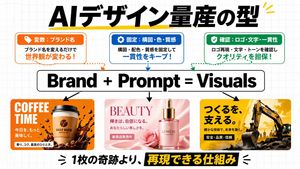
AI Design Production Framework Infographic

AI Design Production Framework Infographic

A bold Japanese infographic for social media explaining a repeatable AI design workflow with three process boxes, a central formula, and three branded visual ad examples.

Prompt
{"type":"Japanese business infographic social media graphic","style":"clean modern presentation slide, startup marketing explainer, bold typography, flat white background with faint gray grid paper pattern, crisp vector-like layout mixed with photoreal product mockup thumbnails","canvas":{"aspect_ratio":"16:9","background":"white with subtle light gray square grid"},"headline":{"text":"{argument name=\"headline text\" default=\"AIデザイン量産の型\"}","position":"top center","style":"extra bold black Japanese sans-serif, very large, with a hand-drawn yellow underline/accent stroke and small yellow accent marks at the top right"},"top_boxes":{"count":3,"items":[{"position":"top left","header":"Variables: Brand Name","theme_color":"orange","icon":"tag icon in white on orange tab","body":"Just changing the brand name changes the worldview!","body_emphasis":"changes the worldview!","outline":"rounded rectangle with orange border"},{"position":"top center","header":"Fixed: Composition, Color, Texture","theme_color":"blue","icon":"gear icon in white on blue tab","body":"Keep consistency by fixing composition, color scheme, and texture!","body_emphasis":"Keep consistency!","outline":"rounded rectangle with blue border"},{"position":"top right","header":"Check: Logo, Text, Consistency","theme_color":"green","icon":"checkmark in white on green tab","body":"Ensure quality by checking logo reproduction, text, and tone!","body_emphasis":"Ensure quality!","outline":"rounded rectangle with green border"}]},"connector_lines":{"count":3,"style":"dotted curved arrows descending from each top box toward the central formula, matching each box color: orange, blue, green"},"formula":{"text":"{argument name=\"formula text\" default=\"Brand + Prompt = Visuals\"}","position":"center","style":"huge bold black sans-serif inside a white rounded rectangle with black outline"},"down_arrows":{"count":3,"style":"solid black arrows pointing downward from the central formula to the three example panels"},"example_panels":{"count":3,"items":[{"position":"bottom left","theme":"coffee brand ad","palette":"orange, brown, white","headline":"COFFEE TIME","subtext_count":3,"subtexts":["Make today","more delicious.","Aroma, richness, the best moment."],"visuals":"takeaway coffee cup centered, coffee bean logo on cup, splashing dark coffee around the base, scattered coffee beans, glossy energetic commercial look, rounded-corner rectangular card"},{"position":"bottom center","theme":"beauty serum ad","palette":"soft pink, rose pink, cream","headline":"BEAUTY","subtext_count":3,"subtexts":["Radiance becomes confidence.","Beauty that is uniquely yours.","New product on sale"],"visuals":"luxury pink glass serum bottle with gold dropper cap, rose flower beside it, silky pink fabric background, elegant cosmetic advertisement aesthetic, rounded-corner rectangular card"},{"position":"bottom right","theme":"construction company ad","palette":"yellow, black, dark gray","headline":"Supporting creation.","subtext_count":3,"subtexts":["Building the future with reliable technology.","Safety, Quality, Trust",""],"visuals":"large excavator on rugged ground, dramatic golden sky, industrial power and reliability mood, bold Japanese ad layout, rounded-corner rectangular card"}]},"footer":{"position":"bottom center","text":"{argument name=\"footer text\" default=\"1枚の奇跡より、再現できる仕組み\"}","style":"very large bold Japanese sans-serif, mostly black text with the phrase 再現できる仕組み reversed out in yellow on a black highlight bar, decorative black emphasis marks on both sides"},"composition":"symmetrical infographic with strong hierarchy: headline at top, 3 explanatory boxes beneath, central formula in the middle, 3 visual examples in the lower half, bold footer statement at bottom","quality":"high-resolution, polished social media educational graphic, sharp text, balanced spacing, clean margins"}
AuthorAl-Shamus
136 days ago

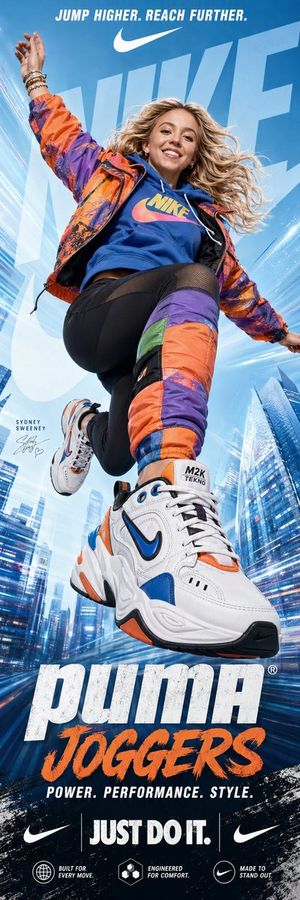
Nike advertising poster prompt

Nike advertising poster prompt

A prompt designed to generate energetic commercial posters featuring specific celebrities and products with a motion-blur aesthetic.

Prompt
A dynamic, vertical advertising poster for {argument name="product" default="Nike Joggers"} featuring {argument name="celebrity" default="Sydney Sweeney"} in a mid-air jump pose. Sydney Sweeney is smiling brightly with her blonde hair flowing dynamically, wearing a vibrant, color-blocked outfit: an {argument name="outfit colors" default="orange and purple"} patterned windbreaker over a blue hoodie with a yellow and pink "NIKE" logo. She wears black athletic leggings with mesh panels and a large, padded, multi-colored (orange, purple, green, blue) leg sleeve on her left leg that matches the jacket. Her footwear is prominent: a massive, highly detailed, chunky Nike M2K Tekno sneaker in white with bold orange, blue, and black accents in the foreground, with a smaller, matching sneaker on her other foot. Her right hand is raised with bracelets. The background is a high-key, stylized light blue gradient, with abstract architectural lines and motion streaks of a city, and a huge, translucent, light blue stylized "NIKE" logo overlapping. The top has text: "JUMP HIGHER. REACH FURTHER." in white with a Nike swoosh. The bottom features large, bold text: "puma”JOGGERS" followed by "POWER. PERFORMANCE. STYLE." The bottom contains more text and logos: "JUST DO IT." and two small Nike swooshes. The entire image has a high-energy, motion-blur-effect aesthetic with graphic textures and a clean, commercial design.
AuthorRichard
136 days ago

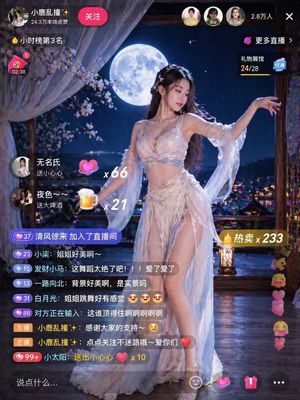
Live Stream Room Scene

Live Stream Room Scene

A prompt for generating realistic live stream room visuals with specific atmospheres and user engagement elements.

Prompt
Generate an image of a live stream room, the atmosphere of the live stream room is a scene of {argument name="氛围" default="beautiful woman dancing under the moon"}, and there are many people commenting in the live stream room.
136 days ago

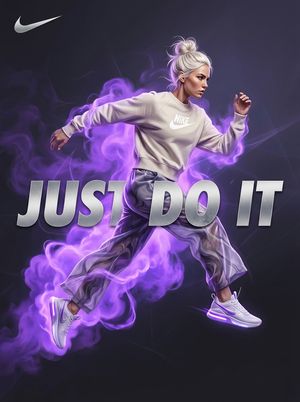
Surreal Violet Sports Ad Poster

Surreal Violet Sports Ad Poster

A cinematic athletic advertising poster with a mid-air female runner, violet energy smoke, and bold slogan typography, ideal for premium sportswear brand campaigns.

Prompt
A high-end surreal sports advertising poster in a 3:4 vertical composition featuring an athletic woman frozen mid-jump against a deep moody charcoal-to-violet gradient background. She is centered slightly to the right, with her body stretched dynamically as if sprinting through the air, left arm extended back, right arm bent forward, one leg kicked forward and the other trailing behind. She has {argument name="hair color" default="platinum blonde"} hair in a messy bun with loose wisps, and wears an off-white oversized Nike crewneck sweatshirt, loose violet-gray marbled athletic pants, and clean white Nike sneakers with a subtle violet glow along the soles. Her face is obscured by a soft rectangular blur block, creating an anonymous editorial fashion look. Behind and around her, dramatic electric violet smoke and energy clouds erupt and swirl, wrapping around her torso, legs, and feet, with luminous vapor trails and a storm-like aura that intensifies the motion. Place 1 white Nike swoosh logo in the top-left corner. Integrate 3 huge metallic silver 3D words across the lower middle of the poster reading {argument name="slogan text" default="JUST DO IT"}, split into the visible word blocks “JUST”, “DO”, and “IT”, partially overlapping the athlete’s body and cutting across the composition like bold campaign typography. The overall look is glossy, cinematic, premium, and energetic, with dramatic rim lighting, strong contrast, soft atmospheric haze, fashion-ad realism, and a viral AI-generated sports campaign aesthetic for {argument name="brand name" default="Nike"}.

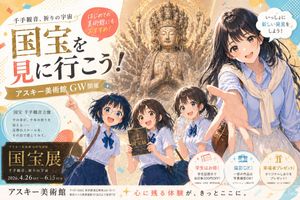
Anime Museum Poster with Kannon Statue

Anime Museum Poster with Kannon Statue

This prompt generates a fictional Japanese-style museum exhibition poster combining anime characters, a grand Thousand-Armed Kannon statue, and fully integrated promotional typography for editorial or advertising use.

Prompt
A polished Japanese museum exhibition poster in a contemporary anime illustration style, vertical layout, warm ivory and gold color palette with pastel confetti accents, designed like a high-end promotional ad for a spring holiday event. The composition features 4 school-age to young adult female characters in the foreground and one monumental Buddhist statue in the background. At center back is a towering gilded Thousand-Armed Kannon statue with a radiant halo, intricate carved details, many arms fanning outward symmetrically, and hands pressed together in prayer at the chest, glowing with sacred golden light. In the foreground on the right is the largest figure, a friendly young woman guide or older student reaching one hand dramatically toward the viewer in forced perspective; she has {argument name="hair color" default="dark brown"} shoulder-length hair, a blue striped blouse, a cream sweater draped over her shoulders, and a light skirt, with a warm inviting expression. Across the lower middle are 3 younger schoolgirls in matching uniforms: short-sleeve pale blue shirts with navy ribbon ties and dark blue skirts. The left girl points upward excitedly with one arm raised and wears a small shoulder bag; the center girl holds an exhibition booklet upright; the right girl drinks from a clear water bottle while looking toward the scene. Give all 4 girls lively anime-style faces, glossy hair, soft shading, and energetic museum-outing body language. Fill the poster with dense Japanese typography and decorative graphic shapes. Place a large bold main headline on the left reading {argument name="headline text" default="国宝を見に行こう!"}, with oversized gold and black calligraphy-style characters and one red-highlighted character. Above it, add smaller text: "千手観音、祈りの宇宙". Add a red circular callout near the top left that says "はじめての美術館にもおすすめ!" and a white cloud-shaped speech bubble near the top right that says "いっしょに新しい発見をしよう!". Add a gold ribbon banner under the main headline reading "アスキー美術館 GW開催". Include a pale blue circular information box on the left with 5 lines of Japanese copy describing the statue: "国宝 千手観音立像", "千の手が、千年の祈りを", "伝える", "圧巻のスケールを、", "その目で感じてみて。". In the lower left, place a dark rectangular exhibition plaque with gold trim and 5 text lines: "アスキー美術館 GW特別展", the large title "国宝展", then "千手観音、祈りの宇宙", then the date line {argument name="event dates" default="2026.4.26 SAT - 6.15 SUN"}. Along the bottom center, add the museum name in large text: {argument name="museum name" default="アスキー美術館"}, followed by a smaller address line and nearest-station access text in Japanese. Add a red-and-black slogan along the bottom right: "心に残る体験が、きっとここに。". In the lower right, include 3 circular benefit icons with captions: one peach circle with a ticket icon and text "学生はお得! 学生証提示で当日券200円OFF!", one blue circle with a camera icon and text "撮影OK! 一部の作品は写真撮影OK!", and one gold circle with a gift icon and text "来場者プレゼント! オリジナルしおりをプレゼント!". Scatter subtle sparkles, halftone dots, abstract blobs, and confetti shapes around the page. Overall mood: inviting, educational, elegant, and exciting, combining sacred cultural grandeur with cheerful youthful discovery, like a fictional premium museum advertisement generated as a complete poster with integrated typography.
Author达叔
136 days ago

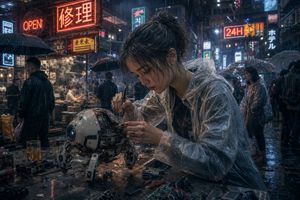
Cyberpunk Rainy Street Robot Repair

Cyberpunk Rainy Street Robot Repair

This prompt generates a cinematic photorealistic cyberpunk scene of a rain-soaked street mechanic repairing a quadruped robot, ideal for sci-fi concept art and atmospheric city visuals.

Prompt
A cinematic cyberpunk street scene at night in heavy rain, ultra-detailed and photorealistic. In the foreground, a young East Asian woman mechanic with messy dark hair tied in a loose bun sits at a wet metal worktable, leaning forward with intense concentration as she repairs a small spherical quadruped robot. Her face is obscured by a centered square censor blur. She wears a transparent plastic rain poncho over dark clothing, the glossy folds catching neon reflections. In one hand she holds a precision screwdriver and with the other she adjusts exposed wiring and circuitry inside the robot’s open shell. The robot is compact and worn, about the size of a small dog, with a white and gray rounded body, a blue camera-like lens for one eye, visible internal electronics, scratches, grime, and four articulated mechanical legs planted on the table. Scatter the tabletop with exact repair clutter: 2 screwdrivers, 2 batteries, 1 circuit board, 1 small camera or lens module, loose screws, wires, and a half-filled glass of amber liquid. Surround them with a dense neon-lit East Asian alley market full of rain-slick pavement, steam from food stalls, and pedestrians carrying umbrellas. Include at least 8 visible illuminated signs layered into the background, including a large red sign reading {argument name="main neon sign" default="修理"}, an orange sign reading "OPEN", a bright sign reading "24H", a vertical sign reading "ホテル", and additional mixed Chinese, Japanese, and Korean-style shop signs. Show several background figures in dark rainwear and translucent ponchos, some faces softly blurred by depth of field. Use moody blue-and-orange lighting, glossy reflections, mist, volumetric rain, shallow depth of field, dramatic bokeh, anamorphic highlights, high texture detail, gritty realism, and the feeling of a lone street technician fixing advanced hardware in a bustling futuristic city.
AuthorNETO 🎯
136 days ago

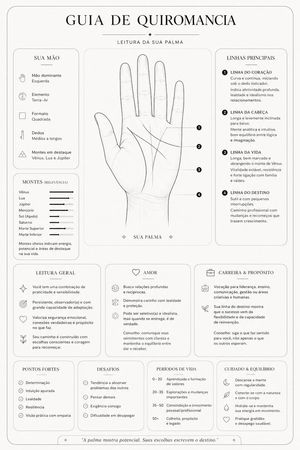
Minimalist Palmistry Guide Prompt

Minimalist Palmistry Guide Prompt

A prompt designed to analyze a photo of a palm and generate a sophisticated, minimalist guide with clean black and white lines.

Prompt
Based on my hand, I want you to make a complete palmistry guide. Analyze the palm; the style of the guide should be {argument name="estilo" default="clean and minimalist"}, with fine lines, rounded cards, and a sophisticated look. Focus on palmistry and create a simple outline in {argument name="esquema de cores" default="black and white"} of my main lines, like a small piece of art. Do your best.
Authorasatoucan
136 days ago

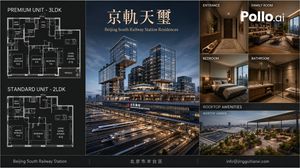
Luxury Beijing Apartment Brochure

Luxury Beijing Apartment Brochure

Generates a premium real-estate brochure layout for a Beijing railway-station residential development with floor plans, tower render, interiors, and rooftop amenities.

Prompt
Goal: Create a polished luxury real-estate brochure board for {argument name="residence name" default="京軌天璽"}, an upscale apartment development branded as {argument name="English subtitle" default="Beijing South Railway Station Residences"}. The design should look like a premium Beijing apartment sales brochure, with architectural visualization, floor plans, interior renders, and rooftop amenities. Canvas: Wide horizontal brochure, approximately 16:9 ratio, dark charcoal and navy palette with thin gold divider lines and refined white typography. Use a clean grid layout with three main vertical zones: floor plans on the left, hero architecture in the center, and interior/amenity preview images on the right. Add a slim footer bar across the full width. Layout: Left column contains exactly 2 stacked black-background architectural floor plan diagrams with white blueprint linework. The top floor plan is labeled “PREMIUM UNIT - 3LDK” and shows labeled rooms including bath room, powder room, balcony, master bedroom, bedroom, bedroom, living dining kitchen, terrace, closet areas, and small fixtures. The lower floor plan is labeled “STANDARD UNIT - 2LDK” and shows labeled rooms including bath room, powder room, shoe closet, master bedroom, bedroom, living dining kitchen, closet/storage, and fixtures. Make the floor plans technical, precise, and dense, with small room labels and dimensions. Center panel: A large dusk hero render of a futuristic glass mixed-use residential tower complex above Beijing South Railway Station. Show multiple illuminated high-rise blocks with cantilevered volumes, sky terraces, warm interior lights, and podium levels. In the foreground, include exactly 7 visible high-speed train sets or train streaks on parallel rail tracks beneath the complex, conveying a major transport hub. Place the large Chinese title “京軌天璽” near the top in elegant gold serif lettering, with the subtitle “Beijing South Railway Station Residences” below it in smaller gold serif type. Include station signage on the building facade reading “北京南站” and “BEIJING SOUTH RAILWAY STATION”. Right column: Arrange exactly 6 preview image panels. Top row has 2 panels: “ENTRANCE” showing a warm modern apartment hallway with console table, plants, wood cabinetry, recessed lighting, and a dark entry door; “FAMILY ROOM” showing a luxurious living room with sofa, bookcase, coffee table, city view windows, and the large white logo text “Pollo.ai” overlaid. Middle row has 2 panels: “BEDROOM” showing a modern bedroom with a neatly made bed, bedside lamp, warm wood tones, and a city skyline view; “BATHROOM” showing a sleek stone bathroom with vanity, mirror, glass shower, toilet, warm lighting, and beige-brown tiles. Bottom section has 2 stacked labels/panels: a dark header labeled “ROOFTOP AMENITIES”, and a wide image labeled “ROOFTOP GARDEN” showing a landscaped rooftop terrace with planters, seating, pergola canopy, railings, and a panoramic city and railway-station view at dusk. Footer: Add a thin full-width black footer bar divided into three text zones by vertical gold lines. Left text: “Beijing South Railway Station”. Center text: {argument name="district text" default="北京市丰台区"}. Right text: {argument name="contact email" default="[email protected]"}. Visual style: Photorealistic architectural visualization mixed with brochure graphic design, high-end real estate marketing, sharp lines, realistic lighting, glossy glass towers, warm interiors, cinematic dusk atmosphere, subtle gold accents, precise typography, no people. Keep all panel labels in uppercase white sans-serif except the main Chinese title in gold serif. Maintain clean margins, straight grid alignment, and a premium corporate presentation.

Minecraft Teleport Compass Screenshot

Minecraft Teleport Compass Screenshot

This prompt generates a Minecraft-style first-person gameplay image featuring a custom teleport compass tool, suitable for illustrating a Bedrock fast-travel or saved-location mod concept.

Prompt
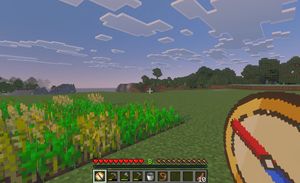
A first-person gameplay screenshot in the style of Minecraft Bedrock Edition at dusk, showing a peaceful grassy plains biome with a small rectangular wheat farm in the left foreground, some crops fully grown and some still green, an open grass field in the center, and a tree line and low blocky hills in the distance under a pale blue-to-pink evening sky filled with flat square clouds. Place a small white crosshair exactly near the center of the frame. Show the full survival HUD along the bottom: 10 red hearts, 10 hunger drumsticks, green experience level {argument name="experience level" default="8"}, and a 9-slot hotbar. The hotbar must contain exactly 9 slots, with these visible items from left to right: 1 custom compass icon selected, 1 hoe tool, 1 pickaxe, 1 axe, 1 bucket, 1 lead or rope item, 2 empty slots, and 1 stack of cooked meat labeled {argument name="item stack count" default="10"}. In the lower-right foreground, overlay an oversized custom item graphic of a {argument name="tool name" default="teleport compass"} held in hand, drawn as a clean pixel-art compass with a tan face, dark brown rim, cream center, and a bold red-and-blue needle angled diagonally. The selected hotbar slot should also display the same custom compass icon. Make the image feel like an in-game screenshot captured on a tablet or PC, with soft atmospheric haze, authentic voxel textures, and a child-friendly utility-mod vibe for fast travel and saved-location navigation.

Minecraft Saved Locations UI Mockup

Minecraft Saved Locations UI Mockup

A pixel-art Minecraft-style first-person screenshot featuring a custom saved-locations menu, useful for showcasing game UI concepts, add-ons, or teleport navigation tools.

Prompt
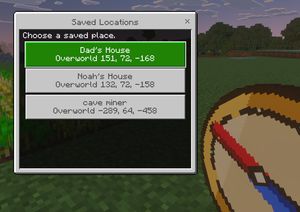
A clean Minecraft Bedrock-style game UI mockup shown as a first-person in-game screenshot at dusk. The background is a blocky grassy field with pixelated trees, a soft purple-blue evening sky, and a small patch of crops on the far left edge. In the lower right foreground, show a large pixel-art compass item held in the player’s hand, angled diagonally upward, with a tan face, dark brown rim, red needle, and blue tip. Center-left, overlay a rectangular Minecraft menu window with a light gray frame, thin dark border, and a black translucent interior panel. At the top of the window, a title bar reads {argument name="window title" default="Saved Locations"} in a Minecraft-inspired pixel font, with a small x close button on the top right. Inside the panel, add the instruction text {argument name="instruction text" default="Choose a saved place."} near the top left. Below it, display exactly 3 stacked destination buttons, each wide and centered. The first button is highlighted bright green with white pixel text and contains 2 lines: {argument name="location 1 name" default="Dad's House"} and "Overworld 151, 72, -168". The second button is light gray with darker gray text and contains 2 lines: "Noah's House" and "Overworld 132, 72, -158". The third button is light gray with darker gray text and contains 2 lines: {argument name="location 3 name" default="cave miner"} and "Overworld -289, 64, -458". Use crisp pixel edges, retro voxel-game aesthetics, subtle screen depth, and an authentic Minecraft Bedrock menu look.

Minecraft Family Compass UI

Minecraft Family Compass UI

A Bedrock-style Minecraft screenshot mockup featuring a custom teleport menu and handheld compass, ideal for showcasing a game mod, add-on, or kid-friendly navigation tool.

Prompt
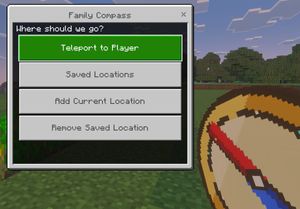
A clean in-game screenshot mockup in the visual style of Minecraft Bedrock Edition, showing a custom teleport menu overlay titled {argument name="window title" default="Family Compass"}. The background is a bright outdoor Minecraft scene with blocky grass in the foreground, a line of leafy trees in the middle distance, and a pale blue sky with rectangular clouds. On the left side, a large Bedrock-style UI window dominates the frame, with a light gray panel, darker gray border, and a small close X in the top-right corner. Centered at the top of the window is the title text. Inside the panel, a dark header bar asks {argument name="prompt text" default="Where should we go?"}. Below it are exactly 4 large horizontal rectangular buttons stacked vertically with even spacing. The first button is highlighted bright green with white pixel-style text reading {argument name="primary button" default="Teleport to Player"}. The next 3 buttons are light gray with medium gray pixel-style text reading, in order, "Saved Locations", "Add Current Location", and "Remove Saved Location". In the lower-right foreground, partially cropped and held as if by the player, is an oversized pixel-art compass item with a tan face, gold rim, and a red needle angled diagonally downward, rendered in chunky Minecraft item icon style. Use authentic Minecraft Bedrock UI proportions, pixelated font, crisp blocky edges, soft in-game lighting, and a polished game-screenshot composition with the menu as the main focus.
Authorのとろ
136 days ago

Tourism Poster Illustration

Tourism Poster Illustration

A prompt for creating regional tourism posters that combine a central symbolic illustration with photographs and names of local landmarks.

Prompt
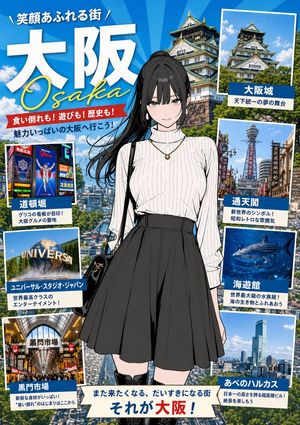
Please create a poster-style illustration promoting "{argument name="地名" default="地名"}". Place this illustration in the center, and display photos and names of tourist spots and famous places around it. Maintain the illustration style. The background should reflect the image of the location. Please introduce several places.
AuthorDanilo
136 days ago

Streetwear Campaign Poster Prompt

Streetwear Campaign Poster Prompt

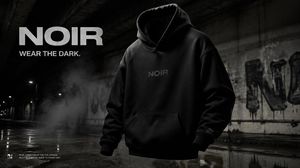
A prompt for generating a premium urban streetwear campaign poster for a brand called NOIR, featuring a gritty aesthetic and minimal typography.

Prompt
Create a premium, highly realistic 1:1 campaign poster for {argument name="brand" default="NOIR"}, a modern streetwear brand. Show one {argument name="product" default="hero oversized hoodie"} as the main focus against a gritty urban backdrop with wet concrete floors, dramatic low lighting, subtle smoke in the air and a raw street energy. Add bold minimal typography with the brand name NOIR and a short campaign headline like "{argument name="headline" default="Wear the Dark"}." Make it feel like a real high-end streetwear editorial, sharp detail, realistic fabric textures, modern and edgy, deep black tones with subtle grey accents, no clutter, no collage.
136 days ago

French New Wave Torn Poster Collage

French New Wave Torn Poster Collage

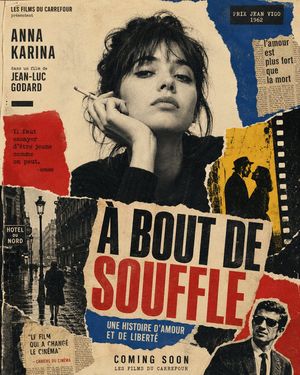
This prompt generates a distressed 1960s-style French art-house movie poster collage, ideal for retro cinema branding, editorial artwork, or vintage film-inspired cover designs.

Prompt
A vintage 1960s French New Wave cinema poster collage on aged beige paper, designed like a torn-paper art-house one-sheet with analog grain, distressed print texture, rough ripped edges, ink wear, halftone imperfections, and slight misregistration. Center the composition around a large black-and-white portrait of a woman with messy dark hair, hand raised to her face, holding a cigarette, cropped from the chest up, with her face obscured by a rectangular blur block. Use a layered collage layout with exactly 8 major paper elements: 1) a top-left black text block reading "LES FILMS DU CARREFOUR présentent" above the large stacked name "ANNA KARINA" and smaller text "dans un film de JEAN-LUC GODARD"; 2) a red torn quote panel on the left reading "Il faut essayer d’être jeune comme on peut. - GODARD"; 3) a blue torn panel in the upper right with a black label reading "PRIX JEAN VIGO 1962"; 4) a narrow torn newspaper clipping on the upper right reading "l’amour est plus fort que la mort"; 5) a yellow torn panel on the mid-right showing a black silhouette of a man in a hat facing a woman, beside a vertical black filmstrip border with white sprocket holes; 6) a bottom-left black-and-white Paris street photo with wet pavement, a lamppost, pedestrians, and a visible sign reading "HOTEL DU NORD"; 7) a small bottom-left review text block reading '"LE FILM QUI A CHANGÉ LE CINÉMA" - CAHIERS DU CINÉMA'; 8) a bottom-right cropped black-and-white portrait of a man in a suit with his face obscured by a rectangular blur block, partially covered by a red torn paper shape. Across the lower middle, place the huge torn-paper title in bold condensed uppercase: "À BOUT DE" in black and "SOUFFLE" in red, slightly angled and spanning most of the width. Under the title, add a blue torn strip with white uppercase text "UNE HISTOIRE D’AMOUR ET DE LIBERTÉ". At the bottom center, add "COMING SOON" in black uppercase and below it "LES FILMS DU CARREFOUR". Limit the palette to faded cream, black, deep ultramarine blue, muted poster red, and mustard yellow. The overall mood is rebellious, romantic, and cinematic, like an iconic French New Wave poster made from ripped magazines, street photography, and bold typography.
136 days ago

French New Wave Protest Film Poster

French New Wave Protest Film Poster

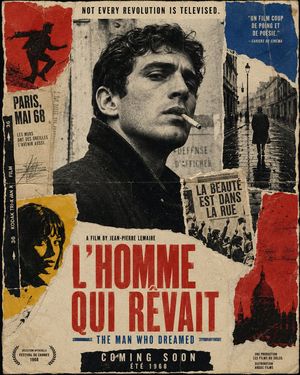
A distressed 1960s-style French art-house movie poster collage for creating rebellious vintage cinema graphics with torn paper, bold typography, and political street-poster energy.

Prompt
Create a vintage French New Wave political cinema poster as a torn-paper collage, vertical one-sheet composition, aged and distressed like a weathered 1968 street poster pasted on a wall. Use a limited palette of cream paper, faded black, deep red, mustard yellow, and muted cobalt blue, with heavy analog film grain, halftone print texture, ink bleed, fold creases, scratches, rough paper fibers, ripped edges, glue stains, and slightly misregistered letterpress typography. In the center, place a large black-and-white portrait of a brooding young man in a dark coat, seen in three-quarter profile, cropped from chest up, with curly dark hair and his face partially obscured by a rectangular censor-like paper block, giving the image a mysterious art-house feel. Surround the portrait with torn collage fragments: at upper left, a red paper panel with a black silhouette of a running protester; beneath it, a narrow off-white text strip reading “PARIS, MAI 68” and smaller French copy “LES MURS ONT DES OREILLES, L’AVENIR AUSSI.”; along the far left edge, a vertical black film-strip border with “36 KODAK TRI-X PAN FILM” in white; at lower left, a mustard-yellow torn panel with a cropped dark silhouette portrait; at upper right, a blue torn panel containing the quote “UN FILM COUP DE POING ET DE POÉSIE.” with “— CAHIERS DU CINÉMA” below; directly below that, a tall black-and-white photo fragment of a lone figure walking down a wet Paris street at night under lampposts; near the middle-right, a small torn newsprint block with the French slogan “LA BEAUTÉ EST DANS LA RUE” above a crowd scene; at lower right, a red torn panel with a black silhouette of a domed Paris landmark. Across the very top, centered in narrow black capitals, add the tagline “NOT EVERY REVOLUTION IS TELEVISED.” Near the lower middle, in small black condensed type, add “A FILM BY {argument name="director name" default="JEAN-PIERRE LEMAIRE"}”. Make the main title dominate the lower half in huge condensed red uppercase letters over torn cream paper: “{argument name="French title" default="L’HOMME QUI RÊVAIT"}”. Directly underneath, in smaller blue condensed capitals, add the English subtitle “{argument name="English subtitle" default="THE MAN WHO DREAMED"}”. At the bottom center, place a black strip with large white condensed capitals reading “COMING SOON”, and below it smaller text “ÉTÉ 1968”. In the bottom left corner, include a Cannes-style laurel mark with “SÉLECTION OFFICIELLE FESTIVAL DE CANNES 1968”. In the bottom right corner, add tiny production credits in French, including “UNE PRODUCTION LES FILMS DU SOLEIL DISTRIBUTION”. Keep the whole design asymmetrical, raw, rebellious, and elegant, evoking Godard, Truffaut, May 1968 protest graphics, and handmade French art-house poster collage.

Multi-Pattern Web Advertisement Grid

Multi-Pattern Web Advertisement Grid

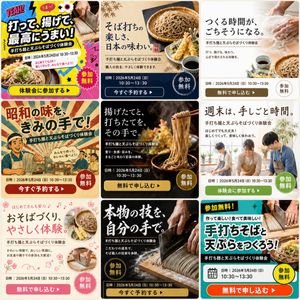
A prompt to generate a 3x3 grid of advertisement variations for an event, featuring different styles, copy, and layouts.

Prompt
Please create 9 patterns of advertisements that meet the following requirements and arrange them in a single image. - This is a web advertisement to get people to participate in {argument name="Event Content" default="Handmade Tempura Soba Making Experience"}. - Please think of the copywriting, eye-catching elements, background images, and layouts. - It is desirable that each of the 9 patterns has a completely different taste. - Please structure it with a main copy, sub-copy, date and time, free of charge, and a button. - The target audience is {argument name="Target Audience" default="Gen Z and around 40s"}.