Felo

GPT Image 2Prompts

Updated every day

10,000+ free image and video prompts
AuthorTakahiko
148 days ago

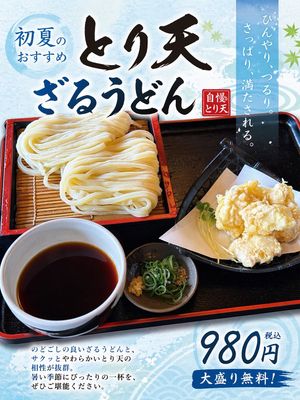
Turn Food Photo Into Japanese Poster

Turn Food Photo Into Japanese Poster

This prompt converts a reference meal photo into a polished Japanese restaurant advertisement poster, useful for menu promos and social media food marketing.

Prompt

Using the provided reference image of the udon meal, turn it into a clean, print-ready Japanese restaurant promotional poster while keeping the food photo itself as the main hero image. Expand the composition vertically into a portrait flyer layout, add a light icy-blue seasonal background with subtle watercolor texture and faint wave motifs, and overlay decorative green maple leaves for an early-summer feel. Add 5 text elements in Japanese: a blue circular badge at the upper left reading "初夏のおすすめ", a large bold brush-calligraphy headline across the top in 2 lines reading "とり天" and "ざるうどん", a small red vertical seal near the headline reading "自慢のとり天", a tall translucent blue vertical copy block at the upper right reading "ひんやり、つるり。さっぱり、満たされる。", and a price block at the lower right reading "980円 税込" with a blue brushstroke banner below that says "大盛り無料!". Add a short 4-line Japanese body copy paragraph at the lower left describing the dish in a menu-poster style. Preserve the original meal arrangement and realistic photography, but enhance it slightly for advertising: brighter, more appetizing, crisp, and high contrast. Make the overall design look like a polished restaurant poster created from a casual food photo.
Authorトモ@
148 days ago

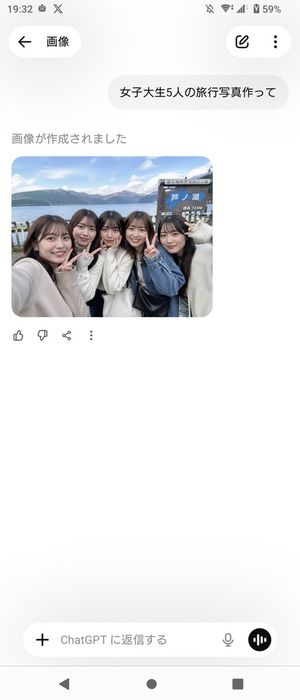
Realistic Friends Trip Selfie at Lake Ashi

Realistic Friends Trip Selfie at Lake Ashi

Generates a realistic smartphone-style group travel selfie of Japanese college women at a scenic lakeside spot, ideal for social-media or casual vacation photo mockups.
Prompt
A candid, smartphone-style travel selfie of {argument name="group size" default="five"} Japanese female college students standing closely together at the shore of {argument name="location" default="Lake Ashi, Hakone"}, shot at arm’s length with a slightly wide-angle front camera feel. They are grouped tightly shoulder-to-shoulder, smiling and making peace signs toward the camera, with a casual cheerful friends-on-a-trip mood. Their styling is realistic and contemporary, with dark brown to black medium-to-long hair, natural makeup, and soft autumn outfits in light neutral tones: cream and white knit sweaters, a blue denim jacket, and a black shoulder bag visible near the center-right. Behind them is a lakeside scenic background with calm blue water, distant mountains under a bright sky with scattered clouds, and a wooden tourist signboard on the right side that clearly includes the Japanese text {argument name="sign text" default="芦ノ湖"} and a smaller elevation marking reading 724M. Composition should look like an authentic social-media travel photo, slightly cropped at the edges as if one person is holding the phone from the left, with natural daylight, realistic skin tones, soft depth, and documentary-style photo realism. Include exactly {argument name="peace sign count" default="three"} visible peace-sign hand gestures. Make it feel like a believable group souvenir photo taken during a day trip in Japan.
Authorトモ@
148 days ago

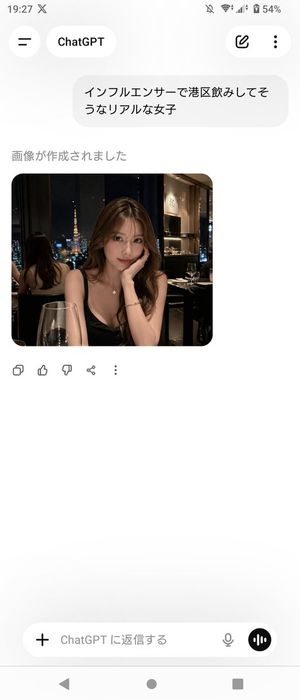
ChatGPT App Screenshot With Generated Portrait

ChatGPT App Screenshot With Generated Portrait

This prompt generates a realistic Android screenshot of the ChatGPT Japanese mobile app displaying a photorealistic nightlife portrait image, useful for social media mockups or UI demonstrations.
Prompt
A realistic smartphone screenshot of the ChatGPT mobile app in Japanese on an Android device, shown full screen in portrait orientation with a clean light theme. The status bar at the top shows the time 19:27, network and battery icons, and 54% battery. The header has a back-style menu icon on the left, a rounded tab labeled ChatGPT, and 2 icons on the right: an edit pencil icon and a vertical three-dot menu. In the chat area, include 1 user message bubble in Japanese reading "インフルエンサーで港区飲みしてそうなリアルな女子". Below it, show the assistant status text "画像が作成されました" and then 1 generated image card with rounded corners. The generated image is a photorealistic night restaurant portrait of a glamorous young Japanese woman seated indoors by a window with Tokyo Tower visible outside, wearing a black spaghetti-strap dress, long wavy brown hair, a delicate necklace, and a bracelet, leaning her face on one hand at a candlelit dinner table with a wine glass in the foreground; the setting feels upscale, dimly lit, and influencer-like, with a mirror behind her reflecting the back of her head and the city view. Blur or mosaic the woman’s face for privacy. Beneath the image, show 5 action icons in a row: copy, thumbs up, thumbs down, share, and more. At the bottom, include the message input bar with a plus icon on the left, placeholder text "ChatGPT に返信する", a microphone icon, and a circular voice button on the right. Also show the Android navigation bar with 3 controls at the very bottom. Keep the overall composition exactly like a casual app screenshot, minimal, spacious, and authentic.
AuthorMURPH
148 days ago

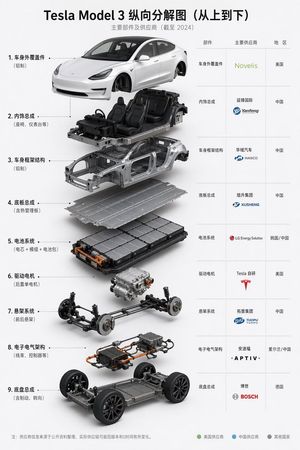
Tesla Model 3 Exploded Supplier Infographic

Tesla Model 3 Exploded Supplier Infographic

A polished Chinese-language automotive infographic showing a 9-layer vertical exploded view of a Tesla Model 3 with a matching supplier table, suitable for industry posts, presentations, and technical content graphics.
Prompt
{"type":"automotive exploded-view supplier infographic poster","topic":"Tesla Model 3 vertical exploded diagram from top to bottom","language":"English","style":"clean professional industrial infographic, white background, high-end corporate presentation, precise 3D product rendering, soft studio shadows, minimal layout, sharp typography","title":{"main":"{argument name=\"headline text\" default=\"Tesla Model 3 Vertical Exploded View (Top to Bottom)\"}","subtitle":"Main Components and Suppliers (As of 2024)"},"subject":{"vehicle":"{argument name=\"vehicle model\" default=\"Tesla Model 3\"}","view":"front three-quarter view","composition":"vertically stacked exploded assembly with components floating in alignment from top to bottom"},"layout":{"left_panel":{"position":"left two-thirds","count":9,"items":[{"index":1,"label":"Outer Body Panels","note":"Aluminum","visual":"painted white outer body shell with doors, hood, trunk, lights, no wheels"},{"index":2,"label":"Interior Assembly","note":"Seats, dashboard, etc.","visual":"interior cabin assembly with four black seats, dashboard, steering wheel, center console mounted on partial chassis"},{"index":3,"label":"Body Frame Structure","note":"Aluminum","visual":"bare silver body-in-white structural frame"},{"index":4,"label":"Underfloor Assembly","note":"Includes thermal management plate","visual":"flat metallic underfloor plate"},{"index":5,"label":"Battery System","note":"Cells + Modules + Battery Pack","visual":"large rectangular battery pack with visible module layout and orange high-voltage connectors"},{"index":6,"label":"Drive Motor","note":"Rear single motor","visual":"single rear drive motor unit floating alone"},{"index":7,"label":"Suspension System","note":"Front and rear suspension","visual":"front and rear suspension subframe assembly with brakes and springs"},{"index":8,"label":"E/E Architecture","note":"Wiring harnesses, controllers, etc.","visual":"electronic module assembly with orange cables, controllers, wiring and junction boxes"},{"index":9,"label":"Chassis Assembly","note":"Includes braking, steering","visual":"rolling skateboard chassis with wheels, battery floor, steering and brake systems"}]},"right_panel":{"position":"right one-third","type":"supplier table","columns":["Component","Main Supplier","Region"],"count":9,"rows":[{"part":"Outer Body Panels","supplier":"Novelis","region":"USA"},{"part":"Interior Assembly","supplier":"Yanfeng International","region":"China"},{"part":"Body Frame Structure","supplier":"HASCO","region":"China"},{"part":"Underfloor Assembly","supplier":"XUSHENG","region":"China"},{"part":"Battery System","supplier":"LG Energy Solution","region":"South Korea / China"},{"part":"Drive Motor","supplier":"Tesla In-house","region":"USA"},{"part":"Suspension System","supplier":"TUOPU","region":"China"},{"part":"E/E Architecture","supplier":"APTIV","region":"Ireland / China"},{"part":"Chassis Assembly","supplier":"BOSCH","region":"Germany"}]},"connectors":"dotted leader lines from each numbered left-side label to corresponding exploded component","footer":{"note":"Note: Supplier information is compiled from public data; actual suppliers may vary by version and time.","legend_count":3,"legend":[{"label":"US Suppliers","color":"green"},{"label":"Chinese Suppliers","color":"blue"},{"label":"Other Countries","color":"gray"}]}} ,"rendering":{"materials":"painted white body, brushed aluminum structures, black leather seats, dark rubber tires, metallic mechanical parts, orange high-voltage cables","lighting":"neutral studio lighting from upper front, gentle ambient occlusion, soft drop shadows beneath each floating layer","camera":"slightly elevated frontal perspective, centered vertical stack","background":"pure white or very light gray"},"constraints":["preserve all 9 layers in exact top-to-bottom order","show supplier logos or brand-styled text in the table","use English labels throughout the infographic","maintain clean spacing and professional information design","make the 3D components realistic and technically plausible"]}
148 days ago

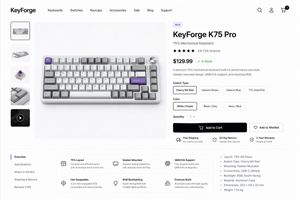
Mechanical Keyboard Product Page Mockup

Mechanical Keyboard Product Page Mockup

This generates a polished desktop e-commerce product page for a premium mechanical keyboard, suitable for product design showcases, storefront concepts, and UI mockups.
Prompt
Create a clean modern e-commerce product detail page for a premium mechanical keyboard brand called {argument name="brand name" default="KeyForge"}, presented as a high-fidelity desktop website mockup on a white background with subtle light-gray dividers and generous spacing. The layout is a single unified storefront scene with a top navigation bar, a left product thumbnail rail, a large center product hero image, and a right-side purchase information panel. In the header, place the bold wordmark on the far left, then 7 navigation items reading “Keyboards”, “Switches”, “Keycaps”, “Accessories”, “Sale”, “Blog”, and “Support”, and on the far right 3 icons for search, account, and cart, with a small black notification badge showing “1” on the cart. The main product shown in the center is a compact 75% mechanical keyboard photographed from a slightly elevated front angle on a pale gray stage, with an aluminum case in silver, white and gray keycaps, several accent keys in lavender purple, and a silver volume knob at the top right. The left vertical gallery contains exactly 5 thumbnails: 1 selected front product shot, 1 angled keyboard view, 1 mechanical switch close-up, 1 keycap texture close-up, and 1 dark video thumbnail with a circular play icon. The right product panel includes a small pill badge reading “NEW”, a large bold product name {argument name="product name" default="KeyForge K75 Pro"}, a subtitle “75% Mechanical Keyboard”, a 5-star rating row with 4.8 and “(126 reviews)”, a large bold price {argument name="price" default="$129.99"} followed by a green “In Stock” status, and a short two-sentence description about premium performance, gasket-mounted design, QMK/VIA support, and RGB. Under that, include a “Switch Type” selector with exactly 4 pill buttons labeled “Cherry MX Red”, “Gateron Brown”, “Gateron Blue”, and “TTC Gold Pink”, with the first selected; a “Color” selector with exactly 3 pill buttons labeled “White / Purple”, “Black / Gray”, and “Navy / Blue”, with the first selected; a “Quantity” dropdown set to “1”; one large black primary button labeled “Add to Cart” with a cart icon; and one outlined secondary button labeled “Add to Wishlist” with a heart icon. Beneath the buttons, show exactly 3 horizontal service highlights with small icons: “Free Shipping” with subtext “On orders over $99”, “30-Day Returns” with subtext “Hassle-free returns”, and “2-Year Warranty” with subtext “Peace of mind”. In the lower content area, create a two-column section separated by light lines. On the left is a vertical tab list with exactly 5 items: “Overview” selected, then “Specifications”, “What’s in the Box”, “Shipping & Returns”, and “Reviews (126)”. To the right of the tabs, place a rounded white feature card grid with exactly 6 feature blocks in 2 rows of 3, each with a simple line icon, bold title, and short explanatory text: “75% Layout”, “Gasket-Mounted”, “QMK/VIA Support”, “Hot-Swappable”, “RGB Backlighting”, and “Premium Build”. On the far right of this lower area, add a specifications bullet list with exactly 7 bullets: “Layout: 75% (82 Keys)”, “Switch Type: Cherry MX Red”, “Mounting: Gasket-Mounted”, “Connectivity: USB-C (Wired)”, “Backlight: RGB, South-facing”, “Material: Aluminum Case”, and “Dimensions: 322 x 135 x 42 mm”, plus an additional final bullet “Weight: 1.25 kg”. Use a refined minimalist product-design aesthetic, realistic UI spacing, clean sans-serif typography similar to Inter or SF Pro, soft shadows, subtle rounded corners, monochrome icons, and polished startup-style consumer electronics presentation.
148 days ago

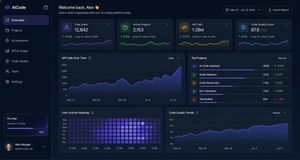
Dark AI Coding Dashboard UI

Dark AI Coding Dashboard UI

A polished dark-mode analytics dashboard for an AI coding platform, suitable for SaaS product design mockups, admin panels, and data-rich web UI presentations.
Prompt
{ "type": "dark SaaS analytics dashboard UI", "product": { "brand": "{argument name=\"brand name\" default=\"AICode\"}", "theme": "dark navy blue glassmorphism interface with subtle gradients, soft glow, rounded cards, thin borders, modern developer-tool aesthetic" }, "canvas": { "aspect_ratio": "16:9", "background": "deep midnight blue with faint vignette and soft radial lighting" }, "layout": { "structure": "left sidebar plus main content area", "sections": [ { "title": "Sidebar", "position": "left", "count": 8, "labels": ["AICode", "Overview", "Projects", "AI Assistants", "API & Usage", "Code Quality", "Team", "Settings"], "details": "logo at top, Overview selected with purple highlight, lower subscription card showing Pro Plan, renews in 12 days, horizontal progress bar at 75%, user profile at bottom with avatar, {argument name=\"user name\" default=\"Alex Morgan\"}, and email [email protected]" }, { "title": "Header", "position": "top main area", "count": 4, "labels": ["Welcome back, Alex 👋", "Here's what's happening with your AI coding platform today.", "May 12 – Jun 12, 2024", "Export Report"], "details": "large greeting on left, date range picker and export button on right" }, { "title": "Metric cards", "position": "top row under header", "count": 4, "labels": ["Total Users", "Active Projects", "API Calls", "Code Quality Score"], "values": ["12,842", "2,153", "1.28M", "876"], "details": "each card has a small colored icon, large main value, comparison text vs Apr 12 – May 12, 2024, positive change percentages 14.6%, 8.3%, 23.7%, 5.9%, and a miniature line chart at the bottom; colors are purple, green, amber, and blue" }, { "title": "Main analytics panels", "position": "middle and bottom rows", "count": 4, "labels": ["API Calls Over Time", "Top Projects", "User Activity Heatmap", "Code Quality Trends"], "details": "API Calls Over Time is a wide area chart with Daily dropdown and rising purple line ending near 250K; Top Projects is a ranked list of 5 items with progress bars and percentage changes; User Activity Heatmap is a 7-row weekly heatmap with hour labels from 12 AM to 9 PM; Code Quality Trends is a line chart with Weekly dropdown and smooth upward purple trend from about 70 to low 90s" }, { "title": "Top Projects list", "position": "middle right panel", "count": 5, "labels": ["AI Code Assistant", "Smart Refactor", "Code Review Bot", "Doc Generator", "Test Builder"], "values": ["485K", "321K", "214K", "132K", "98K"], "details": "green positive deltas for first four items 12.4%, 8.7%, 3.1%, 6.8%, and red negative delta -1.2% for Test Builder; each row has a colored square icon and thin horizontal progress bar" } ] }, "style": { "visual_language": "premium fintech and AI product design mockup", "rendering": "crisp high-fidelity UI mockup, subtle shadows, neon edge lighting, polished charts, clean sans-serif typography", "primary_accent": "{argument name=\"accent color\" default=\"electric purple\"}", "secondary_accents": ["emerald green", "amber yellow", "cyan blue"], "density": "information-rich but spacious, balanced grid, highly legible" } }
148 days ago

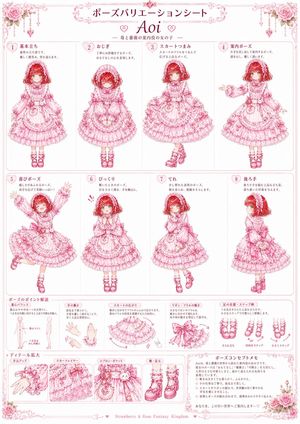
Pink Lolita Pose Variation Sheet

Pink Lolita Pose Variation Sheet

This prompt generates an ornate anime character reference poster with eight pose variations, motion notes, and costume detail callouts for a sweet gothic-lolita girl design.
Prompt
{"type":"anime character pose variation sheet","style":"ornate kawaii gothic-lolita fashion reference poster, predominantly pink monochrome line art with soft white background, delicate rose motifs, lace filigree borders, heart accents, elegant shoujo manga presentation","character":{"name":"{argument name=\"character name\" default=\"Aoi\"}","appearance":"young girl with short wavy bob hair, large eyes, soft doll-like face, wearing a highly detailed sweet lolita dress themed around strawberries and roses","outfit":{"color":"{argument name=\"outfit color\" default=\"pink\"}","pieces":["rose-and-lace bonnet with floral clusters and veil-like trim","multi-tiered ruffled long-sleeve lolita dress with abundant lace, bows, pintucks, and frills","front apron-style panel and oversized waist bow at the back","frilly wrist cuffs","lace-trim socks","platform Mary Jane shoes with bows and straps"]},"theme":"{argument name=\"theme\" default=\"Strawberry & Rose Fantasy Kingdom\"}"},"layout":{"format":"vertical poster reference sheet with decorative floral corners and ornate title cartouche","title":"Pose Variation Sheet","subtitle":"{argument name=\"subtitle text\" default=\"Girl in the Strawberry and Rose Forest\"}","center_name":"Aoi","main_sections":[{"title":"pose grid","position":"upper and middle area","count":8,"items":[{"label":"1 Basic Standing","description":"front-facing neutral standing pose, arms relaxed at sides, full body visible"},{"label":"2 Bowing","description":"formal bowing pose with upper body lowered and hands together in front"},{"label":"3 Skirt Pinch","description":"curtsy-like pose holding out both sides of the skirt to show volume and ruffles"},{"label":"4 Guiding Pose","description":"presentation pose, one arm extended outward to the side, welcoming gesture"},{"label":"5 Joyful Pose","description":"joyful energetic pose, one knee raised, both arms lifted high, smiling brightly"},{"label":"6 Surprised","description":"surprised pose, shoulders slightly raised, hands held near chest, startled mood"},{"label":"7 Shy","description":"bashful shy pose, head tilted, hand near face, knees angled inward"},{"label":"8 Hands Behind Back","description":"three-quarter back view with hands behind the body, showing the back bow and rear silhouette"}]},{"title":"Pose Point Explanation","position":"lower left strip","count":5,"items":[{"label":"Center of Gravity Balance","description":"simple body balance sketches with center line and weight distribution notes"},{"label":"Hand Movement","description":"3 hand drawings showing delicate wrist and finger motion"},{"label":"Skirt Spread","description":"dress hem spread diagram emphasizing circular volume and layered ruffles"},{"label":"Ribbon/Frill Movement","description":"close-up motion study of bow tails and fluttering frills"},{"label":"Foot Position/Step Examples","description":"3 foot placement examples for standing and stepping in heeled shoes"}]},{"title":"Detail Enlargement","position":"bottom left row","count":4,"items":[{"label":"Hand Close-up","description":"close-up of sleeve cuff, lace, ribbons, and hand pose"},{"label":"Skirt Layers","description":"close-up of multiple ruffle and lace layers of the skirt"},{"label":"Apron/Pocket","description":"close-up of apron panel, bow, and decorative pocket charm details"},{"label":"Shoes/Feet","description":"close-up of socks and platform shoes with bows and straps"}]},{"title":"Pose Concept Memo","position":"bottom right box","count":1,"items":[{"label":"memo block","description":"paragraph-style handwritten design notes inside a framed text box"}]}],"footer":"{argument name=\"footer text\" default=\"Strawberry & Rose Fantasy Kingdom\"}"},"composition":"clean white poster background, all drawings rendered in consistent pink ink with subtle blush red hair accents, symmetrical decorative frame, top floral clusters in both corners, highly legible reference-sheet organization, full-body character drawings in 8 bordered panels with explanatory miniature diagrams and detail close-ups along the bottom","quality":"high detail, crisp fine linework, fashion-design sheet clarity, polished printable poster aesthetic"}
Authorzhijunio
148 days ago

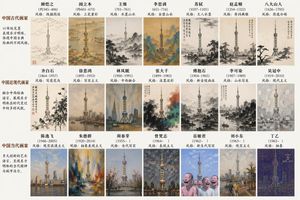
Historical Artist Style Landmark

Historical Artist Style Landmark

A creative prompt asking the AI to render a modern landmark using the artistic styles of various historical Chinese painters.
Prompt
List ancient, modern, and contemporary Chinese painters, and draw {argument name="地标" default="东方明珠"} using the style of each painter.
148 days ago

Chinese Calligraphy Poem Scroll

Chinese Calligraphy Poem Scroll

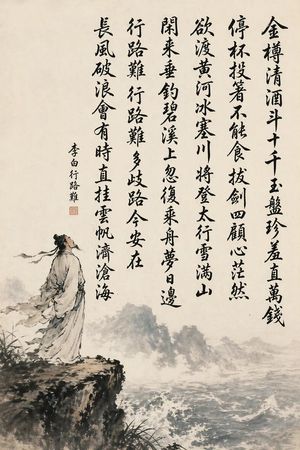
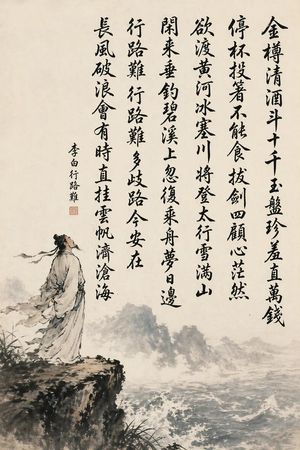
A vertical ink-wash artwork combining a famous Chinese poem in six calligraphy columns with a lone scholar on a cliff, ideal for classical art, cultural posters, or elegant wall-scroll imagery.
Prompt
A traditional Chinese ink wash hanging-scroll painting on warm aged rice paper, vertical composition, with six large vertical columns of bold black brush-calligraphy occupying the upper and right half of the image. The calligraphy should be highly legible expressive Chinese cursive-regular script with varied ink density and natural brush taper, reading from right to left in 6 columns: "金樽清酒斗十千 玉盘珍羞直万钱", "停杯投箸不能食 拔剑四顾心茫然", "欲渡黄河冰塞川 将登太行雪满山", "闲来垂钓碧溪上 忽复乘舟梦日边", "行路难 行路难 多歧路 今安在", "长风破浪会有时 直挂云帆济沧海". Add one smaller vertical inscription on the left side reading "李白行路难" with a small red seal stamp beneath it. In the lower left foreground, depict an ancient Chinese scholar-poet in flowing white and pale gray robes with a blue sash, long black hair in a traditional topknot with loose strands and ribbon, standing on the edge of a dark rocky cliff, body angled right and head lifted upward in a contemplative, heroic pose. Below and across the lower half, paint a turbulent river or sea with white crashing waves in monochrome ink and soft gray washes; in the distance, faint misty mountains and fog dissolve into the paper. Classical literati painting style, dynamic calligraphy as the main focus, poetic and majestic mood, restrained palette of black ink, gray wash, off-white paper, and a small touch of muted blue on the robe, ample negative space, museum-quality Chinese shanshui and calligraphy fusion.
Author傅盛
148 days ago

Chinese Calligraphy Poem Landscape

Chinese Calligraphy Poem Landscape

This prompt generates a classical Chinese ink painting with flawless poem calligraphy and a scholar in a dramatic shanshui landscape, ideal for cultural posters, scroll art, or literary-themed visuals.
Prompt
A traditional Chinese ink wash hanging-scroll style painting on warm off-white rice paper, vertically composed with large black brush-calligraphy occupying the upper and right-central area and a poetic landscape illustration in the lower left and bottom. The calligraphy must be crisp, fully legible, and written in expressive semi-cursive brush script, arranged in 6 vertical columns read right to left. The exact text of the 6 columns is: “金樽清酒斗十千 玉盘珍羞直万钱”, “停杯投箸不能食 拔剑四顾心茫然”, “欲渡黄河冰塞川 将登太行雪满山”, “闲来垂钓碧溪上 忽复乘舟梦日边”, “行路难 行路难 多歧路 今安在”, “长风破浪会有时 直挂云帆济沧海”. Add a smaller vertical signature inscription to the left of the main poem reading “李白行路难”, plus 1 small red square seal beneath the inscription. In the painted scene, show 1 ancient Chinese scholar-poet in flowing pale robes with a dark topknot and trailing ribbons, standing on the edge of a rugged cliff at lower left, gazing upward and outward in contemplation. Below and across the lower half, depict a turbulent river or sea with whitecaps and foam, misty ink-wash mountains receding in the distance, sparse grasses and dark brush vegetation near the cliff edge, and soft atmospheric fog. Use monochrome black and gray ink with very restrained muted blue-gray washes in the water and robe shadows. The mood is heroic, melancholic, and literary, evoking classical Chinese shanshui painting and museum-quality calligraphy, with empty negative space preserved around the text and landscape.
AuthorJeffrey
148 days ago

Visit Malaysia 2026 Travel Poster

Visit Malaysia 2026 Travel Poster

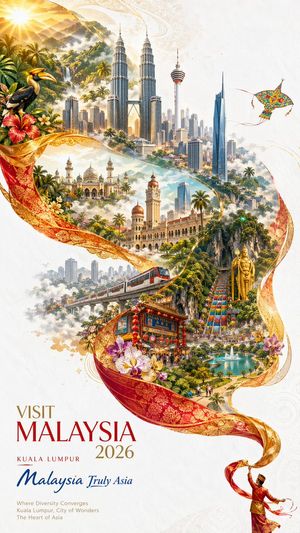
A premium vertical tourism poster showcasing Malaysia’s landmarks, culture, and tropical beauty, ideal for destination marketing and campaign visuals.
Prompt
A luxurious tourism poster for {argument name="destination" default="Malaysia"}, designed as a vertical fine-art travel advertisement on a clean ivory-white textured background with subtle embossed ornamental patterns. The composition is built around one long flowing red-and-gold batik silk ribbon that sweeps diagonally and spirals through the page, forming an elegant S-curve and visually containing a dreamlike collage of landmarks, culture, and nature. At the top left, warm golden sunrise light pours over misty tropical mountains and rainforest with a waterfall, dense palms, and a large rhinoceros hornbill perched beside hibiscus flowers and white tropical blossoms. In the upper center, a detailed Kuala Lumpur skyline rises from mist, dominated by the Petronas Twin Towers, with the KL Tower and several modern skyscrapers visible. Near the upper right floats 1 colorful traditional wau kite with floral patterns against open white space. In the middle left, include 1 grand mosque with multiple domes and minarets set among palms and haze. In the middle center-right, include the historic Sultan Abdul Samad Building with its copper domes and clocktower. In the lower middle left, include 1 elevated red-and-silver urban train crossing through the city. In the lower center, show 1 ornate Chinatown gate labeled Jalan Petaling, decorated with red lanterns and bustling pedestrians. In the lower right-middle, depict the Batu Caves area with 1 towering golden Murugan statue and 1 steep rainbow staircase climbing into limestone cliffs, surrounded by crowds. At the lower right, nestle 1 landscaped city park with a turquoise lake and fountains. Purple orchids and tropical flowers are woven into the ribbon and foreground in several places. At the very bottom right, show 1 small traditional dancer in red and gold attire twirling the trailing end of the ribbon. The collage should feel luminous, hyper-detailed, majestic, and celebratory, blending photorealistic architecture with painterly fantasy travel-poster styling, soft clouds, atmospheric haze, and glowing highlights. Add elegant poster typography in the lower left: the main headline reads {argument name="headline text" default="VISIT MALAYSIA 2026"}, a smaller location line reads {argument name="location text" default="KUALA LUMPUR"}, a blue script tourism slogan reads {argument name="tagline" default="Malaysia Truly Asia"}, and below that a small refined subheading reads {argument name="subheading" default="Where Diversity Converges\nKuala Lumpur, City of Wonders\nThe Heart of Asia"}. Use a premium color palette of gold, crimson, ivory, emerald, sky blue, and tropical greens, with polished editorial composition and high-end destination-branding aesthetics.
Author木马人
148 days ago

GPT-Image V2 Feature Announcement

GPT-Image V2 Feature Announcement

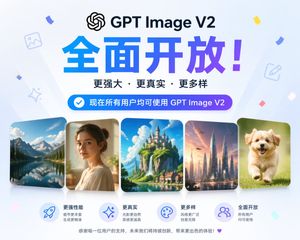
A simple instruction to generate an image illustrating the full release of the GPT Image V2 model.
Prompt
Help me generate an image illustrating that {argument name="公告内容" default="GPT Image V2 is now fully available"}
148 days ago

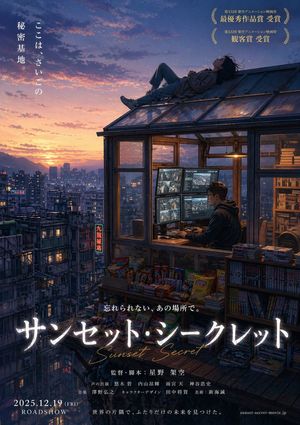
Anime Movie Poster from Reference

Anime Movie Poster from Reference

A simple prompt to generate a fictional anime movie poster using a reference image as the base composition.
Prompt
Create a poster for a {argument name="Genre" default="fictional anime movie"} based on this image using GPT image2.
AuthorGreg_Ld
148 days ago

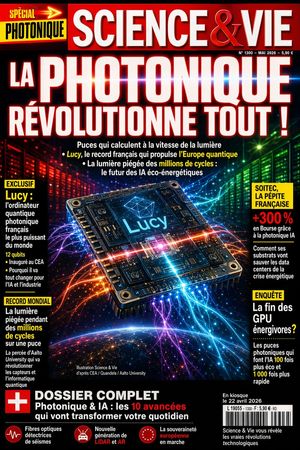
Futuristic Photonics Magazine Cover

Futuristic Photonics Magazine Cover

This prompt generates a dramatic French-style science magazine cover centered on a glowing photonic chip, ideal for editorial mockups, tech news covers, and speculative science publication designs.
Prompt
A hyper-detailed French popular science magazine cover in the style of a bold mainstream newsstand publication, full-page vertical layout, dramatic glossy print design, black background with intense neon lighting and saturated red, blue, purple, green, and orange highlights. At the very top, a wide red masthead bar with the magazine title {argument name="magazine title" default="SCIENCE & VIE"} in huge white serif capital letters with subtle beveling and metallic shine; small issue details on the upper right in tiny white text. On the upper left, a bright yellow and black special tag reading {argument name="special tag" default="SPÉCIAL PHOTONIQUE"} with a red arrow motif. The main headline dominates most of the upper half in gigantic white block capitals with a red glow and slight 3D shadow: {argument name="main headline" default="LA PHOTONIQUE RÉVOLUTIONNE TOUT !"}. Beneath it, 3 short cover lines in smaller white text with selected words highlighted in yellow, discussing ultrafast light-speed chips, a French record computer called Lucy, and light trapped for millions of cycles for energy-efficient AI. Centerpiece image: a futuristic square photonic processor chip floating in space at a slight perspective tilt, extremely detailed circuitry, metallic screws at the corners, glowing traces, and a bright cyan-blue core display labeled {argument name="chip name" default="Lucy"}; the chip emits intersecting beams and flowing fiber-optic light trails in electric blue, magenta, orange, and violet that radiate outward across the page. Background behind the chip shows 2 luminous server-wall corridors, red on the left and green on the right, fading into darkness, suggesting a high-tech datacenter. At the bottom, the curved horizon of Earth from space with a soft blue atmospheric glow and scattered city lights. Add 4 side callout boxes total: 2 stacked on the left and 2 stacked on the right, each with yellow headers and white body text, using a magazine cover typography hierarchy. Left box 1 header: "EXCLUSIF", featuring Lucy as the most powerful French photonic quantum computer in the world, with several short bullet lines and a yellow emphasis on "12 qubits". Left box 2 header: "RECORD MONDIAL", about light trapped for millions of cycles in a chip, with yellow emphasis on "millions de cycles". Right box 1 header area in yellow, with a bold red percentage "+300 %" and text about the French gem Soitec rising thanks to photonic AI and saving datacenters during the energy crisis. Right box 2 header: "ENQUÊTE", about the end of power-hungry GPUs, with yellow-highlighted numeric claims such as 100 times cheaper and 1,000 times faster. Near the lower center, tiny white image-credit text. A thick black bottom banner spans the page with a red square containing a white plus symbol on the left, and a large dossier teaser in white and red text: {argument name="bottom feature text" default="DOSSIER COMPLET Photonique & IA : les 10 avancées qui vont transformer votre quotidien"}. Along the very bottom, add 3 small circular red icon blurbs with short white captions about seismic optical fibers, a new generation of LiDAR and AR, and European sovereignty in progress. Lower right corner includes a white barcode box and a short block of white text about the issue being on sale. Overall look: sensational, prestigious, futuristic, glossy, information-dense, sharp editorial typography, dramatic science-news cover, cinematic lighting, high contrast, photorealistic 3D chip illustration mixed with premium magazine graphic design.
148 days ago

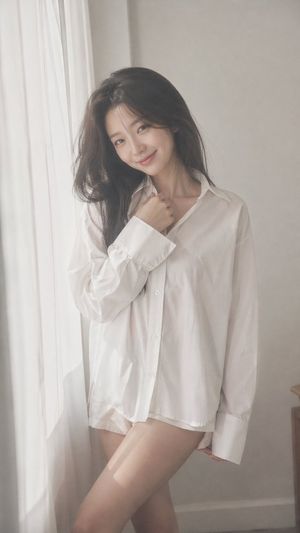
Korean Idol Dreamy Portrait

Korean Idol Dreamy Portrait

A comprehensive prompt for a soft, dreamy Korean idol portrait using film-like filters, natural lighting, and specific fashion details.

Prompt
{argument name="aspect ratio" default="9:16"} vertical — {argument name="subject" default="Korean idol portrait photography"}, single subject soft black mist filter effect, lowered contrast, gentle highlight bloom, subtle glow, soft diffusion, slightly faded blacks minimal indoor setting near window, white curtains, clean light-toned background young Korean female idol, natural minimal makeup, dewy realistic skin texture, subtle imperfections outfit: {argument name="outfit" default="oversized white button-up shirt + short bottoms"}, slightly loose fit, soft and casual styling, no revealing elements hair: long dark hair, slightly messy, natural volume, softly flowing pose: relaxed standing or slight lean, body subtly angled, one leg slightly forward, shoulders relaxed; one hand lightly touching collar or resting near neckline, the other relaxed; gentle body curve without exaggeration expression: soft cute smile, slightly playful eyes, direct or slightly off-camera gaze camera: close to mid-body framing, eye-level, intimate distance, slight handheld feel lighting: diffused natural daylight, soft shadows, gentle light wrapping around face and body mood: cute yet subtly sensual, intimate, everyday softness, quiet romantic atmosphere quality: ultra-realistic, fine film grain, slight softness at edges, natural imperfections, dreamy understated tone

Japanese ClaudeCode Training Banner

Japanese ClaudeCode Training Banner

A polished horizontal corporate banner for promoting an AI or coding training program, suitable for web ads, landing pages, and social media marketing.

Prompt
Create a clean corporate Japanese web banner for an AI training service, wide horizontal format around 1200x247. Use a bright white and pale blue office aesthetic with a modern professional business look. The layout has 5 clear text/icon areas plus one human figure on the right. On the left, place a small top tagline in Japanese reading 「AIはじめてでも安心。実践で身につく。」 in medium blue-gray, aligned near the upper left with a subtle dotted accent mark to its far left. Below it, place a very large bold headline in deep blue reading 「{argument name="main headline" default="ClaudeCode研修"}" with the Latin word oversized and the Japanese word continuing on the same line. Under the headline, place 3 evenly spaced rounded white feature boxes with thin blue borders and blue line icons. Box 1 contains an open book icon and the Japanese text 「基礎から丁寧に学べる」. Box 2 contains a laptop icon and the Japanese text 「ハンズオンで実践力がつく」. Box 3 contains a checkmark in a circle icon and the Japanese text 「チーム開発に活かせる知識」. Along the entire bottom, add a full-width deep blue bar with centered white Japanese text 「{argument name="bottom tagline" default="あなたの開発を、次のステージへ。"}". On the right side, show 1 professional Japanese businessman from the waist up, wearing a dark navy or black suit, white shirt, and blue striped tie, arms crossed, facing forward with a confident posture; his face is intentionally blurred or anonymized. Behind him, use a softly blurred modern office interior with bright daylight, glass, and green plants. Add a sweeping curved blue accent ribbon along the far right edge framing the subject. Overall style: premium B2B seminar ad, polished typography, soft gradients, minimal clutter, strong hierarchy, high readability, Japanese enterprise branding, subtle shadows, crisp vector icons, and balanced negative space.

Japanese AI Training Banner

Japanese AI Training Banner

This prompt generates a polished wide-format Japanese corporate banner for an AI-powered coding training course, suitable for ads, landing pages, and promotional visuals.
Prompt
Create a sleek Japanese corporate training banner in a wide horizontal web-ad format with a dark navy-to-deep-blue gradient background, subtle glowing network nodes and connecting lines across the upper and middle area, and a high-tech AI/business atmosphere. Place a confident businessman on the right side from waist-up, wearing a dark navy suit, white dress shirt, and blue striped tie, arms crossed, facing forward; crop him partially at the top and right edge. On the left, create a strong typographic hierarchy with a small cyan headline at the top reading {argument name="headline text" default="AIを活用した開発スキルを、最短で習得"}, then an oversized bold white main title reading {argument name="main title" default="ClaudeCode研修"}. Along the lower-left area, place exactly 3 rounded rectangular feature boxes outlined in bright cyan with dark interiors and cyan icons: box 1 shows a terminal/code icon and the text "Claude Codeの基本と応用", box 2 shows a rocket icon and the text "開発スピードを飛躍的に向上", box 3 shows a two-person/team icon and the text "現場ですぐに活かせるスキル". On the far right, overlay a large cyan angled polygon callout panel with bold dark text in 2 lines reading {argument name="callout text" default="明日からの開発が\n変わる体験を。"}. Use crisp modern sans-serif Japanese typography, strong contrast, polished marketing design, clean spacing, luminous cyan accents, and a premium AI seminar advertisement look.

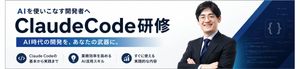
Japanese AI Coding Training Banner

Japanese AI Coding Training Banner

This prompt generates a polished horizontal Japanese corporate banner for promoting an AI-powered coding or developer training program.

Prompt
Create a clean Japanese corporate training banner in a wide horizontal web-header format with a white background and deep navy blue branding. The layout is a single unified promotional banner for an AI programming course. On the left, place a small headline in bold Japanese text reading "AIを使いこなす開発者へ" above a very large dominant title reading "{argument name="main title" default="ClaudeCode研修"}" in heavy sans-serif dark navy lettering, with "ClaudeCode" especially large and the final Japanese word attached on the right in the same style. Beneath the title, add a long horizontal blue gradient bar from medium blue to very light blue containing white bold Japanese text: "{argument name="subheadline text" default="AI時代の開発を、あなたの武器に。"}". Along the bottom left, arrange exactly 3 circular navy icon badges in a horizontal row, each with a short two-line caption in Japanese to the right of the icon. Badge 1 shows a code symbol </> and the text "Claude Codeの 基本から実践まで". Badge 2 shows a light bulb and the text "業務効率を高める AI活用スキル". Badge 3 shows an upward bar chart and the text "すぐに使える 実践的な内容". On the right half, place a confident Japanese businessman from the waist up with arms crossed, wearing a dark navy suit, white shirt, and blue striped tie, facing forward; his face is intentionally soft-focused or anonymized. Behind him, add layered geometric navy and blue diagonal shapes sweeping in from the top right and bottom right, plus a dark blue tech-themed panel with faint code lines and a glowing curly-braces symbol {}. Use a polished B2B seminar advertisement style, crisp typography, strong negative space, subtle gradients, high contrast, and a professional AI/engineering training atmosphere.