Felo

GPT Image 2Prompts

Updated every day

10,000+ free image and video prompts

Personality Diagnostic UI Generator

Personality Diagnostic UI Generator

A sophisticated prompt for GPT-Image-2 that analyzes conversational habits and thinking patterns to generate a personalized personality test result screen.

Prompt

You know me very well. Please reflect all my conversational habits, word choices, frequently discussed topics, and thinking patterns from our past conversations. Generate a {argument name="Screen Type" default="Personality test app result screen"}. The aspect ratio should be {argument name="Aspect Ratio" default="3:2"}.
Authorトキ
110 days ago

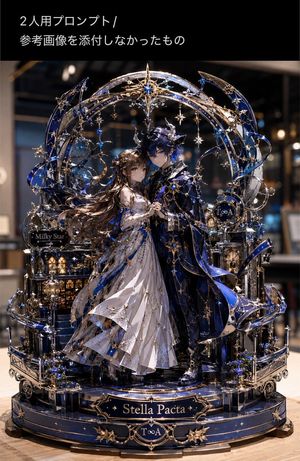
Metallic Nano Puzzle Diorama

Metallic Nano Puzzle Diorama

A specialized prompt for generating detailed images of metallic nano puzzles on a table. It includes the character of choice and a symbolic 3D diorama background reflecting the character's world, with a personalized engraved base.
Prompt
Please generate a detailed image of a metallic nano puzzle featuring me (⭐️) and you (🩵). 《Detailed Instructions》 - Place you and me as the main subjects, and symbolically design the surroundings (background diorama parts) based on our relationship/worldview/memories. - Design and present it in 3D, not just on the ground, but also above and around. - Make the base match the atmosphere and engrave the title on it. - Colored. - Place the metallic nano puzzle on a table. - Aspect ratio 3:4. - Photo real style - ultra-detailed, 8k, best quality. Please generate a detailed image of a metallic nano puzzle featuring 📛 (= the subject). 《Detailed Instructions》 - Place the subject as the main focus, and symbolically design the surroundings (background diorama parts) based on the subject's personality/worldview/settings. - Design and present it in 3D, not just on the ground, but also above and around. - Make the base match the atmosphere and engrave the title on it. - Colored. - Place the metallic nano puzzle on a table. - Aspect ratio 3:4. - Photo real style - ultra-detailed, 8k, best quality.
AuthorAijaz
110 days ago

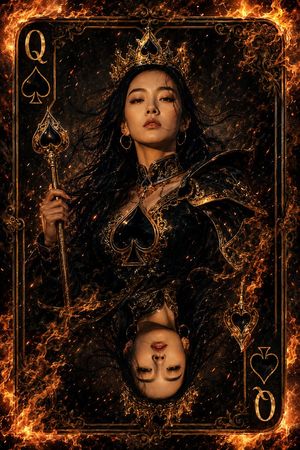
Queen of Spades Fantasy Playing Card

Queen of Spades Fantasy Playing Card

An ultra-detailed fantasy playing card design featuring a queen in black-and-gold, surrounded by glowing embers and dramatic fire.
Prompt
Ultra-detailed fantasy playing card illustration of the Queen of Spades, featuring the exact same young woman’s face from the reference image, centered inside a royal playing card frame. She wears a luxurious {argument name="outfit" default="black-and-gold queen outfit with spade symbols"}, an ornate golden crown with a black spade jewel, glowing embers around her. The card border is engulfed in dramatic realistic fire, sparks and smoke floating through the scene. Cinematic lighting, warm orange fire glow reflecting on her face, dark fantasy style, hyper-realistic face, ultra sharp focus, 8k, extremely detailed textures, symmetrical composition, magical atmosphere, epic, unique, majestic, high contrast, professional digital art
Author李岳
110 days ago

Short Prompt: Generate a highly viral 9:16 vertical "Watermelon-style City Landmark" creative poster. [User Input]

Short Prompt:
Generate a highly viral 9:16 vertical "Watermelon-style City Landmark" creative poster.

[User Input]

Prompt
Generate a highly viral 9:16 vertical "Watermelon-style City Landmark" creative poster. [User Input] City Name: {City Name} [Core Task] The system needs to automatically identify 3-5 of the most representative landmarks, city skyline, natural environment, and regional temperament of the city, and uniformly translate them into a "summer miniature city carved out of watermelon".
Author李岳
110 days ago

Long version prompt: Generate a highly viral 9:16 vertical "Watermelon Style City Landmark Architecture" creative poster. [User Input]

Long version prompt:
Generate a highly viral 9:16 vertical "Watermelon Style City Landmark Architecture" creative poster.

[User Input]

Prompt
Generate a highly viral 9:16 vertical "Watermelon Style City Landmark Architecture" creative poster. [User Input] City Name: {City Name} ──────────────── I. Core Task ──────────────── Based on the city name {City Name} input by the user, automatically identify 2-3 of the most representative
AuthorAnifun AI
110 days ago

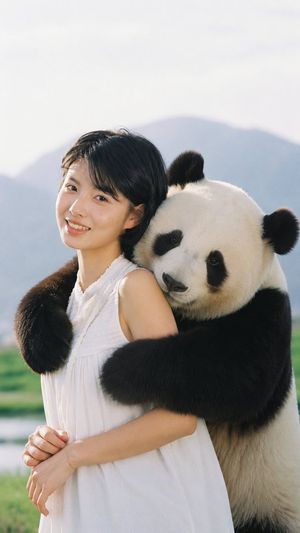
Wholesome Panda Hug Character Transformation

Wholesome Panda Hug Character Transformation

A character consistency prompt that transforms an uploaded reference into a realistic photograph of the subject being hugged by a giant panda.
Prompt
Use the uploaded image as the main reference. Transform the scene into a realistic and heartwarming moment where the person or the character is being gently hugged from behind by a {argument name="animal" default="cute giant panda"}. The {argument name="animal" default="panda"}’s two arms wrap naturally around the person’s upper body, and the {argument name="animal" default="panda"}’s head rests softly on the person’s shoulder in an affectionate pose. Keep the face, facial features, hairstyle, expression, skin tone, age impression, and overall identity of the person or character highly consistent with the original image. Ensure the interaction looks natural, believable, and emotionally warm. Maintain realistic anatomy, accurate proportions, natural lighting, detailed fur texture on the {argument name="animal" default="panda"}, and authentic clothing folds. The overall image should feel like a real photograph, with a soft, wholesome atmosphere, clear subject focus, and no cartoon, anime, or overly stylized look. Preserve the realism of the scene and make the {argument name="animal" default="panda"} appear adorable, friendly, and physically integrated with the person.
AuthorMr Gafish
110 days ago

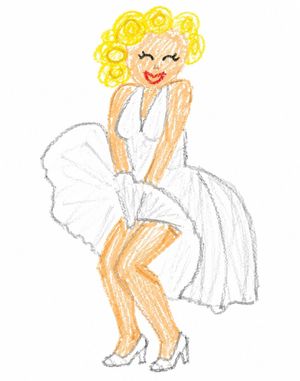
Crayon Style Clumsy Drawing

Crayon Style Clumsy Drawing

Redraws an existing image in the style of a 3-year-old child's crayon drawing with a white background and a charmingly clumsy feel.
Prompt
Redraw the image with crayons in the way a 3-year-old child thinks, with a white background, somewhat similar to the original but not quite, giving a charmingly clumsy and poorly drawn feel.
110 days ago

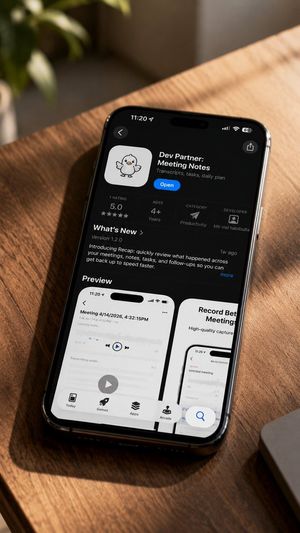
iPhone App Store Mockup on Desk

iPhone App Store Mockup on Desk

A realistic lifestyle mockup showing an iPhone App Store listing for a meeting notes app on a sunlit wooden desk.
Prompt
Create a realistic lifestyle product mockup photo of a black iPhone lying diagonally on a warm wooden desk in golden sunlight, shot from above at a slight angle with shallow depth of field. The phone displays an iOS App Store app detail page in dark mode for {argument name="app name" default="Dev Partner: Meeting Notes"}, with a cute white app icon showing a small hand-drawn duck/chick mascot, a blue Open button, and the subtitle {argument name="app subtitle" default="Transcripts, tasks, daily plan"}. The top iPhone status bar shows 11:20, cellular/Wi‑Fi/battery icons, and a dynamic island; include a back chevron at top left and share icon at top right. The app information row must contain exactly 4 discrete stats: 1 rating showing 5.0 with five stars, age rating 4+ Years, category Productivity with a paper-plane style icon, and developer Mir md habibulla with a small profile icon. Below, show a What's New section with Version 1.2.0, a short update paragraph about introducing Recap to quickly review meetings, notes, tasks, and follow-ups, plus a small “1w ago” label and “more” link. Under that, show a Preview heading and exactly 2 visible preview cards: the left card is a white mobile screenshot titled “Meeting 4/14/2026, 4:32:15PM” with an audio waveform, play controls, a large circular play button, and bottom tabs; the right card is partially visible and titled “Record Better Meetings” with a phone screenshot. At the bottom of the App Store screen show exactly 4 navigation tabs labeled Today, Games, Apps, and Arcade, plus a floating blue search button near the lower right. Surroundings: blurred green plant in the upper left background, a partial silver laptop edge at lower right, strong diagonal sunlight and wood grain shadows across the table, premium candid tech photography, high detail, natural reflections on the phone glass, no hands, no extra devices, no watermark.
AuthorShinning
110 days ago

Prompt

Prompt

Author-provided prompt extracted from a self-reply.

Prompt
Use the uploaded portrait only as the identity and hairstyle reference. Accurately preserve the person’s facial identity, face shape, facial features, skin tone, natural expression, and hairstyle. Do not copy the original clothes, background, lighting, pose, or image
111 days ago

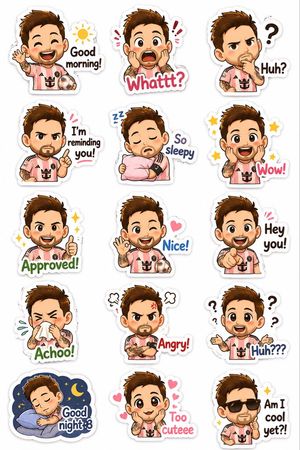
Chibi Expression Sticker Pack

Chibi Expression Sticker Pack

A cute character design prompt for creating a diverse sheet of chibi expressions based on a reference photograph.
Prompt
Using the uploaded photograph, create a cute illustrated {argument name="character style" default="chibi sticker-pack"}. Clean, white background, vertical output with a thick white border. Create {argument name="count" default="diverse cute expressions"}: laughing, crying, sleepy, surprised, confused, eating, grumpy, cute expressions… Each expression should include cute text, for example: Good morning! Whattt? / Huh? / I’m reminding you! / So sleepy / Wow! Approved! / Nice! / Hey you! Achoo! / Angry! / Huh??? / Good night :3 / Too cuteee / Am I cool yet?!
AuthorShinning
111 days ago

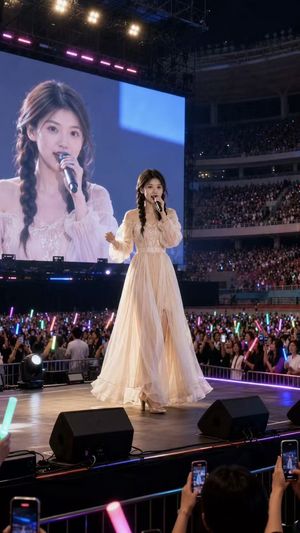
Natural Identity Preservation Prompt

Natural Identity Preservation Prompt

A complete instruction for generating images that look like a specific person using an uploaded reference, focusing on facial consistency and expression.
Prompt
Use the {argument name="input image" default="uploaded portrait"} as the only identity reference. Accurately preserve the person’s real facial identity, face shape, facial features, skin tone, hairstyle, and natural expression. Do not copy the original clothes, background, lighting, or pose from the uploaded portrait.
Authorauqib
111 days ago

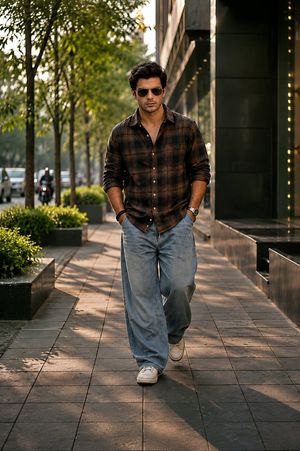
Urban Street Fashion Portrait

Urban Street Fashion Portrait

A highly realistic street fashion portrait of a young man on a luxury urban sidewalk, using an uploaded reference photo for character identity. Perfect for lifestyle and editorial fashion aesthetics.
Prompt
Ultra realistic cinematic street fashion portrait of a {argument name="subject" default="handsome young Man"} walking confidently toward the camera on a luxury urban sidewalk, hands in pockets, wearing black sunglasses, {argument name="shirt" default="dark brown and black plaid flannel shirt"} with sleeves rolled up, loose light-wash baggy jeans, white sneakers, wrist watch and bracelet. Modern glass building on the right side with warm golden lights, lush green trees lining the street, soft evening golden hour sunlight casting long shadows on tiled pavement. Relaxed masculine expression, stylish messy hair, shallow depth of field, natural bokeh background, editorial fashion photography, high-end lifestyle aesthetic, realistic skin texture, detailed clothing folds, symmetrical composition, full body shot, low angle perspective, 85mm lens, f/1.8, soft cinematic color grading, luxury Instagram fashion vibe, ultra detailed, photorealistic, 8k.
AuthorShinning
111 days ago

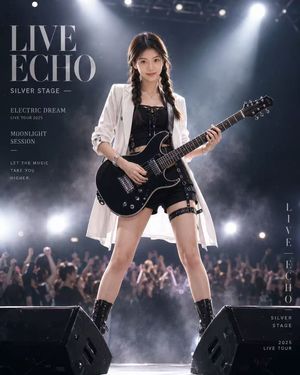
Live Rock Concert Poster

Live Rock Concert Poster

Creates a professional live concert poster using an uploaded portrait for identity. It generates a stylish stage outfit and includes integrated typography for tour titles and dates.
Prompt
Use the uploaded portrait only as the identity and hairstyle reference. Keep the person’s real facial features, face shape, skin tone, and hairstyle accurate. Do not copy the original clothes, pose, or background. Create a highly realistic full-body live concert poster photo of this person on stage holding a {argument name="guitar" default="black electric guitar"}. Low-angle shot, confident rock-star pose, cinematic lighting, bright white spotlights, concert smoke, blurred cheering crowd, stage speakers, premium commercial quality. The outfit must not be fixed—automatically generate a stylish black-and-white stage outfit that suits the uploaded person’s vibe. No sunglasses. Replace the original background text with elegant English concert-poster typography such as {argument name="poster text" default="“LIVE ECHO”, “SILVER STAGE”, “ELECTRIC DREAM”, and “2025 LIVE TOUR”"}. Make the text clean, minimal, readable, and naturally integrated into the design. Photorealistic, ultra-detailed, realistic skin texture, realistic hands, realistic guitar, no watermark.

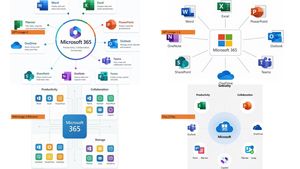
Microsoft 365 Model Comparison Infographic

Microsoft 365 Model Comparison Infographic

Creates a four-quadrant PowerPoint-style comparison infographic of Microsoft 365 ecosystem diagrams labeled by image generation model.

Prompt
Using the provided reference image as a rough inspiration for an official explanatory slide/infographic, create a clean comparison image showing the same Microsoft 365 ecosystem concept generated in four different model styles. Canvas and layout: 16:9 white slide, divided into exactly 4 quadrants in a 2×2 grid with generous whitespace and no hard divider lines. Subject: Each quadrant should show a Microsoft 365 hub-and-spoke or app ecosystem diagram centered on {argument name="main product name" default="Microsoft 365"}, with surrounding Microsoft app icons and short English labels. Quadrants and visible orange model tags: Include exactly 4 orange labels, one per quadrant: 1. Top-left: {argument name="first model label" default="GPT-Image-2"} — polished circular Microsoft 365 hub diagram with multiple app cards around it. 2. Top-right: {argument name="second model label" default="GPT-Image-1.5"} — simpler radial hub diagram with icons around a central Microsoft 365 box. 3. Bottom-left: {argument name="third model label" default="MAI Image 2 Efficient"} — structured dashboard-like diagram with grouped sections such as Productivity, Collaboration, and Storage. 4. Bottom-right: {argument name="fourth model label" default="Flux.2 Flex"} — soft circular diagram with icons orbiting a central Microsoft cloud-style mark. Apps to include across the diagrams: Word, Excel, PowerPoint, Outlook, Teams, OneDrive, SharePoint, OneNote, Planner, Forms, Loop, and Copilot where appropriate. Use recognizable Microsoft-style colored app icons, but keep everything as a generated infographic rather than a screenshot. Style: Modern corporate PowerPoint infographic style, crisp readable English text, flat vector icons, subtle shadows, light gray connector lines, mostly white background, Microsoft blue/green/orange/purple palette. Keep the overall image clean and presentation-ready.

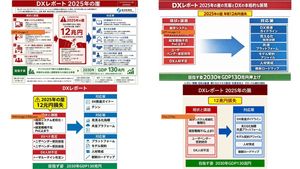
Four-Panel DX Report Model Comparison

Four-Panel DX Report Model Comparison

Creates a PowerPoint-style comparison slide showing four AI-generated versions of a Japanese DX report infographic from a reference image.

Prompt
Using the provided reference image as the source slide, create a 16:9 white comparison canvas showing four different regenerated versions of the same Japanese government-style DX report slide. Layout: Arrange exactly 4 panels in a 2×2 grid with generous white margins. The top-left panel should keep the provided reference slide nearly unchanged and scaled down. The other three panels should be simplified reinterpretations of the same content, each with the same overall logic: red header, red “current issues” block on the left, blue “countermeasures” block on the right, a large blue arrow pointing from left to right, and a green goal band at the bottom. Panel labels: Add exactly 4 small orange model labels over the panels: {argument name="top left model label" default="GPT-Image-2"}, {argument name="top right model label" default="GPT-Image-1.5"}, {argument name="bottom left model label" default="MAI Image 2 Efficient"}, and {argument name="bottom right model label" default="Flux.2 Flex"}. Text and content to preserve from the reference: Keep the main theme as {argument name="main headline" default="DXレポート 2025年の崖"}. Preserve readable Japanese key phrases such as “2025年の崖”, “12兆円損失”, “現状と課題”, “対応策”, “既存システム”, “経営戦略不在”, “DX人材不足”, “DX推進ガイドライン”, “見える化指標”, “共通プラットフォーム”, “モデル契約・アジャイル”, “人材育成”, “刷新ロードマップ”, and the green goal message about “2030年 GDP130兆円”. Panel differences: The top-right version should look like a clean, simplified PowerPoint infographic with a long red title bar, a yellow warning banner near the top, stacked red issue boxes on the left, stacked blue solution boxes on the right, and a large gradient blue arrow in the center. The bottom-left version should look more compact and slightly imperfect, with multiple red issue sections on the left and three blue response sections on the right. The bottom-right version should look like a neat minimal slide with a dark red title bar, a yellow loss badge, two bordered columns, and a green bottom goal bar. Style constraints: Make the overall image look like a screenshot of a PowerPoint slide comparing output quality across image models. Keep all four panels legible, flat, and infographic-like. Do not add photo-realistic elements, people, watermarks, or extra panels.

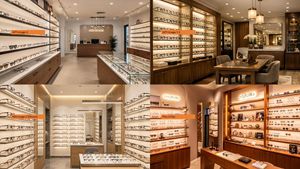
Four-Panel Eyewear Store Model Comparison

Four-Panel Eyewear Store Model Comparison

Creates a photorealistic 2×2 comparison collage of eyewear boutique interiors labeled by image generation model.
Prompt
Using the provided reference image as a layout/comparison inspiration, replace the dense Japanese policy infographic with a photorealistic 2×2 comparison collage. Each of the 4 panels should show a different realistic interior view of {argument name="store type" default="a modern eyeglasses boutique"}, with warm retail lighting, shelves full of glasses, wooden cabinetry, display cases, mirrors, and a polished upscale showroom feel. Add one small horizontal orange label near the left side of each panel, using exactly these 4 labels: {argument name="top left label" default="GPT-Image-2"}, {argument name="top right label" default="GPT-Image-1.5"}, {argument name="bottom left label" default="MAI Image 2 Efficient"}, and {argument name="bottom right label" default="Flux.2 Flex"}. Keep the image as a clean four-quadrant comparison, with no Japanese report text, no diagrams, no government-style boxes, and no extra captions beyond the four orange labels.
111 days ago

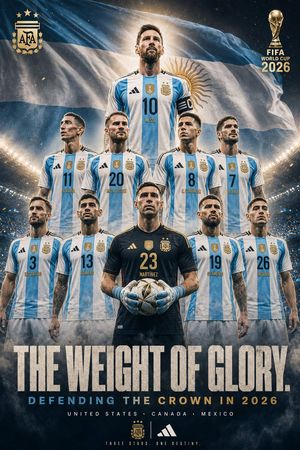
Argentina 2026 Glory Poster

Argentina 2026 Glory Poster

A cinematic football campaign poster featuring Argentina’s 10-player World Cup squad lineup with dramatic stadium lighting and bold tournament typography.
Prompt
Goal: Create a cinematic vertical sports poster for {argument name="team name" default="Argentina national football team"}, styled like a premium agency-level FIFA World Cup campaign artwork. Canvas: Portrait poster, 2:3 aspect ratio, dark dramatic stadium atmosphere, ultra-detailed photorealistic compositing, high contrast, gold and sky-blue color palette, smoky haze, sparks, confetti, and floodlights. Main composition: Show exactly 10 male football players arranged in three stacked rows, all facing forward with stern heroic body language. Their faces should be intentionally anonymized with soft rectangular blur masks covering the face area. Top row: 1 central captain figure standing tallest, wearing jersey number 10 with the name Messi and a black captain armband. Middle row: 4 players, left to right: number 11 Di Maria, number 20 Mac Allister, number 8 E. Fernandez, number 7 De Paul. Front row: 5 players, left to right: number 3 Tagliafico, number 13 Romero, center goalkeeper number 23 Martinez wearing a black goalkeeper kit and holding a football with blue gloves, number 19 Otamendi, number 26 Molina. Keep the player count exactly 10. Uniform details: Use Argentina-style white and sky-blue vertical striped jerseys with black shoulder stripes, gold tournament badge at center chest, AFA-style crest with three stars, black or dark numbering, and subtle sweat, fabric texture, and realistic shadows. The goalkeeper wears a dark navy/black kit with gold accents and matching crest. Background: A huge waving Argentina flag fills the upper background, with a bright glowing sunburst halo behind the top central player’s head. Place a massive illuminated stadium bowl behind the players, packed with tiny crowd lights, fog, blue smoke, and golden particle effects. Logos and marks: Top left place a gold AFA-style crest with three stars. Top right place a gold World Cup trophy icon with stacked text reading exactly: “FIFA WORLD CUP 2026”. Bottom center include a small gold AFA-style crest, a vertical divider, and an Adidas-style three-stripe mark. Text content: At the bottom, create a huge distressed condensed block headline in off-white reading exactly: “{argument name="headline text" default="THE WEIGHT OF GLORY."}” Beneath it, add a smaller spaced subtitle reading exactly: “{argument name="subtitle text" default="DEFENDING THE CROWN IN 2026"}”, with “DEFENDING” in sky blue and “THE CROWN IN 2026” in warm gold. Under that, add location text in small white spaced capitals: “{argument name="host countries" default="UNITED STATES · CANADA · MEXICO"}”. At the very bottom, add tiny spaced gold text: “{argument name="tagline" default="THREE STARS. ONE DESTINY."}” Style constraints: Make it look like an official epic football movie poster, not a flat graphic. Use realistic lighting, sharp jersey details, cinematic grading, metallic gold typography, grunge texture on the headline, symmetrical team hierarchy, no extra players, no extra text, no watermark.
AuthorNoor
111 days ago

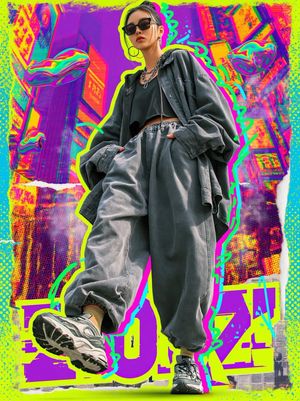
Cyberpunk Streetwear Fashion Poster

Cyberpunk Streetwear Fashion Poster

A high-energy cyberpunk fashion poster prompt featuring mixed media elements, Tokyo cityscapes, and bold urban typography.

Prompt
Ultra-stylized cyberpunk streetwear fashion poster, full-body young woman walking confidently toward camera, {argument name="outfit" default="oversized charcoal gray jacket and ultra-baggy jogger pants, black crop top, chunky futuristic sneakers"}, dark sunglasses, silver chain accessories, low-angle perspective, exaggerated sneaker foreground, {argument name="colors" default="neon lime green and cyan"} graffiti outline glow, vibrant magenta-yellow-purple color palette, glitchcore aesthetic, mixed media collage background, futuristic Tokyo cityscape, floating liquid chrome blobs, halftone textures, spray paint doodles, ripped paper edges, {argument name="typography" default="bold urban typography"}, high contrast lighting, editorial fashion photography mixed with pop-art and vaporwave design, dynamic motion energy, ultra-detailed, sharp focus, poster composition, trendy Gen Z street culture aesthetic, 8k.