GPT इमेज 2.5 बनाम नैनो बनाना 2.1: 13 उपयोग मामलों की तुलना

आपकी अगली परियोजना के लिए कौन सा इमेज मॉडल उपयुक्त है? GPT इमेज 2.5 और नैनो बनाना 2.1 की तुलना करें—ईकॉमर्स इमेज, थंबनेल, इन्फोग्राफिक्स, शैक्षणिक डायग्राम और अन्य क्षेत्रों में।
एक उत्पाद लिस्टिंग, एक यूट्यूब थंबनेल और एक वैज्ञानिक डायग्राम को इमेज मॉडल से अलग-अलग चीज़ों की ज़रूरत होती है। लिस्टिंग में उत्पाद की पहचान बनी रहनी चाहिए; थंबनेल में शीर्षक पढ़ने योग्य रहना चाहिए; मेथड डायग्राम में सही बॉक्स जुड़े रहना चाहिए।
हमने दोनों मॉडलों को 13 उपयोग मामलों के लिए एक जैसा निर्देश दिया और उनके वास्तविक आउटपुट की तुलना की। पाँच टेक्स्ट-प्रधान कार्यों के लिए, हमने अंग्रेज़ी, जापानी और कोरियाई संस्करण भी बनाए। नीचे मुख्य उदाहरणों में अंग्रेज़ी कॉपी या बिना हेडलाइन टेक्स्ट वाली इमेज शामिल हैं; स्थानीयकृत तुलना में जापानी और कोरियाई कॉपी है।
सिफारिशें बताती हैं कि इन निर्देशों के लिए मैं किस मॉडल को पहले आज़माऊँगा। हर सेक्शन में दोनों स्वतंत्र रूप से जनरेटेड परिणाम दिखते हैं और उनके बीच का अंतर समझाया गया है।
Felo पर इन उदाहरणों को आज़माएं: GPT Image 2.5, Nano Banana 2.1, या AI Image टूल।
कौन सा मॉडल पहले आज़माना चाहिए?
| उपयोग मामला | इन सैंपल्स में पहली पसंद |
|---|---|
| सफेद-पृष्ठभूमि उत्पाद लिस्टिंग | दोनों; फिनिश के अनुसार चुनें |
| उत्पाद डिटेल ग्राफिक्स | बड़े कॉलआउट के लिए GPT |
| लाइफस्टाइल उत्पाद विज्ञापन | विज्ञापन हीरो के लिए GPT |
| बिना रेफरेंस के उत्पाद कॉन्सेप्ट | पहले इच्छित ऑब्जेक्ट चुनें |
| यूट्यूब और ट्यूटोरियल थंबनेल | बोल्ड शीर्षक के लिए GPT |
| पैकिंग चेकलिस्ट और नॉलेज कार्ड | बड़े मोबाइल टाइप के लिए GPT; हवादार कार्ड के लिए NB |
| इवेंट पोस्टर | ग्राफिक पोस्टर के लिए NB; वेन्यू मूड के लिए GPT |
| संख्यात्मक इन्फोग्राफिक्स | इस बार-चार्ट निर्देश के लिए NB |
| प्रोसेस डायग्राम | ट्रेनिंग के लिए GPT; रिपोर्ट फिगर के लिए NB |
| वैज्ञानिक कॉन्सेप्ट स्पष्टीकरण | पेपर-स्टाइल नोटेशन के लिए GPT; क्लासरूम स्लाइड के लिए NB |
| रिसर्च मेथड और मॉडल-आर्किटेक्चर डायग्राम | इस सात-नोड फ्रेमवर्क के लिए GPT |
| स्टोरी इलस्ट्रेशन और कॉन्सेप्ट आर्ट | समृद्ध टेक्सचर के लिए GPT; संयमित दृश्य के लिए NB |
| इंटीरियर-डिज़ाइन कॉन्सेप्ट | वातावरण के लिए GPT; सरल दिशा के लिए NB |
साझा उत्पाद रेफरेंस
पहले तीन ईकॉमर्स परीक्षणों में एक ही काल्पनिक उत्पाद का उपयोग हुआ, जिसमें उसका बायां हैंडल, आइवरी ड्रिंकिंग लिड और टेक्सचर्ड नीला बॉडी शामिल है।
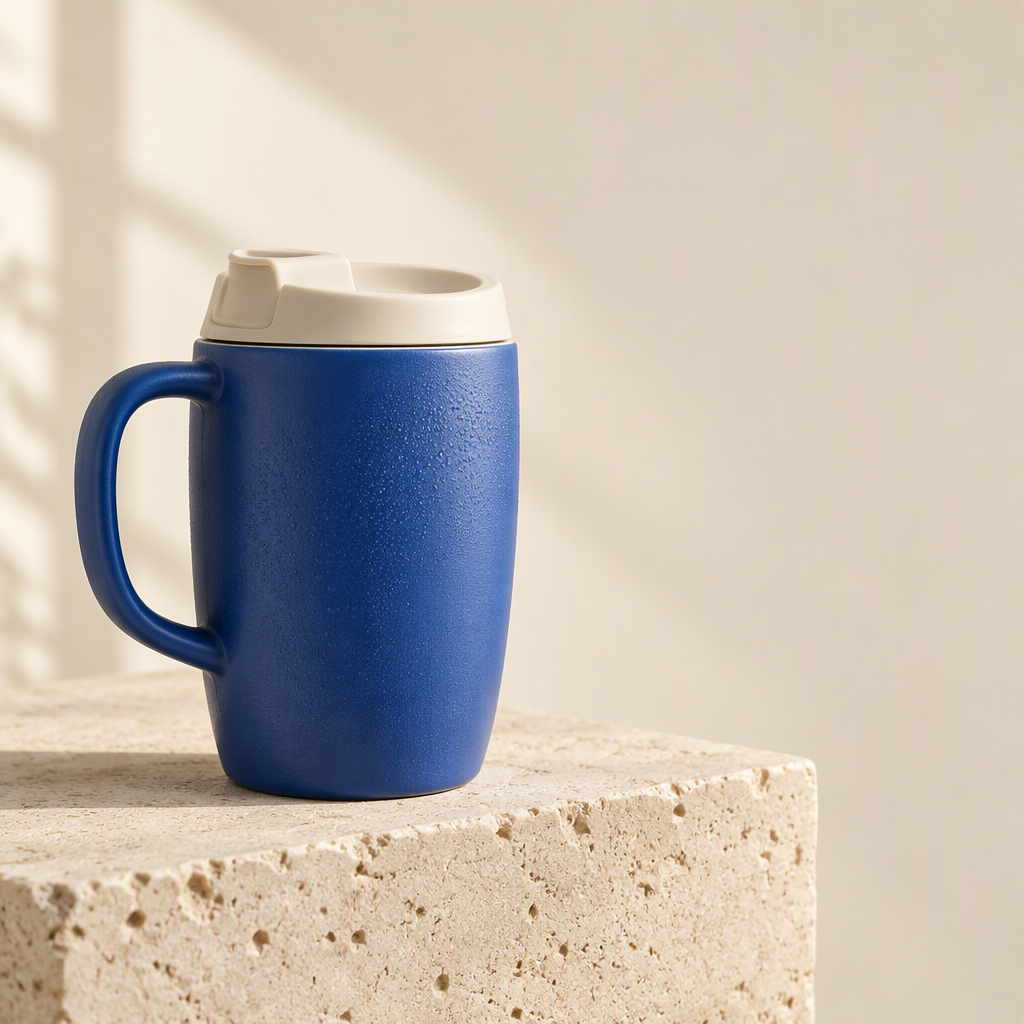
1. सफेद-पृष्ठभूमि उत्पाद लिस्टिंग
साझा निर्देश: वही नीला मग, हैंडल, ड्रिंकिंग लिड और अनुपात रखें, स्टोन ब्लॉक हटाएँ, और पूरा उत्पाद सफेद पृष्ठभूमि पर रखें।
| GPT इमेज 2.5 | नैनो बनाना 2.1 |
|---|---|
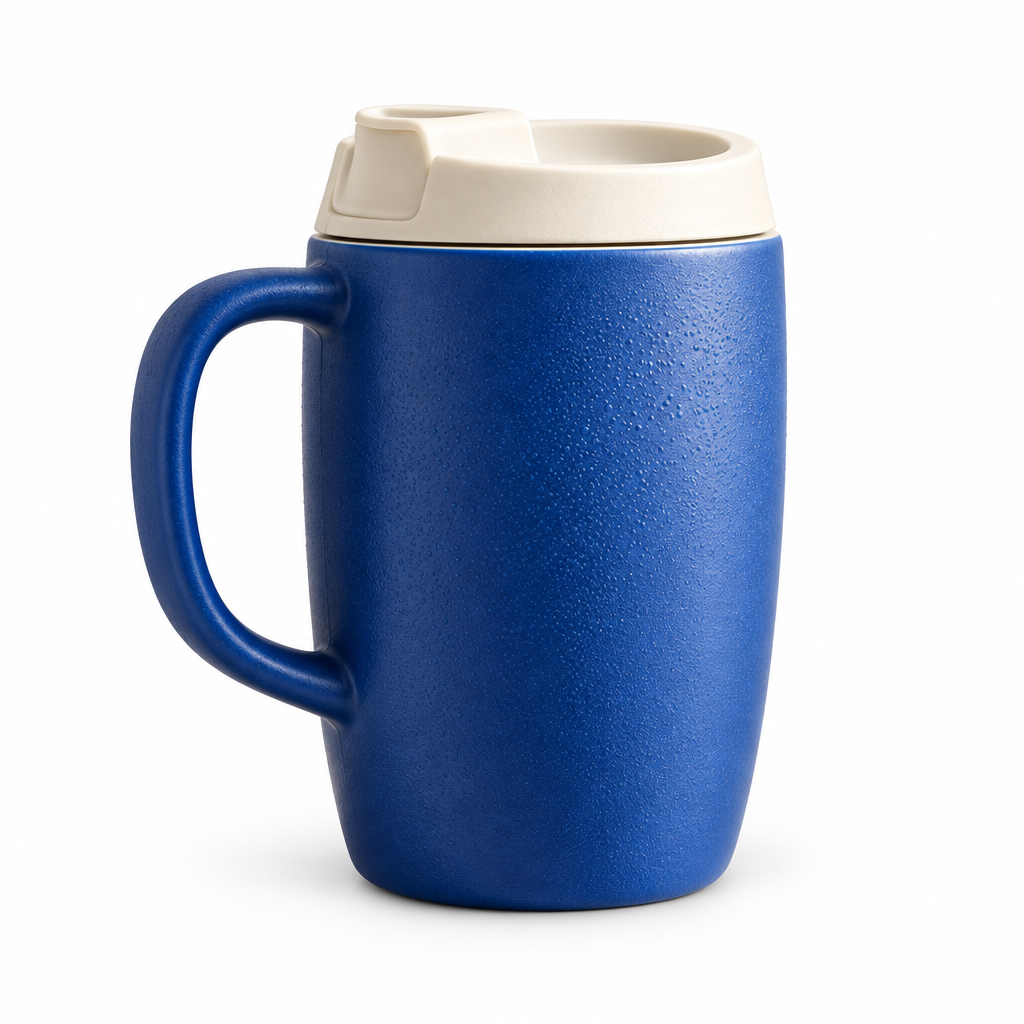 | 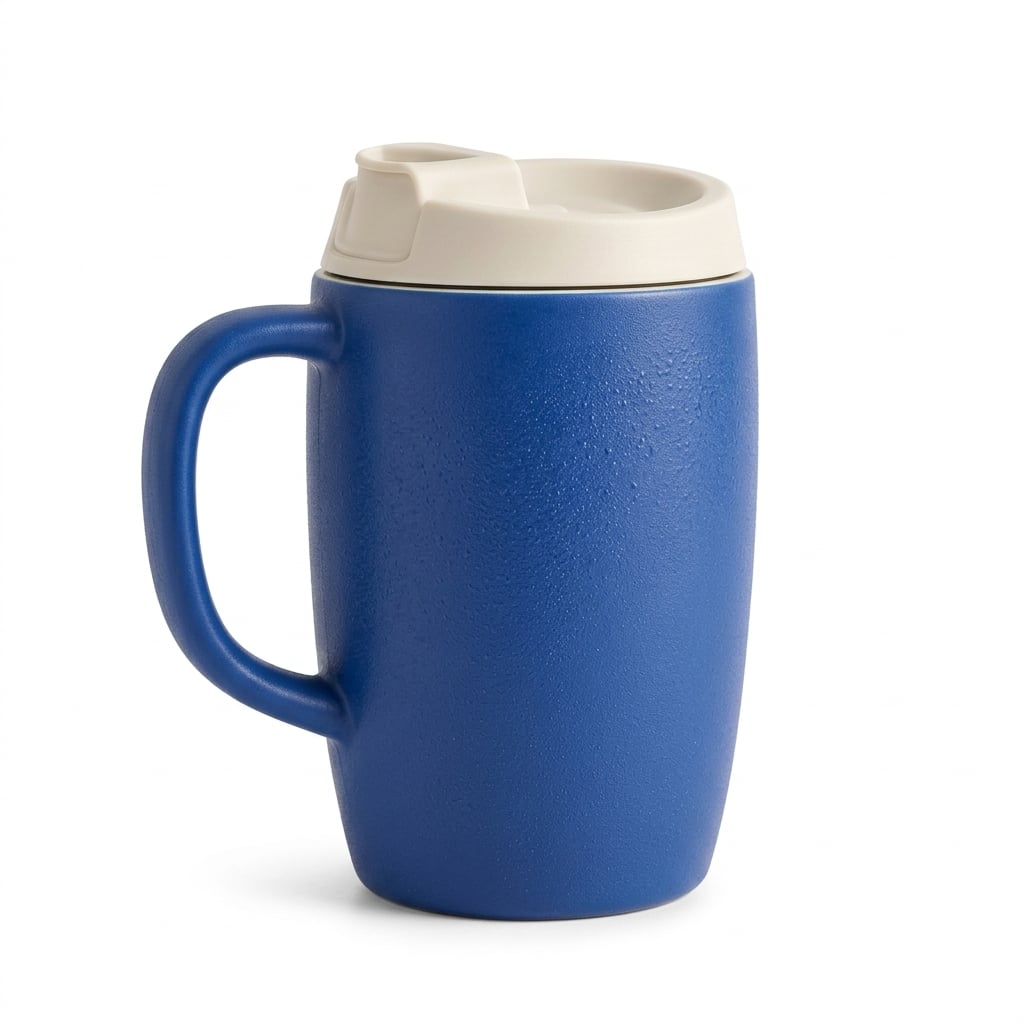 |
दोनों मॉडलों ने हैंडल और लिड को बनाए रखा, रेफरेंस को किसी अन्य ट्रैवल कप में नहीं बदला। GPT इमेज 2.5 में टेक्सचर और ड्रॉपलेट्स पर जोर है; नैनो बनाना 2.1 में सतह और कॉन्टैक्ट शैडो सॉफ्ट फिनिश में है। इस एक उत्पाद के लिए कोई स्पष्ट विजेता नहीं मिला।
कब उपयोग करूँ: सतह डिटेल सबसे ज़्यादा मायने रखे तो GPT से शुरू करें; सॉफ्ट कैटलॉग लाइटिंग पसंद हो तो नैनो बनाना 2.1 से शुरू करें। असली लिस्टिंग के लिए, लिड ओपनिंग, हैंडल कर्व, रंग और सिल्हूट को वास्तविक उत्पाद से मिलाएँ।
2. उत्पाद डिटेल ग्राफिक्स
साझा निर्देश: वही रेफरेंस मग और तीन गोल डिटेल व्यू दिखाएँ, लेबल Ceramic body, Ivory lid और Curved handle।
| GPT इमेज 2.5 | नैनो बनाना 2.1 |
|---|---|
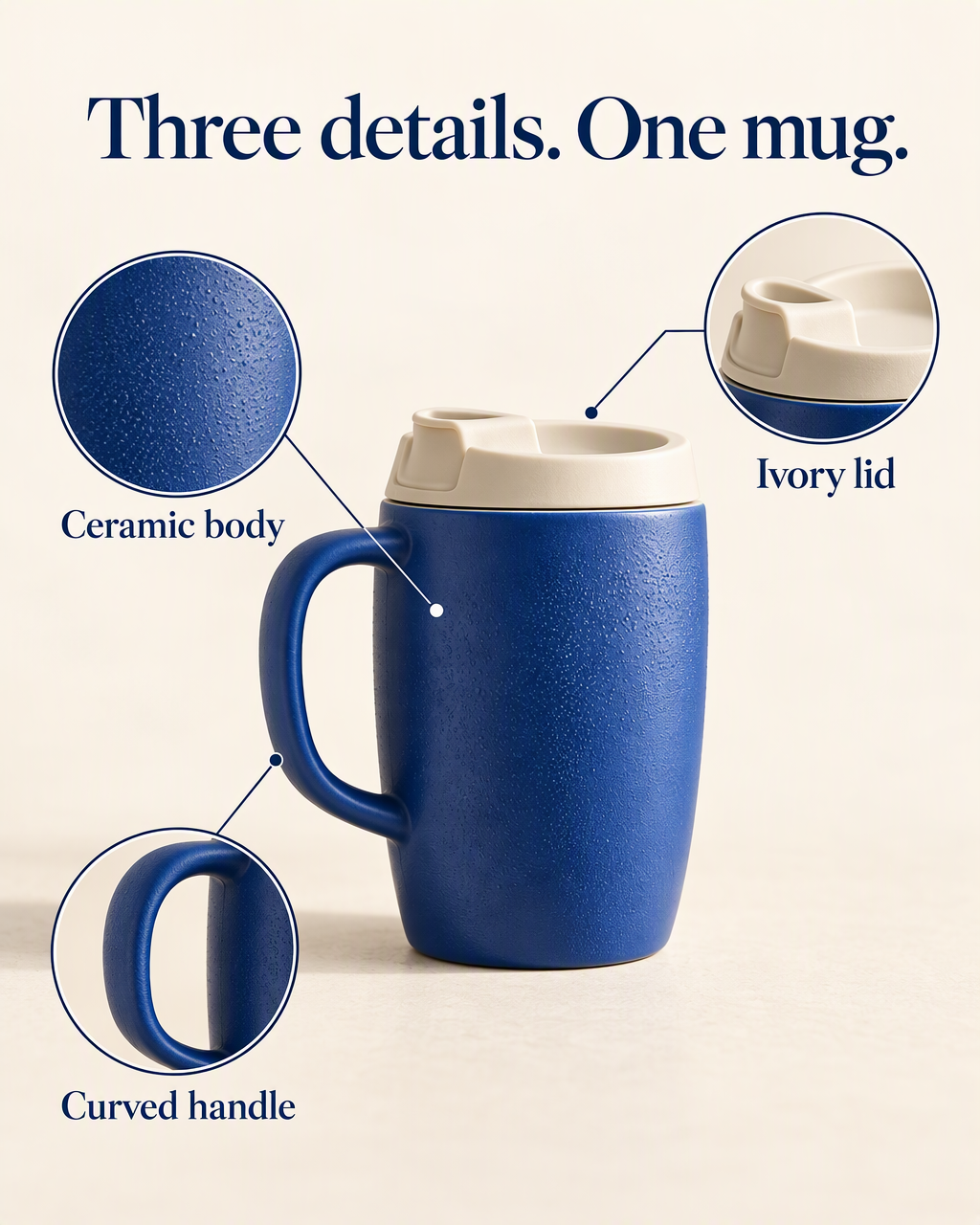 | 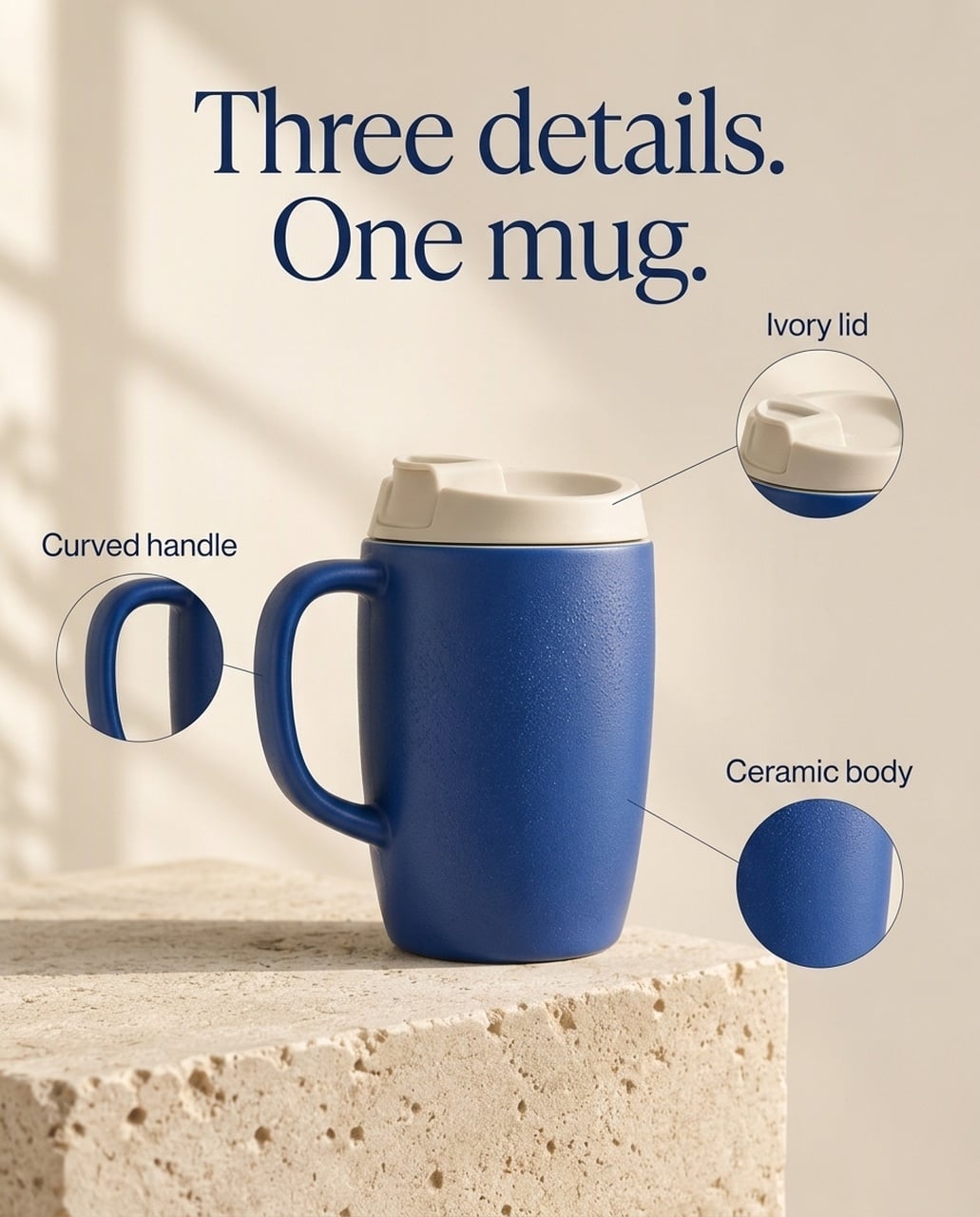 |
दोनों अंग्रेज़ी इमेज में हेडलाइन और लेबल बने रहे। GPT में टेक्सचर और लिड क्रॉप्स को ज़्यादा जगह मिली और फीचर लेबल बड़े हैं। नैनो बनाना 2.1 में छोटे कॉलआउट हैं, केंद्र में उत्पाद है और ओरिजिनल स्टोन सेटिंग ज़्यादा बची है। कई संस्करणों में, GPT लिड लीडर एंडपॉइंट को उत्पाद के ठीक ऊपर रखता है, लाइन पोजिशन की समीक्षा ज़रूरी है।
कब उपयोग करूँ: मोबाइल उत्पाद-डिटेल हीरो के लिए GPT से शुरू करूँगा। शांत सपोर्टिंग उत्पाद पेज के लिए नैनो बनाना 2.1 उपयोगी है। यह चुनाव जोर और एनोटेशन क्लीनअप पर है, न कि हर SKU को बेहतर संरक्षित करने के प्रमाण पर।
जापानी संस्करण
| GPT इमेज 2.5 | नैनो बनाना 2.1 |
|---|---|
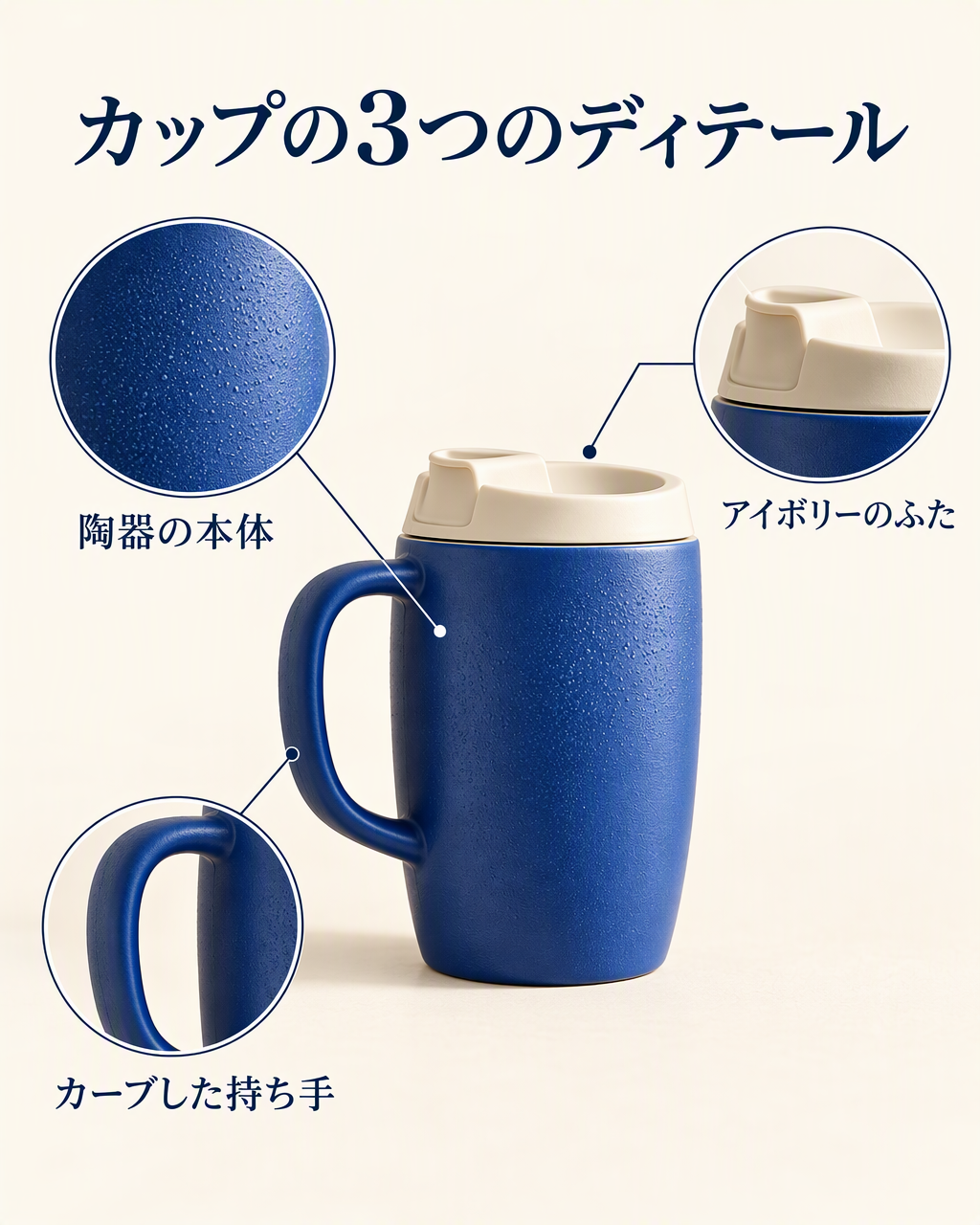 | 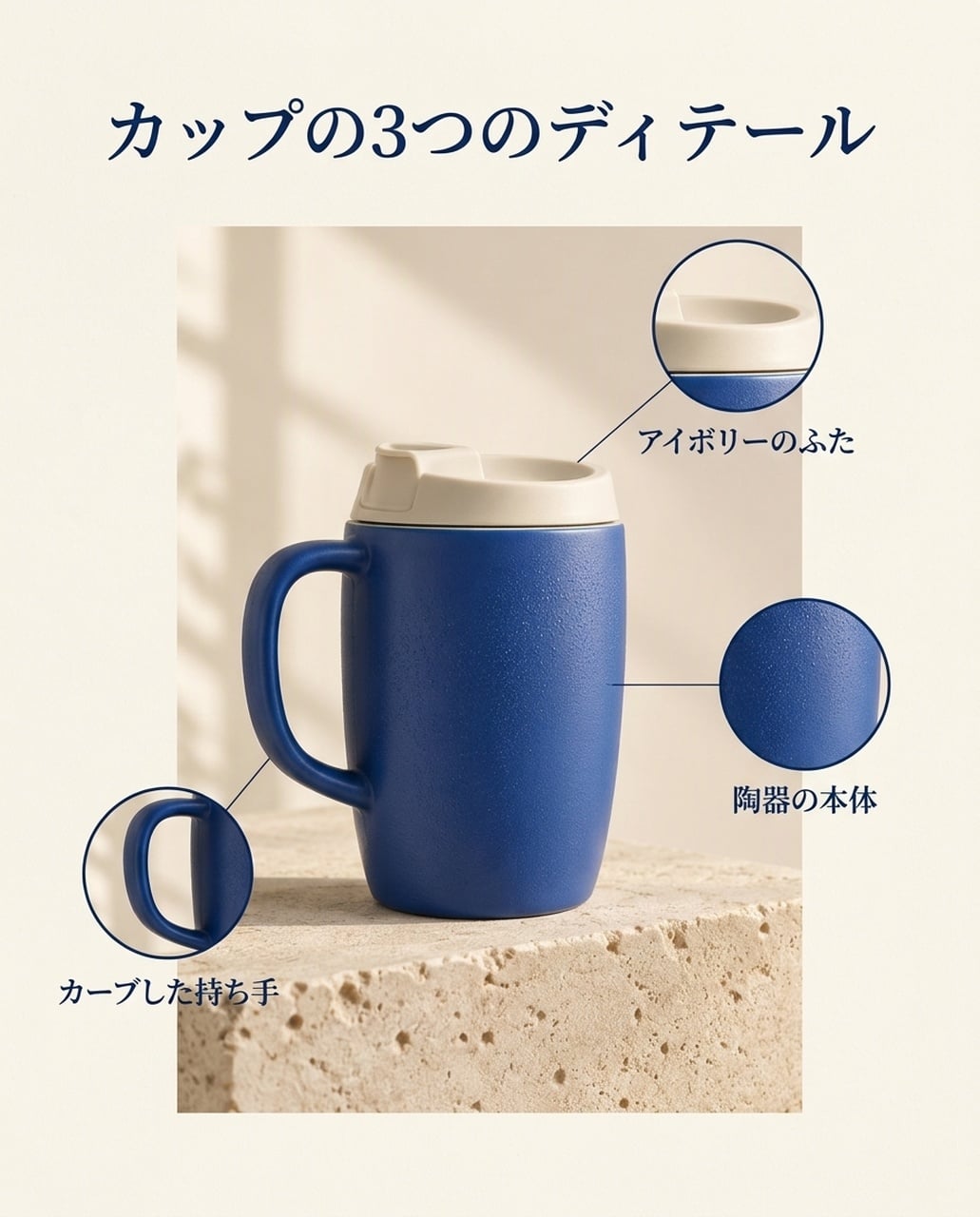 |
दोनों में カップの3つのディテール और फीचर लेबल दिखते हैं। GPT में टेक्सचर क्रॉप बड़ा है, नैनो बनाना 2.1 में उत्पाद पैनल सीमित है। लीडर-लाइन एंडपॉइंट की समीक्षा करें, सिर्फ हेडलाइन से न निर्णय लें।
कोरियाई संस्करण
| GPT इमेज 2.5 | नैनो बनाना 2.1 |
|---|---|
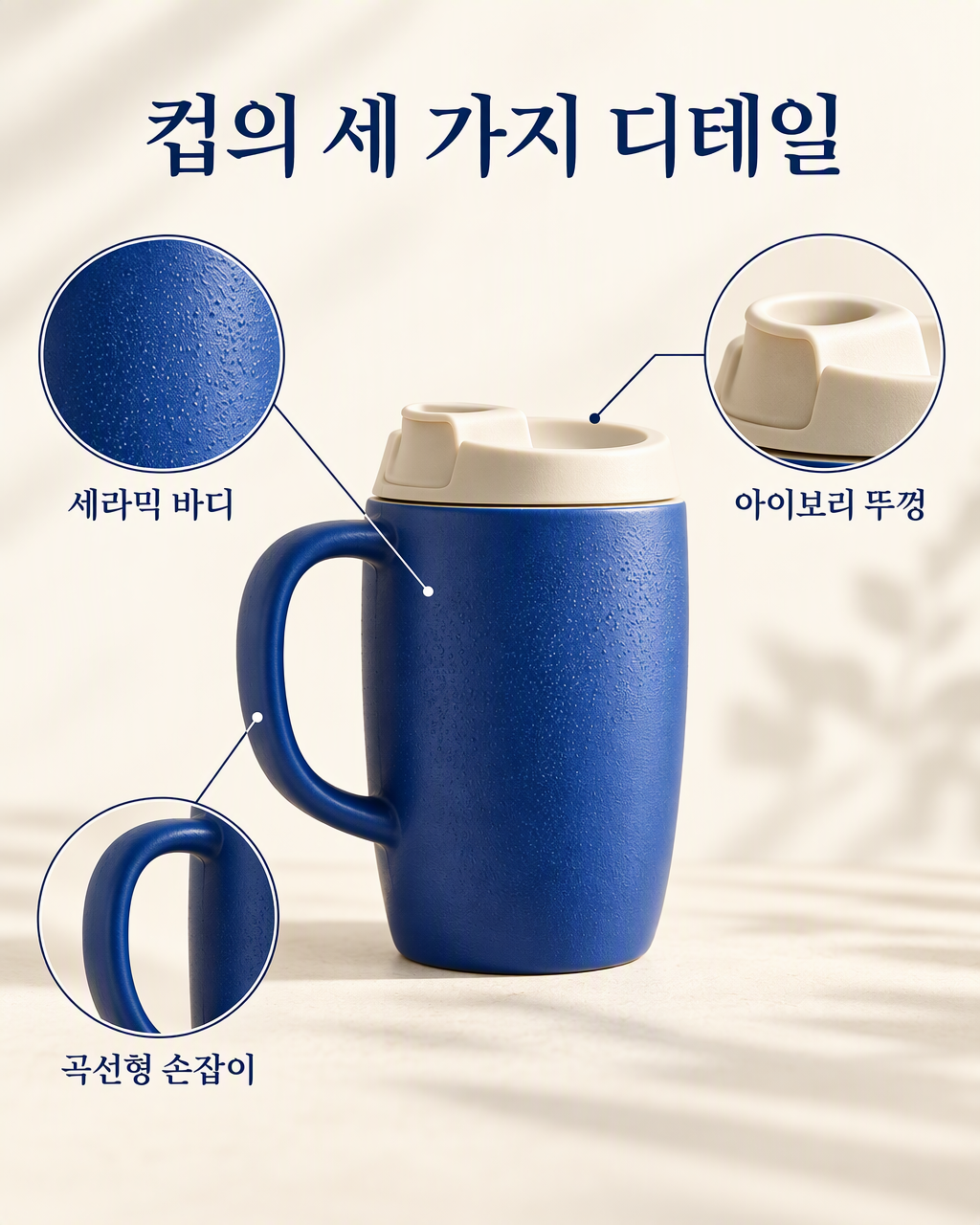 | 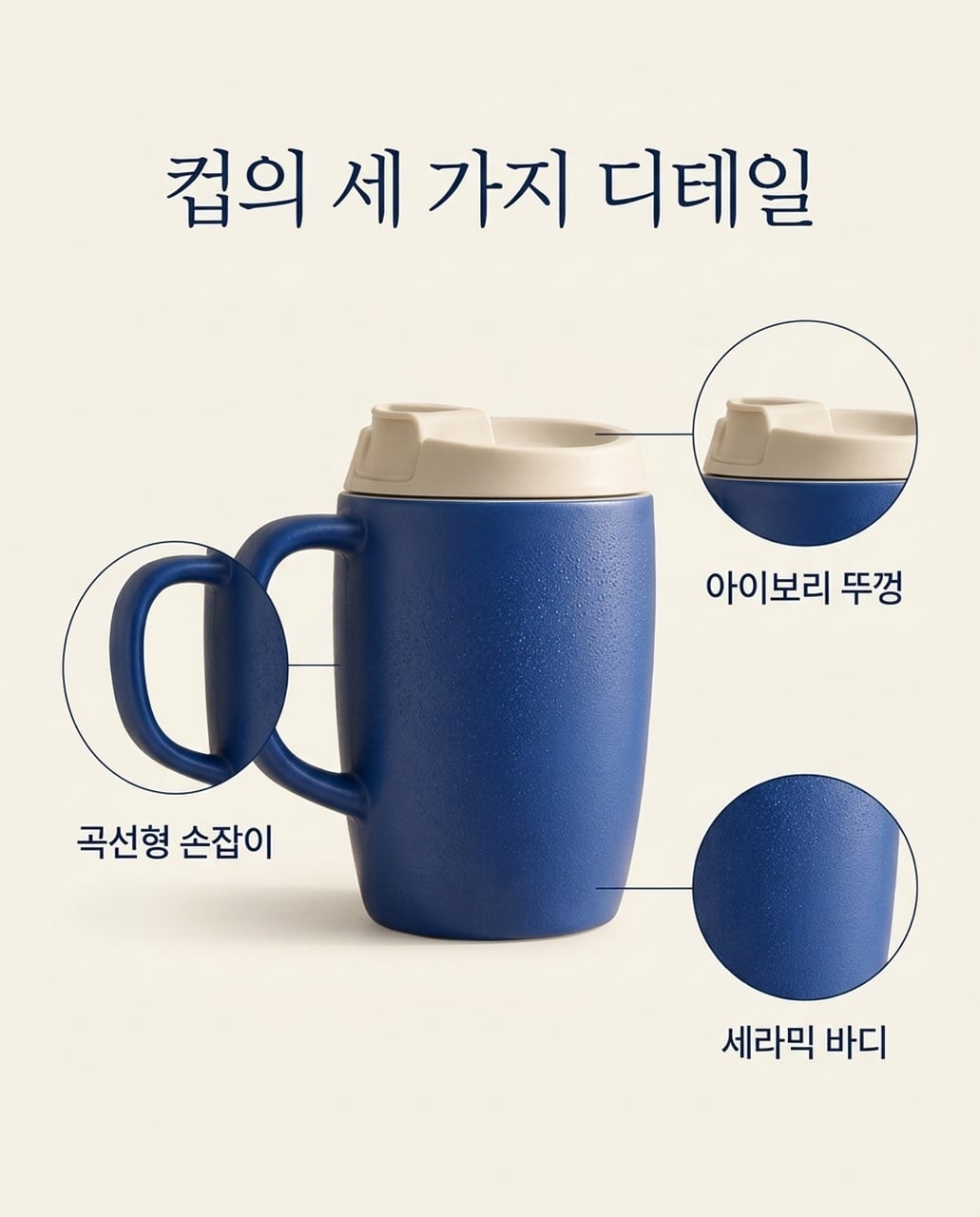 |
तीनों कोरियाई फीचर लेबल दोनों में दिखते हैं। GPT में कॉलआउट चौड़े और बड़े हैं; नैनो बनाना 2.1 में शांत लेआउट है। कर्व्ड-हैंडल क्रॉप NB संस्करण में मुख्य उत्पाद पर ज़्यादा ओवरलैप करता है।
3. लाइफस्टाइल उत्पाद विज्ञापन
साझा निर्देश: वही मग ओक ब्रेकफास्ट टेबल पर रखें, एक बंद नोटबुक के पास, सॉफ्टली ब्लर किचन और दाईं ओर स्पष्ट कॉपी स्पेस।
| GPT इमेज 2.5 | नैनो बनाना 2.1 |
|---|---|
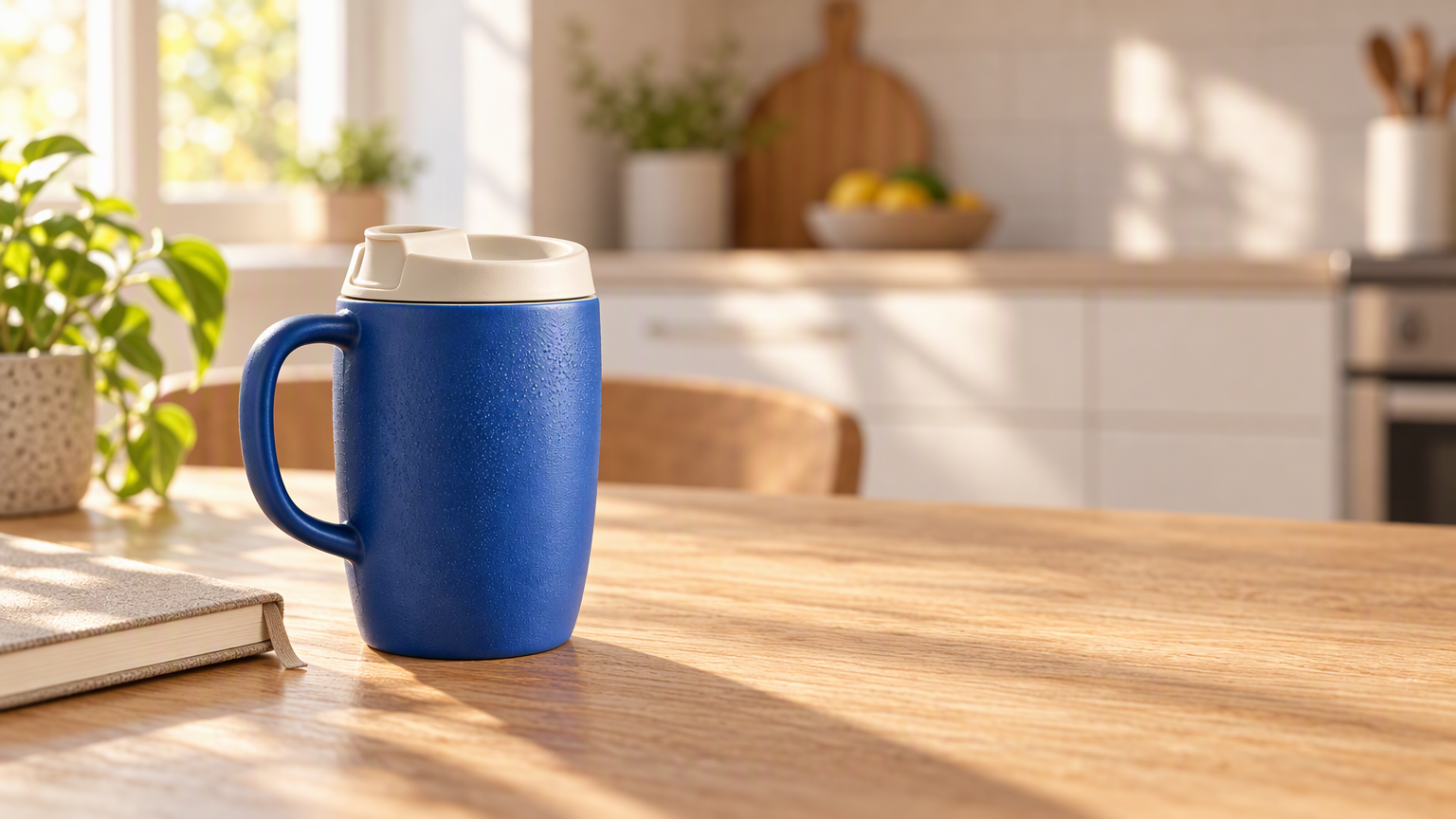 | 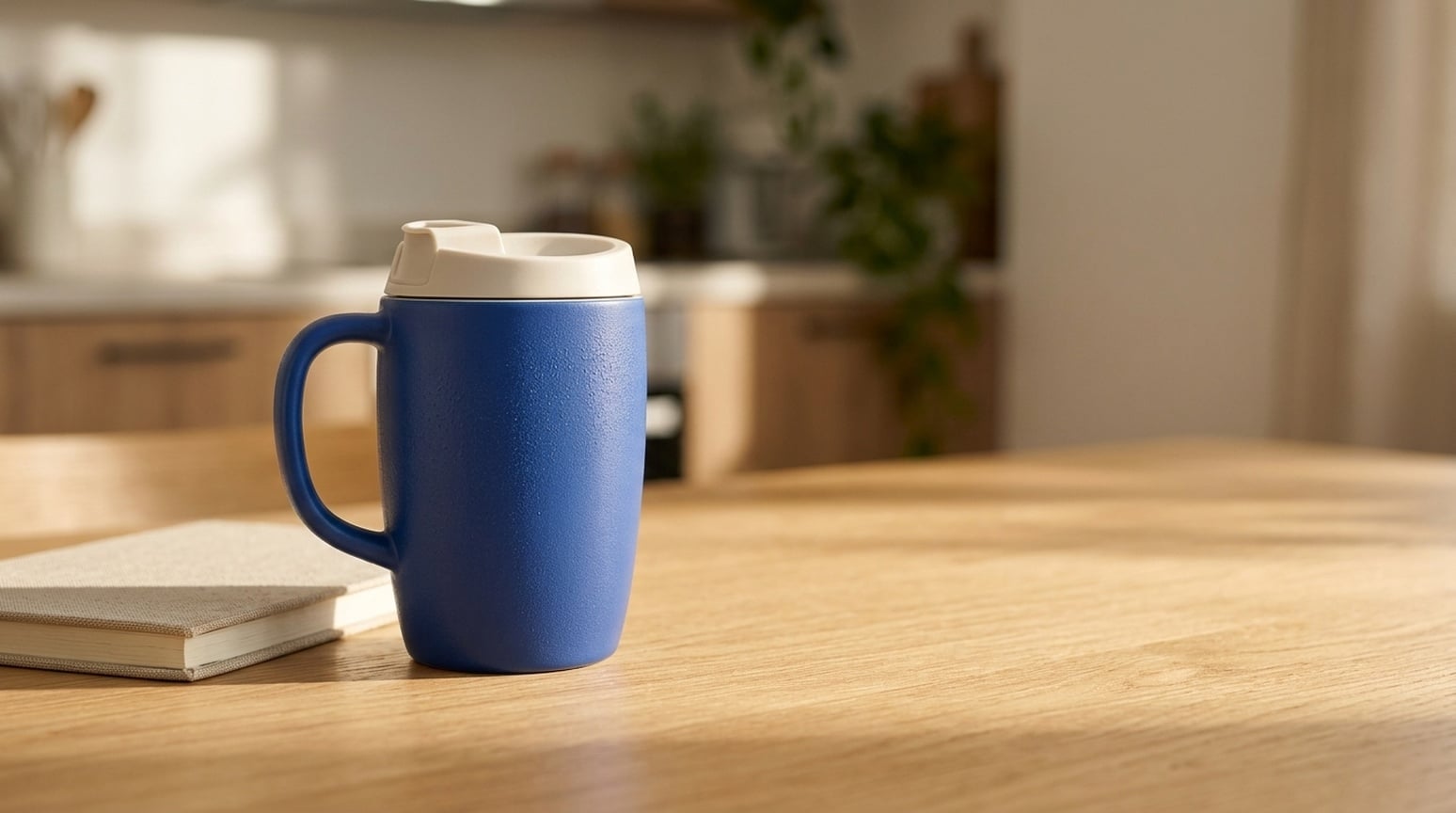 |
GPT में मग को गर्म किचन से अलग दिखाया गया, सिरेमिक टेक्सचर, वुड ग्रेन और डायरेक्शनल लाइट स्पष्ट है। नैनो बनाना 2.1 में दृश्य शांत और कम कॉन्ट्रास्ट में है। दोनों में उत्पाद संरचना और कॉपी स्पेस बना रहा।
कब उपयोग करूँ: ब्रांड बैनर या लाइफस्टाइल विज्ञापन के लिए GPT से शुरू करें, जहाँ उत्पाद दृश्य में प्रमुख हो। रोज़मर्रा के शांत दृश्य के लिए नैनो बनाना 2.1 आज़माएँ। उत्पाद ज्योमेट्री, स्केल और शैडो की जाँच करें, फिर कैंपेन कॉपी जोड़ें।
4. बिना रेफरेंस के उत्पाद कॉन्सेप्ट
साझा निर्देश: एक नीला सिरेमिक ट्रैवल मग, आइवरी लिड, लाइमस्टोन ब्लॉक और खाली कॉपी स्पेस का वर्णन करें, बिना उत्पाद फोटो दिए।
| GPT इमेज 2.5 | नैनो बनाना 2.1 |
|---|---|
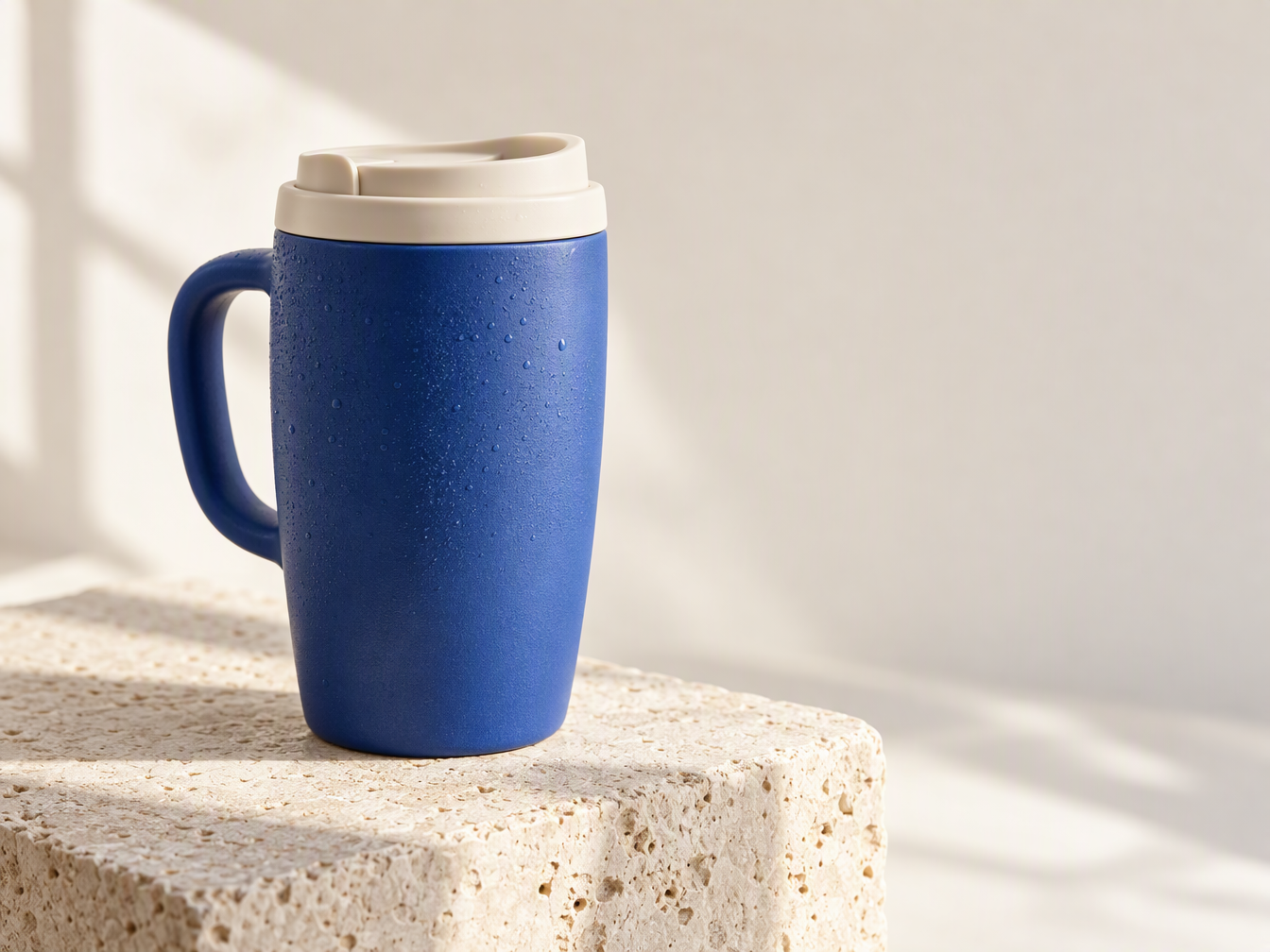 | 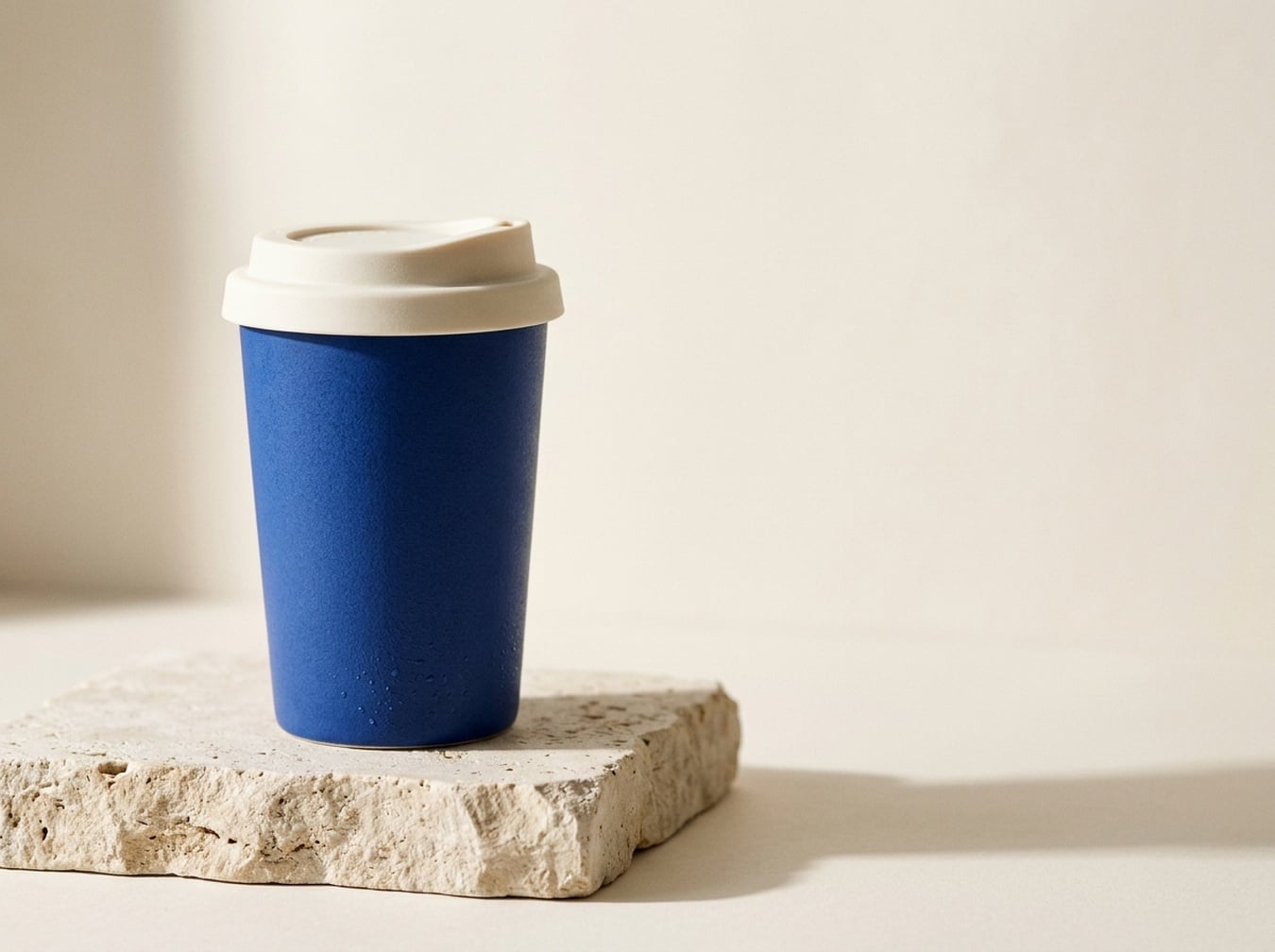 |
GPT ने हैंडल वाला मग बनाया; नैनो बनाना 2.1 ने पतला हैंडल-रहित कप बनाया। प्रॉम्प्ट में हैंडल का उल्लेख नहीं था, दोनों वर्णन की संभावित व्याख्याएँ हैं। GPT में ड्रॉपलेट्स और टेक्सचर पर जोर है, नैनो बनाना 2.1 में उत्पाद सिल्हूट सरल है।
कब उपयोग करूँ: स्पर्शनीय विज्ञापन कॉन्सेप्ट के लिए GPT, साफ पोर्टेबल कप दिशा के लिए नैनो बनाना 2.1। मौजूदा उत्पाद दिखाने के लिए दोनों को एक ही रेफरेंस दें; यह केवल टेक्स्ट-आधारित जोड़ी उत्पाद की सटीकता नहीं दिखाती।
5. यूट्यूब और ट्यूटोरियल थंबनेल
साझा निर्देश: हाथों को रात की सड़क की फोटो लेते दिखाएँ, फोन से, दाईं ओर BETTER PHONE PHOTOS और 3 COMPOSITION TIPS।
| GPT इमेज 2.5 | नैनो बनाना 2.1 |
|---|---|
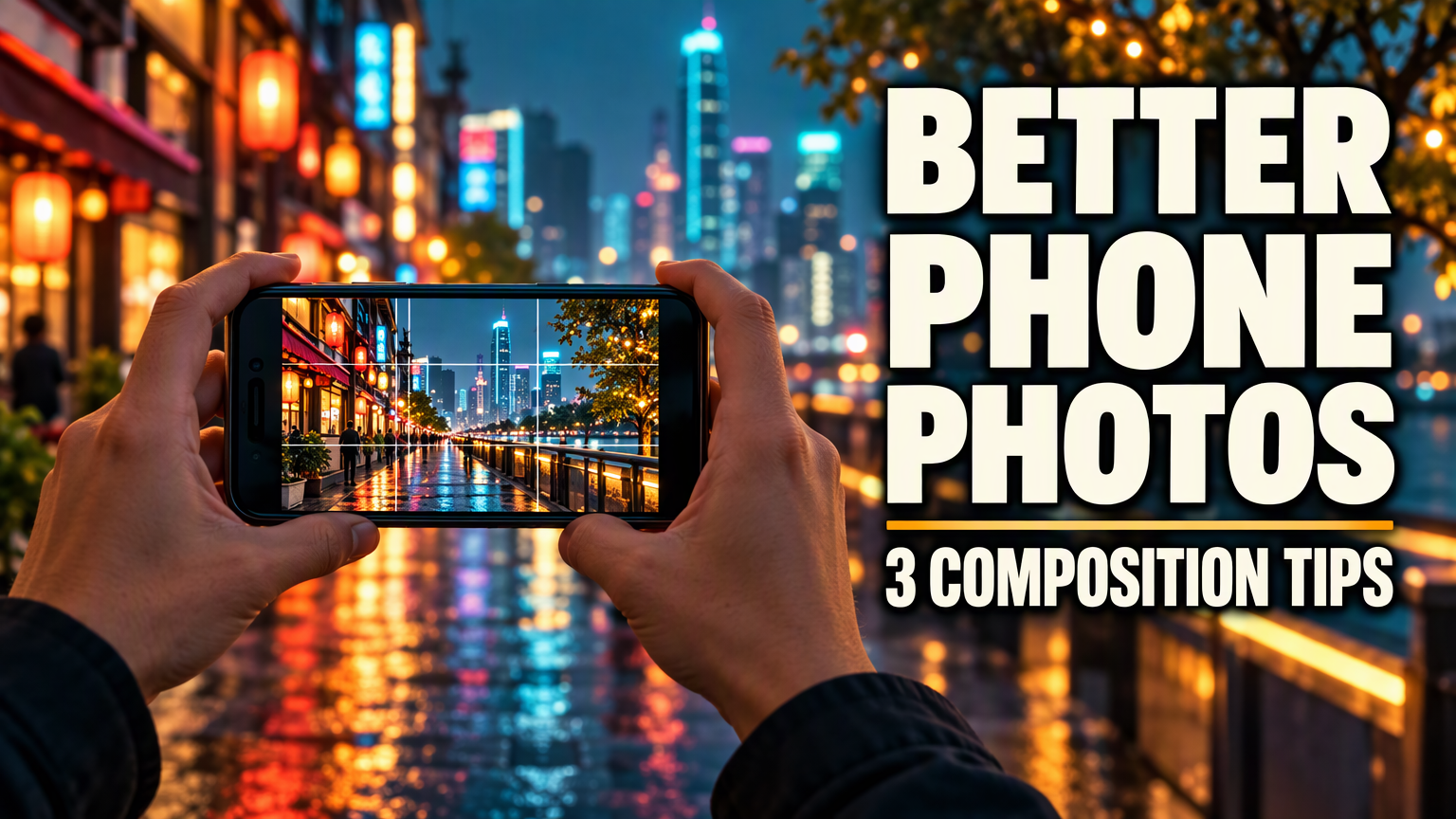 | 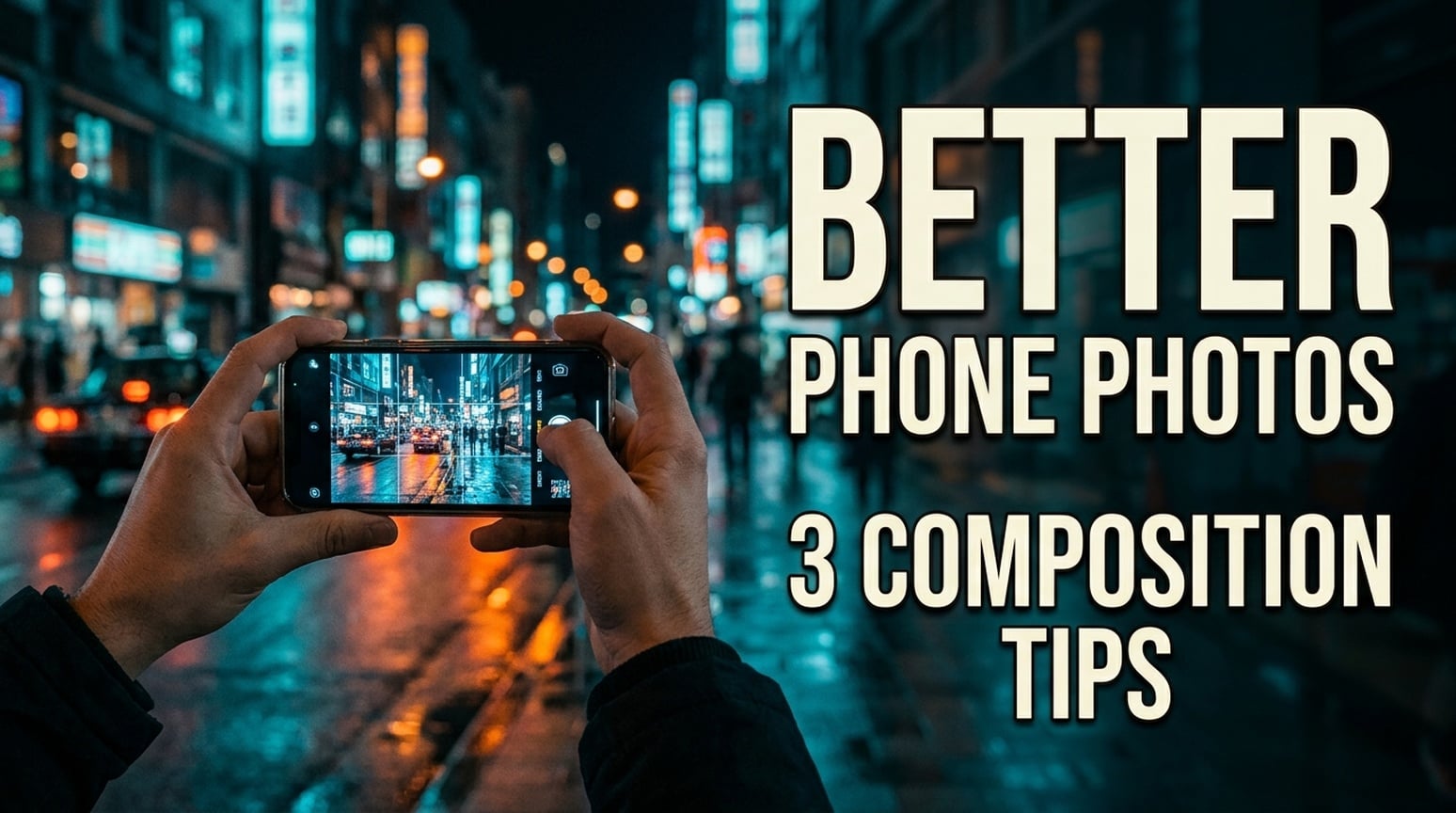 |
दोनों अंग्रेज़ी थंबनेल में दो टेक्स्ट स्ट्रिंग बनी रहीं, लाइन ब्रेक अलग हैं। GPT में बहुत भारी टाइप और कॉम्पैक्ट सेकेंडरी लाइन है। नैनो बनाना 2.1 में संकरी लेटरिंग, सबटाइटल दो लाइन में और दृश्य डॉक्युमेंटरी जैसा है।
कब उपयोग करूँ: बोल्ड ट्यूटोरियल थंबनेल के लिए GPT से शुरू करूँगा। फोटोग्राफी चैनल के लिए, जो कम जोरदार इमेज चाहता है, नैनो बनाना 2.1 आज़माएँ। अंतिम क्रॉप और शीर्षक असली थंबनेल आकार में देखें। क्लिक-थ्रू रेट के लिए टेस्ट नहीं किया गया; जापानी और कोरियाई उदाहरण नीचे हैं।
जापानी संस्करण
| GPT इमेज 2.5 | नैनो बनाना 2.1 |
|---|---|
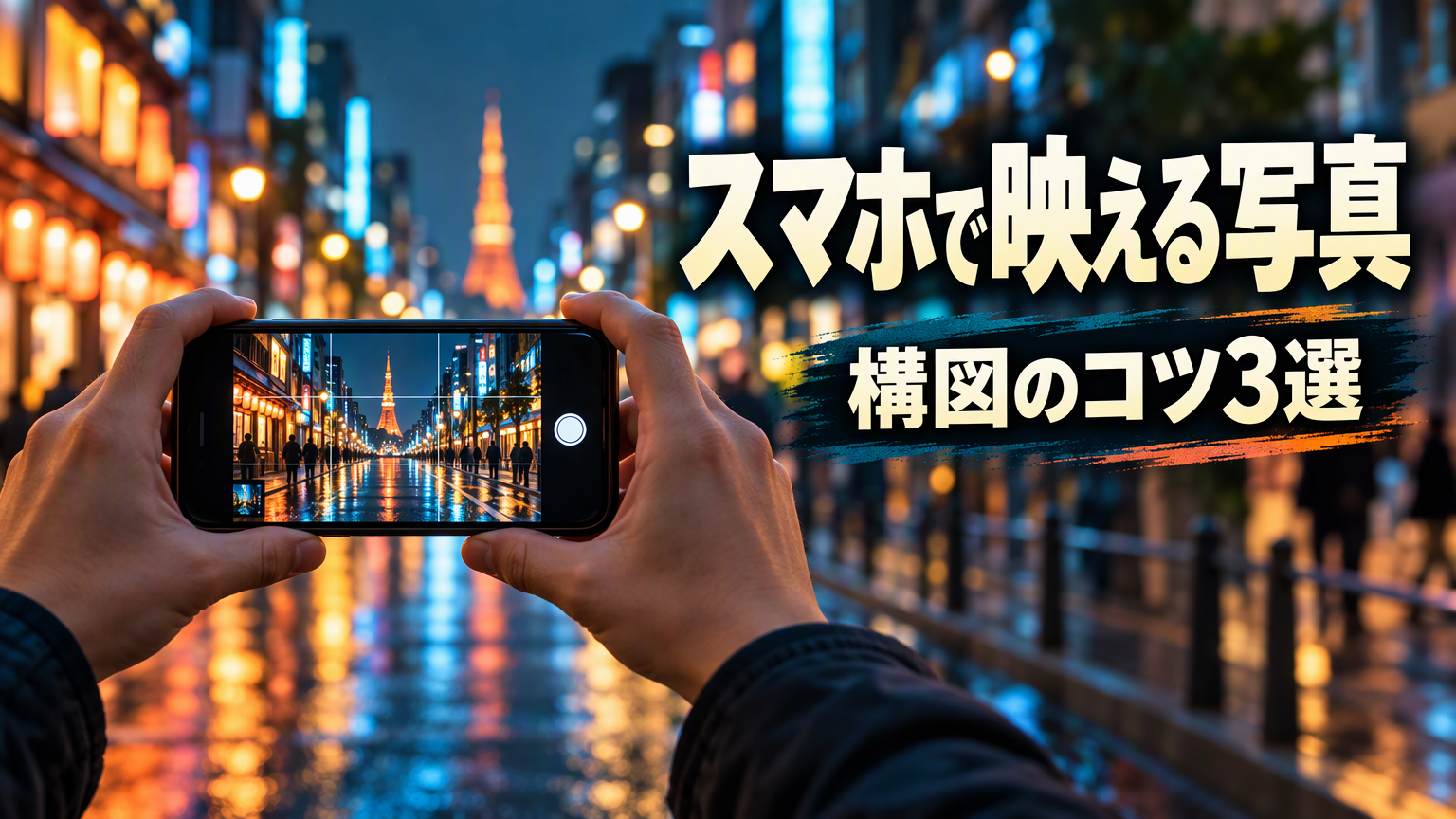 | 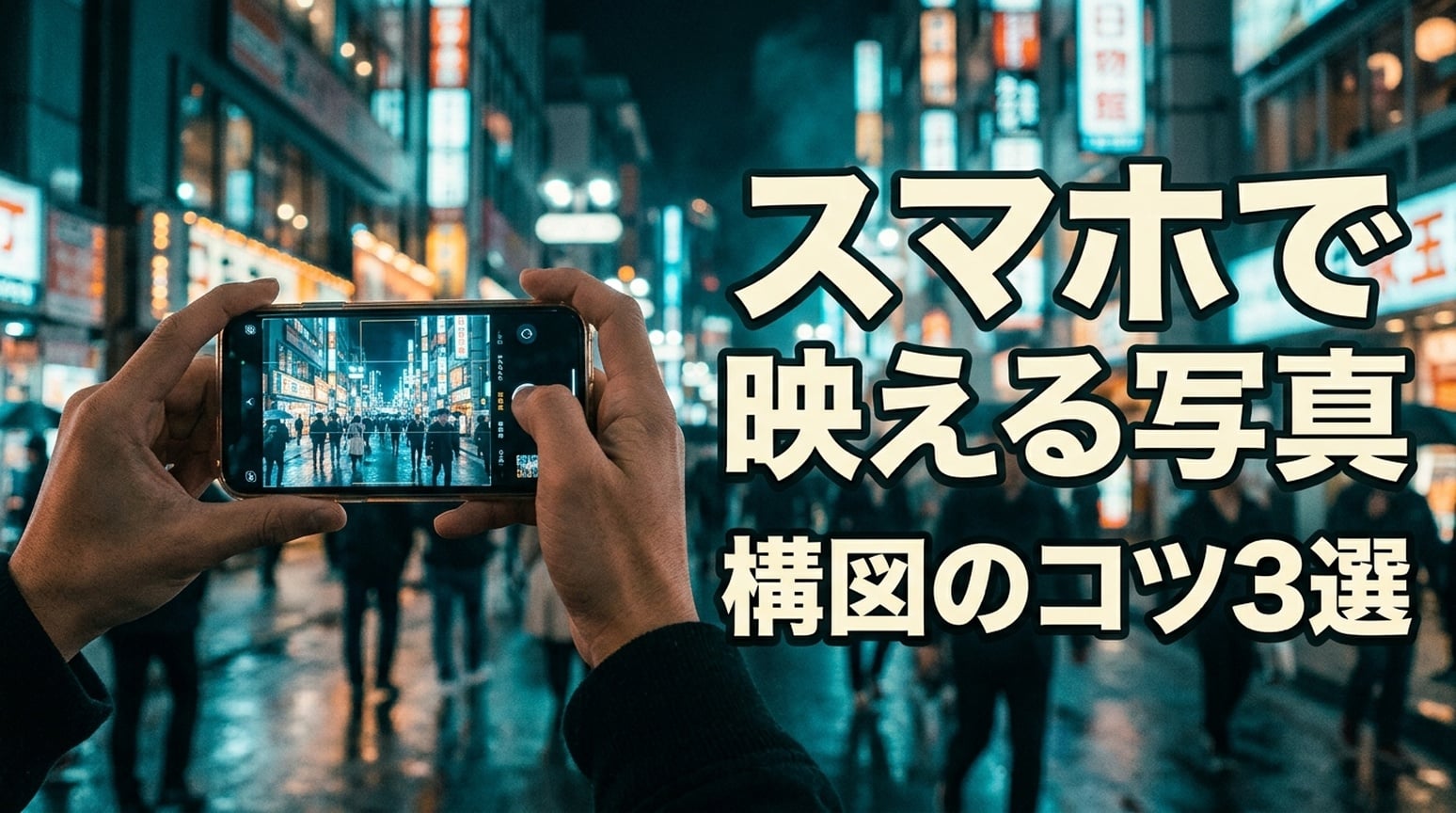 |
दोनों में スマホで映える写真 और 構図のコツ3選 बना रहा। GPT में मुख्य हेडलाइन एक लाइन में है, सबटाइटल डार्क ब्रश पैनल से अलग है। NB में हेडलाइन スマホで के बाद विभाजित है और आउटलाइन मजबूत है।
कोरियाई संस्करण
| GPT इमेज 2.5 | नैनो बनाना 2.1 |
|---|---|
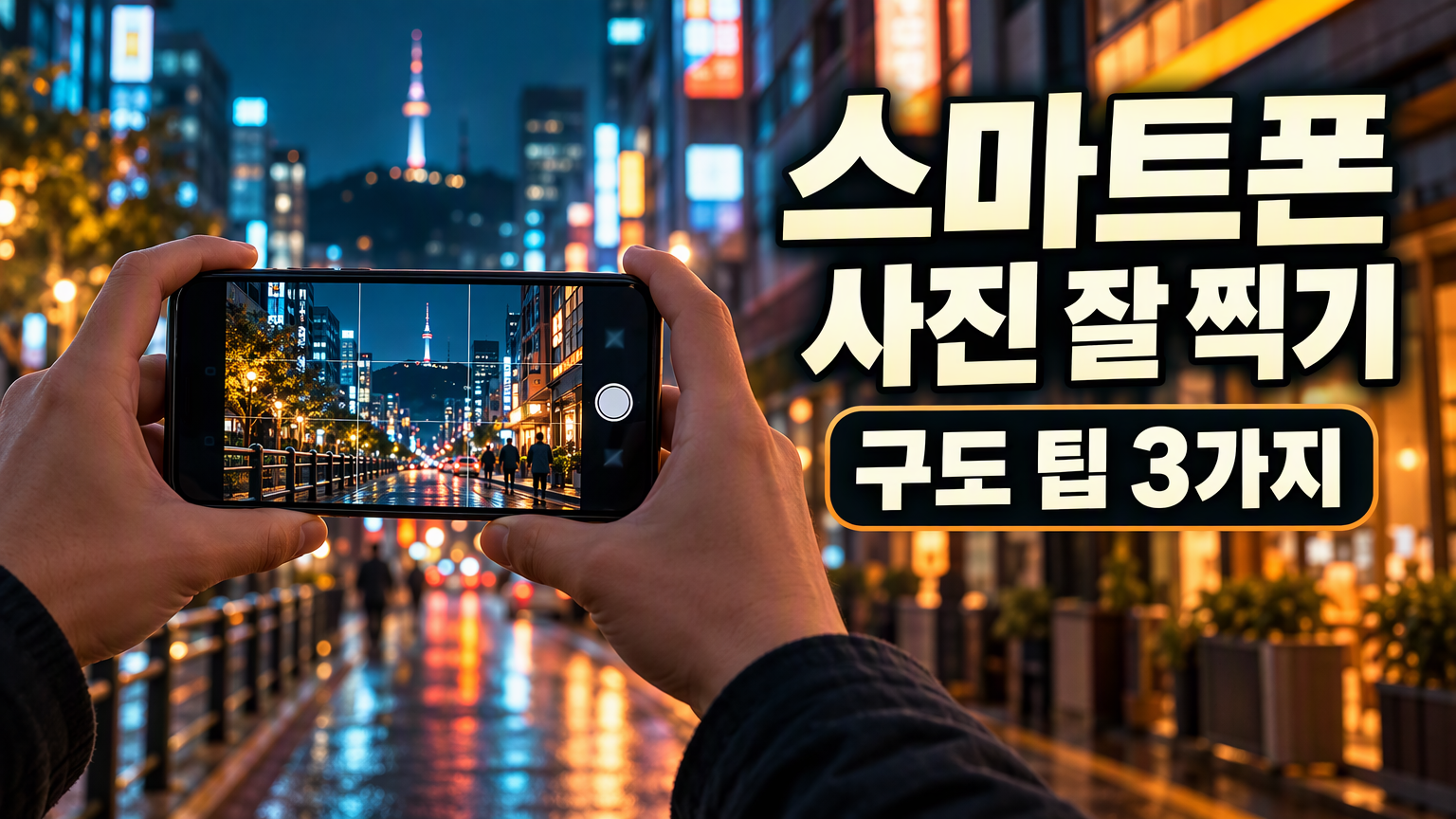 | 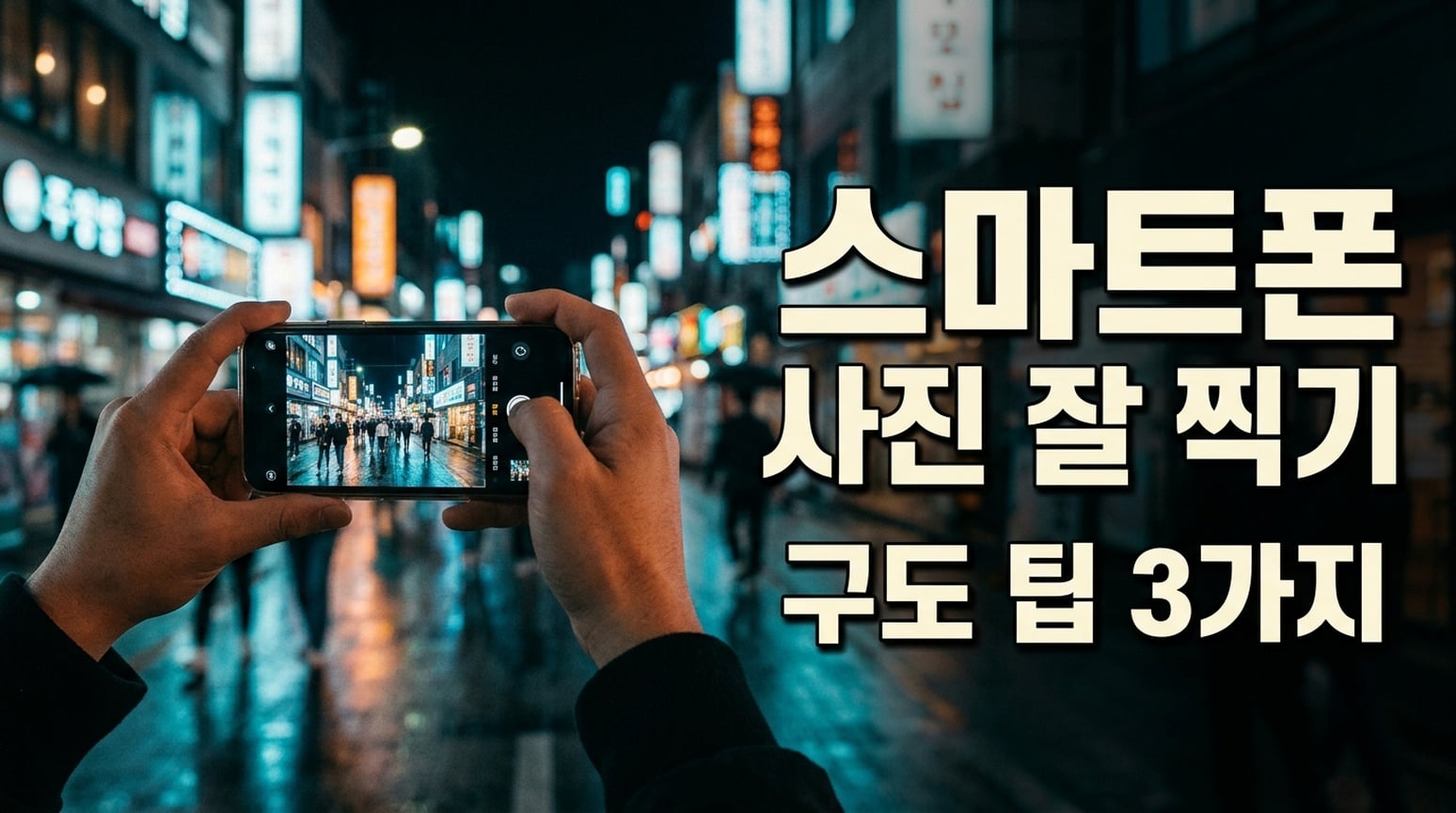 |
दोनों में कोरियाई शब्दिंग बनी रही। GPT में सेकेंडरी लाइन डार्क राउंडेड पैनल से जोरदार है; शब्द स्पेसिंग टाइट है। NB में हेडलाइन और सबटाइटल खुलकर अलग हैं। अंतिम डिलीवरी में स्पेसिंग की समीक्षा करें।
6. पैकिंग चेकलिस्ट और नॉलेज कार्ड
साझा निर्देश: छह निर्दिष्ट श्रेणियाँ और आइटम सूची दो कॉलम, तीन पंक्ति वाली पैकिंग चेकलिस्ट में दिखाएँ, कोई अतिरिक्त कॉपी न जोड़ें।
| GPT इमेज 2.5 | नैनो बनाना 2.1 |
|---|---|
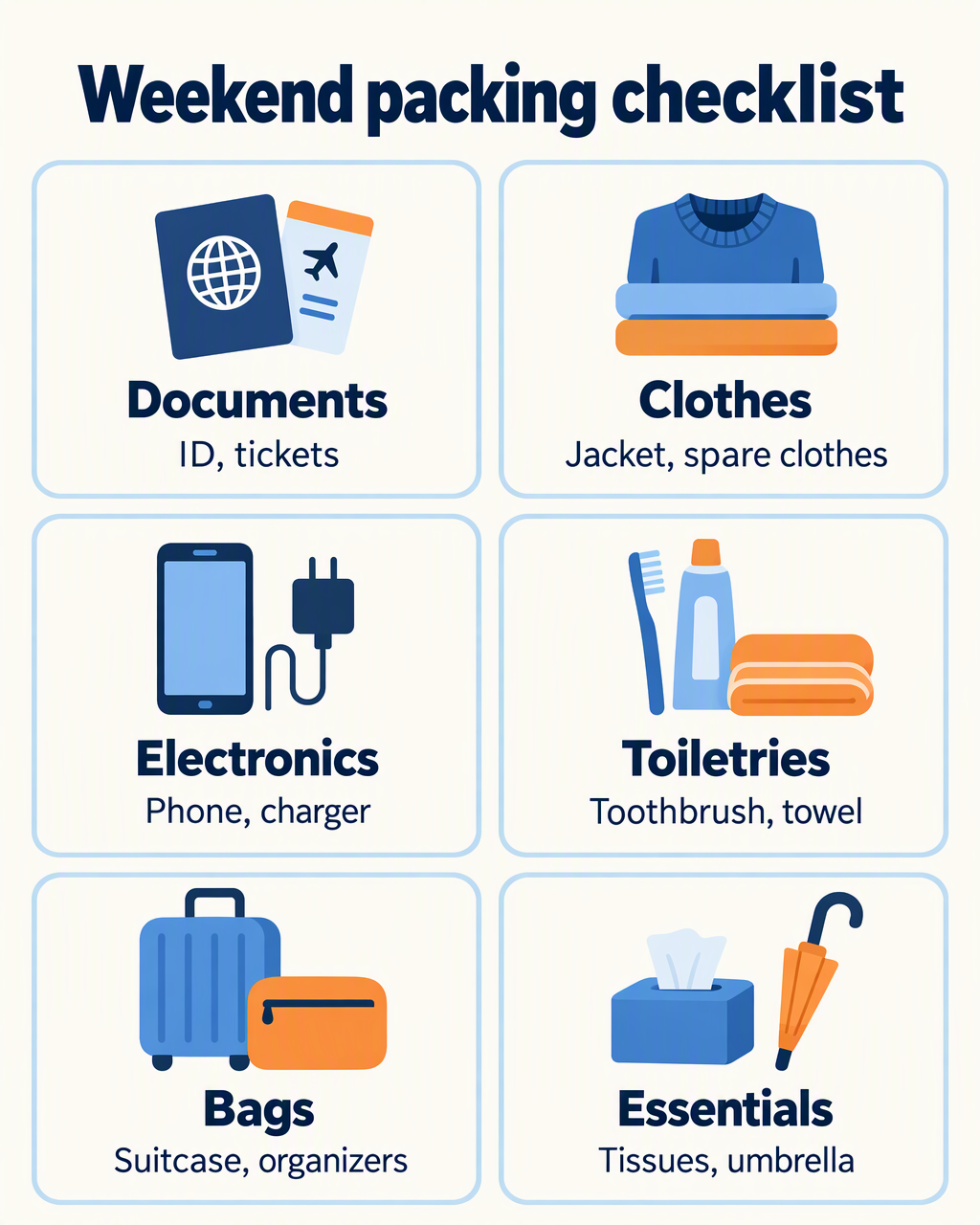 | 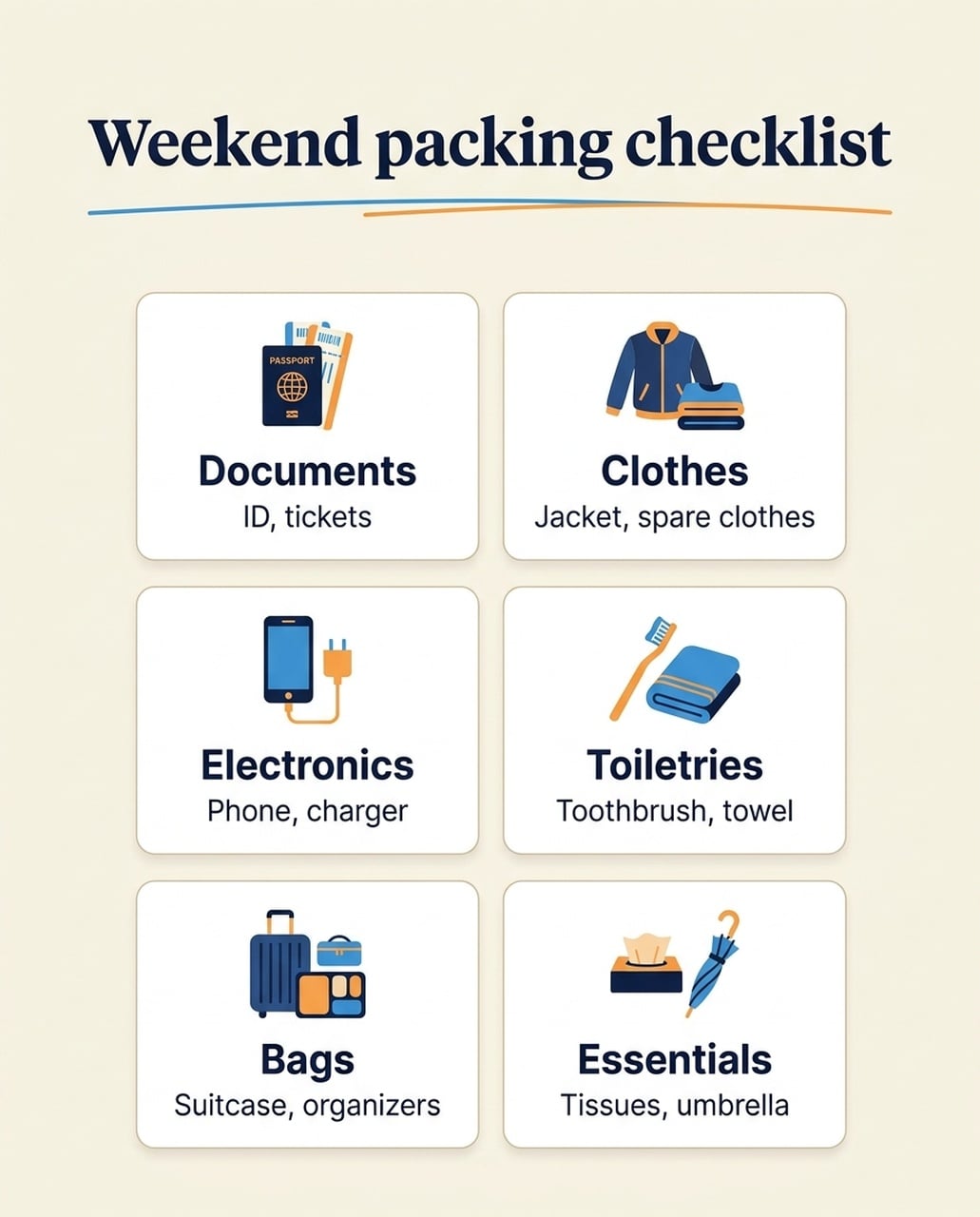 |
अंग्रेज़ी संस्करणों में छह श्रेणियाँ और आइटम सूची बनी रही। GPT में इल्लस्ट्रेशन और लेबल हर कार्ड में ज़्यादा जगह में हैं। नैनो बनाना 2.1 में छोटे आइकन और ज़्यादा व्हाइटस्पेस है; पासपोर्ट आइकन में अनचाहा PASSPORT लेबल भी है। जापानी और कोरियाई संस्करणों में पहले चीनी प्रयोग वाला अतिरिक्त अंग्रेज़ी सबटाइटल नहीं है।
कब उपयोग करूँ: बड़े मोबाइल-पढ़ने योग्य लेबल चाहिए तो GPT चुनें। संयमित कार्ड लेआउट पसंद हो तो नैनो बनाना 2.1 चुनें, आइकन लेबल और बॉडी कॉपी की जाँच करें। एक भाषा में देखी गई कॉपी त्रुटि को हर भाषा के लिए दावा न मानें।
जापानी संस्करण
| GPT इमेज 2.5 | नैनो बनाना 2.1 |
|---|---|
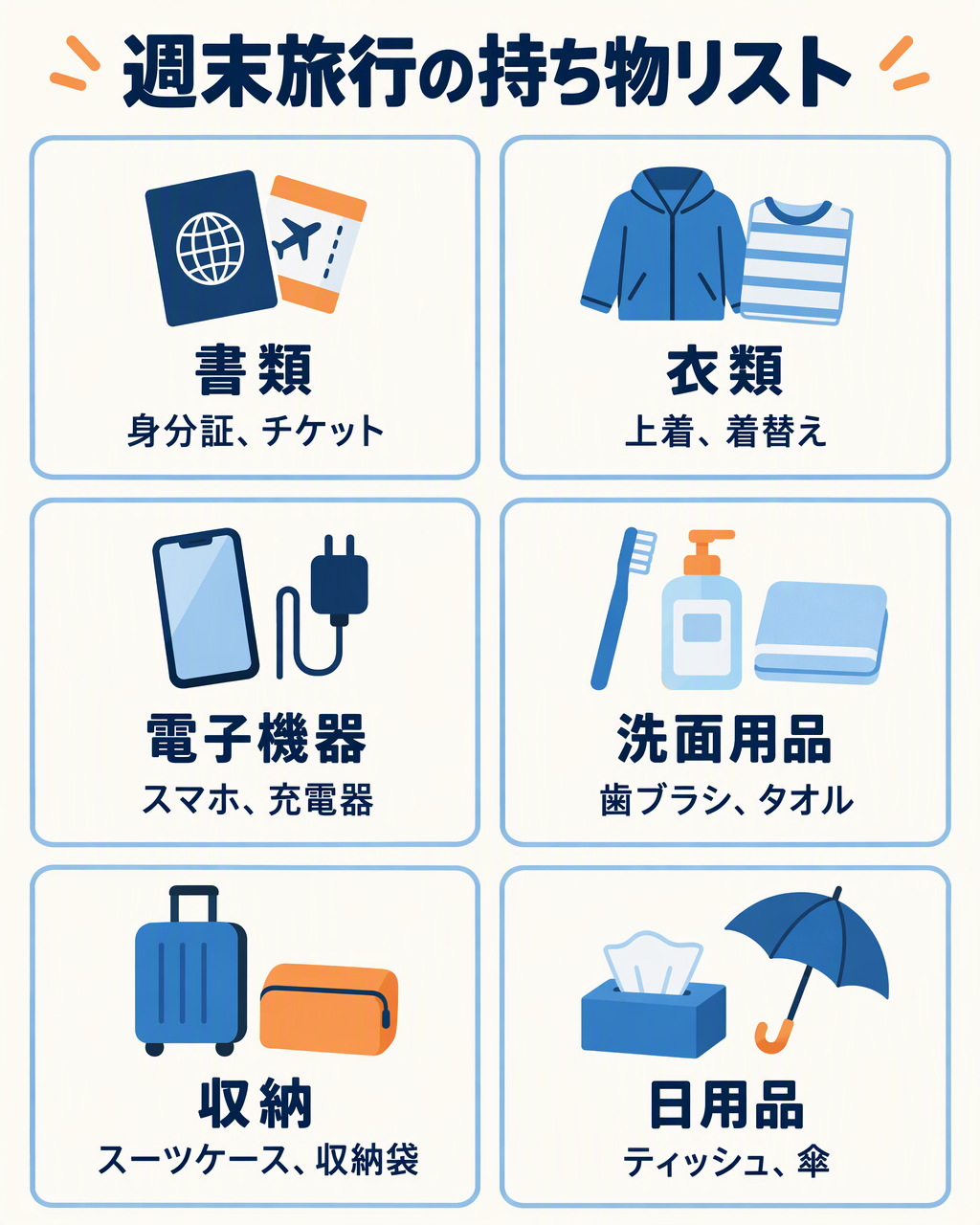 | 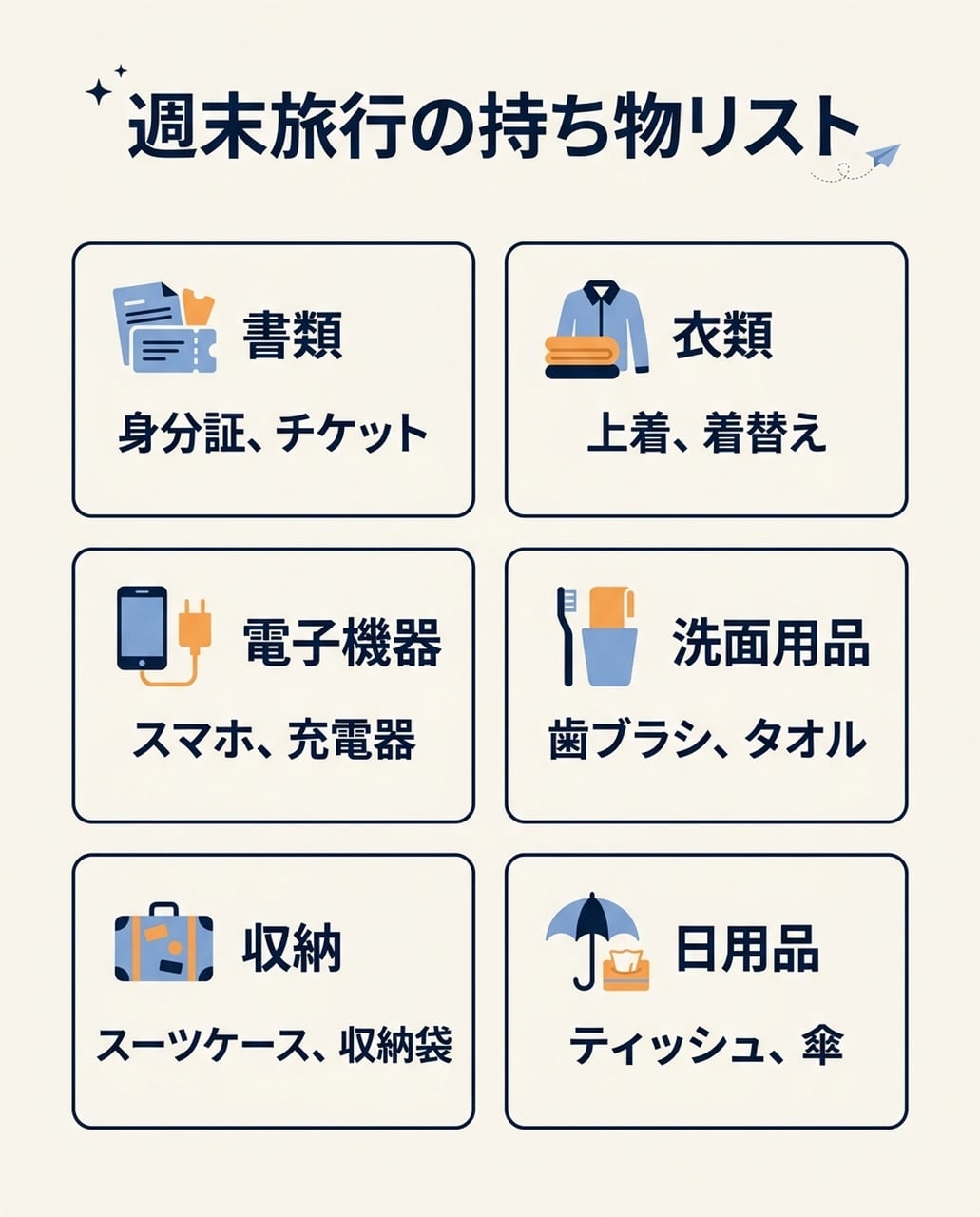 |
दोनों में छह जापानी श्रेणियाँ और आइटम सूची है, चीनी परीक्षण वाला अनचाहा अंग्रेज़ी सबटाइटल नहीं है। GPT में इल्लस्ट्रेशन बड़े हैं; NB में छोटे आइकन और कॉम्पैक्ट टेक्स्ट ब्लॉक हैं।
कोरियाई संस्करण
| GPT इमेज 2.5 | नैनो बनाना 2.1 |
|---|---|
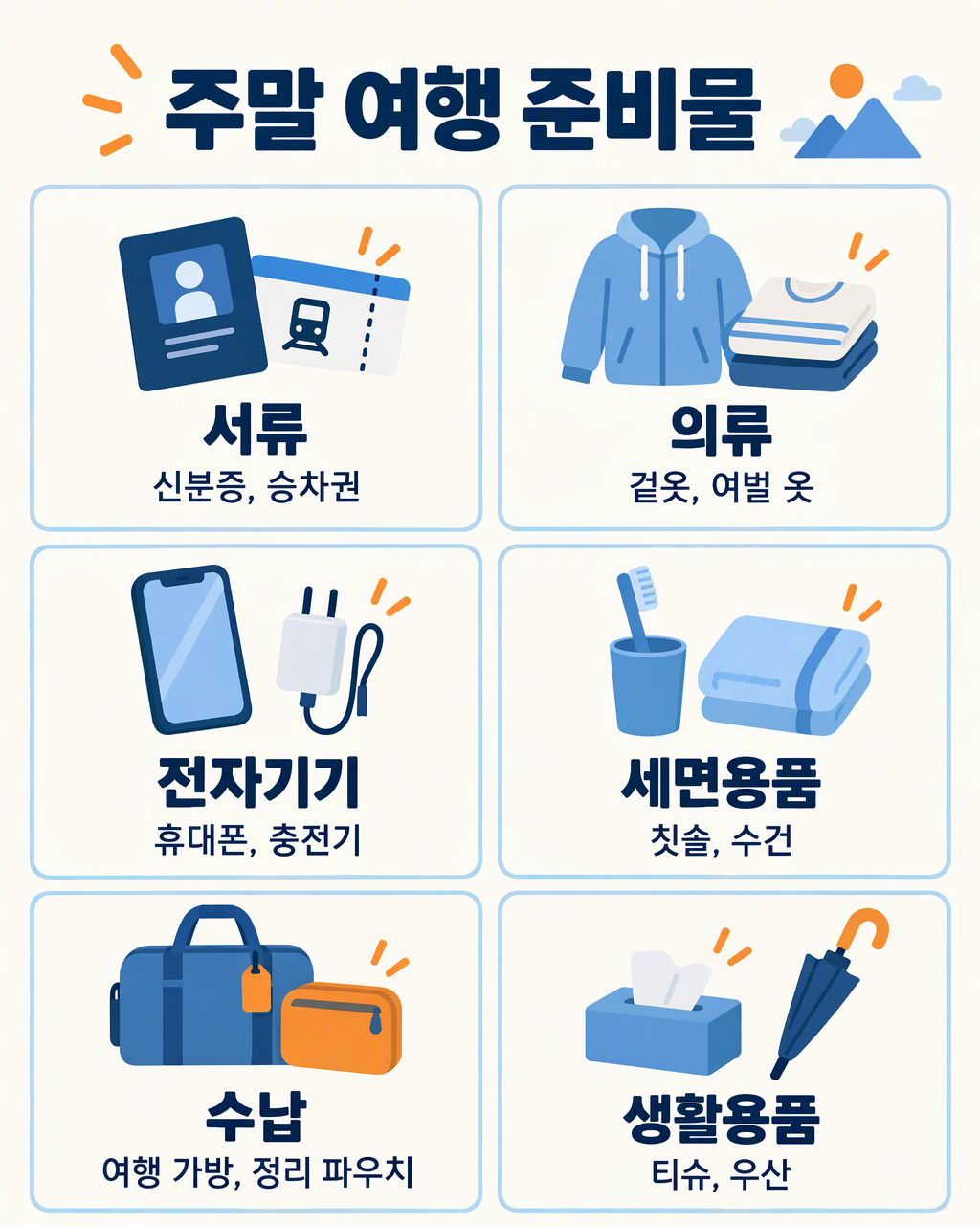 | 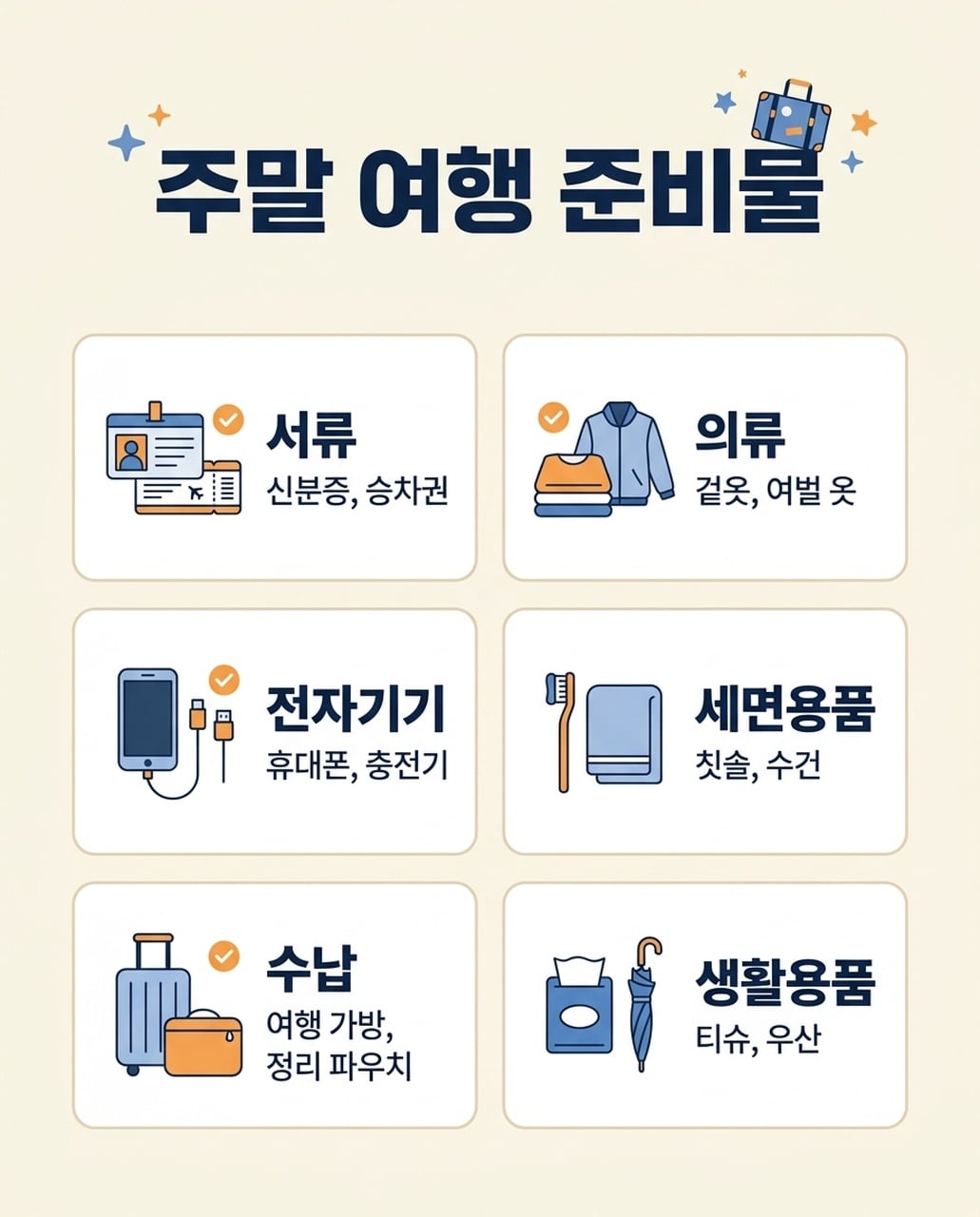 |
दोनों में छह कोरियाई श्रेणियाँ और संबंधित आइटम हैं। GPT में लंबी आइटम सूची एक लाइन में है; NB में Bags आइटम सूची दो लाइन में है। दोनों में अंतिम स्पेसिंग और छोटे ग्लिफ की समीक्षा ज़रूरी है।
7. इवेंट पोस्टर
साझा निर्देश: NIGHT GARDEN और Botanical light show · Kyoto · 7–9 pm को हरे और एम्बर रंग की चमकदार वनस्पति आकृतियों के साथ दिखाएँ।
| GPT इमेज 2.5 | नैनो बनाना 2.1 |
|---|---|
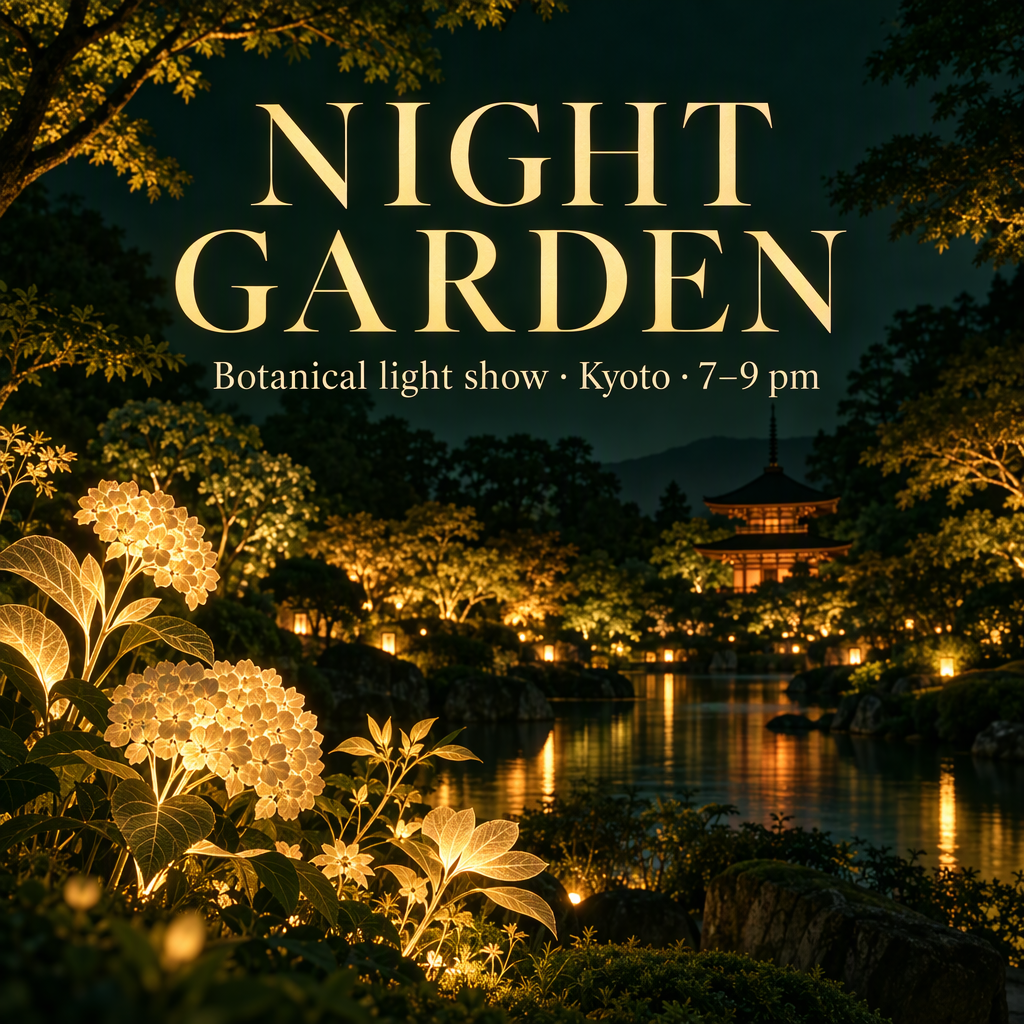 | 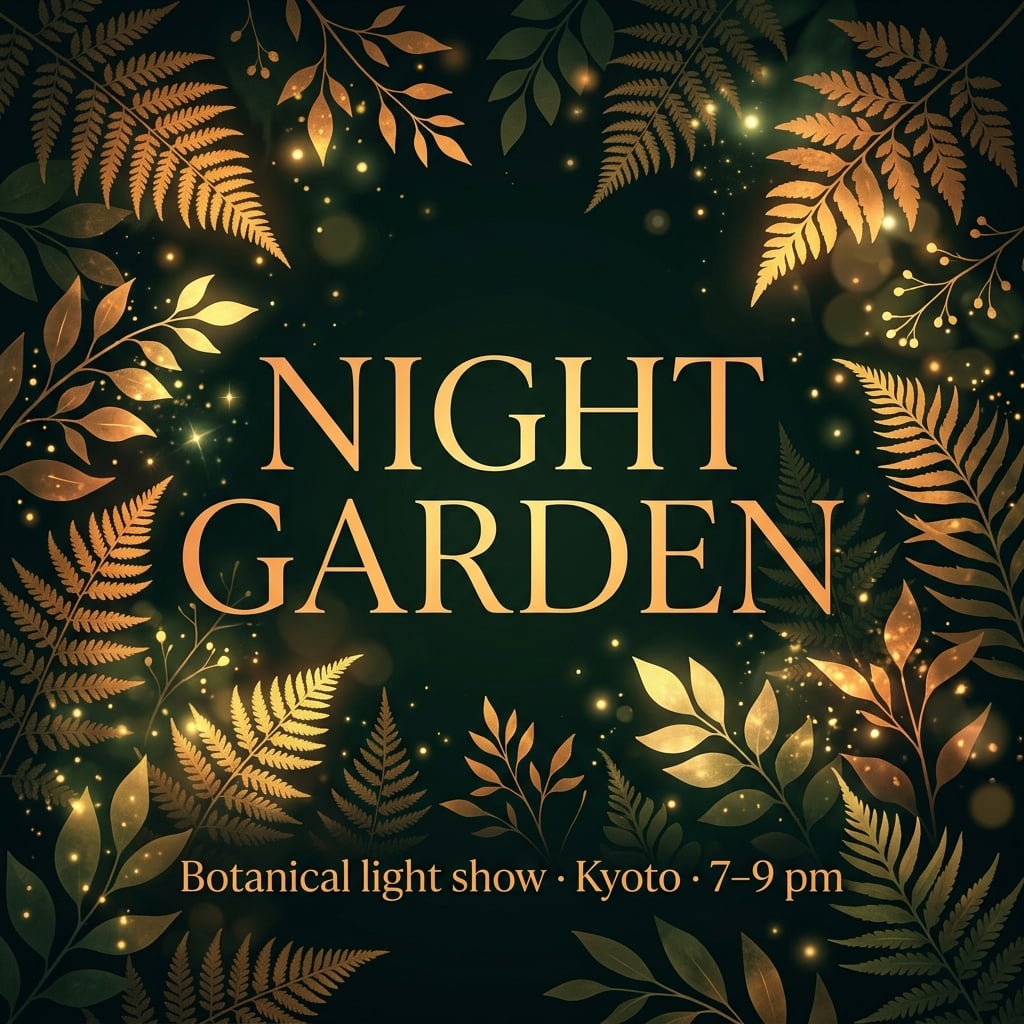 |
दोनों अंग्रेज़ी पोस्टर में मुख्य इवेंट कॉपी बनी रही। GPT ने गार्डन वेन्यू, बिल्डिंग और पानी बना दिया। नैनो बनाना 2.1 ने शीर्षक को पत्तियों से फ्रेम किया और सबटाइटल नीचे रखा। जापानी और कोरियाई संस्करणों में इवेंट जानकारी केंद्र में है।
कब उपयोग करूँ: ग्राफिक, टाइपोग्राफी-प्रधान इवेंट पोस्टर के लिए नैनो बनाना 2.1 से शुरू करें। वातावरणीय कैंपेन विजुअल के लिए GPT से शुरू करें। असली वेन्यू ज़रूरी हो तो दोनों को रेफरेंस दें; कल्पित बिल्डिंग असली स्थान का संकेत नहीं देती।
जापानी संस्करण
| GPT इमेज 2.5 | नैनो बनाना 2.1 |
|---|---|
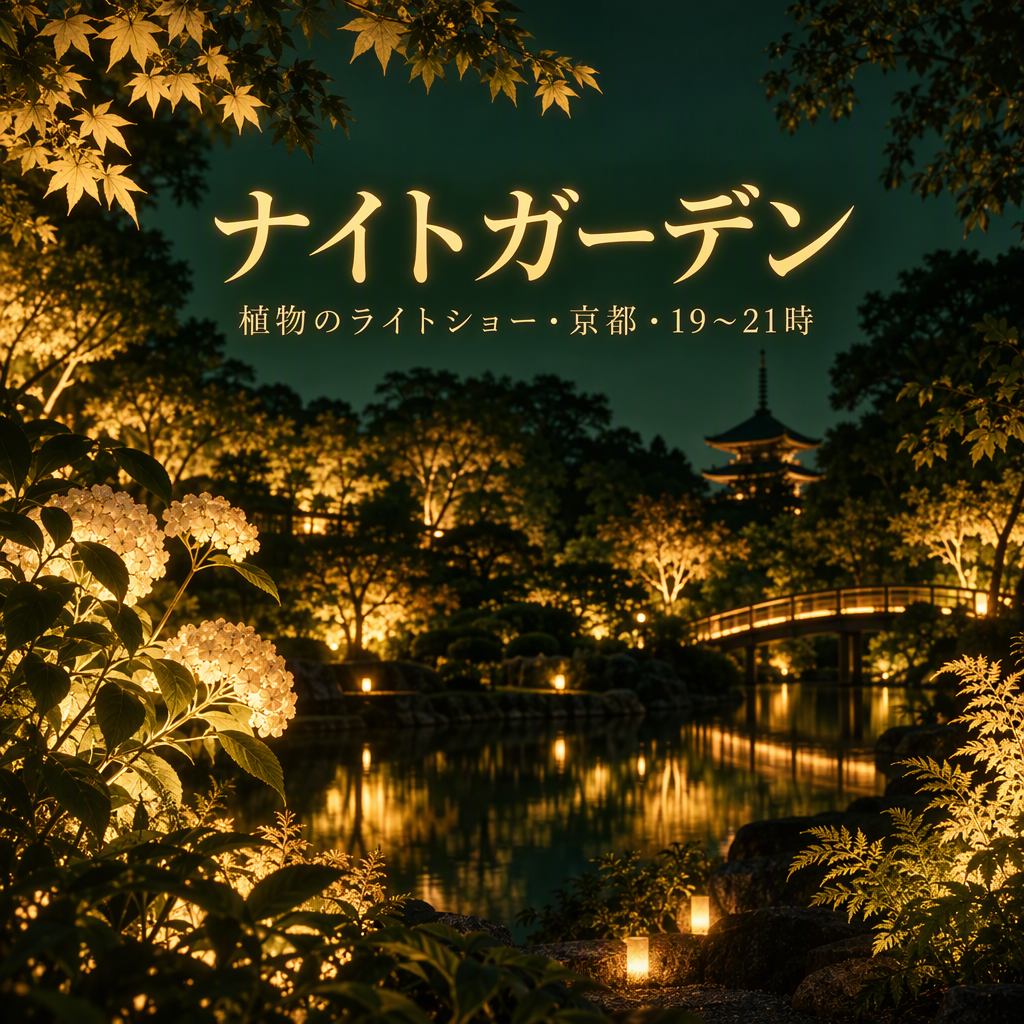 | 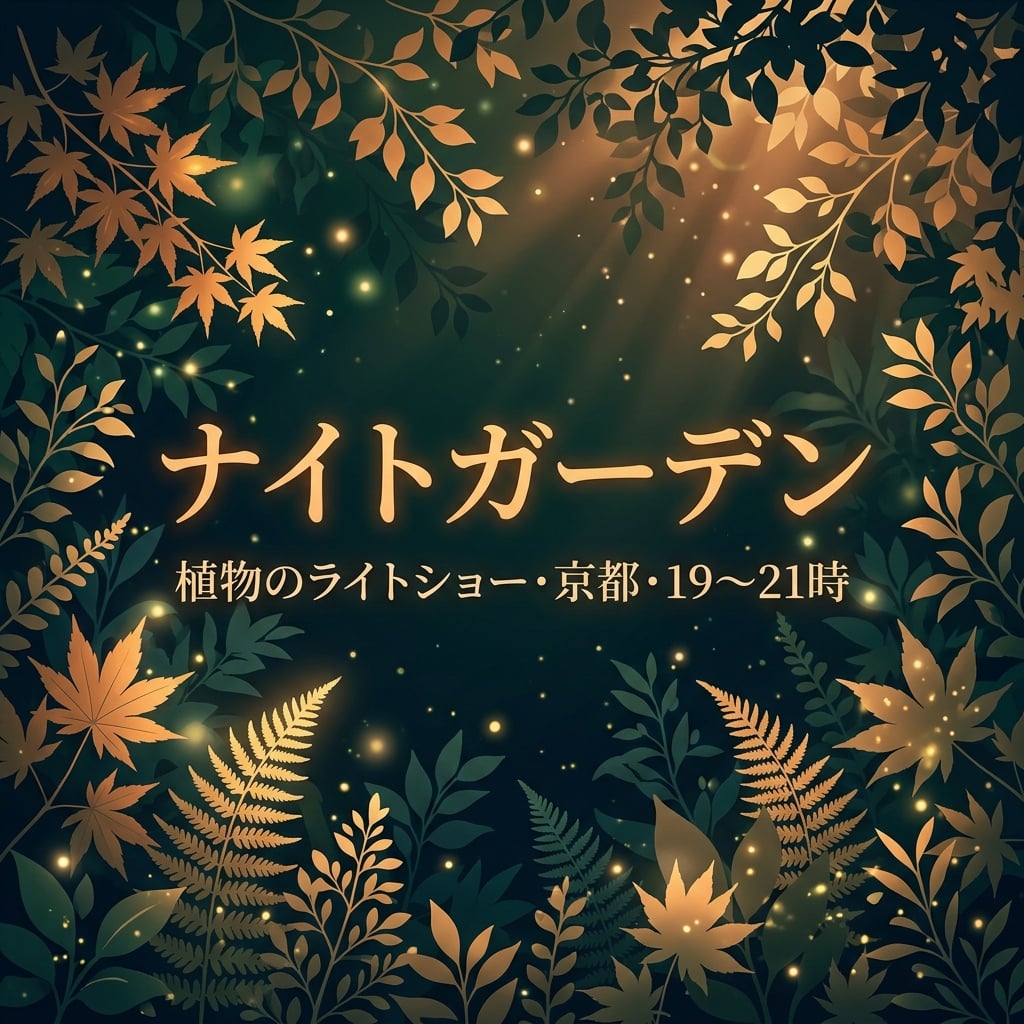 |
दोनों में ナイトガーデン और स्थान/समय जानकारी बनी रही। NB में शीर्षक और सबटाइटल केंद्र में पत्तियों के सामने है; GPT में सबटाइटल छोटा है, विस्तृत गार्डन दृश्य के ऊपर। समय-रेंज ग्लिफ की समीक्षा करें जब सटीक विराम चिन्ह ज़रूरी हो।
कोरियाई संस्करण
| GPT इमेज 2.5 | नैनो बनाना 2.1 |
|---|---|
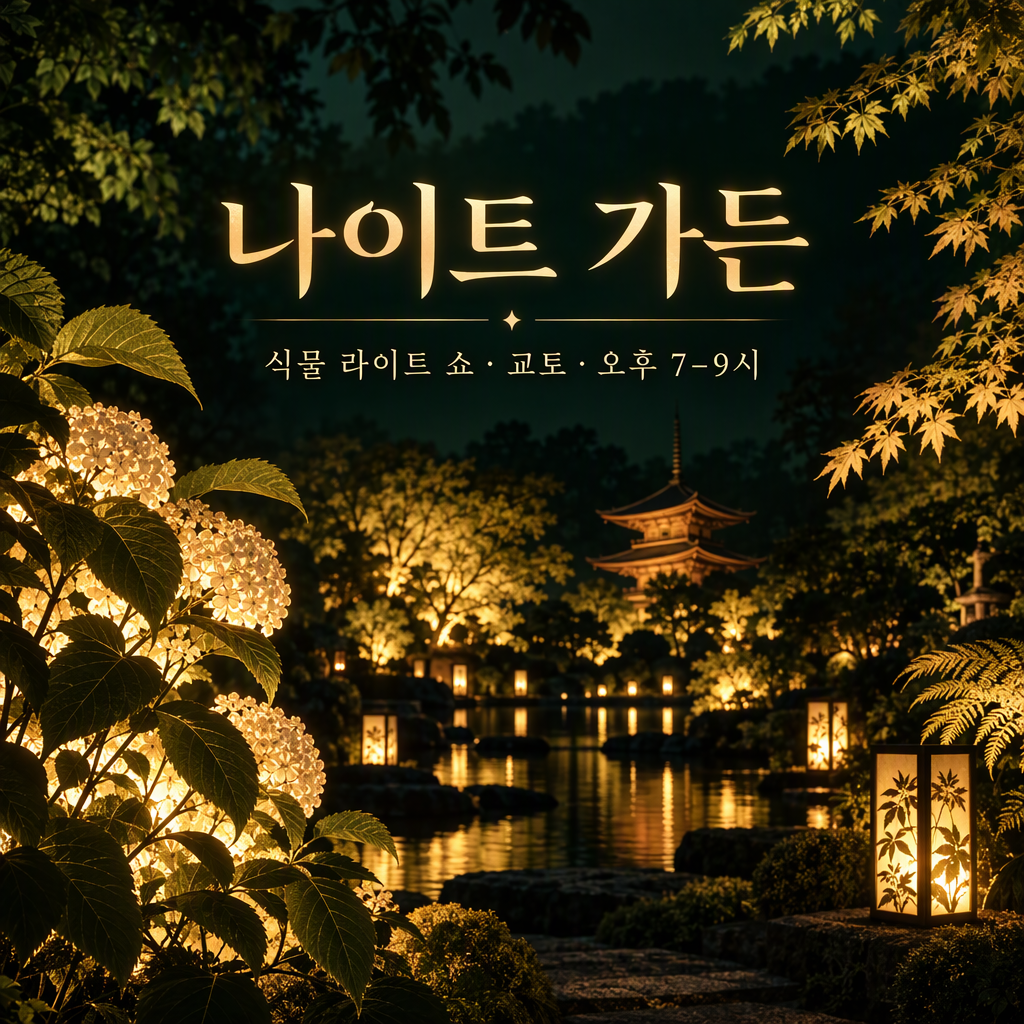 | 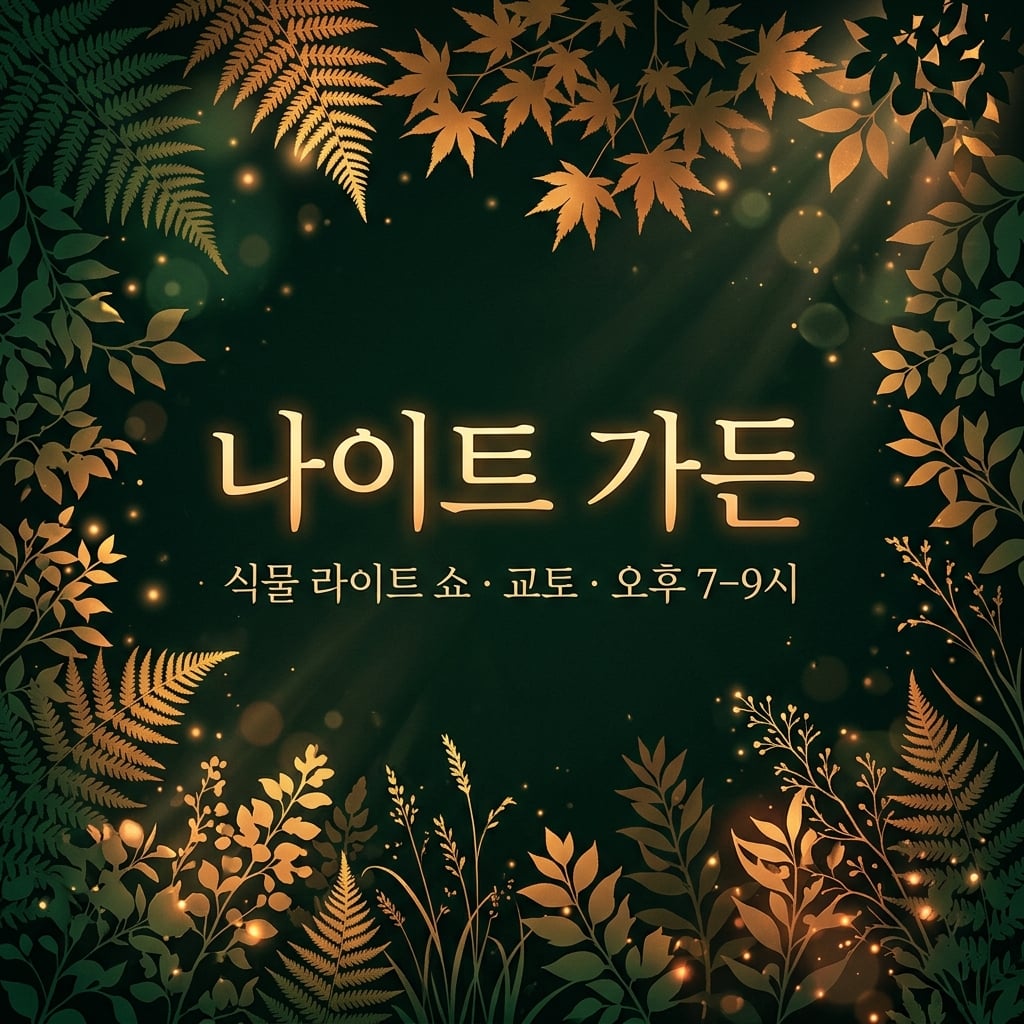 |
दोनों में 나이트 가든 और कोरियाई स्थान/समय जानकारी बनी रही। NB में केंद्रीय टेक्स्ट पर जोर है; GPT में कल्पित गार्डन वेन्यू पर जोर है। अंतर मुख्य रूप से कैंपेन शैली का है, कोरियाई सटीकता का प्रमाण नहीं।
8. संख्यात्मक इन्फोग्राफिक्स
साझा निर्देश: चार बार एक ज़ीरो बेसलाइन पर बनाएं—40%, 25%, 20% और 15%—सटीक लेबल और स्पष्ट डेटा नोट के साथ।
| GPT इमेज 2.5 | नैनो बनाना 2.1 |
|---|---|
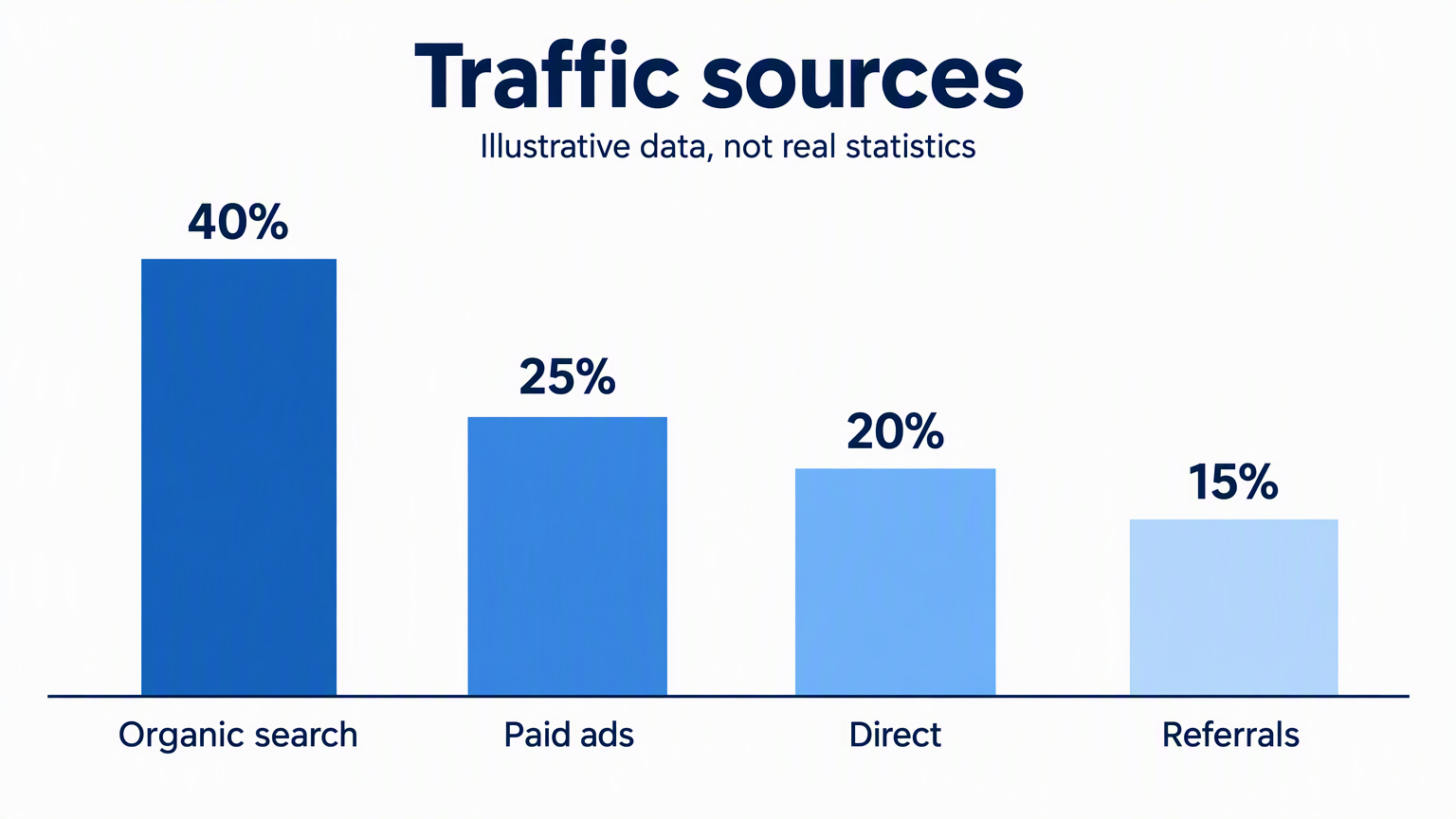 | 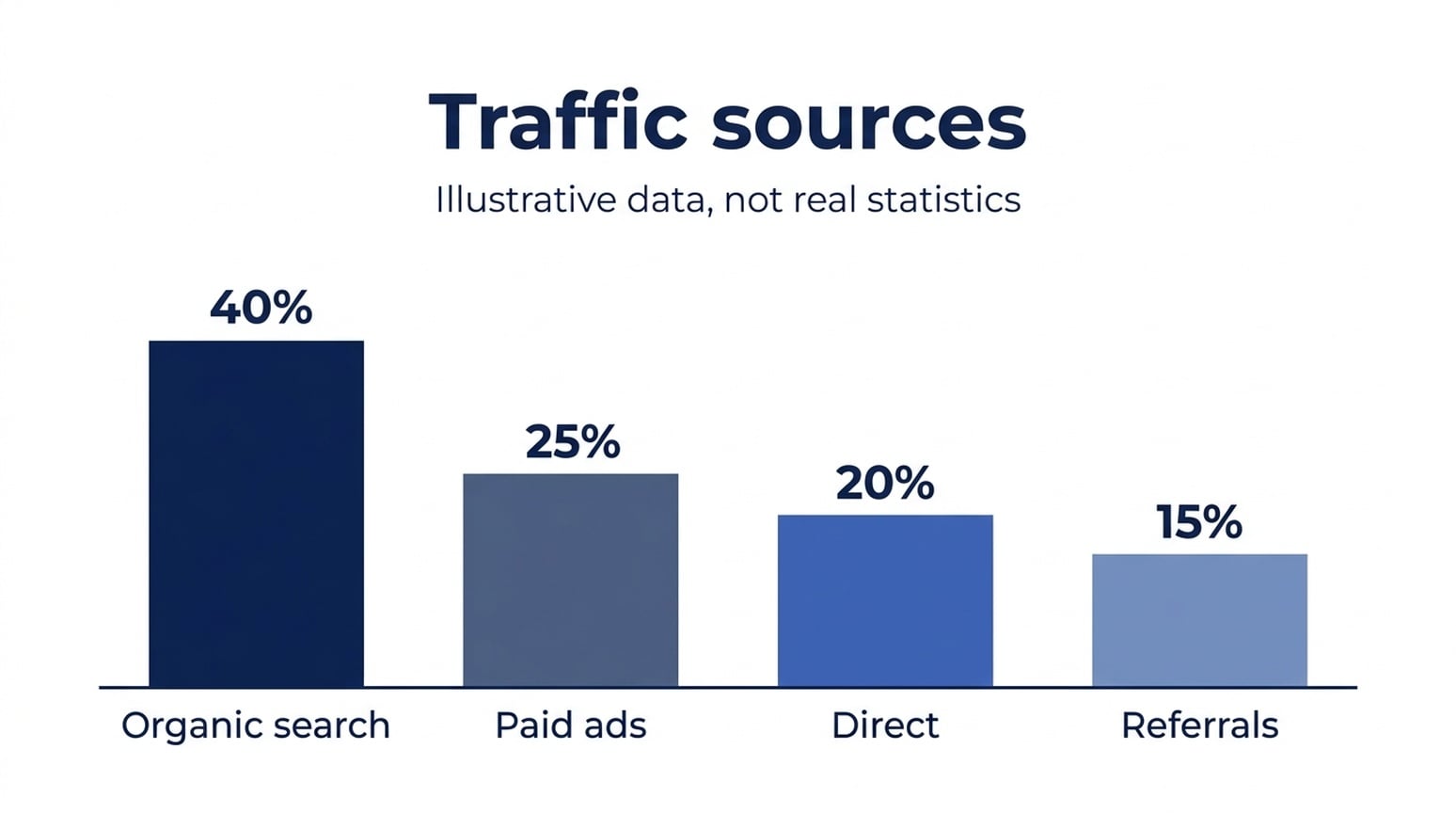 |
सभी छह अंग्रेज़ी, जापानी और कोरियाई इमेज में दिखाए गए मान और श्रेणी लेबल बने रहे। बार की खुद की समीक्षा ज़रूरी है। पहले बार को 40 पर सामान्य करें, अंग्रेज़ी GPT बार के पिक्सल माप 25.6, 21.0 और 16.3 हैं; नैनो बनाना 2.1 बार 24.7, 20.1 और 15.6 हैं। तीन भाषा सैंपल में नैनो बनाना 2.1 अनुरोधित अनुपात के ज़्यादा करीब है, दोनों पूरी तरह सटीक नहीं।
कब उपयोग करूँ: इस सरल इन्फोग्राफिक ड्राफ्ट के लिए नैनो बनाना 2.1 से शुरू करूँगा। चार्ट ज्योमेट्री बिल्कुल सटीक चाहिए तो डेटा चार्टिंग टूल से अंतिम बार बनाएं। बार के ऊपर सही प्रतिशत छपना बार की ऊँचाई की सटीकता नहीं दर्शाता।
जापानी संस्करण
| GPT इमेज 2.5 | नैनो बनाना 2.1 |
|---|---|
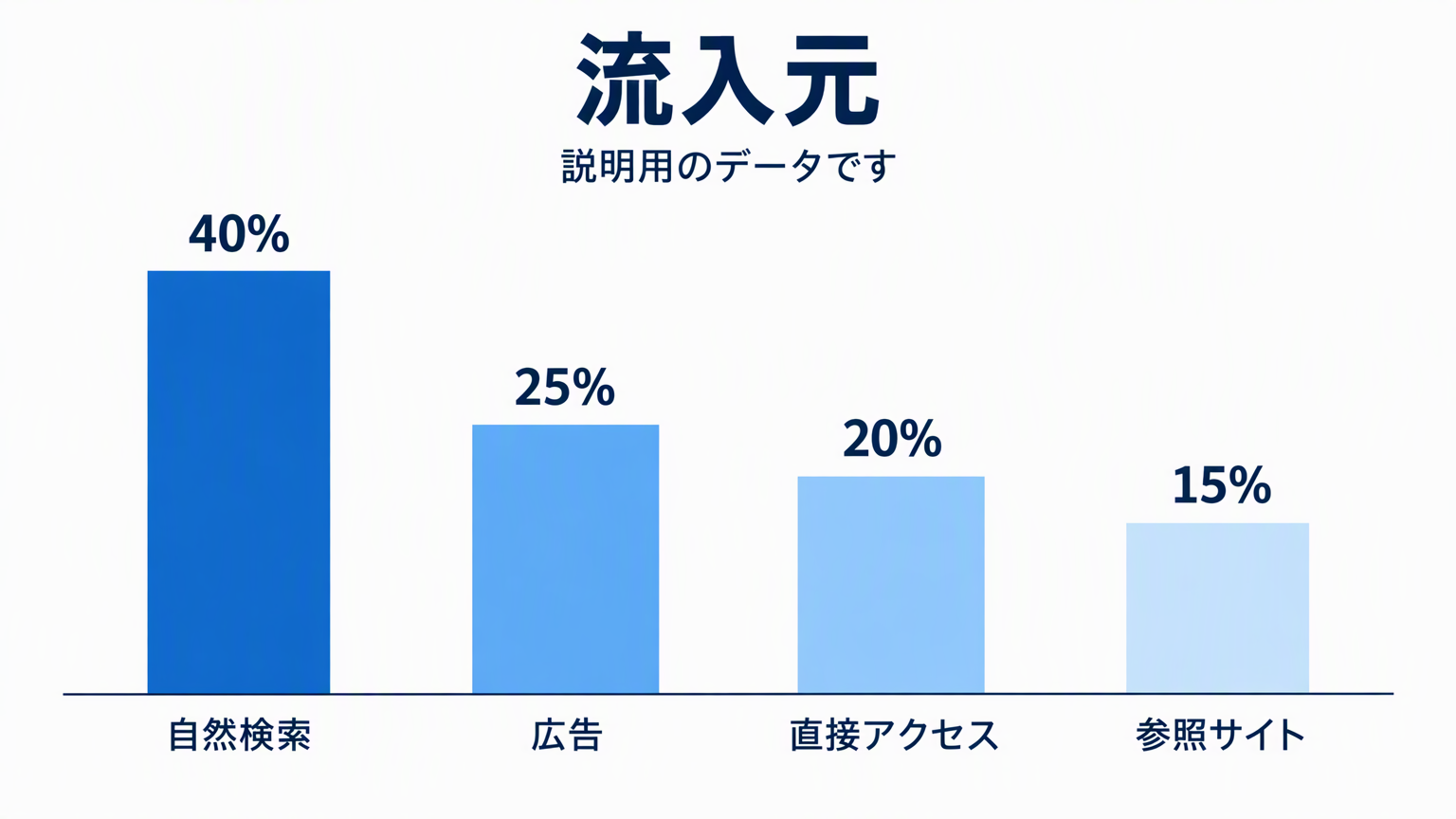 | 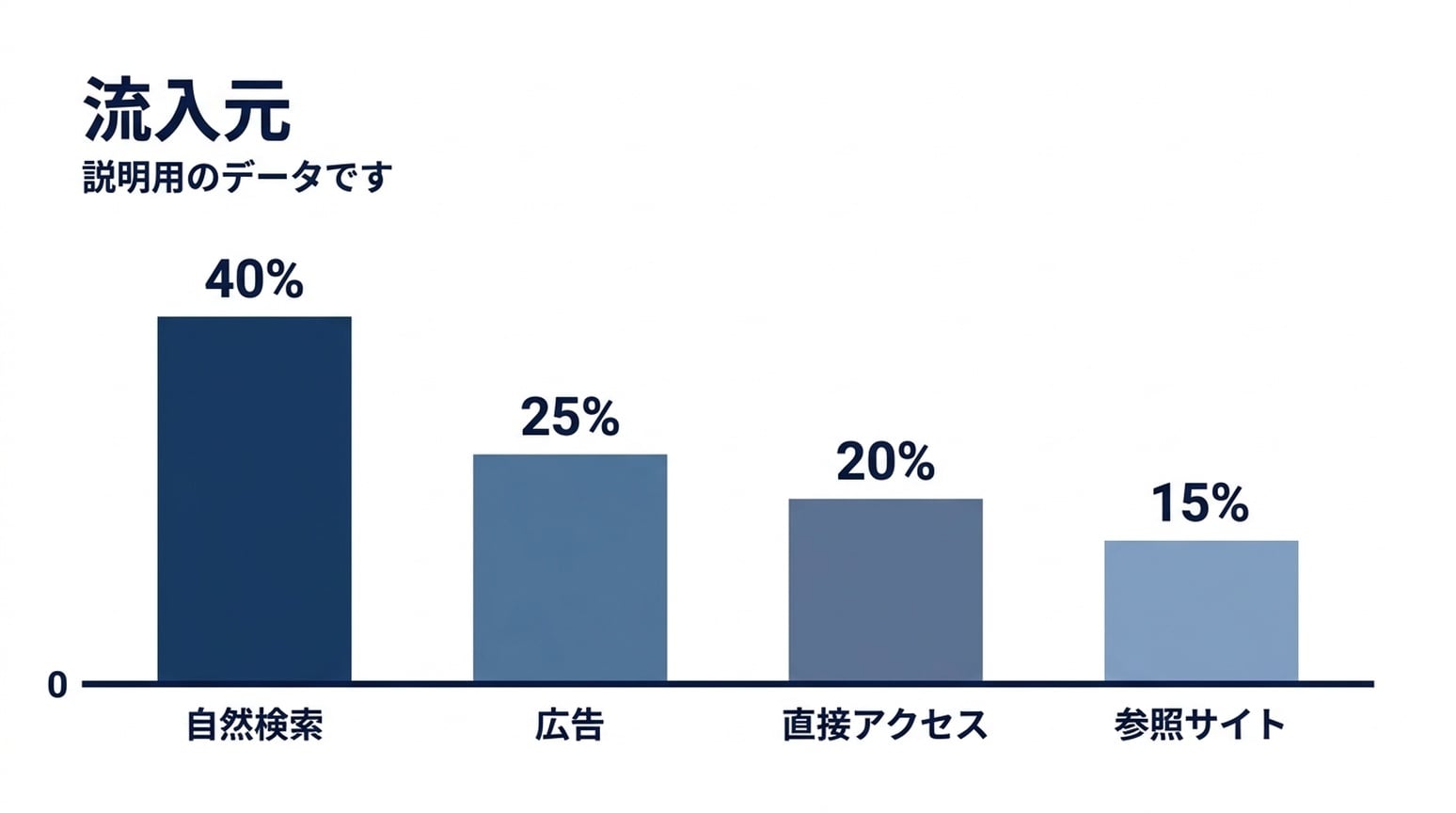 |
जापानी लेबल दोनों में पढ़ने योग्य हैं। NB में साझा बेसलाइन पर ज़ीरो मार्कर है। बार अनुपात अनुरोधित मान के करीब हैं, सबसे छोटा बार थोड़ा ऊँचा है।
कोरियाई संस्करण
| GPT इमेज 2.5 | नैनो बनाना 2.1 |
|---|---|
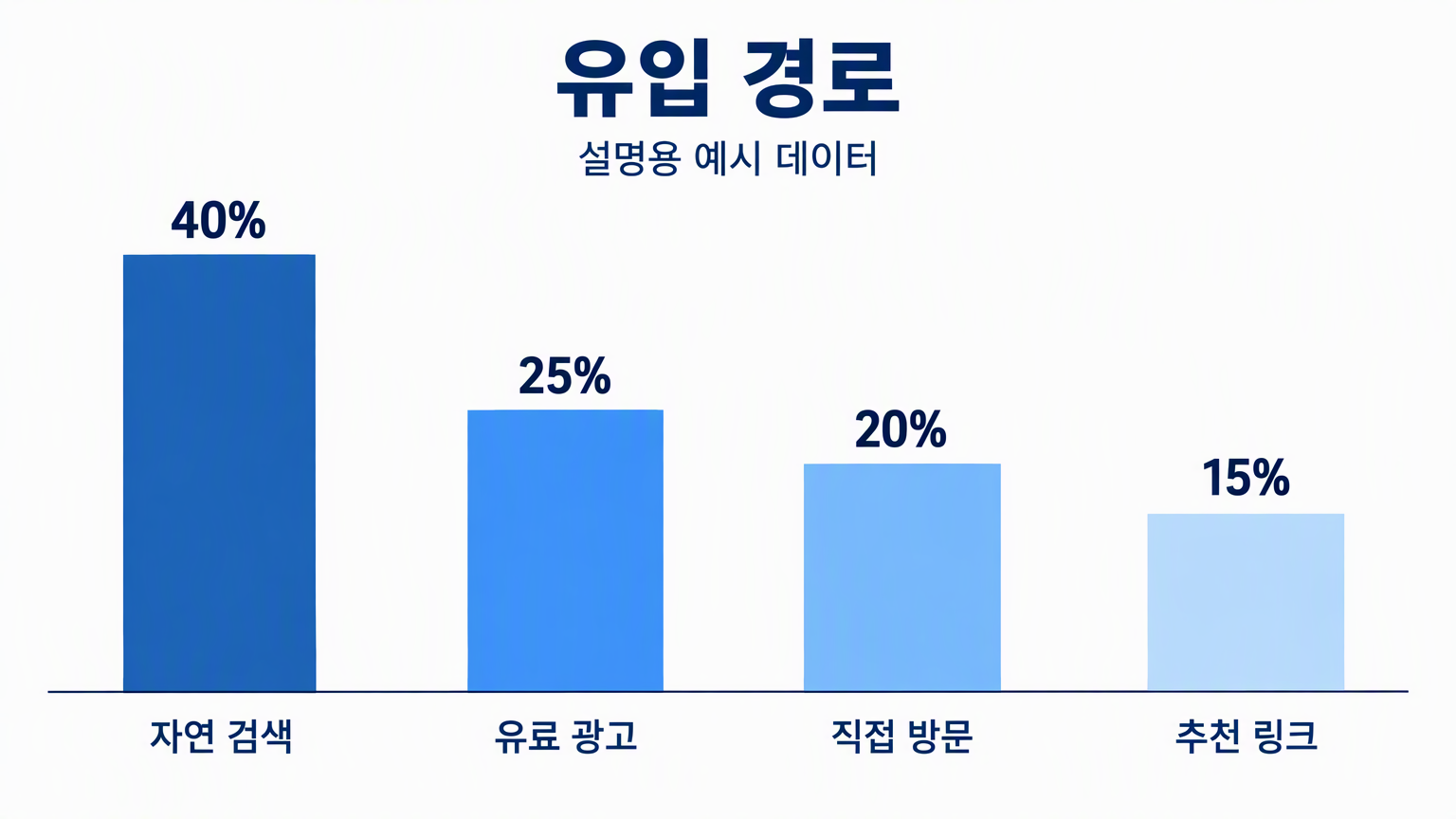 | 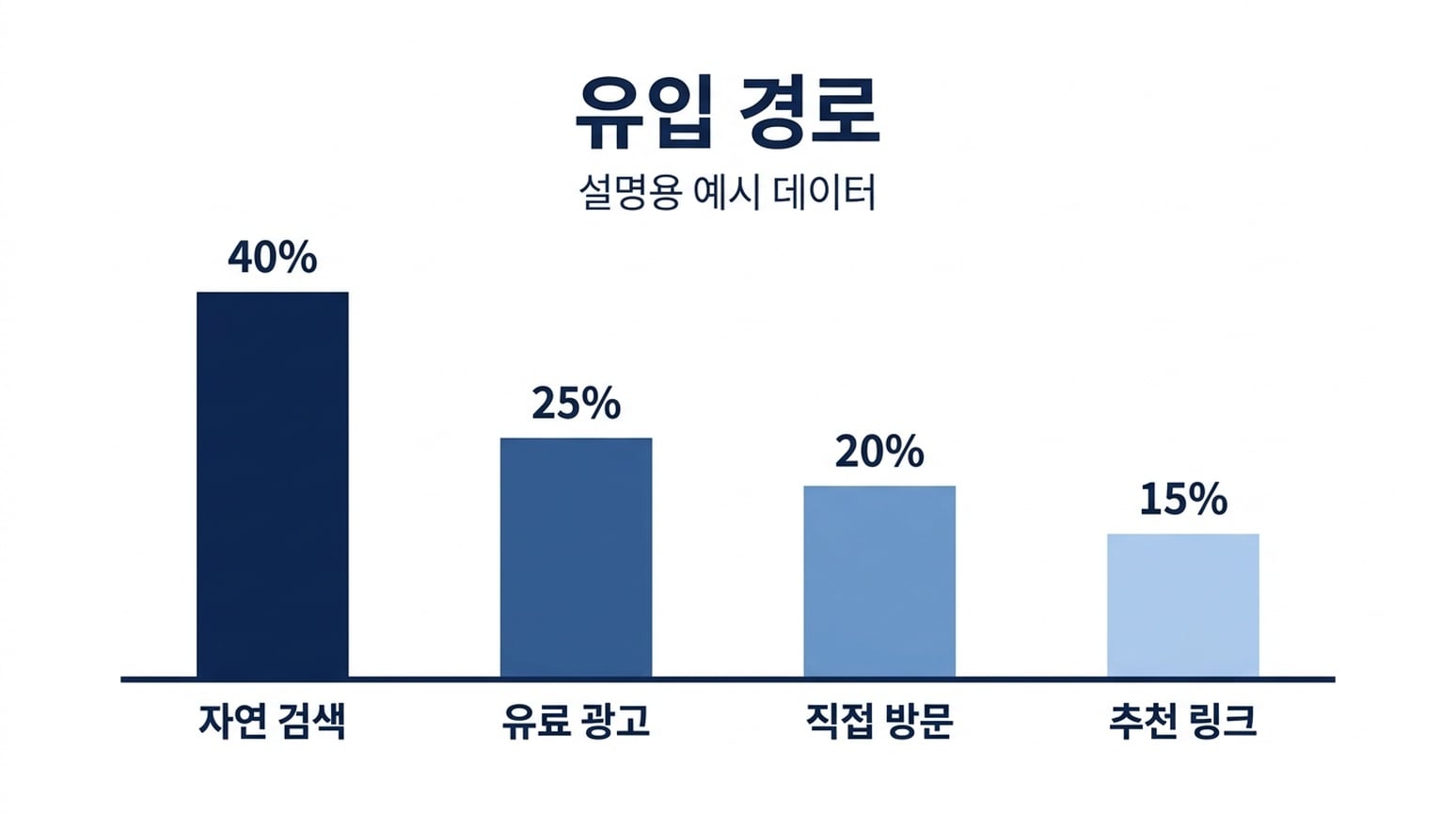 |
दोनों में कोरियाई लेबल और चार प्रतिशत बने रहे। भाषा सैंपल में कोरियाई NB परिणाम बार-ऊँचाई अनुपात के सबसे करीब है। यह अनुमानित इमेज है, डेटा-मान्य चार्ट नहीं।
9. प्रोसेस डायग्राम
साझा निर्देश: Generate, Inspect और Refine क्रम में दिखाएँ, हर एक के निर्दिष्ट सपोर्टिंग लाइन के साथ, तीर से जुड़े हुए।
| GPT इमेज 2.5 | नैनो बनाना 2.1 |
|---|---|
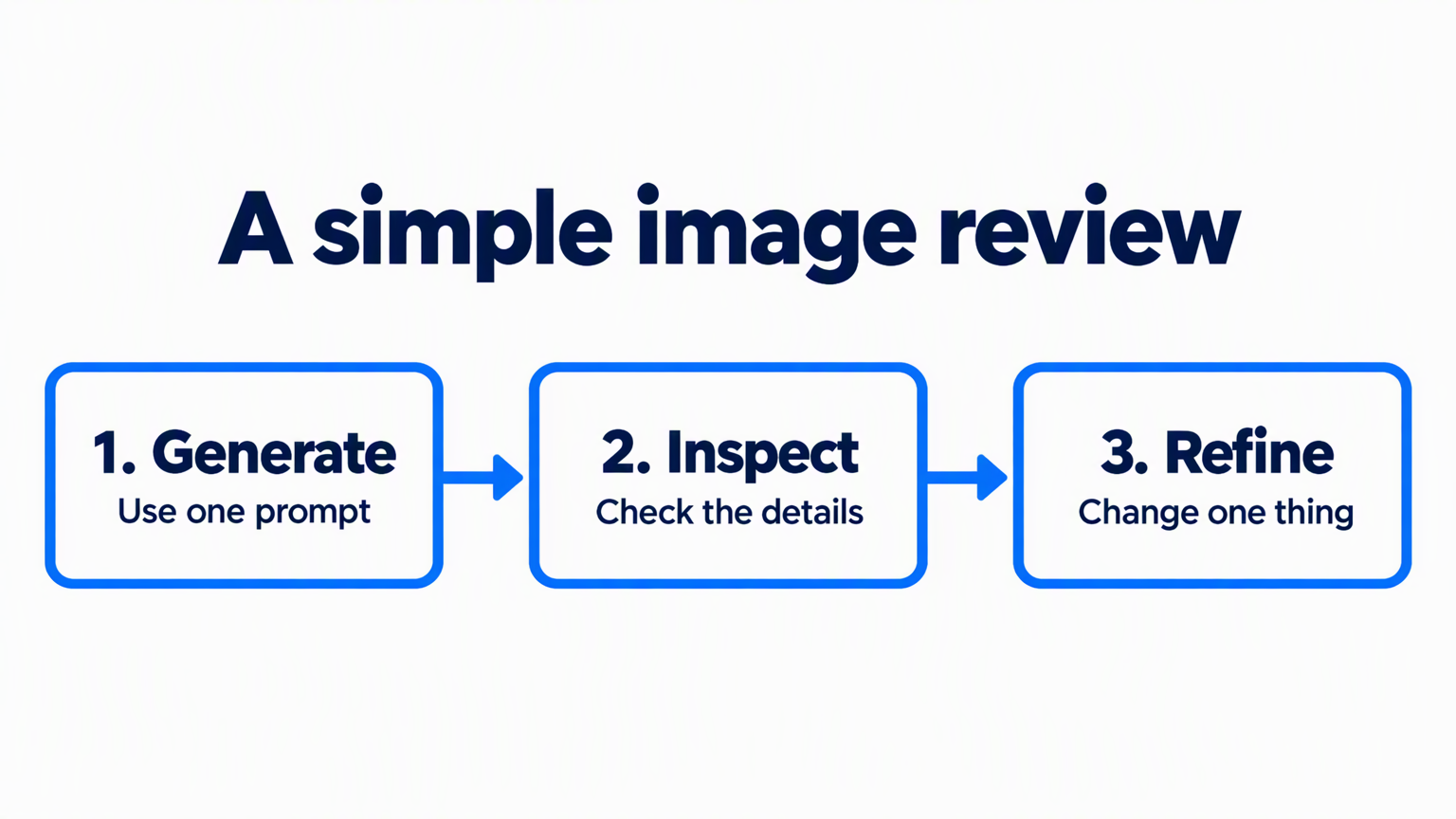 | 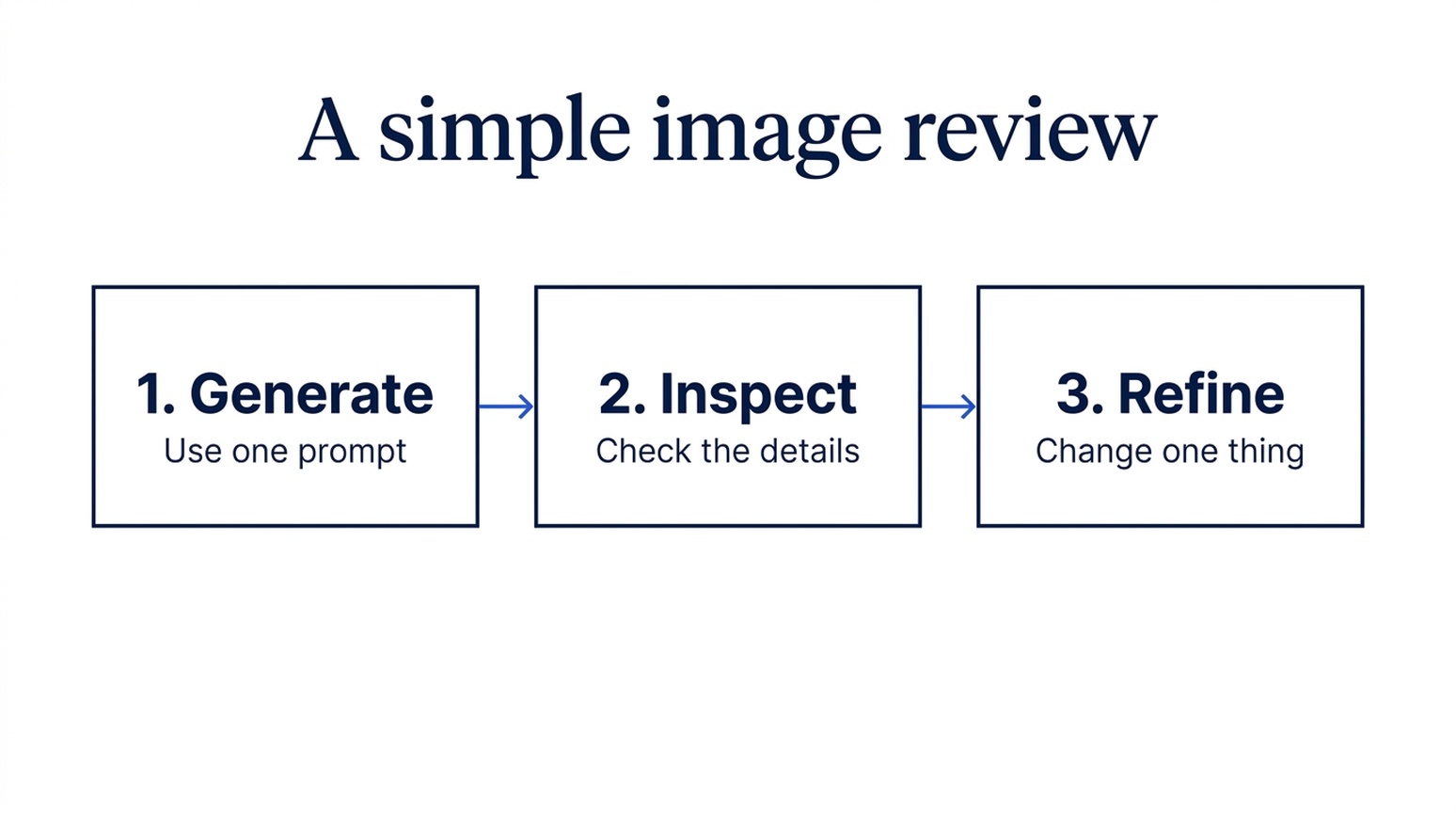 |
दोनों आउटपुट में लेबल, सपोर्टिंग टेक्स्ट और तीन-स्टेप क्रम बना रहा। GPT में मोटे नीले तीर और गोल फ्रेम हैं। नैनो बनाना 2.1 में पतले कनेक्टर और शांत आयताकार बॉक्स हैं। दोनों को एक ही लैंडस्केप फॉर्मेट में अनुरोध किया गया।
कब उपयोग करूँ: ट्रेनिंग स्लाइड के लिए GPT चुनें, जहाँ क्रम तुरंत स्पष्ट हो। रिपोर्ट में सपोर्टिंग प्रोसेस फिगर के लिए नैनो बनाना 2.1 चुनें। इस जोड़ी में कोई स्पष्ट कंटेंट-सटीकता विजेता नहीं है।
10. वैज्ञानिक कॉन्सेप्ट स्पष्टीकरण
साझा निर्देश: एक सरल डिफ्यूजन प्रक्रिया समझाएँ—चार प्रोग्रेसिवली नॉइज़ी सैंपल, फिर चार डीनॉइज़िंग सैंपल उल्टे क्रम में।
| GPT इमेज 2.5 | नैनो बनाना 2.1 |
|---|---|
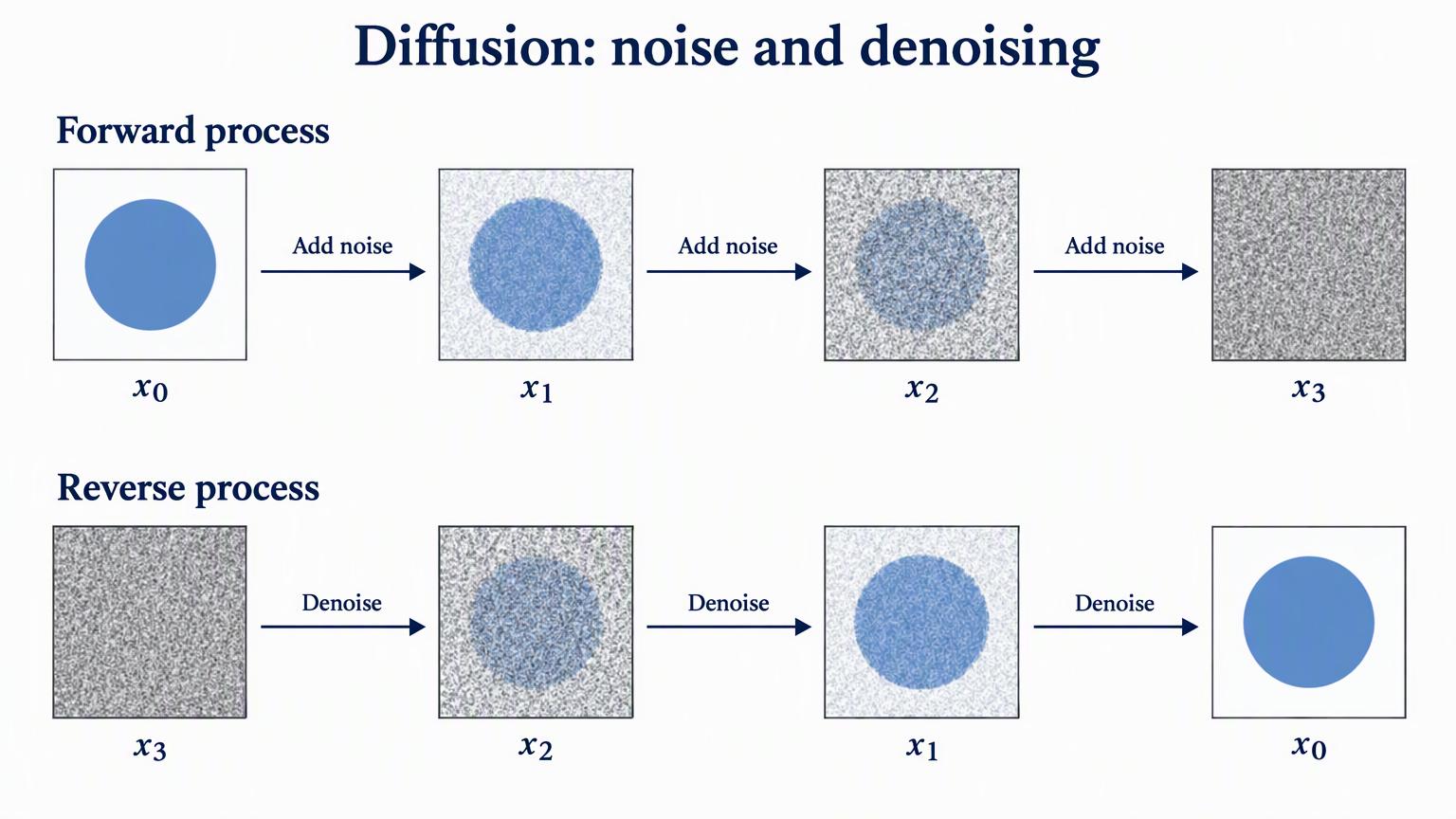 | 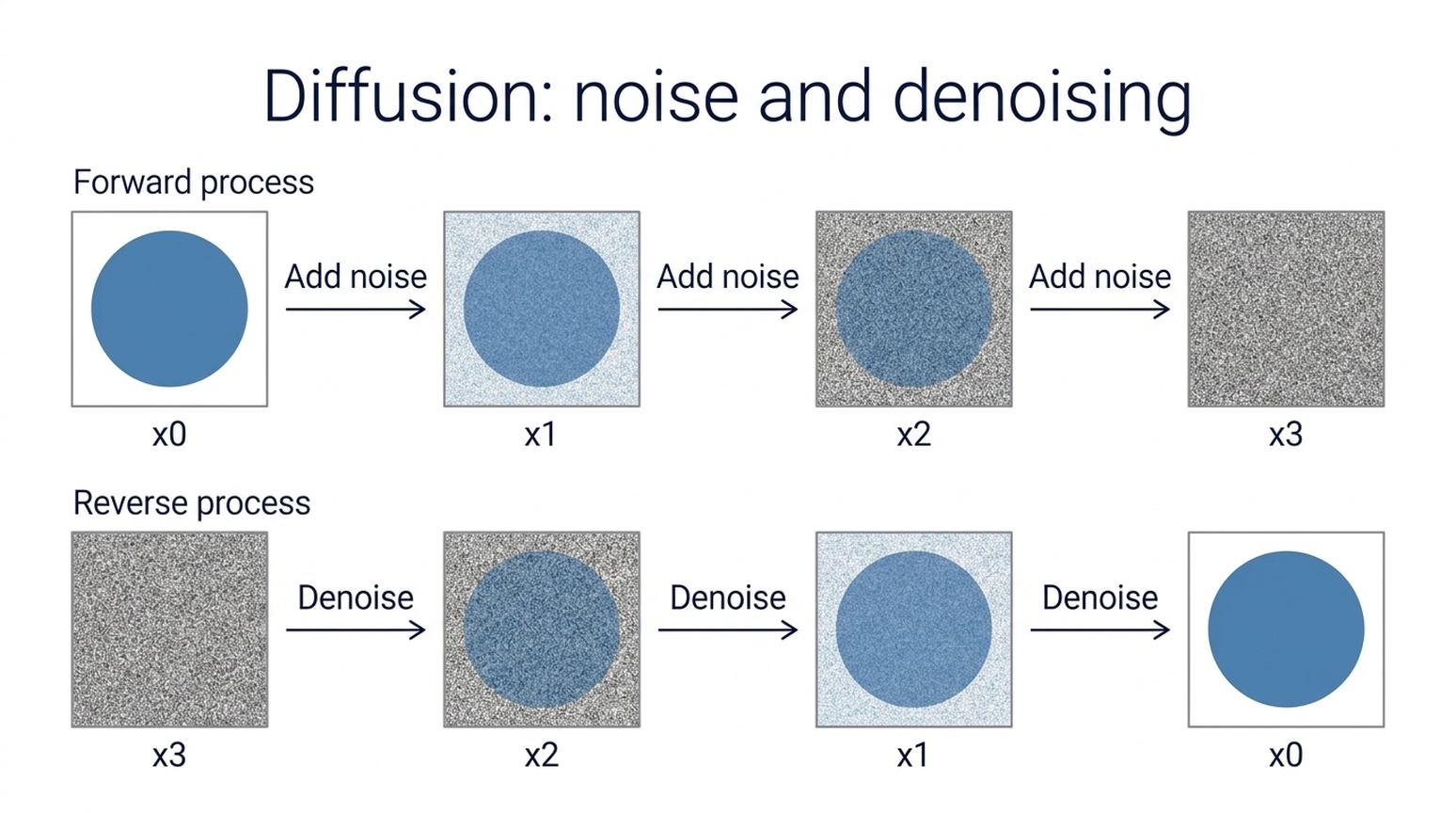 |
दोनों मॉडल में सैंपल काउंट, x0-to-x3 और x3-to-x0 क्रम, और तीर दिशा बनी रही। GPT में गणितीय सबस्क्रिप्ट और स्पष्ट नॉइज़ प्रगति है। नैनो बनाना 2.1 में साधारण लेबल और सरल सैंस-सेरिफ लेआउट है।
कब उपयोग करूँ: पेपर-स्टाइल स्पष्टीकरण फिगर के लिए GPT से शुरू करें, या क्लासरूम स्लाइड के लिए नैनो बनाना 2.1। ये अवधारणात्मक इल्लस्ट्रेशन हैं, प्रयोगात्मक परिणाम नहीं। असली पेपर नोटेशन और प्रक्रिया की समीक्षा करें। Denoising Diffusion Probabilistic Models में अवधारणा पर चर्चा है।
11. रिसर्च मेथड और मॉडल-आर्किटेक्चर डायग्राम
साझा निर्देश: मुख्य इमेज-प्रोसेसिंग पथ, रेफरेंस ब्रांच जो Feature fusion में जाती है, और Input image से Image decoder तक डैश्ड स्किप कनेक्शन बनाएं।
| GPT इमेज 2.5 | नैनो बनाना 2.1 |
|---|---|
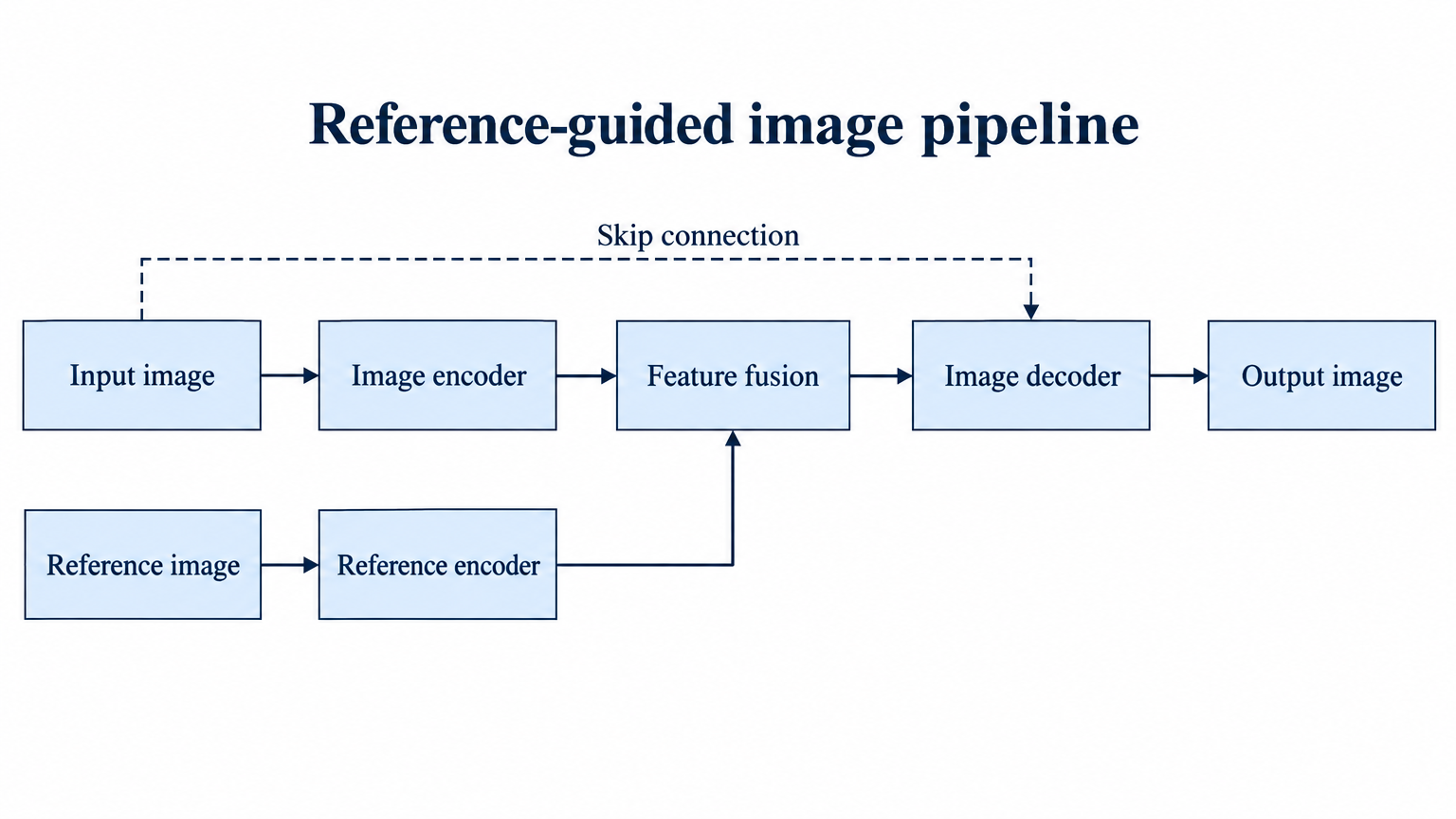 | 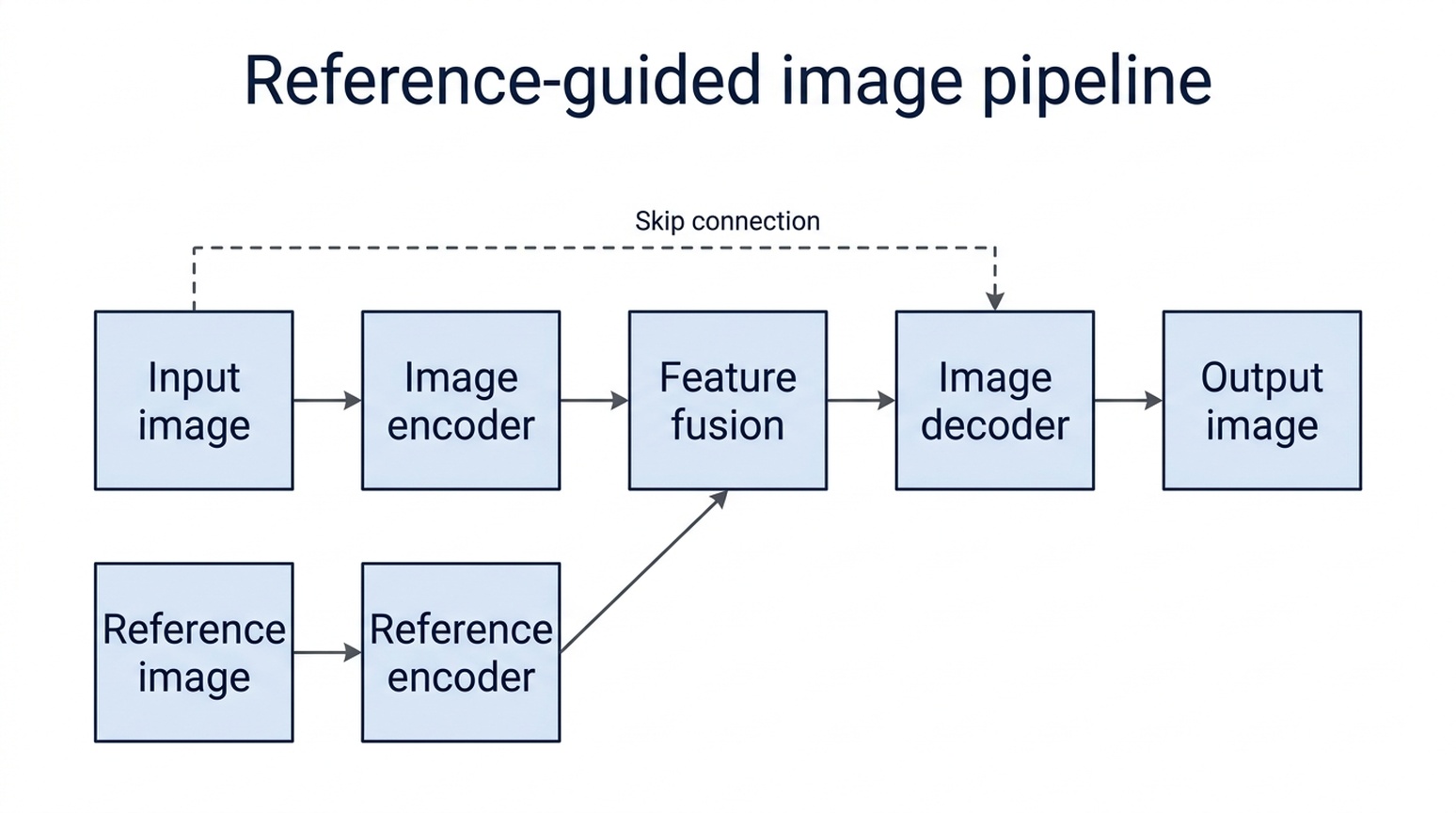 |
दोनों मॉडल में मुख्य पथ, रेफरेंस ब्रांच और स्किप कनेक्शन अनुरोधित बॉक्स से जुड़े हैं। GPT में लंबे लेबल चौड़े नोड में हैं और स्पष्ट ऑर्थोगोनल ब्रांच है। नैनो बनाना 2.1 में लेबल दो लाइन में हैं, नीचे रेफरेंस लेबल बॉक्स किनारे के पास हैं।
कब उपयोग करूँ: इस मेथड डायग्राम के लिए GPT से शुरू करूँगा, क्योंकि लेबल और बॉक्स एडजस्टमेंट कम चाहिए। नैनो बनाना 2.1 में भी टोपोलॉजी सही है। फ्रेमवर्क काल्पनिक है; असली पेपर के लिए हर तीर की उत्पत्ति, गंतव्य और दिशा की समीक्षा करें, कल्पित डायग्राम को मेथड का प्रमाण न मानें।
12. स्टोरी इलस्ट्रेशन और कॉन्सेप्ट आर्ट
साझा निर्देश: एक पारदर्शी टीकप में छोटा वेधशाला और खगोलशास्त्री, मॉस पर, ब्लू-आवर फॉरेस्ट में रखें।
| GPT इमेज 2.5 | नैनो बनाना 2.1 |
|---|---|
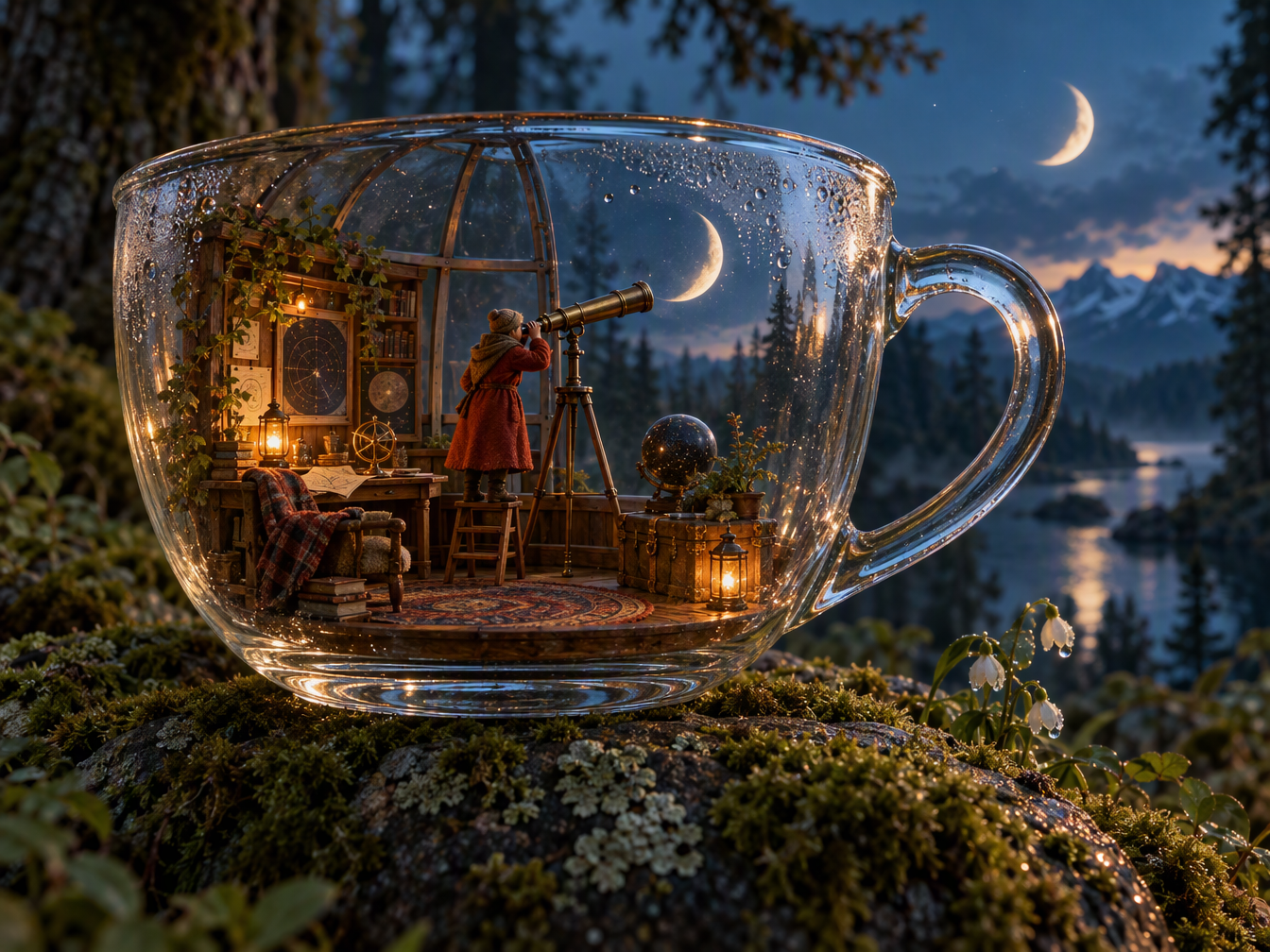 | 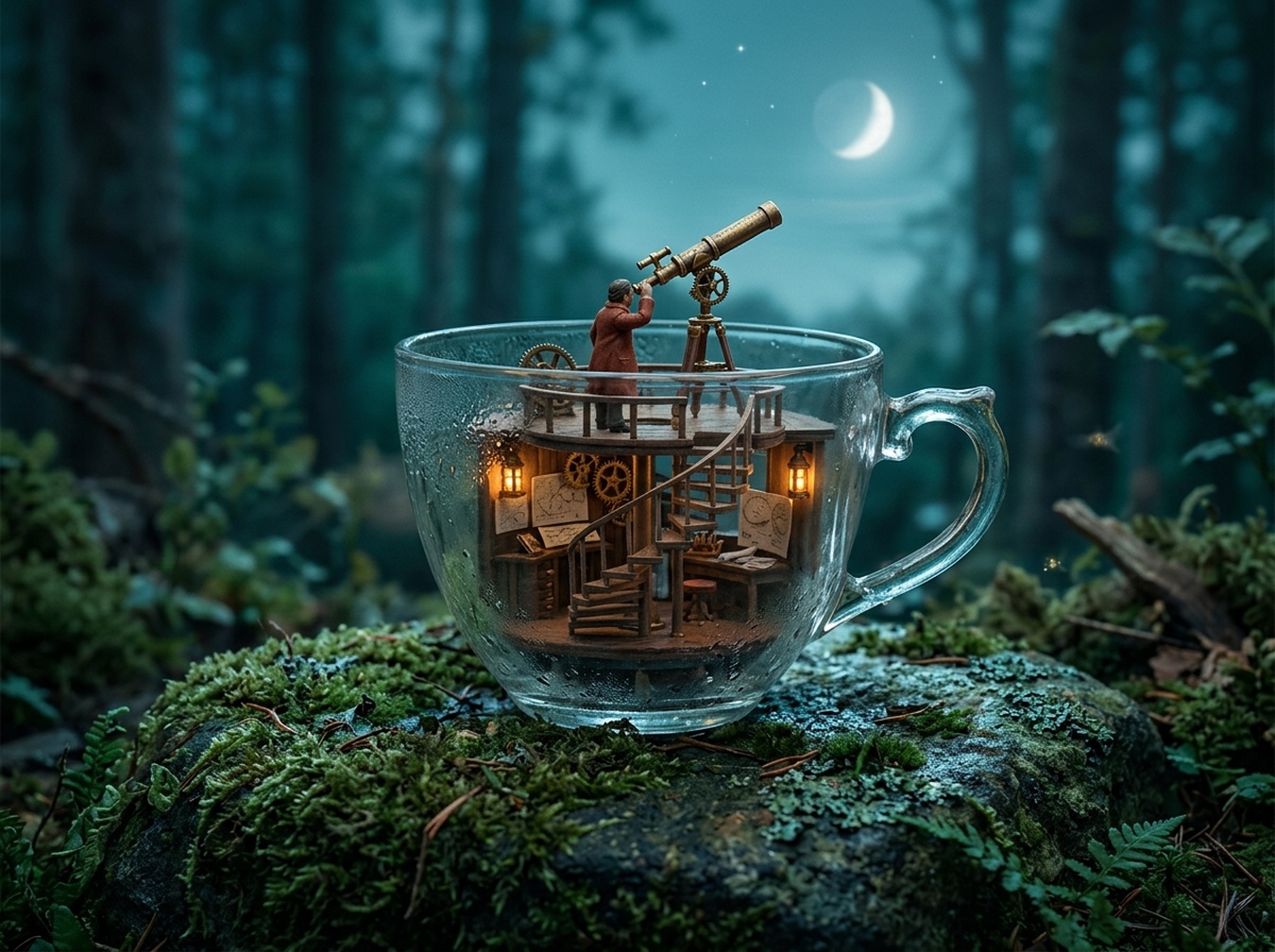 |
GPT में सुसज्जित मिनिएचर रूम और विश्वसनीय ग्लास रिफ्लेक्शन हैं, लेकिन दूसरा क्रेसेंट मून जोड़ दिया। नैनो बनाना 2.1 में वेधशाला सरल संरचना में है और कप के ऊपर एक मून है। दोनों में हर स्थानिक निर्देश पूरी तरह लागू नहीं हुआ।
कब उपयोग करूँ: विस्तृत फैंटेसी कॉन्सेप्ट के लिए GPT से शुरू करें, अतिरिक्त मून को ठीक करें। शांत मिनिएचर इलस्ट्रेशन के लिए नैनो बनाना 2.1 से शुरू करें। ज़्यादा विस्तृत इमेज हमेशा ज़्यादा सटीक नहीं होती।
13. इंटीरियर-डिज़ाइन कॉन्सेप्ट
साझा निर्देश: रीडिंग कैफे दिखाएँ—बाईं ओर तीन गोल टेबल, विंडो-साइड बुककेस, पीछे काउंटर और स्पष्ट केंद्र गलियारा।
| GPT इमेज 2.5 | नैनो बनाना 2.1 |
|---|---|
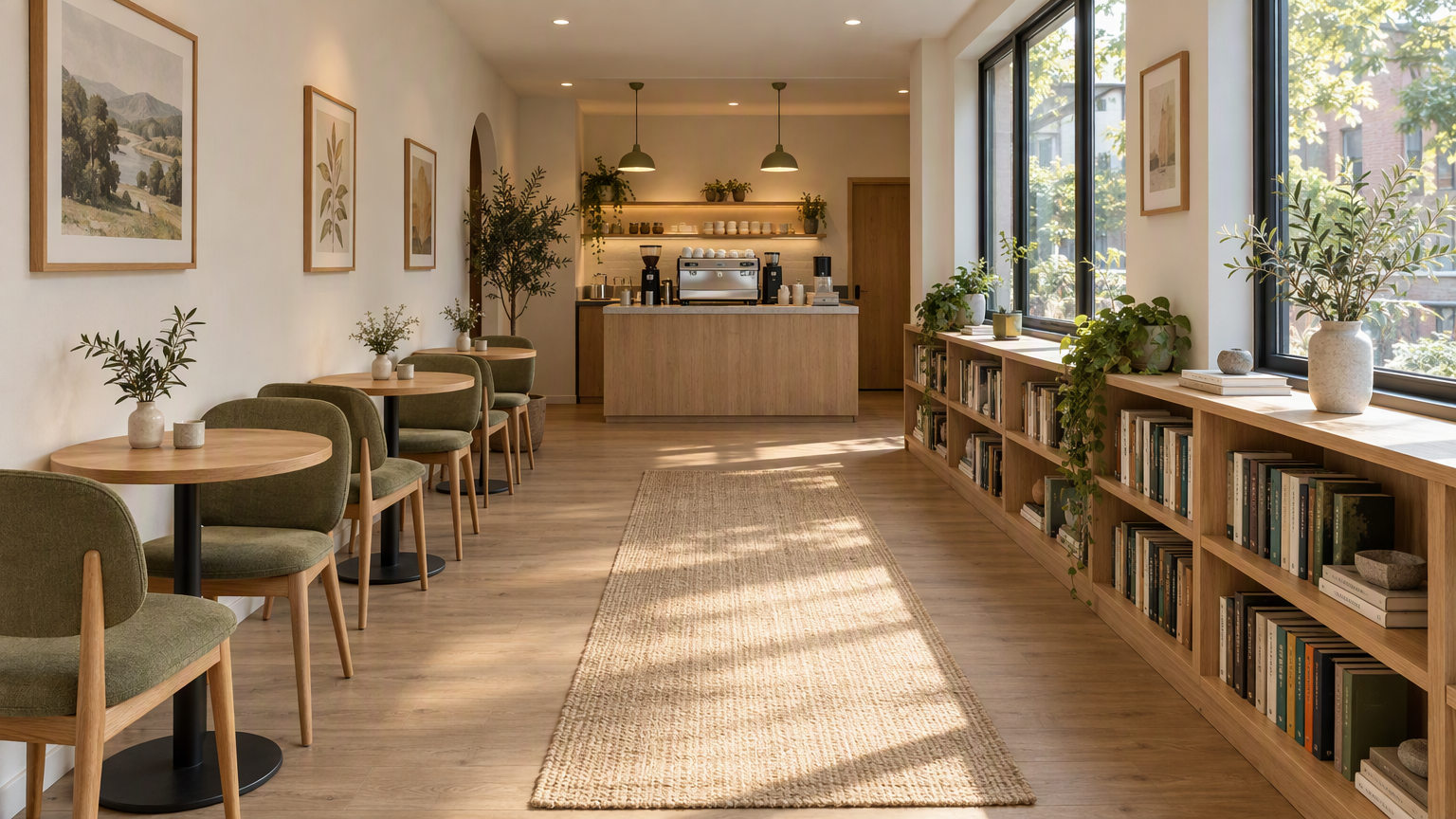 | 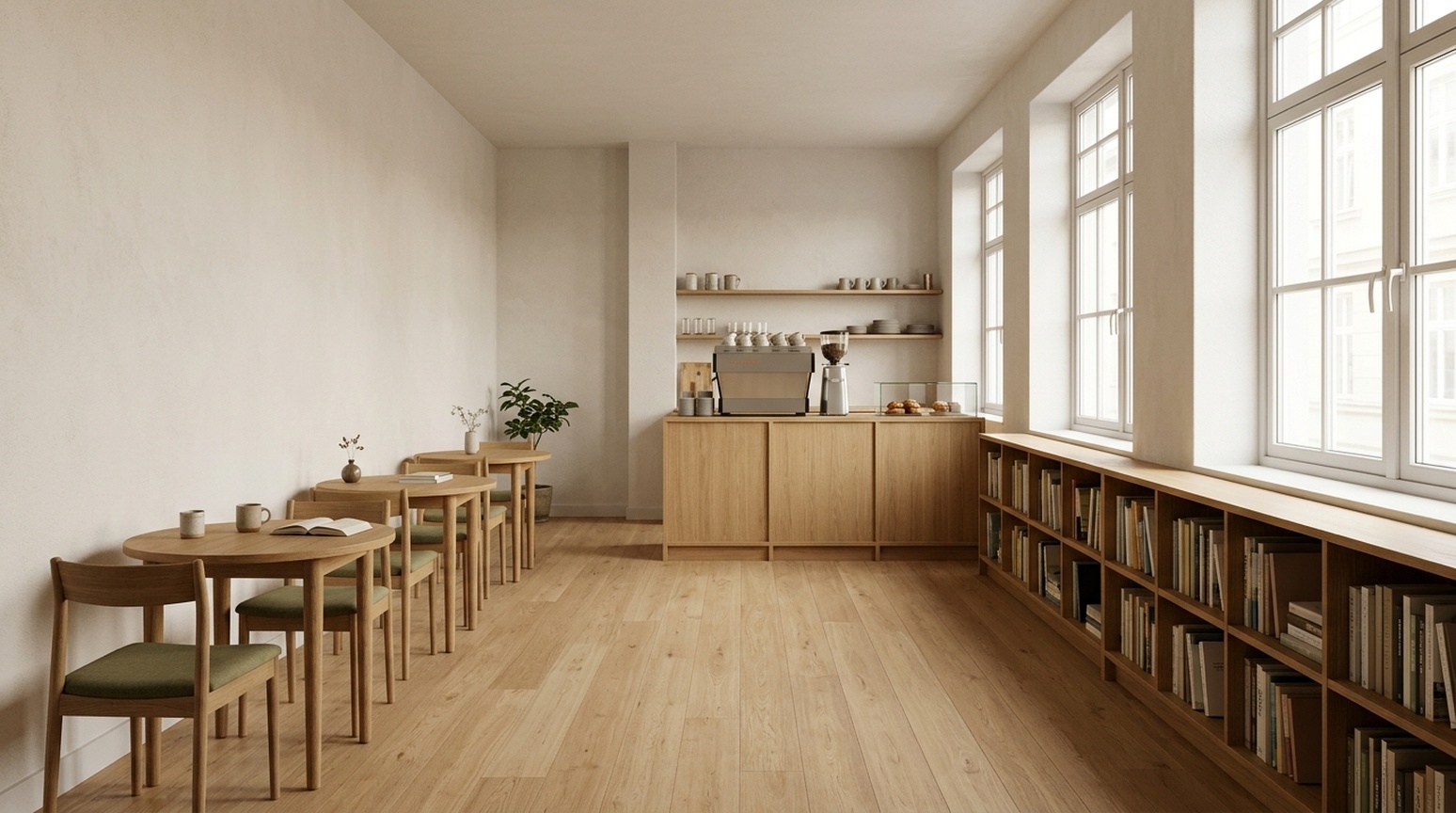 |
GPT में साइड लाइट, ओक टेक्सचर और ऑलिव अपहोल्स्ट्री पर जोर है, साथ में रग, आर्टवर्क और पौधे हैं। नैनो बनाना 2.1 में कम सजावट और गलियारा व बुककेस का सीधा दृश्य है। पीछे फर्नीचर ओवरलैप करता है, टेबल-और-चेयर की गिनती सटीक चाहिए तो सावधानी से जाँचें।
कब उपयोग करूँ: वातावरणीय क्लाइंट कॉन्सेप्ट के लिए GPT से शुरू करें; सरल विजुअल दिशा के लिए नैनो बनाना 2.1 से शुरू करें। कोई परिप्रेक्ष्य इमेज मापी गई आयाम, सर्कुलेशन चौड़ाई या बिल्डेबल प्लान नहीं दिखाती।
अपने काम के लिए चुनाव
थंबनेल या उत्पाद-डिटेल हीरो के लिए, GPT इमेज 2.5 उपयोगी है जब प्रमुख टेक्स्ट और डिटेल क्रॉप चाहिए। टाइपोग्राफी-प्रधान इवेंट पोस्टर के लिए, नैनो बनाना 2.1 उपयोगी ग्राफिक दिशा देता है। बार-चार्ट निर्देश के लिए, तीन भाषा सैंपल में इसकी ज्योमेट्री अनुरोधित अनुपात के करीब थी।
रेफरेंस उत्पादों के लिए, वस्तु की समीक्षा करें, फिर सेटिंग की। वैज्ञानिक फिगर के लिए, संबंधों की समीक्षा करें, फिर शैली की। स्थानीयकृत मार्केटिंग के लिए, असली लक्ष्य-भाषा इमेज की समीक्षा करें: चीनी चेकलिस्ट में अतिरिक्त अंग्रेज़ी सबटाइटल जापानी और कोरियाई चेकलिस्ट सैंपल में नहीं था।
इन Felo टूल्स से अपनी खुद की छवियाँ बनाएं
ऊपर दिए गए उदाहरणों के आधार पर एक प्रारंभिक टूल चुनें:
| आपका कार्य | अनुशंसित Felo टूल |
|---|---|
| उत्पाद विवरण ग्राफिक्स, बोल्ड थंबनेल या शोध विधि डायग्राम ड्राफ्ट | GPT Image 2.5 |
| इवेंट पोस्टर, सरल ज्ञान कार्ड या साधारण बार-चार्ट ड्राफ्ट | Nano Banana 2.1 |
| मॉडल चुनने से पहले छवि विचारों का अन्वेषण करें | AI Image |
नीचे दिए गए परिशिष्ट से मिलती-जुलती प्रॉम्प्ट कॉपी करें। निष्पक्ष तुलना के लिए दोनों मॉडल टूल्स में वही प्रॉम्प्ट, संदर्भ छवि और सटीक अंग्रेज़ी, जापानी या कोरियाई कॉपी का उपयोग करें। प्रकाशित करने से पहले उत्पाद विवरण, लेबल और डेटा की समीक्षा करें।
जनरेशन और समीक्षा नोट्स
आर्टिकल में 23 प्रदर्शित जोड़ी हैं: 13 मुख्य मामले और दस अतिरिक्त जापानी/कोरियाई वेरिएंट, कुल 46 तुलना इमेज। हर जोड़ी में एक ही कंटेंट प्रॉम्प्ट और, जहाँ ज़रूरी, एक ही रेफरेंस है। GPT में अनुरोधित ePhone GPT इमेज 2.5 Sunburst स्किल हाई क्वालिटी पर चला; नैनो बनाना 2.1 में अनुरोधित स्किल डिफॉल्ट्स थे। क्वालिटी सेटिंग और लागत सामान्य नहीं थी। हर प्रदर्शित रन में पहला सफल आउटपुट रखा गया, कंटेंट में कोई रीटच नहीं किया।
टेक्स्ट टिप्पणियाँ दृश्य जांच हैं, न कि नेटिव-स्पीकर प्रमाणन या दोहराया भाषा बेंचमार्क। छोटे अक्षर, जापानी समय-रेंज विराम चिन्ह और कोरियाई स्पेसिंग की डिलीवरी समीक्षा ज़रूरी है। बार अनुपात पिक्सल से अनुमानित हैं, एंटीएलियासिंग के अधीन हैं। क्लिक-थ्रू रेट, कन्वर्जन रेट या मल्टी-रन विश्वसनीयता का परीक्षण नहीं हुआ।
तुलना में उपयोग किए गए सटीक प्रॉम्प्ट
दोनों मॉडलों में एक ही प्रॉम्प्ट और रेफरेंस इमेज का उपयोग करें। उत्पाद रेफरेंस ऊपर दिखाया गया है।
ईकॉमर्स व्हाइट
Create a square ecommerce catalog photograph using the supplied blue travel mug as the exact product reference. Preserve the cobalt-blue ceramic body, the curved handle on the left, the ivory drinking lid, the lid opening, the body proportions and surface texture. Remove the limestone block and the original environment. Show the complete mug centered on a pure white background, three-quarter view, with one subtle natural contact shadow beneath it. Product fills about 75% of the canvas height. No added objects, no text, no logo, no badge, no watermark. Do not redesign the product. Square 1:1.
ईकॉमर्स लाइफस्टाइल
Create a realistic landscape lifestyle advertising photograph using the supplied blue travel mug as the exact product reference. Preserve its cobalt-blue ceramic body, curved handle, ivory drinking lid, and proportions. Place the complete mug on a light oak breakfast table next to one closed linen notebook in a quiet sunlit apartment kitchen. The mug is the sharp hero subject on the left third; the kitchen is softly out of focus. Warm morning light comes from the left. Leave the right third uncluttered as copy space. Natural believable scale and contact shadows. No people, no additional mugs, no text, no logo, no watermark. Landscape 16:9.
अकादमिक डिफ्यूजन
Create a scientifically correct schematic for explaining a diffusion model in an academic presentation. Landscape 16:9, white background, precise thin lines, navy text, muted blue and gray palette, no decorative scenery. Exact title: 'Diffusion: noise and denoising'. Two clearly separated horizontal rows, each containing exactly four square image samples. The top row is labeled 'Forward process'. Its samples run left to right: a clean blue circle labeled 'x0', a lightly noisy version labeled 'x1', a very noisy version labeled 'x2', pure gray noise labeled 'x3'. Connect adjacent samples with three right-pointing arrows, each labeled 'Add noise'. The bottom row is labeled 'Reverse process'. Its samples run left to right: pure gray noise labeled 'x3', a very noisy blue circle labeled 'x2', a lightly noisy circle labeled 'x1', a clean blue circle labeled 'x0'. Connect adjacent samples with three right-pointing arrows, each labeled 'Denoise'. Preserve these exact labels, arrow directions, sample counts, and ordering. This is a conceptual explanation, not experimental results. No equations, no additional labels, no 3D, no watermark.
इंटीरियर कॉन्सेप्ट
Create a photorealistic interior design concept image of a small contemporary reading cafe, landscape 16:9. Wide view from the entrance at eye level, a clear continuous central aisle leading to the rear counter. Along the left wall, exactly three small round oak tables, each with exactly two chairs. Along the right wall, one continuous low oak bookcase beneath large windows. A compact coffee counter is centered on the rear wall. Warm white plaster, light oak, muted olive textiles, soft morning daylight from the right, believable furniture scale, coherent straight perspective, no people, no signage, no text, no extra tables, no watermark.
अकादमिक मेथड
Create a precise academic method diagram for a hypothetical reference-guided image pipeline. White background, landscape 16:9, navy text, thin dark arrows, restrained pale blue rectangles, generous spacing, no decorative imagery. Exact title: 'Reference-guided image pipeline'. Use exactly seven boxes, each label appearing once. The main row runs left to right: 'Input image' -> 'Image encoder' -> 'Feature fusion' -> 'Image decoder' -> 'Output image'. A second row below the first two boxes contains 'Reference image' -> 'Reference encoder'. Draw one arrow from 'Reference encoder' upward and to the right into 'Feature fusion'. Draw one additional dashed skip-connection arrow from 'Input image' to 'Image decoder', routed above the main row and labeled exactly 'Skip connection'. All seven connectors must terminate on the specified boxes; do not connect the reference branch directly to the output or decoder. Keep every label readable and every box distinct. No extra boxes, no other labels, no graph statistics, no equations, no watermark. This is a hypothetical diagram, not an architecture attributed to a real paper.
फैंटेसी सीन
A cinematic editorial illustration of a tiny observatory built inside a clear glass teacup, resting on a moss-covered stone in a quiet forest at blue hour. A miniature astronomer in a rust-red coat looks through a brass telescope at a luminous crescent moon visible through the cup. Delicate reflections and condensation on the glass, rich tactile detail, restrained teal and amber palette, storybook realism, carefully composed, no text, no letters, landscape 4:3.
उत्पाद कॉन्सेप्ट
A premium studio product photograph of a matte cobalt-blue ceramic travel mug with an ivory lid, standing on a pale limestone block. Three-quarter view, soft morning window light from the upper left, subtle condensation, warm off-white background, generous negative space on the right, no logo, no text, no extra objects, realistic commercial photography, landscape 4:3.
प्रोसेस इन्फोग्राफिक
Create a clear horizontal infographic titled “A simple image review”. Show exactly three connected panels in this order, with these exact labels: “1. Generate”, “2. Inspect”, “3. Refine”. Add one small line under each: “Use one prompt”, “Check the details”, “Change one thing”. Flat editorial vector style, navy text, cobalt-blue connectors, white background, evenly spaced panels, no icons, no extra words, 16:9.
अंग्रेज़ी, जापानी और कोरियाई तुलना प्रॉम्प्ट
ecommerce-detail-en
Language: English. Requested size: 1024x1280.
Specified text:
- Three details. One mug.
- Ceramic body
- Ivory lid
- Curved handle
Create a portrait ecommerce product detail graphic using the supplied blue travel mug as the exact product reference. Preserve its cobalt-blue ceramic body, left handle, ivory drinking lid, proportions, and texture. Put one full product view in the center, with three small circular detail crops around it: the ceramic body surface, the ivory lid, and the curved handle. Each detail crop must correspond to the same product. Add exactly this English headline: "Three details. One mug.". Add exactly these three labels next to their corresponding detail crops: "Ceramic body", "Ivory lid", "Curved handle". All text must be in English; do not add translations or another language. Use thin connector lines that point to the correct feature, generous spacing, a warm off-white background, navy text, refined commercial editorial layout. No invented performance claims, no numbers, no prices, no other words, no watermark. Portrait 4:5.
Reference: shared mug
data-infographic-en
Language: English. Requested size: 1536x864.
Specified text:
- Traffic sources
- Illustrative data, not real statistics
- Organic search
- Paid ads
- Direct
- Referrals
- 40%
- 25%
- 20%
- 15%
Design a precise flat vector infographic on a white background, landscape 16:9. Exact English title: "Traffic sources". Exact small subtitle: "Illustrative data, not real statistics". Draw exactly four vertical bars on one common zero baseline, left to right with these exact labels and values: "Organic search" 40%, "Paid ads" 25%, "Direct" 20%, "Referrals" 15%. Bar heights must be proportional to 40, 25, 20, 15: the first is tallest, the second is 62.5% of its height, the third is 50%, and the fourth is 37.5%. Put each value directly above its own bar and its category directly below. Use four restrained shades of blue, navy text, wide margins, readable typography. All text must be in English, with no translations or additional words. No perspective, no 3D, no icons, no extra charts, no watermark.
video-thumbnail-en
Language: English. Requested size: 1536x864.
Specified text:
- BETTER PHONE PHOTOS
- 3 COMPOSITION TIPS
Create a polished landscape 16:9 YouTube thumbnail for a English-language smartphone photography tutorial. On the left, a realistic close view of two hands holding one smartphone horizontally, its screen visibly framing the same neon-lit city street seen behind it. Use dramatic but believable teal and warm orange night lighting, a strong focal subject and crisp silhouettes. On the right, add exactly these two text strings in two distinct title groups: "BETTER PHONE PHOTOS" and "3 COMPOSITION TIPS". The first is larger; both must be readable at a thumbnail width of 320 pixels. Use bold high-contrast ivory typography with a subtle dark outline. Typography and line breaks must be natural for English, preserving every character exactly. All background signs must be abstract and unreadable. No other readable words, no translations, no camera brands, no logos, no comparison panels, no watermark. Keep all text inside the frame with generous margins.
event-poster-en
Language: English. Requested size: 1024x1024.
Specified text:
- NIGHT GARDEN
- Botanical light show · Kyoto · 7–9 pm
Design a square event poster with exactly this English headline: "NIGHT GARDEN". Add exactly this subtitle: "Botanical light show · Kyoto · 7–9 pm". Use luminous botanical silhouettes, deep forest green and warm amber, refined editorial typography, clear contrast, balanced margins, all text fully inside the canvas. Use natural English typography and line breaks without changing any characters. No other words, no translations, no logos, no watermark.
social-knowledge-en
Language: English. Requested size: 1024x1280.
Specified text:
- Weekend packing checklist
- Documents
- ID, tickets
- Clothes
- Jacket, spare clothes
- Electronics
- Phone, charger
- Toiletries
- Toothbrush, towel
- Bags
- Suitcase, organizers
- Essentials
- Tissues, umbrella
Design a readable portrait 4:5 English knowledge card for a travel packing checklist. Exact headline: "Weekend packing checklist". Use exactly six equal cards in a two-column by three-row grid. Left to right, top to bottom, each card has exactly this heading and one text line: "Documents" with "ID, tickets"; "Clothes" with "Jacket, spare clothes"; "Electronics" with "Phone, charger"; "Toiletries" with "Toothbrush, towel"; "Bags" with "Suitcase, organizers"; "Essentials" with "Tissues, umbrella". One simple relevant flat icon per card. Clean cream background, navy typography, restrained blue and orange accents, clear title hierarchy, comfortable whitespace, no overlapping elements. Use natural English typography and line breaks. Preserve all specified text and punctuation exactly. No extra copy, no translations, no other languages, no watermark.
ecommerce-detail-ja
Language: Japanese. Requested size: 1024x1280.
Specified text:
- カップの3つのディテール
- 陶器の本体
- アイボリーのふた
- カーブした持ち手
Create a portrait ecommerce product detail graphic using the supplied blue travel mug as the exact product reference. Preserve its cobalt-blue ceramic body, left handle, ivory drinking lid, proportions, and texture. Put one full product view in the center, with three small circular detail crops around it: the ceramic body surface, the ivory lid, and the curved handle. Each detail crop must correspond to the same product. Add exactly this Japanese headline: "カップの3つのディテール". Add exactly these three labels next to their corresponding detail crops: "陶器の本体", "アイボリーのふた", "カーブした持ち手". All text must be in Japanese; do not add translations or another language. Use thin connector lines that point to the correct feature, generous spacing, a warm off-white background, navy text, refined commercial editorial layout. No invented performance claims, no numbers, no prices, no other words, no watermark. Portrait 4:5.
Reference: shared mug
data-infographic-ja
Language: Japanese. Requested size: 1536x864.
Specified text:
- 流入元
- 説明用のデータです
- 自然検索
- 広告
- 直接アクセス
- 参照サイト
- 40%
- 25%
- 20%
- 15%
Design a precise flat vector infographic on a white background, landscape 16:9. Exact Japanese title: "流入元". Exact small subtitle: "説明用のデータです". Draw exactly four vertical bars on one common zero baseline, left to right with these exact labels and values: "自然検索" 40%, "広告" 25%, "直接アクセス" 20%, "参照サイト" 15%. Bar heights must be proportional to 40, 25, 20, 15: the first is tallest, the second is 62.5% of its height, the third is 50%, and the fourth is 37.5%. Put each value directly above its own bar and its category directly below. Use four restrained shades of blue, navy text, wide margins, readable typography. All text must be in Japanese, with no translations or additional words. No perspective, no 3D, no icons, no extra charts, no watermark.
video-thumbnail-ja
Language: Japanese. Requested size: 1536x864.
Specified text:
- スマホで映える写真
- 構図のコツ3選
Create a polished landscape 16:9 YouTube thumbnail for a Japanese-language smartphone photography tutorial. On the left, a realistic close view of two hands holding one smartphone horizontally, its screen visibly framing the same neon-lit city street seen behind it. Use dramatic but believable teal and warm orange night lighting, a strong focal subject and crisp silhouettes. On the right, add exactly these two text strings in two distinct title groups: "スマホで映える写真" and "構図のコツ3選". The first is larger; both must be readable at a thumbnail width of 320 pixels. Use bold high-contrast ivory typography with a subtle dark outline. Typography and line breaks must be natural for Japanese, preserving every character exactly. All background signs must be abstract and unreadable. No other readable words, no translations, no camera brands, no logos, no comparison panels, no watermark. Keep all text inside the frame with generous margins.
event-poster-ja
Language: Japanese. Requested size: 1024x1024.
Specified text:
- ナイトガーデン
- 植物のライトショー・京都・19〜21時
Design a square event poster with exactly this Japanese headline: "ナイトガーデン". Add exactly this subtitle: "植物のライトショー・京都・19〜21時". Use luminous botanical silhouettes, deep forest green and warm amber, refined editorial typography, clear contrast, balanced margins, all text fully inside the canvas. Use natural Japanese typography and line breaks without changing any characters. No other words, no translations, no logos, no watermark.
social-knowledge-ja
Language: Japanese. Requested size: 1024x1280.
Specified text:
- 週末旅行の持ち物リスト
- 書類
- 身分証、チケット
- 衣類
- 上着、着替え
- 電子機器
- スマホ、充電器
- 洗面用品
- 歯ブラシ、タオル
- 収納
- スーツケース、収納袋
- 日用品
- ティッシュ、傘
Design a readable portrait 4:5 Japanese knowledge card for a travel packing checklist. Exact headline: "週末旅行の持ち物リスト". Use exactly six equal cards in a two-column by three-row grid. Left to right, top to bottom, each card has exactly this heading and one text line: "書類" with "身分証、チケット"; "衣類" with "上着、着替え"; "電子機器" with "スマホ、充電器"; "洗面用品" with "歯ブラシ、タオル"; "収納" with "スーツケース、収納袋"; "日用品" with "ティッシュ、傘". One simple relevant flat icon per card. Clean cream background, navy typography, restrained blue and orange accents, clear title hierarchy, comfortable whitespace, no overlapping elements. Use natural Japanese typography and line breaks. Preserve all specified text and punctuation exactly. No extra copy, no translations, no other languages, no watermark.
ecommerce-detail-ko
Language: Korean. Requested size: 1024x1280.
Specified text:
- 컵의 세 가지 디테일
- 세라믹 바디
- 아이보리 뚜껑
- 곡선형 손잡이
Create a portrait ecommerce product detail graphic using the supplied blue travel mug as the exact product reference. Preserve its cobalt-blue ceramic body, left handle, ivory drinking lid, proportions, and texture. Put one full product view in the center, with three small circular detail crops around it: the ceramic body surface, the ivory lid, and the curved handle. Each detail crop must correspond to the same product. Add exactly this Korean headline: "컵의 세 가지 디테일". Add exactly these three labels next to their corresponding detail crops: "세라믹 바디", "아이보리 뚜껑", "곡선형 손잡이". All text must be in Korean; do not add translations or another language. Use thin connector lines that point to the correct feature, generous spacing, a warm off-white background, navy text, refined commercial editorial layout. No invented performance claims, no numbers, no prices, no other words, no watermark. Portrait 4:5.
Reference: shared mug
data-infographic-ko
Language: Korean. Requested size: 1536x864.
Specified text:
- 유입 경로
- 설명용 예시 데이터
- 자연 검색
- 유료 광고
- 직접 방문
- 추천 링크
- 40%
- 25%
- 20%
- 15%
Design a precise flat vector infographic on a white background, landscape 16:9. Exact Korean title: "유입 경로". Exact small subtitle: "설명용 예시 데이터". Draw exactly four vertical bars on one common zero baseline, left to right with these exact labels and values: "자연 검색" 40%, "유료 광고" 25%, "직접 방문" 20%, "추천 링크" 15%. Bar heights must be proportional to 40, 25, 20, 15: the first is tallest, the second is 62.5% of its height, the third is 50%, and the fourth is 37.5%. Put each value directly above its own bar and its category directly below. Use four restrained shades of blue, navy text, wide margins, readable typography. All text must be in Korean, with no translations or additional words. No perspective, no 3D, no icons, no extra charts, no watermark.
video-thumbnail-ko
Language: Korean. Requested size: 1536x864.
Specified text:
- 스마트폰 사진 잘 찍기
- 구도 팁 3가지
Create a polished landscape 16:9 YouTube thumbnail for a Korean-language smartphone photography tutorial. On the left, a realistic close view of two hands holding one smartphone horizontally, its screen visibly framing the same neon-lit city street seen behind it. Use dramatic but believable teal and warm orange night lighting, a strong focal subject and crisp silhouettes. On the right, add exactly these two text strings in two distinct title groups: "스마트폰 사진 잘 찍기" and "구도 팁 3가지". The first is larger; both must be readable at a thumbnail width of 320 pixels. Use bold high-contrast ivory typography with a subtle dark outline. Typography and line breaks must be natural for Korean, preserving every character exactly. All background signs must be abstract and unreadable. No other readable words, no translations, no camera brands, no logos, no comparison panels, no watermark. Keep all text inside the frame with generous margins.
event-poster-ko
Language: Korean. Requested size: 1024x1024.
Specified text:
- 나이트 가든
- 식물 라이트 쇼 · 교토 · 오후 7–9시
Design a square event poster with exactly this Korean headline: "나이트 가든". Add exactly this subtitle: "식물 라이트 쇼 · 교토 · 오후 7–9시". Use luminous botanical silhouettes, deep forest green and warm amber, refined editorial typography, clear contrast, balanced margins, all text fully inside the canvas. Use natural Korean typography and line breaks without changing any characters. No other words, no translations, no logos, no watermark.
social-knowledge-ko
Language: Korean. Requested size: 1024x1280.
Specified text:
- 주말 여행 준비물
- 서류
- 신분증, 승차권
- 의류
- 겉옷, 여벌 옷
- 전자기기
- 휴대폰, 충전기
- 세면용품
- 칫솔, 수건
- 수납
- 여행 가방, 정리 파우치
- 생활용품
- 티슈, 우산
Design a readable portrait 4:5 Korean knowledge card for a travel packing checklist. Exact headline: "주말 여행 준비물". Use exactly six equal cards in a two-column by three-row grid. Left to right, top to bottom, each card has exactly this heading and one text line: "서류" with "신분증, 승차권"; "의류" with "겉옷, 여벌 옷"; "전자기기" with "휴대폰, 충전기"; "세면용품" with "칫솔, 수건"; "수납" with "여행 가방, 정리 파우치"; "생활용품" with "티슈, 우산". One simple relevant flat icon per card. Clean cream background, navy typography, restrained blue and orange accents, clear title hierarchy, comfortable whitespace, no overlapping elements. Use natural Korean typography and line breaks. Preserve all specified text and punctuation exactly. No extra copy, no translations, no other languages, no watermark.
यह पोस्ट इन भाषाओं में भी उपलब्ध है: English, 简体中文, 日本語, 한국어, 繁體中文, Français, العربية, Русский, اردو, Bahasa Indonesia, Deutsch, Tiếng Việt, Türkçe, Italiano, ไทย, Español, বাংলা and Português।