GPT Image 2.5 提示詞指南:如何寫出有效的提示

實用的 GPT Image 2.5 提示詞指南:七大提示骨架、12 個可直接複製的提示、編輯規則,以及重要設定。可在 Felo 免費體驗。
GPT Image 2.5 消除了大部分藉口。
它更貼近指令。臉部、產品或角色在多次編輯中保持辨識度。短文字可讀。生成速度比 GPT Image 2 快最多 50%,一次可測試五種方向。
渲染結果如果仍然出錯,通常不是模型的問題,而是簡報的問題。
OpenAI 自家的圖像提示指南用一句話就說明了重點:先從你需要的圖像開始,然後描述主題、構圖、風格以及限制條件。這樣的說法簡單易懂,但實際操作起來卻出乎意料地困難,而提示細節的層次正是值得保留的部分。
所以這裡提供一個實用版本:每個提示欄位的作用、十二個你今天就能複製使用的提示,以及區分可用圖像和僥倖圖像的規則。
想邊讀邊試這些提示詞,Felo 的 GPT-Image 2.5 工作區免費開放,瀏覽器即可使用,不需 API 金鑰。

本指南所有圖像皆由 GPT-Image 2.5 在 Felo 生成,包括封面。無設計疊加。
GPT Image 2.5 有哪些改變
四項升級對提示詞撰寫有影響,每一項都改變你能要求的內容。
- 自然光與質感。 肌膚、布料、金屬、玻璃呈現材質而非表面。可明確描述並得到回應。
- 參考保真度。 上傳照片,主體特徵在新場景、風格或構圖下仍保留。角色與產品系列因此可行。
- 穩定多輪編輯。 多次修改,未提及的部分保持原樣。早期編輯不再崩壞。
- 可讀文字。 短文案——標題、標籤、包裝、UI 字串——渲染更準確,尤其引用並指定位置時。
API 背後有兩個模型,選擇在於速度與精度:
| Model | Built for | Trade-off |
|---|---|---|
| GPT-Image-2.5 Flare | 日常生成、社群與產品內容、快速原型、大量產出 | 品質與 GPT Image 2 相當,延遲最多降 50% |
| GPT-Image-2.5 Sunburst | 創意製作、精細編輯、豐富細節、面向客戶 | 品質高於 GPT Image 2,單張速度較慢 |
兩者每 token 價格相同。不確定用哪個,請同時生成並比較你真正關心的部分——通常是文字準確度或臉部一致性,而非整體美觀。詳細介紹見 GPT-Image 2.5 on Felo。
GPT Image 2.5 提示詞的七大欄位
大多數提示詞只描述主題,忽略其他要素。模型會替你做合理選擇,但合理往往不是你要的。
填滿這七個欄位,結果不再靠運氣:
- 任務——圖像用途。產品照、活動海報、角色設定、簡報頁。這一句會改變構圖。
- 主題——畫面主體,具體描述辨識細節:年齡、材質、顏色、磨損、表面處理。
- 動作與互動——發生什麼事。手的位置、視線方向、物品如何握持。
- 構圖——取景、鏡頭角度、主體占比、文字預留空間。
- 光線、材質、質感——物理描述。柔和窗光、拉絲鋁、粗糙紙張、濕潤柏油。
- 風格與媒介——寫實、編輯攝影、扁平向量插圖、水彩、3D 渲染。目標為寫實時請明確要求。
- 文字與限制——精確文案用引號標示,指定位置、出現次數,以及禁止出現的內容:多餘文字、logo、水印、重度修圖。
複雜主題請分組標示。OpenAI 建議場景 / 主題 / 細節 / 限制結構,這種格式最耐編輯:
Scene: 場景、時間、環境。
Subject: 圖像主題。
Details: 構圖、光線、材質、風格、精確文字。
Constraints: 不可變或不可出現的內容。
弱提示 vs. 有效提示
同一概念,兩種細節層級。
弱:
A premium coffee bag on a table, nice lighting.
你會得到「一個」咖啡袋,不會得到「你的」咖啡袋、指定角度、可讀標籤。
有效:
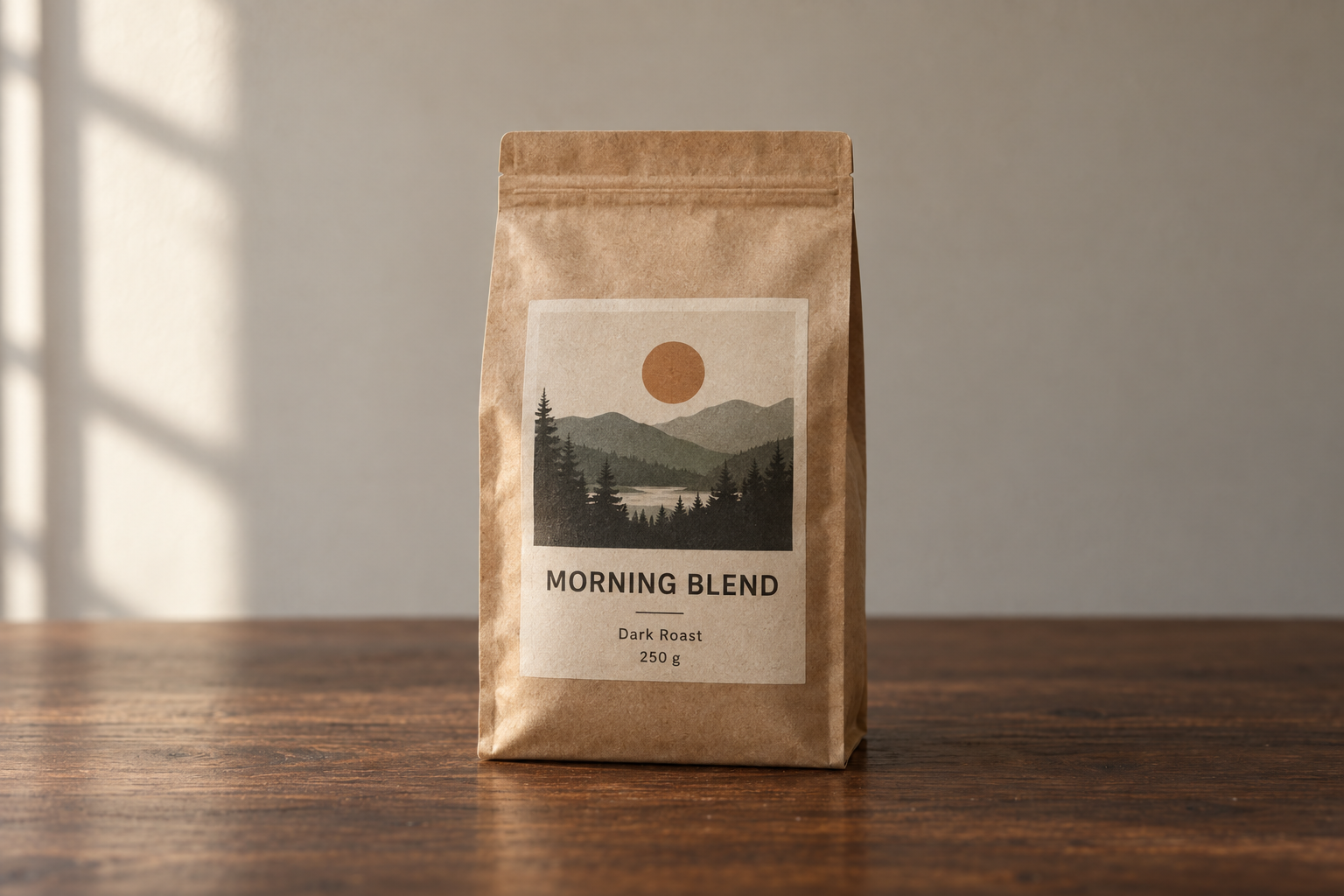
Product photograph of a 250 g matte kraft-paper coffee bag standing upright on a dark walnut
table. The front label faces the camera straight on and stays fully legible.
Label text (exact): "MORNING BLEND" as the headline, "Dark Roast · 250 g" beneath it.
Composition: centered, three-quarter height, generous negative space above for a headline.
Light: soft directional window light from the left, gentle contact shadow under the bag,
warm neutral color balance.
Style: premium e-commerce photography, shallow depth of field, subtle film grain.
Constraints: no extra text, no logos, no watermarks, no hands, no props crowding the frame.
同一模型、同一設定,產出完全不同。
不要寫進提示詞的設定
用 OpenAI API 生成時,尺寸、品質、背景是參數,不是句子。用文字說「4K」只是建議,設定 size 才有保證。
| Parameter | What to set it to | When it matters |
|---|---|---|
model | gpt-image-2.5-flare 或 gpt-image-2.5-sunburst | 按工作需求選速度或精度 |
quality | low, medium, high, xhigh, max | 小文字、密集圖表、最終交付 |
size | 1024x1024, 1536x1024, 1024x1536, 2048x2048, 2048x1152, 3840x2160, 2160x3840,或自訂 WIDTHxHEIGHT | 印刷、簡報、垂直社群格式 |
background | auto, opaque, 或 transparent | 去背、貼紙、logo、合成 |
自訂尺寸有硬性規則:每邊需為 16 的倍數,最大不超過 3,840 px,長短比不超過 3:1,總像素介於 655,360 到 8,294,400。超過 3,686,400 像素(2560×1440 以上)為實驗性,請先檢查再交付。
兩個習慣提升品質設定效益:
- 草稿低品質,成品高品質。 構圖探索用
low或medium,最終提示用high以上。品質階層會改變 token 數,最高階層成本約為最低階層的 36 倍。 - 只為修正而升級。 小文字模糊或圖表標籤崩壞時才升一階,不要因為「高品質」聽起來安全。高階不保證每次都更好。
在 Felo 可省略這層:選 GPT-Image 2.5、格式與解析度,直接生成。工作區自動處理參數,提示詞才是唯一需要精確的部分。
12 個可直接複製的提示詞
這些是可用起點,不是聖經。換主題,保留結構。
1. 寫實肖像,不帶合成感
Create a photorealistic candid photograph of a bicycle mechanic in her late 40s,
wiping her hands on a rag in a narrow repair shop.
Visible skin texture: pores, freckles, a small scar on the forearm. Faded ink smudges
on her knuckles. A denim apron worn soft at the edges.
Shot like a 35 mm film photograph, medium shot at eye level, 50 mm lens.
Light: overcast daylight through an open garage door, soft falloff, no harsh highlights.
Color: natural and slightly muted, subtle grain.
Feel: unposed and ordinary, real materials and everyday clutter.
Constraints: no glamorization, no heavy retouching, no studio lighting, no text.
有效原因:明確指定任務(隨拍)、光線、底片參考,並拒絕模型預設的修圖。
2. 電商產品照,標籤清晰可讀
Studio product photograph of a frosted glass 50 ml serum bottle with a brushed gold cap,
standing on a pale stone plinth against a soft beige backdrop.
Label text (exact): "LUMEN" as the brand, "Hydrating Serum · 50 ml" beneath it.
Render the label text once, straight on, sharp and fully legible.
Composition: centered, full bottle in frame, generous empty space on the right.
Light: large softbox from the upper right, gentle gradient falloff, clean contact shadow.
Style: premium beauty e-commerce photography, crisp detail, no props.
Constraints: no additional text, no logos, no watermarks, no reflections of studio equipment.
有效原因:短文字精確引用,指定位置與次數,三要素讓圖像內文案保留。
3. 海報,標題可讀
Design a bold event poster for an electronic music night.
Headline (exact, once): "CITY LIGHTS FESTIVAL"
Subline (exact, once): "SAT 14 NOV · DOCK 9 · 22:00"
Visual: a duotone night skyline in deep indigo and warm amber, grain texture, strong diagonal
composition with the headline sitting in the calm upper third.
Typography: heavy condensed sans-serif, high contrast against the background, generous kerning.
Format: vertical poster, print quality.
Constraints: no extra text, no sponsor logos, no watermarks, no stock-photo people.
有效原因:藝術與排版分開,兩段文字明確,文案長度適合海報。
4. 系列角色設定表
Create a character reference sheet for an original character.
Character: a young forest ranger with close-cropped dark hair, freckles across the nose,
a moss-green canvas jacket, a burnt-orange scarf, and scuffed leather boots.
Sheet contents: three views — front, three-quarter, and profile — plus one detail close-up
of the scarf knot.
Style: clean concept-art illustration, soft cel shading, consistent line weight,
neutral light gray background.
Layout: evenly spaced figures, same proportions across every view, no overlapping limbs.
Constraints: original design, no copyrighted characters, no text, no watermarks.
有效原因:設定表是格式而非單圖,明確標示視角與固定細節,方便後續場景重用。
5. 漫畫分格,主角一致
Create a four-panel horizontal comic strip, same character in every panel.
Character consistency: same face, same short red jacket, same black bob haircut,
same proportions and line weight throughout.
Panel 1: she opens the front door and looks back into the apartment.
Panel 2: the door clicks shut; the cat, alone, turns slowly toward the empty room.
Panel 3: the cat sprawls across the sofa in a shaft of afternoon light.
Panel 4: the door opens again; the cat sits primly by the entrance, composed.
Style: clean flat comic illustration, limited palette, thin black outlines.
Constraints: no speech bubbles, no text, no watermarks, no style drift between panels.
有效原因:分格明確列出,角色一致性重複強調。
6. 流程解說資訊圖
Create a clean infographic titled "How a Heat Pump Heats a House" for a general audience.
Show four stages connected by arrows: the outdoor unit absorbs heat from the air →
the refrigerant is compressed → heat is released indoors → the refrigerant expands and loops back.
Label each stage with a short caption, and label the key parts: outdoor unit, compressor,
expansion valve, indoor coil.
Style: flat vector illustration, muted blue and warm orange palette, white background,
consistent icon style, generous white space, readable labels.
Constraints: no tiny text, no decorative clutter, no watermarks.
有效原因:以教學設計簡報處理圖像——受眾、階段、標籤、視覺系統——而非插圖請求。
7. 投影片,數據真實
Create one pitch-deck slide titled "Market Opportunity" in the style of a clean Series A deck.
Layout: title top-left, a TAM/SAM/SOM nested-circle diagram in muted blues and grays,
a bar chart beneath it showing growth from 2021 to 2026, and a quiet footer line.
Use exactly these numbers: TAM $42B, SAM $8.7B, SOM $340M.
Footnotes (exact): "Source: internal analysis"
Style: white background, modern sans-serif typography, generous margins, crisp data hierarchy,
no shadows and no gradients.
Constraints: no clip art, no stock photos, no decorative elements, no extra text.
有效原因:明確指定交付物(單張投影片)、畫布、層級、實際數據,腳註標明文字,避免模型自由發揮。
8. 實際 App UI 模擬圖
Create a realistic mobile app UI mockup for a neighborhood farmers market.
Screens: a simple header, a short vendor list with small photos and category labels,
a "Today's specials" section with two items, and a footer with location and opening hours.
Style: white background, subtle natural accent colors, clear type scale, minimal decoration,
realistic spacing and touch targets. It should look like a real, usable, well-designed product.
Present the screen inside a modern phone frame, straight on, on a plain light background.
Constraints: no concept-art styling, no invented brand logos, no watermarks.
有效原因:以已存在產品描述,要求介面寫實而非概念藝術。
9. 透明產品去背圖
Extract the product from the input image and isolate it on a fully transparent background.
Output: centered product, crisp silhouette, clean alpha edges, no halos or fringing.
Preserve product geometry, proportions, and label legibility exactly.
Add only light polishing. Do not add a solid backdrop, checkerboard, scenery, floor, or shadow.
Do not restyle the product.
Constraints: transparency must be real alpha, not a painted background.
有效原因:同時要求主體去背與透明背景,預先點出常見失敗——棋盤格與光暈。
10. 新主題風格轉換
Use the visual style from the input image — its palette, texture, and rendering medium —
and apply it to a new subject: a lighthouse on a rocky coast at dusk.
Keep the style's color range, brush treatment, and level of detail.
Change only the subject. Do not copy the original composition or reuse its objects.
Constraints: no text, no watermarks, no signature, no frame border.
有效原因:給參考圖明確角色——調色、質感、媒介——不只說「同風格」,避免模型整張複製。
11. 精確局部編輯
In this room photo, replace only the white dining chairs with chairs made of light oak.
Preserve everything else exactly: camera angle, wall color, rug pattern, table, pendant light,
window light direction, floor shadows, and surrounding objects.
Match the existing perspective and soft daylight; add realistic contact shadows and wood grain.
Constraints: change nothing outside the chairs, no added decor, no text.
有效原因:單一修改,長保留清單。結果偏移時,通常是清單漏掉的項目,而非指令不夠長。
12. 設計翻譯不破版
Translate the text in the infographic from English to Spanish.
Do not change any other aspect of the image: layout, icons, colors, typography,
line weights, spacing, and illustration style all stay exactly as they are.
Match the original type size and alignment so the translated text fits the same areas.
Constraints: no leftover English words, no added text, no watermarks.
有效原因:翻譯提示常因重設版面失敗。「只翻譯,不重設」,加上固定項目清單,資產可重用。
如何讓文字真正渲染出來
文字曾是 AI 圖像最容易露餡的部分。現在改善,但前提是給模型可用的內容。
- 精確引用文案。
headline reads "CITY LIGHTS FESTIVAL"勝過 "add some event text"。 - 指定出現次數。 "Render the tagline exactly once" 避免重複與回音。
- 拼出特殊字。 品牌名或特殊拼法請給字母,並逐字檢查結果。
- 標明排版。 粗體窄字體、置中、字距寬、對比高。
- 保持簡短。 標題、標籤、價格、短標語。段落仍需排版工具。
- 明確禁止。 結尾加 "no extra text, no watermarks, no logos",否則模型可能自創標語或招牌。
- 小字提高品質。 密集標籤、圖例、座標、腳註建議用
high以上,並選橫幅尺寸。
交付前兩項檢查:逐字讀圖像內所有文字,逐一核對數字。圖表最容易出現看似合理但錯誤的細節。
參考圖要指定角色,不要只給氛圍
上傳多張圖時,請編號並分配任務。「Use the references」讓模型自由混合,指定角色則不會。
Image 1 是人物身份參考——保留臉部、特徵、比例。
Image 2 是服裝參考——讓人物穿這套衣服。
Image 3 是背景參考——置於該環境。
匹配 image 3 的光線與色溫,保持 image 1 的姿勢。
Constraints: 不改臉部、身形、髮型;不加配件、文字、logo。
兩條規則讓結果穩定:
- 明確說明變動與固定。 "Place the dog from image 2 next to the woman in image 1, matched to the existing light" 是合成簡報。"Combine these" 是許願。
- 每輪重述錨點。 系列作業請重複標示識別細節——服裝顏色、臉部特徵、比例、調色——即使很明顯。模型只要限制不重述就會偏移。
角色與產品重複時,請先核准一張基準圖,後續場景都用它作為輸入。後續版本偏移時,仍有基準可回溯。
編輯不偏移
GPT Image 2.5 多輪編輯比前代穩定,但「穩定」不等於「自動」。有效流程:
- 每輪只改一項。 光線、背景或文字,勿同時改三項,否則無法判斷效果。
- 用只改公式。 "Change only X",後接明確保留清單。需像素完全不變區域,請直接合成原圖,不要只靠提示。
- 回饋前一版本。 編輯已核准圖像,不要重新描述場景。
- 保留核准版本。 編輯破壞構圖時,有版本可回溯,不只靠記憶。
- 精細排版另行完成。 最後 5% 字距與間距用排版工具比多次生成更快。
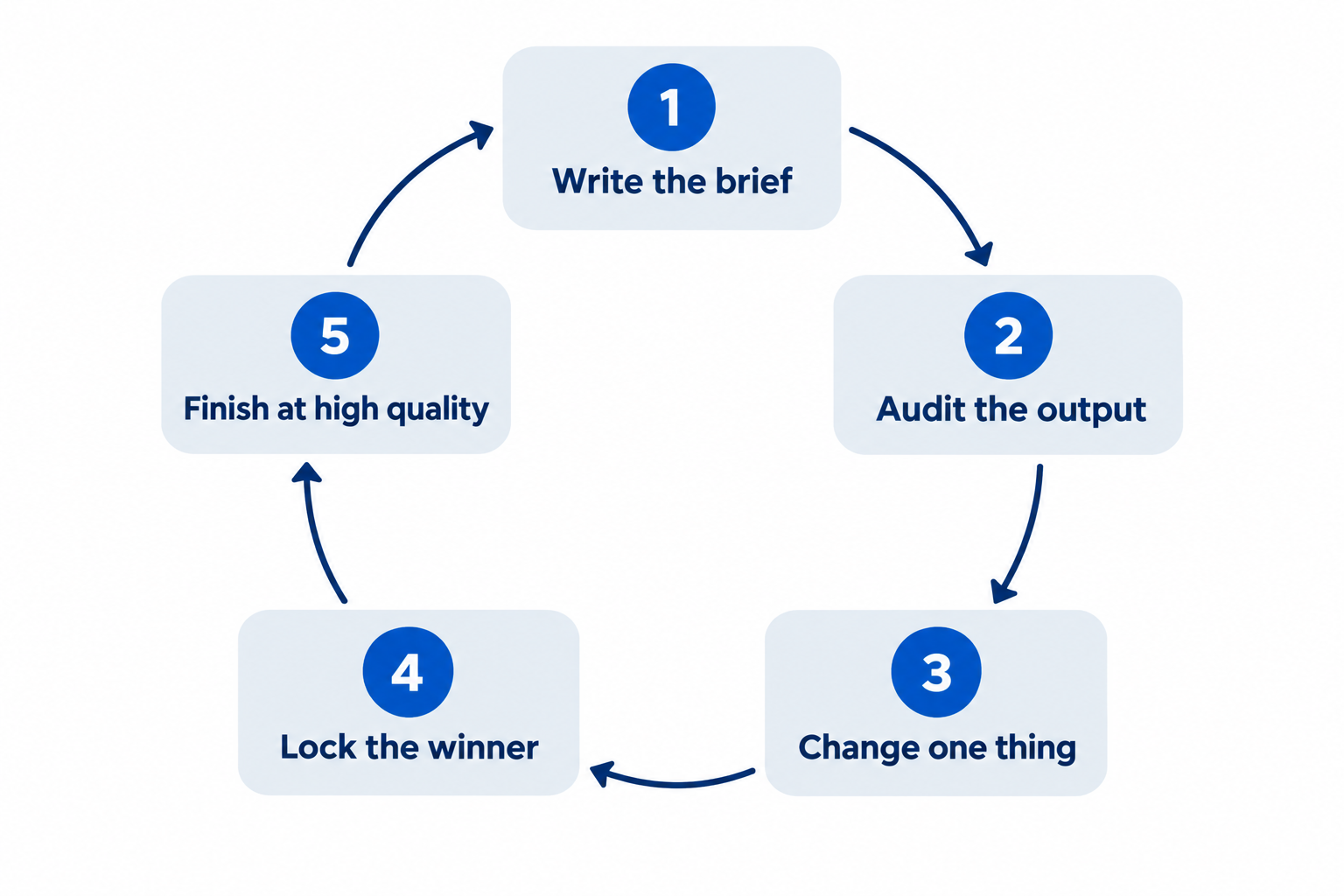
15 分鐘迭代流程
能產出可用圖像與只能靠運氣的差別不在提示詞字彙,而在流程。
- 基準(2 分鐘)。 寫七大欄位,草稿品質生成一張圖。
- 審查(2 分鐘)。 檢查五項:主題、構圖、光線、文字、限制。大聲說出最大問題。
- 單一修改(2 分鐘)。 只重寫造成問題的欄位,其他提示詞保持不變,方便比較。
- 鎖定(1 分鐘)。 渲染可接受時,存檔並記錄提示詞版本,該版本成為參考。
- 完成(5 分鐘)。 用高品質與全解析度重跑最佳提示,檢查最終尺寸——手機、簡報、印刷——不要只在螢幕放大檢查。
多數人跳過第 3 步,每次重寫整個提示詞。這樣會花一小時卻無法知道模型回應了什麼。
常見失敗與修正方法
| 症狀 | 實際原因 | 修正 |
|---|---|---|
| 肌膚與表面塑膠感 | 提示詞要求「完美」「光滑」,未提質感 | 明確標示肌膚、毛孔、磨損、材質,加上「no heavy retouching」或「no glamorization」 |
| 文字亂碼或重複 | 文案被改寫,未指定次數 | 引用字串、標明「exactly once」,小字提高品質 |
| 角色跨圖變化 | 一致性細節未重複 | 用核准圖作輸入,每輪重述識別細節 |
| 編輯超出要求 | 無保留清單 | 明確列出固定內容,像素不變區域直接合成 |
| 同一細節反覆出錯 | 每次都重跑整個提示詞 | 只改一欄,其他保持一致,方便比較 |
| 「透明」PNG 有灰色棋盤格 | 背景被畫出而非去除 | 明確要求透明,輸出 PNG 或 WebP,檢查 alpha |
| 4K 細字模糊 | 小字用草稿品質生成 | 文字密集圖像用 high 以上,檢查最終顯示尺寸 |
| 圖像全像庫圖 | 提示詞描述類型,未指定時刻 | 加上任務、地點、時間、值得注目的細節 |
在 Felo 執行這些提示詞
本指南所有內容皆可用 OpenAI API 執行,自行管理金鑰、帳單、參數。若想專注提示詞,Felo 將 GPT-Image 2.5 放進瀏覽器:
- 免費起步。 每日額度,不需信用卡、不需 API 金鑰。
- 無水印,商用權完整。 免費方案亦適用。
- 最高 4K 輸出。 原生 3840×2160,首張即為成品。
- 50+ 視覺風格與 50+ 語言文字。 海報、包裝、菜單、多語行銷皆適用。
- 所有頂級模型一站整合。 GPT-Image 2.5、GPT-Image 2、Nano Banana Pro、Nano Banana 2 Lite、Grok Imagine 2.0、Gemini 3.1 Flash Image 等,任務需求可換模型。
- 引導式工作流程。 分鏡、表情設定、標題序列、精靈表單,皆有現成提示結構。
工作區內還有現成提示詞庫,六格分鏡、活動海報、產品包裝、漫畫分格、解說圖、廣告變體皆可直接執行。當作校準用:先跑一個,讀結果,再將七大欄位套用到自己的專案。
FAQ
GPT Image 2.5 最佳提示方式? 像設計師簡報一樣描述圖像:用途、主題、動作、構圖、光線與材質、風格、精確文字與限制。複雜圖像分組標示,迭代時一次只改一項。
Flare 與 Sunburst 怎麼選? 速度優先且需快速審查時用 Flare。創意製作、細節豐富、精細編輯用 Sunburst。兩者價格相同,選擇在於品質與延遲,不是成本。
如何讓 AI 圖像文字可讀? 精確引用文案,指定位置與次數,標明排版,保持簡短,禁止多餘文字。然後逐字檢查結果,小字時提高品質設定。
如何讓角色或產品跨圖一致? 核准一張基準圖,後續場景都用它作參考,明確分配角色,每次提示重述識別細節。一致性來自重複限制與固定參考,不靠運氣。
為何編輯會改到未提及部分? 因提示只列修改,未列保留清單。請說「change only X」,並明確標示需保持的內容:鏡頭角度、光線、幾何、標籤、背景物件。
用這些提示詞需要 OpenAI API 嗎? 不需要。提示技巧屬於模型層級,Felo 的 GPT-Image 2.5 工作區瀏覽器即可執行,不需 API 金鑰,直接貼本指南提示詞即可生成。
GPT Image 2.5 生成圖像可商用嗎? 在 Felo 上可——圖像無水印,商用權完整,免費方案亦適用。
寫簡報,不寫願望
平庸渲染與可用資產的差距幾乎不是魔法字眼,而是任務描述、構圖、光線、材質、引用文案、不可變清單。
七大欄位一次寫完,效果立刻不同。然後一次只改一欄,模型跟著調整。
打開工作區,貼本指南提示詞,看看 GPT-Image 2.5 如何處理真正的簡報。
本文也提供以下語言版本:English、简体中文、日本語、한국어、हिन्दी、Français、العربية、Русский、اردو、Bahasa Indonesia、Deutsch、Tiếng Việt、Türkçe、Italiano、ไทย、Español、বাংলা、Português。