GPT-Image 2.5 實用場景:你真的能做的 12 件事

從個人頭像到產品包裝照:12 個 GPT-Image 2.5 實用場景,附可直接複製的提示語,以及讓人臉、產品、文字保持一致的習慣。
模型升級容易讓人興奮,但實際運用卻常常讓人困惑。生成圖像更精細,細節更清楚,文字能辨識——然後你在週二下午坐下來,開始思考這些功能到底能做什麼。
這裡整理了實用版本。GPT-Image 2.5 擅長的十二個工作,從個人專案到電商應用,每個都附上可複製的提示語,以及簡短說明。這些案例都遵循一個原則:像交付設計師一樣交付模型——說明圖像用途、主體、構圖、光線,以及哪些元素必須保持不變。
如果你還沒看過 發佈說明,簡要重點:GPT-Image 2.5(也稱為 ChatGPT Images 2.5)於 2026 年 9 月 8 日推出,細節更銳利,光線與材質更自然,參考照片更容易辨識,編輯能跨回合保持一致,短文字可讀,延遲比前一代低最多 50%。在 Felo 上運行,免費開始,不需 API key。
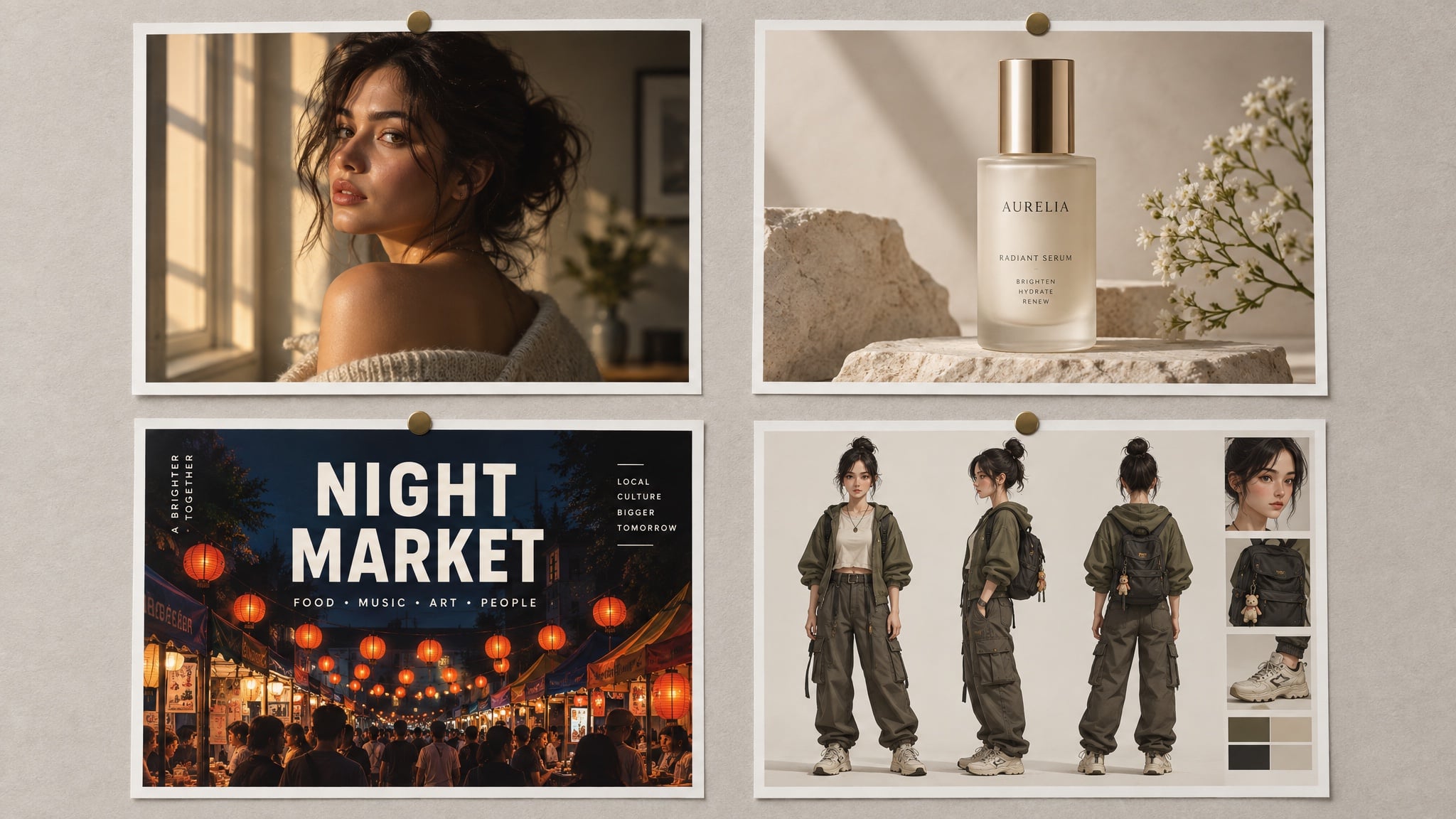
本文所有圖片皆由 GPT-Image 2.5 在 Felo 生成。海報與包裝上的文字為模型輸出,非設計覆蓋。
先想工作需求,不是模型功能
三個問題決定後續幾乎所有細節:
- 這張圖要用在哪裡? 頭像、海報、產品頁規則不同——正方形或直式、裁切距離、版面留白。
- 哪些元素必須完全一致? 人臉、標籤、Logo、瓶身曲線。這些都要放進參考圖與提示語的保留清單。
- 文字內容要完全正確? 引號標示、拼寫明確、位置指定。GPT-Image 2.5 能生成短文字,但不會幫你寫段落。
回答這三點,提示語基本就成型。如果想了解完整提示語結構——每個欄位、順序——可參考我們的 GPT-Image 2.5 提示語指南。
個人專案
1. 保留本人特徵的頭像照
多數人最先感受到的升級是皮膚。人臉回來有毛孔、雀斑、自然不均,而不是舊模型的蠟質效果——但前提是你明確要求,並禁止美肌修飾。
Create a natural head-and-shoulders portrait of the person in the reference photo.
Keep the face, hairline, and features unchanged.
Expression: relaxed, mid-laugh, looking slightly off camera.
Light: late-afternoon window light from the left, soft falloff, a catchlight in the eyes.
Wardrobe: plain dark crew-neck, no logos.
Background: softly out-of-focus neutral grey wall, no clutter.
Style: 85 mm portrait, shallow depth of field, true-to-life skin texture, minimal retouching.
Constraints: no beauty filter, no skin smoothing, no added jewellery, no text.
效果原因:明確指定鏡頭與光線,並禁止兩個讓 AI 頭像顯眼的元素——塑膠皮膚與完美棚拍。
2. 同一張照片,四種風格
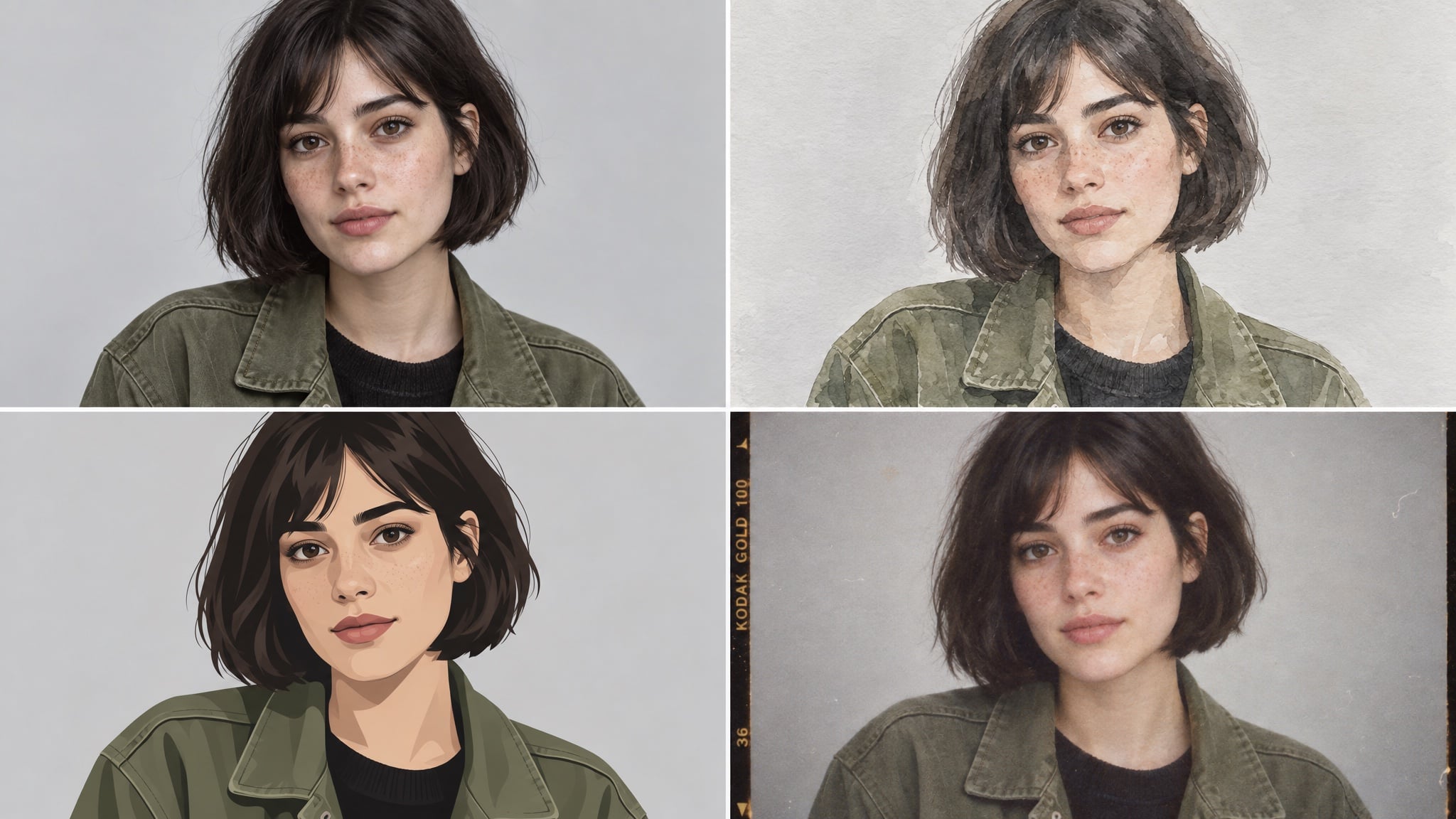
一張參考照就能生成同一人的多種風格:寫實版適合工作,插畫版適合頻道橫幅,底片風格適合個人頁。
Create a four-panel grid of the same person from the reference photo:
photorealistic portrait, loose watercolour, flat vector illustration, and 1990s film photograph.
Keep the same face, the same short dark bob, and the same olive jacket in all four panels.
Evenly spaced panels, identical framing and head size, neutral light-grey background.
Constraints: no text, no watermark, no style blending between panels.
效果原因:「相同構圖與頭部大小」是關鍵。沒有這條,模型會同時改裁切與風格,網格就失去一致性。
3. 自己舉辦活動的邀請函或海報
這是測試文字生成進步最快的方法。文字保持兩行,讓模型處理版面。
Design a vertical poster for a rooftop dinner party.
Headline (exact, once): "SUNDAY SUPPER"
Subline (exact, once): "SUN 21 SEP · 18:30 · ROOFTOP"
Visual: warm minimal composition in terracotta and cream, a simple line-art table setting,
generous empty space around the type.
Typography: elegant serif headline, small uppercase sans-serif subline.
Constraints: no extra text, no logos, no watermark, no photographic people.
效果原因:藝術與字體需求分開,文字用引號標示,「無額外文字」防止模型自創標語。
4. 不做整形的照片修復
掃描家族舊照是這裡的隱形亮點,因為模型能重建缺失材質,而不是模糊剩下的部分。
Restore and colourise this scanned family photograph.
Keep faces, clothing, and composition identical.
Repair the cracked corner and the faded area on the left without inventing new objects.
Return natural colour, neutral skin tones, and film-like grain.
Constraints: no glamour retouching, no added background elements, no cropping, no text.
效果原因:修復失敗通常是模型決定「改善」人物。明確描述損壞並禁止創作,結果才是修補而非重製。
創作者與社群內容
5. 標題清晰可讀的海報
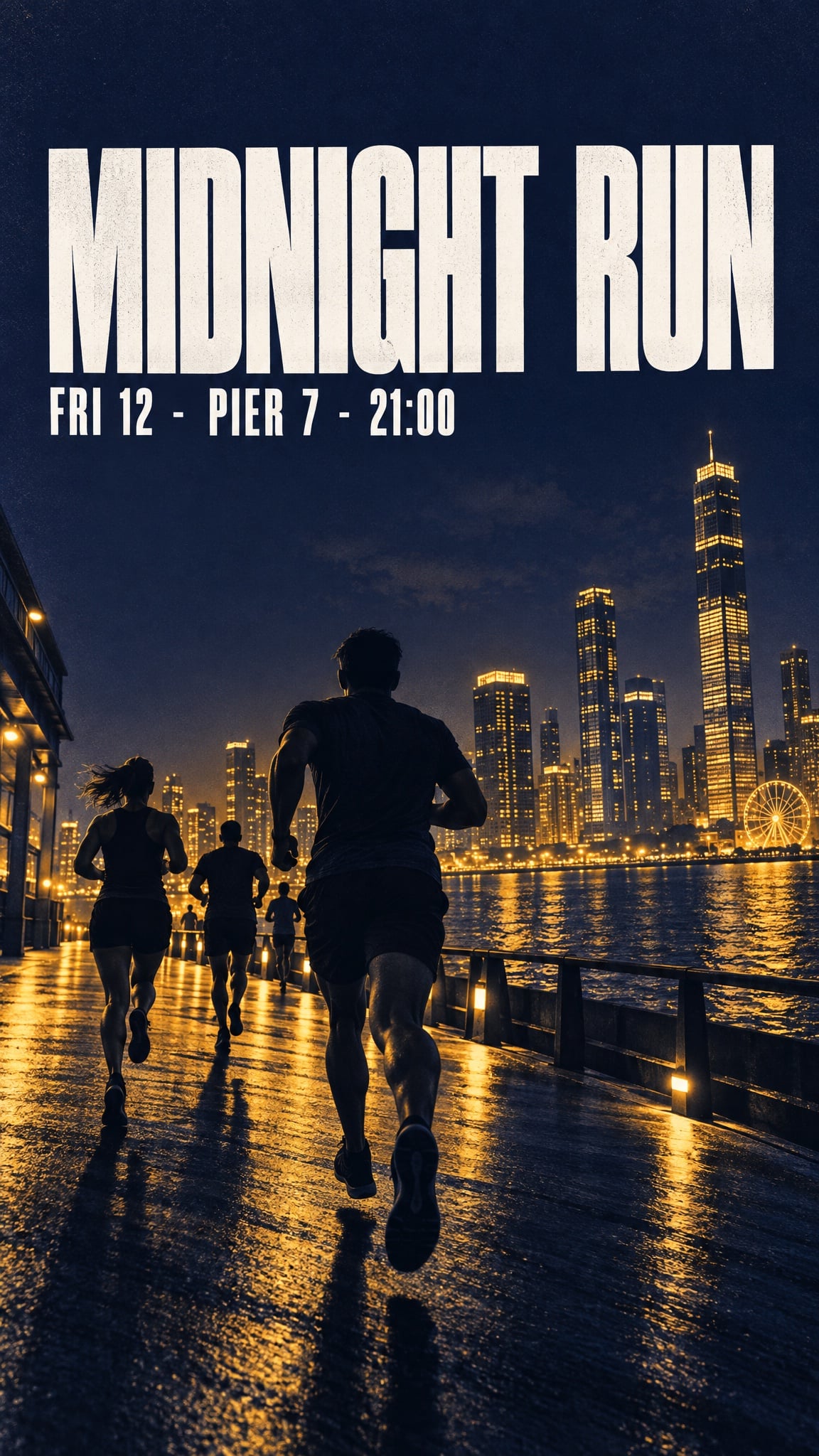
短標題、日期、價格現在能完整生成——只要保持簡短、引號標示、位置明確。
Bold minimalist event poster for a night run.
Headline (exact, once): "MIDNIGHT RUN"
Subline (exact, once): "FRI 12 · PIER 7 · 21:00"
Visual: deep indigo background, warm amber duotone skyline silhouette, strong diagonal
composition, headline sitting in the calm upper third.
Typography: heavy condensed sans-serif, high contrast, generous kerning.
Format: vertical, print quality.
Constraints: no extra text, no sponsor logos, no watermarks, no stock-photo people.
效果原因:標題放在「安靜的上三分之一」——構圖指令讓文字遠離複雜畫面,而不是靠運氣落在可讀位置。
6. 可重複使用的角色參考表
參考表是一種格式,不是一張圖。有了它,後續每個場景都能從同一張認可的臉開始。
Create a character reference sheet for an original character.
Character: a teenage skater with a close-cropped undercut, a faded red hoodie,
ripped black jeans, and scuffed high-tops.
Sheet contents: front, three-quarter, and profile views, plus a close-up of the hand holding a board.
Style: clean concept-art illustration, soft cel shading, consistent line weight, light grey background.
Layout: evenly spaced figures, identical proportions in every view, no overlapping limbs.
Constraints: original design, no text, no watermark.
效果原因:表格明確列出視角,並固定識別細節。這些細節後續提示語都能用來保持一致。
7. 四格漫畫與分鏡腳本
多格圖是舊模型最容易失敗的地方,角色在每格都變形。有參考圖與一致性條款,四格能保持穩定。
Create a four-panel horizontal comic strip with the same character in every panel.
Character consistency: same face, same faded red hoodie, same undercut, same line weight.
Panel 1: she kicks her board up and catches it.
Panel 2: a security guard points at a sign.
Panel 3: she shrugs, board under her arm.
Panel 4: she skates away down an empty street in evening light.
Style: clean flat comic illustration, limited palette, thin black outlines.
Constraints: no speech bubbles, no text, no watermark, no style drift between panels.
效果原因:每格都是獨立指令,不是長場景描述,一致性條款重複而非假設。
8. 小螢幕也能辨識的縮圖
縮圖首先是可讀性問題,其次才是美術問題。一個主題、一個文字區塊、足夠對比,320 像素寬也能辨識。
Design a video thumbnail about building a home espresso bar.
Composition: subject on the left, large text block on the right, high contrast,
readable at small size.
Text (exact, once): "MY 800 SETUP"
Subject: a chrome espresso machine on a wooden counter, steam rising, warm morning light.
Style: crisp editorial photograph, slightly elevated saturation.
Constraints: no extra text, no arrows, no circles, no shocked-face people, no watermark.
效果原因:「小尺寸可讀」就是全部需求。它讓模型選擇更少元素、更強對比,而不是複雜場景。
電商與產品應用
9. 標籤清晰可讀的包裝照
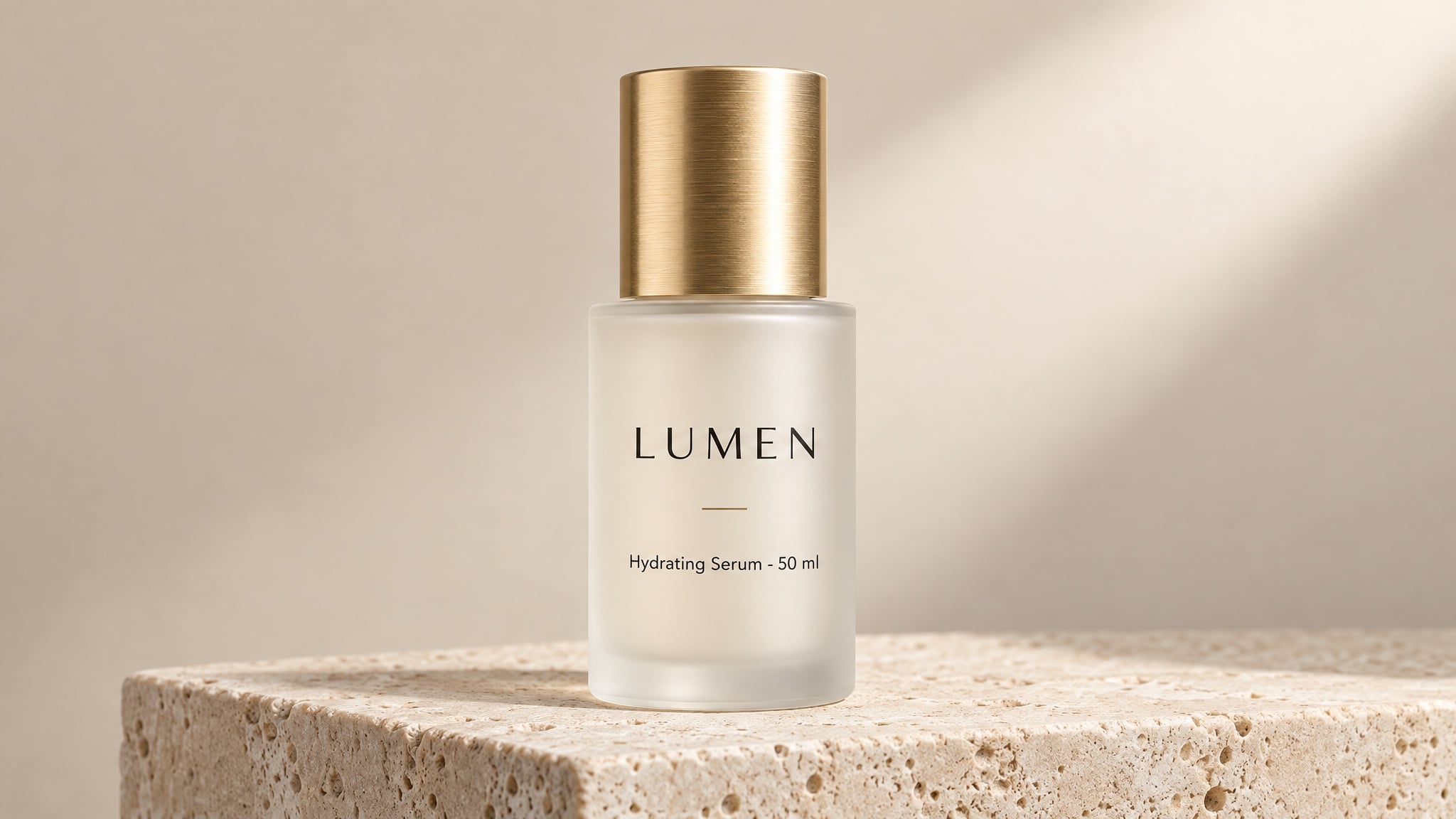
這個場景改變預算。乾淨棚拍包裝照以前需要攝影師、棚、整週時間。現在關鍵是標籤文字,這變成寫作工作。
Studio product photograph of a frosted glass 50 ml serum bottle with a brushed gold cap,
standing on a pale travertine plinth against a soft beige backdrop.
Label text (exact): "LUMEN" as the brand, "Hydrating Serum · 50 ml" beneath it,
rendered once, straight on, sharp and fully legible.
Composition: centred, full bottle in frame, generous empty space on the right.
Light: large softbox from the upper right, gentle gradient falloff, clean contact shadow.
Style: premium beauty e-commerce photography, crisp detail, no props.
Constraints: no additional text, no logos, no watermark, no studio reflections.
效果原因:短文字、精確引號、位置與數量明確。這三點讓圖中標籤在商品頁尺寸下仍可辨識。
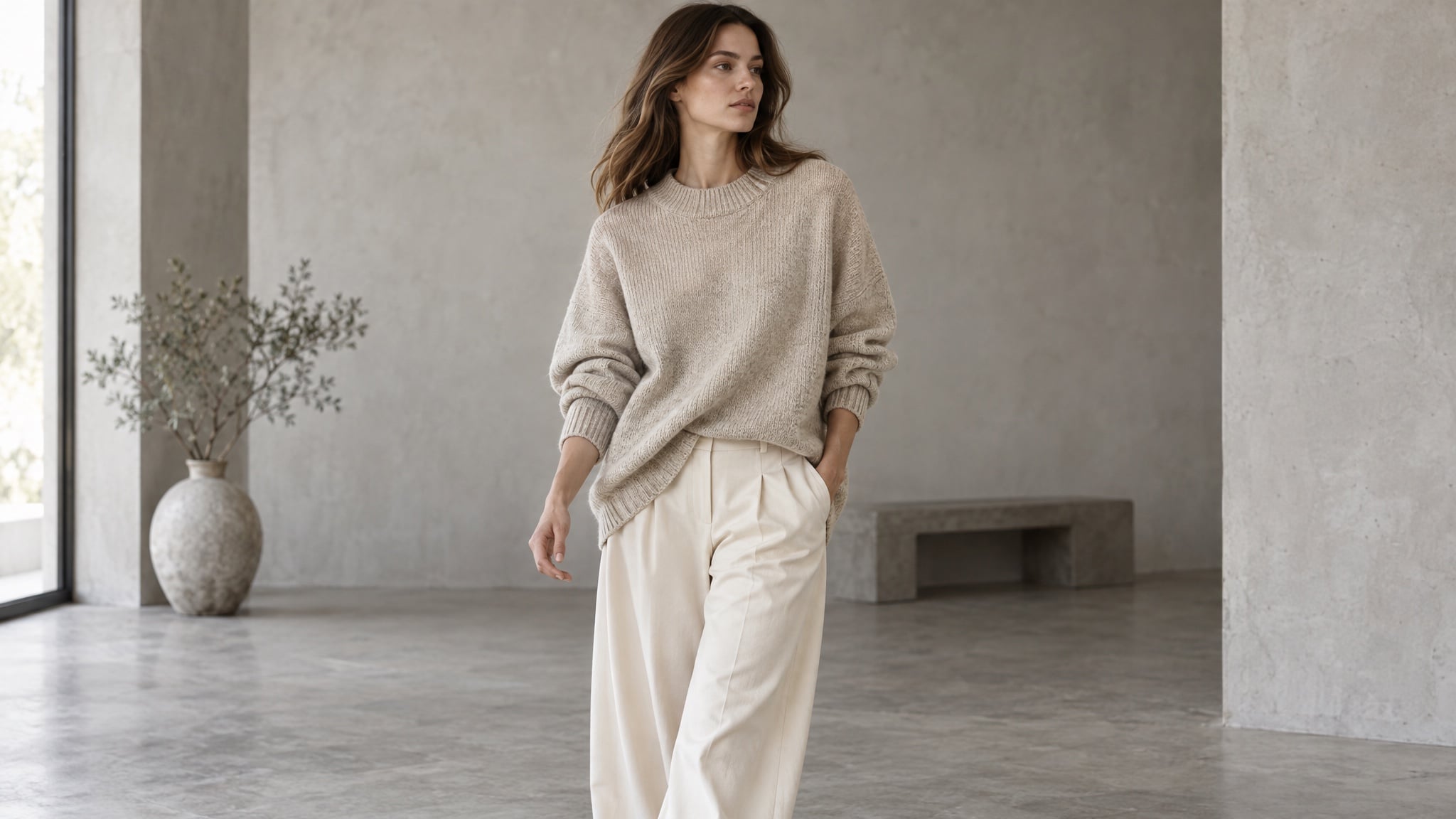
10. 無需棚拍的穿搭與生活照
上傳認可的服裝照,然後移到模特身上、房間裡或自然光下。服裝必須是同一件——同色、同織法、同輪廓。
Editorial e-commerce photograph of a model wearing the oversized oatmeal knit sweater
and wide-leg cream trousers from the reference images. Mid-shot, mid-stride, three-quarter angle.
Keep garment colour, texture, and silhouette exactly as in the reference.
Light: soft daylight in a minimal concrete studio, gentle shadow, neutral colour balance.
Style: catalogue lookbook photography, shallow depth of field, natural fabric folds.
Constraints: no text, no watermark, no pattern changes, no extra accessories.
效果原因:保留清單明確列出服裝賣點。「無圖案變化」看似多餘,但毛衣常常會被模型加上不存在的印花。
11. 一個產品,多種場景
產品圖認可後,變化就很便宜。瓶身、標籤、比例都一致——換房間、換光線、換季節。
Same product, new scene: keep the bottle, cap, label, and proportions identical to the reference.
Scene: a bathroom shelf at 7 a.m., condensation on the window, a folded linen towel behind.
Light: cool morning daylight from the left, soft reflections on the glass.
Composition: eye level, product in the right third, quiet negative space on the left.
Style: natural lifestyle photography, muted palette, realistic materials.
Constraints: unchanged label text and geometry, no extra products, no text overlays.
效果原因:第一行分開「可變」與「固定」元素。編輯失敗常常是模型猜錯哪些部分是關鍵。
12. 多語言包裝與菜單
多語言產品設計以前要每個市場一位設計師。模型能處理版面與字體,你還是要提供翻譯文字。
Create three versions of the same coffee packaging, one per language, identical in layout.
Pack: 250 g matte kraft-paper bag with a matte black label band.
Label line 1 (exact): "MORNING BLEND"
Label line 2 (exact): "Dark Roast · 250 g"
Keep the bag shape, label position, and typography identical across all three versions.
Style: studio packshot, soft neutral background, softbox light from the upper left.
Constraints: no extra text, no watermark, no colour shift between versions.
效果原因:版面固定,只換文字,市場適應仍然是同一產品,而不是三種設計。
十二種場景共通的習慣
場景不同,失敗方式卻很類似。六個習慣能避免大部分問題:
- 主體用參考圖,不只用文字描述。 人臉或產品用圖像輸入,比文字描述一致性高很多。
- 每次只改一個元素。 同時調整光線、背景、裁切,無法判斷哪個指令造成偏移。
- 草稿用低品質,定稿用高品質。 構圖探索用低品質,選出最佳再用高品質重跑。品質等級會改變輸出權重,最高等級成本約為最低的 36 倍。
- 文字用引號,並指定數量。 「只生成一次」加精確字串,防止標籤重複或自創標語。
- 寫出保留清單。 每個提示語最後都要列出不可變元素:標籤形狀、服裝顏色、鏡頭角度、背景物件。
- 用認可圖像作為輸入。 一致性來自固定參考加重複約束,不是反覆重跑直到接近。
運行這些提示語的平台
上述所有內容都能用 OpenAI API 運行,自行管理金鑰、帳單、參數。如果你想把時間花在圖像而不是技術,Felo 讓 GPT-Image 2.5 直接在瀏覽器裡運行:
- 免費開始。 每日額度,不需信用卡、不需 API key、不需安裝。
- 無浮水印,完整商業權利。 免費方案也包含。
- 最高 4K 輸出。 原生 3840×2160,首張圖就能直接用作最終素材。
- 50+ 視覺風格,50+ 語言文字。 專為海報、包裝、菜單、多市場活動設計。
- 所有頂級模型同一工作區。 GPT-Image 2.5、GPT-Image 2、Nano Banana Pro、Nano Banana 2 Lite 等——根據需求切換模型。
- 引導式工作流程。 分鏡、表情表、片頭、精靈圖,從現成提示語結構開始,不用空白起步。
工作區內還有現成提示語——六格分鏡、活動海報、產品包裝、漫畫、說明圖、廣告變體。先跑一個校準,觀察模型如何處理每個欄位,再套用到自己的產品。
FAQ
GPT-Image 2.5 能做什麼? 任何需要特定圖像而非通用圖像的場景:肖像與頭像、活動海報、漫畫與分鏡、縮圖、產品包裝照、穿搭照、生活場景、包裝、菜單、活動變體。
用這些提示語需要 API key 嗎? 不用。提示語技巧屬於模型層級,Felo 在瀏覽器運行 GPT-Image 2.5,不需 API key,直接貼上提示語即可生成。
如何讓產品或人臉在多張圖中保持一致? 認可一張基準圖,每次都上傳作為參考,並在每個提示語重述識別細節。一致性來自固定參考加重複約束。
為什麼圖像中的文字會出錯? 通常是文字被改寫、沒用引號、或太長。用精確字串、指定位置與出現次數、保持簡短、加上「無額外文字」。
高品質設定一定產生更好圖像嗎? 不一定。成本較高、速度較慢,主要用於小字、細節密集、最終交付。用於解決特定問題,不要當預設。
生成的圖像能商用嗎? 在 Felo,圖像有完整商業權利且無浮水印,免費方案也包含——包裝照能直接用於商品頁。
選一個工作,直接產出
真正有用的問題不是「這模型能做什麼?」而是「哪張圖一直等棚拍?」需要重拍的標籤、個人頁的風格組、你一直拖延的影片分鏡。
挑一個今天最耗時的場景,貼上提示語,每次只改一個欄位,直到生成出你願意公開的圖像。
本文也提供以下語言版本:English、简体中文、日本語、한국어、हिन्दी、Français、العربية、Русский、اردو、Bahasa Indonesia、Deutsch、Tiếng Việt、Türkçe、Italiano、ไทย、Español、বাংলা、Português。