MemClaw 產出物:儲存與取回 AI 生成的工作成果

學習如何將文件、報告與檔案儲存至 MemClaw 工作區,讓 AI 代理的輸出結果跨工作階段持續保存,並依專案整理歸類。
每一次與 AI Agent 的工作階段都會產生有價值的內容。競爭分析報告、規格文件、測試案例集、會議記錄、電子郵件草稿序列——這些成果都值得好好保存。
然後 session 結束了——它去哪了?
如果你沒有手動存到某個地方,它就埋在聊天記錄裡。技術上還在,但實際上等於遺失。你搜不到它、無法在未來的 session 中引用它,Agent 也完全不知道它的存在。
MemClaw 產出物解決了這個問題。Session 中產生的任何東西——文件、報告、URL、程式碼片段、筆記——都可以用一條指令儲存到 workspace。它跨 session 持久存在、限定在正確的專案範圍內,而且 Agent 在任何未來的 session 中都能取回。
什麼算是產出物
產出物是 session 中任何值得保留的東西。這個類別刻意設得很寬:
- 文件:規格書、簡報、提案、報告、分析
- 筆記:會議摘要、決策理由、研究發現
- URL:參考連結、競品頁面、Agent 應該知道的資源
- 程式碼:片段、設定檔、session 中產生的腳本
- 草稿:文案、電子郵件、進行中的內容
如果 Agent 產出了它,而你之後可能會用到,那就是值得儲存的產出物。
儲存產出物
儲存是自然語言指令。你不需要指定檔案格式、資料夾路徑或任何 metadata。
儲存 Agent 剛產出的東西:
Save that to the workspace
Save that competitive analysis to the workspace
Add that spec document to the workspace
用描述性名稱儲存:
Save that as "Q2 pricing analysis" in the workspace
Add that to the workspace as "API design decisions"
儲存 URL 或外部資源:
Add this URL to the workspace: https://competitor.com/pricing
Save this as a reference: https://docs.example.com/api
儲存筆記或摘要:
Add this to the workspace: client confirmed budget is $15k,
timeline is flexible as long as we hit the June launch
Agent 處理儲存。你只需告訴它要保留什麼。
取回產出物
取���同樣簡單直接。你可以按名稱、類型或時間範圍查詢產出物。
取得特定產出物:
Show me the competitive analysis
Pull up the API design decisions doc
按類型瀏覽:
Show me all the documents in this workspace
List all the URLs I've saved to this workspace
按時間搜尋:
Find the pricing analysis from last week
What did we save in the March sessions?
在當前 session 中使用產出物:
Load the spec document and let's review it
Pull up the email draft and continue from where we left off
Agent 取回產出物並帶入當前 session 脈絡。你從上次中斷的地方繼續,不需要從記憶中重建任何東西。
產出物是專案範圍的
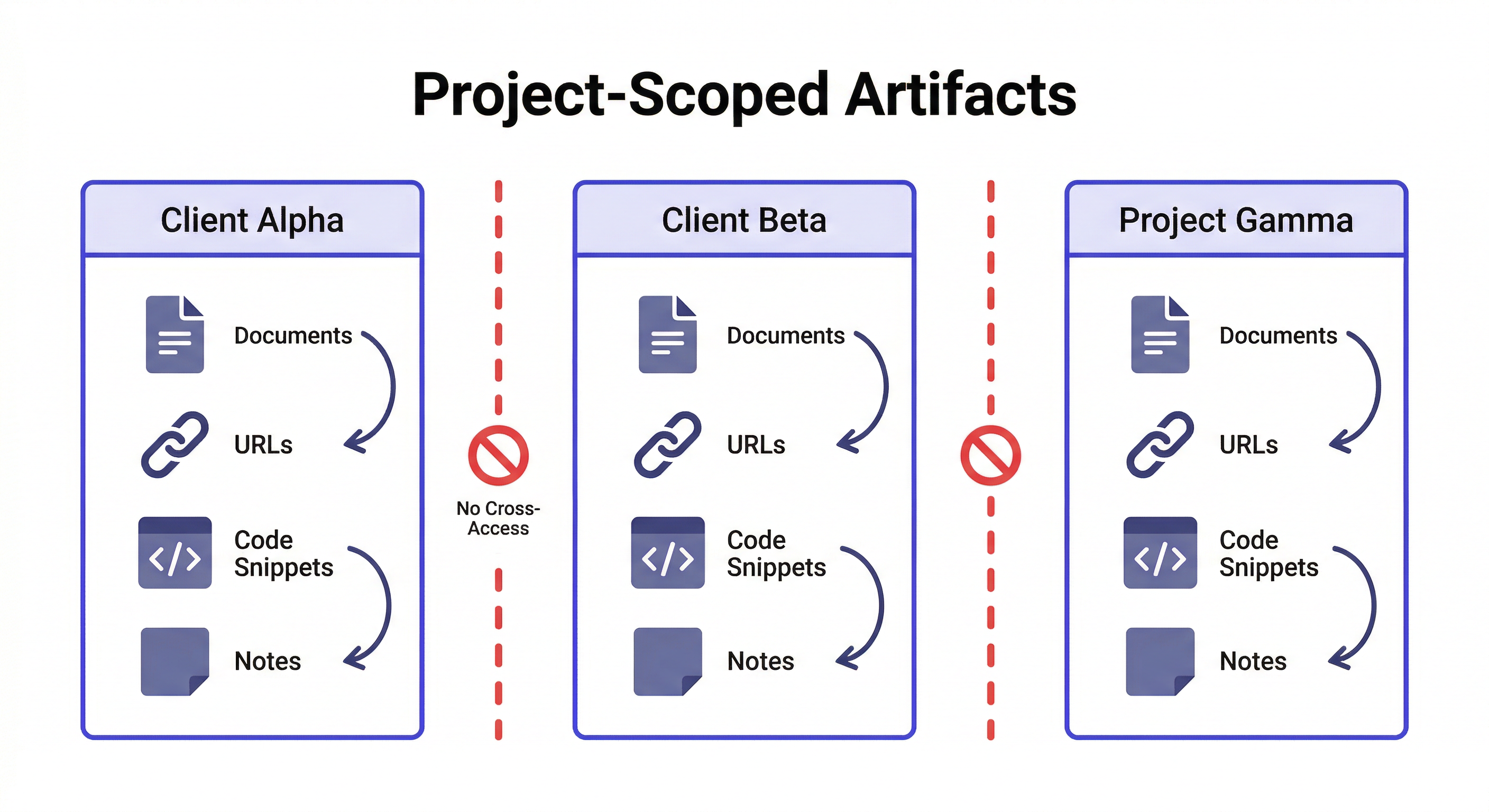
這是對同時跑多個專案的人最重要的部分。
產出物儲存在 workspace 內——這意味著它們限定在特定專案範圍內。你為 Client Alpha 儲存的競爭分析不會在你處理 Client Beta 時出現。Project Gamma 的規格文件在 Project Delta 的 workspace 中不可見。
這是結構性隔離,不是過濾。你不需要用專案名稱標記產出物,也不需要記住東西放在哪個資料夾。載入 workspace 就給你該專案的產出物,其他什麼都沒有。
Load the Client Alpha workspace
Show me all the documents in this workspace
→ 只回傳 Client Alpha 的文件
Load the Client Beta workspace
Show me all the documents in this workspace
→ 只回傳 Client Beta 的文件
零交叉污染。不需要在共享資料夾中搜尋,試圖記住哪份分析屬於哪個客戶。
產出物 vs. 決策 vs. 狀態
MemClaw workspace 儲存三種不同類型的資訊。值得了解它們的差異:
| 類型 | 是什麼 | 範例 |
|---|---|---|
| 產出物 | 專案期間產生的文件和輸出 | 規格文件、競爭分析、電子郵件草稿 |
| 決策 | 附帶理由的選擇 | 「用 REST 不用 GraphQL,因為客戶團隊不熟悉 GraphQL」 |
| 狀態 | 專案的當前進展 | 「付款整合完成 80%,retry 邏輯待處理」 |
產出物是輸出。決策是選擇。狀態是目前的進展。
儲存方式不同:
Save that report to the workspace          ← 產出物
Add decision: using Postgres not MySQL     ← 決策
Update status: finished auth, starting dashboard  ← 狀態
取回方式也不同:
Show me the reports in this workspace      ← 產出物
What did we decide about the database?    ← 決策
Where did I leave off?                    ← 狀態
每種類型服務不同目的。合在一起,它們給 Agent 一個完整的專案全貌——不只是產出了什麼,還有做了什麼決策、目前進展到哪裡。
一個具體範例:你在為客戶建一個電商網站。你的 workspace 可能包含:
- 產出物:Session 2 寫的產品規格文件
- 產出物:Session 4 的競爭分析
- 決策:「v1 不做訪客結帳——客戶想最大化帳號註冊」
- 決策:「用 Shopify Payments 不用 Stripe——客戶已有帳號」
- 狀態:「結帳流程完成。購物車頁面完成。產品頁面進行中。」
當你在 Session 8 載入 workspace,Agent 知道所有這些,不需要你重新解釋任何一項。它可以引用規格、遵守決策、從當前狀態繼續——全在 session 的第一條訊息中。
實用的產出物工作流程
規格驅動開發
在一個 session 中寫規格,在所有未來 session 中引用:
Session 1:
→ 和 Agent 一起撰寫產品規格
→ "Save that as the product spec in the workspace"

Session 2-N:
→ "Load the product spec and let's work on the authentication section"
→ "Does the current implementation match the spec?"
→ "Update the spec to reflect the change we just made"
規格存在 workspace 中。每個 session 都可以引用、更新或對照檢查。
研究累積
跨多個 session 建立研究基礎:
Session 1: 研究競品
→ "Save that competitor analysis to the workspace"

Session 2: 研究定價模式
→ "Save that pricing research to the workspace"

Session 3: 綜合分析
→ "Pull up all the research we've saved and help me synthesize it"
每個 session 都為研究基礎添磚加瓦。到 Session 3,Agent 可以存取之前所有 session 累積的內容。
客戶交付物追蹤
追蹤已交付的內容:
→ "Save that proposal draft to the workspace as 'Proposal v1'"
→ "Save the revised version as 'Proposal v2 — after client feedback'"
→ "Show me all the proposal versions in this workspace"
版本歷史,按專案組織,隨時可取回。
跨 Agent 產出物存取
在一個 Agent 中儲存的產出物可以在另一個 Agent 中存取——只要它們使用同一個 workspace。
如果你用 OpenClaw 做研究、用 Claude Code 做實作,兩個 Agent 共享同一個 workspace。在 OpenClaw session 中儲存的研究在 Claude Code 中可用:
# 在 OpenClaw — 研究 session
Save that architecture analysis to the workspace

# 之後,在 Claude Code — 實作 session
Load the workspace
Pull up the architecture analysis
Let's implement based on this
不需要在工具之間複製貼上。不需要因為找不到存在哪裡而重新跑研究。
讓產出物長期保持有用
幾個讓你的產出物庫不會變得雜亂的習慣:
用描述性名稱儲存。「Save that to the workspace」可以用,但「Save that as 'March competitive analysis'」之後更容易取回。名稱越具體,取回越容易。
立即儲存,不要等。 如果你想「我關閉 session 前再存」——你不會的。Agent 產出時就存。
產出物變更時更新。 如果規格被修改了,存新版本。你可以保留兩個版本或替換舊的:
Save this as "Product spec v2 — updated after sprint review"
不要什麼都存。 中間輸出、探索性草稿和一次性分析不需要儲存。存你之後真的會想引用的東西。
產出物能做到而聊天記錄做不到的事
值得明確說明為什麼產出物比翻聊天記錄更有用。
可搜尋性。 聊天記錄是按時間排列的。產出物可以按名稱、類型或描述取回。「Find the pricing analysis」可以用。「翻 40 個 session 找我們什麼時候討論過定價」不行。
Agent 可存取。 Agent 可以在新 session 中載入和使用產出物。它無法讀取你之前 session 的聊天記錄——session 結束時那些脈絡就消失了。產出物是讓過去 session 的有用輸出在未來 session 中可用的機制。
專案範圍。 產出物存在 workspace 內。處理 Client A 時,只有 Client A 的產出物可存取。切換到 Client B,你得到 Client B 的產出物。聊天記錄沒有這種隔離——它是一條未分類的串流。
持久性。 聊天介面會刪除舊對話。脈絡會被清除。Session 會過期。產出物在 workspace 中無限期持久存在,不受聊天介面影響。
實際意義:如果某個東西在 session 中值得產出,就值得存為產出物。成本是一句話。好處是這份工作在每個未來 session 中都可存取,任何 Agent 都能用,限定在正確的專案範圍內。
開始使用產出物
如果你已經在用 MemClaw,產出物開箱即用——不需要額外設定。只需告訴 Agent 儲存:
Save that to the workspace
如果你還沒使用 MemClaw:
安裝:
/plugin marketplace add Felo-Inc/memclaw
/plugin install memclaw@memclaw
設定 API key:
export FELO_API_KEY="your-api-key-here"
在 felo.ai/settings/api-keys 取得你的 key。
建立 workspace 並開始儲存:
Create a workspace called [project name]
常見問題
MemClaw 支援哪些檔案格式的產出物? 產出物以文字內容儲存——markdown、純文字、程式碼。MemClaw 不直接儲存 PDF 或圖片等二進位檔案,但你可以儲存指向這些檔案的 URL。
每個 workspace 可以儲存多少產出物? 沒有硬性限制。根據專案需求儲存。
我可以刪除產出物嗎?
可以:Delete the [artifact name] from the workspace
隊友可以存取我的產出物嗎? 如果你已與隊友共享 workspace,可以——他們可以取回和新增產出物到同一個 workspace。
如果我刪除 workspace,產出物會怎樣? 刪除 workspace 會移除其所有內容,包括產出物。刪除前請匯出重要內容。