AI text to video generator From a written scene to a finished clip

Describe the subject, action, camera and style. Felo plans the shots, picks the right video model and generates a clip you can refine in the same thread — no footage, timeline or editing skills required.

See text-to-video examples
Length
2–30 s
Resolution
480P–2K
Formats
6 aspect ratios
Models
4 available now
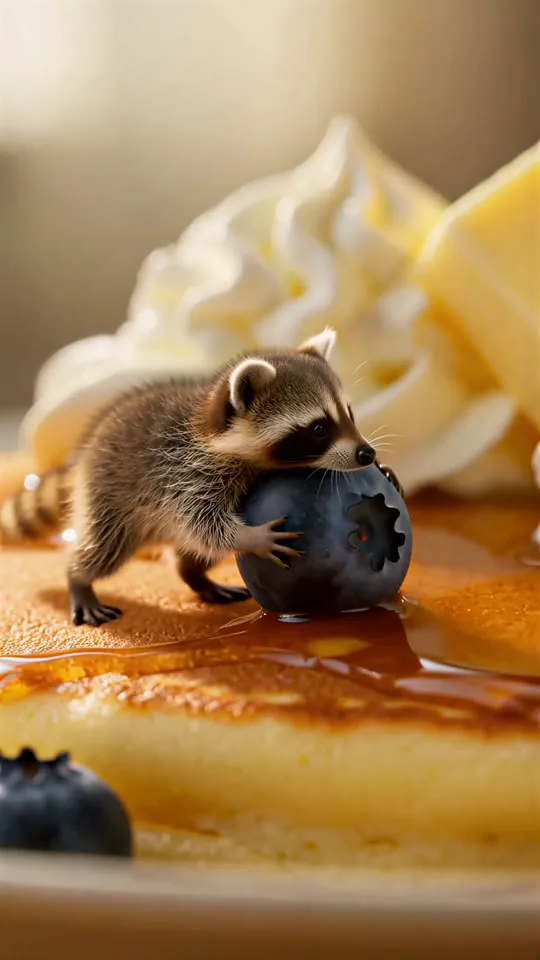
The Pancake Heist9:16 · 6 s · 2K · one prompt

Text to video model directory

Felo routes each shot to a video model. MiniMax H3, Seedance 2.5, Wan 3.0 Prime and Kling 4.0 are available now; Gemini Omni Flash is coming soon. Pick one in video settings, or let the agent decide.

  • MiniMax H3

    Available now

    2K clips from text, image, video and audio references

    Sound: SilentLength: 4–30 sMax resolution: 2K

  • Seedance 2.5

    Available now

    Fast, motion-heavy short clips

    Sound: GeneratedLength: 4–30 sMax resolution: 720P

  • Wan 3.0 Prime

    Available now

    Flexible generation modes

    Sound: GeneratedLength: 2–30 sMax resolution: 1080P

  • Kling 4.0

    Available now

    Cinematic motion and character consistency

    Sound: SilentLength: 3–30 sMax resolution: 1080P

  • Gemini Omni Flash

    Coming soon

    Fast multimodal generation

    Sound: —Length: —Max resolution: —

Each model has its own limits for duration, resolution, aspect ratio and reference media. Video settings show the limits of the model you pick.

What is text to video AI?

Text to video AI turns a written scene into a moving clip. You describe who is on screen, what happens and how the camera moves; the model generates the footage. Felo adds an agent layer: it turns one sentence into a shot list, chooses a video model and keeps the context so you can refine the result without starting over.

  • Start from words — no camera, crew or editing timeline.
  • The agent plans shots, camera moves and pacing.
  • Choose 21:9, 16:9, 4:3, 1:1, 3:4 or 9:16.
  • Refine with a follow-up in the same thread.
Phoenix Rising16:9 · 8 s · 1080P · text to video · Kling 4.0
Made with Kling 4.0

What you can make with text to video

Two clips for each job, each made with Kling 4.0 from a single prompt. Copy a prompt or load it into the box above.

9:16 · 5 s · 1080P

Red Coat in SnowPrompt1 / 6

Vertical cinematic shot on a quiet narrow street at night with falling snow and warm lantern light. A young woman in a red wool coat walks away from camera, stops, and turns back over her shoulder with a small smile as snowflakes catch in her hair. Slow push-in, consistent face and coat, shallow depth of field, soft bokeh. No readable signs, no text.

How to use text to video in Felo

Three steps from a written scene to a finished clip.

  1. 01

    Write the scene

    Describe the subject, action, camera and style in a sentence or two. Add sound if it matters. The agent can search the web for context before it plans the shots.

  2. 02

    Let the agent plan the shot

    Felo builds a shot list, picks a video model and matches the aspect ratio, resolution and duration to your idea.

  3. 03

    Generate, refine and download

    Preview the clip, ask for a change in the same thread, then download or share the version you like.

How to write a text to video prompt

A useful prompt reads like a shot description. Cover these five elements and the agent can plan the camera work and sound.

  1. 01

    Subject

    Who or what is on screen — appearance, materials, clothing and the details that must stay consistent.

  2. 02

    Action

    What happens, and how the scene changes from the first frame to the last.

  3. 03

    Camera

    Shot size, angle and movement: push in, track, arc around, pull out.

  4. 04

    Style

    Live action or animation, lighting, palette, film stock or a visual reference.

  5. 05

    Sound

    Ambience, effects and music. Seedance 2.5 and Wan 3.0 Prime generate sound with the clip; MiniMax H3 and Kling 4.0 return silent video.

Example prompt
A thumb-sized raccoon on a giant pancake hugs a blueberry larger than its head. Maple syrup stretches under one paw as it takes two determined steps, slips, and is launched in a clean arc into a cloud of whipped cream. Photoreal miniature food comedy, macro lens, warm breakfast light, playful pizzicato strings.

Text to video examples made with Felo

Every clip below started as a written prompt. Watch one, copy its prompt, and change the subject, style or aspect ratio.

See the full gallery

The Ring Beyond the Storm

21:9 · 10 s · 2KMiniMax H3

The Pancake Heist

9:16 · 6 s · 2KMiniMax H3

One Last Train

16:9 · 7 s · 768PMiniMax H3

The Cloud Collector

16:9 · 9 s · 768PMiniMax H3

After the Rain

4:3 · 8 s · 768PMiniMax H3

Zero-Gravity Espresso

1:1 · 8 s · 768PMiniMax H3

Related video tools

Pick the page that matches what you are making.

Key takeaways

  • Felo text to video turns a written prompt into a clip of 2 to 30 seconds, depending on the model.
  • MiniMax H3 renders up to 2K, Wan 3.0 Prime and Kling 4.0 up to 1080P, and Seedance 2.5 up to 720P.
  • Six aspect ratios cover cinematic 21:9, widescreen 16:9 and vertical 9:16.
  • The agent plans shots and picks a model; you can refine the result in the same thread.

Frequently asked questions

What is a text to video AI generator?
A text to video AI generator turns a written description into video. Felo adds an agent layer that plans the shots, chooses a video model and keeps the context, so you can refine the clip in the same thread.
How do I turn text into video with Felo?
Type a prompt in the Felo video agent, describe the subject, action, camera and style, and press generate. Felo plans the shot, picks a model and returns a clip you can preview.
What should I include in a text to video prompt?
Cover the subject, action, camera, style and sound. One or two sentences are enough; the agent can fill in the shot plan and camera moves.
Which video model does Felo use for text to video?
MiniMax H3, Seedance 2.5, Wan 3.0 Prime and Kling 4.0 are available now; Gemini Omni Flash is coming soon. The agent picks a model for each shot, or you can choose one in video settings.
How long can a Felo text to video clip be?
Clip length depends on the model: Wan 3.0 Prime runs 2–30 seconds, Kling 4.0 3–30 seconds, Seedance 2.5 4–30 seconds, and MiniMax H3 4–30 seconds (4–15 seconds at 1080P and 2K). You can pick the duration in video settings before generating.
What aspect ratios and resolution can I use?
Felo supports 21:9, 16:9, 4:3, 1:1, 3:4 and 9:16; each model offers a subset. Resolution runs from 480P to 2K: MiniMax H3 goes up to 2K, Wan 3.0 Prime and Kling 4.0 up to 1080P, and Seedance 2.5 up to 720P.
Which models generate sound?
Seedance 2.5 and Wan 3.0 Prime can generate sound with the clip. MiniMax H3 and Kling 4.0 return video without sound, so add music or effects in your editor.
Can I edit a video after Felo generates it?
Yes. Ask a follow-up in the same thread to change the shot, style or length, and Felo generates a new version without starting over.
Can I start from an image instead of text?
Yes. Felo also supports image to video and first-and-last-frame generation. Upload a reference image and describe how it should move.
How much does Felo text to video cost?
Video generations use Felo points. The cost depends on the model, resolution and length; video settings show an estimate before you generate, and the final charge may vary. The pricing page lists the points included with each plan.

Turn your next idea into a video

Describe it in a sentence, or start from one of the example prompts.